

Klook Tours & Activities Scraper — Price, Rating & Bookings
Pricing
from $4.00 / 1,000 activity founds
Klook Tours & Activities Scraper — Price, Rating & Bookings
Search Klook by destination or keyword and get tours, activities and attraction tickets: price with currency (and original price when discounted), rating, review count, bookings, category, location, tags, image and the direct listing URL. Public pages, no login.
Pricing
from $4.00 / 1,000 activity founds
Rating
0.0
(0)
Developer

Tim Zinin
Maintained by CommunityActor stats
0
Bookmarked
1
Total users
1
Monthly active users
4 days ago
Last modified
Categories
Share
Klook Tours & Activities Scraper — Price, Rating, Bookings and Category by Destination
Get live Klook search results as clean rows: price with currency (and the pre-discount price when a listing is on sale), rating, review count, how many times it has been booked, category, location, badges and the direct listing URL — for any destination or keyword, no Klook account and no API key.
Small first run
At the default 2 GB, the start fee is $0.04. If this input delivers three results, the listed total is $0.052. Set the run spending limit to bound the whole run. The result limit applies separately to each search; adding searches can increase the total. Runtime depends on source responses and retries.
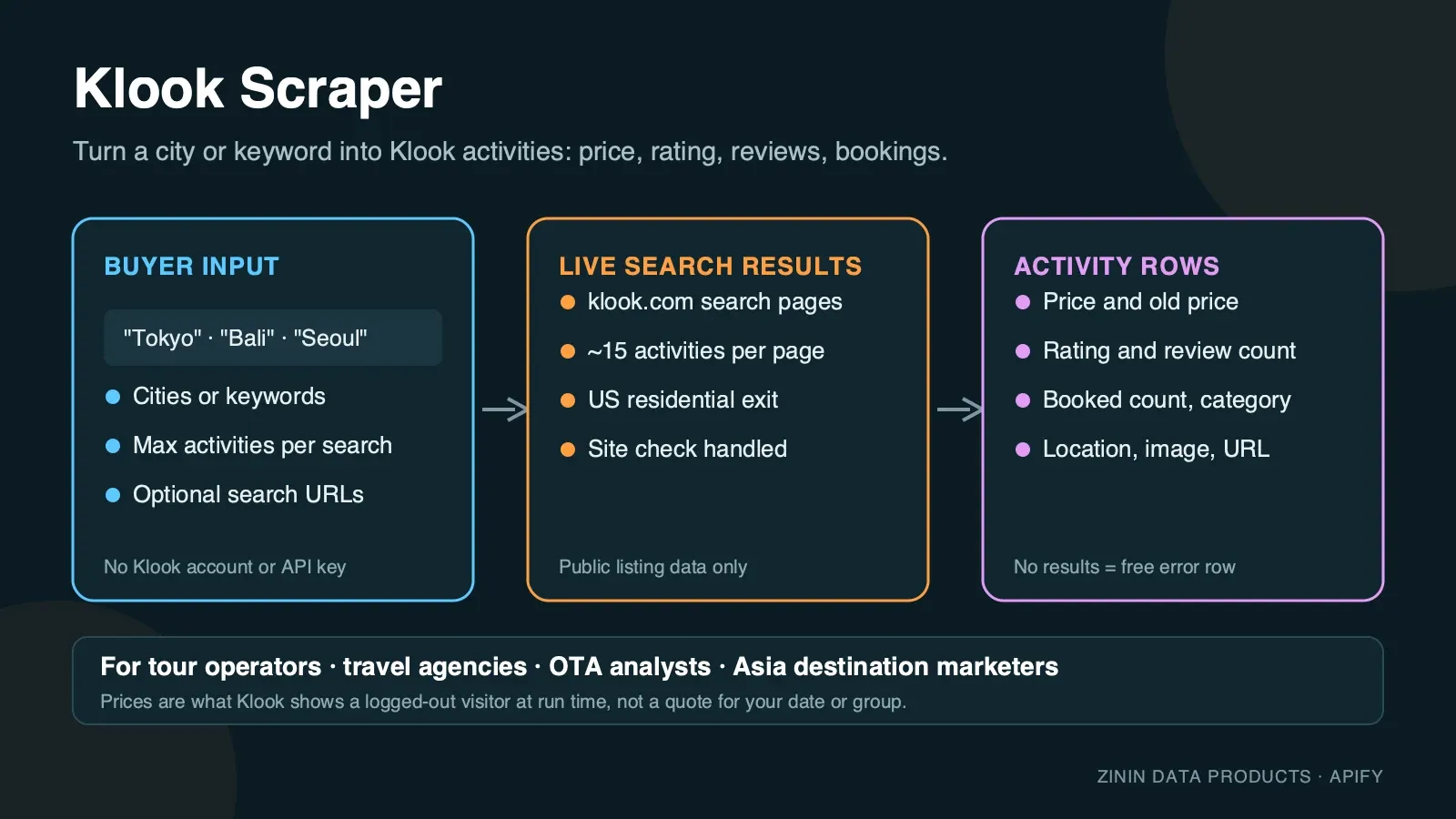
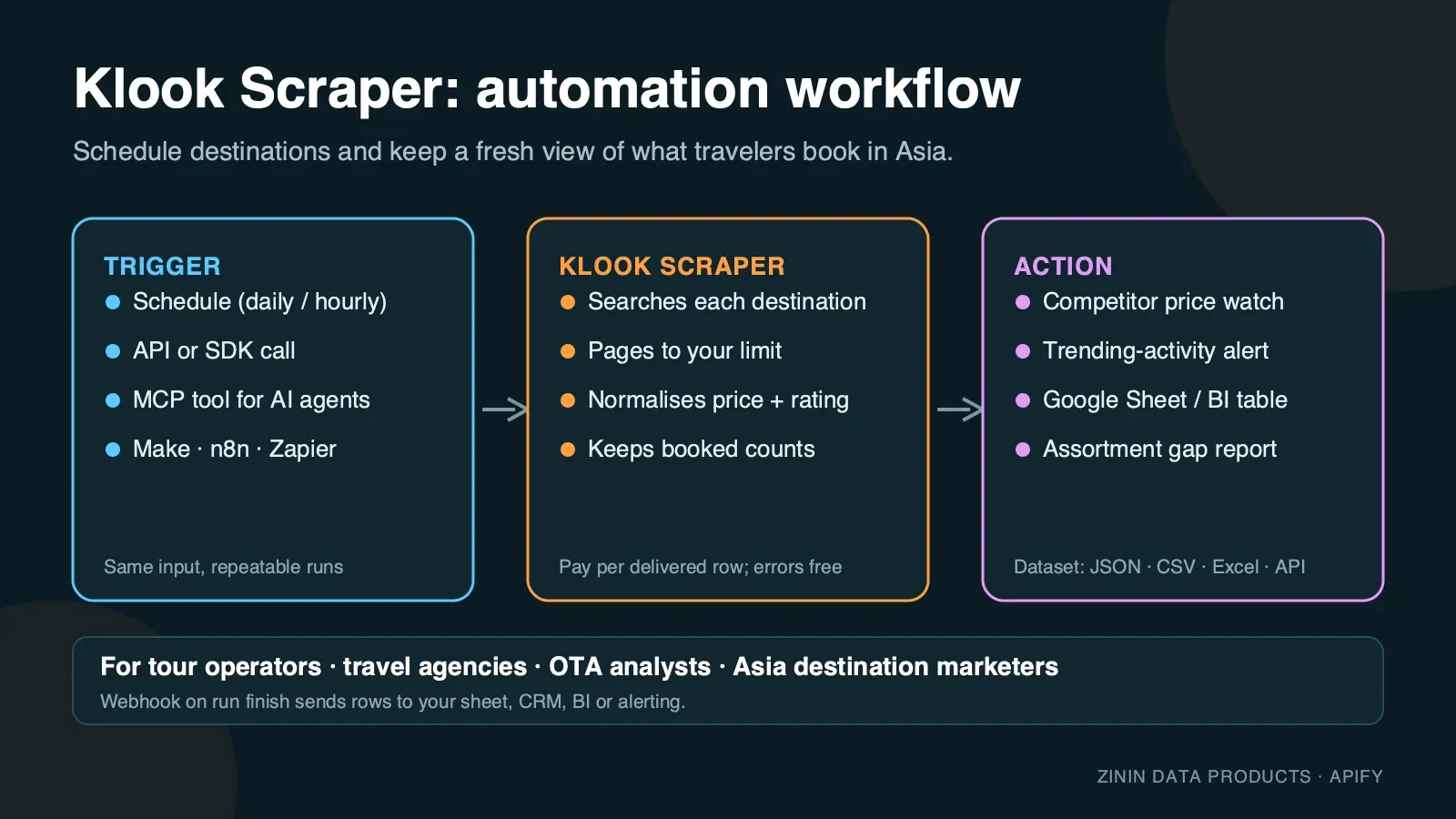
Klook is one of Asia-Pacific's largest travel marketplaces: attraction tickets, tours, transport passes, car rentals and even hotels, all searchable from one box and ranked by Klook's own algorithm. This Actor opens the public search page exactly as a traveller sees it, in a real anti-detect browser behind residential proxies, waits out Klook's own anti-bot check when it appears, and turns every result card into one structured row. You pick a destination or keyword, set how many results you need, and get a dataset you can download as JSON, CSV or Excel, pull through the Apify API, or send to Google Sheets, Make, n8n, Zapier or an AI agent over MCP.
It is built for recurring travel-product work: run it daily or weekly on your destination list and you know who changed a price, which listing is trending ("6M+ booked"), which discounts are live right now, and how your own catalogue's price and rating compare to what a traveller actually sees on page one of Klook.
What you get
One row per result card on the Klook search results page:
- Identity —
activityId, Klook's numeric ID parsed from the listing URL, andtitleexactly as shown.activityIdisnullfor the car-rental and hotel cards Klook blends into activity search results (see Evidence and boundaries). - Price —
priceas a number,originalPrice(the struck-through price) when the card shows a discount, andcurrency(USDby default, matching the Actor's US residential exit). - Social proof —
rating(0–5) andreviewCount. - Popularity —
bookedCount, Klook's own text badge such as"6M+ booked"or"200K+ booked"— real text, not a rounded number, and a strong signal of category leaders. - Category and location —
category(e.g."Theme parks","Airport trains & buses","Car rentals","Hotels") andlocationexactly as the card shows it. - Badges —
tags, every ribbon on the card:"Instant confirmation","Free cancellation","Book now for today","English guided"and similar. - Media and link —
imageUrl(CDN thumbnail) andurl, the direct listing page. - Position —
pageandpositionon the results page, so you can track ranking over time. - Context —
queryorsearchUrlthat produced the row and ascrapedAttimestamp.
Every row is a real listing that Klook showed for your search. Searches with no matches or a page Klook did not serve after retries are reported as free rows with an error field, so you always know what happened and never pay for an explanation.
Who uses it
- OTAs and metasearch sites comparing Klook's activity prices next to GetYourGuide, Viator, Tripadvisor or their own inventory, without a Klook partner integration.
- Tour and activity operators in Asia-Pacific checking how their own listing ranks and prices against Klook's category leaders, and which badges (
"Free cancellation","Instant confirmation") the competition is winning. - Revenue and pricing teams watching discount activity (
originalPricevsprice) on a category to time their own promotions. - Destination marketers and DMOs sizing what a traveller actually sees when they search a city on Klook: how many listings, price spread, which categories dominate page one.
- Content and affiliate publishers building "best things to do in {city}" pages from fresh prices, ratings and booking links.
- AI travel agents that need a grounded, current answer to "what can I book in {city} on Klook and what does it cost" and can call the Actor as an MCP tool.
How to run
- Click Try for free (or Start) on this page. You need a free Apify account; no Klook account, no API key.
- In Destinations or keywords, enter one or more searches, one per line — a city (
Tokyo), an activity type (theme park) or a specific attraction (Universal Studios Japan). - Optional: paste one or more Klook search URLs into Klook search URLs (optional) to reuse filters you already set on the site. Only
https://www.klook.com/<locale>/search/...URLs are accepted. - Set Max results per destination or URL. One results page holds 15 activities; the Actor pages further automatically up to this limit.
- Click Start. Runtime varies. Archived runs for Tokyo at
maxItems: 15took 47–69 seconds, and a 120-result run took 137 seconds; these are observations, not completion-time guarantees. - Open the Output tab: the Activities view shows image, title, price, rating, bookings and category; the Errors and empty searches view shows any free explanation rows. Download as JSON, CSV, Excel or HTML, or call the dataset through the API.
To run it on a schedule, open Schedules, pick the Actor (or a saved task with your destination list) and choose daily or weekly. To connect it to other tools, see Integration recipes.
Pricing
This Actor uses pay per event pricing. You pay only for activities actually delivered to your dataset, plus a small start fee:
| Event | Price | When it is charged |
|---|---|---|
| Actor start | $0.02 per GB of memory | Once per run, per GB. The default 2 GB memory means two start events (apify-actor-start: 2 in the real runs at 2 GB); if you raise memory to 4 GB, four start events are charged. |
| Activity found | $0.004 per row | For every result row delivered to the dataset. |
Example: with the default 2 GB memory, a run that delivers 100 activities costs 2 × $0.02 + 100 × $0.004 = $0.44; 1,000 activities cost $4.04. The same price applies on every Apify plan.
What you do not pay for:
- Rows with an
errorfield — searches with no results, pages Klook did not return after retries, and the note written when your spending limit is reached — are free. - Proxy traffic, browser time and retries are included in the row price. You never see a separate proxy bill.
Spending limit. Apify lets you set Max total charge for any run. The Actor checks the remaining budget before every row and stops cleanly when the next row would exceed it, then writes a free row saying so. The archived partial-output sample illustrates the row shape. Its $0.02 cap is not a current runnable budget at 2 GB, where the start fee alone is $0.04.
Free plan. Apify's free plan includes monthly platform credit that covers small test runs of this Actor. The prefilled example is sized so that it completes well inside that credit.
Input contract
| Field | Type | Default | What it does |
|---|---|---|---|
searchQueries | array of strings | — (prefill ["Tokyo"]) | Destinations, cities or activity keywords to search on Klook. Up to 50 per run; duplicates are removed. |
startUrls | array of URLs | [] | Klook search-result URLs to reuse filters (sort, category, price range) you already set on the site. Only https://www.klook.com/<locale>/search/... URLs are accepted; anything else is rejected before any work starts. |
maxItems | integer 1–3000 | 30 (prefill 20) | Activities to return per destination, keyword or URL. One results page holds 15 activities; the Actor pages further automatically up to this limit. |
You must provide at least one destination/keyword or one URL. An empty input fails immediately with a clear message and costs nothing beyond the start event.
Minimal input (the current prefill):
The closest real-run evidence for this shape used maxItems: 15 for the same destination — see Happy output below.
Multi-destination monitoring input:
Deep category research (a real run walked 8 pages with this shape):
Reuse filters you set on the site:
Output examples
All examples below are copied from real runs of this Actor on the Apify platform (September 2026). Nothing is invented or edited except whitespace.
Happy output
Input {"searchQueries": ["Tokyo"], "maxItems": 15} — close to the Actor's current prefill (maxItems: 20) — finished in 46.6 seconds at 4 GB memory (a second real run with the identical input at the default 2 GB finished in 68.7 seconds with the same rows), 15 activities delivered, 0 errors. First four rows, which already show the range of listing types Klook mixes into one result page:
Row 3 is not a ticketed activity at all — it is Klook's own "Tokyo car rentals" cross-sell card, which is why activityId is null and url points at /car-rentals/results/... instead of /activity/.... This is real Klook behaviour, not a parsing gap; see Evidence and boundaries.
A larger real run — {"searchQueries": ["Tokyo"], "maxItems": 120} at 4 GB memory — walked 8 results pages and delivered all 120 activities in 137.4 seconds, for $0.034 of platform usage.
Partial output (spending limit reached)
Archived output shape, not a current-price example. The quoted $0.02 cap below does not match the current tariff. At the default 2 GB, the start fee alone is $0.04. Use the current Pricing section when choosing a runnable spending limit.
Input {"searchQueries": ["Bali"], "maxItems": 15} started with Max total charge set to $0.02 on 2 GB memory. The Actor delivered 5 activities, saw that the next one would exceed the limit, stopped before charging and wrote this free row:
Two of the five delivered rows, showing a live discount and a fifth blended listing type (a hotel, sourced from a different image CDN than the activity cards):
Empty output (no results)
Input {"searchQueries": ["zzxxqqnonexistentxyz123"], "maxItems": 15} finished in 45 seconds, 0 activities delivered, 1 free row:
Guarded failure (not observed in the cloud runs, documented from the code)
Every search a Klook session refuses after three fresh residential-proxy attempts gets a free error row instead of a paid one, and if every search in the run was refused, the run still ends as Succeeded with the status message "The site blocked all N search(es)… No result was billed, only the run start." — check that message or the error field to retry automatically. This is what that free row looks like, built from the shared retry code (lib/browser.js) and main.js:
Honestly: every one of the five labelled cloud runs used as evidence for this page succeeded. Klook's DataDome device-check interstitial (page title "klook.com", an HTTP 403 behind an auto-solving proof-of-work challenge) was observed once during development, on the very first request of a local test — the Actor's built-in retry with a fresh proxy session got past it within the same run, and no cloud run in the evidence set ever needed a second attempt. The message format above is the literal string the shared retry code produces; it is shown so you know exactly what to expect if Klook ever refuses all three attempts for a search.
Field dictionary
| Field | Type | Meaning | Notes |
|---|---|---|---|
activityId | integer | Klook's numeric activity ID, parsed from the listing URL (/activity/<id>-...) | null on car-rental and hotel rows (see below) and on error rows. |
title | string | Listing title exactly as Klook wrote it | Not translated or edited. |
price | number | Current/sell price shown on the card | The advertised price at run time, not a checkout total. |
originalPrice | number | Pre-discount ("market") price shown struck through | null when the card shows no discount. |
currency | string | Always USD when price is present | Matches the Actor's default US residential exit and en-US locale. |
rating | number | Star rating, 0–5 | null when the card has no rating block (common on car-rental cards). |
reviewCount | integer | Review count parsed from the card's "(N) • M booked" text | Can be present even when bookedCount is null, and vice versa — the two halves of that text are independent. |
bookedCount | string | Klook's own popularity badge, e.g. "6M+ booked", "200K+ booked", "50+ booked" | Free text, not a number — compare it as a string or parse the leading number yourself if you need it numeric. null when the card shows no booking badge. |
category | string | Klook's own category label on the card | Free text, e.g. "Theme parks", "Airport trains & buses", "Rail passes", "Ferries", "Car rentals", "Hotels" — not a fixed enum, and not limited to bookable activities. |
location | string | Location text on the card | Free text, sometimes with a qualifier, e.g. "Narita (From Narita)". |
tags | array of strings | Every badge shown on the card | E.g. "Instant confirmation", "Free cancellation", "Book now for today", "English guided". Empty array when the card shows none. |
url | string | Absolute listing URL | Can point at /activity/..., /car-rentals/results/... or /hotels/detail/... — check activityId/category before assuming it is a bookable ticket. |
imageUrl | string | First card image (CDN URL) | Images are not downloaded by the Actor. Activity cards use res.klook.com; hotel cards observed so far use i.travelapi.com, a travel-industry image CDN, which is a real signal that Klook sources some hotel inventory from a partner feed rather than its own catalogue. |
page | integer | 1-based results page the card came from | |
position | integer | 1-based position on that page | |
query | string | The search keyword that produced the row | null for URL-based jobs (startUrls). |
searchUrl | string | First results page URL for this keyword or URL | |
scrapedAt | string | ISO timestamp when the row was written | UTC. |
error | string | Present only on free explanation rows | Never present on paid activity rows. |
Evidence and boundaries
What this Actor observes and what it does not:
- Source. Only the public Klook search results pages at
klook.com/<locale>/search/, the same page any visitor sees without logging in. It does not open activity detail pages, the booking flow, checkout or account areas. - Price is the card price at run time. Klook changes prices with date, group size, promotions and currency. The row is what the search card said when the Actor loaded it — not a specific date, a specific pax count, or the checkout total after taxes and add-ons.
- The search blends inventory types, not only ticketed activities. A destination search on Klook returns tours and attraction tickets, but also car-rental and hotel cross-sell cards in the same result list — confirmed in the real Tokyo and Bali runs above.
activityIdis populated only when the card's URL matches Klook's/activity/<id>-...pattern; car-rental and hotel rows getactivityId: nullwith aurlpointing elsewhere. Filter oncategoryoractivityIdif you only want bookable tickets. - Locale and exit are fixed, independent of a pasted URL. The Actor always browses through a US residential proxy with an
en-USbrowser locale, regardless of the locale segment in astartUrlsentry — pasting a/ja-JP/search/...URL still fetches that Japanese-language page through a US IP. Treat prices and ranking as what a US-based visitor sees, even for a non-English pasted URL. - Pagination works by URL parameter here, unlike some sibling sites in this wave — Klook's server-rendered page honours
?page=Ndirectly (confirmed by requesting page 2 and seeing a fresh, non-overlapping set ofactivityIds), so the Actor pages by incrementing that parameter rather than clicking a "load more" control. - Ratings, review counts and booking badges are the card's own numbers, Klook's aggregate figures at run time, not independently verified.
- No guarantee of completeness. The Actor stops once it has
maxItemsrows, once Klook's.no-result-page-titleempty state appears, or once a page returns no cards or a page's cards are not new — whichever comes first. Broad destinations can have far more listings than any single run needs; narrow the query or paste a filteredstartUrlslink for a bounded set.
How the Actor reaches the page: Klook, like most large travel marketplaces, protects its pages against automated traffic with DataDome. Some residential proxy sessions load the real result page immediately with HTTP 200; others sit on an auto-solving device-check interstitial (page title "klook.com") for roughly 30–40 seconds behind a proof-of-work challenge before silently continuing to the real page — no click or user action resolves it, it just takes time. The Actor's readiness check polls for up to 45 seconds per attempt specifically to outlast this challenge instead of failing fast on an early 403. It opens each page in a real, privacy-hardened browser (Camoufox) through residential proxies, and images, fonts and video are never downloaded, which keeps the run fast and the traffic small. If a page is still not usable after that, it retries with a fresh proxy session up to three times and then reports the search as a free error row instead of guessing.
Decision routing
| What you see in the data | What it usually means | What to do next |
|---|---|---|
bookedCount in the millions (e.g. "6M+ booked") with a high reviewCount | Category leader, likely Klook's own default recommendation for the destination | Benchmark your own listing's price and cancellation terms directly against it |
originalPrice present and greater than price | The listing is running a live discount | Track the gap over time — a "discount" that never lapses is really the list price |
tags includes "Free cancellation" on a competitor but not on yours | Lower switching cost for buyers choosing between similar listings | Consider matching cancellation terms before matching price |
category is "Hotels" or "Car rentals" inside an activity-focused search | Klook broadened the result set beyond attractions for that query | Filter these rows out by category before activity-only analysis, or study them separately as cross-sell evidence |
activityId is null but url is present | Non-ticket inventory (car rental or hotel), not a scraper gap | Key these rows by url instead of activityId |
Free error row "No results found" | Query too narrow, misspelled, or a destination Klook does not cover | Try a broader or better-known destination name |
| Free error row about attempts | DataDome refused three fresh sessions in a row (rare) | Re-run later; it is not charged |
Commercial playbooks
1. Daily destination price watch. Save a task with your 10–30 destination or keyword searches and maxItems: 30–45. Schedule it daily. Key rows on activityId (fall back to url for the rows without one), track price and originalPrice over time, and alert when a competitor's listing goes on discount or a new listing enters the top positions.
2. Category sizing before adding a destination. Run one broad destination query with maxItems: 120–150 (a real run delivered 120 rows across 8 pages in 137 seconds). Group by category, look at the price distribution and how concentrated bookedCount is among the top few listings — that tells you in a couple of minutes whether a destination's activity market is fragmented or dominated by a handful of leaders.
3. Competitive positioning for tour operators. Search the category and city you operate in, find your own activityId by title, and read the rating, reviewCount, bookedCount and tags of the listings ranked above you. That tells you whether to fix price, cancellation policy or social proof first.
4. Content and affiliate pages. Pull the top listings by rating/reviewCount for a destination, filter to a minimum reviewCount, and use the fresh price and booking link in a "best things to do in {city}" page. Refresh weekly.
5. Cross-sell and bundle intelligence. Because Klook blends car-rental and hotel cards into activity search results, a run over your competitive destination set doubles as a read on how Klook is merchandising beyond pure activities in that market — useful context for OTAs deciding whether to compete with Klook on tickets only or on the full trip.
Integration recipes
Apify API (any language). Start a run and get items in one call:
Python client.
JavaScript client.
Google Sheets. Use Apify's Google Sheets integration on a saved task: every finished run appends rows to your sheet. Filter out rows where error is not empty.
Make, n8n and Zapier. Use the Apify app: trigger "Watch Actor runs" (or "Watch task runs"), then "Get dataset items", then your action — a Slack alert when a competitor goes on discount, a row in Airtable, a record in your CRM.
Webhooks. Add a webhook for ACTOR.RUN.SUCCEEDED pointing at your endpoint; it receives the run object with defaultDatasetId, and you fetch items from there.
AI agents (MCP). The Actor is available as a tool through the Apify MCP server (https://mcp.apify.com). An agent can call it with a destination and use the returned rows to answer "what can I book in {city} on Klook right now and what does it cost". Keep maxItems small for interactive use.
Comparing runs over time
Most buyers use this Actor to see change, not a single snapshot. A reliable setup looks like this:
- Fix the input. Save a task with the exact destinations/keywords and
maxItems. Changing either changes which listings are in scope and makes day-to-day comparison noisy. - Key on
activityIdwhen present,urlwhen it is not.activityIdis stable across runs for ticketed activities; car-rental and hotel rows carry noactivityId, so key those onurlinstead. - Store
scrapedAtwith every row. Two rows with the same key and a differentpriceare a price change between those two timestamps. - Separate "dropped off page one" from "delisted". If a listing disappears from your result window it may simply have ranked lower rather than been removed. For important listings, request more pages (raise
maxItems) so they stay in scope. - Watch
originalPriceandbookedCount, not onlyprice. A listing gainingoriginalPrice(a new discount) or a step change inbookedCountoften moves before its ranking position does.
A simple daily sheet: one tab per day of rows, a pivot of price per activityId, and a conditional format that flags a change of more than 10%. That is enough to catch most competitor moves within a day.
Operating guide
- Memory. The Actor's default is 2 GB. A real run at 4 GB finished the same 15-row Tokyo search in 46.6 seconds versus 68.7 seconds at 2 GB, with identical rows — raise memory only if run time matters more than the extra start events (one per GB).
- Run size. One results page ≈ 15 activities and a few seconds. A real run with
maxItems: 120walked 8 pages and finished in 137 seconds. A run with 10 destinations × 30 activities typically finishes in a few minutes. - Scheduling. Daily is enough for most price and discount tracking; hourly makes sense only around a specific sale event.
- Stable keys. Compare runs on
activityId(fall back tourlfor rows without one), not ontitle(rarely edited, but not guaranteed) and not onposition(ranking moves). - Many destinations. Put up to 50 destinations/keywords into one run rather than starting 50 runs — you pay one start fee instead of fifty.
- Timeouts. The default run timeout is 30 minutes. For very large jobs (many destinations × high
maxItems), raise the timeout or split searches across runs. - Retries. A search that failed with an attempts error is safe to run again; nothing was charged for it.
Troubleshooting
The run finished but I got fewer activities than maxItems. Klook had fewer matching listings for that search, or the destination genuinely has fewer than 15×N results at page N.
Some rows have activityId: null and a url I did not expect. That is a car-rental or hotel card Klook blended into the activity search results, not a scraper bug — check category and url to see what it is, and key those rows on url instead of activityId.
I see No results found. Check the spelling or try a broader or better-known destination name.
I see an error about attempts. Klook's DataDome check did not clear within three separate fresh-proxy sessions (rare — it normally resolves within one). This is temporary; start the run again. The failed search was not charged.
The run stopped early with a spending-limit row. Your Max total charge was reached. Raise it in the run options or lower maxItems.
Prices look different from what I see in my own browser. Your browser may be in a different country, logged in, or personalising results. The Actor always browses through a US residential connection with an en-US locale, regardless of what locale a pasted startUrls link points at.
My pasted URL was rejected. Only https://www.klook.com/<locale>/search/... result URLs are accepted. Activity pages, hotel pages and non-search URLs are not search result pages.
FAQ
Do I need a Klook account or API key? No. The Actor reads public search pages; there is nothing to register.
Is this Klook's official API? No. It is an independent tool that reads the public website. Klook's own affiliate/partner integrations require a commercial agreement and have their own field set; this Actor needs neither and returns what the public website shows.
Can I get full activity descriptions, package options, time slots or availability? Not in this Actor. It reads search results, which is what price and rank monitoring needs at scale. The url field takes you to the full listing page.
Why does a car rental or hotel show up in my activity search? Klook's own search blends inventory types into one result list — see Evidence and boundaries. Filter on category or activityId if you want ticketed activities only.
How fresh is the data? It is read at run time. Schedule the Actor as often as you need fresh prices.
Can I search other Klook country sites in their native language and currency? You can paste a startUrls link with any /<locale>/search/... path, and the Actor will fetch that exact page, but it always does so through a US residential proxy with an en-US browser locale — so treat the result as "what a US-based visitor sees on that page", not a native local shopper's view.
What happens if Klook changes its page? Rows would stop appearing and searches would return free error rows rather than wrong data. The Actor is monitored and updated.
Why is bookedCount sometimes text like "6M+ booked" instead of a number? That is exactly what Klook's own card shows — it is a rounded popularity badge, not a review count. Use reviewCount for the exact number of reviews.
Can this Actor book an activity? No. It only reads the public search results; it never adds to cart, enters payment details or interacts with the booking flow.
Sources and rights
- Data comes from publicly accessible Klook search result pages. The Actor does not log in, does not bypass any paywall and does not collect personal data about travellers.
- Listing titles, prices, ratings and images belong to Klook and the respective activity operators, hotels and car-rental suppliers shown on the page. Use the data in line with Klook's terms and the laws that apply to you, especially for republication. For large-scale commercial reuse, consider Klook's official affiliate or partner programme.
- This Actor is not affiliated with, endorsed by or sponsored by Klook. "Klook" is a trademark of its owner and is used here only to describe the data source.
- Report a bug or ask for a feature in the Issues tab of this Actor. Custom fields or other destinations can be built on request.
More travel scrapers from the same author
| Actor | What it gives you |
|---|---|
| Tripadvisor Scraper | Attractions, restaurants and hotels with ratings and ranks |
| Expedia Hotel Scraper | Hotel prices per night and guest ratings |
| Viator Tours Scraper | Tours with from-prices, ratings and durations |
| Airbnb Listings & Prices Scraper | Airbnb listings with nightly prices |


