
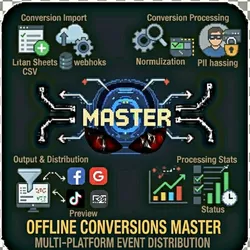
Offline Conversions Master - Multi-Platform Event Distribution
Pricing
from $0.01 / 1,000 results
Offline Conversions Master - Multi-Platform Event Distribution
Import offline conversions from multiple sources, validate, normalize, hash PII for compliance, and distribute to any ad platform via webhooks. Perfect for tracking in-store purchases, phone orders, and CRM conversions.
Pricing
from $0.01 / 1,000 results
Rating
0.0
(0)
Developer

The Howlers
Maintained by CommunityActor stats
0
Bookmarked
2
Total users
1
Monthly active users
10 days ago
Last modified
Categories
Features
Share
Import offline conversions from Google Sheets, CSV files or CRM webhooks. Validate, normalize, hash PII, dedupe and format them for Facebook, Google, LinkedIn, TikTok, Microsoft, Pinterest and Snapchat, then deliver the formatted batches to your own webhook (for example a Make, Zapier or n8n scenario that forwards them to the ad platform).
This actor does not call ad platform APIs directly. The only task that sends data anywhere is export_to_webhook, and it sends only to the outputWebhookUrl you provide.
Quick Start
Import from a Google Sheet
The sheet needs a header row and must be shared as "Anyone with the link can view" or published to the web. Paste the link from the browser address bar; the tab id (#gid=...) is picked up automatically.
Import from a CSV URL
Format and deliver to your webhook
Every task reads conversions from the first data source you set, in this order: conversions (JSON array), webhookPayload, csvUrl, googleSheetUrl. The import_from_sheet, import_from_csv and process_webhook_payload tasks use only their own source.
Input Parameters
| Parameter | Type | Default | Required | Description |
|---|---|---|---|---|
task | string | "import_from_sheet" | Yes | The operation to perform |
googleSheetUrl | string | - | No | Google Sheet link (shared with anyone with the link, or published to the web) |
csvUrl | string | - | No | Public URL of a CSV file with a header row |
webhookPayload | string | - | No | JSON payload from an incoming webhook (array of conversion objects) |
conversions | string | - | No | JSON array of conversion objects for processing |
eventType | string | "Purchase" | No | Event type applied to imported rows that have none |
emailColumn | string | "email" | No | Column name containing email addresses |
phoneColumn | string | "phone" | No | Column name containing phone numbers |
valueColumn | string | "value" | No | Column name containing conversion value/revenue |
currencyColumn | string | "currency" | No | Column name containing currency code |
timestampColumn | string | "timestamp" | No | Column name containing conversion timestamp |
orderIdColumn | string | "order_id" | No | Column name containing order/transaction ID |
clickIdColumn | string | "click_id" | No | Column name containing click IDs (gclid, fbclid, etc.) |
targetPlatform | string | "generic" | No | Format output for specific platform requirements |
hashFields | string | "email,phone" | No | Comma-separated field names to SHA256 hash |
dedupeField | string | "order_id" | No | Field to deduplicate on (e.g., 'order_id', 'email') |
filterExpression | string | - | No | Filter expression (e.g., 'value > 100', 'event_type == Purchase') |
outputWebhookUrl | string | - | No | Webhook URL that receives formatted conversion batches |
batchSize | integer | 100 | No | Number of conversions per webhook batch |
webhookUrl | string | - | No | URL to receive the final result via webhook |
demoMode | boolean | false | No | Return labeled sample data instead of processing your data |
Column names are matched case-insensitively. Columns you do not map are kept on each conversion as-is. Values like $1,234.50 are parsed as numbers.
Pricing
This actor uses pay-per-event billing:
| Event | When it is charged | Price |
|---|---|---|
| Actor start | Once when the run starts, one event per GB of memory (minimum one). At the default 1 GB of memory that is $0.10 per run | $0.10 per GB |
| Facebook Batch Conversions | Send multiple offline conversions to Facebook in a single batch | $0.01 |
| Google Click Conversion | Upload click-based conversion to Google Ads using gclid/gbraid/wbraid | $0.01 |
| LinkedIn Batch Conversions | Send multiple conversions to LinkedIn in a single batch | $0.01 |
| TikTok Batch Events | Send multiple events to TikTok Events API in a single batch | $0.01 |
| Microsoft/Bing Conversion | Upload offline conversion to Microsoft Advertising | $0.01 |
| Pinterest Event | Send conversion event to Pinterest Conversions API | $0.01 |
| Snapchat Event | Send conversion event to Snapchat Conversions API | $0.01 |
| Result | Each item written to the default dataset | $0.00001 |
Local processing tasks (import, validate, normalize, hash, dedupe, filter, format, preview, stats) charge no task events. Batches your webhook rejects, failed tasks, the generic format and demo runs charge no task events.
Errors
If a task cannot run (no data source, a private sheet, invalid JSON, an unreachable URL), the actor writes one row with success: false and an error message, sets the run status message, and charges no task events. If some webhook batches fail, the row has partial: true and lists failedBatches; only accepted batches are charged.
Troubleshooting
"returned an HTML page instead of CSV"
The sheet or file is private, or the link points to a web page rather than the CSV itself. For Google Sheets, use Share > Anyone with the link, or File > Share > Publish to web.
No results or empty dataset
Check the run log and the error field. Common causes:
- No data source set (set
conversions,webhookPayload,csvUrlorgoogleSheetUrl) - The sheet or CSV has no header row
How do I test without my own data?
Turn on demoMode. The actor returns sample conversions so you can inspect the output format. Every sample row has demo: true and a _notice saying it is sample data. Demo runs send nothing to any webhook and charge no task events. With demoMode off, the actor never substitutes sample data: missing or broken input produces an error row instead.
Built by John Rippy | Actor Arsenal


