

AI Document & Web Analyzer — powered by OpenAI GPT
Pricing
from $1.50 / 1,000 item analyzed (own key)s
AI Document & Web Analyzer — powered by OpenAI GPT
Summarize, classify or extract JSON from web pages, PDFs, Word files, images, texts and any Apify dataset with OpenAI GPT models. Bring your own OpenAI API key. Token caps, an estimate-only mode and a visual report. Not affiliated with OpenAI.
Pricing
from $1.50 / 1,000 item analyzed (own key)s
Rating
0.0
(0)
Developer

Badr Bouargan
Maintained by CommunityActor stats
0
Bookmarked
2
Total users
1
Monthly active users
12 hours ago
Last modified
Categories
Features
Share
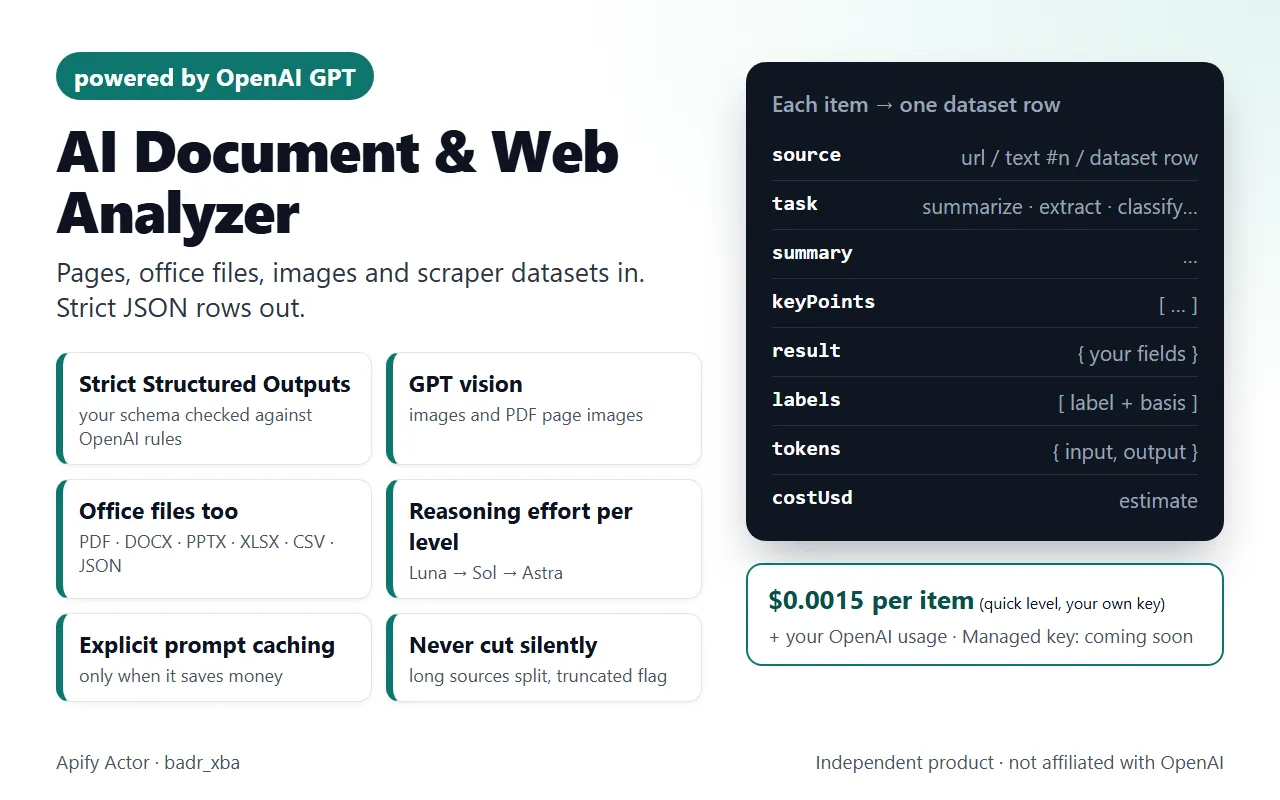
Run OpenAI GPT models on web pages, PDFs, Word / PowerPoint / Excel files, images, raw texts and the datasets of any other Apify Actor. Every item becomes one row: summary, key points, your extracted JSON fields, labels, key facts, a report section or a comparison. You also get token counts, the estimated OpenAI cost and a visual REPORT page.
Independent product, not affiliated with or endorsed by OpenAI. "OpenAI" and "GPT" are named only to say which models the Actor uses.
Why use it
- Strict JSON you can load straight into a database. Every answer uses OpenAI Structured Outputs in strict mode;
extractfollows your JSON Schema, checked against the strict-mode rules before the run starts. - Office files, not only PDFs. PDF, DOCX, PPTX, XLSX, TXT, MD, CSV and JSON documents up to 50 MB.
- One step after any scraper. Pass the dataset of Website Content Crawler, Amazon, Instagram, Facebook Ads or LinkedIn Jobs scrapers and add an AI column to every row.
- Cost under control. Estimate-only runs, a per-run cost cap (
maxCostUsd, default $2), token caps and a per-item part limit. - Honest output. Long content is never cut silently, images are the source's own (up to 3), and a confidence value is shown only when the model gave one with a basis, labelled "model-reported". The Actor computes no scores.
What OpenAI brings to this Actor
These are the OpenAI API features the code actually uses (see src/provider.py, src/analyzer.py, src/prompts.py):
| OpenAI feature | What it means for you |
|---|---|
Responses API with Structured Outputs (json_schema, strict: true) | The answer must match the schema. Your outputSchema is checked first: root must be an object, every object gets additionalProperties: false, fields not listed as required become nullable; allOf, not, if/then/else, patternProperties… are rejected with a clear message. |
Vision (input_image) | imageUrls, and optionally the images of web pages and dataset items (analyzePageImages). |
Native file input (input_file) | PDFs are sent with their text and page images; Office files are sent as text. |
Reasoning effort per level (reasoning.effort) | low / medium / high by level, or force it with reasoningEffort. Reasoning tokens are billed as output. |
Image detail (imageDetail) | low = at most ~308 tokens per image or PDF page; high = at most ~3,000. |
| Explicit prompt caching | The shared instructions are cached only when that saves money. |
Token counting (responses.input_tokens.count) | Optional exact input counts in estimate-only runs (exactTokenCount). |
Streaming, store: false | Answers are streamed; requests ask OpenAI not to store the response. |
Accepted sources
| Source | Input field | Details |
|---|---|---|
| Web pages | startUrls | One plain HTTP GET per page with an honest User-Agent; no browser, no JavaScript, no anti-bot bypass; robots.txt Disallow honoured (skipped pages go to FAILED_INPUTS). A URL that serves a PDF, Word file or image is analysed as a document or image. |
| Raw texts | texts | Emails, reviews, transcripts. Through the API each entry can be a long string with line breaks. |
| Documents | documentUrls | PDF, DOCX, PPTX, XLSX, TXT, MD, CSV, JSON, up to 50 MB each. Old .doc files are not supported. |
| Images | imageUrls | PNG, JPEG, WEBP, GIF, analysed with GPT vision. |
| Apify datasets | datasetIds + datasetFields | Each item is analysed. Dot paths such as metadata.description. Empty datasetFields = the usual text fields (title, text, markdown, description, review…). Your account must be able to read the dataset. |
Use cases
- Product data teams: turn Amazon titles, feature bullets and descriptions into a strict specs schema (brand, capacity, material, warranty…).
- Back office: extract invoice numbers, totals and currencies from PDFs, spreadsheets (XLSX) or slide decks (PPTX).
- Social listening: classify Instagram captions or Facebook ads by topic, tone or offer type.
- Content audits: summarize every page of a Website Content Crawler run with key points and entities.
- Visual checks: read receipts, screenshots and product photos with GPT vision.
- Vendor comparison:
compareadds one comparison row over all analysed items.
How it works
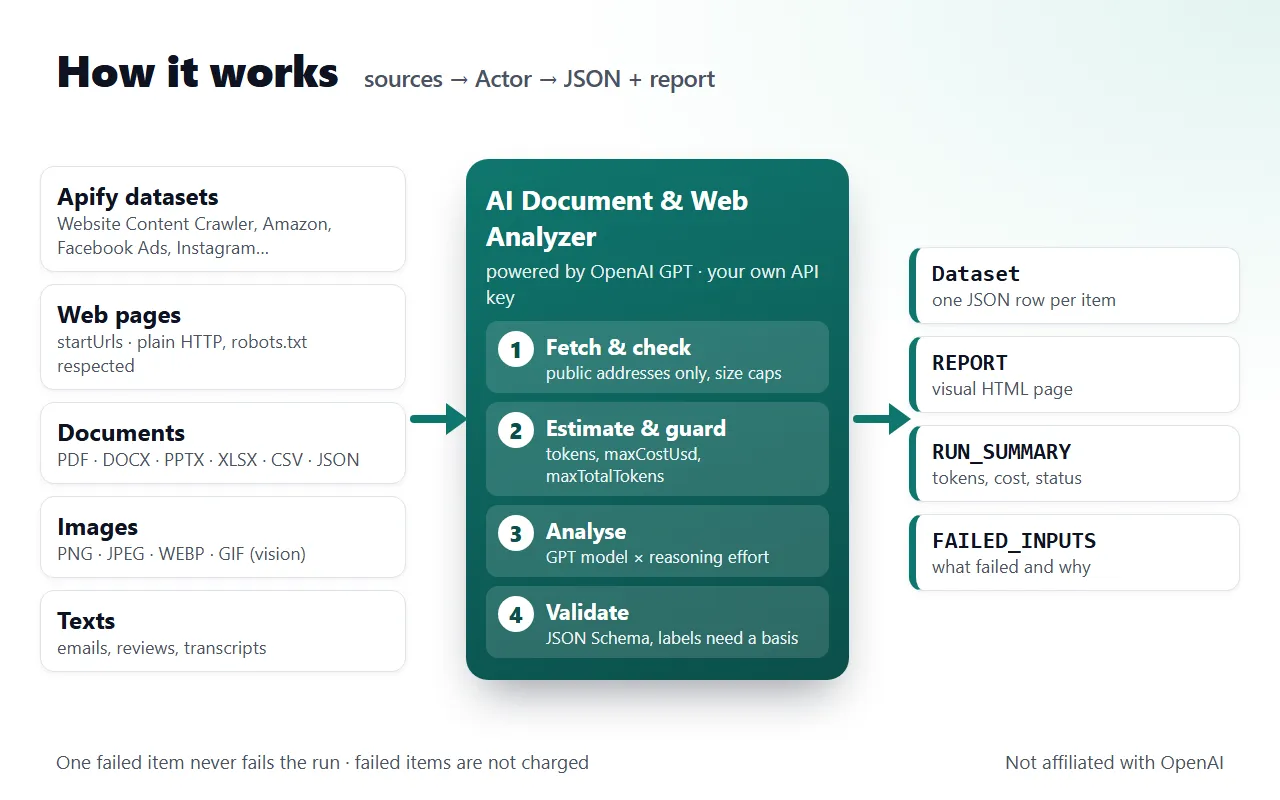
- Fetch and check every source (public addresses only, at most 5 redirects, size caps, robots.txt).
- Estimate and guard: input tokens are estimated and checked against
maxCostUsd/maxTotalTokensbefore each call. - Analyse with the GPT model of your level at its reasoning effort; long content is split into parts, condensed, then analysed.
- Validate the strict JSON answer and write one row per item, then
REPORT,RUN_SUMMARYandFAILED_INPUTS.
Tasks
task | What you get |
|---|---|
summarize (default) | title, summary, key points, entities, important info |
extract | the fields of your JSON Schema (outputSchema) in result |
classify | your labels (single, or several with multiLabel), each with a stated basis |
analyze | topics, insights, tone |
detect_key_info | dates, amounts, contacts, deadlines, obligations |
compare | every item, plus one comparison row over all analysed items (needs at least 2) |
report | report sections |
custom | the answer to your instructions |
Analysis levels and models
From src/models.json (OpenAI list prices read 2026-11-09):
analysisLevel | Model | Reasoning | Max output tokens | Image detail | Typical web item* |
|---|---|---|---|---|---|
quick | gpt-6-luna | low | 6,000 | low | ≈ $0.0006 |
standard (default) | gpt-6.1-sol | medium | 16,000 | high | ≈ $0.019 |
deep | gpt-6-astra | high | 32,000 | high | ≈ $0.19 |
*OpenAI list price for 1,500 tokens of text in and about 500 visible tokens out; an estimate, not a measured run. Reasoning tokens are billed as output.
Force a model with model:
model | Input / cached input / output per 1M tokens | Above 272K input tokens |
|---|---|---|
gpt-6-luna | $0.10 / $0.01 / $0.50 | $0.20 / $0.02 / $0.75 |
gpt-6.1-terra | $1.00 / $0.05 / $5.00 | $2.00 / $0.10 / $7.50 |
gpt-6.1-sol | $2.00 / $0.10 / $10.00 | $4.00 / $0.20 / $15.00 |
gpt-6-astra | $10.00 / $1.00 / $50.00 | $20.00 / $2.00 / $75.00 |
All four have a 1,050,000-token context window and up to 128,000 output tokens. Above 272K input tokens the whole request is priced at the long-context rate (the conservative reading) and the row says longContext: true.
Pricing
- Your own OpenAI API key (available now): $0.0015 / $0.003 / $0.006 per analysed item for quick / standard / deep (one
item-analyzedevent × 1, 2 or 4), plus Apify's start event of $0.00005 per run. OpenAI bills you directly for the AI tokens. - Failed items, refusals and estimates are never charged.
- Managed key (no API key needed): coming soon. It is not open yet: a run with
apiKeyMode: "managed"stops before any AI call with a clear message, and nothing is charged.
API key setup
- Create a key at platform.openai.com/api-keys.
- Paste it into the OpenAI API key field (
apiKey). It is an Apify secret input: stored encrypted, never logged, never stored in the output. - Leave API key mode (
apiKeyMode) onown_key.
Without a key the run only estimates tokens and costs. Only the apiKey field is encrypted: if you send a key under another field name (for example openaiApiKey), the Actor ignores it and warns you without printing it. That value still sits in plain text in the run's input, so remove it and rotate the key.
Input
Every field of the input schema (.actor/input_schema.json). No field is required, but a run needs at least one source.
| Field | Type | Default | Description |
|---|---|---|---|
startUrls | array | — | Web pages to analyse (plain HTTP, robots.txt honoured). |
texts | array | — | Raw texts, one item per entry. |
documentUrls | array | — | PDF, DOCX, PPTX, XLSX, TXT, MD, CSV or JSON links (50 MB max each). |
imageUrls | array | — | PNG, JPEG, WEBP or GIF images (GPT vision). |
datasetIds | array | — | IDs of datasets produced by other Actors. |
datasetFields | array | — | Fields of each dataset item to send (dot paths). Empty = the usual text fields. |
task | string | "summarize" | summarize, extract, classify, analyze, detect_key_info, compare, report, custom. |
instructions | string | — | Extra instructions in plain words; needed in practice for custom. |
outputSchema | object | — | JSON Schema for extract, checked against the Structured Outputs rules. |
labels | array | — | Allowed labels for classify. |
multiLabel | boolean | false | classify: allow more than one label per item. |
language | string | — | Language of the answers. Empty = the language of each source. |
analysisLevel | string | "standard" | quick (GPT-6 Luna), standard (GPT-6.1 Sol), deep (GPT-6 Astra). |
model | string | — | Optional override: gpt-6-luna, gpt-6.1-terra, gpt-6.1-sol, gpt-6-astra. |
reasoningEffort | string | — | Optional override: none, low, medium, high, xhigh, max (unsupported values fall back to the level default). |
imageDetail | string | — | low or high. Empty = level default (quick: low, others: high). |
analyzePageImages | boolean | false | Also send the (up to 3) images of web pages and dataset items to GPT vision. |
maxItems | integer | 50 | Maximum number of items analysed in this run (1 to 10,000). |
maxInputTokensPerItem | integer | 100000 | Longer content is split into parts (2,000 to 922,000). Above 272,000 OpenAI charges long-context prices. |
maxOutputTokensPerItem | integer | 0 | Includes reasoning tokens. 0 = level default (6,000 / 16,000 / 32,000). |
maxChunksPerItem | integer | 10 | Parts beyond this number are not analysed and the row says truncated: true (1 to 100). |
maxTotalTokens | integer | 0 | The run stops before a call that could exceed this total. 0 = no limit. |
maxCostUsd | number | 2 | The run stops before a call whose worst case could push the estimated OpenAI cost above this (USD). 0 = no limit. |
estimateOnly | boolean | false | Download the sources and estimate input tokens and the maximum cost per item, without calling the model. |
exactTokenCount | boolean | false | With estimateOnly and your own key: ask OpenAI's token-counting endpoint for exact input tokens. |
concurrency | integer | 3 | Items analysed at the same time (1 to 10). |
itemTimeoutSecs | integer | 0 | 0 = automatic: one answer of the full output budget at 30 tokens/s + 60 s (at least 300 s). |
apiKeyMode | string | "own_key" | own_key (available) or managed (coming soon, not open yet). |
apiKey | string (secret) | — | Your OpenAI API key. |
Output
One dataset row per item (views: Overview, Structured results, Tokens and cost). Fields from .actor/dataset_schema.json:
| Field | Type | Description |
|---|---|---|
source | string | URL, text #n, dataset:<id>#<index> or the compared sources. |
sourceType | string | web, text, document, image, dataset or comparison. |
task | string | Task run on the item. |
model | string | OpenAI model that answered. |
analysisLevel | string | quick, standard or deep. |
reasoningEffort | string | Reasoning effort sent to the model (null = model default). |
title | string | Title of the source or the one the model found. |
summary | string | Summary written by the model. |
keyPoints | array | Key points. |
result | object | Task result: your extracted fields, labels, topics, key facts, report sections, comparison table… |
labels | array | classify only: labels given WITH a stated basis; confidence is model-reported (null when the model gave none). |
entities | array | People, organisations, places, products named in the source. |
importantInfo | array | Risks, deadlines, amounts, obligations or warnings. |
language | string | Language of the answer. |
images | array | Up to 3 real image URLs from the source (never generated). |
tokens | object | {input, cachedInput, cacheWrite, output, reasoning} as reported by OpenAI. |
costUsd | number | Estimated OpenAI cost at list prices; 0 for estimate-only rows. |
billedEvents | object | Apify pay-per-event events charged for this row. |
durationMs | integer | Time spent on the item. |
truncated | boolean | True when part of a very long source was not analysed. |
truncationReason | string | Why and how much was left out. |
chunks | integer | Parts the source was split into (1 = sent whole). |
longContext | boolean | More than 272K input tokens: long-context prices applied. |
estimateOnly | boolean | Row from an estimate-only run (no AI call). |
estimatedInputTokens | integer | Local estimate of the input tokens of the direct request. |
estimatedMaxCostUsd | number | Estimate-only: worst-case OpenAI cost of the item. |
warnings | array | Notes about this item ({code, message}). |
error | object | {code, message} when the item gave no analysis (also listed in FAILED_INPUTS). |
datasetId | string | Dataset the item came from. |
datasetIndex | integer | Position of the item in that dataset. |
Key-value store: REPORT (visual page), RUN_SUMMARY, FAILED_INPUTS (every input that gave no analysis, with a code).
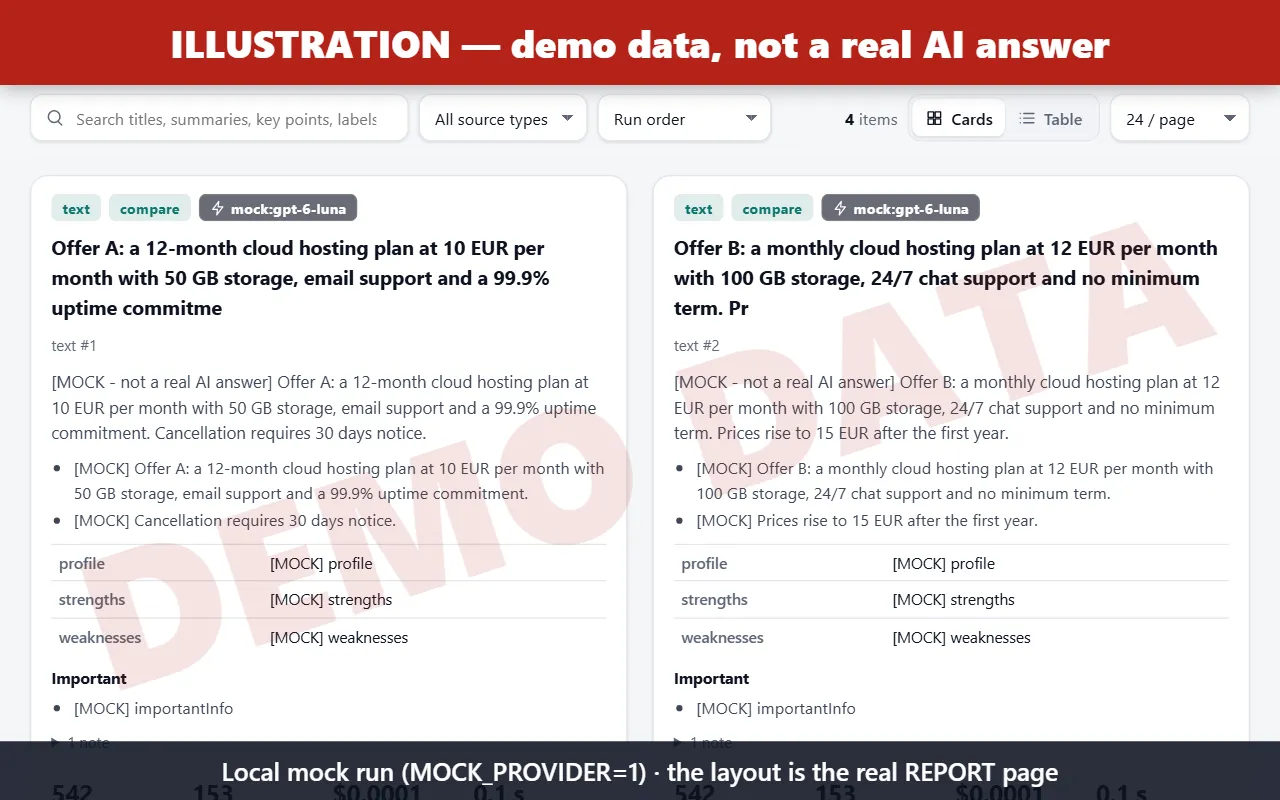
Illustration — demo data, not a real AI answer. Screenshot of the real REPORT page layout, rendered from a local mock run (MOCK_PROVIDER=1): every text marked [MOCK] is canned, no model was called.
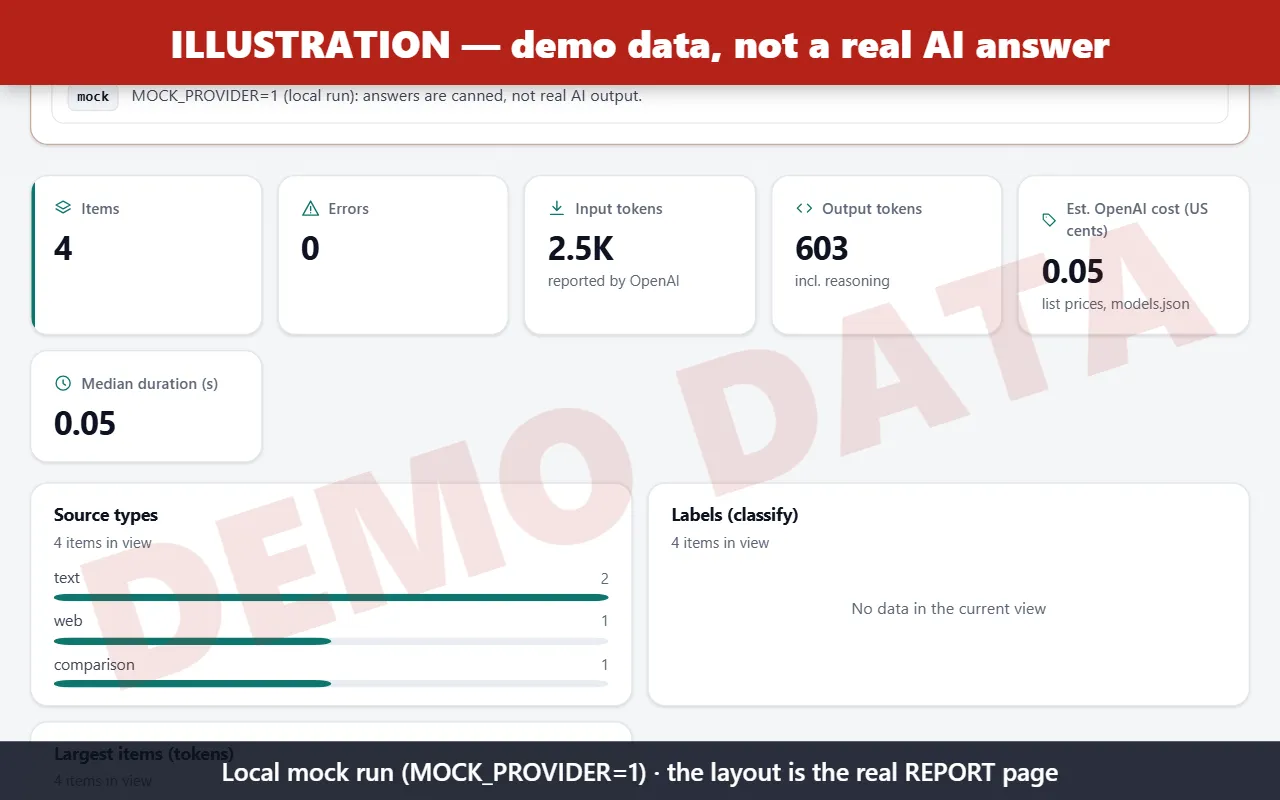
Illustration — demo data, not a real AI answer. Run statistics of the same local mock run.
Examples
Summarize a page, cheapest level:
Extract invoice fields from PDFs, spreadsheets or slides (strict schema):
Read receipts with vision, low detail to save tokens:
Estimate a big job with OpenAI's exact token count:
Integrations: chain it after a scraper
Every Apify Actor writes its results to a dataset. Pass that dataset's ID in datasetIds and choose the fields with datasetFields. The field names below are the real output fields of each scraper.
In the Apify Console (no code): open the scraper (or its task) → Integrations → Connect Actor or task → choose this Actor and use an input such as {"datasetIds": ["{{resource.defaultDatasetId}}"], ...}. Each finished scraper run then starts an analysis of its own results.
Website Content Crawler (apify/website-content-crawler) — summarize a crawl:
Amazon Product Scraper (badr_xba/amazon-product-scraper) — strict specs table:
Instagram Scraper (badr_xba/instagram-scraper) — classify post captions, with the post image:
Facebook Ads Library Scraper (badr_xba/facebook-ads-library-scraper) — analyse competitors' ad messaging:
LinkedIn Jobs Scraper (badr_xba/linkedin-jobs-scraper) — key facts from job posts:
From code (apify-client for JavaScript): run a scraper, then analyse its dataset.
Cost control
estimateOnly: downloads the sources and estimates input tokens and the maximum cost per item without calling the model. AddexactTokenCountfor OpenAI's own count.maxCostUsd(default $2) andmaxTotalTokens: the run stops before a call whose worst case could go over.maxInputTokensPerItem+maxChunksPerItem: above the limit the text is split into parts, each part is condensed, then the task runs on the notes. If parts still have to be left out, the row saystruncated: trueand gives the reason.imageDetail: "low": at most ~308 tokens per image or PDF page instead of ~3,000.quicklevel: GPT-6 Luna is about 1/20 of GPT-6.1 Sol's token price.itemTimeoutSecs: 0 = automatic, long enough for the full output budget (deep level ≈ 19 min), because OpenAI still bills an answer cut by a timeout.
Limits and errors
- No JavaScript rendering: pages that need a browser come back as "no readable text". Crawl them first with Website Content Crawler, then pass its dataset.
- Old
.docfiles are not supported. Scanned PDFs are read from their page images only. - With your own key, token estimates before the call are local approximations (about 4 characters per token). Costs in the rows are estimates at list prices; your OpenAI invoice is the reference.
- Failed inputs are listed in
FAILED_INPUTSwith a code; the row'serroris{code, message}. Warnings use codes such astruncated,schemaMismatch,longContext,noTextLayer,compareSkipped(fewer than two items analysed) andkeyIgnored. - Prices and model capabilities were taken from OpenAI's official pages on 2026-11-09 (
src/models.json).
Troubleshooting
| Status message / FAILED_INPUTS code | Cause | Fix |
|---|---|---|
"Stopped: OpenAI rejected the API key — nothing was analysed or billed." / invalidApiKey | The key in "OpenAI API key" is wrong, revoked, expired or mistyped. The run stops after the first refused request (no other item is sent), lists every item in FAILED_INPUTS, sets stoppedReason in RUN_SUMMARY and ends FAILED so that schedules and integrations notice it. Only Apify's run start event is charged. | Create or copy a key at https://platform.openai.com/api-keys and paste it, without spaces or quotes, in the "OpenAI API key" field (apiKey). |
Same message / apiKeyNoAccess | The key is known but has no access (HTTP 403 / permission denied). | Check at https://platform.openai.com/api-keys that the key's project may use the chosen model and your region is supported. |
rateLimited, serverError (or similar) | Rate limit (429) or provider outage (5xx): retried with back-off, never treated as a key error; the other items continue. | Run again later or lower concurrency. |
| No key at all | Not an error: the run is an estimate-only demo (SUCCEEDED, nothing billed). | Add your key to analyse. |
Privacy
Your key is a secret input (encrypted by Apify). It is never logged or stored. Anything that looks like a key is removed from error messages and from crash tracebacks. Logs contain ids and lengths only, never your content. Requests are sent with store: false. Content goes to OpenAI under your API account terms. Every fetched host is resolved once and the connection goes to that exact validated IP (private, loopback, link-local and cloud-metadata addresses are refused, also after redirects), with the real host name kept for the Host header and TLS certificate checks, so DNS rebinding cannot reach an internal address.
FAQ
Do I need an OpenAI account? Yes, for now: own-key mode is the only mode available. The managed key is coming soon.
Are the answers in the screenshots real? No. The report screenshots come from a local demo run with canned answers, to show the page layout.
Why did my schema get rejected? Strict Structured Outputs do not accept some JSON Schema keywords (allOf, not, if/then/else, patternProperties…). The run stops before any AI call and says which keyword to remove.
Feedback and reviews
Something missing or wrong? Please open an issue on the Actor's Issues tab. We read them all. If the Actor saved you time, a short review on the Store helps other users find it.


