

AI Multimodal Analyzer — powered by Gemini
Pricing
from $1.50 / 1,000 item analyzed (own key)s
AI Multimodal Analyzer — powered by Gemini
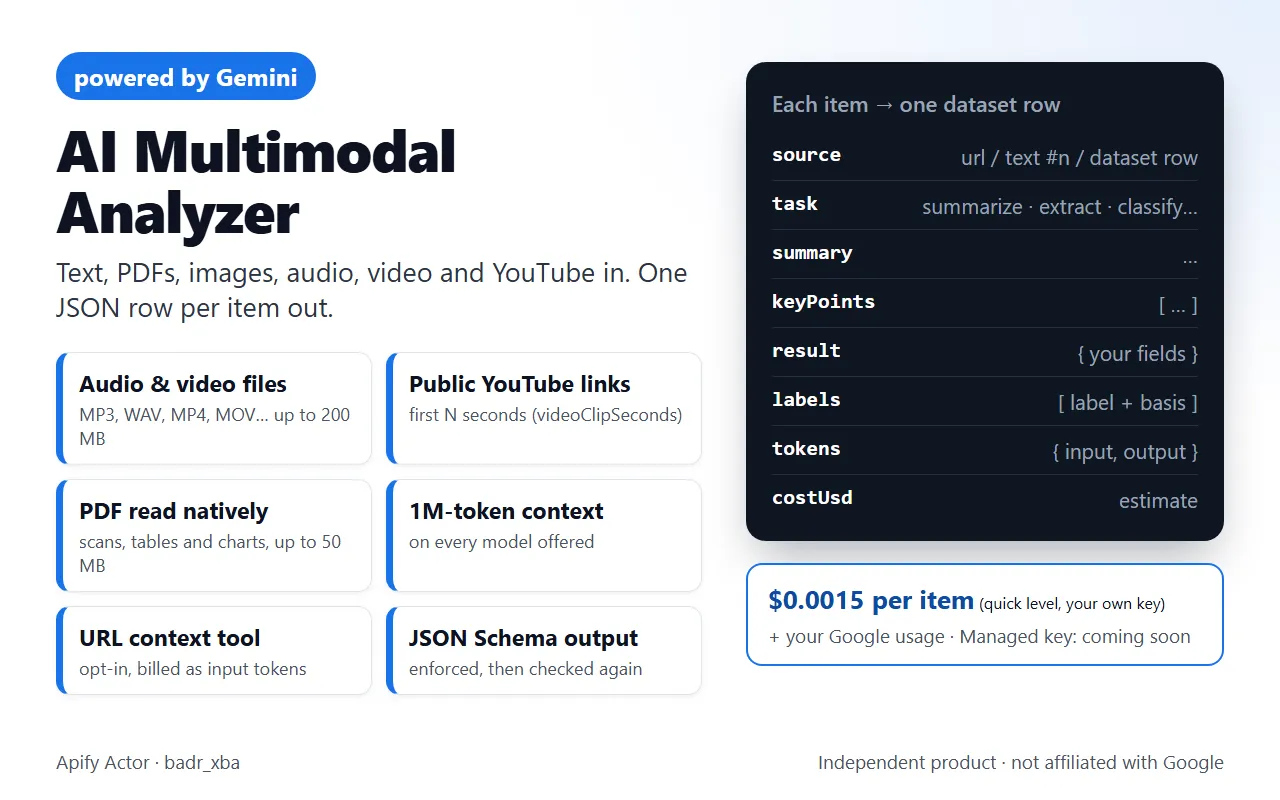
Summarize, extract to your JSON schema, classify or compare web pages, PDFs, images, audio, video, YouTube links and any Apify dataset with Google Gemini. Bring your own Gemini API key. Token and cost estimate on every row. Not affiliated with Google.
Pricing
from $1.50 / 1,000 item analyzed (own key)s
Rating
0.0
(0)
Developer

Badr Bouargan
Maintained by CommunityActor stats
0
Bookmarked
3
Total users
2
Monthly active users
8 hours ago
Last modified
Categories
Features
Share
Send web pages, PDFs, Word files, images, audio, video, public YouTube links or the results of any other Apify Actor to Google Gemini, and get one clean row per item: a summary, key points, extracted JSON that follows your schema, labels with the quote they are based on, key facts (dates, amounts, obligations), risks, or a comparison across items. Every row also shows the tokens Google reported and an estimated cost, and the run writes a visual REPORT page.
Independent product, not affiliated with or endorsed by Google. "Gemini" is used only to say which model family powers the analysis.
Why use it
- Media, not only text. Audio files, video files and public YouTube videos go to the model natively: no separate transcription step.
- One step after any scraper. Analyse the output of YouTube, TikTok, Instagram or Google Maps scrapers row by row (
datasetIds+datasetFields). - Structured, checkable output.
extractfollows your JSON Schema (enforced by Gemini's structured output and checked again by the Actor);classifyuses your labels, each with the quote it is based on. - Cost under control. A run without a key becomes an estimate run;
maxCostUsd,maxTotalTokens,maxChunksPerItemandvideoClipSecondsare checked before each call. - Honest rows. Nothing is cut silently (
truncated+truncationReason), images are the source's own, confidence is model-reported.
What Gemini brings to this Actor
These are the Gemini API features the code actually uses (see src/provider.py, src/sources.py):
| Gemini feature | What it means for you |
|---|---|
| Native multimodal input | One model reads text, images, PDFs (as pages, not just extracted text), audio and video. |
| YouTube input (preview feature of the Gemini API) | Public YouTube links in mediaUrls (or startUrls) are analysed directly; only the first videoClipSeconds are sent. |
| Files API | Media above 19 MB (up to 200 MB) are uploaded through the Gemini Files API and deleted by the Actor at the end of the run. |
| 1M-token context window | On every model offered here (1,048,576 tokens). |
Structured output (response_json_schema) | Every answer is JSON; extract follows your schema. |
| Thinking levels | quick = model default (minimal), standard = low, deep = high. Thinking tokens are billed as output. |
URL context tool (useUrlContext, opt-in) | Gemini may open the URLs mentioned in the content; retrieved pages are billed as input tokens and listed in groundingSources. |
| Context caching | Implicit caching of repeated prefixes (tokens.cachedInput), plus an explicit 15-minute cache for long shared instructions (useContextCache). |
Token counting (count_tokens) | Used by estimate runs when you give a key. |
| Media resolution | mediaResolution low / medium / high trades tokens against small-print accuracy. |
Accepted sources
Mix them freely in one run.
| Source | Input field | Details |
|---|---|---|
| Web pages | startUrls | Plain HTTP request with an honest User-Agent, robots.txt respected, no JavaScript rendering, no anti-bot bypass. A PDF, image or YouTube URL is handled as such. |
| Raw texts | texts | Emails, reviews, transcripts. |
| Documents | documentUrls | PDF read natively by Gemini (scans, tables and charts included, up to 50 MB), DOCX, TXT, MD, CSV. |
| Images | imageUrls | PNG, JPEG, WEBP, HEIC, GIF (up to 15 MB each): screenshots, receipts, product photos, charts. |
| Audio / video / YouTube | mediaUrls | Audio (MP3, WAV, AAC, OGG, FLAC, M4A…) and video (MP4, MOV, WEBM…) up to 200 MB, plus public YouTube videos. |
| Apify datasets | datasetIds + datasetFields | One item per row (reviews, posts, product pages…). Dotted paths allowed. Empty datasetFields = the usual text fields (text, markdown, description, title, review…), else every short field. |
Use cases
- Video research: summarize the first minutes of public YouTube videos, or extract product mentions and claims from them.
- Podcasts and calls: key facts, decisions and risks from MP3 / WAV recordings.
- Social listening: classify TikTok and Instagram post texts with your own labels, each with the quote it rests on.
- Transcripts at scale: run
summarizeoranalyzeon thetranscriptfield of a YouTube scraper dataset. - Scanned documents: extract fields from scanned PDFs, tables and charts read as pages.
- Local business research: analyse Google Maps places (descriptions, ratings, categories).
How it works
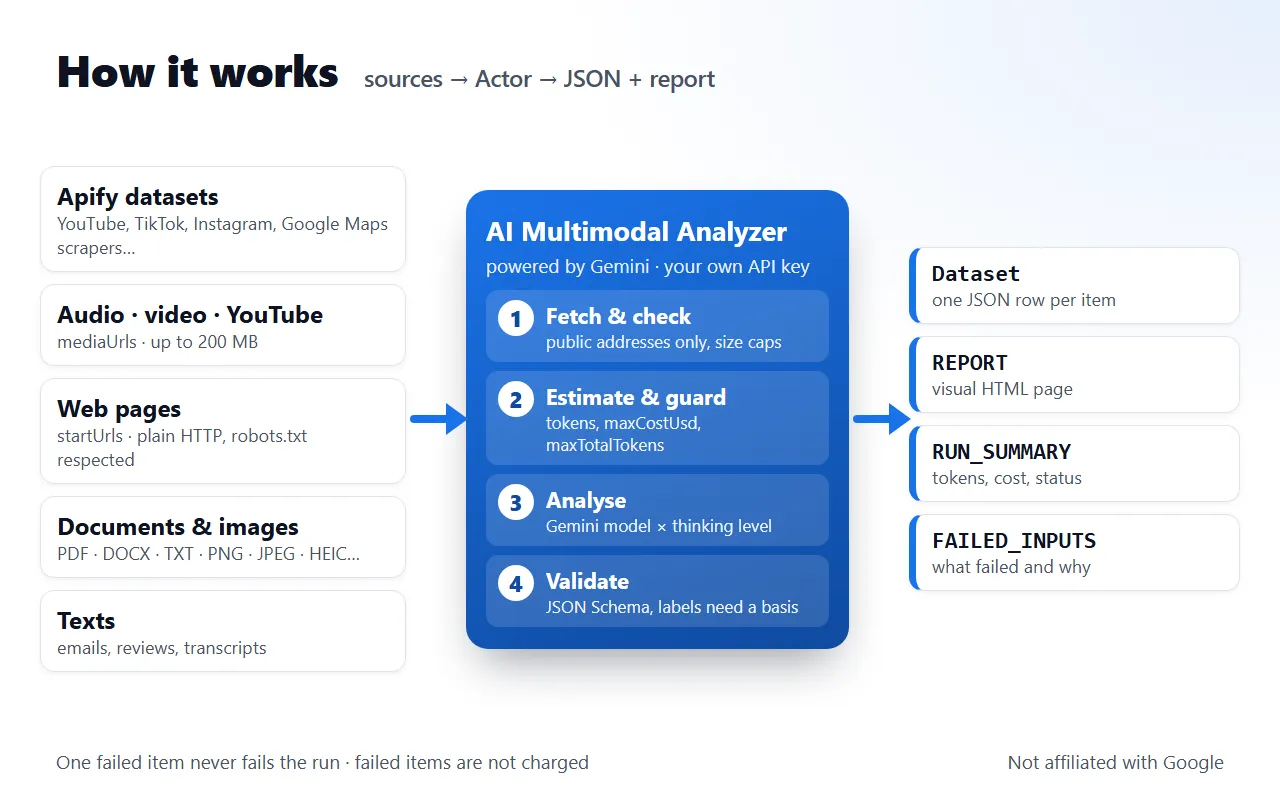
- Fetch and check every source: http(s) only, public addresses only (also for URLs handed to Gemini), size caps.
- Estimate and guard: tokens are estimated (or counted with your key) and checked against your caps before each call.
- Analyse with the Gemini model of your level at its thinking level; long texts and PDFs are read in parts and combined (map-reduce).
- Validate the JSON (your schema for
extract; labels without a basis are dropped) and write one row per item, thenREPORT,RUN_SUMMARYandFAILED_INPUTS.
Tasks
task | You get |
|---|---|
summarize (default) | title, summary, up to 10 key points, entities, important info, risks |
extract | the fields of your JSON Schema, enforced by Gemini's structured output and checked again by the Actor |
classify | one or several of your labels, each with a model-reported confidence and the quote it is based on (labels without a basis are dropped) |
analyze | themes, sentiment with evidence, strengths, weaknesses, recommendations |
detect_key_info | dates, deadlines, amounts, prices, people, contacts, obligations, risks, quoted exactly |
compare | every item, plus one extra row with similarities and differences per aspect |
report | an executive summary and sections with headings |
custom | your own instructions |
Analysis levels and models
From src/models.json:
analysisLevel | Default model | Thinking | Max output tokens |
|---|---|---|---|
quick | gemini-3.5-flash-lite | model default (minimal) | 2,048 |
standard (default) | gemini-3.8-flash (fallback gemini-3.6-flash*) | low | 4,096 |
deep | gemini-4-argon | high | 16,384 |
* Own key only, when model is not set: an item that gemini-3.8-flash cannot answer (no response, HTTP 503, HTTP 429 quota) is retried once on gemini-3.6-flash; the row then shows model, requestedModel and fallbackReason.
Override with model (also gemini-3.6-flash, gemini-3.1-flash-lite, gemini-3.1-pro-preview); an explicit model is never switched. All level defaults are stable models; the preview model shows a warning.
Google list prices (USD per 1M tokens, read 2026-11-09 on aistudio.google.com/docs/pricing):
model | Input | Cached input | Output | Scheduled change |
|---|---|---|---|---|
gemini-3.5-flash-lite | 0.30 | 0.03 | 2.50 | – |
gemini-3.1-flash-lite | 0.25 (audio 0.50) | 0.025 (audio 0.05) | 1.50 | shuts down 2027-05-07 |
gemini-3.8-flash | 0.75 | 0.075 | 3.75 | 1.50 / 0.15 / 7.50 from 2027-01-01 |
gemini-3.6-flash | 0.75 | 0.075 | 3.75 | 1.50 / 0.15 / 7.50 from 2027-01-01 |
gemini-4-argon | 2.00 | 0.10 (implicit only) | 10.00 | 4.00 / 0.20 / 20.00 from 2026-12-01 |
gemini-3.1-pro-preview | 2.00 (4.00 above 200K) | 0.20 (0.40) | 12.00 (18.00) | – |
The Actor prices every call on the date of the call (costUsd). Your Google invoice is authoritative.
Pricing
- Your own Gemini API key (available now): $0.0015 / $0.003 / $0.006 per analysed item for quick / standard / deep (one
item-analyzedevent × 1, 2 or 4), plus Apify's start event of $0.00005 per run. Google bills you directly for the AI tokens. - Failed items, refusals and estimates are never charged.
- Managed key (no API key needed): coming soon. It is not open yet: a run with
apiKeyMode: "managed"stops before any AI call with a clear message, and nothing is charged.
API key setup
- Create a key in Google AI Studio at aistudio.google.com/apikey.
- Paste it into the Gemini API key field (
apiKey). It is an Apify secret input: stored encrypted, never logged, never stored in outputs. - Leave API key (
apiKeyMode) onown_key.
A run without any key automatically becomes an estimate run. Only the apiKey field is encrypted: a key sent under another field name (e.g. geminiApiKey) is not used and is stored unencrypted in the run input; the run log warns about it (field name only, never the value). Rotate such a key. Rate limits depend on your Google project tier (see AI Studio).
Input
Every field of the input schema (.actor/input_schema.json). No field is required, but a run needs at least one source.
| Field | Type | Default | Description |
|---|---|---|---|
task | string | "summarize" | summarize, extract, classify, analyze, detect_key_info, compare, report, custom. |
instructions | string | — | Extra guidance for every item, or the full instruction for custom. Content is treated as data. |
outputSchema | object | — | JSON Schema for extract (root "type": "object" with "properties"). Supported keywords: type, properties, required, items, enum, description, format, minimum, maximum, minItems, maxItems, anyOf, $ref/$defs. |
labels | array | — | The only labels Gemini may use (at least 2). |
multiLabel | boolean | false | On: every label that applies. Off: exactly one. |
language | string | "auto" | auto answers in the language of each item; or a language name. |
startUrls | array | — | Web pages (PDF, image and YouTube URLs are handled as such). |
texts | array | — | Raw texts, one item per entry. |
documentUrls | array | — | PDF (up to 50 MB), DOCX, TXT, MD or CSV. |
imageUrls | array | — | PNG, JPEG, WEBP, HEIC, GIF images (up to 15 MB each). |
mediaUrls | array | — | Audio / video files up to 200 MB and public YouTube links. |
datasetIds | array | — | Dataset IDs of other Actor runs; one item per row. |
datasetFields | array | — | Field names to send (dotted paths allowed). |
maxDatasetItems | integer | 100 | Rows read from each dataset (1 to 10,000). |
analysisLevel | string | "standard" | quick, standard, deep. |
model | string | — | Optional override: gemini-3.5-flash-lite, gemini-3.1-flash-lite, gemini-3.8-flash, gemini-4-argon, gemini-3.1-pro-preview. |
estimateOnly | boolean | false | Count tokens and estimate the cost; nothing is analysed. |
maxItems | integer | 50 | Items analysed in this run, all sources together (1 to 10,000). |
maxInputTokensPerItem | integer | 100000 | Longer texts and PDFs are read in parts (1,000 to 800,000). |
maxOutputTokensPerItem | integer | — | Includes thinking tokens (256 to 65,536). Empty = level default (2,048 / 4,096 / 16,384). |
maxTotalTokens | integer | 0 | The run stops before a call that could go above this. 0 = no limit. |
maxCostUsd | string | — | Stops before a call that could exceed this estimate at Google's list price, e.g. "1.50". Empty = no limit. Note: a string field. |
maxChunksPerItem | integer | 12 | Upper bound on the parts of one long item (1 to 50; each part is one AI call). |
videoClipSeconds | integer | 300 | Only the first N seconds of each video (file or YouTube) are sent (10 to 10,800). |
mediaResolution | string | "default" | default, low, medium, high. |
useUrlContext | boolean | false | Let Gemini open the URLs mentioned in the content (retrieved pages billed as input tokens). |
useContextCache | boolean | true | Cache long shared instructions (> 4,096 tokens, 3+ items) once instead of re-sending them. |
concurrency | integer | 3 | Items analysed at the same time (1 to 20). |
itemTimeoutSecs | integer | 300 | Maximum time for one Gemini call (30 to 1,800); raised automatically, with a warning, when the output limit needs more time. |
firstResponseTimeoutSecs | integer | 60 | Abort a call when Gemini sends nothing at all within this time (15 to 600); retried once, then providerNoResponse. |
apiKeyMode | string | "own_key" | own_key (available) or managed (coming soon, not open yet). |
apiKey | string (secret) | — | Your Gemini API key. |
Output
One dataset row per item (views: Overview, Structured results, Estimates). Fields from .actor/dataset_schema.json:
| Field | Type | Description |
|---|---|---|
source | string | URL of the page/file, text #n, or dataset:<id>#<row>. |
sourceType | string | web, text, document, image, audio, video, youtube, dataset or comparison. |
task | string | Task run on the item. |
model | string | Gemini model id used. |
analysisLevel | string | quick, standard or deep. |
title | string | Title of the item (its own, or the one Gemini gave). |
summary | string | Summary written by Gemini. |
keyPoints | array | Most important points. |
result | object | Task result: extracted JSON, analysis, key facts, report sections, comparison or custom answer. |
labels | array | classify only: labels with model-reported confidence and the basis quoted from the content. |
entities | array | People, organisations, places, products, dates, amounts. |
importantInfo | array | Facts a reader must not miss. |
risks | array | Risks or warnings stated in the content. |
language | string | Language of the source (ISO 639-1, reported by Gemini). |
image | string | First image of the source (same as images[0]), for table views. |
images | array | Up to 3 real image URLs from the source. |
imageLabel | string | What the image is when it is not a picture from the page itself, e.g. "YouTube thumbnail". |
groundingSources | array | Pages retrieved by the URL context tool (uri, retrieval status). |
tokens | object | {input, cachedInput, output, thinking} reported by Google (output includes thinking). |
costUsd | number | Estimated cost at Google list price on the day of the call (USD). |
billedEvents | object | Apify pay-per-event events charged for this row. |
durationMs | number | Processing time of the item. |
truncated | boolean | True when part of the item was NOT read. |
truncationReason | string | Why. |
chunks | number | Number of parts the item was read in (map-reduce). |
warnings | array | Warnings about this row. |
error | string | Always empty here: failed items are listed in FAILED_INPUTS. |
estimateOnly | boolean | True for estimate rows (no AI call). |
estimate | object | estimateOnly: input tokens, max output tokens, calls, cost estimates. |
datasetId | string | Source dataset (datasetIds input). |
datasetIndex | number | Row number in the source dataset. |
comparedSources | array | compare: the sources compared in this row. |
analyzedAt | string | Time of the analysis (UTC, ISO 8601). |
Key-value store: REPORT (visual report: cards, extracted fields as tables, labels, token and cost statistics, comparison view, errors panel), RUN_SUMMARY, FAILED_INPUTS (with a reason and a code such as notFound, robotsDisallowed, blocked, blockedAddress, tooLong, maxTokens, rateLimited, auth, budgetStop).
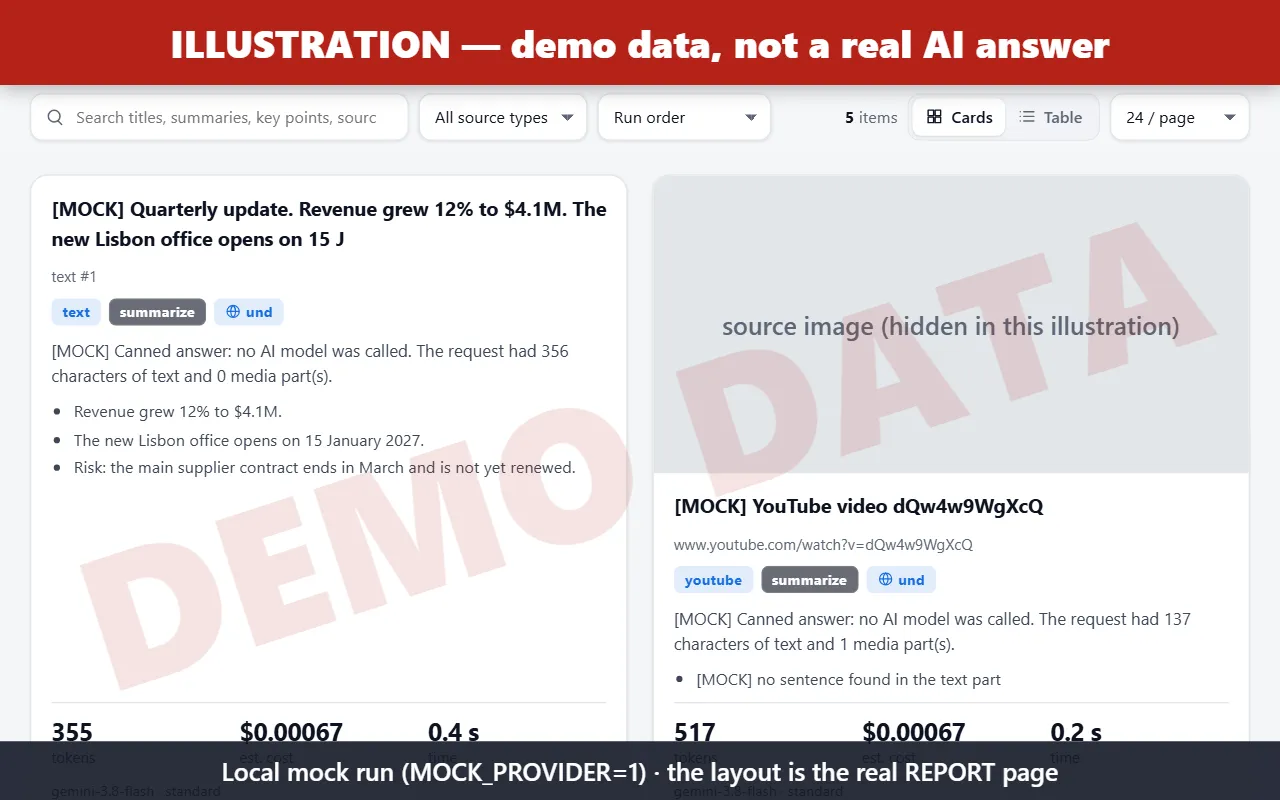
Illustration — demo data, not a real AI answer. Screenshot of the real REPORT page layout, rendered from a local mock run (MOCK_PROVIDER=1): every text marked [MOCK] is canned, no model was called. The source image of the YouTube card is hidden in this illustration.
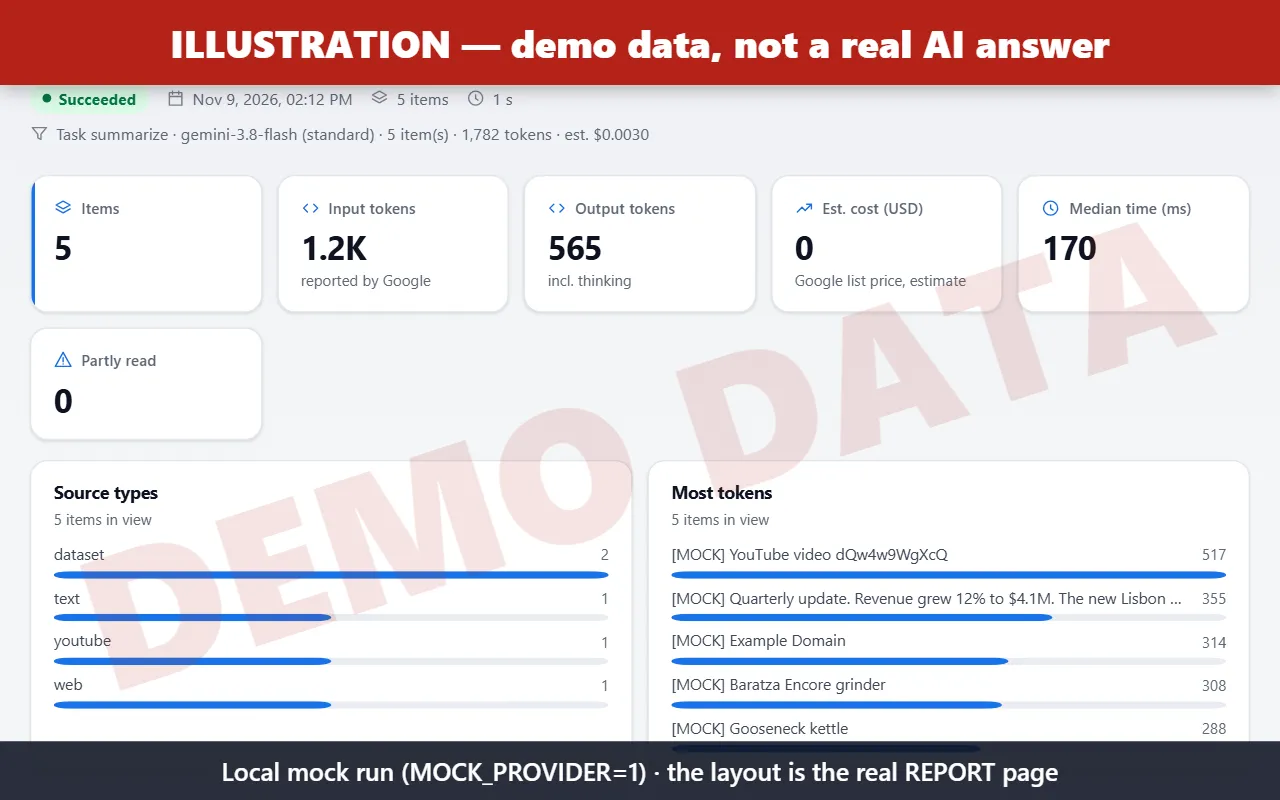
Illustration — demo data, not a real AI answer. Run statistics of the same local mock run.
Examples
Summarize a public YouTube video (first 5 minutes):
Key facts from a recorded call (audio file):
Extract product data from PDFs:
Estimate a run with a cost cap (note: maxCostUsd is a string):
Integrations: chain it after a scraper
Every Apify Actor writes its results to a dataset. Pass that dataset's ID in datasetIds and choose the fields with datasetFields. The field names below are the real output fields of each scraper.
In the Apify Console (no code): open the scraper (or its task) → Integrations → Connect Actor or task → choose this Actor and use an input such as {"datasetIds": ["{{resource.defaultDatasetId}}"], ...}. Each finished scraper run then starts an analysis of its own results.
YouTube Data Scraper (badr_xba/youtube-data-scraper) — analyse transcripts (run the scraper with "Get the transcript" on):
TikTok Scraper (badr_xba/tiktok-scraper) — classify posts by theme:
Instagram Scraper (badr_xba/instagram-scraper) — key facts from captions:
Google Maps Scraper (badr_xba/google-maps-scraper) — one comparison of the places found:
From code (apify-client for JavaScript): find videos with the YouTube scraper, then let Gemini watch them (the video URLs go to mediaUrls, not datasetIds).
Cost control
estimateOnly: counts tokens (Geminicount_tokenswith your key, local estimate otherwise) and estimates the cost per item and in total; nothing is analysed. A run without any key automatically becomes an estimate run.maxInputTokensPerItem+maxChunksPerItem: longer texts and PDFs are split into parts, read one by one, then combined. If parts are left out, the row saystruncated: truewith the reason. Audio, images and DOCX that are too long fail with a clear reason instead of being cut.videoClipSeconds(default 300): only the start of each video is sent.maxOutputTokensPerItem,maxTotalTokens,maxCostUsd: checked before each call with a worst-case estimate; the run stops cleanly and lists what was skipped.mediaResolution: "low": fewer tokens per image or video frame.- Answers are streamed, so a call cut off by a timeout still reports the tokens Google counted. The per-call timeout is never shorter than
maxOutputTokensPerItem÷ 20 tokens/s + 120 s. SDK automatic continuation is off, so one call never exceedsmaxOutputTokensPerItem.
Limits and errors
- No JavaScript rendering; pages that need it give
emptyPage. Paywalled or login pages are not read. - YouTube input is a preview feature of the Gemini API (public videos only; free tier: 8 hours per day).
- Inline requests are limited to 20 MB; bigger media use the Files API (stored by Google for 48 h at most, deleted by the Actor at the end of the run).
- Token estimates without a key are heuristics (≈ 4 characters per token, 258 tokens per PDF page, 32 per second of audio, 300 per second of video, ~1,100 per image).
- Retries with back-off on 429/5xx/timeouts (Retry-After / Google
retryDelayrespected), 4 attempts. One failed item never fails the run; the run is FAILED only when every item failed for a reason that is not the input (wrong key, quota, outage). - A model that sends nothing at all within
firstResponseTimeoutSecs(default 60 s) is retried once (or, with a level fallback, sent at once to the fallback), then the item fails withproviderNoResponse; after 2 such no-responses in a row, the remaining items for that model are skipped with the same code instead of waiting again. - Level fallback (own key, no explicit
model): when thestandardmodel fails with no response, HTTP 503 or HTTP 429 RESOURCE_EXHAUSTED, the item goes at once (no same-model retry) togemini-3.6-flash(same price) and billed at that model's price; after 2 no-responses later items go straight to it. If the fallback fails too, the item keeps the first model's error code with a note. Managed mode never falls back.
Troubleshooting
| Status message / FAILED_INPUTS code | Cause | Fix |
|---|---|---|
"Stopped: Gemini rejected the API key — nothing was analysed or billed." / invalidApiKey | The key in "Gemini API key" is wrong, revoked, expired or mistyped. The run stops after the first refused request (no other item is sent), lists every item in FAILED_INPUTS, sets stoppedReason in RUN_SUMMARY and ends FAILED so that schedules and integrations notice it. Only Apify's run start event is charged. | Create or copy a key at https://aistudio.google.com/app/apikey and paste it, without spaces or quotes, in the "Gemini API key" field (apiKey). |
Same message / apiKeyNoAccess | The key is known but has no access (HTTP 403 / permission denied). | Check at https://aistudio.google.com/app/apikey that the Gemini API (Generative Language API) is enabled in the key's project and the key's API restrictions allow it. |
rateLimited, serverError (or similar) | Rate limit (429) or provider outage (5xx): retried with back-off, never treated as a key error; the other items continue. | Run again later or lower concurrency. |
| No key at all | Not an error: the run is an estimate-only demo (SUCCEEDED, nothing billed). | Add your key to analyse. |
Why Google Search grounding is not offered
The Gemini API Additional Terms (aistudio.google.com/docs/terms, "Grounding with Google Search", read 2026-11-09) say you "will only display the Grounded Results with the associated Search Suggestion(s) to the end user who submitted the prompt", "will not modify, or intersperse any other content with, the Grounded Results or Search Suggestions", and may not "cache, frame, syndicate, resell, analyze, train on, or otherwise learn from Grounded Results or Search Suggestions" (beyond narrow exceptions, and never where results can be "accessed or collected by automated or programmatic means"). An Apify Actor stores every result in a dataset that is read programmatically, exported and shared, so grounded results cannot be kept within those terms. The Actor therefore never sends the Google Search tool, never stores Search Suggestions or search queries, and an input with useGoogleSearch: true is refused with a clear message before any AI call.
URL context stays available (useUrlContext): the same terms page has no section on the URL context tool, and the URL context guide (aistudio.google.com/docs/url-context, read 2026-11-09) sets no storage or display restriction on its output (retrieved content is simply billed as input tokens). Google's general Gemini API terms still apply to it, as to any output.
Network safety
Every URL the Actor fetches, every redirect hop (at most 5) and every URL handed to Gemini for server-side fetching (YouTube links, URLs seen by the URL context tool) must be http(s) and resolve only to public addresses: loopback, private (10/8, 172.16/12, 192.168/16), link-local (169.254/16 incl. the 169.254.169.254 metadata service), unique-local IPv6 (fc00::/7), fe80::/10, ::1, 0.0.0.0, CGNAT and localhost / *.internal / *.local names are refused (blockedAddress). Downloads are size-capped (web pages and PDFs 50 MB, of which at most 8 MB of HTML is parsed; images 15 MB; audio/video 200 MB). Each host is resolved once per hop and the connection is pinned to the exact IP that passed the check, while the original host name is kept for the Host header and for TLS SNI and certificate verification, so a DNS-rebinding answer cannot redirect the connection to an internal address. URLs handed to Gemini are fetched by Google, not by the Actor: they are checked before they are sent.
Privacy
- Your API key is an encrypted secret input; it is never logged or stored in outputs, and key-like strings are redacted from every error message and every logged traceback (including a crash of the whole run).
- Content goes only to the Gemini API (Google's terms apply to your key; paid-tier data handling differs from the free tier, see Google's terms). Logs contain ids, types and sizes only, never the content.
- Results stay in your run's own storages.
FAQ
Do I need a Google account? Yes, for now: own-key mode (a Gemini API key from AI Studio) is the only mode available. The managed key is coming soon.
Are the answers in the screenshots real? No. The report screenshots come from a local demo run with canned answers, to show the page layout.
Can it analyse private or unlisted YouTube videos? No, only public ones (a limit of Gemini's YouTube input).
Feedback and reviews
Questions, bugs or ideas: open an issue on the Actor's Issues tab. If the Actor saves you time, a short review on the Apify Store helps other users find it.


