

Depop Scraper - Listings, Prices, Brands & Shops
Pricing
from $1.05 / 1,000 listings
Depop Scraper - Listings, Prices, Brands & Shops
Scrape Depop listings by search query or by shop: price, brand, size, condition, likes, sold status, photos and seller. Brand, size, price and condition filters. No login.
Pricing
from $1.05 / 1,000 listings
Rating
0.0
(0)
Developer

Cliqto Media
Maintained by CommunityActor stats
0
Bookmarked
1
Total users
0
Monthly active users
8 days ago
Last modified
Categories
Features
Share
Depop Scraper collects listings from Depop, the second-hand fashion marketplace. Add a search query or a shop username, and you get one row per listing with price, brand, size, condition, likes (Search mode), sold status, photos and seller. In Shop mode you also get listing dates and, if you want, the shop's sold items. No Depop account or login is needed.
The smallest run is one query, for example vintage nike with 20 listings: it finishes in a few seconds and costs $0.034 on the Free plan.
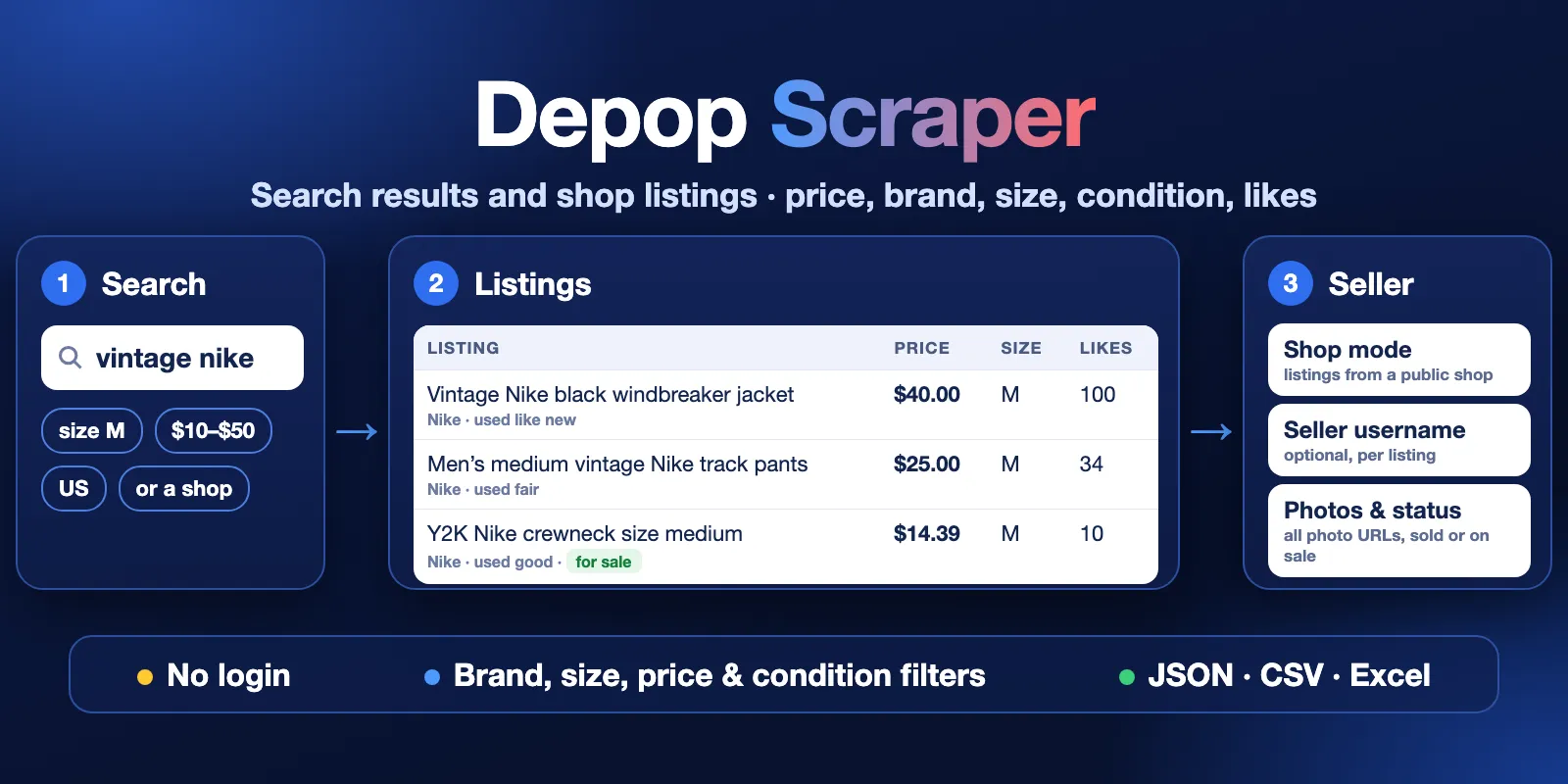
Table of contents
- What it does
- How it works
- What data you get
- Quick start
- Input
- Input examples
- Output example
- Output fields
- Pricing
- Use cases
- Scheduling and monitoring
- API, export and integrations
- Limits
- Troubleshooting
- FAQ
- Related Actors
- Support
What it does
The Actor reads public Depop listings in two ways:
- Search mode — the listings Depop shows for your keywords, like the search box on depop.com.
- Shop mode — the listings of one or more Depop shops, by username or shop link.
You can keep only one brand, one size, a price range and chosen conditions. The Actor saves each listing once per run, even when two queries find it.
Good fit
- Track prices of a brand or item type, for example vintage Nike jackets in size M under $50.
- Check what a shop sells, how items are priced, when they were listed and what the shop has already sold.
- Collect listing photos, brands and sizes for resale research or price comparison.
Not a fit / limits
- No login: the Actor does not read messages, orders, offers, private data or seller contact details.
- Listing dates (
createdAt,updatedAt) come only in Shop mode. Depop search results carry no dates, so they arenullin Search mode. - Search returns the listings Depop shows for a query. It is not a full export of all Depop listings.
- Seller usernames in Search mode are optional and cost extra (see
includeSellerDetails).
How it works
- You give search queries (Search mode) or shop usernames or links (Shop mode), plus optional filters.
- The Actor reads the public Depop pages that the website itself uses for search results and shop listings, page by page, with no login.
- Each listing becomes one Dataset row. Filters are applied, duplicates are dropped, and you pay only for saved rows.
- With
includeSellerDetailsin Search mode, it also reads each seller's public profile to add the seller username. - At the end it writes
RUN_SUMMARY: status, reason and counts per query or shop.
What data you get
One Dataset row per listing:
- Listing:
id,url,title,description,category,photos. - Price:
price,originalPrice,isReduced,shippingPrice,currency. - Item:
brand,size,condition,colours,gender. - Demand:
likes(Search mode only;nullin Shop mode),sold,status. - Dates (Shop mode):
createdAt,updatedAt. - Seller:
sellerId;sellerUsername,sellerUrlandsellerVerifiedin Shop mode or withincludeSellerDetails. - Run context:
mode,searchQuery,shopUsername,position,fetchedAt,error.
The key-value store also has a RUN_SUMMARY record with the run status, counts per query or shop and public shop numbers (items sold, followers, reviews) in Shop mode.
Quick start
Open the Input tab. The form already has a first test filled in:
- What to scrape (
mode): keep Search results (by keyword). - Search queries (
queries): one Depop search per line, for examplevintage nike. - Max listings per query or shop (
maxItems): keep20for a first test.
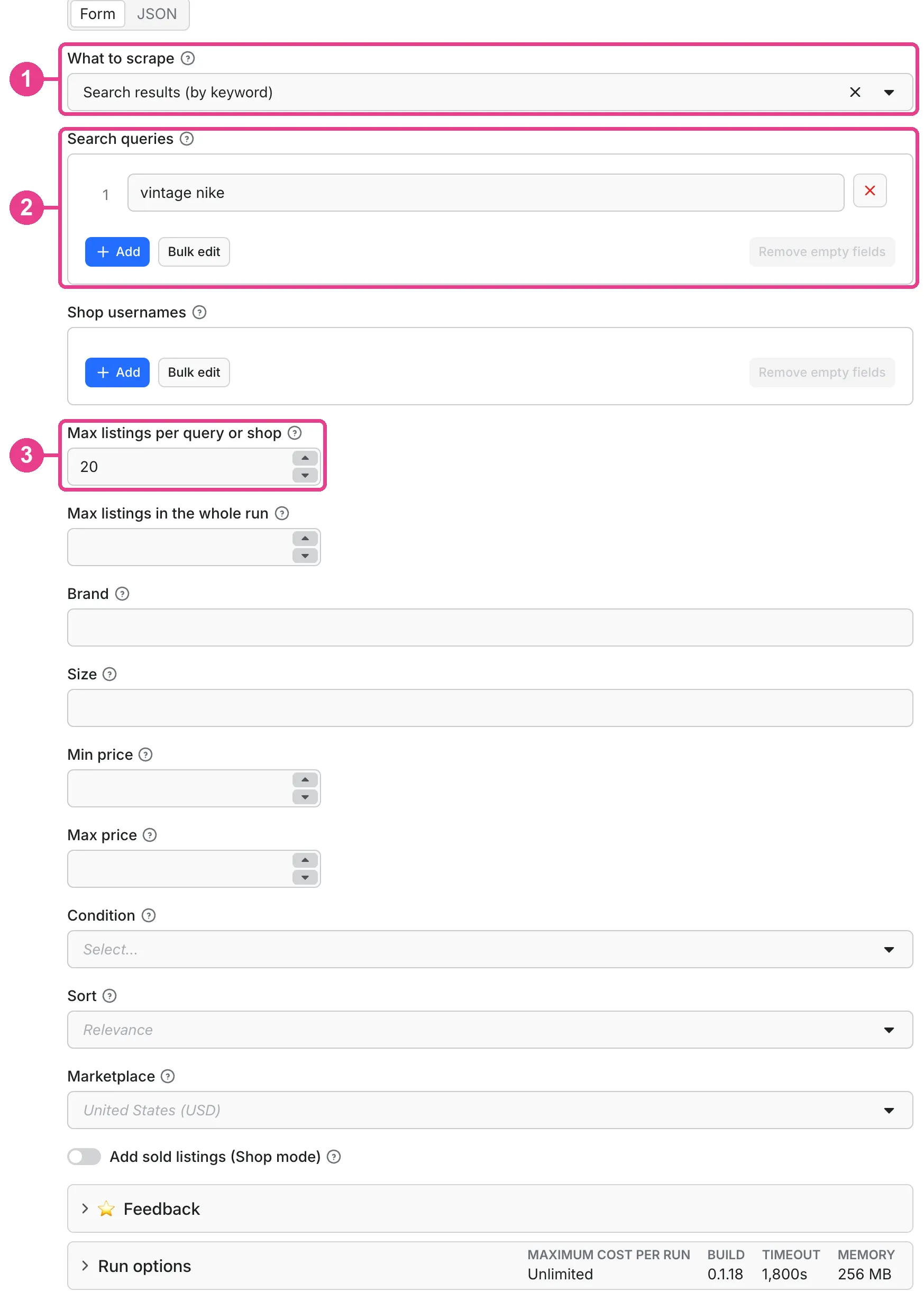
Click Start. The run takes a few seconds.
- When the run finishes, open the Output tab and keep the Overview table.
- Check the columns: photo, Title, Price, Currency, Brand, Size, Condition, Likes, Sold and Link. Switch to All fields for photos, colours, seller id and dates.
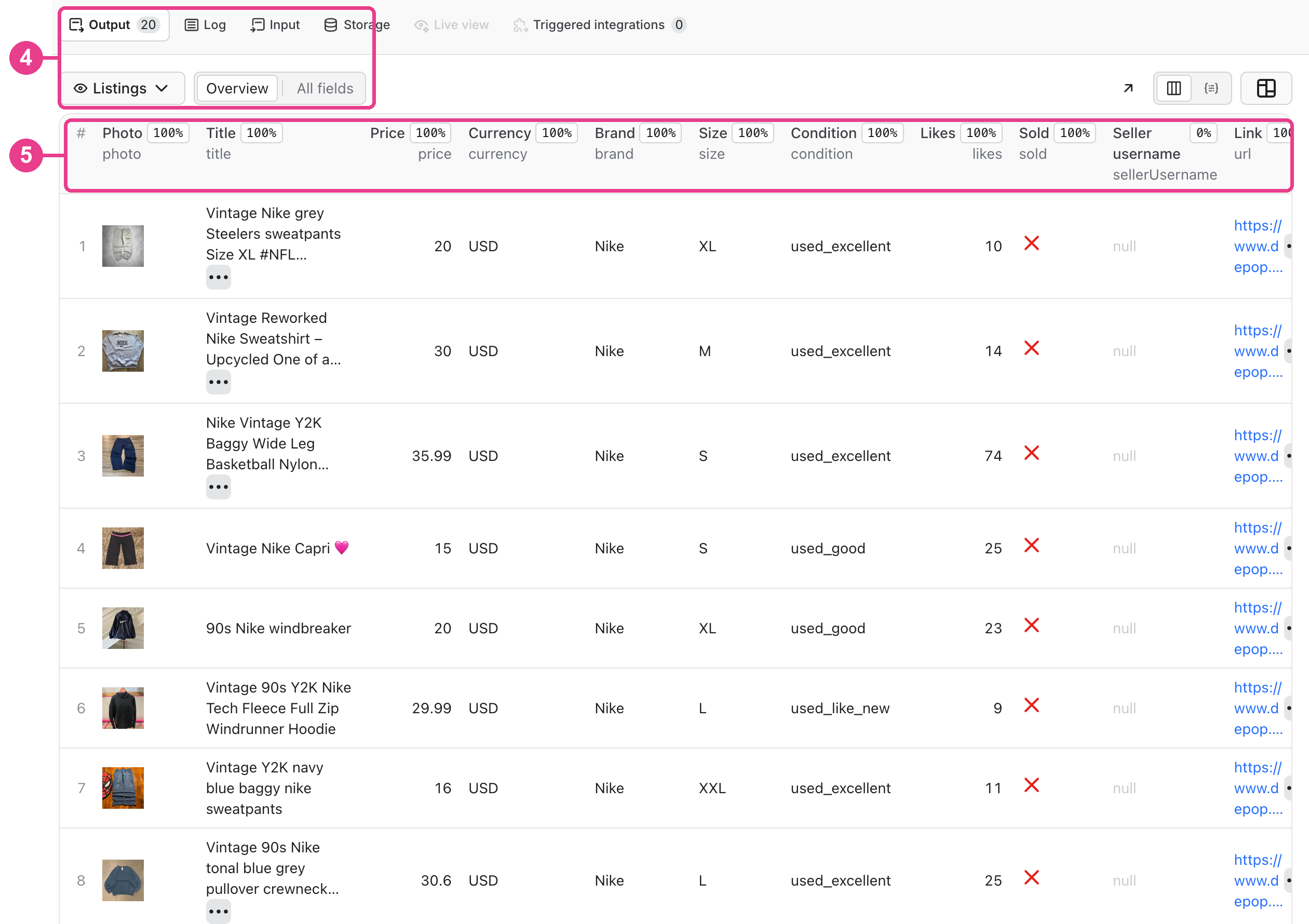
Expected result: 20 listings for vintage nike, status message Saved 20 listings from 1 query.
Input
All fields are optional, but Search mode needs queries or brand, and Shop mode needs shopUsernames.
| Field | Plain name | Type | Default / prefill | Allowed values | What it changes | Recommendation |
|---|---|---|---|---|---|---|
mode | What to scrape | string | default search | search, shop | Search by keyword or read shops | Use shop when you know the sellers |
queries | Search queries | array of strings | prefill ["vintage nike"] | up to 50; empty lines and duplicates are dropped | One Depop search per line (Search mode) | Short queries like a Depop user would type |
shopUsernames | Shop usernames | array of strings | none | up to 50; username, @username or https://www.depop.com/username/ | Shops to read (Shop mode) | Check the spelling; a missing shop is reported as not found |
maxItems | Max listings per query or shop | integer | default 100, prefill 20 | 1–5000 | Stops each query or shop after this many saved listings | Start small; each saved listing is one paid result |
maxTotalItems | Max listings in the whole run | integer | none (no run cap) | 1–250000 | Stops the whole run after this many listings, across all queries or shops | Use it with many queries to cap the total |
brand | Brand | string | none | any brand name, e.g. Nike | Keeps only this brand. Without queries in Search mode, the brand itself is searched | Use the brand name as Depop shows it |
size | Size | string | none | a size label, e.g. M, US 9, 32 | Keeps only listings with this size | Case, spaces and inch marks are ignored |
priceMin | Min price | number | none | 0–1000000 | Lowest item price, without shipping | Price is in the marketplace currency |
priceMax | Max price | number | none | 0–1000000, not below priceMin | Highest item price, without shipping | |
conditions | Condition | array | none (any) | brand_new, used_like_new, used_excellent, used_good, used_fair | Keeps only these conditions | |
sort | Sort | string | default relevance | relevance, priceLowToHigh, priceHighToLow | Order of search results | Use a price order to find the cheapest or most expensive items |
country | Marketplace | string | default us | us, gb, au, ca, de, fr, it, ie | Depop marketplace and currency (USD, GBP, AUD, CAD, EUR) | Choose the market you sell or buy in |
includeSoldItems | Add sold listings (Shop mode) | boolean | default false | true, false | After the listings on sale, also reads the shop's sold listings (sold: true) | Turn on to see what a shop has sold and for how much; sold rows count towards maxItems |
includeSellerDetails | Add seller username (Search mode) | boolean | default false | true, false | Reads each seller's Depop profile once per run to add sellerUsername, sellerUrl, sellerVerified | Turn on only when you need the seller; it is a little slower and paid per listing |
How settings work together
| When | Fields | What happens |
|---|---|---|
| Brand without queries | brand, queries empty | Search mode searches the brand name |
| Brand Depop knows | brand | Search mode uses Depop's own brand filter; the run summary shows brandFilter.brandId |
| Brand Depop does not know | brand | Rows are matched by brand name, and a warning explains it |
| Size | size | W32 equals 32 (jeans waist); a bare number like 9 also matches US 9, UK 9 or EU 9 |
| Price | priceMin, priceMax | Sent to Depop and checked again on each row |
| Shop mode with filters | mode: shop + brand/size/price/conditions | Filters apply to the shop's listings (brand by name). queries and includeSellerDetails are ignored in Shop mode |
| Only shops or only queries | shopUsernames without queries, or the other way round | The run uses the mode that fits, even if mode says the other one, and logs it |
| Many queries | queries | maxItems applies to each query. A listing found by two queries is saved once |
| Run limits | maxTotalItems, run option Max items | The run stops at the smaller of the two, ends as a success with limitReached: "MAX_ITEMS" and lists the queries or shops not started in unprocessedTargets |
| A bad query or shop among good ones | e.g. a non-Depop link in shopUsernames | It gets one free row with status: "invalid_input" and error; the rest of the run goes on. If all are bad, the run stops with INVALID_INPUT |
| Field names from other scrapers | maxResults, limit, resultsLimit → maxItems; startUrls, urls → shopUsernames; query, searchTerms, keywords → queries | Read as this Actor's field. When both are set, this Actor's own field wins (a maxItems left at its default of 100 does not count as set). Unknown fields are ignored and listed in ignoredInputFields |
Input examples
Search: vintage Nike, size M, $10–$50
Expected behavior: the Actor searches vintage nike on the US marketplace and keeps size M items between $10 and $50.
Expected output: up to 50 rows with price, brand, size, likes and url.
Shop: listings of two shops
Expected behavior: up to 200 listings on sale are read from each shop. Rows have sellerUsername, sellerUrl, createdAt and updatedAt, and RUN_SUMMARY has public shop numbers.
Cost note: shop profiles are not charged; you pay for saved listings.
Shop: what a shop has sold
Expected output: first the listings on sale, then sold listings with sold: true and a sold status such as status: "STATUS_PURCHASED" or "STATUS_MARKED_AS_SOLD", up to 300 rows in total. RUN_SUMMARY.targets[].savedSold counts the sold rows.
Search with seller usernames
Expected output: 20 rows where sellerUsername, sellerUrl and sellerVerified are filled and sellerDetailsFetched is true.
Cost note: each enriched listing adds one seller-details event.
Output example
One row from the prefill run (vintage nike, 20 listings). The seller name in slug and url, sellerId and the photo link are placeholders, and the photo list is shortened.
null means Depop did not give this value, or it needs an option or mode that was off (here: seller username and dates in Search mode). An empty list [] means the listing has no value of this kind.
Output fields
| Field | Meaning | Type | Can be null? | Example |
|---|---|---|---|---|
id | Depop listing id | integer | only on an invalid_input row | 952642444 |
slug | Listing slug from the link | string | only on an invalid_input row | user-mens-medium-…-156f |
url | Listing page | string | only on an invalid_input row | https://www.depop.com/products/…/ |
title | First line of the description, without trailing hashtags, up to about 100 characters. Depop has no separate title | string | yes | Men’s medium vintage Nike track pants |
description | Full listing text | string | yes | |
price | Current item price, without shipping | number | yes | 25 |
originalPrice | Price before a discount (same as price when not reduced) | number | yes | 25 |
isReduced | The seller reduced the price | boolean | no | false |
currency | Currency of all prices | string | yes | USD, GBP, EUR |
shippingPrice | Shipping price for the marketplace | number | yes | 3.99 |
brand | Brand name | string | yes | Nike |
brandId | Depop brand id | integer | yes | 270 |
size | All sizes in one text | string | yes | M or S, M |
sizes | Sizes as a list. Removed size variants are left out | array | no (can be []) | ["M"] |
condition | Item condition | string | yes | brand_new, used_like_new, used_excellent, used_good, used_fair |
category | Depop category name | string | yes | Joggers |
productType | Depop product type | string | yes | joggers-tracksuits |
gender | Department | string | yes | male, female |
colours | Colours | array | no (can be []) | ["navy", "black"] |
styles | Style tags; mostly [] in Shop mode | array | no (can be []) | ["streetwear"] |
sellerId | Seller's numeric id | integer | yes | 12345678 |
sellerUsername | Seller's username | string | yes: filled in Shop mode or with includeSellerDetails | some_shop |
sellerUrl | Seller's shop page | string | yes, same as above | https://www.depop.com/some_shop/ |
sellerVerified | Seller has a verified badge | boolean | yes, same as above | false |
likes | Number of likes; Search mode only, null in Shop mode (Depop shop pages do not show it) | integer | yes | 34 |
sold | Item is sold (status is not on sale) | boolean | no | false |
status | Depop listing status; invalid_input on the free row for a bad query or shop | string | yes | STATUS_ONSALE, STATUS_PURCHASED, STATUS_MARKED_AS_SOLD |
quantity | Listed quantity | integer | yes | 1 |
photo | First photo | string | yes | https://media-photos.depop.com/…/P0.jpg |
photos | All photos | array | no (can be []) | |
isBoosted | Listing is promoted by the seller | boolean | yes | false |
country | Seller's country code | string | yes | US |
createdAt | When the seller listed the item (Shop mode) | string | yes: null in Search mode | 2026-09-01T10:00:00Z |
updatedAt | When the listing was last changed (Shop mode) | string | yes: null in Search mode | 2026-10-01T10:00:00Z |
sellerDetailsFetched | Seller fields come from the shop or seller profile | boolean | no | false |
mode | Mode that found the row | string | no | search, shop |
searchQuery | Query that found the row (Search mode) | string | yes | vintage nike |
shopUsername | Shop that was read (Shop mode) | string | yes | some_shop |
position | Place of the row in its query or shop | integer | no | 2 |
fetchedAt | When the row was read (UTC) | string | no | 2026-10-15T02:32:21.242Z |
error | What was wrong with the query or shop (invalid_input row only) | string | yes: null on listings | "not-a-shop/x" is not a Depop shop username… |
Run summary
The key-value store record RUN_SUMMARY explains every run:
status:COMPLETE,PARTIAL,NO_RESULTS,ERROR,INVALID_INPUTorCANCELLED.reason: why a run stopped early, for exampleMAX_ITEMS,CHARGE_LIMIT,TIME_LIMIT,LOW_YIELD,SPARSE_FILTERorSOURCE_ERROR.limitReachedandrunItemLimit: set when the run stopped atmaxTotalItemsor the run option Max items.unprocessedTargets: queries or shops not started because the run stopped or was cancelled.ignoredInputFields: input fields this Actor does not know.targets: one entry per query or shop withstatus(complete,partial,no_results,not_found,error,skipped), pages read and listings saved. In Shop mode it also hassavedSoldand public shop numbers: items sold, followers, reviews and rating.counts: saved listings, charged listing events, invalid queries or shops, seller details (fetched, failed, skipped), and rows skipped as duplicates or by filters.
In Shop mode, rows have sellerDetailsFetched: true, but counts.sellerDetailsFetched stays 0: the shop page is free, and this counter counts only paid seller-details events.
Pricing
This Actor uses pay-per-event pricing. You pay for:
| Event | When | Price |
|---|---|---|
| Actor start | Once per run, for the default memory; Apify scales it with run memory (per GB) | $0.004 |
| Listing | Each listing saved to the Dataset | $0.0015 (Free plan), $0.00135 (Bronze), $0.0012 (Silver), $0.00105 (Gold and higher) |
| Seller username | Each Search mode listing enriched when includeSellerDetails is on | $0.0015 |
Search pages, shop profiles, filtered or duplicate rows, invalid_input rows and the run summary are not charged. A run with no listings costs only the start: $0.004. This is also true for a run that stops on invalid input or a source error.
Cost examples (Free plan prices)
| Scenario | Input | Charged events | Cost |
|---|---|---|---|
| First test | 1 query, maxItems: 20 | 1 start + 20 listings | $0.034 |
| Small | 10 listings | 1 start + 10 listings | $0.019 |
| Normal | 100 listings | 1 start + 100 listings | $0.154 |
| Large | 1,000 listings | 1 start + 1,000 listings | $1.504 |
| With seller usernames | 100 listings + includeSellerDetails | 1 start + 100 listings + 100 seller usernames | $0.304 |
| No matches | a filter that matches nothing | 1 start | $0.004 |
To cap your spend, set Maximum cost per run in the run options. The Actor stops before it goes over it, keeps the listings it saved and ends with PARTIAL and reason CHARGE_LIMIT. To cap the number of rows instead, set maxTotalItems or the run option Max items.
Use cases
| Goal | Input | Key fields | Next step |
|---|---|---|---|
| Price research for resale | queries, size, priceMin/priceMax, sort | price, originalPrice, condition, likes, sold | Export CSV or Excel and compare prices |
| Watch a brand | brand, conditions | brand, price, size, url, fetchedAt | Run on a schedule and compare runs |
| Check a shop | mode: shop, shopUsernames, includeSoldItems | price, sold, createdAt, category + shop numbers in RUN_SUMMARY | Track stock, sold items and prices over time |
| Find sellers for an item | queries, includeSellerDetails: true | sellerUsername, sellerUrl, sellerVerified | Open the shop link |
Scheduling and monitoring
Use Apify Schedules to run the same input every day or week. Each run is a full snapshot: it does not compare with earlier runs. To see changes, compare id, price and sold between two runs' Datasets, for example in a spreadsheet or with a webhook to your own system.
API, export and integrations
- Export: download the Dataset as JSON, CSV, Excel, XML or HTML from the Output tab or by API.
- API: start a run with
POST https://api.apify.com/v2/acts/cliqtomedia~depop-scraper/runsand the input JSON, then read rows from the run's default Dataset. See the Apify API docs. - Integrations: connect runs to Google Sheets, Make, Zapier, Slack or webhooks in the Integrations tab.
Use with AI agents (MCP)
- MCP server with only this Actor:
https://mcp.apify.com?tools=cliqtomedia/depop-scraper. See the Apify MCP docs. - Smallest useful input:
{"mode": "search", "queries": ["vintage nike"], "maxItems": 20}. - Key fields:
title(what the item is),priceandcurrency(asking price),sizeandcondition(item details),sold(still available or not),url(link to cite). - A 20-listing search finishes in under 20 seconds and costs $0.034 on the Free plan. At most 50 queries or shops per run and up to 5,000 listings per query or shop (1,000 listings in one query took about 2.5 minutes in our test);
maxTotalItemscaps the whole run. Other scrapers' field names such assearchTerms,startUrlsandmaxResultsare accepted.RUN_SUMMARYexplains empty and partial runs.
Limits
- Run time: in our test, 1,000 search listings took about 2.5 minutes, and 100 listings with
includeSellerDetailstook about 1 minute. The default timeout is 30 minutes; if time runs out, the run ends withPARTIALand reasonTIME_LIMITand keeps what it saved. If time runs out before any listing is saved, the run fails withERRORand reasonTIME_LIMIT. - Page limit: at most 250 result pages (about 6,000 listings) per query or shop (
PAGE_LIMIT). The largest search run we tested saved 1,000 listings in about 2.5 minutes; bigger runs were not tested. - Slow seller profiles: each Depop request waits at most 20 seconds. If seller profiles answer too slowly, seller details stop: the remaining listings are saved without a seller username, are not charged for
seller-details, and are counted incounts.sellerDetailsSkippedwith a warning inRUN_SUMMARY. - Few results (
LOW_YIELD): a run makes up to 5 Depop requests (search pages, shop profiles or shop pages) for free, plus 2 for each saved listing. If they keep giving almost nothing — typos, a size nobody sells, many overlapping queries — the run stops and the remaining queries or shops areskipped. For example, when the first five shops are not found, later shops are skipped. - Rare filter (
SPARSE_FILTER): after 10 pages, a query whose filters keep fewer than 1 in 100 listings is stopped, and the run moves to the next query. - Shop mode: the Actor reads the shop's own listing pages, as the shop page on depop.com shows them, then its sold listings when
includeSoldItemsis on. Filters in Shop mode are applied by the Actor to each row, so a strict filter on a big shop reads many pages for few rows. - Duplicates: a listing found again in the same run is not saved again and not charged.
Troubleshooting
The run ends with no listings
Symptom: status NO_RESULTS, empty Dataset.
Likely reason: the query has a typo, or the filters (size, brand, price, conditions) match nothing.
Check: open RUN_SUMMARY and look at reason and targets[].skippedFilter.
Action: search the same words on depop.com, loosen the filters, and run again.
Some queries or shops are skipped
Symptom: targets shows skipped, reason LOW_YIELD.
Likely reason: earlier queries or shops gave too few listings (see Limits).
Action: fix the spelling, remove queries that find the same items, or run the rest in a separate run.
A row has status: "invalid_input"
Symptom: a row with id: null and an error text, plus a warning Skipped … with invalid input.
Likely reason: that query or shop is not valid, for example a link to another site or a Depop page that is not a shop.
Action: fix the value from searchQuery or shopUsername and run it again. The row is free.
A shop is not_found
Symptom: warning Shop not found: ….
Likely reason: wrong username, or the shop was closed.
Action: open https://www.depop.com/<username>/ in a browser and copy the username from the link.
The brand filter keeps fewer items than expected
Symptom: warning that the brand is not recognised. Likely reason: Depop does not know this exact brand name, so rows are matched by name. Action: use the brand name exactly as Depop shows it on listings.
The run fails with a source error
Symptom: status ERROR or PARTIAL with reason SOURCE_ERROR, code like SOURCE_BLOCKED or SOURCE_UNAVAILABLE.
Likely reason: Depop was not reachable or blocked requests after several retries.
Action: start the run again later. Saved listings stay in the Dataset.
FAQ
Do I need a Depop account?
No. The Actor reads only public listings and does not log in.
Is this the Depop API?
No. Depop has its own Partner API for sellers to manage their shops, and it needs a key from Depop. This Actor needs no key: it reads the public listings anyone can see and gives you the same data as JSON, CSV or Excel through the Apify API.
Why is createdAt null in Search mode?
Depop search results carry no listing dates. Shop mode reads the shop's own listing pages, which have createdAt and updatedAt.
Why is sellerUsername empty in Search mode?
Depop search results carry only the seller's numeric id (sellerId). Turn on includeSellerDetails to add the username, or use Shop mode.
Do I pay for listings that do not match my filters?
No. Only saved listings are charged. Filtered and duplicate rows are free.
Are prices and sold status live?
They are what Depop showed at fetchedAt. Prices and status can change at any time.
Which countries are supported?
The US, UK, Australia, Canada, Germany, France, Italy and Ireland marketplaces, chosen with country.
Related Actors
- Vinted Scraper - Listings, Prices & Brands in 25 Countries — the same kind of second-hand fashion listings from Vinted.
- eBay Sold Listings Scraper - Sold Prices & Dates — sold prices and dates on eBay, to compare resale prices.
- Facebook Marketplace Scraper - Prices & Price Drops, No Login — local second-hand listings and price drops.
- Etsy Listings & Shop Export (Etsy Open API v3) — vintage and handmade listings by shop or keyword on Etsy.
- Marketplace Fee Calculator: Etsy, eBay & Amazon Payout — work out your payout after marketplace fees before you list.
Support
For a bug, question or feature request, open this Actor's Issues tab on Apify. Include the run ID, the mode and the error text. Never post tokens, cookies or private data.
⭐ Found it useful? Rate this Actor. Something wrong? Report a problem — we fix reported problems.


