

Immobiliare.it Property Listings (Italy) - No login
Pricing
from $0.44 / 1,000 saved listings
Immobiliare.it Property Listings (Italy) - No login
Get Italian homes for sale, to rent or at auction from Immobiliare.it: price, m², rooms, address, zip code, map point, energy class and agency. Search by city or URL. Track new listings and price changes.
Pricing
from $0.44 / 1,000 saved listings
Rating
0.0
(0)
Developer

Cliqto Media
Maintained by CommunityActor stats
0
Bookmarked
2
Total users
1
Monthly active users
5 days ago
Last modified
Categories
Features
Share
Get Italian homes for sale, to rent or at auction from Immobiliare.it, with price, size, rooms, address, zip code, map point, energy class and agency, in one table.
Use it to study prices in an Italian city, track new listings, or build a list of local agencies. The smallest run is one city name, for example Milano: it returns 20 rental listings in about 10 seconds.
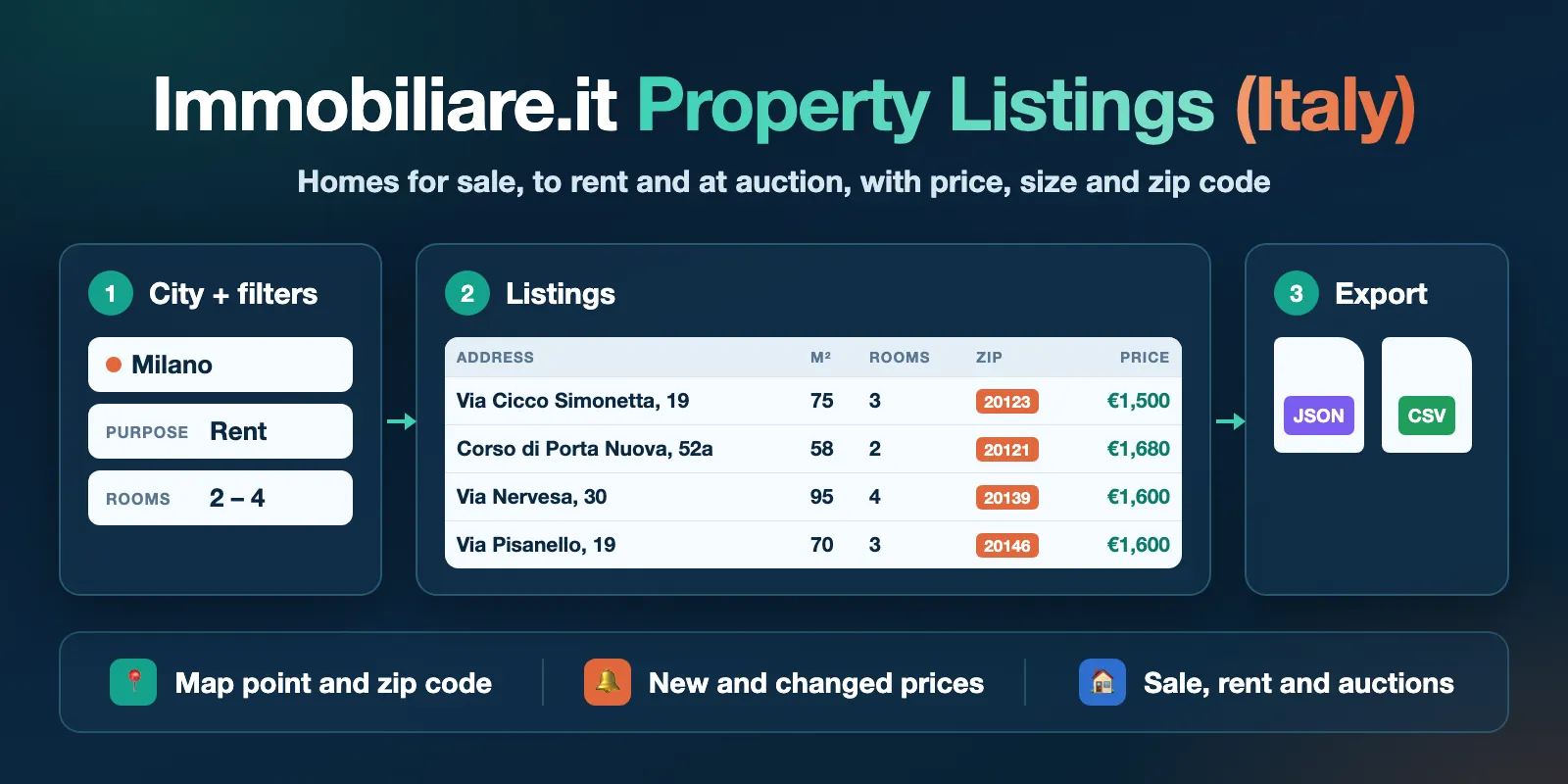
Table of contents
- What it does
- How it works
- Quick start
- Use cases
- Input
- Output
- Pricing
- Limits
- API, export and integrations
- Troubleshooting
- FAQ
- Related Actors
- Support
What it does
This Actor reads public listings on Immobiliare.it, the largest property site in Italy. You give it a city or a search link. It returns one row for each property: the asking price or monthly rent, the area in m², rooms, bathrooms, floor, the street address, the zip code (CAP), coordinates, the energy class, heating, kitchen and building floors, the agency name and phone, photos and the full description.
It works without an Immobiliare.it account. It does not return contact details of private sellers.
Good fit
- See rents and sale prices in one Italian city or zone, with price per m².
- Get only new listings and price changes on each scheduled run.
- Make a list of agencies that are active in a city, with their public phone numbers.
- Follow property auctions (
purpose: auction).
How it works
- The Actor opens the Immobiliare.it search for your city and filters, or the search links you paste.
- It reads each results page. For each listing it can also open the listing page to get the full text, dates, energy class and costs.
- It saves one row per listing in the Dataset. It also saves a short run report,
RUN_SUMMARY, with the status, the number of pages and any errors.
If Immobiliare.it blocks the first connection, the Actor tries other Apify connections. You do not need to set a proxy.
Quick start
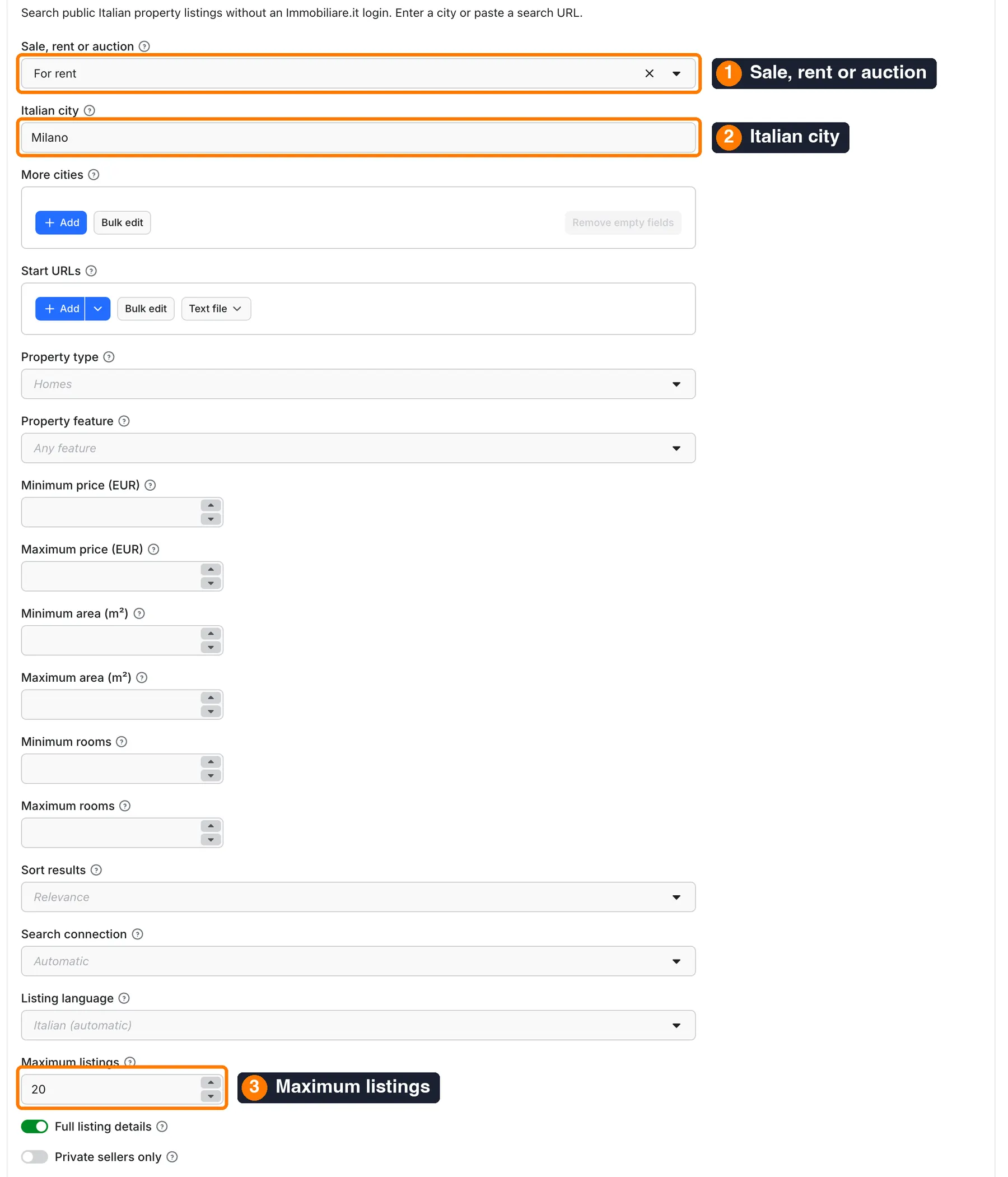
-
Open the Input tab. Sale, rent or auction is set to
rent(box 1). -
Type a city in Italian city, for example
Milano(box 2). Use the Italian name:Roma,Torino,Firenze. -
Keep Maximum listings at
20(box 3). The runtime default is 100 when you start the Actor by API. -
Click Start.
-
When the run ends, open the Output tab. Check the Price (EUR) (box 1), Area m² (box 2), Postal code (box 3) and Address (box 4) columns in the picture below.
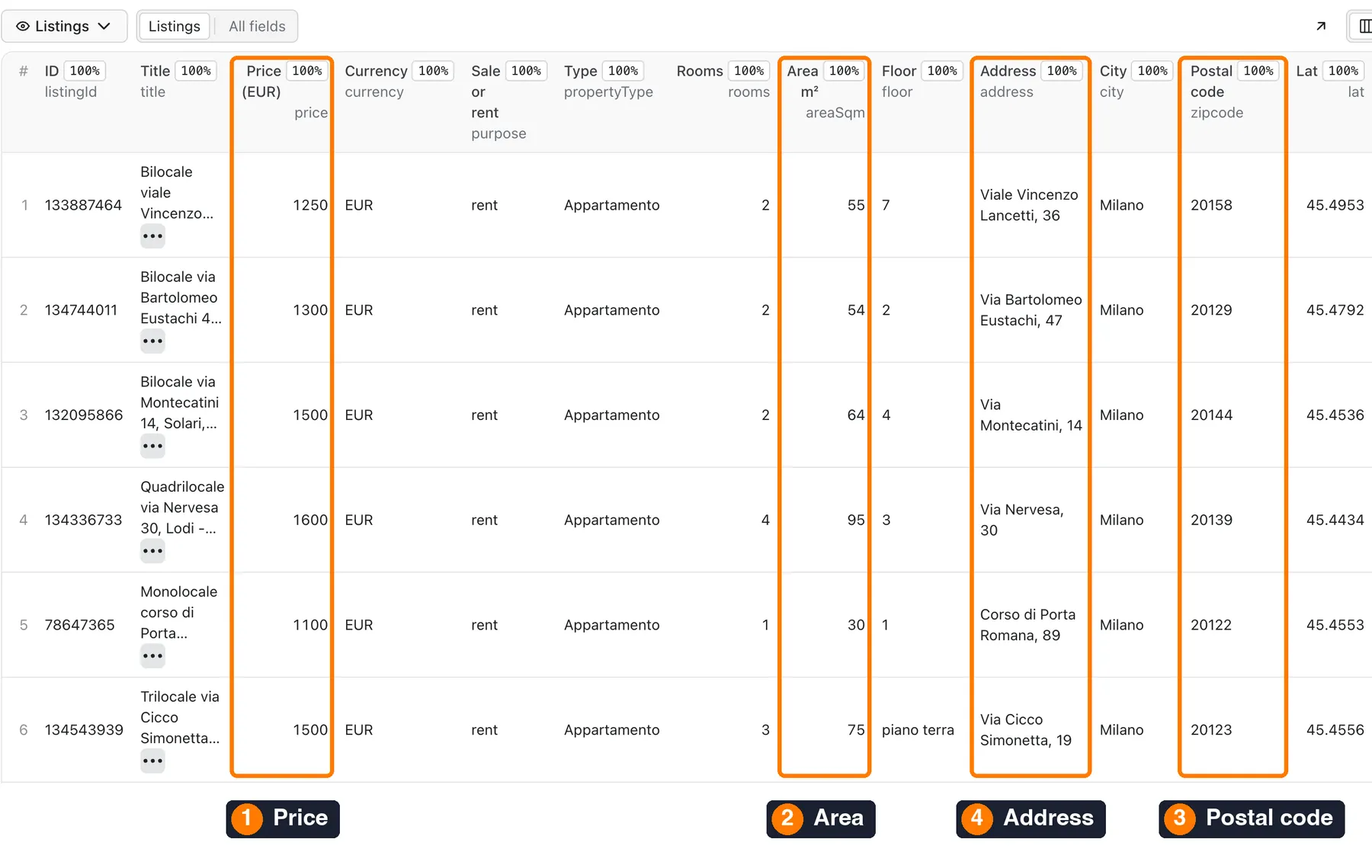
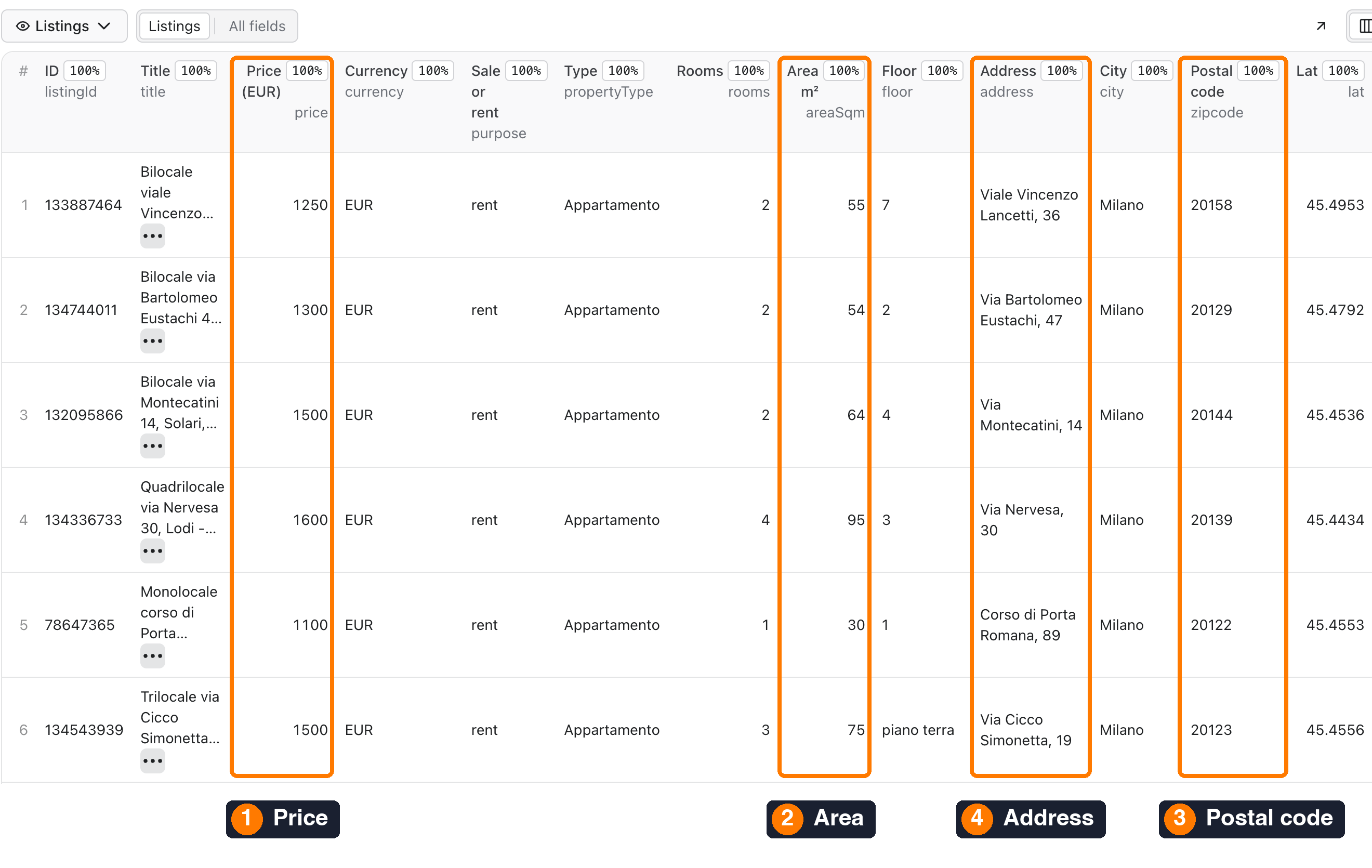
Expected result: 20 rows of rental homes in Milano, each with a price in EUR and a link to the listing.
Use cases
| Buyer job | Input path | Output entity | Key fields | Next integration |
|---|---|---|---|---|
| Compare rents in a city | city, purpose: rent | Rental listing | price, areaSqm, pricePerSqm, macrozone, zipcode | Export to CSV or Google Sheets |
| Watch a search for new homes | startUrls, monitoringMode | New or changed listing | recordStatus, price, oldPrice, url | Schedule + Slack or Notion summary |
| Find agencies in an area | city, propertyType | Listing with agency | agency, agencyPhone, address, city | CRM import from CSV |
| Follow auctions | purpose: auction | Auction listing | price, address, listedAt, url | Daily schedule |
| Map properties | city or startUrls | Listing with a point | lat, lng, zipcode, address | GIS or a map tool |
Input
Input fields
| Field | Plain name | Type | Required | Default / prefill | Allowed values | Effect | Example | Recommendation |
|---|---|---|---|---|---|---|---|---|
purpose | Sale, rent or auction | string | no | default rent, prefill rent | sale, rent, auction | Chooses sale prices, monthly rents or auctions | sale | Start Urls keep their own type |
city | Italian city | string | yes, if no other place | prefill Milano | Italian city name | City to search | Roma | Use the Italian name |
cities | More cities | array of strings | no | empty | city names | Searches several cities in one run | ["Torino","Bologna"] | The same listing is saved once |
startUrls | Start URLs | array of URLs | no | empty | Immobiliare.it search or listing links | Searches these links instead of city | https://www.immobiliare.it/affitto-case/milano/ | Best for many filters at once |
propertyType | Property type | string | no | home | home, apartment, villa, commercial, land, rooms | Type for a city search | apartment | — |
feature | Property feature | string | no | any | any, elevator, garage, cellar, terrace, garden, pool, airConditioning | One feature filter for a city search | terrace | For several features, use a filtered link |
minPrice / maxPrice | Price range (EUR) | integer | no | empty | 0 or more | Price or monthly rent range | 800 / 1500 | — |
minAreaSqm / maxAreaSqm | Area range (m²) | integer | no | empty | 0 or more | Size range | 50 / 90 | — |
minRooms / maxRooms | Rooms range | integer | no | empty | 0 or more | Italian locali count, not bedrooms | 2 / 3 | A bilocale has 2 locali |
sortBy | Sort results | string | no | relevance | relevance, newest, priceAsc, priceDesc | Order of a city search | newest | Use newest for alerts |
routeMode | Search connection | string | no | auto | auto, direct, datacenter, residential, unblocker | How the Actor connects | auto | Keep auto |
outputLanguage | Listing language | string | no | auto | auto, it, en, fr, de, es, pt, ru, el | Language of labels and text when the site has it | en | Start URLs keep their URL language |
maxItems | Maximum listings | integer | no | default 100, prefill 20 | 1–2000 | Most paid rows in one run | 500 | Above 500, raise the run timeout |
includeDetails | Full listing details | boolean | no | true | true / false | Opens each listing for full text, dates, energy class and costs | false | Turn off for a quick price list |
onlyPrivate | Private sellers only | boolean | no | false | true / false | Keeps only private sellers | true | Their contact data is not returned |
monitoringMode | Only new listings | boolean | no | false | true / false | Returns only listings new since the last run | true | Use with a schedule |
detectPriceChanges | Report price changes | boolean | no | false | true / false | Also returns listings with a new price | true | Needs monitoringMode |
detectRemovedListings | Report removed listings | boolean | no | false | true / false | Returns listings gone since the last full scan | true | Needs a full scan of the search |
stateKey | State key | string | no | default | short text | Name of the saved snapshot | milano-rent | One key for each watch |
resetState | Start a new snapshot | boolean | no | false | true / false | Clears the snapshot for this key first | true | — |
deliveryConnector | Send results to | string | no | empty | your MCP connector | Posts a short summary after the run | Slack or Notion | — |
deliveryTarget | Notion page or channel | string | no | empty | Notion page link or Slack channel ID | Where the summary goes | C0123456789 | Notion needs a page link |
If city, cities and startUrls are all empty, the run stops with a clear input error and costs only the start fee.
Interacting settings
| When | Input A | Input B | Effective behavior | Example | Cost/result effect |
|---|---|---|---|---|---|
| You give both | startUrls | city | Start URLs win; the city is not searched | a link + Milano | Only the links are searched |
| Start URL search | startUrls | propertyType, feature, price and size fields | The filters inside the link are used | a filtered link | Form filters are ignored for that link |
| Watching a search | monitoringMode | stateKey | Rows are compared with the snapshot of that key | milano-rent | Unchanged listings are not saved and not paid |
| Removed listings | detectRemovedListings | maxItems | Removed rows come only after a full scan | maxItems: 2000 | A short maxItems can stop the scan early |
| Quick price list | includeDetails: false | maxItems | Rows come only from search pages | 500 rows | Faster; description is short, some fields empty |
Input examples
Rents in Milano
Expected behavior: the Actor searches rental homes in Milano.
Expected output: 20 listings with price, areaSqm, rooms, zipcode and url.
Limit or cost note: one search page and 20 listings.
New listings in a filtered search, every day
Expected behavior: the first run saves the listings and the snapshot. Later runs return only new listings and listings with a new price.
Expected output: rows with recordStatus (new or price_changed), oldPrice and newPrice.
Limit or cost note: a run with no changes still pays the start fee and the search pages it reads.
Output
Output fields
| Field | Meaning | Type | Can be empty? | Example / enum | Source / notes |
|---|---|---|---|---|---|
listingId | Listing number on Immobiliare.it | string | no | 134543939 | — |
title | Listing headline | string | rarely | Trilocale via Cicco Simonetta 19, Corso Genova, Milano | Italian text by default |
price | Asking price, or monthly rent for rentals, in EUR | number | yes | 1500 | Empty when the price is hidden or 0 |
pricePerSqm | Price divided by area | number | yes | 20 | Only when both are known |
purpose | Contract type | string | rarely | rent, sale, auction | — |
propertyType | Property type from the site | string | rarely | Appartamento | — |
rooms / bedrooms / bathrooms | Room counts | integer | yes | 3 / 2 / 1 | rooms = Italian locali |
areaSqm | Area in m² | number | yes | 75 | areaLabel keeps ranges for new projects |
floor | Floor | string | yes | piano terra | As written on the site |
address | Street and number | string | yes | Via Cicco Simonetta, 19 | Some sellers hide it |
city, province, region | Place | string | rarely | Milano, Lombardia | — |
zipcode | Italian postal code (CAP) | string | yes | 20123 | Empty when the site has no code: about 1 in 10 listings in large scans |
macrozone / microzone | City zone | string | yes | Genova, Ticinese | — |
lat / lng | Map point | number | yes | 45.4556 / 9.1747 | Some listings show only the area |
agency / agencyPhone | Agency name and public phone | string | yes | TEMPOCASA Milano Papiniano | Empty for private sellers |
isPrivateSeller | Posted by a private person | boolean | no | false | — |
energyClass | Energy class | string | yes | D | Needs includeDetails |
condominiumFees, deposit | Costs | string | yes | € 200/mese | As written on the site |
heating / airConditioning | Heating and air conditioning | string | yes | Autonomo, a pavimento | Italian text from the site; needs includeDetails |
kitchen / garden | Kitchen and garden type | string | yes | Cucina semi abitabile / Nessun giardino | Italian text; needs includeDetails |
contractType / availability | Contract and when the home is free | string | yes | Affitto, 4+4 / libero | Italian text; needs includeDetails |
buildingFloors | Floors in the building | integer | yes | 5 | Needs includeDetails |
disabledAccess | Step-free access | boolean | yes | false | Needs includeDetails |
description | Listing text | string | yes | — | Full text when descriptionComplete is true |
listedAt / updatedAt | Listing dates, UTC | string | yes | 2026-11-08T19:04:21.000Z | Needs includeDetails |
images, floorPlans, videos, virtualTours | Media links | array | can be [] | — | Public links |
features | Listed features | array | can be [] | Fibra ottica | — |
recordStatus | Change type in monitoring | string | only in monitoring | new, price_changed, removed | — |
oldPrice / newPrice / priceDelta / priceChangePercent | Price change | number | only for price_changed | 1600 / 1500 / -100 / -6.25 | — |
url | Listing link | string | no | https://www.immobiliare.it/annunci/134543939/ | — |
fetchedAt | When the row was read, UTC | string | no | — | — |
Output entities and surfaces
| Situation | Dataset/API/KVS/live view | Result shape | User action |
|---|---|---|---|
| Normal item | Dataset, view Listings | One row per listing | Open, export or filter the table |
| Domain-empty result | Dataset is empty; RUN_SUMMARY.status is not_found | No rows | Check the city name or loosen filters |
| Partial result | Dataset + RUN_SUMMARY.status: partial and stopReason | Rows saved before the stop | Read stopReason, then run again |
| Technical failure or retry | RUN_SUMMARY.errors, run status Failed | Error code and short message | Retry later, or send the run ID in Issues |
| Bad start URL | Dataset row with status: invalid_input and error | Free row for that link | Fix that link |
| Unknown city or removed search | RUN_SUMMARY.errors with code NOT_FOUND | No rows for that city, no page charge | Use the Italian city name |
Output example
This example is trimmed and shows one listing from the Milano rent example. null means the site does not show this value for this listing. The Actor does not guess missing values.
Send results to Slack or Notion
Choose your connector in the optional deliveryConnector field. After the run saves its rows, the Actor posts a short summary there: up to 25 listings and a link to the full Dataset. In deliveryTarget, put a Notion page link or a Slack channel ID. In Notion every run is added on top of that one page, so you do not get a new page each time. Without a page link, Notion delivery is skipped and RUN_SUMMARY says why. A delivery error never fails the run and costs nothing extra. Connect a service once in Apify Console → MCP connectors.
Use case → fields
| Buyer job | Input path | Output entity | Key fields | Next integration |
|---|---|---|---|---|
| Rent study | city, purpose | Listing | price, areaSqm, pricePerSqm, zipcode | CSV, Google Sheets |
| Daily alert | startUrls, monitoringMode | New or changed listing | recordStatus, price, oldPrice, url | Slack, Notion, webhook |
| Agency list | city | Listing with agency | agency, agencyPhone, city | CRM |
Pricing
Pricing unit
You pay per event. The main unit is one saved listing row. The Actor also charges for each search page it reads and a small start fee per run.
| Event | Free plan | Bronze | Silver | Gold and higher |
|---|---|---|---|---|
Listing row (listing) | $0.00063 | $0.000567 | $0.000504 | $0.000441 |
Search page (search-page, up to 25 listings) | $0.0028 | $0.00252 | $0.00224 | $0.00196 |
| Run start | $0.002 | $0.002 | $0.002 | $0.002 |
The start fee is for a run with the default 512 MB memory. If you give a run more memory, the start fee is charged once per GB. Apify platform usage is included in these prices.
You do not pay for listings that the Actor skips: duplicates, listings that are gone, unchanged listings in monitoring, or rows that are not saved. A search page is paid only after it is read without errors. A search with no matches, and a monitoring run with no changes, still pay the start fee and the search page that was read. A run that stops early pays only for what it saved. A direct listing link pays the start fee and one listing row.
Set Max charge per run in the run options to stop at a price you choose. The Actor stops cleanly at that limit and marks the run partial with stopReason: CHARGE_LIMIT.
Cost examples
| Scenario | Input scope | Expected item/event count | Base charge (Free / Gold) | Optional charge | Stop/cap behavior |
|---|---|---|---|---|---|
| First test | city: Milano, maxItems: 20 | 1 start + 1 page + 20 rows | $0.0174 / $0.0128 | none | Stops at 20 rows; about 10 s |
| Default run | one city, maxItems: 100 | 1 start + 4 pages + 100 rows | $0.0762 / $0.0539 | none | Stops at 100 rows |
| Large scan | one city, maxItems: 2000 | 1 start + 80 pages + 2000 rows | $1.486 / $1.041 | none | Set timeout to 1200 s |
| No matches | filters with no results | 1 start + 1 page | $0.0048 / $0.0040 | none | Ends with an empty Dataset |
These numbers use the prices above. Real counts depend on how many listings the site shows on each page.
Limits
- One run returns at most 2000 listing rows. The default is 100.
- Immobiliare.it shows at most 80 pages (2,000 listings) for one search. When a search has more, the run stops at page 80 and adds a
SEARCH_DEPTHwarning toRUN_SUMMARY; split the search by zone, price or type to get the rest. - The default run timeout is 300 seconds. That is enough for about 500 rows. For 2000 rows, set the timeout to 1200 seconds in the run options (a 2000-row test took about 12 minutes).
- A run stops at 5000 requests to the site or 500 MB of downloaded data. It then saves what it has and marks the run
partial. A 2000-row run with listing details uses about 90% of this budget (4152 requests), so for more rows split the search into several runs. - One run takes up to 100 cities in
citiesand up to 1000 links instartUrls. - A search page larger than 4 MB counts as an error for that search. A listing page larger than 2 MB is not read, and its row keeps the search-card fields. The paid unblocking route is used for at most 3 requests per run.
- With several cities or links, an unknown city or a missing listing is listed in
errors, the run goes on with the rest and ends aspartial. Any other error with one input is also listed inerrorsand the rest still run; their rows are saved, but the run ends as failed so you notice it. A site block or site change stops the whole run, because it would repeat for every input. - City names are checked before the run starts. A name with symbols that no place name has (for example
Milano!or a link pasted intocity) stops the run at once withINVALID_INPUT; only the $0.002 start fee is charged. A wrong link instartUrlsis only listed inerrors, and the other links still run. queryandkeywordsare read ascity;queriesandsearchTermsare read ascities. If both are set,cityandcitieswin.- Auction city searches have no
featurefilter and noroomstype, because Immobiliare.it has none for auctions. The run rejects them at start. - Only Immobiliare.it in Italy is supported. Other sites of the same group are not supported.
- If the site blocks all connections, the run ends as
partialor failed with an error code inRUN_SUMMARY. It does not pretend that the search was empty. - Some fields are empty when the site does not show them: price on request, a hidden address, no map point, or a missing zip code.
- Phone numbers of private sellers are never returned.
- Data is public listing data as shown on Immobiliare.it at run time. Read the Immobiliare.it terms before you use it, especially for commercial use. You are responsible for how you use the data.
API, export and integrations
- API: start a run with the input JSON above. Read the rows from the run's default Dataset, and the run report from the
RUN_SUMMARYrecord. - Export: download the Dataset as JSON, CSV, Excel, XML or HTML from the Output tab or the API.
- Scheduling: create a Task with your city or link and
monitoringMode: true, then add a schedule. Each run returns only new listings. - Webhooks / no-code: use an Apify webhook or the Make, Zapier or n8n integrations. Use
urlas the unique key andpricefor alerts. - SDK / MCP / agent: call the Actor from the Apify SDK, or from an AI agent through the Apify MCP server (see below).
Use with AI agents (MCP)
- MCP server URL with only this Actor:
https://mcp.apify.com?tools=cliqtomedia/immobiliare-scraper. - Smallest useful input:
{"purpose": "rent", "city": "Milano", "maxItems": 20}. - Key output fields:
price— asking price, or monthly rent, in EUR;areaSqm— area in m²;rooms— Italian locali count;zipcode— Italian postal code;url— the listing page.
- A 20-row run takes about 10 seconds and costs $0.0174 on the Free plan.
maxItemscan be 1–2000; above 500 rows the run needs a longer timeout.
Troubleshooting
The Dataset is empty
Symptom: the run succeeded but there are no rows.
Likely reason: the city name is not Italian, or the filters are too narrow.
Check: open RUN_SUMMARY. status: not_found with no errors means the site had no matching listings. An error with code NOT_FOUND means the city or link was not found.
Action: use the Italian city name (Firenze, not Florence) or remove some filters.
The run is marked partial
Symptom: fewer rows than maxItems, and RUN_SUMMARY.status is partial.
Likely reason: see stopReason. DEADLINE means the timeout was too short. CHARGE_LIMIT means the max charge was reached. SOURCE_ERROR means the site failed: the error code SOURCE_BLOCKED means it refused the request, and SOURCE_CHANGED means it answered without listing data, so its pages probably changed.
Check: read stopReason and errors in RUN_SUMMARY.
Action: raise the timeout or max charge, or run again later. Keep routeMode: auto. For SOURCE_CHANGED, send the run ID in Issues.
Some rows have no energy class or dates
Symptom: energyClass, listedAt or the full description are empty.
Likely reason: includeDetails is off, the listing page did not answer, or the seller did not publish them.
Check: look at descriptionComplete. false means the listing page was not read. A DETAILS_PARTIAL warning in RUN_SUMMARY means some listing pages did not answer; those rows still have the search-card fields.
Action: turn on includeDetails.
Monitoring returns nothing
Symptom: a scheduled run with monitoringMode returns 0 rows.
Likely reason: there are no new listings since the last run. This is normal.
Check: RUN_SUMMARY has no errors.
Action: nothing. Use resetState: true once if you want a full list again.
Monitoring returns every listing as new
Symptom: a monitoring run returns all listings again, and RUN_SUMMARY has a MONITOR_STATELESS or STATE_STORE_UNAVAILABLE warning.
Likely reason: the Actor could not open its saved state store, for example because the run has limited storage permissions.
Check: the warning and the status message say that watch state was unavailable.
Action: run the Actor with full permissions, or set a different stateKey.
FAQ
Do I need an Immobiliare.it account or a proxy?
No. The Actor reads public pages and chooses the connection itself.
Why did I pay for a search with no results?
Each run pays the start fee, and each search page that is read is paid. A search with no matches reads one page, so it costs $0.0048 on the Free plan. Listing rows are paid only when they are saved.
Are the listings complete and up to date?
The Actor returns what Immobiliare.it shows at run time, up to maxItems. The site itself limits how many results one search can show, so for a very large city split the search by zone, price or type. Empty fields mean the seller did not publish that value.
What does "rooms" mean?
It is the Italian locali count: all main rooms, not only bedrooms. A bilocale has 2 locali. Use bedrooms for bedrooms.
Related Actors
- Idealista Scraper - Spain, Italy, Portugal, France Listings — listings from Idealista in Italy, Spain, Portugal and France, to compare with Immobiliare.it.
- ImmobilienScout24 Scraper - German Real Estate, No Login — the same kind of listing data for Germany.
- Rightmove & Zoopla Property Listings (UK) - No login — homes for sale and to rent in the UK.
Support
For a bug, a question or a feature request, open the Issues tab of this Actor on Apify. Add the run ID, your input mode (city, cities or start URLs) and the error text from RUN_SUMMARY. Never send tokens, cookies or billing data.
⭐ Found it useful? Rate this Actor. Something wrong? Report a problem — we fix reported problems.


