

Journalist Requests Feed: SourceBottle, Bluesky, Mastodon
Pricing
from $1.02 / 1,000 journalist requests
Journalist Requests Feed: SourceBottle, Bluesky, Mastodon
Find fresh journalist requests for expert sources on SourceBottle, Bluesky and Mastodon. Pitch for press coverage before the deadline: filter by topic, market and open deadline, and get only new requests. No login.
Pricing
from $1.02 / 1,000 journalist requests
Rating
0.0
(0)
Developer

Cliqto Media
Maintained by CommunityActor stats
0
Bookmarked
2
Total users
1
Monthly active users
4 days ago
Last modified
Categories
Features
Share
Journalist Requests Feed collects fresh requests from journalists who need expert sources. It reads SourceBottle call-outs and #journorequest posts on Bluesky and Mastodon, and saves each request as one row with the deadline, outlet and a link to respond.
Use it if you pitch experts to the media: PR teams, founders, coaches and agencies. The smallest run uses the prefilled form and saves up to 10 requests from the last 48 hours. You do not need an account on any of the sources.
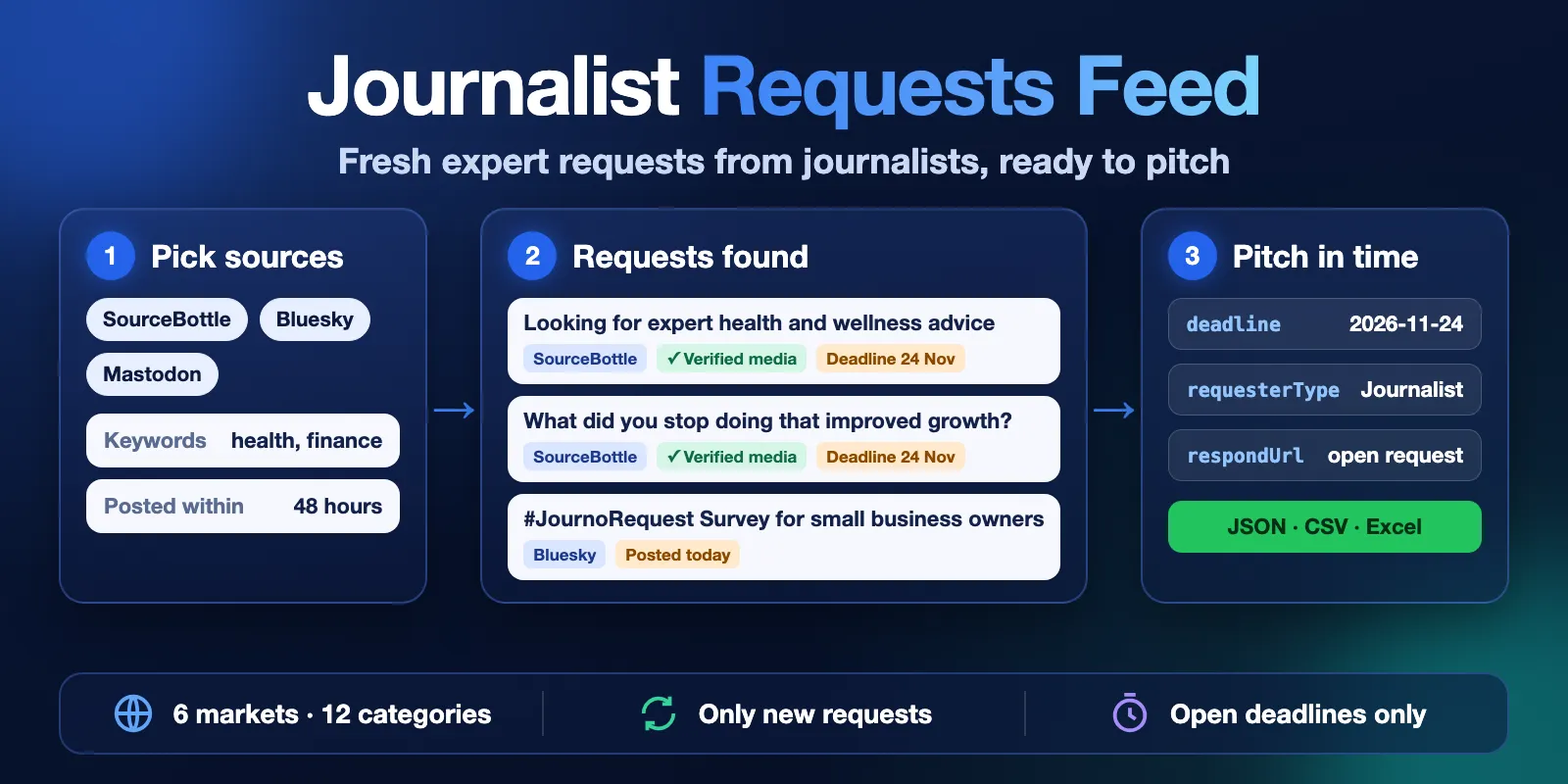
Table of contents
- What it does
- How it works
- Quick start
- Use cases
- Input
- Output
- Pricing
- Limits
- API, export and integrations
- Troubleshooting
- FAQ
- Related Actors
- Support
What it does
The Actor is a HARO alternative feed: it finds requests where a journalist asks for experts, stories or comments, and gives you one clean list. Each row has the request text, the source, the posting date, the deadline (when the source shows one), the outlet, the market and the link where you can answer.
It reads three public sources:
- SourceBottle – call-outs from journalists and PR people in Australia, New Zealand, the UK and Ireland, Canada, the US and Singapore. The Actor opens each request page to get the full text, the deadline, the market and the Verified Media badge.
- Bluesky – public posts with the tags #journorequest, #prrequest and #mediarequest (you can change the tags).
- Mastodon – the same tags on mastodon.social.
The Actor only reads requests. It does not reply, send pitches or log in.
Good fit
- Get a daily list of new journalist requests in your topic, for example "health" or "finance".
- Find requests that are still open, sorted by the deadline you can still meet.
- Send new requests to Slack or Notion so your team sees them in one place.
- Feed requests into a sheet, a CRM or an AI agent that drafts pitch ideas.
How it works
- The Actor reads the sources you pick. For SourceBottle it reads the request lists by market and category, then opens each new request page. For Bluesky and Mastodon it searches public posts by tag.
- It keeps requests from the time window you set, removes expired requests (if Keep open requests is on) and checks your keywords. Requests with a keyword match come first.
- It saves one row per request in the Dataset and stops at your Maximum requests. With Only new requests it skips requests that earlier runs of the same monitor already saved.
- It writes a short report to
RUN_SUMMARYin the Key-value store: how many requests it read, matched and saved, and why it stopped.
Emails and phone numbers in the request text are replaced with [email removed] and [phone removed]. Links lose their tracking parameters.
Quick start
-
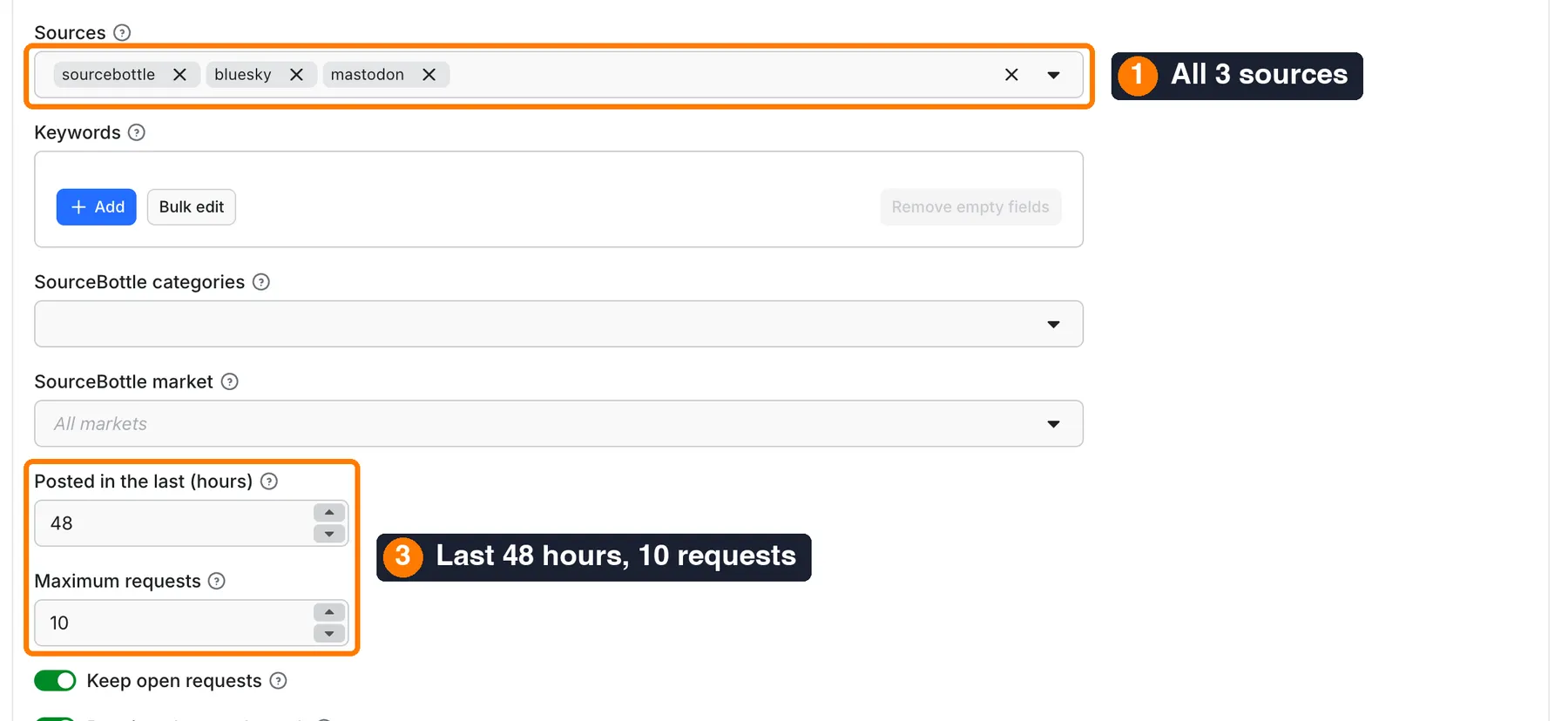
Open the Input tab. Sources already has SourceBottle, Bluesky and Mastodon (box 1).
-
Optional: add words to Keywords, for example
healthorsmall business. Leave it empty to see all topics. -
Keep the prefill Posted in the last (hours) = 48 and Maximum requests = 10, or change them (box 3).
-
Click Start.
-
Open the Output tab. Check Title, Outlet and Deadline (box 5). Original opens the request.
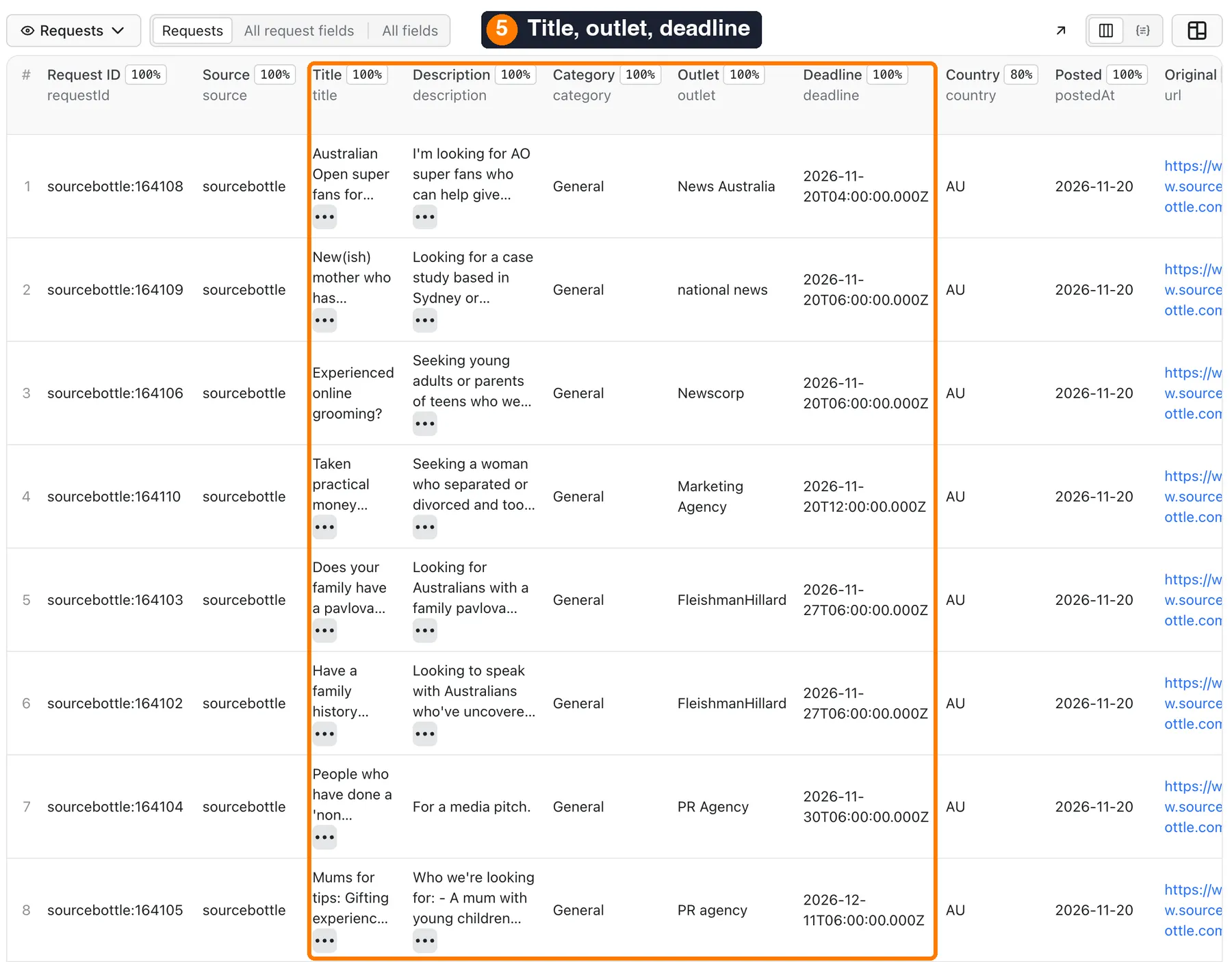
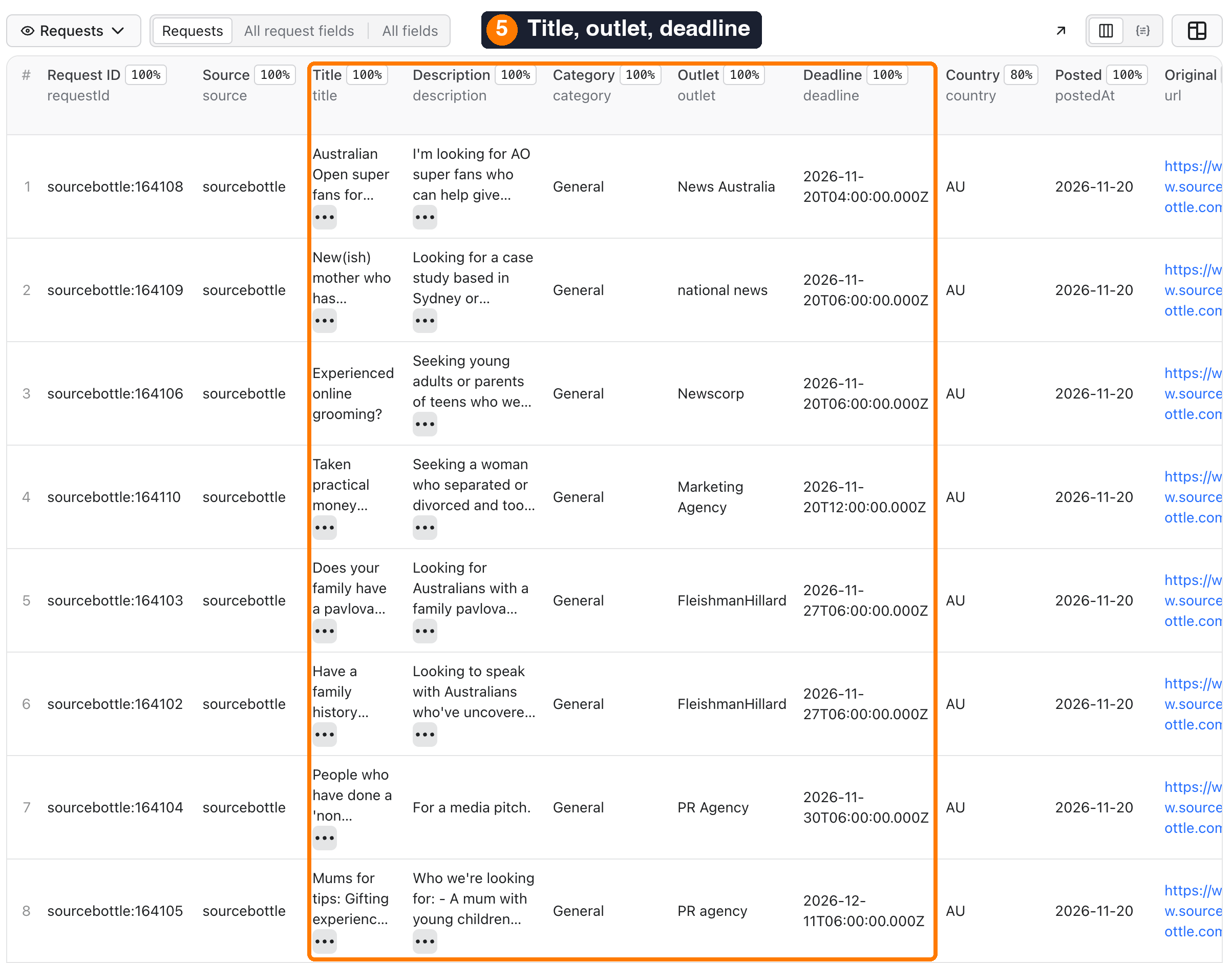
Expected result: up to 10 open requests from the last 48 hours. SourceBottle is read first, so with a small limit most rows usually come from SourceBottle.
Use cases
| Buyer job | Input path | Output entity | Key fields | Next integration |
|---|---|---|---|---|
| Find requests in my topic | keywords | Journalist request | title, description, matchedKeywords, respondUrl | Export CSV or Excel |
| Pitch only to verified media | sources = SourceBottle | Journalist request | outlet, verifiedMedia, requesterType, deadline | Sort by deadline |
| Daily feed without repeats | onlyNew, monitorName + a schedule | New journalist requests | requestId, postedAt, deadline | Slack or Notion via deliveryConnector |
| Requests in one market | country, categories | SourceBottle request | country, category, outlet | Sheet or CRM via API |
| Watch social call-outs | sources = Bluesky, Mastodon; hashtags | Social post | author, links, hashtags, language | AI agent via MCP |
Input
Input fields
All fields are optional. With an empty input the Actor reads all three sources, looks back 168 hours and saves up to 100 requests.
| Field | Plain name | Type | Default / prefill | Allowed values | Effect | Recommendation |
|---|---|---|---|---|---|---|
sources | Sources | array | all 3 (default and prefill) | sourcebottle, bluesky, mastodon | Which feeds to read, in this order | Keep all 3; use only SourceBottle for full details |
keywords | Keywords | array | empty | any words or phrases | Matches the title, description or outlet | Use 2–5 topic words |
excludeKeywords | Exclude keywords | array | empty | any words or phrases | Skips requests with these words | Use to drop topics you never pitch |
keywordsOnly | Require a keyword match | boolean | on | on / off | Off: keeps unmatched requests too, after the matched ones | Keep on when you use keywords |
categories | SourceBottle categories | array | empty (all) | 12 SourceBottle sections, for example Health & Wellbeing | Reads only these sections | A category filter leaves social posts out |
country | SourceBottle market | string | ALL | ALL, AU, NZ, UK, CA, US, SG | Reads one market only (UK = UK and Ireland) | A market filter leaves social posts out |
maxAgeHours | Posted in the last (hours) | integer | 168; prefill 48 | 1–2160 | Time window for posts | 24–72 for a daily check |
maxItems | Maximum requests | integer | 100; prefill 10 | 1–150 | Total rows across all sources | Start with 10, then raise |
openOnly | Keep open requests | boolean | on | on / off | Skips expired deadlines; keeps requests without a deadline | Keep on |
onlyNew | Only new requests | boolean | off | on / off | Skips requests saved by earlier runs of the same monitor | Turn on for scheduled runs |
monitorName | Monitor name | string | default | any short name | Keeps a separate request history per name | One name per feed you schedule |
hashtags | Social hashtags | array | journorequest, prrequest, mediarequest | tags, with or without # | Tags for Bluesky and Mastodon | Add tags that people in your niche use |
languages | Languages | array | empty (all) | codes like en, fr | Keeps social posts in these languages | Posts without a language are skipped |
includeReplies | Include social replies | boolean | off | on / off | Adds replies from Bluesky and Mastodon | Usually keep off |
deliveryConnector | Send results to | string | empty | your MCP connector | Posts a short summary after the run | See Send results to Slack or Notion |
deliveryTarget | Notion page or channel | string | empty | Notion page link or Slack channel ID | Where the summary goes | Needed for Notion |
The same request is saved once per run, even when it appears in more than one market or category.
Interacting settings
| When | Input A | Input B | Effective behavior |
|---|---|---|---|
| You pick a market or a category | country / categories | sources with Bluesky or Mastodon | Social posts are left out: they have no market or category |
| Keywords are set | keywords | keywordsOnly = off | Matched requests come first, then the others, up to maxItems |
| Several sources | sources | maxItems | Sources are read in order; the first source can fill the limit |
| Scheduled feed | onlyNew = on | monitorName | Each monitor name has its own history; a new name starts from zero |
Input examples
Daily topic feed
Expected behavior: reads the last day of requests, keeps the ones about health and skips requests that this monitor saved before.
Expected output: new requests with title, outlet, deadline, matchedKeywords and respondUrl.
Limit or cost note: on a quiet day the run can save 0 rows and pay only the start fee.
Social call-outs only
Expected behavior: reads Bluesky and Mastodon posts with #journorequest in English from the last 3 days.
Expected output: posts with author, links, hashtags and postedAt. Social posts have no outlet or deadline fields.
Output
Output fields
| Field | Meaning | Type | Can be empty? | Example |
|---|---|---|---|---|
requestId | Stable ID: source + request number or post ID | string | no | sourcebottle:164108 |
source | Where the request came from | string | no | sourcebottle, bluesky, mastodon |
title | Request title (or the start of the post) | string | no | Australian Open super fans for insider tips |
description | Full request text | string | no | I'm looking for AO super fans… |
summary | Short text from the request list | string | yes (social) | |
category | SourceBottle section where the run found it first | string | yes (social) | General |
outlet | Media outlet or requester name | string | yes | News Australia |
requesterType | Who asks | string | yes | Journalist, PR Pro |
verifiedMedia | SourceBottle Verified Media badge | boolean | yes (social, or detail page not read) | true |
deadline | Deadline as a date and time (UTC) | string | yes | 2026-11-20T04:00:00.000Z |
deadlineText | Deadline as the source shows it | string | yes | 20 November 2026 @ 3pm Eastern Daylight Saving Time |
country | Market on the request page | string | yes | AU |
sourceMarkets | Market list where the run first saw it | array | yes | ["AU"] |
postedAt | Posting date (SourceBottle) or exact time (social) | string | no | 2026-11-20 |
url | Request page or post | string | no | |
respondUrl | Where to answer the request | string | no | |
matchedKeywords | Your keywords found in this request | array | yes | ["health"] |
links | Links in the text, without tracking parameters | array | yes | |
hashtags | Tags in a social post | array | yes | ["journorequest"] |
language | Language of a social post | string | yes | en |
author | Social post author: handle and url | object | yes (SourceBottle) | |
fetchedAt | When the Actor read the request | string | no |
The Output tab has two views: Requests (the main fields for pitching) and All request fields.
Output entities and surfaces
| Situation | Where | Result shape | What to do |
|---|---|---|---|
| Normal item | Dataset | One row per request | Open respondUrl and pitch |
| Nothing found | Dataset is empty; RUN_SUMMARY.status = not_found | 0 rows | Use fewer keywords or a longer time window |
| Partial result (best effort) | Dataset + RUN_SUMMARY.status = partial, run SUCCEEDED | Some rows; some pages failed, the run hit its time, request or cost limit, or a few rows have only list data (verifiedMedia, country = null) | Read sourceErrors and sourceWarnings in RUN_SUMMARY |
| Technical failure | RUN_SUMMARY.status = error, run FAILED | Usually 0 rows, for example a source error or the time limit before the first row. If the run fails after some rows were saved, those rows stay in the Dataset and are charged | Run again later; open an issue with the run ID if it repeats |
Output example
A SourceBottle request:
A Bluesky post (trimmed):
null means the source does not show this value. Social posts never have outlet, deadline, country or verifiedMedia. If a SourceBottle request page cannot be read, the row is still saved from the request list, and verifiedMedia and country are null.
Send results to Slack or Notion
Pick your connector in the optional deliveryConnector field. After the run saves its data, the Actor posts a short summary (up to 25 rows and a link to the full dataset) there. Put a Notion page link or a Slack channel ID in deliveryTarget: in Notion every run is added on top of that one page, so your workspace does not fill up with new pages. Without a page link, Notion delivery is skipped and the log says so. A delivery error never fails the run and costs nothing extra. Connect a service once in Apify Console → MCP connectors.
Use case → fields
| Buyer job | Input path | Output entity | Key fields | Next integration |
|---|---|---|---|---|
| Pitch before the deadline | openOnly | Journalist request | deadline, deadlineText, respondUrl | Sort in a sheet |
| Choose strong outlets | sources = SourceBottle | Journalist request | outlet, verifiedMedia, requesterType | Filter in Excel |
| Team alert | onlyNew, deliveryConnector | New request | title, url | Slack or Notion |
Pricing
Pricing unit
You pay per saved request (event journalist-request) and a small start fee per run. Platform usage is included.
| Plan | Price per 1,000 requests |
|---|---|
| Free | $1.45 |
| Bronze | $1.305 |
| Silver | $1.16 |
| Gold, Platinum, Diamond | $1.015 |
The start fee is $0.008 per run. It scales with run memory: one event per GB, and the default 256 MB counts as one event.
You pay only for rows saved in the Dataset. Requests that do not match your filters, expired requests and requests skipped by Only new requests are free. A run that finds nothing pays only the start fee. A run that stops early (time limit or your maximum cost) keeps and charges only the rows it saved. When the run reaches your maximum cost, it stops with stopReason: CHARGE_LIMIT and keeps the saved rows.
Cost examples
Free plan prices:
| Scenario | Input scope | Rows | Start fee | Rows charge | Total |
|---|---|---|---|---|---|
| Nothing new today | onlyNew = on, no new requests | 0 | $0.008 | $0 | $0.008 |
| Prefill run | 3 sources, 48 hours, 10 rows | 10 | $0.008 | $0.0145 | $0.0225 |
| Medium run | 3 sources, 168 hours, 60 rows | 60 | $0.008 | $0.087 | $0.095 |
| Largest run | 3 sources, 720 hours, 150 rows | 150 | $0.008 | $0.2175 | $0.2255 |
Limits
- One run saves at most 150 requests. For more, run it more often with Only new requests.
- Sources are read in order: SourceBottle, then Bluesky, then Mastodon. With a small limit SourceBottle can fill all rows. To get social posts, pick only Bluesky and Mastodon or raise the limit.
- SourceBottle shows only the posting date, not the time. The time window includes the whole day in Sydney time.
- When a deadline is not clear,
deadlinekeeps the date anddeadlineTextkeeps the original words. categoryandsourceMarketsshow where the run first found the request, not every place it is listed.- Mastodon results are few, and a week can have none: the Actor reads public tag timelines on mastodon.social only.
- The Actor does not reply to journalists and does not read paid or login-only services.
- You are responsible for how you use the requests. Read the source terms: SourceBottle terms (they limit republishing call-outs online), Bluesky terms, mastodon.social terms.
API, export and integrations
- API: start a run with the input JSON and read the Dataset items. The Actor ID is
cliqtomedia/journalist-requests. - Export: download the Dataset as JSON, CSV, Excel, XML or HTML from the Output tab.
- Scheduling: create a schedule in Apify Console with
onlyNew= on and a fixedmonitorName. Each run then saves only new requests. - Webhooks / no-code: use an Apify webhook on run success to send the Dataset to Make, Zapier or n8n. The next step reads
title,deadlineandrespondUrl. - Slack or Notion: use
deliveryConnectoranddeliveryTarget(see above).
Use with AI agents (MCP)
- MCP server URL with only this Actor:
https://mcp.apify.com?tools=cliqtomedia/journalist-requests. - Smallest useful input (same as the prefill):
- Key output fields:
title(what the journalist needs),description(full request),outlet(who asks),deadline(UTC time to answer before, or null),respondUrl(where to answer). - A run with 60 rows took 1 to 2.5 minutes and cost $0.095 on the Free plan; 150 rows took 2.5 to 5.5 minutes and cost $0.2255. Time depends on how fast SourceBottle answers. The limit is 150 rows per run.
Troubleshooting
The run saved 0 requests
Symptom: the Dataset is empty and RUN_SUMMARY.status is not_found.
Likely reason: your keywords, market or time window are too narrow, or Only new requests skipped everything.
Check: scannedCount, matchedCount and seenCount in RUN_SUMMARY.
Action: remove some keywords, raise Posted in the last (hours) or use a new Monitor name.
I see no Bluesky or Mastodon posts
Symptom: all rows are from SourceBottle.
Likely reason: SourceBottle is read first and filled the limit, or you set a market or category (they leave social posts out).
Check: completedSources and unfinishedSources in RUN_SUMMARY.
Action: pick only Bluesky and Mastodon, clear country and categories, or raise Maximum requests.
The run status is partial
Symptom: the status message says some pages failed or some requests have list data only.
Likely reason: SourceBottle was slow or did not answer for some pages.
Check: sourceErrors, sourceWarnings and detailFallbacks in RUN_SUMMARY.
Action: the saved rows are fine to use. Run again later to get the missing details.
The run stopped at the time limit
Symptom: the status message says the run reached its time limit. Likely reason: SourceBottle pages are slow and the run timeout is short. Action: keep the default 600 seconds or more, or lower Maximum requests.
Requests repeat with Only new requests
Symptom: requests from earlier runs come back.
Likely reason: the monitor history could not be opened (monitorStorage = unavailable in RUN_SUMMARY), or you changed Monitor name.
Action: keep the same Monitor name and run again.
FAQ
Do I need a SourceBottle, Bluesky or Mastodon account?
No. The Actor reads public pages and public posts. To answer a SourceBottle request, you use your own SourceBottle account on the request page.
Is this a HARO replacement?
It is a HARO alternative feed with other public sources. It is not connected to HARO, SourceBottle, Bluesky or Mastodon.
Why does a request have no deadline?
Social posts have no deadline field, and some SourceBottle requests do not state one. Keep open requests keeps requests without a deadline.
How fresh is the data?
Each run reads the sources live. For a daily feed, schedule a run every day with Only new requests on.
Where is the monitor history kept?
In a named key-value store in your Apify account. Each Monitor name has its own history.
Related Actors
- Bluesky Scraper – get more Bluesky posts, profiles and followers of the journalists you find.
- Google News Scraper – see what an outlet or journalist published recently before you pitch.
- News Article Extractor – get clean text of articles from an outlet to match your pitch to its style.
- Apple Podcast Directory Scraper – find podcasts in your topic for guest pitches.
Support
For a bug, question or feature request, open the Actor's Issues tab on Apify. Include the run ID, your input (without private data) and the status message. Never send tokens or passwords.
⭐ Found it useful? Rate this Actor. Something wrong? Report a problem — we fix reported problems.


