

SHEIN Products Scraper: Home Feed Prices by Country
Pricing
from $0.60 / 1,000 product rows
SHEIN Products Scraper: Home Feed Prices by Country
Compare SHEIN prices across 26 country stores with no login. Get products from each store's home feed with sale price, discount, local currency and USD price, then export JSON or CSV.
Pricing
from $0.60 / 1,000 product rows
Rating
0.0
(0)
Developer

Cliqto Media
Maintained by CommunityActor stats
0
Bookmarked
3
Total users
2
Monthly active users
5 days ago
Last modified
Categories
Features
Share
Pick SHEIN country stores and get the products from each store's home feed, with sale price, discount, local currency and USD price, with no login and no API key. Compare prices for the same product across 26 countries. A first run of 10 products costs about $0.01.
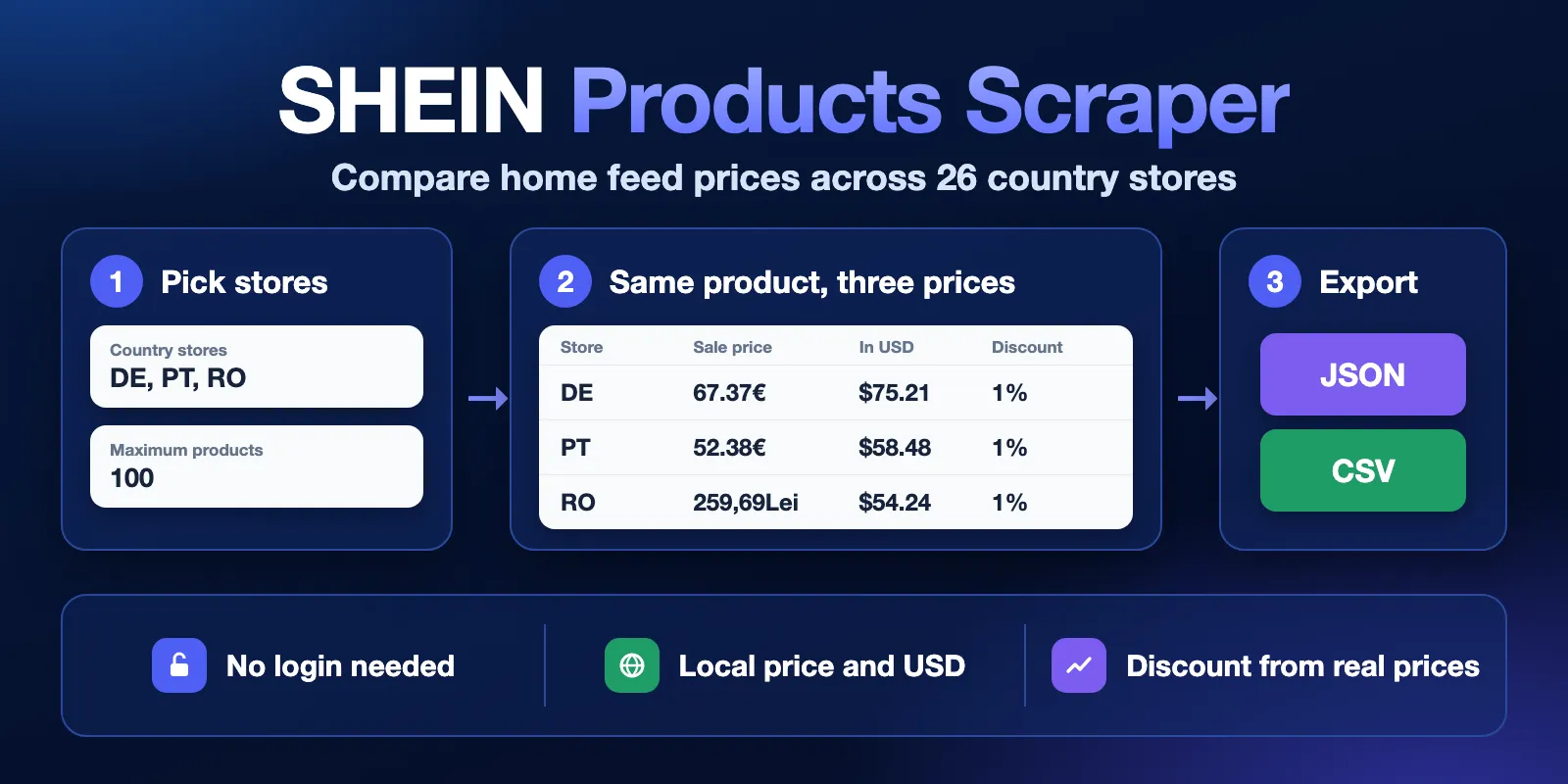
Table of contents
- What it does
- How it works
- Quick start
- Use cases
- Input
- Output
- Pricing
- Limits
- API, export and integrations
- Troubleshooting
- FAQ
- Related Actors
- Support
What it does
This Actor reads the public home feed of SHEIN country stores. It returns one row for each product in each store: title, regular price, sale price, discount, currency, the same prices in USD, one picture, the category ID and a link.
One run can read many stores. When a product is in two stores, you get two rows, so you can compare its price by country.
The Actor reads only what the home feed shows, and SHEIN chooses those products. It has no keyword search, it does not open a product from a link, and it has no ratings, reviews, sizes, colors or stock. A store usually gives 8 to 50 different products at one time.
Good fit
- You follow fashion prices and want to see what SHEIN shows on its home feed today.
- You sell online and want to compare one SHEIN product across countries.
- You want local prices and USD prices in one table.
- You run the same check on a schedule and keep your own price history.
Not a good fit: you need every product in a category, or results for a search word.
How it works
- You choose the country stores and the maximum number of products.
- The Actor reads the public home page of each store, in turns, until the feed gives no new products or your limit is reached. It keeps products that pass your title filter, if you set one.
- The Actor saves the rows to a Dataset and a short run summary to the
RUN_SUMMARYrecord.
If SHEIN shows a check page, the Actor does not solve it. It tries again and then moves on, and that store is listed as not read.
Quick start
-
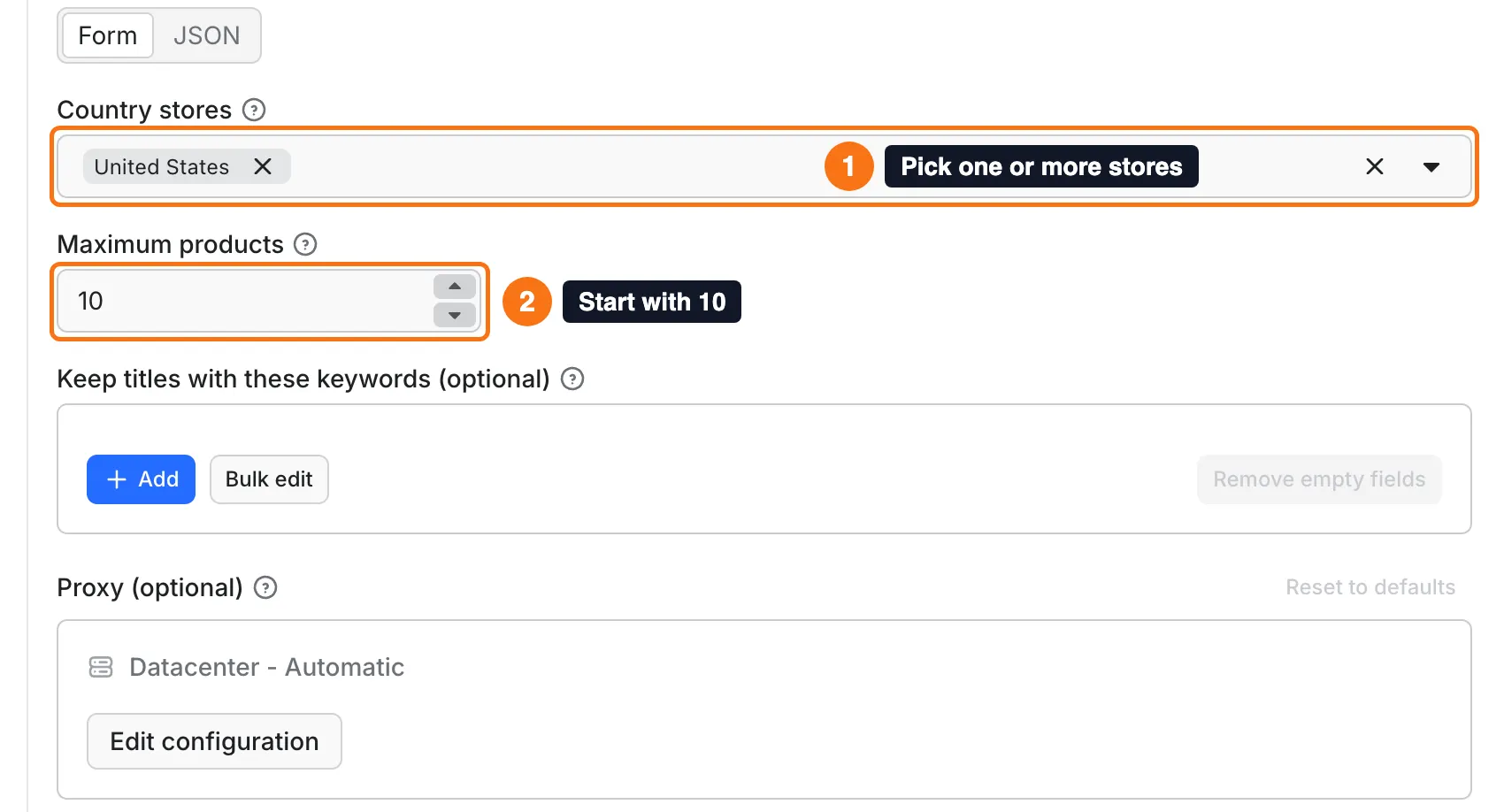
On the input form, keep United States in Country stores or add other stores (box 1 in the picture).
-
Keep
10in Maximum products for a first run (box 2). -
Click Start.
-
Open the Output tab and choose the Products view. Check
salePriceandsalePriceUsd(box 4).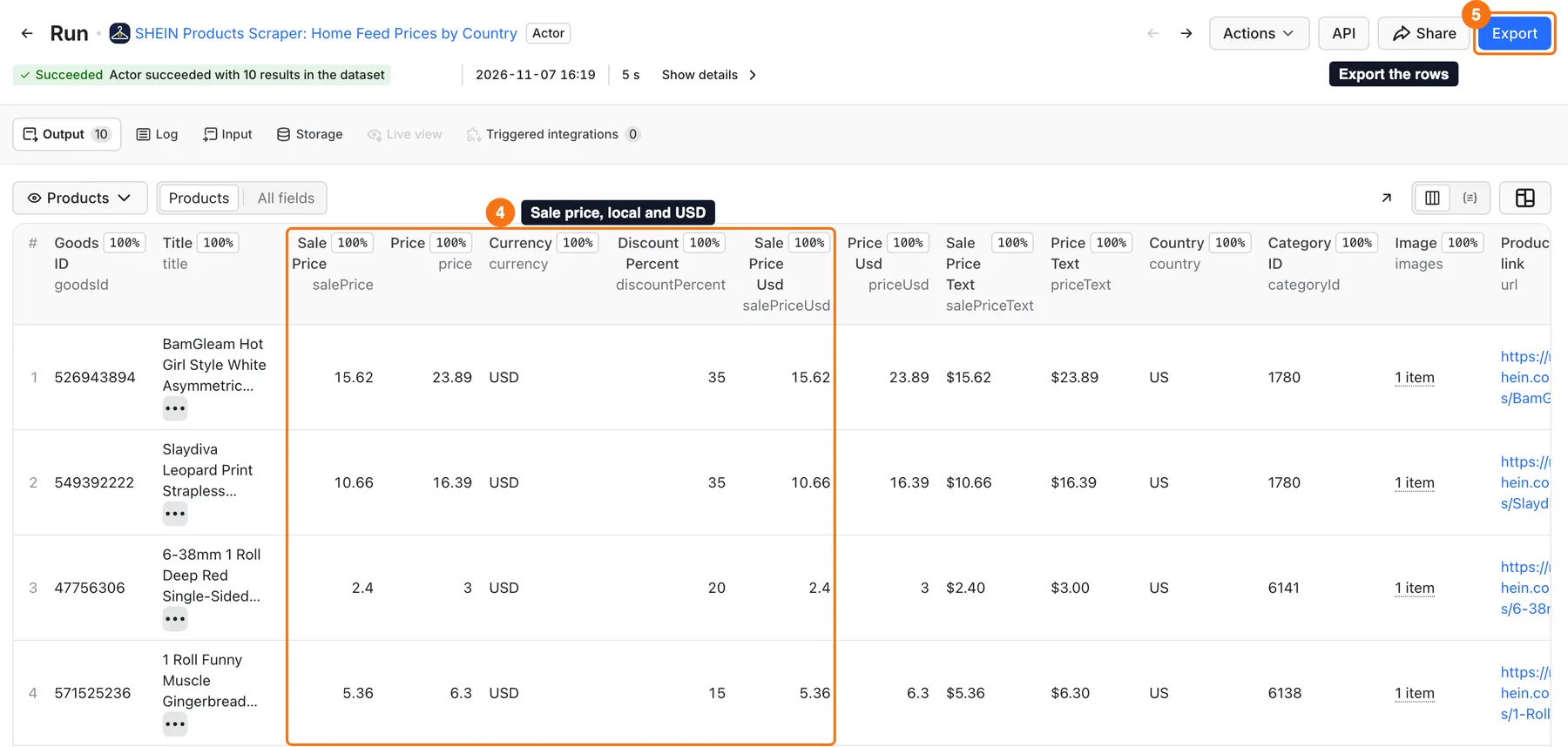
-
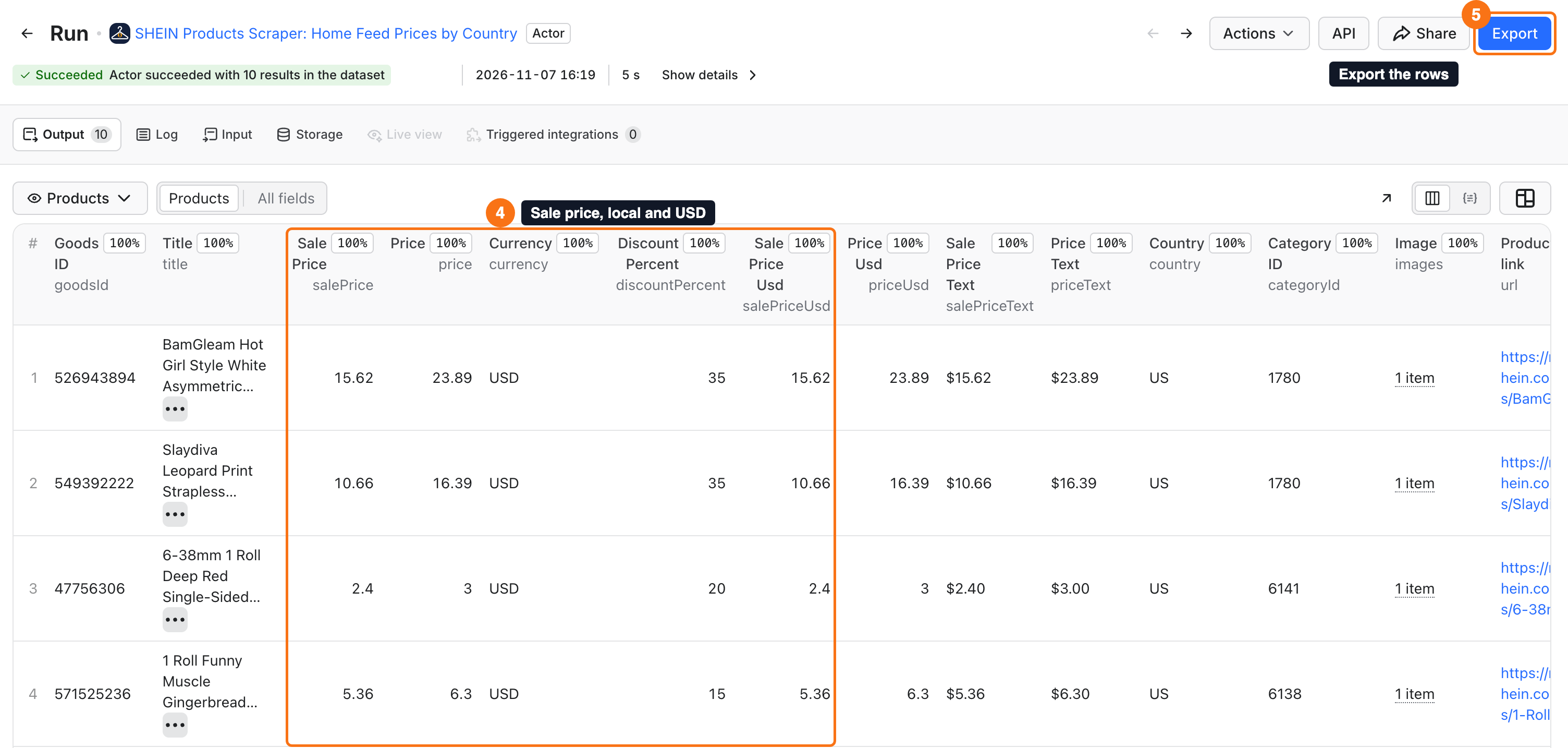
Click Export to get JSON, CSV or Excel (box 5).
Expected result: 10 product rows in under 10 seconds. This run costs $0.01005 on the Free plan.
Use cases
| Buyer job | Input path | Output entity | Key fields | Next integration |
|---|---|---|---|---|
| Compare one product across countries | countries with several stores | Product row per store | goodsId, country, salePrice, salePriceUsd | Spreadsheet, group by goodsId |
| See what a store promotes today | countries with one store | Product | title, salePrice, discountPercent, url | Daily schedule and Google Sheets |
| Follow one product type | titleFilter, such as dress | Product | title, matchedKeywords, salePrice | Slack or Notion summary |
| Keep a price history | Same input on a schedule | Product | goodsId, salePrice, currency, fetchedAt | Your own database |
Input
No field is required. An empty input reads the US store and saves up to 100 products.
Input fields
| Field | Plain name | Type | Required | Default / prefill | Allowed values | Effect | Example | Recommendation |
|---|---|---|---|---|---|---|---|---|
countries | Country stores | array | no | ["US"] | AT, AU, BR, CA, CH, CL, DE, ES, FR, IL, IT, JP, MX, MY, NL, NZ, PE, PH, PL, PT, RO, SE, SG, TH, UK, US, upper case | Stores to read | ["DE", "PT", "RO"] | Use UK for the United Kingdom. Each store read adds one store charge |
maxItems | Maximum products | integer | no | 100, prefill 10 | 1 to 1000 | Most rows in the whole run. Stores share it evenly | 100 | Start with 10. A run can end below this number |
titleFilter | Keep titles with these keywords (optional) | array | no | empty | Up to 50 entries, each up to 100 characters | Keeps products whose title has every word of at least one entry | ["dress", "summer top"] | Use English words. This is a filter of the feed, not a search |
proxyConfiguration | Proxy (optional) | object | no | {"useApifyProxy": true} | Apify Proxy settings | Used when SHEIN limits direct requests | {"useApifyProxy": true} | Keep the default |
deliveryConnector | Send results to (optional) | string | no | empty | Your MCP connector | Posts a short summary | Your Slack connector | Connect it once in Console |
deliveryTarget | Notion page or channel (optional) | string | no | connector decides | Notion page link or Slack channel ID | Where the summary goes | C0123456789 | Set one page or channel |
Interacting settings
| When | Input A | Input B | Effective behavior | Example | Cost/result effect |
|---|---|---|---|---|---|
| Several stores | countries | maxItems | Stores take turns and share the limit evenly | 4 stores and 40 | About 10 rows from each store, if each has them |
| Filter is set | titleFilter | maxItems | The Actor reads up to 4 pages per store and keeps matches | ["dress"] and 50 | Often fewer rows. Each store read still costs one store |
| Same product, two stores | countries | Output rows | You get one row per store | ["DE", "PT"] | Each row is charged |
| Spending limit | maxItems | maxTotalChargeUsd in run options | The run stops at the first limit. The default run options set $1 | 1000 and $0.05 | The run ends as partial with CHARGE_LIMIT |
| No proxy | proxyConfiguration | Source limits | With useApifyProxy: false, the Actor uses direct requests only | {"useApifyProxy": false} | A limited store can stay not read |
Input examples
First look at one store
Expected behavior: the Actor reads the US home feed and stops at 10 products.
Expected output: 10 product rows with salePrice, price, discountPercent.
Limit or cost note: $0.01005 on the Free plan.
Compare three stores
Expected behavior: the stores take turns until 60 rows, or until the feeds give no new products.
Expected output: rows with country, currency, salePrice, salePriceUsd. Group by goodsId to find products that are in more than one store.
Limit or cost note: not every product is in every store. 60 rows cost $0.05425 on the Free plan.
Keep one product type
Expected behavior: the Actor keeps only titles with the word dress. It can save no rows if the feed has none at that moment.
Expected output: product rows with matchedKeywords, or an empty Dataset with status: not_found in RUN_SUMMARY.
Limit or cost note: with no match this run costs $0.0024 on the Free plan.
Output
The Dataset has one view: Products. A view chooses columns and does not remove rows. Every row is one product in one store.
Output fields
| Field | Meaning | Type | Can be empty? | Example / enum | Source / notes |
|---|---|---|---|---|---|
goodsId | SHEIN product ID | string | no | 145308515 | Source |
title | Product title | string | no | Winter Knee High Boots Mid-Calf Pull-On Faux Fur... | Source. Often in English, sometimes in the local language |
price | Regular price, in store currency | number | yes | 43.2 | Source |
salePrice | Current price, in store currency | number | yes | 27.59 | Source |
currency | Store currency | string | yes | USD, EUR, JPY | Source |
priceText, salePriceText | Prices as the store writes them | string | yes | $43.20, 259,69Lei | Source |
priceUsd, salePriceUsd | The same prices in USD | number | yes | 43.2, 27.59 | SHEIN's own conversion |
discountPercent | Discount in percent | number | yes | 36 | Worked out from price and salePrice. Without usable prices, SHEIN's own figure. Otherwise null |
categoryId | SHEIN category ID | string | yes | 8507 | Source. The feed has no category name |
images | Picture link | array | no | https://img.ltwebstatic.com/... | One picture from the feed |
url | Product link | string | no | https://m.shein.com/us/...-p-145308515.html | Built from the title and the ID |
country | Store that gave this row | string | no | US | Your input |
matchedKeywords | Filter words found in the title | array | no | ["dress"] | Empty list when no filter is set |
source | Source name | string | no | shein | Set by the Actor |
sourceRoute | How the row was read | string | no | home_feed_html | Set by the Actor |
fetchedAt | Time of reading, UTC | string | no | 2026-11-07T08:58:27.021Z | Set by the Actor |
Output entities and surfaces
| Situation | Dataset/API/KVS/live view | Result shape | User action |
|---|---|---|---|
| Normal item | Dataset, API, Products view | One row per product and store. status: complete in RUN_SUMMARY | Export or read the key fields |
| Domain-empty result | Empty Dataset, RUN_SUMMARY record, status message | Run succeeds with 0 rows and status: not_found, stopReason: NO_MATCH | Change titleFilter, or run later when the feed has changed |
| Partial result | Dataset, RUN_SUMMARY record, status message | Saved rows and status: partial, with stopReason such as SOURCE_ERROR, SOURCE_OUTAGE, DEADLINE or CHARGE_LIMIT. The message lists stores not read | Run the listed stores again |
| Technical failure or retry | Run status, RUN_SUMMARY record, status message | Failed run with status: error, when no rows were saved and the source failed. This is not the same as an empty result | Run the same input again later |
Output example
This row comes from the first input example.
null means the source did not give this value in this run. It does not mean zero.
Send results to Slack or Notion
Pick your connector in the optional deliveryConnector field. After the run saves its data, the Actor posts a short summary (up to 25 rows and a link to the full dataset) there. Put a Notion page link or a Slack channel ID in deliveryTarget: in Notion every run is added on top of that one page, so your workspace does not fill up with new pages. A delivery error never fails the run and costs nothing extra. Connect a service once in Apify Console → MCP connectors.
Use case → fields
| Buyer job | Input path | Output entity | Key fields | Next integration |
|---|---|---|---|---|
| Compare countries | countries | Product | goodsId, country, salePriceUsd | Spreadsheet |
| Watch a store's feed | countries | Product | title, salePrice, discountPercent, url | Google Sheets |
| Follow a product type | titleFilter | Product | title, matchedKeywords | Slack or Notion |
| Keep a history | Scheduled run | Product | goodsId, salePrice, fetchedAt | Database |
Pricing
Pricing unit
You pay per event. You do not pay for platform usage: event prices include it.
| Event | What it means | Free plan, per 1000 | Bronze | Silver | Gold and above |
|---|---|---|---|---|---|
apify-actor-start | One run start | $0.70 | $0.70 | $0.70 | $0.70 |
store | One country store read in this run | $0.85 | $0.765 | $0.68 | $0.595 |
product | One product row | $0.85 | $0.765 | $0.68 | $0.595 |
The start fee scales with run memory, per GB. At the default 256 MB you pay it once.
What you pay when you get no paid rows:
- Filter with no match: the start fee and one
storefor each store read. The Actor must read a store before it can filter it. - A store that could not be read: that store is free. A failed unit never costs more than a success.
- Source failure with no rows: only the start fee, $0.0007.
- Partial run: the start fee, the stores read and the rows saved. Stores not read are free.
- Bad input: the run fails before it reads the source and costs only the start fee.
Cost examples
Amounts are for the Free plan, at 256 MB.
| Scenario | Input scope | Expected item/event count | Base charge | Optional charge | Stop/cap behavior |
|---|---|---|---|---|---|
| First run | 1 store, maxItems: 10 | 1 store, 10 product | $0.01005 | none | Stops at 10 |
| One row | 1 store, maxItems: 1 | 1 store, 1 product | $0.0024 | none | Stops at 1 |
| One full store | 1 store, 50 rows | 1 store, 50 product | $0.04405 | none | Ends when the feed gives no new products |
| 6 stores | 6 stores, maxItems: 100 | 6 store, 100 product | $0.0908 | none | Stops at 100 |
| All stores | 26 stores, 393 rows in one test | 26 store, 393 product | $0.35685 | none | Ends when the feeds give no new products |
| Filter with no match, 1 store | 1 store, titleFilter | 1 store | $0.00155 | none | Up to 4 pages read |
| Filter with no match, all stores | 26 stores, titleFilter | 26 store | $0.0228 | none | Up to 4 pages per store |
| Spending limit | Any run, maxTotalChargeUsd | As many events as fit | Your limit | none | Run succeeds with stopReason: CHARGE_LIMIT |
Limits
- Source: only the home feed of 26 SHEIN country stores. No search, no product page by link, no account data and no ROMWE.
- Fields: no ratings, reviews, sizes, colors, stock or category names, because the feed does not have them.
- Size: a store usually gives 8 to 50 different products. In two tests with all 26 stores, each store gave 6 to 52 rows, and the runs saved 369 and 393 rows.
maxItemsallows 1000, but a run ends when the feeds give no new products. - Time: the default timeout is 900 seconds. Real runs took under 10 seconds for 10 products, under a minute for 100 products and about 5.5 minutes for all 26 stores. A shorter timeout saves what it has: in two tests with all 26 stores, a 40-second timeout gave 114 and 128 rows from 11 and 12 stores, with
status: partialandDEADLINE. - Memory: 256 to 1024 MB. Outside this range the run stops at the start with
UNSUPPORTED_MEMORY. - Spending: the default run options set a spending limit of $1. This is more than a run with all 26 stores costs. An API call with no
maxTotalChargeUsdcan use a higher limit from your account, so set it in the call. - Duplicates: a product shown twice in one store gives one row. The same product in two stores gives two rows. Stores share few products: in one test with all 26 stores, 25 of 338 different products appeared in more than one store.
- Title filter: titles are often in English, sometimes in the local language. A word in another language can match nothing, for example
Kleidin the Japan store. - Blocks: the Actor does not solve check pages. A store that stays blocked is listed as not read. After three such stores in a row the run stops with
SOURCE_OUTAGE. - Freshness: prices are what the feed showed at
fetchedAt. SHEIN changes the feed, so two runs can give different products. - Your use: check that your use fits SHEIN's terms and the law in your country. This Actor is not linked to SHEIN.
API, export and integrations
- API: send the input JSON to the run endpoint. Read rows from the run's default Dataset. The next system uses
goodsId,country,salePrice. - Export: in the Output tab, click Export for JSON, CSV or Excel. For CSV, use the Products view.
- Scheduling: schedule the same input every day. Keep
goodsId,salePriceandfetchedAtto build a price history. - Webhooks / no-code: add a webhook on run success. Then Make, Zapier or n8n can read the Dataset and use
goodsId,salePriceUsd,url. - SDK / MCP / agent: start the Actor
cliqtomedia/shein-scraperwith the same input from the Apify SDK or MCP server. Read the rows from the default Dataset.
Use with AI agents (MCP)
MCP server URL with only this Actor: https://mcp.apify.com?tools=cliqtomedia/shein-scraper
Smallest useful input:
Key output fields:
goodsId: the SHEIN product ID. Use it to join rows from different stores.country: the store that gave the row.salePrice: the current price in the store currency. Null means the source did not give it.salePriceUsd: the same price in USD.url: the product link.
A run of 10 products takes under 10 seconds and costs $0.01005 on the Free plan. Limits: up to 1000 products per run, usually 8 to 50 per store, a default spending limit of $1 in the run options (set maxTotalChargeUsd in an API call) and a default timeout of 900 seconds. It has no keyword search.
Troubleshooting
The run gives fewer rows than maxItems
Symptom: the status message says complete and FEED_EXHAUSTED, with fewer rows than you asked for.
Likely reason: the feed gave no new products. A store usually has 8 to 50.
Check: read goodsSeen and requests for each store in countries in the RUN_SUMMARY record.
Action: add more stores, or run again later when SHEIN has changed the feed.
The filter returns no rows
Symptom: the run succeeds with no rows, and the message says not_found and NO_MATCH.
Likely reason: no title in the feed has your words at this moment. This is a filter, not a search.
Check: run once with no titleFilter and read the titles.
Action: use shorter English words, or add more entries. The run still costs the start fee and one store for each store read.
Some stores were not read
Symptom: the message says partial with SOURCE_ERROR or SOURCE_OUTAGE, and lists stores under not read.
Likely reason: these stores did not answer, or SHEIN showed a check page.
Check: read status and reason for each store in countries in the RUN_SUMMARY record.
Action: run only the listed stores again later. Stores not read are free, and saved rows stay.
The run stops with DEADLINE
Symptom: the message says partial and DEADLINE, and lists stores under not read.
Likely reason: the timeout was too short for this many stores.
Check: read the timeout in the run options.
Action: use the default 900 seconds, or read fewer stores in one run.
The run stops with CHARGE_LIMIT
Symptom: the message says partial and CHARGE_LIMIT.
Likely reason: the run reached maxTotalChargeUsd.
Check: read chargedEvents in the RUN_SUMMARY record.
Action: raise the limit in run options and start again.
The run fails with no rows
Symptom: the run has the status FAILED, and RUN_SUMMARY has status: error.
Likely reason: the source did not answer, or its page has changed. This is not an empty result.
Check: read message, blocked, rateLimited and serverErrors in the RUN_SUMMARY record.
Action: run the same input again later. If it fails again, open an issue with the run ID.
The input is rejected
Symptom: the run does not start, or fails at once, with a message about a field.
Likely reason: a store code is not on the list or is in lower case, or titleFilter has no letters or numbers.
Check: compare your input with the Input fields table.
Action: use upper-case codes such as UK and fix the field.
FAQ
Do I need a SHEIN account or an API key?
No. The Actor reads public pages. You need only an Apify account.
Can I search SHEIN for a word?
No. titleFilter only keeps matching products from the home feed. It does not ask SHEIN to find them.
Can I get one product from its link?
No. The Actor reads home feeds only.
Why do I get different products in each run?
SHEIN chooses and changes the feed. Each row shows the time in fetchedAt.
How do I compare prices by country?
Read several stores in one run and group the rows by goodsId. Compare salePriceUsd, or salePrice with currency. Not every product is in every store, so some products have one row.
Why can the discount differ from a figure on the SHEIN page?
discountPercent is worked out from price and salePrice in the same row, so it fits the two prices you see.
What does an empty run cost?
The start fee and one store for each store read. On the Free plan, this is $0.00155 for one store and $0.0228 for all 26 stores. A store that could not be read is free.
How fresh is the data?
The Actor reads the source during the run. fetchedAt shows the time. Prices can change after that.
Related Actors
- Temu Scraper: Products, Prices, Variants & Reviews: compare prices on another low-price marketplace.
- AliExpress Scraper: Products, Prices & Reviews, No Login: find import prices for similar products.
- Shopee Products Scraper: Prices, Reviews, No Login: check prices in Asian markets.
- Trendyol Scraper: Products, Prices & Reviews (No login): follow fashion prices in Turkey.
- Vinted Scraper - Listings, Prices & Brands in 25 Countries: see secondhand fashion prices.
Support
For a bug, question or feature request, open the Actor's Issues tab on Apify. Include the run ID, your input and the error text, with no sensitive data. Never send tokens, cookies or billing data.


