

Keyword Search Volume & CPC: Google + Bing via DataForSEO
Pricing
from $1.89 / 1,000 keyword results
Keyword Search Volume & CPC: Google + Bing via DataForSEO
Google Ads and Bing Ads keyword data with your own DataForSEO API key: monthly search volume, CPC, top-of-page bids, competition, 12-month trend, keyword difficulty and search intent. Keyword ideas from seeds or a domain. Up to 1,000 keywords per run.
Pricing
from $1.89 / 1,000 keyword results
Rating
0.0
(0)
Developer

Cliqto Media
Maintained by CommunityActor stats
0
Bookmarked
2
Total users
1
Monthly active users
25 minutes ago
Last modified
Features
Share
Get monthly search volume, CPC, top-of-page bids, competition and keyword difficulty for up to 1,000 keywords from Google Ads and Bing Ads data. The Actor uses your own DataForSEO API key, so you pay DataForSEO directly for the data and pay this Actor only for the rows you get.
It is for SEO and PPC teams who need keyword numbers in a table or an API. The smallest run is two keywords, Google, with your DataForSEO login and password.
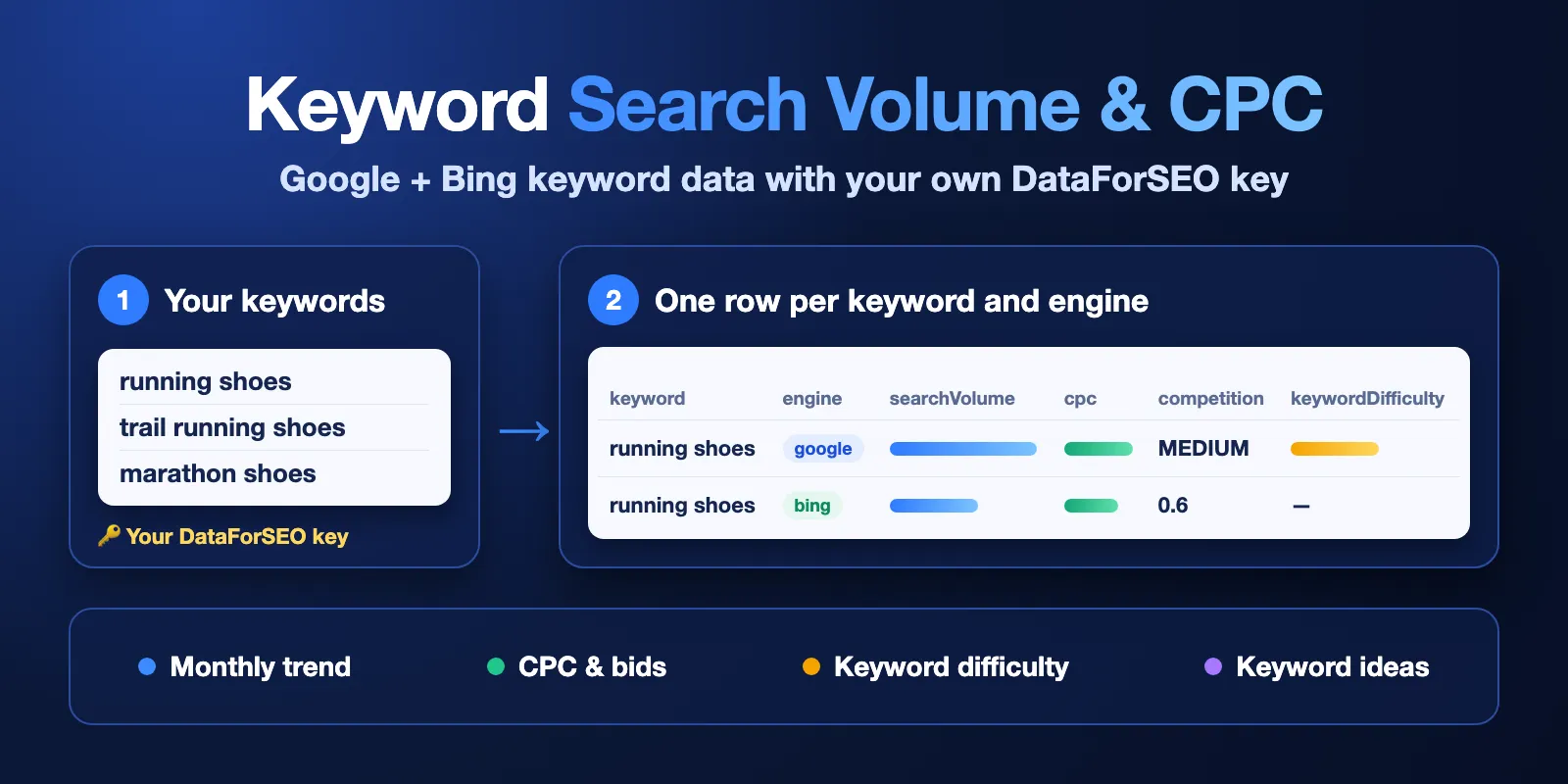
Table of contents
- What it does
- How it works
- Quick start
- Use cases
- Input
- Output
- Pricing
- Limits
- API, export and integrations
- Troubleshooting
- FAQ
- Related Actors
- Support
What it does
You give a list of keywords, a few seed keywords, or a domain. The Actor asks the DataForSEO API with your own DataForSEO key and saves one row per keyword and search engine.
Each row has:
- monthly search volume and up to 4 years of monthly history (Bing: 2 years);
- the trend and the change in % from last month, 3 months ago and 1 year ago;
- CPC, low and high top-of-page bids, competition (LOW / MEDIUM / HIGH and 0–100);
- keyword difficulty 0–100 (Google, on by default);
- search intent (Google, optional).
You need a DataForSEO account. This Actor does not include keyword data. You create a DataForSEO account, add money to it, and copy the API login and API password from the API Access page. DataForSEO bills your account for each request (about $0.09 for up to 1,000 Google keywords, see Pricing). Without a key, the run saves one row that tells you what to add.
Three modes:
metrics— numbers for your own keywords (up to 1,000).ideas— related keyword ideas for up to 20 seed keywords (up to 5,000 ideas).site— keywords for a domain or one page.
Good fit
- Check search volume and CPC for a keyword list before you write content or start ads.
- Compare Google and Bing demand for the same keywords in one table.
- Find new keyword ideas with volume, CPC and difficulty for a topic or a competitor domain.
- Send keyword numbers to a sheet, a database or an AI agent on a schedule.
How it works
- The Actor reads your keywords (or seeds, or domain) and your DataForSEO login and password.
- It checks your DataForSEO balance first. Then it asks Google Ads data, Bing Ads data and, if you turn them on, keyword difficulty and search intent. It stops before any request that would take your DataForSEO spend for this run past
maxProviderCostUsd. - It saves one row per keyword and engine in the Dataset, and a short run report in the
RUN_SUMMARYrecord (status, number of rows, DataForSEO cost).
Your login and password are sent only to DataForSEO. They are never written to the log, the Dataset or the Key-value store.
Quick start
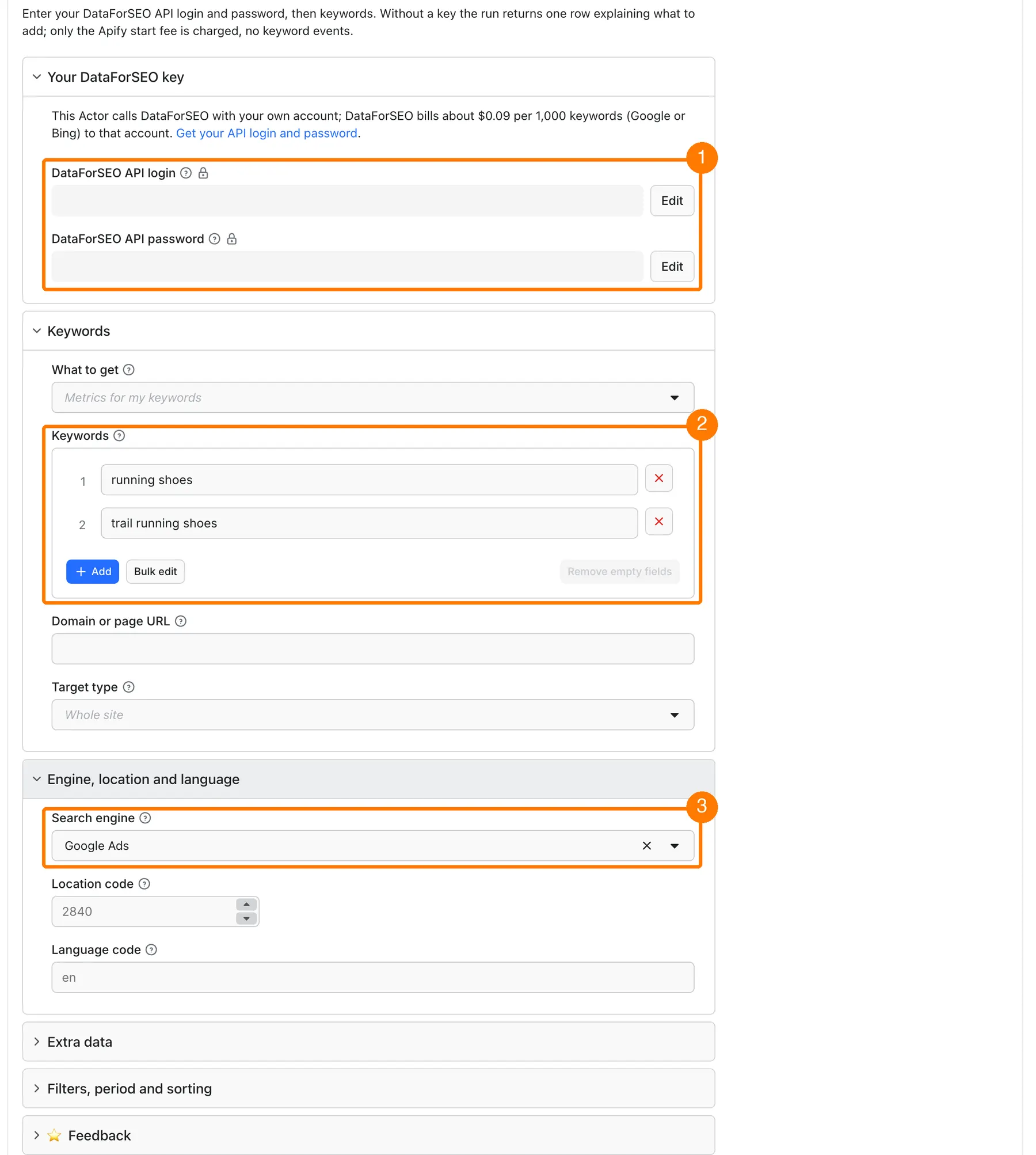
-
Open the Input tab. Paste your DataForSEO API login into
dataforseoLoginand your API password intodataforseoPassword(box 1 in the picture). Find both on the DataForSEO API Access page. -
Keep the prefilled
keywords("running shoes", "trail running shoes") or add your own, one per line (box 2). -
Keep
engine=google(prefill) or choosebingorboth(box 3). -
Click Start.
-
Open the Output tab and check
searchVolume,cpcandkeywordDifficulty.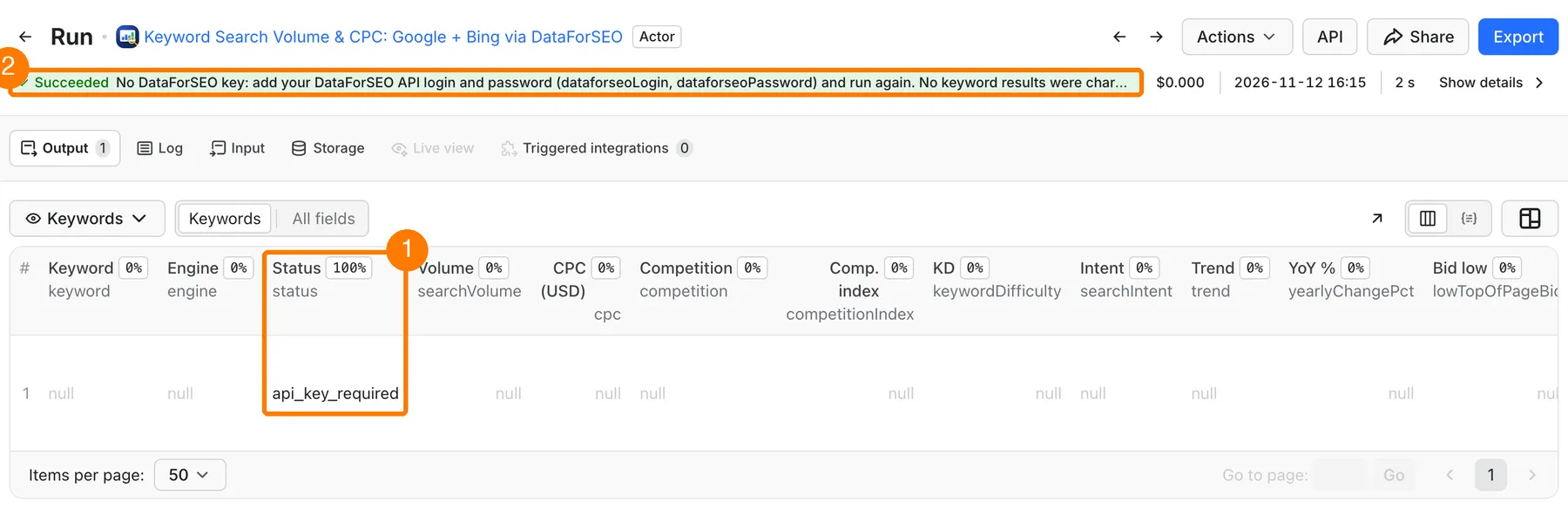
The picture shows a run without a key: one row with
status=api_key_required. With your key, you get one row per keyword and engine withstatus=ok.
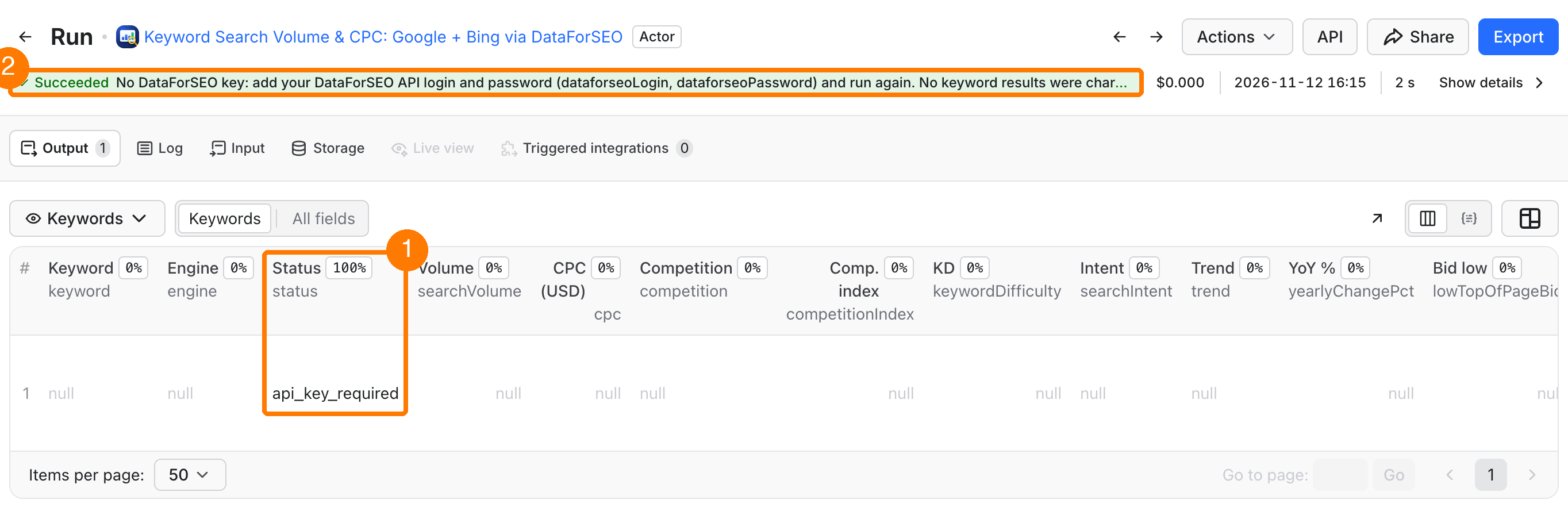
Expected result: one row per keyword and engine, with search volume, CPC, competition and keyword difficulty.
Use cases
| Buyer job | Input path | Output entity | Key fields | Next integration |
|---|---|---|---|---|
| Check volume and CPC for a keyword list | mode = metrics, keywords | keyword row | searchVolume, cpc, competition, keywordDifficulty | CSV / Google Sheets |
| Compare Google and Bing demand | engine = both | one row per keyword and engine | engine, searchVolume, cpc | Excel, BI tool |
| Find new keyword ideas for a topic | mode = ideas, keywords (seeds), minVolume | keyword idea row | keyword, isSeed, searchVolume, keywordDifficulty | content plan, sheet |
| See which keywords a site or page ranks for in ads data | mode = site, domain, targetType | keyword row | keyword, searchVolume, cpc | competitor research |
| Watch seasonality and trends | keywords, dateFrom, dateTo | keyword row | monthlySearches, trend, yearlyChangePct | schedule + dashboard |
Input
Input fields
| Field | Plain name | Type | Required | Default / prefill | Allowed values | Effect | Example | Recommendation |
|---|---|---|---|---|---|---|---|---|
dataforseoLogin | DataForSEO API login | string (secret) | yes, for data | empty | your API login | Signs requests to DataForSEO | your API login | Copy from API Access, not the website login |
dataforseoPassword | DataForSEO API password | string (secret) | yes, for data | empty | your API password | Signs requests to DataForSEO | your API password | This is not your dashboard password |
mode | What to get | string | no | metrics | metrics, ideas, site | Chooses the data source | ideas | metrics for your own list |
keywords | Keywords or seeds | array of strings | for metrics and ideas | prefill: "running shoes", "trail running shoes" | metrics: up to 1,000; ideas: up to 20; each up to 80 characters and 10 words | Keywords to check, or seeds for ideas | "running shoes" | Duplicates are removed |
domain | Domain or page | string | for site | empty | domain or page URL | Source for site mode | nike.com | Use a page URL with targetType = page |
targetType | Whole site or one page | string | no | site | site, page | Scope of site mode | page | — |
engine | Search engine | string | no | google (prefill and default) | google, bing, both | One row per keyword and engine | both | both doubles rows and cost |
locationCode | Location | integer | no | 2840 (United States) | DataForSEO location code | Country or region of the numbers | 2826 (UK) | 2124 Canada, 2036 Australia, 2276 Germany, 2250 France |
languageCode | Language | string | no | en | language code | Language of the numbers | de | Bing: en, fr, de only |
includeKeywordDifficulty | Keyword difficulty | boolean | no | true | true / false | Adds keywordDifficulty to Google rows | true | About $0.01 + $0.0001 per keyword on your DataForSEO account |
includeSearchIntent | Search intent | boolean | no | false | true / false | Adds searchIntent to Google rows | true | English keywords |
searchPartners | Search partners | boolean | no | false | true / false | Adds search partner networks to volume and CPC | false | — |
includeAdultKeywords | Adult keywords | boolean | no | false | true / false | Allows adult ideas in ideas and site | false | — |
dateFrom | History from | string | no | empty (last 12 months) | YYYY-MM-DD, up to 4 years back | Start of monthlySearches | 2024-01-01 | Bing keeps 24 months |
dateTo | History to | string | no | empty (latest month) | YYYY-MM-DD | End of monthlySearches | 2026-09-30 | — |
bingDevice | Bing device | string | no | all | all, mobile, desktop, tablet | Bing rows only | mobile | — |
minVolume | Minimum volume | integer | no | 0 | 0 or more | Drops rows with lower volume | 100 | Dropped rows are not charged |
maxIdeas | Maximum ideas | integer | no | 1000 | 1–5,000 | Caps rows in ideas and site | 500 | — |
sortBy | Sort rows by | string | no | relevance | relevance, search_volume, cpc, competition_index, keyword_difficulty | Row order, highest first | search_volume | — |
maxProviderCostUsd | DataForSEO spend limit | number | no | 1 | 0.01–100 | Stops before a DataForSEO request that would pass this amount | 5 | Raise it for big Bing or both runs |
deliveryConnector | Slack or Notion connector | string | no | empty | your MCP connector | Posts a short summary after the run | — | See below |
deliveryTarget | Where to post | string | no | empty | Notion page link or Slack channel ID | Target of the summary | — | — |
Empty keywords in metrics or ideas mode, or an empty domain in site mode, fails the run with a clear input error (RUN_SUMMARY status INVALID_INPUT) before any DataForSEO request. Nothing is charged except the start fee.
Interacting settings
| When | Input A | Input B | Effective behavior | Example | Cost/result effect |
|---|---|---|---|---|---|
| Both engines | engine = both | keywords | One Google row and one Bing row per keyword | 100 keywords → 200 rows | Twice the rows; Bing needs one request per 200 keywords |
| Bing and language | engine = bing | languageCode | Bing works for en, fr, de only | de + 2276 | Other languages stop with an input error |
| Difficulty and intent | includeKeywordDifficulty, includeSearchIntent | engine | Added to Google rows only | both | Bing rows keep these fields empty |
| Spend limit | maxProviderCostUsd | your DataForSEO balance | The lower of the two is the limit for the run | balance $0.50, limit $1 | Run stops at $0.50 with QUOTA_LIMIT |
| Filter | minVolume | any mode | Rows below the value are dropped | minVolume = 1000 | Dropped rows cost nothing on Apify; DataForSEO still bills the request |
Input examples
Volume and CPC for your keywords
Expected behavior: one Google Ads request and one keyword difficulty request.
Expected output: 2 rows with searchVolume, cpc, competition, keywordDifficulty.
Limit or cost note: about $0.10 on your DataForSEO account and $0.0104 on Apify (FREE tier).
Keyword ideas from seeds
Expected behavior: one Google Ads ideas request, then keyword difficulty for the ideas.
Expected output: up to 500 rows, highest volume first; isSeed = true for your seed keywords.
Limit or cost note: up to 20 seeds per run.
Output
Output fields
| Field | Meaning | Type | Can be empty? | Example / enum | Source / notes |
|---|---|---|---|---|---|
keyword | The keyword | string | no on data rows | "running shoes" | your input or DataForSEO ideas |
engine | Search engine | string | on service rows | google, bing | — |
status | Row status | string | no | ok, no_data, api_key_required, invalid_credentials, quota_limit, cost_limit, error | see the table below |
searchVolume | Average monthly searches | integer | yes | 74000 | Google Ads or Bing Ads data |
monthlySearches | Monthly history, newest first | array | yes | [{"year":2026,"month":9,"searchVolume":74000}] | — |
trend | Last 3 months vs the 3 before | string | yes | up, down, flat | more than ±10 % is up or down |
momChangePct | Change from last month, % | number | yes | -18.3 | newest month vs the month before |
quarterlyChangePct | Change from 3 months ago, % | number | yes | 22.4 | newest month vs 3 months before it |
yearlyChangePct | Change from 1 year ago, % | number | yes | -55.3 | newest month vs 12 months before it |
cpc | Average cost per click, USD | number | yes | 1.21 | — |
lowTopOfPageBid | Low top-of-page bid, USD | number | yes | 0.52 | Google only |
highTopOfPageBid | High top-of-page bid, USD | number | yes | 2.10 | Google only |
competition | Ads competition | string | yes | LOW, MEDIUM, HIGH | Bing 0–1 is mapped to these levels |
competitionIndex | Ads competition 0–100 | integer | yes | 50 | — |
keywordDifficulty | SEO difficulty 0–100 | integer | yes | 63 | Google rows, when includeKeywordDifficulty is on |
searchIntent | Main search intent | string | yes | commercial | Google rows, when includeSearchIntent is on |
secondaryIntents | Other intents | array | yes | ["transactional"] | same |
isSeed | Your seed keyword | boolean | yes | true | ideas mode |
spell | Spelling DataForSEO used | string | yes | null | Google only |
locationCode, languageCode | Location and language of the numbers | integer, string | on some service rows | 2840, en | your input |
source | Data source | string | no | dataforseo:google_ads/search_volume | DataForSEO endpoint; keyword-metrics on service rows |
message | Explanation for a non-ok row | string | yes | "Google Ads has no data for this keyword…" | — |
checkedAt | When the data was read | string | no | ISO date-time | — |
Output entities and surfaces
| Situation | Dataset/API/KVS/live view | Result shape | User action |
|---|---|---|---|
| Normal item | Dataset, status = ok | one row per keyword and engine | Export or use searchVolume, cpc |
| Keyword without data | Dataset, status = no_data | row with empty numbers and a message | Check spelling, location and language |
| No key | Dataset, one api_key_required row; RUN_SUMMARY status NO_KEY | one service row | Add dataforseoLogin and dataforseoPassword |
| Wrong key | one invalid_credentials row; RUN_SUMMARY status INVALID_CREDENTIALS | one service row | Copy the API password from API Access |
| Balance or spend limit reached | rows found so far + one quota_limit or cost_limit row; RUN_SUMMARY status PARTIAL | partial list | Top up DataForSEO or raise maxProviderCostUsd |
| DataForSEO error | error row; RUN_SUMMARY status PARTIAL or ERROR | partial list or one service row | Run again later; open an issue with the run ID |
The RUN_SUMMARY record in the Key-value store has status, stopReason, the number of rows, dataforseoCostUsd (what DataForSEO billed for this run), chargedEvents and chargedNoDataEvents.
Output example
This example is trimmed (only one month of history) and shows the shape of one row. The numbers are an illustration, not live data. null means DataForSEO did not return that value or the option is off.
Send results to Slack or Notion
Pick your connector in the optional deliveryConnector field. After the run saves its data, the Actor posts a short summary (up to 25 rows and a link to the full dataset) there. Put a Notion page link or a Slack channel ID in deliveryTarget: in Notion every run is added on top of that one page, so your workspace does not fill up with new pages. Without a page link, Notion delivery is skipped and the log says so. A delivery error never fails the run and costs nothing extra. Connect a service once in Apify Console → MCP connectors.
Use case → fields
| Buyer job | Input path | Output entity | Key fields | Next integration |
|---|---|---|---|---|
| Pick keywords for content | keywords, includeKeywordDifficulty | keyword row | searchVolume, keywordDifficulty | content plan |
| Plan an ads budget | keywords, engine = both | keyword row | cpc, highTopOfPageBid, competition | ads planner sheet |
| Track seasonality | dateFrom, dateTo | keyword row | monthlySearches, yearlyChangePct | dashboard |
Pricing
Pricing unit
You pay two separate bills:
- DataForSEO bills your own DataForSEO account for the data. This Actor does not include it. DataForSEO prices (live mode, checked on 2026-11-12, may change — see DataForSEO pricing):
- Google Ads search volume or ideas: about $0.09 per request of up to 1,000 keywords;
- Bing Ads search volume: about $0.09 per request of up to 200 keywords (this Actor sends 200 per request);
- keyword difficulty: about $0.01 + $0.0001 per keyword;
- search intent: about $0.012 per request;
- the balance check is free.
RUN_SUMMARY.dataforseoCostUsdshows what DataForSEO billed for the run.
- Apify charges this Actor's events (pay per event):
| Event | When | FREE | BRONZE | SILVER | GOLD and higher |
|---|---|---|---|---|---|
keyword-result | one row with data (status = ok) | $0.0027 | $0.00243 | $0.00216 | $0.00189 |
keyword-no-data | one checked keyword without data (status = no_data) | $0.0001 | $0.00009 | $0.00008 | $0.00007 |
apify-actor-start | automatic Apify start fee, once per run | $0.005 at the default 256 MB |
The start fee is set by Apify and scales with run memory (per GB). The default memory is 256 MB.
- No key: the run is not an error. It saves one
api_key_requiredrow and charges no keyword events. Only the automaticapify-actor-startfee applies. - Wrong key, empty balance, spend limit, DataForSEO error: service rows (
invalid_credentials,quota_limit,cost_limit,error) are free. You pay only for rows with data and for keywords without data that were checked. - Valid run with no data: each checked keyword without data costs
keyword-no-data, plus the start fee. minVolumefilter: dropped rows are not charged on Apify.- The developer pays the Apify platform usage (compute) for this Actor.
Cost examples
Apify amounts are FREE-tier prices. DataForSEO amounts are estimates from the prices above.
| Scenario | Input scope | Expected item/event count | Base charge | Optional charge | Stop/cap behavior |
|---|---|---|---|---|---|
| No key | prefill, no login | 1 free row | $0.005 (start) | none | Stops after the api_key_required row |
| Prefill | 2 keywords, Google | 2 keyword-result | $0.0104 on Apify | about $0.10 on DataForSEO (with difficulty) | — |
| Keyword list | 1,000 keywords, Google | 1,000 keyword-result | $2.705 on Apify | about $0.20 on DataForSEO | maxProviderCostUsd default $1 is enough |
| Both engines | 1,000 keywords, both | 2,000 keyword-result | $5.405 on Apify | about $0.65 on DataForSEO | 5 Bing requests of 200 keywords |
| Ideas | 20 seeds, maxIdeas = 1,000 | up to 1,000 keyword-result | up to $2.705 on Apify | about $0.20 on DataForSEO | maxIdeas caps the rows |
The Apify Maximum cost per run setting also works: the run stops writing rows at that limit and keeps what it saved.
Limits
- A DataForSEO account with money on it is required. The Actor has no free data, demo rows or built-in key.
- Up to 1,000 keywords per run in
metricsmode, 20 seeds inideasmode, 5,000 rows inideasandsitemode. - Each keyword: up to 80 characters and 10 words (Google Ads rule).
- Bing: English, French and German only; history up to 24 months.
- Keyword difficulty and search intent are Google only.
- Numbers come from Google Ads and Bing Ads data through DataForSEO. They are monthly averages, not exact counts, and DataForSEO updates them about once a month.
- One run makes at most 120 HTTP requests to DataForSEO and stops its DataForSEO work after 1,500 seconds (25 minutes), even if the run timeout is longer. This protects your DataForSEO balance. A full 1,000-keyword
bothrun needs about 9 requests. - A request that fails or times out is retried up to 2 times (after 5 and 15 seconds); a DataForSEO rate-limit answer (40202) is retried once after 60 seconds. If DataForSEO had already processed a request that timed out, it may bill that batch twice.
maxProviderCostUsdcounts only the costs DataForSEO reports back. - The live DataForSEO answers were not tested by us with a real key before release. The parsing was tested on DataForSEO's documented response format. If you see a wrong field, please open an issue.
API, export and integrations
- API: start the Actor with the same JSON as the input form, then read the Dataset items.
- Export: CSV, JSON, Excel, XML or HTML from the Output tab or the Dataset API.
- Scheduling: run the same keyword list every month with an Apify schedule and compare
searchVolumeandtrend. - Webhooks / no-code: Make, Zapier, n8n or a webhook can start a run and read the Dataset when it finishes.
- SDK / MCP / agent: see below.
Example with the Apify API (put your keys in the input, never in the URL):
Use with AI agents (MCP)
- MCP server URL with only this Actor:
https://mcp.apify.com?tools=cliqtomedia/keyword-metrics. - Smallest useful input (the agent must also pass the user's DataForSEO login and password):
- Key output fields:
keyword,engine,status(okmeans numbers are present),searchVolume(average monthly searches),cpc(USD),keywordDifficulty(0–100). - A small run takes a few seconds of API time. Cost: $0.0027 per row with data on Apify (FREE tier) plus the start fee, and the DataForSEO cost on the user's account (see Pricing).
- Limits: up to 1,000 keywords per run;
maxProviderCostUsd(default $1) caps the DataForSEO spend.
Troubleshooting
One row with status api_key_required
Symptom: the run finished with one row and no numbers.
Likely reason: dataforseoLogin or dataforseoPassword is empty.
Check: open the Input tab and look at both fields.
Action: add your DataForSEO API login and API password and run again.
Status invalid_credentials
Symptom: one invalid_credentials row.
Likely reason: you used your website password, not the API password, or your DataForSEO IP whitelist blocks Apify.
Check: open the API Access page.
Action: copy the API password from that page. Turn off the IP whitelist or allow all IPs.
Status quota_limit or cost_limit
Symptom: some rows, then a quota_limit or cost_limit row; RUN_SUMMARY status PARTIAL.
Likely reason: your DataForSEO balance or your daily DataForSEO limit is too low (quota_limit), or the run reached maxProviderCostUsd (cost_limit).
Check: the message of that row says which one.
Action: top up DataForSEO, raise the daily limit in DataForSEO, or raise maxProviderCostUsd. The rows you already got stay in the Dataset.
Many no_data rows
Symptom: rows with status = no_data.
Likely reason: the keyword has too few searches, or the location or language does not match it.
Check: locationCode, languageCode and the spelling.
Action: try a broader keyword or another location. Each no_data row costs only keyword-no-data.
FAQ
Do I need my own DataForSEO key?
Yes. Create an account at DataForSEO, add money, and copy the API login and API password from the API Access page. The Actor uses only your key. It does not store or log it.
What happens when I run it without a key?
The run finishes with one api_key_required row. No keyword events are charged. Apify still takes its automatic start fee ($0.005 at 256 MB).
Why is my number different from Google Keyword Planner?
Both use Google Ads data, but Keyword Planner often shows ranges, and DataForSEO updates monthly. Use the numbers for comparing keywords, not as exact counts.
How fresh is the data?
DataForSEO updates Google Ads and Bing Ads volumes about once a month. checkedAt shows when this Actor read the data.
Related Actors
- Google Autocomplete Scraper — get more keyword ideas from Google suggestions, then check their volume here.
- Google Trends Scraper — see interest over time and by region for the same keywords.
- Google Search Results Scraper (SERP) — see who ranks for your keywords.
- SEO Site Audit — check the pages you want to rank.
Support
For a bug, question or feature request, open the Actor's Issues tab on Apify. Include the run ID, the mode and engine you used, and the message of the row. Never send your DataForSEO login or password, your Apify token or billing data.
⭐ Found it useful? Rate this Actor. Something wrong? Report a problem — we fix reported problems.


