

WooCommerce Store Products Export - Prices, Stock, No Login
Pricing
from $0.63 / 1,000 products
WooCommerce Store Products Export - Prices, Stock, No Login
Export public products from any WooCommerce store: prices, sale prices, stock, SKUs, categories, attributes, images and links. Whole catalog or one category, only-new mode for scheduled runs. No login or API key needed.
Pricing
from $0.63 / 1,000 products
Rating
0.0
(0)
Developer

Cliqto Media
Maintained by CommunityActor stats
0
Bookmarked
2
Total users
1
Monthly active users
4 days ago
Last modified
Categories
Security
Limited permissionsShare
Export public products from any WooCommerce store to JSON, CSV or Excel. You get one row per product with prices, sale prices, stock, SKUs, categories, attributes, images and the product link.
Add one store URL, such as https://woocommerce.com, and click Start. There is no login and no API key. A first run with 20 products takes about 5 seconds and costs about $0.02.
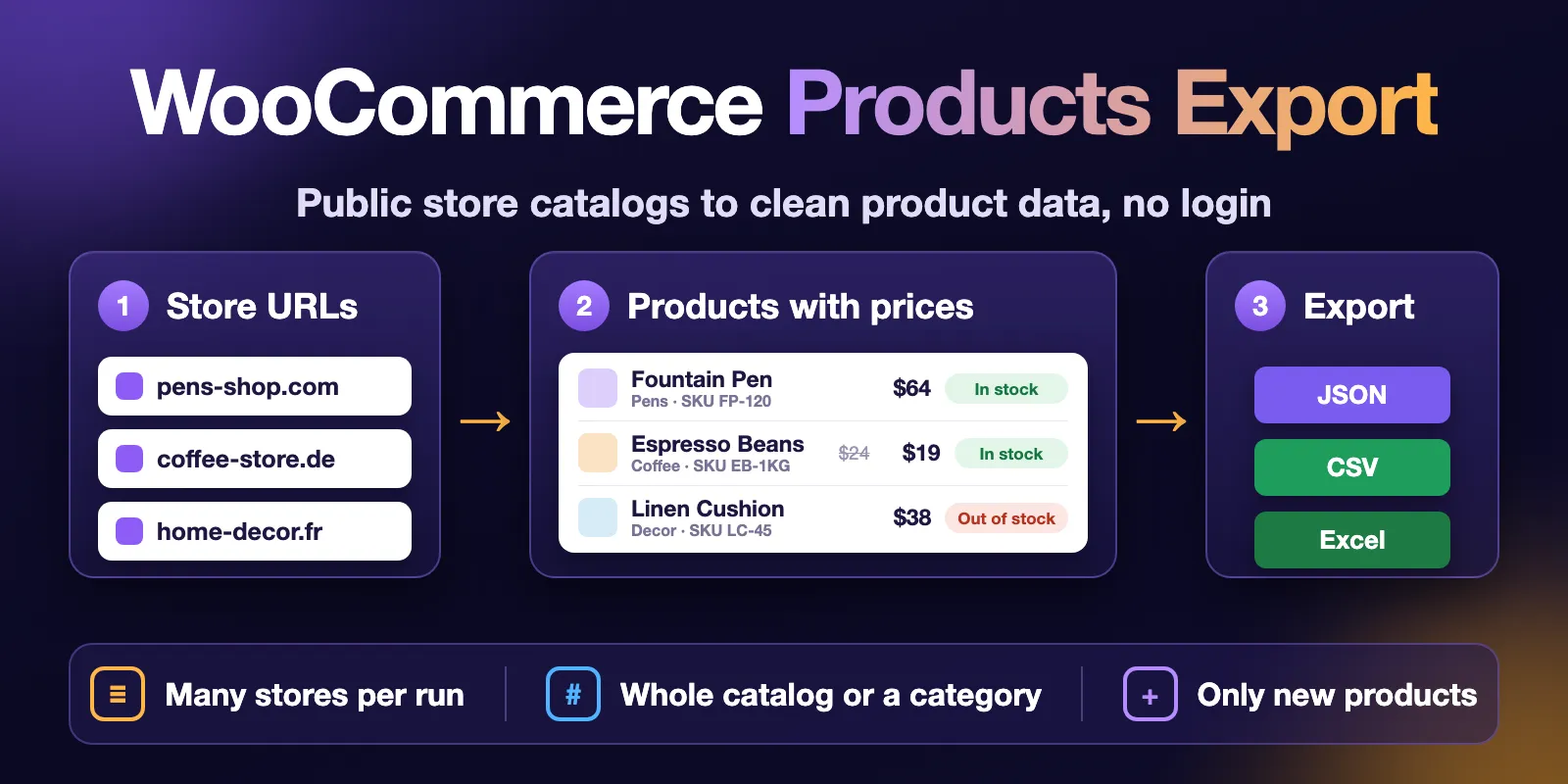
Table of contents
- What it does
- How it works
- Quick start
- Use cases
- Input
- Output
- Pricing
- Limits
- API, export and integrations
- Troubleshooting
- FAQ
- Related Actors
- Support
What it does
Most WooCommerce stores have a public Store API. The store's own pages use it to show products. This Actor reads the same public API and saves one Dataset row per product.
You can export the whole catalog or one category, such as hoodies. You can keep only products that match a search, are on sale, featured, in stock or in a price range, and sort them by price, popularity, rating or name. You can add up to 100 stores in one run.
Each product row has the price, the regular price, the sale price, stock, SKU, categories, tags, brands, attributes, images, rating and the product URL.
The Actor only reads public storefront data. It does not log in to the store admin and does not use WooCommerce REST API keys. This is an independent tool. It is not affiliated with, endorsed by, or sponsored by WooCommerce or Automattic.
What data you get
- Product:
productId,name,slug,sku,type,shortDescription,descriptionandurl. - Price:
price,regularPrice,salePrice,priceMin,priceMax,onSaleandcurrency. - Stock:
inStock,stockStatus,lowStockRemainingandpurchasable. - Catalog:
categories,categorySlugs,tags,brands,attributesandvariationsCount. - Images and reviews:
imageUrl,images,averageRatingandreviewCount. - Status rows: one row for each store that gave no products or stopped early, with
statusCodeandstatusMessage.
The data comes from the store's public Store API. It is the same data that the store shows to every visitor.
Good fit
- Watch a competitor's prices, sales and stock.
- Copy a supplier's catalog with SKUs and images into your own system.
- Get a daily list of only the new products in a store.
Not a fit / limits
- Stores that are not on WooCommerce, or that closed the Store API. You get a status row, not products.
- Exact stock numbers. Most stores only say if a product is in stock. Some show a low-stock number (
lowStockRemaining). - Private data: orders, customers, costs, admin-only fields and hidden or draft products.
- Price per variation (size, color). You get the price range of a variable product and its attribute values, not one row per variation.
How it works
- The Actor finds the public Store API of each store URL. It tries
/wp-json/, then?rest_route=, then the API link in the store's home page. - It reads the products page by page, about one request per second per store. The category, the filters and the sorting are passed to the store, so the store itself picks the products.
- It saves one Dataset row per product, a free status row for each store that gave no products or stopped early, and a run summary (
RUN_SUMMARY) in the key-value store. With Only new products on, it also remembers the products it already returned.
Quick start
-
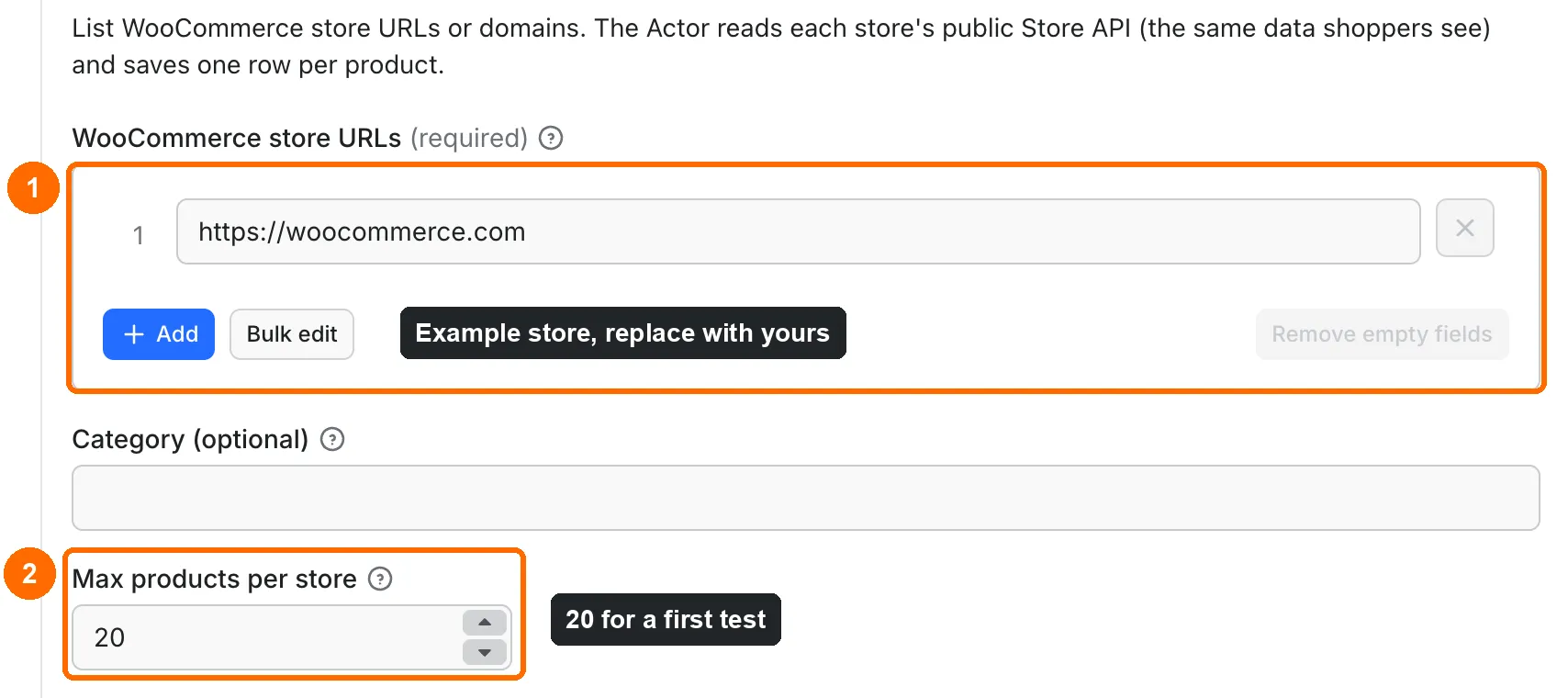
WooCommerce store URLs (
storeUrls) in the input form is prefilled with the example storehttps://woocommerce.com(box 1 in the picture). Replace it with your stores or keep it for a test. -
Keep Max products per store (
maxProducts) at the prefilled 20 for a first test (box 2). Runs without this field read up to 1,000 products per store. -
Click Start at the bottom of the form.
-
When the run finishes, open the Products view in the Output tab. Check
name,priceandinStock(box 4). Rows withrecordType: productare products.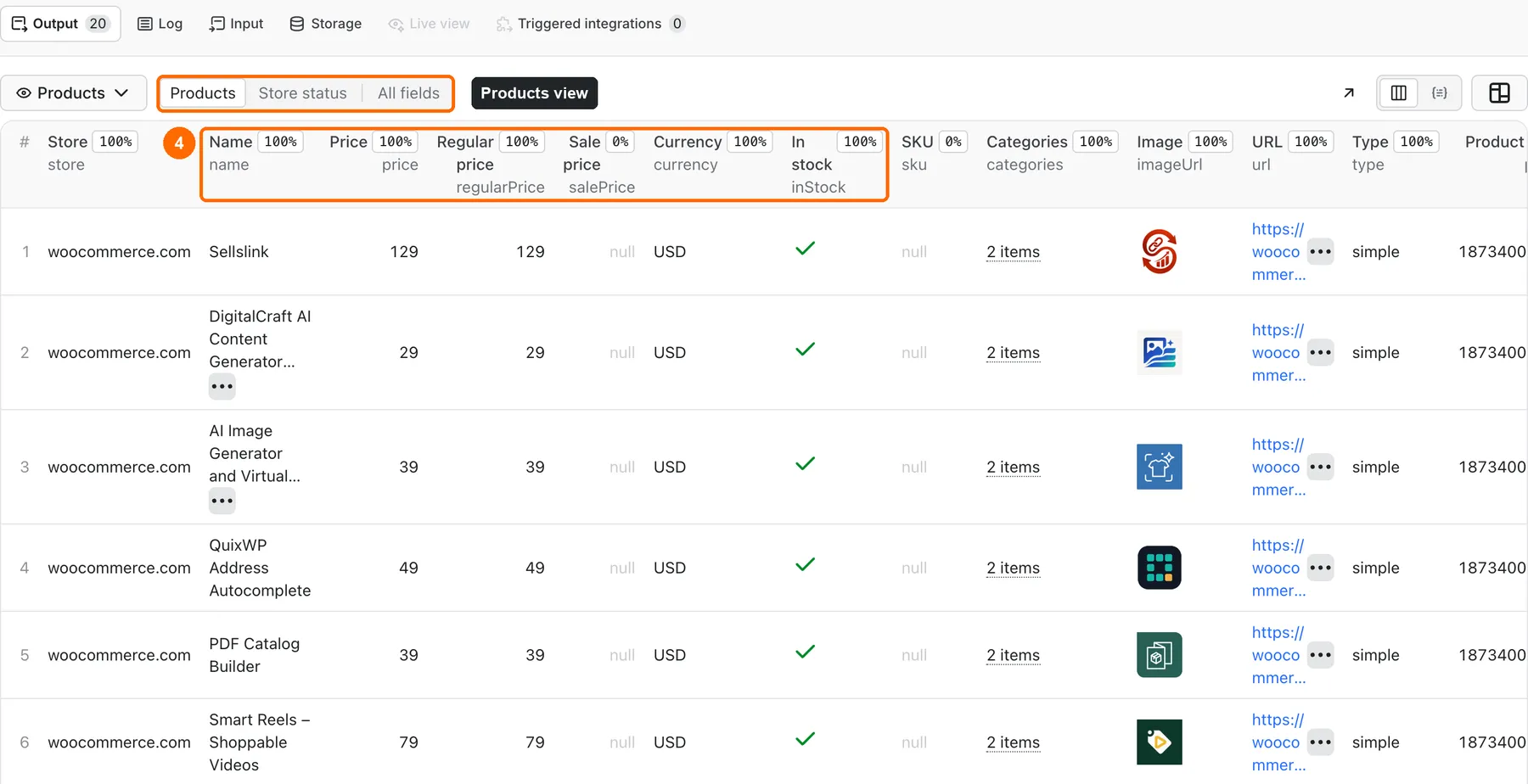
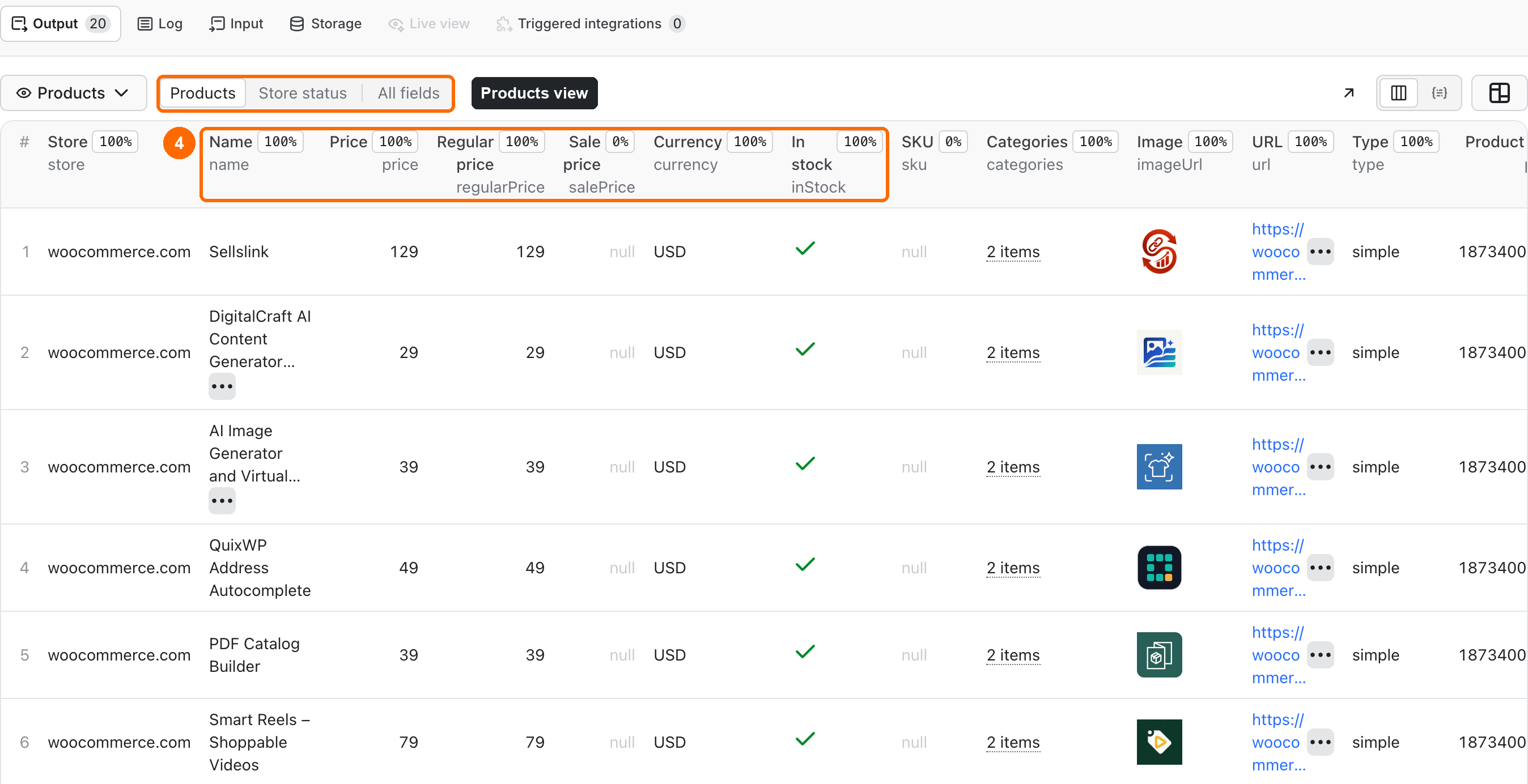
Expected result: 20 product rows from the store, newest first.
Use cases
| Buyer job | Input path | Output entity | Key fields | Next integration |
|---|---|---|---|---|
| Competitor price and sale watch | storeUrls, schedule | Product row | price, regularPrice, salePrice, onSale, inStock | Dataset export or API to a sheet |
| Supplier catalog import | storeUrls | Product row | sku, price, images, description, attributes | JSON/CSV import into your store or PIM |
| New product alerts | storeUrls, onlyNew: true, schedule | New product rows | name, url, isNew | Webhook or integration on run finish |
| Category research | Category URL or category | Product row | categories, brands, tags, price | Dataset export |
Input
Input fields
| Field | Plain name | Type | Required | Default / prefill | Allowed values | Effect | Example | Recommendation |
|---|---|---|---|---|---|---|---|---|
storeUrls | Store URLs | array of strings | yes | prefill: https://woocommerce.com | 1–100 URLs or domains | Stores to export. A category page URL exports only that category. | shop.example.com, https://shop.example.com/product-category/hoodies/ | Use the store's public domain. Duplicates are merged. |
category | Category | string | no | empty (whole catalog) | slug, ID or name | Applied to every store without a category in its URL | hoodies, 16, Hoodies | Use it for big catalogs or one product group. |
maxProducts | Max products per store | integer | no | default 1,000; prefill 20 | 1–50,000 | Stops each store after this many product rows, in the sortBy order | 500 | Each product row is billed, so set the number you need. |
onlyNew | Only new products | boolean | no | false | true / false | Returns only products that earlier runs did not return | true | Use it with a schedule. |
search | Search text | string | no | empty | up to 200 characters | Keeps only products the store's own search finds | booking | Same results as the store's search box. |
onSale | Only products on sale | boolean | no | false | true / false | Keeps only products the store marks as on sale | true | Good for watching a competitor's discounts. |
featured | Only featured products | boolean | no | false | true / false | Keeps only featured products | true | |
stockStatus | Stock status | array of strings | no | empty (all) | instock, outofstock, onbackorder | Keeps only products with these statuses | ["instock"] | |
minPrice / maxPrice | Min / max price | number | no | empty | 0 or more, min ≤ max | Keeps products in this price range, in each store's own currency | 50, 100 | 50 means $50 in a USD store and ¥50 in a JPY store. |
sortBy | Sort by | string | no | date | date, price, popularity, rating, title, menu_order | Order in which products are read and saved | price | With maxProducts it decides which products you get. |
sortOrder | Sort order | string | no | desc | desc, asc | High to low (newest first) or low to high | asc | price + asc gives the cheapest products first. |
stateName | State name | string | no | default | letters, digits, -, _; up to 40 | Name of the only-new memory | competitors-daily | Use a different name for each schedule. The old field name stateKey still works in API calls. |
deliveryConnector | Send results to | string (MCP connector) | no | empty (no delivery) | one of your Apify MCP connectors | Posts a short summary of the run there | your Notion or Slack connector | See Send results to Slack or Notion. |
deliveryTarget | Notion page or channel | string | no | empty | Notion page link or ID, Slack channel ID | Where the summary goes | C0123456789 | Use one Notion page for all runs. |
You can write a store as a full URL or as a domain. The Actor adds https://. Invalid URLs (IP addresses, local names, URLs with a password) get a free status row and do not stop the other stores.
If a store hides /wp-json/, the Actor tries the ?rest_route= address and the API link in the store's home page.
Interacting settings
| When | Input A | Input B | Effective behavior | Example | Cost/result effect |
|---|---|---|---|---|---|
| A store URL has a category | storeUrls | category | The category in the URL wins for that store | .../product-category/hoodies/ + category: Sale | Only hoodies is read for that store |
| The store has no such category | category | — | A CATEGORY_NOT_FOUND status row. Its message lists some categories that the store has. | category: no-such-thing | 1 checked store, 0 products |
| Only new is on | onlyNew | maxProducts | The first run returns the newest products up to the max. It treats all older products as already seen. Later runs return only products added since. | onlyNew: true, maxProducts: 50 | First run: up to 50 rows. Unchanged store: 0 product rows. |
| Only new is on, many new products | onlyNew | maxProducts | A run stops at the max. The next run returns the rest of the new products. | 400 new, max 300 | 300 rows, then 100 rows |
| Filters are set | search, onSale, featured, stockStatus, minPrice, maxPrice | category | The store applies all of them together. catalogTotal in the status counts only matching products. | category: hoodies + onSale: true | Only matching product rows are billed |
| Only new with filters | onlyNew | any filter | Each filter set has its own only-new memory, so changing a filter starts fresh | onlyNew: true + onSale: true | First run with new filters: up to the max |
| Only new with sorting | onlyNew | sortBy, sortOrder | Sorting is not used: only new always reads the newest first. The run log shows SORT_IGNORED. | onlyNew: true + sortBy: price | Same as without sorting |
| Different schedules | onlyNew | stateName | Each name has its own memory | stateName: daily-sale | Schedules do not hide each other's products |
Input examples
Whole store, first test
Expected behavior: the Actor reads the newest 20 products of the store.
Expected output: 20 product rows with name, price, regularPrice, inStock and categories.
Limit or cost note: about $0.02 on the Free plan.
One category from two stores
Expected behavior: each store is filtered by the category name Fountain Pens. A store URL with /product-category/... would keep its own category.
Expected output: up to 200 product rows from www.passion4pens.com. woocommerce.com has no such category, so it gives one free CATEGORY_NOT_FOUND row that lists its categories.
Limit or cost note: up to 200 product rows, at most $0.18 on the Free plan.
Cheapest products in a price range
Expected behavior: the store returns only products from $50 to $100, cheapest first.
Expected output: 50 product rows; on 2026-11-03 the first was PricePulse Discounts and Coupons at $51. The status row shows how many products match (catalogTotal, 583 that day).
Limit or cost note: about $0.046 on the Free plan.
Products on sale that match a search
Expected behavior: the store searches for b2b and keeps only in-stock products on sale.
Expected output: on 2026-11-03 one product row, B2B for WooCommerce at $149 instead of $179. If nothing matches, you get one status row with 0 products and pay only for the store check.
Limit or cost note: $0.002 for this run on the Free plan.
Daily new products
Expected behavior: the first run saves up to 200 newest products per store. Later runs save only new products.
Expected output: product rows with isNew: true after the first run. A store with nothing new gives no product rows.
Limit or cost note: an unchanged run of 2 stores costs $0.0012.
Output
The run saves two kinds of rows in the same default Dataset: product rows (recordType: product) and store status rows (recordType: store-status) for stores that gave no products or stopped early. The views do not filter rows. The Products view shows the product columns, and the Store status view shows the status columns. To get only one row type, filter by recordType. A run summary is saved as RUN_SUMMARY in the key-value store.
Output fields
| Field | Meaning | Type | Can be empty? | Example / enum | Source / notes |
|---|---|---|---|---|---|
recordType | Row type | string | no | product, store-status | Set by the Actor |
status | Row status | string | no | complete, not_found, error | not_found means no data; error means the store failed |
store / storeUrl | Store domain / home URL | string | conditional | www.passion4pens.com | After redirects |
category | Category filter used | string | yes | hoodies | null for the whole catalog |
productId | WooCommerce product ID | integer | product rows: no | 21466 | Store API |
name | Product name | string | no | Lamy® Safari Yellow Fountain Pens... | HTML entities decoded |
slug | URL name of the product | string | yes | lamy-safari-yellow-... | Store API |
sku | SKU | string | yes | L18 | null when the store has no SKU |
type | Product type | string | yes | simple, variable, grouped, external | Store API |
parentId | Parent product ID | integer | yes | null | Set for child products only |
price | Current price | number | yes | 30.25 | In currency, not cents. A real 0 stays 0. |
regularPrice | Price without sale | number | yes | 37 | Store API |
salePrice | Sale price | number | yes | 30.25 | Only when the product is on sale, else null |
priceMin / priceMax | Price range | number | yes | 30.25 / 30.25 | For variable and grouped products |
onSale | Sale flag | boolean | yes | true | Store API |
currency | Currency code | string | yes | USD | The store's currency |
inStock | In stock | boolean | yes | true | Store API |
stockStatus | Stock text | string | yes | in-stock, out-of-stock, on-backorder | Store API |
lowStockRemaining | Items left when stock is low | integer | yes | 3 | Only when the store shows it |
purchasable | Can be bought now | boolean | yes | true | Store API |
categories / categorySlugs | Category names / slugs | array | yes | ["Fountain Pens"] | Store API |
tags / brands | Tags / brands | array | yes | ["fountain pens"] | Store API |
attributes | Attributes and values | array | yes | [{"name":"size","values":["B","F"]}] | Store API |
variationsCount | Number of variations | integer | yes | 4 | Variable products |
averageRating / reviewCount | Rating / number of reviews | number / integer | yes | 4.5 / 12 | averageRating is null when there are no reviews |
shortDescription / description | Texts as plain text | string | yes | Automatically email a PDF... | HTML removed; up to 2,000 / 5,000 characters |
imageUrl / images | Main image / all images | string / array | yes | https://.../image.webp | Store API |
url | Product page | string | yes | https://passion4pens.com/product/... | Store API |
isNew | New since the last run | boolean | yes | true | Only-new mode; null on the first run and when the mode is off |
source / sourceUrl / fetchedAt | Source, API page and fetch time | string | no | woocommerce-store-api | Set by the Actor; time in UTC |
input | Store as you wrote it | string | status rows only | shop.example.com | Your input |
statusCode / statusMessage | Reason for a status row | string | status rows only | NOT_WOOCOMMERCE, CATEGORY_NOT_FOUND | Plain-English message |
productsFound | Product rows saved before the stop | integer | status rows only | 0 | Set by the Actor |
Output entities and surfaces
| Situation | Dataset/API/KVS/live view | Result shape | User action |
|---|---|---|---|
| Normal item | Dataset, recordType: product (Products view) | One product row | Export or read the fields |
| Domain-empty result | Dataset, recordType: store-status (Store status view) | status: not_found, codes NOT_WOOCOMMERCE, STORE_API_DISABLED, CATEGORY_NOT_FOUND, NO_PRODUCTS | Check the URL or the category |
| Invalid URL | Dataset, recordType: store-status | status: error, code INVALID_URL | Fix the URL |
| Filters match nothing | Dataset, recordType: store-status | status: not_found, code NO_PRODUCTS, message "No products match the filters" | Loosen the filters |
| Only new, nothing new | RUN_SUMMARY | No product rows, message "No new products since the previous run." | Nothing to do |
| Partial result | Dataset, recordType: store-status (Store status view) | status: error with productsFound above 0 | Run again later; the rows already saved are valid |
| Technical failure | Dataset + RUN_SUMMARY | status: error, codes BLOCKED, RATE_LIMITED, SOURCE_UNAVAILABLE, SOURCE_TIMEOUT | Run again later |
| Run time limit | RUN_SUMMARY | status: PARTIAL, reason: TIME_LIMIT; the run is still Succeeded | Raise the timeout or split the stores |
| Cost limit reached | Dataset, recordType: store-status | Code CHARGE_LIMIT | Raise the maximum cost per run |
The run status is Succeeded when at least one store gave products or the result is honestly empty. It is Failed only when the input is invalid, or when no store gave products and at least one store failed with an error.
Output example
This example is trimmed. It is a real row from a run on www.passion4pens.com. The shortDescription and description fields are left out here, and sourceUrl is shortened. null means the store does not publish the value. It never stands for zero.
Send results to Slack or Notion
Pick your connector in the optional Send results to field (deliveryConnector). After the run saves its data, the Actor posts a short summary there: up to 25 products (name, price, store) and a link to the full Dataset. Put a Notion page link or a Slack channel ID in deliveryTarget. In Notion every run is added on top of that one page, so your workspace does not fill up with new pages. A delivery error never fails the run and costs nothing extra. Connect a service once in Apify Console → MCP connectors. The outcome is in RUN_SUMMARY.delivery.
Pricing
Pricing unit
You pay per event. Platform usage is included: the developer pays for compute, and you do not pay for compute or proxies separately. The start fee scales with run memory (per GB); the default 256 MB counts as one start.
| Event | When it is charged | Free plan | Bronze | Silver | Gold and higher |
|---|---|---|---|---|---|
| Actor start | Once per run (per GB of memory, at least one; default 256 MB = one) | $0.001 | $0.001 | $0.001 | $0.001 |
| Store checked | Once for each store that the Actor checks, whatever the result | $0.0001 | $0.0001 | $0.0001 | $0.0001 |
| Product | Each product row | $0.0009 | $0.00081 | $0.00072 | $0.00063 |
Per 1,000 products this is $0.90 on the Free plan, $0.81 on Bronze, $0.72 on Silver and $0.63 on Gold and higher. Status rows are free. Invalid URLs are not charged as a store. A store that is not WooCommerce, blocked or empty is still a checked store ($0.0001). A valid run with no results, a filter with no matches and an only-new run with nothing new all pay only the start and the store fees. A partial run pays only for the product rows it saved. If you set a maximum cost per run, the Actor stops before it goes over. Stores it did not check are not charged.
Cost examples
| Products from 1 store | Events | Free | Bronze | Silver | Gold+ |
|---|---|---|---|---|---|
| 1 | 1 start, 1 store, 1 product | $0.002 | $0.00191 | $0.00182 | $0.00173 |
| 10 | 1 start, 1 store, 10 products | $0.0101 | $0.0092 | $0.0083 | $0.0074 |
| 20 (first test) | 1 start, 1 store, 20 products | $0.0191 | $0.0173 | $0.0155 | $0.0137 |
| 100 | 1 start, 1 store, 100 products | $0.0911 | $0.0821 | $0.0731 | $0.0641 |
| 1,000 | 1 start, 1 store, 1,000 products | $0.9011 | $0.8111 | $0.7211 | $0.6311 |
The start and store fees are the same on every plan. For one or a few products they are most of the price.
| Other scenario | Input scope | Events | Free plan charge | Stop/cap behavior |
|---|---|---|---|---|
| Many stores | 10 stores × 100 products | 1 start, 10 stores, 1,000 products | $0.902 | Stops each store at 100 |
| Only new, nothing new | 1 store, onlyNew: true | 1 start, 1 store, 0 products | $0.0011 | No product rows |
| Wrong category | 1 store, unknown category | 1 start, 1 store, 0 products | $0.0011 | One CATEGORY_NOT_FOUND status row |
| Only invalid URLs | IP addresses or local names | 1 start | $0.001 | The run fails with a clear message |
| Wrong sites | 100 sites that are not WooCommerce | 1 start, 100 stores, 0 products | $0.011 | Status rows only |
Limits
- Tested size. The biggest tested run saved 2,009 products from 4 stores in under 2 minutes. The biggest tested store had 1,757 products. The input allows up to 50,000 products per store, but bigger stores were not tested.
- Time. Speed depends on the store. In tests one store gave 1,000 products in about 15 seconds, and a slower store gave 1,757 products in under 2 minutes. The Actor asks each store at most once per second. Up to 5 stores are read at the same time. For many big stores, raise the timeout in Run options (default 300 seconds) or split the stores.
- Price
0. Some stores show0for products that you cannot buy online. The row then hasprice: 0andpurchasable: false, as the store gives it. - Variable products.
priceis the lowest variation price.priceMinandpriceMaxshow the range. There is no row per variation. - No proxy needed. The API is public. The Actor waits when a store asks it to slow down (HTTP 429 or 503).
- Order. Rows come newest first by date added, unless Sort by (
sortBy) and Sort order (sortOrder) say otherwise. Only-new runs always read the newest first. - Unreachable stores. If 5 different stores in a row cannot be reached and no store has worked yet, the run stops early to save your money. Several categories of one store count as one store here. Stores that it did not check are not charged.
- Run time limit. About 20 seconds before the run timeout the Actor stops reading, saves what it has and finishes the run as Succeeded with
status: PARTIALandreason: TIME_LIMITinRUN_SUMMARY. - Delivery to Notion or Slack. Each connector call waits up to 30 seconds, less when the run is close to its timeout. The summary has up to 25 products and a link to the Dataset. A failed delivery does not fail the run.
- Partial results. If a store fails, the rows already saved stay in the Dataset, and the other stores go on. The store also gets a status row with
status: errorandproductsFound. The run summary lists every store with its result.
API, export and integrations
- API: start the Actor with the Apify API and read the default Dataset with
?view=products, then keep rows withrecordTypeequal toproduct. - Export: download the Dataset as JSON, CSV, Excel, XML or HTML in the Output tab. To keep only some columns, pick them in the Export dialog, or add
fields=name,price,skuto the Dataset items API URL. - Scheduling: create a schedule in Apify Console with
onlyNew: trueto get new products every day. - Webhooks / no-code: use an Apify integration or webhook on run finish to send rows to Make, Zapier, Google Sheets or your own URL.
Scheduling and monitoring
To get new products every day, save your input as a task and add a schedule in Apify Console. Set onlyNew: true.
- The first run saves up to
maxProductsnewest products per store. All older products count as already seen. - Each later run saves only products added since the last run, with
isNew: true. An unchanged store usually needs only one request. - A run with nothing new saves no product rows and costs only the start and store fees.
- Use a different
stateNamefor each schedule, so two schedules do not hide products from each other.
For price or stock watching, run the full export on a schedule without onlyNew and compare price and inStock by productId between runs in your own tool.
Use with AI agents (MCP)
- Apify MCP server URL with only this Actor:
https://mcp.apify.com?tools=cliqtomedia/woocommerce-products. - Smallest useful input:
{"storeUrls": ["https://woocommerce.com"], "maxProducts": 20}. - Key output fields:
name(product name),priceandregularPrice(current and normal price),inStock(in stock),url(product page),recordType(productorstore-status). - A run of 20 products takes about 5 seconds and costs about $0.02. One run reads up to 100 stores.
Troubleshooting
The store gives a NOT_WOOCOMMERCE row
Symptom: no products and statusCode: NOT_WOOCOMMERCE.
Likely reason: the site is not on WooCommerce, or it is a WordPress site without a shop.
Check: open https://<store>/wp-json/wc/store/v1/products in a browser.
Action: if the browser shows no product list, this Actor cannot read that store.
STORE_API_DISABLED
Symptom: a status row with this code. Likely reason: the store runs WooCommerce, but it switched the public Store API off or limits it to logged-in users. Check: open the URL above in a browser. Action: this Actor cannot read that store. It never logs in.
CATEGORY_NOT_FOUND
Symptom: a status row for the store with this code.
Likely reason: the category is wrong, or the store uses another slug.
Check: statusMessage lists some categories that the store has. You can also open the category in the store and copy the part after /product-category/.
Action: run again with that slug, ID or name.
BLOCKED, RATE_LIMITED, SOURCE_UNAVAILABLE or SOURCE_TIMEOUT
Symptom: a status row with status: error. The run may be Failed when no store gave products.
Likely reason: the store's bot protection, a slow server or a temporary outage.
Check: statusMessage and productsFound in the row.
Action: run again later. Rows already saved in the Dataset are valid.
No products match the filters
Symptom: a status row with statusCode: NO_PRODUCTS and the message "No products match the filters".
Likely reason: the search, sale, stock or price filters together leave no products in that store.
Check: try the same search in the store's own search box, or remove one filter.
Action: loosen the filters. The run costs only the start and the store fee.
STATE_UNAVAILABLE in the run summary
Symptom: an only-new run returns products, and RUN_SUMMARY.warnings has STATE_UNAVAILABLE.
Likely reason: the Actor could not open its memory store in your account, for example because a store with the same name was made by something else.
Check: RUN_SUMMARY.warnings.
Action: the products of this run are valid, but the next only-new run cannot tell which ones you already have. Contact us through the Issues tab.
SORT_IGNORED in the run summary
Symptom: an only-new run with Sort by set has SORT_IGNORED in RUN_SUMMARY.warnings.
Likely reason: only-new always reads the newest products first, so the sorting is not used.
Action: nothing to do, or turn Only new products off to sort.
The run summary says TIME_LIMIT
Symptom: RUN_SUMMARY.status is PARTIAL with reason: TIME_LIMIT, and the run is Succeeded.
Likely reason: the stores did not fit into the run timeout.
Action: raise the timeout in Run options, lower maxProducts or split the stores into several runs. Rows already saved are valid.
The summary did not reach Notion or Slack
Symptom: RUN_SUMMARY.delivery.status is failed or skipped, and reason says why.
Likely reason: no connector was selected, the connector has no access to the page or channel, or the target is wrong.
Check: open the connector in Apify Integrations and make sure it can see the page or channel in Notion page or channel (deliveryTarget).
Action: fix the connector or the target and run again. The products in the Dataset are valid either way.
Fewer products than the store shows
Symptom: the Dataset has fewer rows than the store's website.
Likely reason: maxProducts stopped the store, or the store hides some products from its public API.
Check: the warnings and productsFound in RUN_SUMMARY.
Action: raise maxProducts, or run category by category.
FAQ
Do I need a WooCommerce login or API key?
No. The Actor reads the store's public Store API. Stores that close it are skipped with a status row.
Why are there no products in an only-new run?
Nothing was added to the store since the last run with the same stateName. The run costs only the start and store fees. The first only-new run returns the newest products and treats all older products as already seen. The memory lives in the key-value store woocommerce-products-state in your account.
Is the stock number exact?
Most stores only say if a product is in stock (inStock, stockStatus). Some show lowStockRemaining when few items are left. Full quantities are not public.
How fresh is the data?
Each row is read live from the store at fetchedAt.
Related Actors
- Shopify Store Products Export - No Login, Any Store — the same product export for stores on Shopify.
- Website JSON-LD Structured Data Scraper — read product data from stores that are not on WooCommerce or Shopify.
- Google Shopping Scraper - Prices, Stores & Offers, No Login — compare the same products across many shops in Google Shopping.
- WordPress Posts & Pages Scraper: HTML, Text & Tags — export the blog posts and pages of the same WordPress site.
Support
For a bug, a question or a feature request, open an issue on this Actor's Issues tab in Apify Store.
Include the run ID, the store URL and the statusCode from the row or RUN_SUMMARY.
Do not send tokens, cookies, private account data or full sensitive payloads.


