

Whop Products Scraper (whop.com) - Prices & Reviews
Pricing
from $0.90 / 1,000 results
Whop Products Scraper (whop.com) - Prices & Reviews
Scrapes the Whop marketplace (whop.com): digital products, courses, communities and software with price, billing plans, rating, reviews, category, seller, FAQ and social links. Search by keyword or paste search, store or product URLs. Also lists businesses.
Pricing
from $0.90 / 1,000 results
Rating
0.0
(0)
Developer

ActorFlow
Maintained by CommunityActor stats
0
Bookmarked
2
Total users
1
Monthly active users
2 days ago
Last modified
Categories
Share
Scrape digital products from the Whop marketplace (whop.com): title, headline, description, category, seller, price and billing period, every plan, rating, review count, star breakdown, GMV, latest reviews, FAQ, social links and creation dates. Export Whop product data as JSON, CSV or Excel, or call the actor as a Whop API. Type a keyword or paste a Whop search, store or product URL, press Start, and get clean data. Switch to business mode to list Whop sellers with member counts, views and owners instead.
Target website: whop.com
✨ Features of this Whop products scraper
- Whop product extraction — title, headline, description, category, seller, price, billing period, trial days, rating, review count, Whop ranking, active users and dates.
- Full product details — every pricing plan, owner, FAQ, social links, included features (Discord, courses, forums and other apps), affiliate commission and the 10 latest reviews.
- Whop business search — switch Search for to Businesses to get sellers with member count, total views, rating, owner, logo and banner.
- Pagination support — keeps paging through Whop search results until Max items is reached.
- Keyword and URL input — search by keyword, paste a Whop search URL, or pass single store or product URLs.
- Incremental runs, no repeat charges — with a cache project name, products you already scraped are skipped on every later run, so scheduled runs return only new products.
- Sales and review signals — GMV in USD, app sessions and a 1-5 star review breakdown for each product.
- Proxy support — optional Apify Proxy, off by default.
- No browser required — plain HTTP requests keep runs fast and cheap.
🚀 How to scrape Whop products in 5 steps
- Sign up for a free Apify account — includes $5 monthly credit.
- Open the actor page and click Try for free.
- Fill in the Input fields (a search query, search URL or product URL is required).
- Click Start and wait for the run to complete.
- Download results from the Output tab in JSON, CSV, or Excel format.
You can also run this actor via the Apify API or integrate it directly into your workflows using Zapier, Make, or n8n.
💰 Whop scraper pricing
This actor uses pay-per-result billing: you pay for each product or business saved to the dataset.
- New Apify accounts include $5 of free monthly credit.
- The actor uses plain HTTP requests, so it costs significantly less to run than browser-based scrapers.
- The proxy is disabled by default; leaving it off keeps runs cheapest.
- Items skipped by the cache are not charged, so repeated and scheduled runs cost only for genuinely new products.
🔧 Whop scraper input configuration
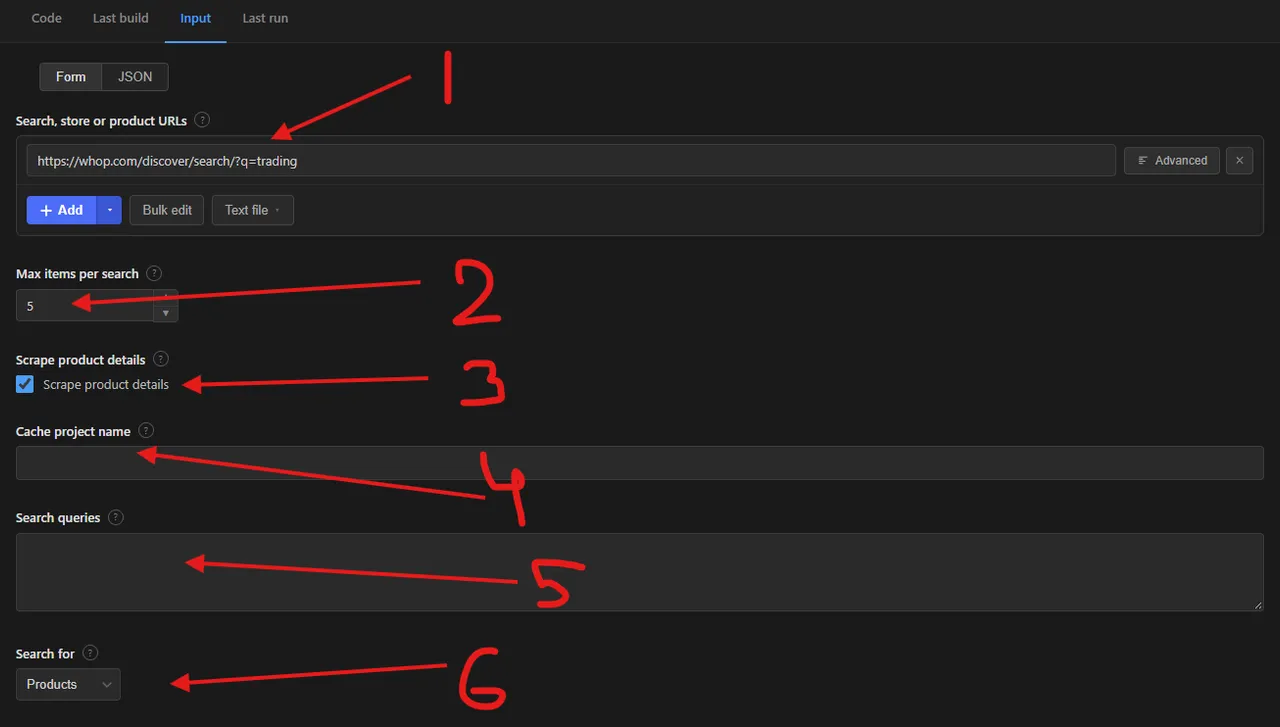
| Field | Type | Required | Default | Description |
|---|---|---|---|---|
Search, store or product URLs (startUrls) | array | — | — | Whop search URLs, store URLs or product URLs. |
Max items per search (maxItems) | integer | — | 5 | Maximum unique items saved for each search query or search URL. |
Scrape product details (scrapeDetails) | boolean | — | true | Adds every plan, owner, FAQ, social links, features, affiliate rate and latest reviews. Turn off for faster runs. Product URLs always include details. |
Cache project name (cacheProjectName) | string | — | — | Use the same name on each run to get only new items. Cached items are skipped, not charged and not counted towards Max items. Records get changeType: new. |
Search queries (searchQueries) | array | — | — | Keywords to search the Whop marketplace for. Each query is searched separately. |
Search for (searchType) | string | — | products | products (one record per product with prices and plans) or businesses (one record per seller). Applies to searches. |
Proxy configuration (proxyConfiguration) | object | — | no proxy | Whop works without a proxy. Enable Apify Proxy only if you get blocked. |
Supported URL types:
- Search:
https://whop.com/discover/search/?q=trading - Store:
https://whop.com/heatseeker/ - Product:
https://whop.com/discover/merov/merovclub-adhesion/orhttps://whop.com/merov/merovclub-adhesion/
📦 Whop products scraper output data
Each product is saved as one dataset item with the fields id, url, title, headline, description, category, companyId, companyName, companyRoute, companyUrl, companyLogo, companyMemberCount, businessType, industryType, reviewsAverage, reviewsCount, verified, activeUsersCount, whopRanking, gmvUsd, appSessionsCount, reviewStarCounts, planId, planName, planType, priceText, price, initialPrice, renewalPrice, currency, billingPeriod, trialDays, free, releaseMethod, plansCount, plans, cta, ctaUrl, affiliatePercentage, ownerId, ownerUsername, ownerName, ownerBio, features, socialLinks, faq, media, latestReviews, createdAt, firstApprovedAt, updatedAt, scrapedAt and, when caching is on, changeType. Business mode returns id, url, title, route, description, verified, memberCount, reviewsAverage, reviewsCount, totalViews, isLive, logo, bannerImage, ownerId, ownerUsername, ownerName, ownerBio, createdAt and scrapedAt. The dataset has 1 view, Overview, a table of the product, seller, category, price, rating and URL.
Output at a glance:
| Product | Seller | Category | Price | Rating | Reviews |
|---|---|---|---|---|---|
| Crystal Academy Membership | Crystal Academy | Trading | $65 / month | 4.82 | 3,549 |
| Pro | Skylit | Trading | $699 / month | 4.87 | 571 |
| Elite Options Pro | Elite Options Trader | Trading | $189 / month | 4.87 | 1,449 |
| Dr. Profit Premium | Dr. Profit Premium | Trading | $149 / month | 4.83 | 1,580 |
| Wealth Group Credit Card Pay | Wealth Group | Trading | $250 / month | 4.89 | 1,989 |
Sample output (raw JSON):
🔁 Scrape only new Whop products with the cache
Set the same Cache project name (cacheProjectName) on every scheduled run and the actor remembers which Whop products and businesses it has already saved under that name.
- Old data is skipped — a product saved in an earlier run is not scraped, saved or charged again.
- Max items counts new items only — skipped products do not use up Max items per search, so each run reaches further into the results instead of re-reading the same top matches.
- Every new row is labelled — records saved while caching is on carry
changeType: "new". - Separate caches per name — use one name per niche (for example
whop-tradingandwhop-fitness) and each keeps its own history. Use a new name to start from scratch. - Cheaper runs — you only pay for genuinely new products, and cached items never trigger the extra detail request.
Combine it with an Apify Schedule (daily or weekly) and a list of search URLs in Search, store or product URLs to get a feed of newly listed Whop products.
🐍 How to scrape Whop with Python, JavaScript or the API
Run the actor programmatically with the official Apify clients. Replace <YOUR_API_TOKEN> with the token from your Apify Console.
Python (pip install apify-client):
JavaScript (npm install apify-client):
cURL — start a run and wait for the dataset:
💡 What you can use Whop product data for
- Pricing research — compare subscription prices, billing periods and trials across trading, fitness, e-commerce and AI communities.
- Competitor tracking — watch rival products' ratings, review counts, plans and Whop ranking over time.
- Lead generation — find Whop sellers, their owners and social links in a niche.
- Market sizing — count products and businesses per keyword and category, with member counts and views.
- Review monitoring — collect the latest reviews and star ratings for products you sell or resell.
Creators, affiliate marketers, agencies and market researchers in the creator economy, online education and trading communities use this data to price products, pick affiliate offers and spot growing niches.
⚠️ Whop scraper limitations
- Hidden counters — sellers can hide member and active user counts; these then come back as
0. - Search depth — Whop returns at most the number of matches it reports for a query (usually a few hundred), 50 per page.
- Leaderboards and Content Rewards pages — not supported; use a search query, store or product URL.
- Reviews — the 10 latest reviews per product are included, not the full review history.
❓ Whop scraper FAQ
Can I scrape Whop legally?
The actor only collects data that is publicly visible on whop.com without logging in. Scraping publicly available data is generally considered lawful (see hiQ Labs v. LinkedIn), but you are responsible for following Whop's Terms of Service and laws such as GDPR or CCPA when you handle personal data like owner names.
What data does the Whop scraper return?
Every product comes with title, headline, description, category, seller, default price and billing period, rating, review count, Whop ranking and dates. With Scrape product details on (the default) you also get every plan, the owner, FAQ, social links, included features, affiliate commission and the latest reviews.
How many Whop products can I scrape from one search?
Max items per search limits the unique items saved for each search query or search URL. The actor pages through results 50 at a time until that limit or the end of Whop's results, which is usually a few hundred matches per keyword.
Do I need a proxy to scrape whop.com?
No. The proxy is off by default and Whop answers plain requests. Turn on an Apify datacenter proxy only if you start seeing failed requests on very large runs.
How do I scrape Whop with Python?
Use the Python example above: start the actor with your search queries, then iterate over the dataset items of the finished run.
Can I run this Whop scraper on a schedule?
Yes. Create an Apify Schedule and set a Cache project name. Products already scraped under that name are skipped, are not charged and do not count towards Max items, so each scheduled run returns only new Whop products marked with changeType: new. See the cache section above for details.
What output formats are supported?
JSON, CSV, Excel, XML and RSS, either from the Output tab or through the Apify API.
How do I get only new Whop products on each run?
Set the same Cache project name on every run. Items saved in earlier runs are skipped before they are scraped or charged, so the dataset holds only new products.
Can I scrape Whop sellers instead of products?
Yes. Set Search for to Businesses and each record is a Whop seller with member count, total views, rating, review count, owner, logo and banner image.
🔗 Relevant actors for Whop and marketplace product data
| Scraper | Description |
|---|---|
| 🛍️ Carousell Products Scraper | Carousell.sg product listings: prices, seller ratings and deal methods. |
| 🇯🇵 Mercari Japan Scraper | Mercari Japan listings: price in JPY, sold status, condition and category. |
| 📦 Tokopedia Product Scraper | Tokopedia products: title, shop, price in IDR, stock, category and images. |
| ✉️ Substack Scraper | Substack posts and comments by keyword, publication or post URL. |
| ▶️ YouTube Channel Info and Stats Scraper | YouTube channel info and statistics from channel About pages. |
🔗 Other actors you may find useful
| Scraper | Description |
|---|---|
| 📅 Facebook Events Scraper | Public Facebook events by keyword, location and date, without logging in. |
| 📈 Kalshi Markets Scraper | Kalshi prediction markets: yes/no prices, implied probability and volume. |
| 💼 Dice Jobs Scraper | Tech job listings from Dice by keyword or URL: company, salary and location. |
| 🎬 TikTok Ad Library Scraper | TikTok Ad Library ads by keyword, advertiser or ad ID. |
| 🥾 AllTrails Scraper | Hiking, biking and running trails by park, city, state or coordinates. |
💬 Support & contact
If you encounter any issues or have questions, please open an issue.
You can also find more of our actors on the Actor Flow page.


