

Company Expansion Keyword Monitor
Pricing
from $2.40 / 1,000 expansion-signal-results
Company Expansion Keyword Monitor
Monitor public company websites, newsrooms, blogs, careers pages, and announcements for expansion keywords - hiring, funding, launch, partnership, market entry, office, and acquisition signals. One flat, CSV-ready row per matched signal with a transparent score. No login or cookies.
Pricing
from $2.40 / 1,000 expansion-signal-results
Rating
0.0
(0)
Developer

Delowar Munna
Maintained by CommunityActor stats
0
Bookmarked
2
Total users
1
Monthly active users
4 months ago
Last modified
Categories
Share
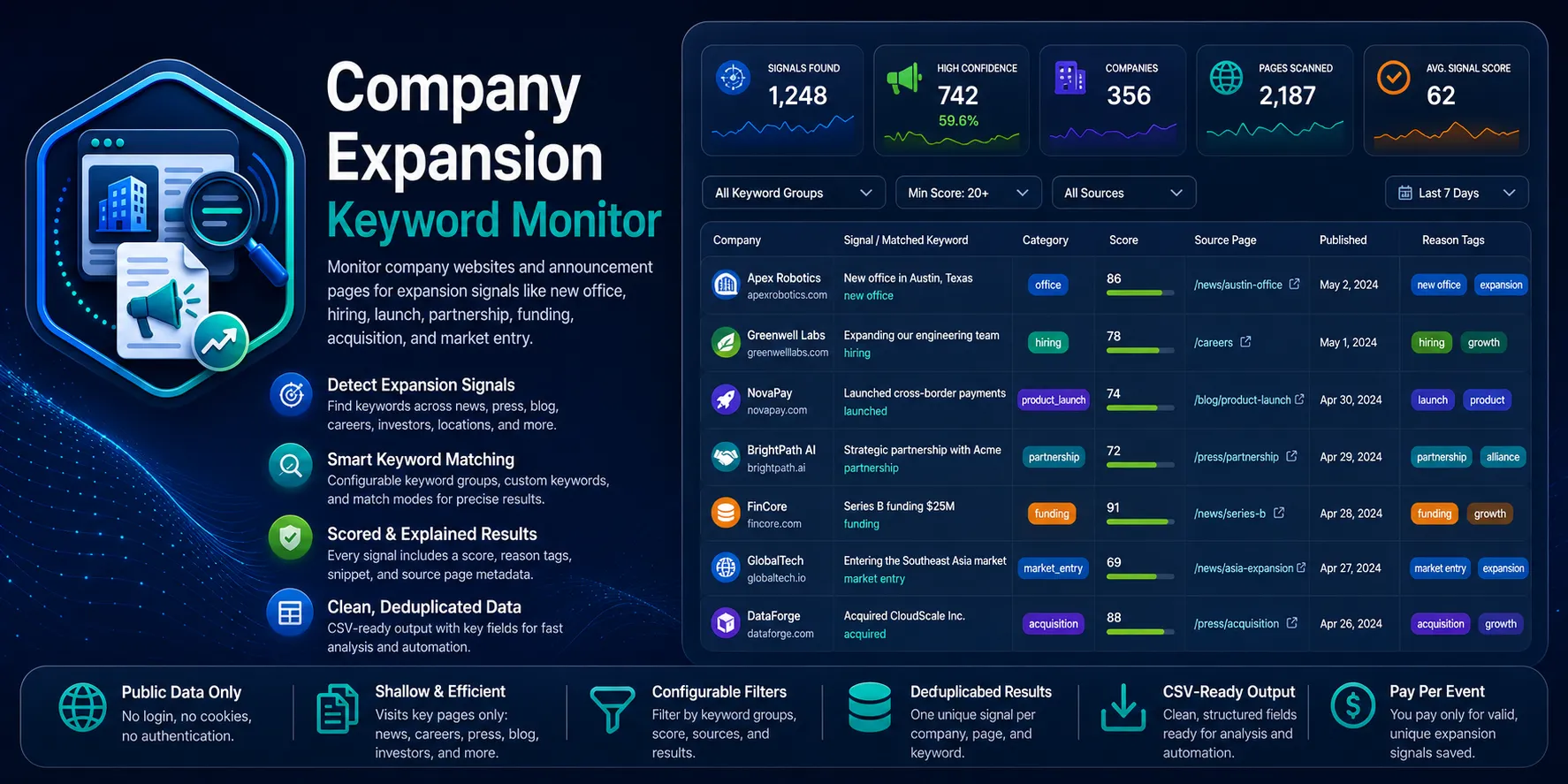
Monitor public company websites, newsrooms, blogs, careers pages, and announcements for expansion keywords — hiring, funding, product launch, partnership, market entry, new offices, and acquisitions. You give it company domains and/or specific page URLs; it returns one flat, CSV-ready row per matched signal with the matched keyword, a snippet, a signal category, and a transparent signal score (0–100).
Built for B2B sales, lead generation, agencies, market researchers, and competitor-intelligence teams who want pre-classified buying/expansion signals without configuring a generic crawler or writing keyword rules from scratch.
- ✅ No login, no cookies, no API keys. Public HTML only.
- ✅ One row per matched signal, classified into a category.
- ✅ Transparent, non-AI scoring you can audit field-by-field.
- ✅ Shallow, targeted discovery — homepage plus likely signal pages, bounded per company.
What it does
For every company domain or URL the actor:
- Normalizes the input (domain → homepage; URLs are fetched directly). Plain company names without a domain are skipped in V1.
- Fetches the start page over plain HTTP and, if enabled, shallow-discovers likely expansion pages on the same domain (news, press, blog, careers, about, locations, investors, announcements), bounded by
maxPagesPerCompany. - Matches your selected keyword groups + custom keywords against the visible page text.
- Scores each matched category with a transparent
signal_scoreand emits one flat row per signal, including a snippet and reason tags.
It does not do deep crawling, login/session scraping, browser rendering, contact/email enrichment, AI summaries, or historical diffing.
Input
| Field | Type | Default | Description |
|---|---|---|---|
startUrls | array of strings | [] | Exact company/announcement page URLs to monitor (max 500). |
companies | array of strings | [] | Company domains or website URLs. Plain names without a domain are warned + skipped in V1. |
enableShallowDiscovery | boolean | true | Discover likely expansion pages from each company homepage. |
maxPagesPerCompany | integer | 10 | Pages fetched per company/domain, incl. the start page (1–50). |
maxResults | integer | 100 | Global cap on saved signal rows (1–10000). |
keywordGroups | array of strings | all 8 groups | expansion, hiring, funding, partnership, product_launch, market_entry, office, acquisition. |
customKeywords | array of strings | [] | Your own expansion keywords/phrases (max 100, ≤80 chars each). |
matchMode | string | phrase | phrase (case-insensitive substring) or word_boundary (whole word). |
minSignalScore | integer | 20 | Drop matches below this score (0–100). |
includeSnippet | boolean | true | Include a short snippet around the matched keyword. |
deduplicate | boolean | true | Merge/skip duplicate signals. |
proxyConfiguration | object | { "useApifyProxy": true } | Datacenter, no proxy, or custom proxy URLs. Apify Residential rejected at startup. |
You must provide at least one valid URL or domain across startUrls / companies.
Example inputs
1. Monitor company homepages + a newsroom for the default expansion signals
2. Build a funding/office watchlist with your own keywords
3. Minimal run — just give it companies
Output
One flat row per matched company/page/keyword signal:
- Identity/source:
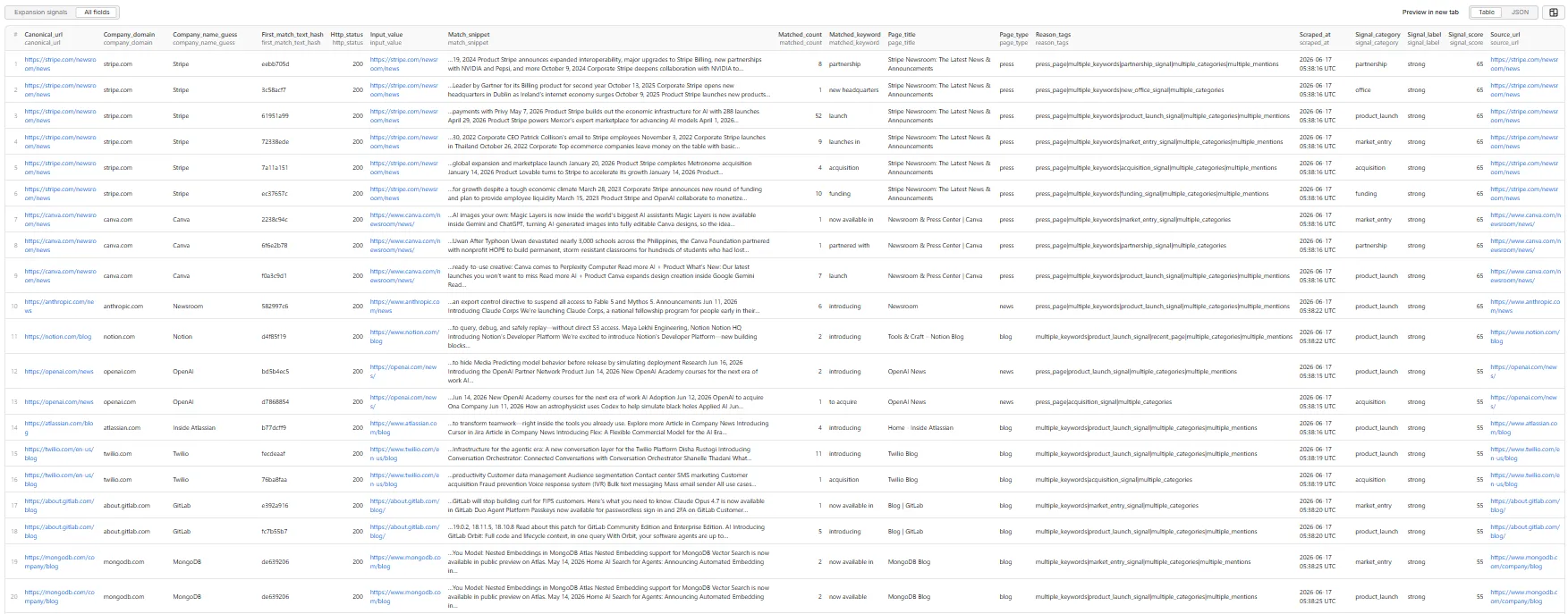
input_value,company_domain,company_name_guess,source_url,canonical_url,page_title,page_type(home/news/press/blog/careers/locations/investors/about/other),http_status - Match:
signal_category,matched_keyword,match_snippet,matched_count,first_match_text_hash - Scoring:
signal_score(0–100),signal_label(weak/moderate/strong/very_strong),reason_tags - Runtime:
scraped_at
Expansion signals — all fields (table view)
Sample record
Real output — an office-expansion signal detected on Stripe's newsroom (one of several categories the same page produced — see the run note below):
From that single Stripe newsroom page the run produced distinct rows for
office,partnership,product_launch,market_entry,acquisition,funding, andexpansion— each its own commercially-distinct signal with its own keyword, snippet, and score.
A run summary is stored in the default key-value store under RUN_SUMMARY with counters such as inputs_total, pages_fetched, raw_matches_found, results_saved, duplicates_removed, filtered_out, and charged_events.
Signal score
A transparent 0–100 weighted sum (see PRD §7), based only on visible public fields:
+20for any selected keyword match+10if the keyword appears in the page title or H1+10if the page type ispress,news,careers,locations, orinvestors+10if at least 3 related keywords appear on the page+15if the category is high-intent (funding,market_entry,office,acquisition,partnership,product_launch)+10if the page looks recent (visible date or URL year/month within ~18 months)+10if multiple expansion categories appear on the same page+15if a custom keyword matched
Labels: 0–24 weak, 25–49 moderate, 50–74 strong, 75–100 very_strong.
Pricing
Pay Per Event. One event, expansion-signal-result, is charged only after a valid, unique signal row is successfully pushed to the dataset. Duplicate signals, filtered-out matches, failed pages, blocked requests, and skipped invalid inputs are never charged. The actor honours your per-run spending limit and stops cleanly when it is reached.
🚦 Proxy policy
Use Apify Datacenter proxy or no proxy for normal runs — both work reliably for public company pages at this actor's conservative concurrency.
Apify Residential proxy is not supported. The actor fails at startup if apifyProxyGroups includes RESIDENTIAL. Reason: in pay-per-event actors, residential bandwidth (~$8/GB) is billed to the developer, not the run user, so a single bandwidth-heavy run could exceed the per-result event revenue.
If you genuinely need residential routing, supply your own residential provider via the proxy editor's Custom proxy URLs field — that traffic goes through your provider, not Apify, and is unaffected:
Notes & limitations
- Public HTML only, HTTP-first. No headless browser in V1, so pages that render their entire body in client-side JavaScript may yield little visible text.
- Shallow by design. Discovery follows only likely-signal links from the homepage, bounded by
maxPagesPerCompany— it is not a whole-site crawler. - Plain company names (no domain) are skipped in V1; supply a domain or URL.
phrasemode is a case-insensitive substring match (broad recall); useword_boundaryfor stricter whole-word matching.- This actor is built to clone into specialised variants (funding monitor, office-expansion monitor, product-launch monitor, partnership monitor).


