

Facebook Photos Scraper
Pricing
from $1.00 / 1,000 photo results
Facebook Photos Scraper
Scrape public photos from Facebook Pages, profiles and albums: full-size image URLs, alt text, captions, dates, reactions, comments and shares. No login or cookies. $1 per 1,000 photos, details $1 per 1,000 more.
Pricing
from $1.00 / 1,000 photo results
Rating
0.0
(0)
Developer

Delowar Munna
Maintained by CommunityActor stats
0
Bookmarked
7
Total users
4
Monthly active users
18 days ago
Last modified
Categories
Features
Share
Facebook Photos Scraper — Pages, Albums & Profiles, No Login
Get every public photo from a Facebook Page, profile or album as clean rows. Each row has the full-size image URL with its width and height, Facebook's alt text, and the owner. Turn on details to add each photo's date, caption, hashtags, mentions and exact reaction, comment and share counts. Export to JSON, CSV or Excel.
- 🖼️ Full-size image URLs with width and height, plus Facebook's alt text (and a thumbnail on photos-tab rows)
- 📅 Optional details: date, caption, hashtags, mentions, and exact reactions (by type), comments and shares, not "5.2K"
- 📚 Pages, public profiles, albums and single photos, mixed in one run
- 🗂️ Albums: read one album, or the first N albums of a Page, with the album name on every row
- ⏱️ Date filter: only photos newer than a date or "7 days"
- 🔓 No Facebook login, cookies or account, and no browser, so runs are fast
- 💸 Pay only for photos delivered. Details are a separate, optional charge, so image-only runs cost less
What can I scrape?
| Start URL | What you get |
|---|---|
A Page or profile: facebook.com/NASA, facebook.com/NASA/photos | Its photos, newest first |
A profile by ID: facebook.com/profile.php?id=100044561550831 | Its photos, newest first |
An albums tab: facebook.com/NASA/photos_albums | The first "Maximum albums" albums, and their photos |
An album: facebook.com/media/set/?set=a.416661013162614 | That album's photos, with the album name |
A photo: facebook.com/photo/?fbid=1667357648092938 | That one photo |
Locale and mobile hosts (en-gb.facebook.com, m.facebook.com) work too. Group, event, reel and video URLs get a free error row that names the right Actor for them.
Quick start
Run it with the defaults: you get 10 photos from NASA's Page, with details, in under a minute.
More examples
An album's photos, images only (faster and cheaper):
The last 30 days of photos from three brand Pages, with engagement:
The first 3 albums of a Page, 20 photos each:
A Page and one of its albums, with details. This is the input behind the screenshot and sample records under Output; the group URL shows what an error row looks like:
One photo:
Input
| Field | Default | What it does |
|---|---|---|
startUrls | NASA's photos | Pages, profiles, albums tabs, albums or photo URLs (full facebook.com/… URLs). |
resultsLimit | 10 | The most photos per start URL (per album for an albums tab), up to 5,000. |
includeDetails | on | Open each photo for its date, caption, hashtags, mentions and engagement. Charged per photo. |
photosNewerThan | empty | A date (2026-10-01) or a relative value (7 days, 2 weeks, 3 months). Turns details on. |
maxAlbums | 5 | For an albums tab: how many albums to read. |
proxyConfiguration | Apify Datacenter | See Proxy policy. |
debug | off | Log request status, size and timing. |
Why might I get fewer photos than I asked for?
- The Page, profile or album has fewer public photos.
- The date filter skipped older photos. A source stops once a whole page of its photos is older than your date.
- Facebook limited requests for a while. The run then saves what it has, marks the source in
RUN_SUMMARY, and saves a ready-to-runRETRY_INPUTwith the unfinished sources. - Your spending limit was reached. The run stops early and keeps everything already delivered.
Output
One row per photo. A start URL that produces no photos gets one free error row with status: "error", an errorCode (NOT_FOUND, NOT_PUBLIC, RATE_LIMITED, BLOCKED or UNSUPPORTED_URL) and a message.
| Field | Notes |
|---|---|
photoId, photoUrl | Facebook's photo ID and the photo's page |
imageUrl, imageWidth, imageHeight | The full-size image and its size in pixels |
thumbnailUrl | A small square preview. Photos-tab rows only; null for album rows and single photos |
altText | Facebook's accessibility caption: the owner's own alt text, Facebook's generated one, or "No photo description available." |
ownerId, ownerName | The Page or profile that posted the photo |
sourceUrl, sourceType, position | Which start URL listed it (page, albums, album, photo) and where in that list |
albumId, albumName | When listed from an album or an albums tab |
createdAt, createdDate | When it was published (with details) |
caption, hashtags, hashtagsText, mentions, mentionsText | The post text and what it tags (with details) |
reactionsCount, reactionsByType, commentsCount, sharesCount | Exact counts, and reactions split into like, love, care, haha, wow, sad, angry (with details) |
detailStatus | ok, skipped (details off) or failed (Facebook did not return the details; not charged) |
status, errorCode, errorMessage, scrapedAt |
Values Facebook does not publish are null, never 0.
⚠️ Image URLs expire. Facebook signs its image links, and they stop working after a few days. Download the images you need soon after the run.
Output views and sample records
The dataset has four views. The records below are real rows from Apify runs (long URLs and captions trimmed).
Photos: table view
Image, owner, date, caption, engagement and links, one row per photo.
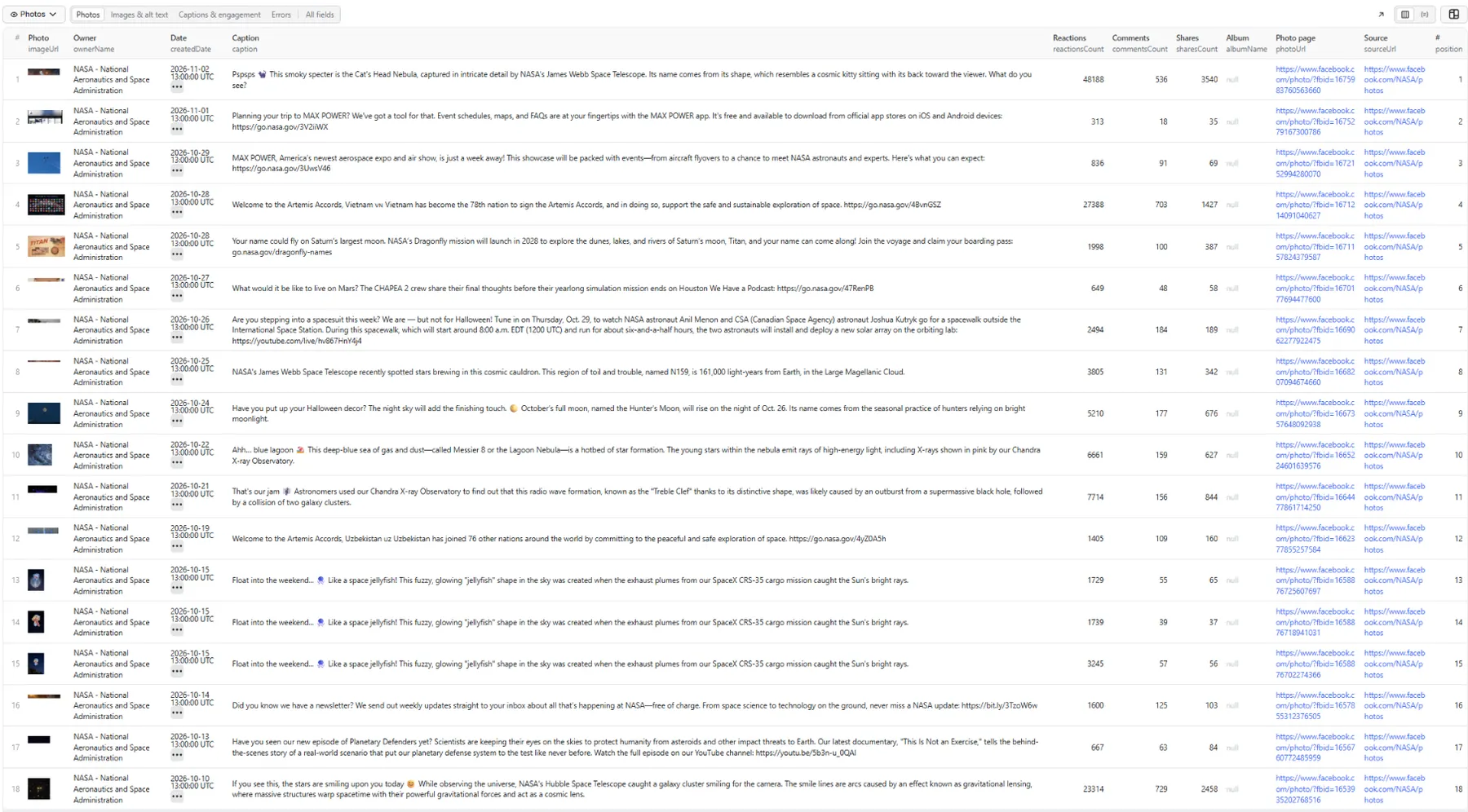
A full record from NASA's photos tab, with details on:
Images & alt text
Full-size image URLs with their size and alt text. A row from NASA's "Cover photos" album (album rows carry albumId and albumName, and no thumbnailUrl):
Captions & engagement
Date, caption, hashtags, mentions and every count. A row from Nike's photos tab:
Errors
Start URLs that produced no photos, and why. Free:
Run summary and retries
The key-value store holds RUN_SUMMARY (photos listed and saved, details fetched, duplicates skipped, photos skipped by the date filter, errors by code, one report per source) and, when a source stopped early, RETRY_INPUT: your input with only the unfinished sources, ready to run again.
Do I need a Facebook login or cookies?
No. The Actor reads only what Facebook shows a logged-out visitor, over plain HTTP. There is nothing to log in to and no account to get restricted.
What is not available?
- Private photos: friends-only profiles, private groups, and anything behind a login.
- Who is tagged in a photo, and who reacted.
- Photo comments. Use the Facebook Comments Scraper with a photo's
photoUrl. - Videos and reels. Use the Facebook Reels Scraper.
- Image files. The Actor returns image URLs, not the image files themselves.
Is a photo returned twice if it is in a Page and an album?
No. Photos are de-duplicated across the whole run: a photo found through a Page's photos tab and again through one of its albums is returned, and charged, once.
💸 How is pricing calculated?
Pay per photo. There are two events:
- Photo result: once per unique photo delivered to your dataset.
- Photo details: once per delivered photo whose details (date, caption, hashtags, mentions, engagement) were read. Only charged with "Include photo details" on.
You are not charged for error rows, duplicates, photos skipped by the date filter, details that could not be read, paging, retries, or the run summary. There is no start fee.
Image-only runs (details off) pay for the photo result only. Current prices are on the Actor's Pricing tab. This README deliberately doesn't quote figures, so it can never disagree with the live price.
If you set a spending limit on your run, the Actor stops when it is reached and keeps everything already delivered.
🔗 Coregent Facebook Actors
| You have | Use | To get |
|---|---|---|
A photo's photoUrl | Facebook Comments Scraper | the photo's comment thread, with replies |
| A Page URL | Facebook Posts Scraper | its posts, with text and engagement |
| A Page URL | Facebook Reels Scraper | its reels and videos |
| A Page URL | Facebook Pages Scraper | category, phone, email, website, address, followers |
Can I schedule it?
Yes. Save your input as a Task and add a Schedule in Apify Console. With photosNewerThan: "7 days" and a weekly schedule, each run returns only the new photos.
Can I call it through the API or MCP?
Yes, like any Apify Actor:
It is also available to AI agents through the Apify MCP server, and from the Apify SDKs for JavaScript and Python.
🚦 Proxy policy
Use Apify Datacenter proxy (the default) for normal runs.
Apify Residential proxy is not supported. If apifyProxyGroups includes RESIDENTIAL, the run uses Apify Datacenter proxy instead and logs a warning; it doesn't fail. Reason: on pay-per-result Actors, residential bandwidth is billed to the Actor's developer rather than to your run, and each photo's details are about 0.6 MB, so a single run could cost more than its results earn.
If you genuinely need residential routing, supply your own provider under Custom proxy URLs in the proxy editor. That traffic goes through your own account and is used as given:
Limitations
- Public, logged-out photos only, by design.
- Image URLs expire after a few days (see above).
- The date filter needs details, because the photo list itself carries no dates. Setting a date turns details on.
- Order is Facebook's. Photos tabs list newest first; albums list in the album's own order.
- Facebook limits request rates. Large runs over many Pages can slow down or stop early on some sources;
RETRY_INPUTlets you finish them.
Privacy and responsible use
This is an unofficial tool and is not affiliated with, endorsed by or sponsored by Meta or Facebook.
It collects only what Facebook shows publicly to a logged-out visitor. It does not log in, does not use cookies, and does not bypass any access control. Photos remain the copyright of their owners: you are responsible for how you use the images and data, including having a lawful basis to collect and process any personal information (for example under GDPR or CCPA).
Need something else?
Found a bug, or need a field or source that isn't here? Open an issue on the Actor's Issues tab. We read them.


