
Instagram Trending Audio Scraper - Reels Sounds & Music
Pricing
from $3.00 / 1,000 sound results
Instagram Trending Audio Scraper - Reels Sounds & Music
Find Instagram Reels audio by keyword or link: song and original sound details, artist, duration, Reel counts, and the top Reels using each sound. Track how fast a sound is growing between runs. No login, no cookies.
Pricing
from $3.00 / 1,000 sound results
Rating
0.0
(0)
Developer

Delowar Munna
Maintained by CommunityActor stats
0
Bookmarked
3
Total users
2
Monthly active users
8 days ago
Last modified
Categories
Features
Share
🎵 Instagram Trending Audio Scraper – Reels Sounds, Music and Reel Counts
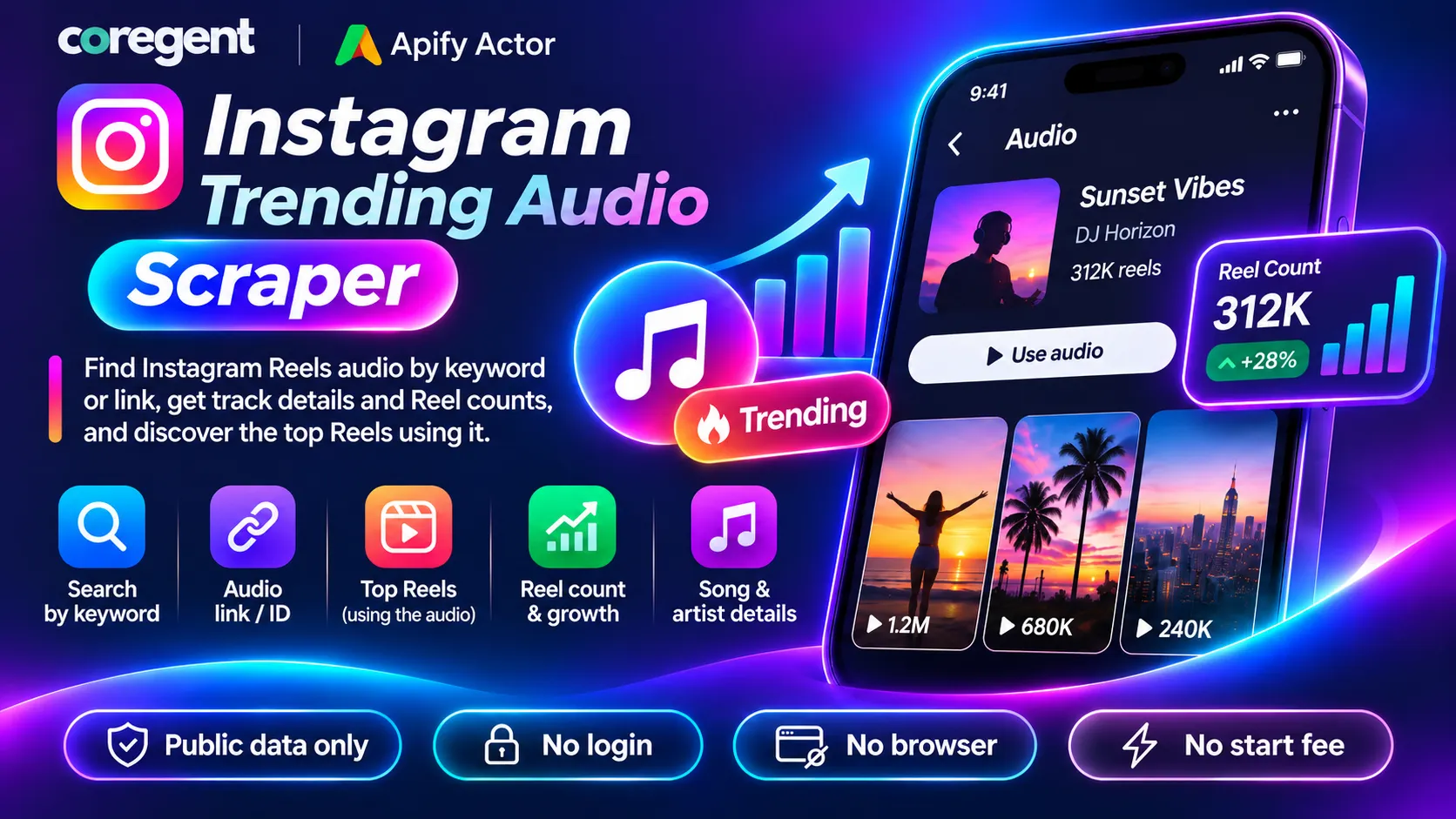
Find the Instagram Reels sounds people are using: search Instagram's audio library by keyword, or paste audio links, and get each sound's title, artist, duration, Reel count and trending flag, plus the top Reels that use it. Schedule it, and it shows how many new Reels each sound picked up since the last run.
No login, no cookies, no browser extension.
✨ What you get
- Sounds by keyword: song names, artists, moods or niches (
lofi,gym motivation,Taylor Swift). Up to 10 sounds per keyword, in Instagram's search order. - Sounds used in Reels about your keyword (optional): goes beyond the audio search's 10 by scanning Reels about each keyword and returning the songs and reused original sounds they use, with how many of the scanned Reels used each one. Good for "what's actually playing in my niche".
- Sounds by link: any audio page (
https://www.instagram.com/reels/audio/<id>/) or audio ID, for licensed songs and creators' original sounds. - Reel counts, trending flag and trend rank, where Instagram shows them.
- Growth between runs: the change in Reel count since this task last ran, in numbers and percent.
- Top Reels per sound (optional): Reel link, creator, plays, likes, comments, caption and date.
- Filters: minimum Reel count, trending only, original sounds only, licensed music only.
🧑💼 Who it's for
- Social media managers and agencies: pick a rising sound for a client's Reel before it peaks.
- Creators: find sounds in your niche and see which Reels do well with them.
- Labels, artists and music promoters: track how many Reels use a track, week by week, and who's using it.
- Trend researchers and AI workflows: feed sound and Reel data into reports and agents.
🚀 How to use it
- Enter one or more Keywords, or paste Audio links or IDs.
- Optional: switch on Include top Reels for each sound and set Max Reels per sound.
- Optional: set filters.
- Click Start. Results appear in the Sounds, Growth and Reels tabs; export to CSV, Excel or JSON.
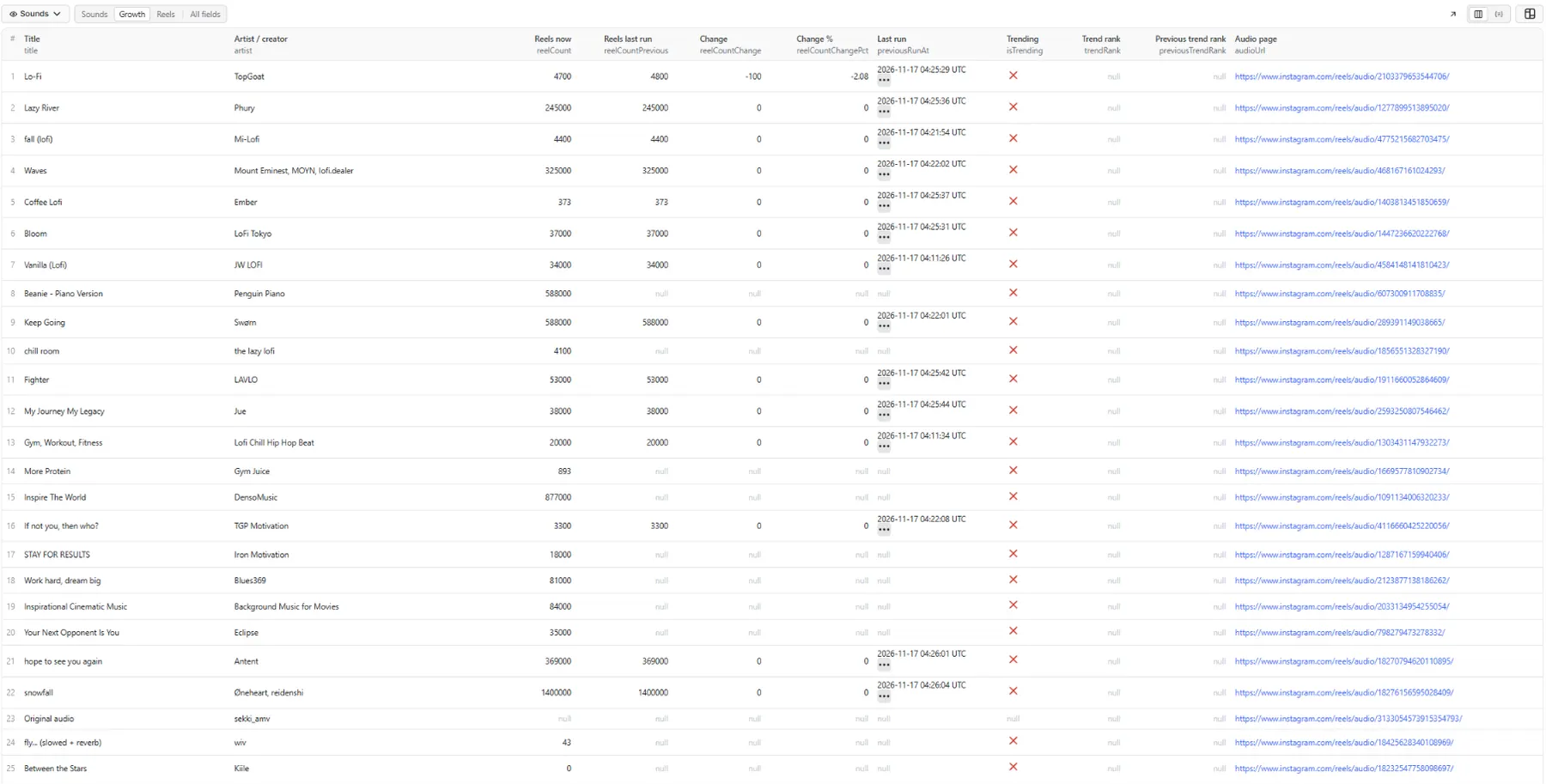
To track growth: save your input as a task and add a daily or weekly schedule. From the second run on, the Growth tab shows each sound's Reel count now, last run, and the change. Each saved task keeps its own history; give several tasks the same History name to share one.
Example inputs
Trending lofi and study sounds, with growth tracking:
More sounds per keyword, from Reels about the topic:
One sound and its top 20 Reels:
Running with the defaults searches lofi and returns about 10 sounds.
📦 Output
There's one row per sound (rowType: "audio"). When Reels are on, each sound's Reels are in its topReels list,
and the Reels tab shows them one per row (via the API: ?view=reels, or unwind=topReels). Inputs that couldn't
be used get a free rowType: "error" row.
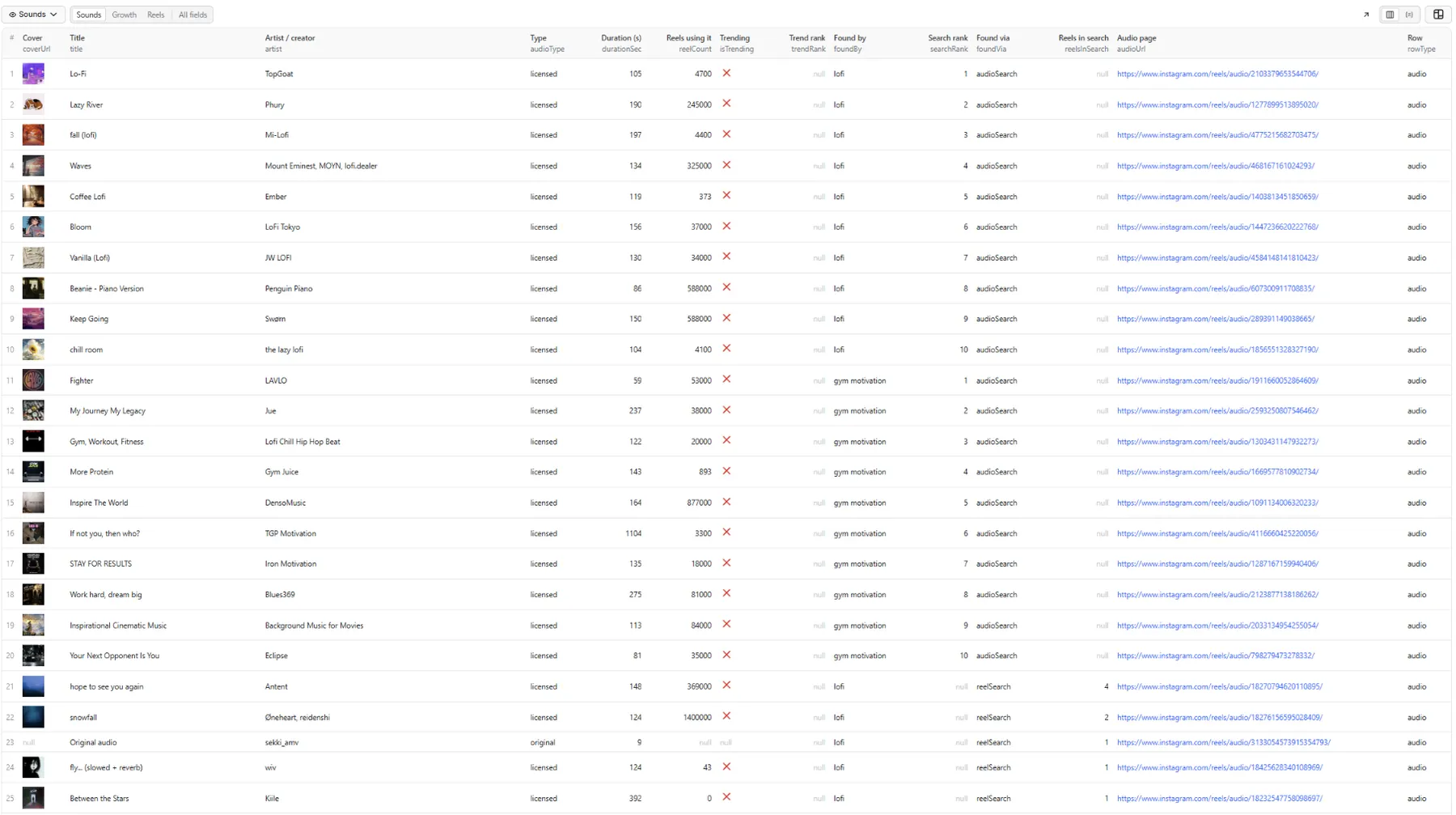
Sounds tab
One row per sound: title, artist, type, duration, Reel count, trending flag, how it was found, and the audio page.
Growth tab
Each sound's Reel count now and at this task's previous run, with the change in numbers and percent.
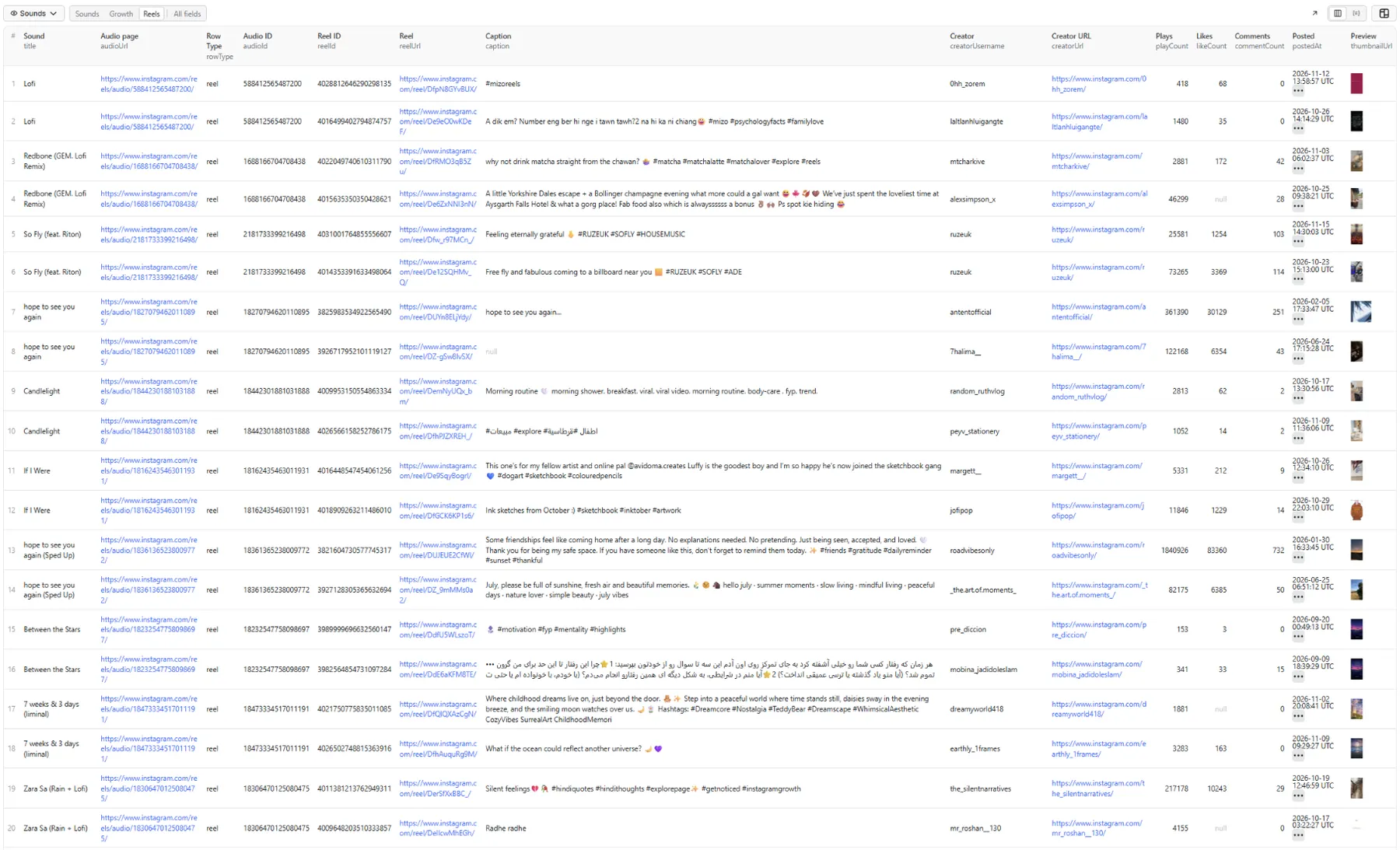
Reels tab
When Include top Reels is on: one row per Reel, with the creator, plays, likes, comments, caption, date and the sound it uses.
Fields
Sound row
| Field | Description |
|---|---|
audioId, audioUrl | Instagram audio ID and audio page link |
title, artist | Track title and artist (for original sounds, the creator's username) |
audioType | licensed or original |
durationSec, isExplicit, hasLyrics | Track details |
coverUrl | Cover art |
reelCount | Number of Reels using the sound, when Instagram shows it |
reelCountPrevious, reelCountChange, reelCountChangePct, previousRunAt | Growth since this task's previous run |
isTrending | Instagram's trending flag |
trendRank, previousTrendRank | Instagram's trending position now and before, for trending sounds |
ownerUsername, ownerUrl | Creator of an original sound |
foundBy, foundVia | The keyword (or url), and how the sound was found: audioSearch, reelSearch or url |
searchRank | Position in the audio search results |
reelsInSearch | For sounds found in the Reels search: how many of the scanned Reels used it |
reelsReturned, topReels | Number of Reels returned and the Reels themselves (when Reels are on) |
Each Reel in topReels: reelId, reelUrl, caption (first 300 characters), creatorUsername, creatorUrl,
playCount, likeCount (null when the creator hides likes), commentCount, postedAt, thumbnailUrl, audioId.
The Reels tab fills only when Include top Reels is on.
Sample output
A sound from the audio search, with growth tracking and Reels on (one of its 3 Reels shown, caption and image URLs shortened):
A sound found by the Reels search (Also find sounds used in Reels):
Fields Instagram doesn't provide for a sound are null, never guessed. The run's counts, filters and data-source
usage are saved in the RUN_SUMMARY record.
💳 Pricing
Pay per result, no start fee:
- Sound result: each sound from the audio search or an audio link.
- Reel-search sound: each sound found by Also find sounds used in Reels, only when that option is on. It costs a little more because each one takes extra lookups.
- Reel result: each Reel returned, only when Include top Reels is on.
Duplicates, sounds removed by your filters and error rows are free. Your run's spending limit is respected: the run stops cleanly when it's reached. See the Pricing tab for current rates (this README deliberately doesn't quote figures).
❓ FAQ
Why at most 10 sounds per keyword? That's what Instagram's audio search returns per query. For more, add keywords
(for example lofi, lofi chill, lofi beats), or turn on Also find sounds used in Reels about each keyword:
each Reel search page typically adds several more sounds. Creators' own audio (used only in their own Reel) is
skipped; original sounds are included when someone else's Reel reuses them.
Why do some original sounds have no Reel count? Instagram doesn't return a Reel count for many original sounds. Their title, creator and duration are still filled.
Can I download the audio? No. The scraper returns the audio page link and cover art, not the audio files, which are copyrighted.
Why does the Reel-count change sometimes show 0? Instagram shows Reel counts rounded (for example 4.7K or 588K), and that's the number we return. A sound has to gain enough Reels to move the rounded figure before the change shows, so daily runs on very popular sounds often show 0; weekly runs show movement more clearly.
Why is reelCount, isTrending or trendRank sometimes empty? Instagram doesn't show them for every sound
(trend ranks only exist for trending sounds). Filters that need a value keep sounds without it, and the run summary
counts how often that happened.
Do I need an Instagram account? No.
🔗 Related scrapers
- TikTok Sound / Music Scraper: the same idea for TikTok sounds, with matching field names.
- Instagram Reels Scraper
- Instagram Hashtag Scraper
⚖️ Disclaimer
This Actor collects publicly available data only. It is not affiliated with, endorsed by, or connected to Instagram or Meta. You are responsible for using the data in line with applicable laws and Instagram's terms.


