

LinkedIn Post Comments Scraper
Pricing
$1.00 / 1,000 comment results
LinkedIn Post Comments Scraper
Scrape the top public comments from LinkedIn posts - the most relevant comments LinkedIn shows publicly (about 10 per post), with comment text, commenter names and profile URLs, exact timestamps, reaction counts, mentions, links and hashtags. No LinkedIn login or cookies required.
Pricing
$1.00 / 1,000 comment results
Rating
0.0
(0)
Developer

Delowar Munna
Maintained by CommunityActor stats
0
Bookmarked
3
Total users
2
Monthly active users
12 days ago
Last modified
Categories
Share
Scrape the top public comments from LinkedIn posts. Paste one or more post URLs and get one clean row per comment for the comments LinkedIn shows publicly on each post - its most relevant ~10: comment text, exact timestamp, commenter name and profile URL, reaction count, mentions, links, hashtags, attached images and source-post context. Export as JSON, CSV or Excel.
Built for quick engagement checks across many posts: who the most visible commenters are, what they are saying, and which companies are joining in. It does not yet collect every comment on a post, replies, newest-first order or commenter headlines (see Limitations).
No LinkedIn login, cookies or browser extension required.
What you get
| Field | Description |
|---|---|
recordType | COMMENT (top-level). REPLY is reserved for when replies become available |
commentId, commentUrn, commentUrl | Stable comment identifiers and a permalink that opens the post at that comment |
text, createdAt | Comment text (line breaks preserved) and exact ISO timestamp |
parentCommentId, rootCommentId | Thread links: a comment's rootCommentId is its own ID and parentCommentId is null |
commentRank, replyRank | Position under the requested sort order |
replyCount, isPinned, isEdited | Not shown on LinkedIn's public page, so currently null |
reactions | total; the per-type keys (like, praise, ...) are currently null |
commenter | name, profileUrl, publicIdentifier, imageUrl, isCompany (headline and profileId currently null) |
mentions, links, hashtags, media | Tagged people/companies, outbound links, hashtags, attached images |
post | postId, postUrn, activityId, postUrl, inputUrl, reportedCommentsCount |
sortOrder, dataSource, scrapedAt | Order actually applied, which source served the row, scrape time |
Never estimated. If a value is not publicly available for a comment, it is null - not 0 and not false. For example, when only a reaction total is visible, the breakdown fields are null.
How it works
- Each post URL is normalised (tracking parameters, fragments and comment-specific links are reduced to the parent post) and duplicates are removed.
- The actor opens the post's public page - the same page a logged-out visitor sees. It proves the post is public and shows the post's total comment count and its most relevant top-level comments (typically about 10).
- Those comments are parsed into rows in LinkedIn's relevance order. When a post has more comments than its public page shows, you get the visible ones and the post is marked
PARTIAL_RESULTin the run summary, with LinkedIn's total. - Comments are deduplicated by comment ID across posts, so the same comment reached through two URLs is never saved or billed twice.
FAQ
Which post URL formats are supported?
https://www.linkedin.com/feed/update/urn:li:activity:<id>https://www.linkedin.com/feed/update/urn:li:ugcPost:<id>https://www.linkedin.com/posts/<author>_<slug>-activity-<id>-<hash>https://www.linkedin.com/posts/<author>_<slug>-ugcPost-<id>-<hash>- Country subdomains (
uk.linkedin.com,de.linkedin.com, ...) work too.
Can I use comment-specific URLs? Yes. A link containing ?commentUrn=... (or a /feed/update/urn:li:comment:(...) link) is normalised to its parent post, and all of that post's comments are collected.
Do I need to log in or provide cookies? No. The actor never asks for credentials or cookies.
Can I scrape multiple posts? Yes - up to 1,000 post URLs per run, processed in parallel. One failed post never fails the run.
Can I scrape all comments? Not yet. The actor returns the comments LinkedIn shows on a post's public page - about the 10 most relevant. For a post with more, the run summary marks it PARTIAL_RESULT and gives LinkedIn's total comment count. Scrape all comments is accepted but currently returns the same ~10.
How do comment limits work? Max comments per post caps top-level comments per post. Values above ~10 currently return the ~10 the public page shows.
Are replies included? Not yet. LinkedIn's public page doesn't show replies, so Include replies currently returns no reply rows. Replies will come as their own rows (recordType: "REPLY", linked by parentCommentId and rootCommentId) once a source for them is available.
Which sort orders are supported? Relevance - LinkedIn's own order, which commentRank follows. NEWEST is accepted but not available yet: comments come back in relevance order, each row records the order actually applied in sortOrder, and the run summary notes it.
Are commenter headlines and profile URLs included? Profile URLs (people and company pages) are included for virtually every comment. Headlines are not: LinkedIn's public page doesn't display them, so headline is null. To get them, pass commenter.profileUrl to a profile scraper.
Are reaction types included? The reaction total is included. The per-type breakdown isn't shown on the public page, so those fields are null - never estimated.
Are mentions, links and hashtags included? Yes. Mentions are structured (name, type, publicIdentifier, profileUrl); links have LinkedIn's redirect and tracking wrappers removed.
What happens when a post can't be scraped? Nothing is charged for it. Every post gets a status in the RUN_SUMMARY key-value record:
| Status | Meaning |
|---|---|
SUCCESS | All requested comments were collected |
PARTIAL_RESULT | Some comments were collected but fewer than requested (reason given) |
NO_COMMENTS | The post has no comments |
INVALID_POST_URL | The URL is not a LinkedIn post URL (e.g. a profile or company page) |
POST_NOT_FOUND | The post does not exist or was deleted |
POST_UNAVAILABLE | The post is not public |
RATE_LIMITED / BLOCKED / TEMPORARY_LINKEDIN_ERROR | LinkedIn refused or failed the request - try again later |
SKIPPED_SPENDING_LIMIT | Your per-run spending limit was reached before this post |
Posts worth retrying are written to the RETRY_INPUT record - paste it back as input to re-run just those.
How does pricing work? Pay per result: you are charged once per unique comment or reply row saved to the dataset, at the same price for both. Post lookups, pagination, retries, duplicates, failed or comment-less posts and the run summary are free, and a run with no results costs nothing in result charges. See the Pricing tab for current rates - this README deliberately doesn't quote figures, so it never goes out of date. The actor stops cleanly at your per-run spending limit.
Can I schedule recurring collection? Yes - use Apify Schedules to re-run the same input (for example daily on a campaign post).
Can I use it from the API or an AI agent (MCP)? Yes. Use the Apify API, any official client, or the Apify MCP server; the input and output are plain JSON. See API example.
How do I enrich commenters afterwards? Feed commenter.profileUrl into a LinkedIn profile scraper for full profiles, then into a work-email finder. To find posts in the first place, use Coregent's LinkedIn Profile Posts Scraper (a person's or company's posts) or LinkedIn Posts Search Scraper (posts by keyword), then pass their post URLs here.
Input examples
Minimal - one post:
Several posts - mixed URL forms. This returned 24 comments (10 + 9 + 5) in a test run:
Output example
Results appear in the Comments & replies table (one row per comment or reply; All fields shows every column) and can be exported as JSON, CSV, Excel or HTML, or read through the API.
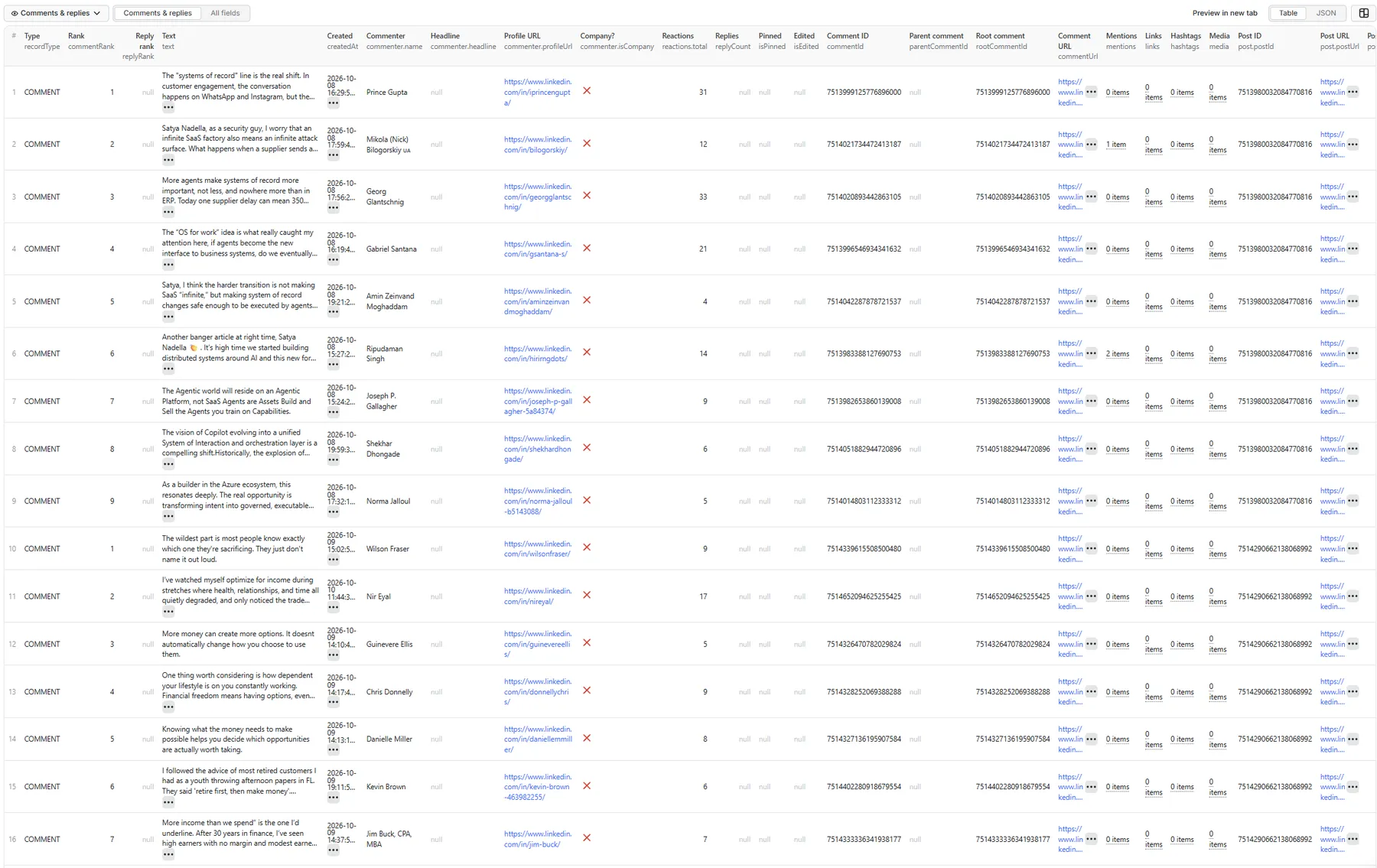
Comments & replies tab - sample record
A real row from a 3-post run (24 rows, public post pages). This one is a company commenter with a mention, a link and hashtags. The commenter's headline and reaction breakdown are null because LinkedIn's public page doesn't show them - never estimated.
API example
Run the actor and get the comment rows back in one call (replace <YOUR_APIFY_TOKEN>):
Or with the JavaScript client:
Run summary
The RUN_SUMMARY key-value record contains per-post statuses plus run metrics: posts processed / partial / failed, comments saved, rows per post, profile-URL availability, duplicate rate, retries, runtime per 1,000 rows and which data source served each post.
Each post gets an entry in posts. A real example - a post with over 1,000 comments, of which the public page shows the top 10:
You are charged only for the 10 rows saved.
🚦 Proxy policy
Use Apify Datacenter proxy (the default) or no proxy for normal runs - both work reliably for public LinkedIn post pages at this actor's conservative concurrency.
Apify Residential proxy is not supported. The actor will fail at startup if apifyProxyGroups includes RESIDENTIAL. Reason: in pay-per-event actors, residential bandwidth is billed to the developer, not the run user, so a single bandwidth-heavy run could exceed the per-result event revenue.
If you genuinely need residential routing, supply your own residential provider via the proxy editor's Custom proxy URLs field - that traffic goes through your provider, not Apify, and is unaffected:
Limitations
- Top comments only. LinkedIn's public page shows a post's most relevant comments - typically about 10. Posts with more are returned with those comments and marked
PARTIAL_RESULT. Every comment on a post, replies, newest-first order, commenter headlines, reaction breakdowns and pinned/edited flags are not available yet; those fields arenull, never guessed. - Only public posts can be read. Private, deleted or connection-only posts are reported as
POST_UNAVAILABLE/POST_NOT_FOUNDand never charged. - Ranks reflect LinkedIn's order at scrape time and can change. Comments may later be edited or deleted, and engagement counts change over time.
- Individual reactor identities, full commenter profiles, sentiment and email enrichment are out of scope (see the related actors above).
Compliance
This is an unofficial tool and is not affiliated with, endorsed by or sponsored by LinkedIn. It processes publicly available professional data only and does not log in, use cookies, bypass private content, message anyone or infer sensitive attributes. You are responsible for processing the data lawfully (e.g. GDPR/CCPA) in your downstream use.


