

X Comments Scraper
Pricing
from $0.30 / 1,000 reply results
X Comments Scraper
Scrape public replies and comment threads from X (Twitter) posts by URL or ID: reply text, date, likes, views, author, parent and reply depth. Optional original-post details. No login, no cookies. Pay only for replies saved.
Pricing
from $0.30 / 1,000 reply results
Rating
0.0
(0)
Developer

Delowar Munna
Maintained by CommunityActor stats
0
Bookmarked
2
Total users
1
Monthly active users
5 days ago
Last modified
Categories
Features
Share
X Comments Scraper — Twitter Replies & Threads Export

Collect the public replies under any X (Twitter) post: reply text, date, likes, views, author and media, with the original post's details on every row. Paste post URLs or IDs, set a limit, and export clean rows to JSON, CSV or Excel.
No X login, no cookies, no browser and no proxy setup. You pay only for replies saved to your dataset.
✨ What it does
- 💬 Replies from one post or a hundred — paste X post URLs (x.com, twitter.com, mobile and
/i/status/links all work) or numeric post IDs. - 🧵 Conversation context — every reply carries the post it answers (
parent_id), itsdepthand the conversation ID. Want the replies to a reply? Paste that reply's URL as a post. - 📈 Engagement on every reply — likes, reposts, replies, quotes, bookmarks and views.
- 👤 Author details — username, display name, user ID, verified badge and avatar.
- 🔀 Two reply orders — X's default Relevance order, or Latest first for monitoring new replies.
- 🎯 Filters — date range, language, minimum likes, and an option to drop the post author's own replies.
- 📝 Original post included — the original post's author, text, date, likes, reply count and views on every reply row, at no extra cost.
- ♻️ Repeat runs without paying twice — pass reply IDs or URLs you already have and they are skipped and never charged.
- ⚖️ Fair limits across posts — posts are read in turns, one page each, so one huge thread can't use up the whole run.
🚀 Quick start
- Paste one or more X post URLs into Post URLs.
- Set Maximum replies per post (default 10) and Maximum replies (total).
- Click Start. Replies appear in the dataset as they are collected.
Run it with the defaults and you get up to 10 replies from the example post.
Example inputs
Replies from two posts, 10 each. This is the input behind the output preview below:
Newest replies from the last 30 days, including replies to replies:
📥 Input
| Field | What it does |
|---|---|
postUrls | X post URLs whose replies you want. |
postIds | Numeric post IDs, as an alternative to URLs. Duplicates across both lists are fetched once. |
maxResultsPerSource | Stops each post after this many saved replies (default 10). |
maxResults | Stops the whole run after this many saved replies (default 100). |
sortBy | relevance (X's default order) or latest (newest first). |
since, until | Only replies posted in this window. A date (2026-11-01) or a relative period (7 days). |
language | Only replies in this language, as detected by X. |
minLikes | Only replies with at least this many likes. |
excludeAuthorReplies | Drop replies written by the original post's author. |
skipIds, skipUrls | Replies you already have. Skipped and never charged. |
debug | Saves the data provider's raw response for each post to the run's key-value store. For troubleshooting only. |
Filters are applied after replies are fetched, so a strict filter can mean more pages are read to fill your limit. Replies dropped by a filter are never charged.
📸 Output preview
A real run on two public posts, 10 replies each (the first input under Example inputs).
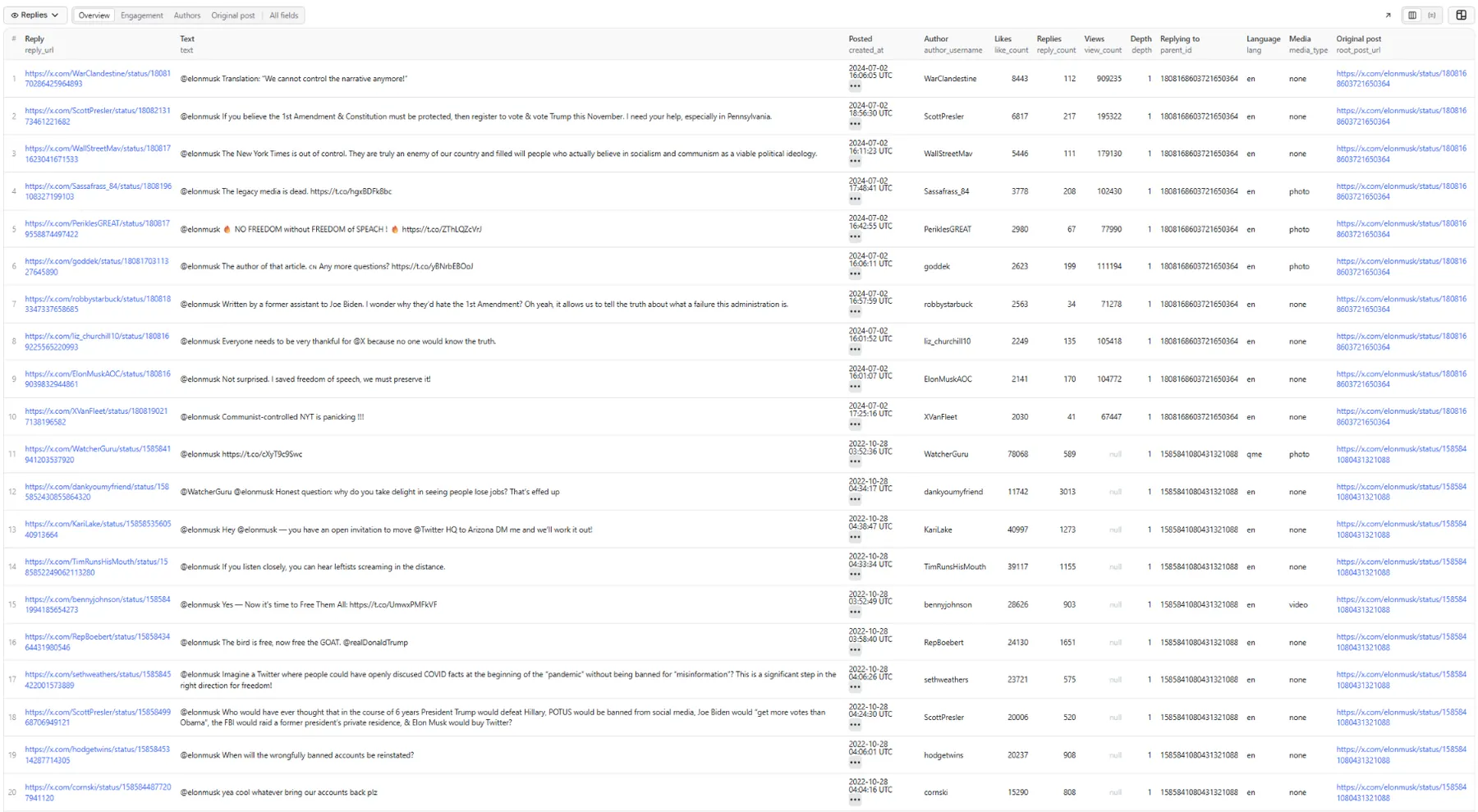
Overview
Reply text, date, author, likes, replies, views, depth, the post it answers, language and media type.
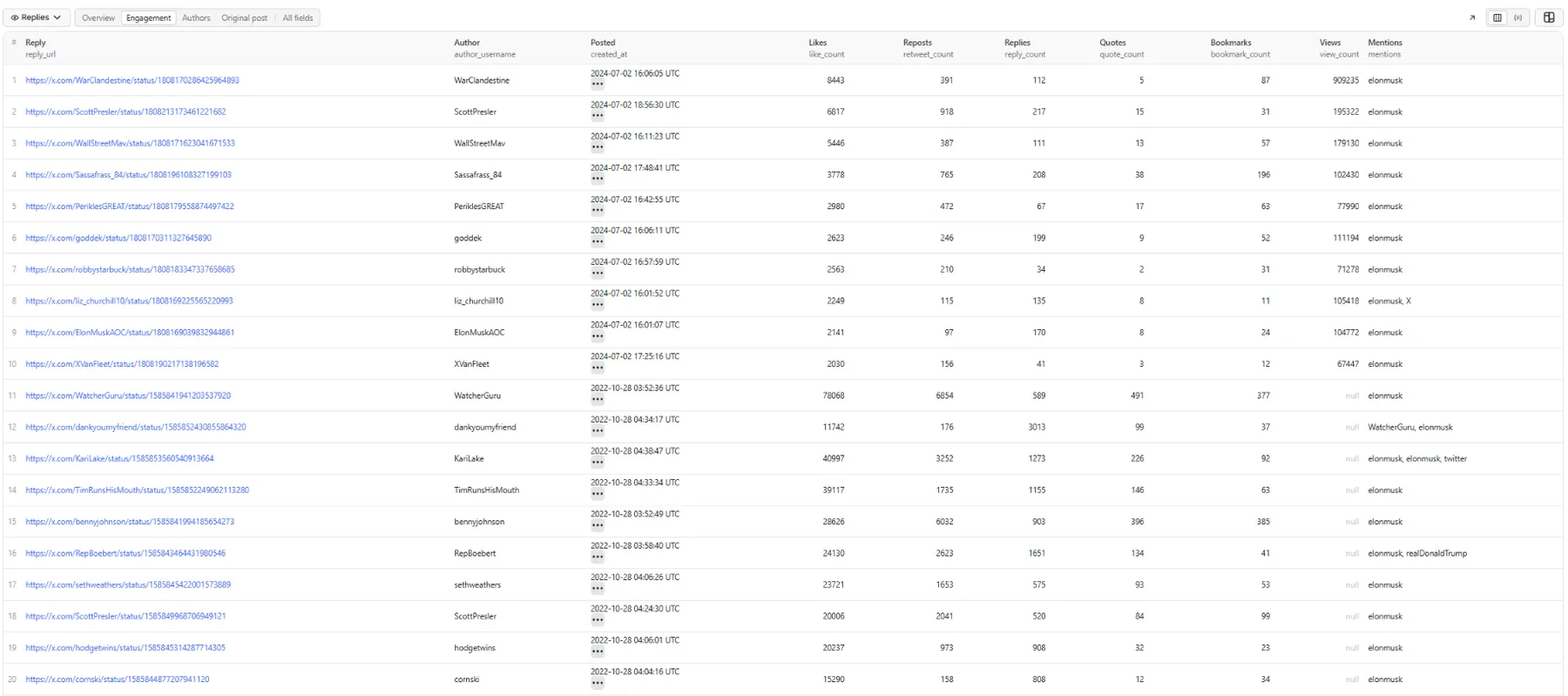
Engagement
Every engagement counter X shows on a reply, plus who it mentions.
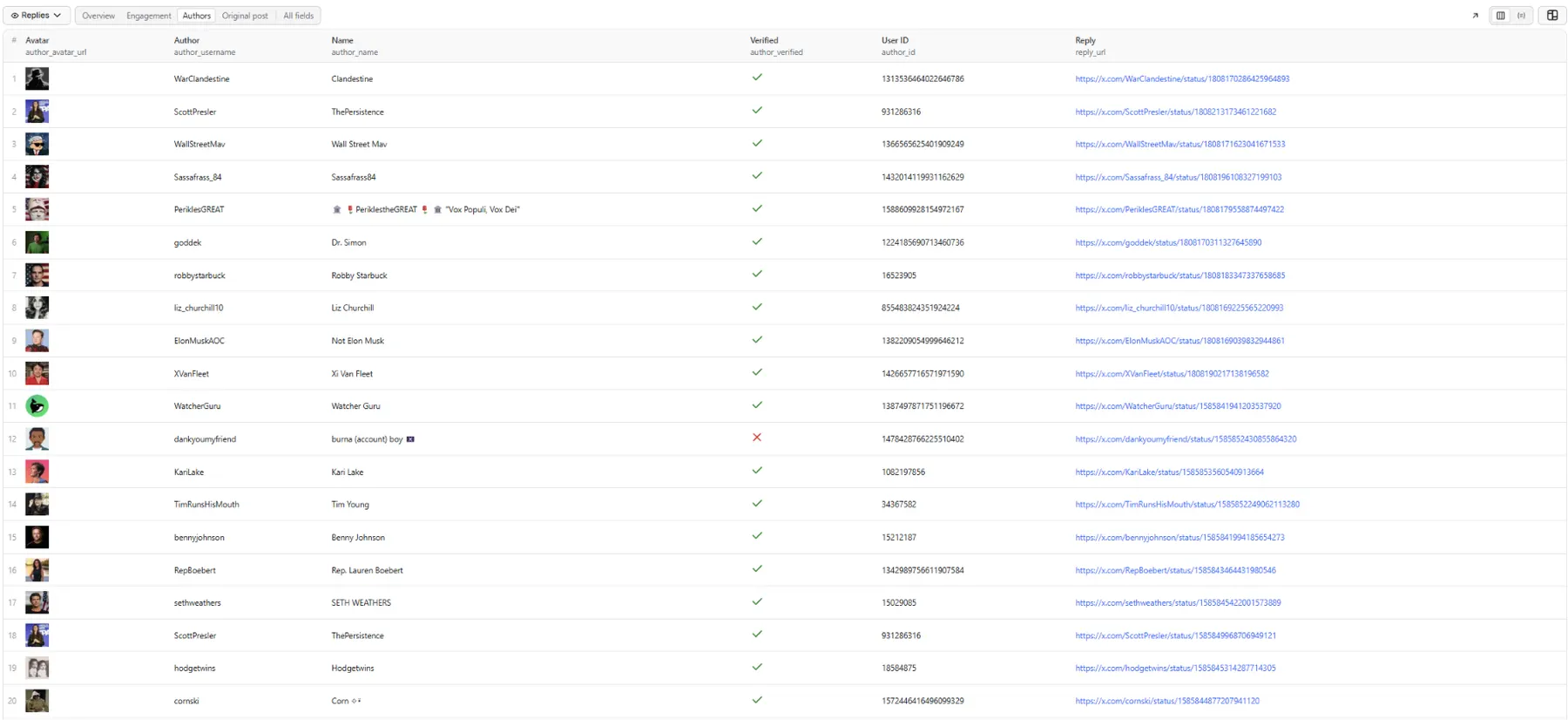
Authors
Who replied: avatar, username, name, verified badge and user ID.
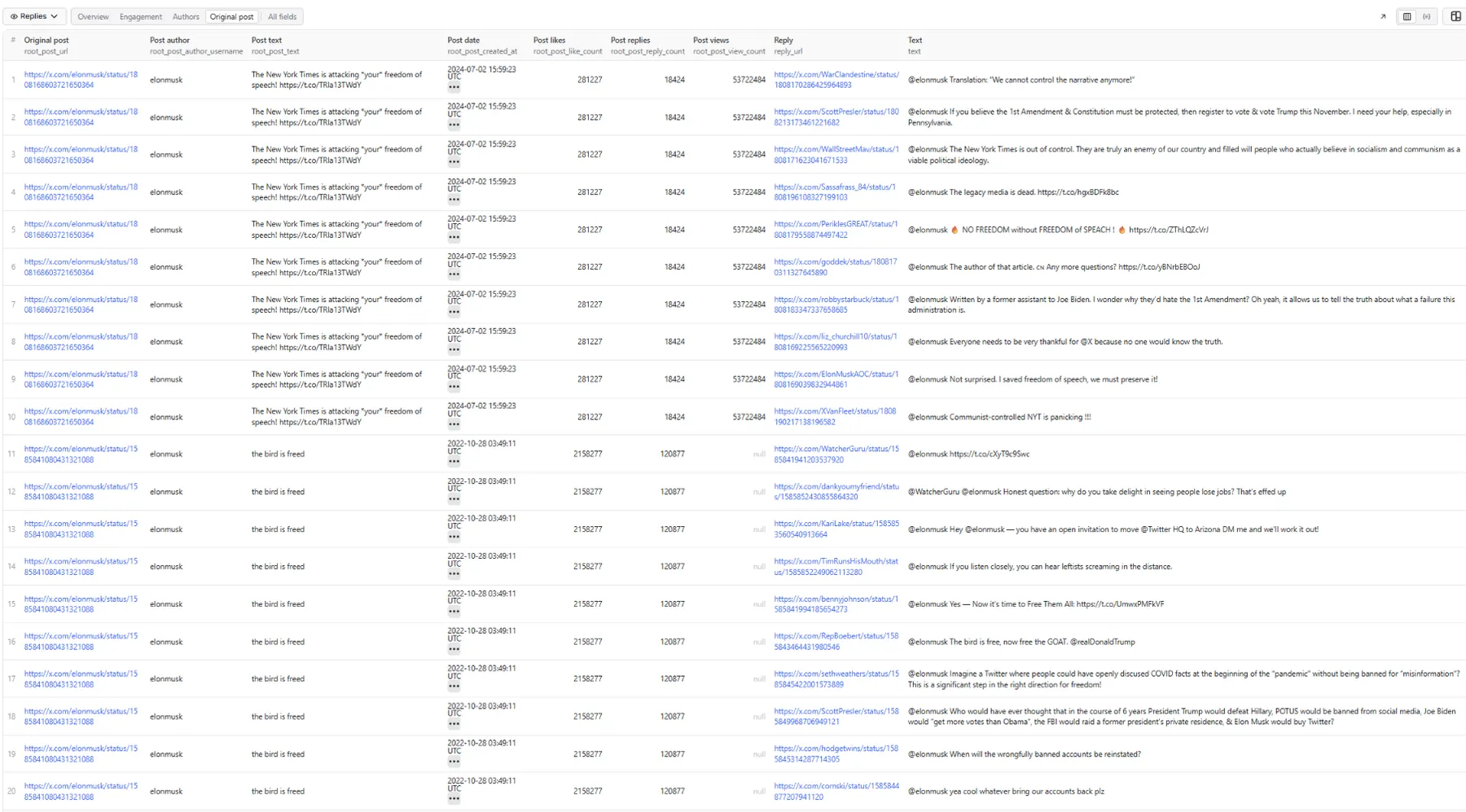
Original post
The post being replied to, on every row: author, text, date, likes, replies and views.
📤 Output
One row per unique reply. Missing values are null, never guessed. A full record with every field:
- Relevance order returns the direct replies to each post you give (
depth1,parent_id= that post). To go one level deeper, paste a reply's URL as a post. - Latest first returns the whole conversation newest first, including replies to replies. Every row has the real
parent_id;depthis 1 for direct replies andnullfor deeper ones. hashtags,urls,media_*,video_urlandis_sensitivearenullwhen the reply has none or X doesn't say.view_countisnullon posts from before X started counting views (late 2022).- Dataset views: Overview, Engagement, Authors and Original post.
Run summary
Each run also writes a RUN_SUMMARY record to the key-value store, kept out of the dataset: inputs given, valid and invalid entries, pages fetched, replies saved, duplicates removed, replies skipped and filtered, failed posts with a reason (for example "the post may not exist, be deleted, or be from a protected account"), and why the run stopped.
💰 Pricing
Pay per event:
- Reply result: charged once per unique reply saved to the dataset. The original post's details on each row are included.
Not charged: duplicates, replies dropped by filters or skip lists, failed posts, and the run summary. A run that saves nothing costs nothing in events. You can set a maximum cost per run in Apify, and the run stops cleanly when it's reached.
See the Pricing tab for current rates. This README deliberately doesn't quote figures, because prices can change.
🔁 Monitor replies on a schedule
To collect only new replies on a post or campaign:
- Set Reply order to Latest first and Replies posted after to a relative period such as
1 day. - Save the input as a task and schedule it daily in Apify.
- Optionally, pass the reply IDs from earlier runs in Reply IDs to skip, so they are never charged again.
⚠️ Limitations
- Only public replies are returned. Replies on protected accounts, deleted posts and replies X hides from logged-out viewers aren't available.
- X decides which replies it shows and in what order, so very large threads may not be returned in full.
- Filters run after fetching. X doesn't filter replies for us.
- In Relevance order a run returns one level, the direct replies to each post you give. Use Latest first, or a reply's URL as input, for replies to replies.
- Author follower counts and bios aren't available from this source, so they aren't in the output.
🔒 Privacy and disclaimer
This is an unofficial, independent Actor, not affiliated with or endorsed by X Corp. It processes only publicly accessible information. You are responsible for using the data in line with applicable law (including data protection rules such as GDPR), X's terms and Apify's policies. Don't use it to collect sensitive personal data.
🔗 Integrations
Use it from the Apify Console, the Apify API, scheduled tasks, webhooks, Make, Zapier, n8n, or any tool that reads Apify datasets. To collect posts themselves by keyword, hashtag or profile, see X Tweet Scraper.
❓ Troubleshooting
- A post returns no replies: check that the post is public and still online, and that it has replies.
- Fewer replies than the limit: X may show fewer replies to logged-out viewers, or your filters dropped some (see
RUN_SUMMARY.filtered_out). - "Unusable entry": the entry isn't an X post URL (it needs
…/status/<id>) or a numeric ID.
📝 Changelog
- 0.1 — first release: replies by post URL or ID, relevance or latest order, filters, skip lists, original post details on every row.


