

Airbnb Reviews Scraper | Ratings, Host Replies, Translations
Pricing
from $2.30 / 1,000 reviews
Airbnb Reviews Scraper | Ratings, Host Replies, Translations
Get Airbnb guest reviews by listing URL or ID: star rating, original text, Airbnb's translation, date, reviewer location and host reply, plus listing title and 6 category ratings on every row. Filter by date, stars, keyword or topic. Many listings per run, no login.
Pricing
from $2.30 / 1,000 reviews
Rating
0.0
(0)
Developer

Flowo
Maintained by CommunityActor stats
0
Bookmarked
2
Total users
1
Monthly active users
a day ago
Last modified
Categories
Features
Share
Get the guest reviews of any Airbnb listing as one flat row per review: the star rating, the original review text, Airbnb's own translation, the review date, the reviewer's first name and location, and the host's reply with its date. Every row can also carry the listing title, its overall rating and the 6 category ratings (cleanliness, accuracy, check-in, communication, location, value). Give listing URLs from any Airbnb domain or plain listing IDs; no login or API key is needed.
What does Airbnb Reviews Scraper do?
You give it one or many Airbnb listings, and it returns their reviews in the sort order you pick: newest first, lowest rated, highest rated or Airbnb's "most relevant". You can keep only reviews written since a date, only 1–3 star reviews, only reviews containing a keyword (searched by Airbnb) or only reviews Airbnb tagged with a topic such as CLEANLINESS. It is made for hosts and property managers watching their own listings, short-term-rental analysts comparing competitors, and researchers running sentiment or topic analysis on guest feedback.
How to scrape Airbnb reviews
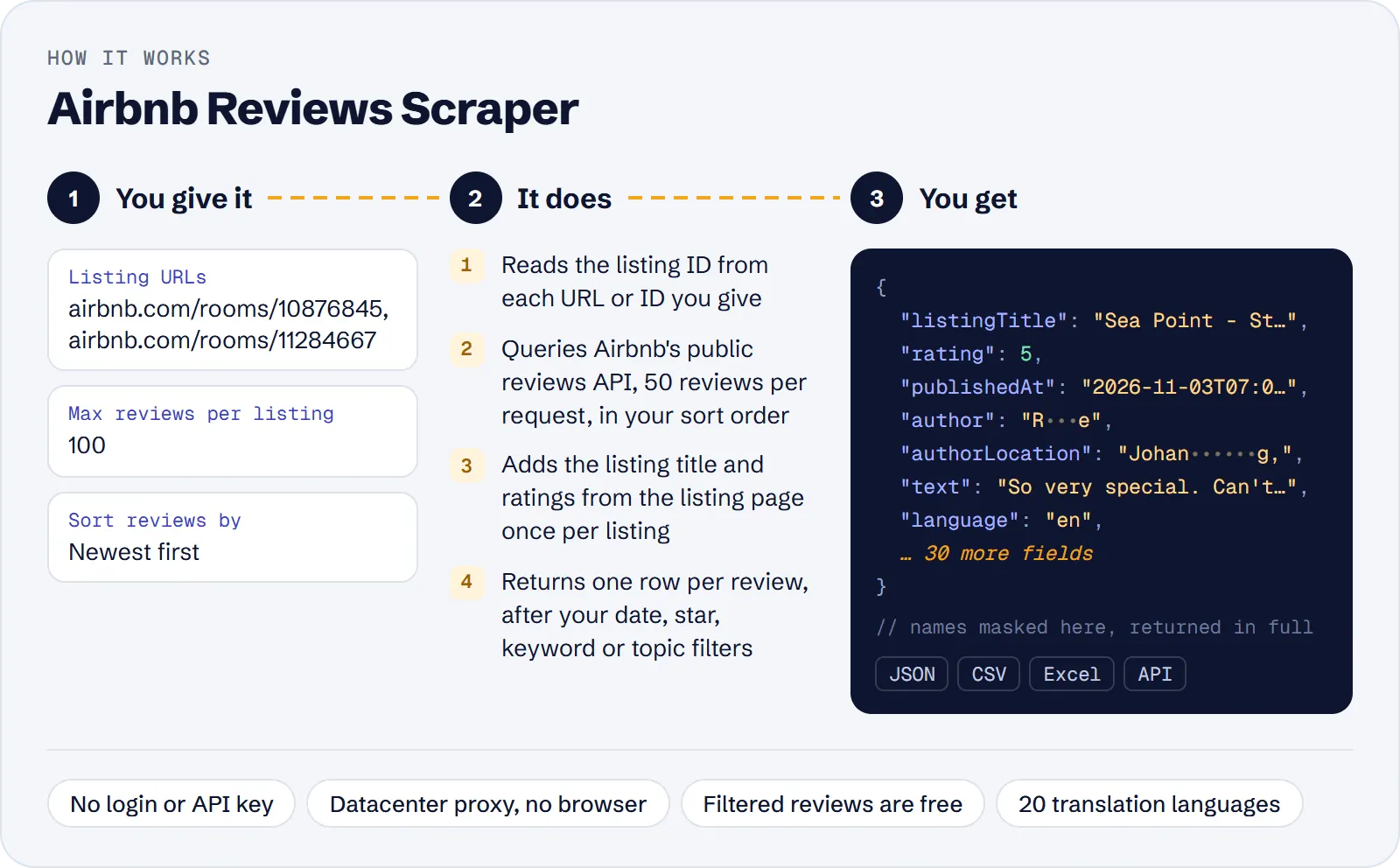
- Open the actor in Apify Console and paste one or more listing URLs into Listing URLs (e.g.
https://www.airbnb.com/rooms/50633275), or listing numbers into Listing IDs. - Set Max reviews per listing (default 100, 0 = every review) and pick Sort reviews by.
- Optionally set filters: Reviews since, Min rating / Max rating, Keyword in review or Topic, and the Translation and date language.
- Click Start. Download the reviews as JSON, CSV or Excel, or read them through the API.
How much does it cost to scrape Airbnb reviews?
Price per event by Apify plan:
| Event | Free | Bronze | Silver | Gold and above |
|---|---|---|---|---|
| Review | $2.70 per 1,000 | $2.43 per 1,000 | $2.16 per 1,000 | $1.89 per 1,000 |
| Actor start | $0.00005 | $0.00005 | $0.00005 | $0.00005 |
A test run with the API example input below returned 200 rows in 17 s.
You pay per review saved to the dataset, plus a small start fee per run. Reviews removed by your rating, date, keyword or topic filters are not charged, and neither are listings without reviews, listings that were not found or listings that failed. The listing info on every row (title, overall and category ratings) is included at no extra charge.
| Scenario | Reviews (events) | Cost on the Free plan |
|---|---|---|
| Newest 100 reviews of one listing | 100 | ≈ $0.27 |
| Prefilled example: 2 listings, up to 100 each (138 reviews) | 138 | ≈ $0.37 |
| All reviews of 20 competitor listings (~2,000 reviews) | 2,000 | ≈ $5.40 |
| Large research set | 10,000 | ≈ $27.00 |
Costs include the $0.00005 start fee. Paid Apify plans get a lower price per review.
Input
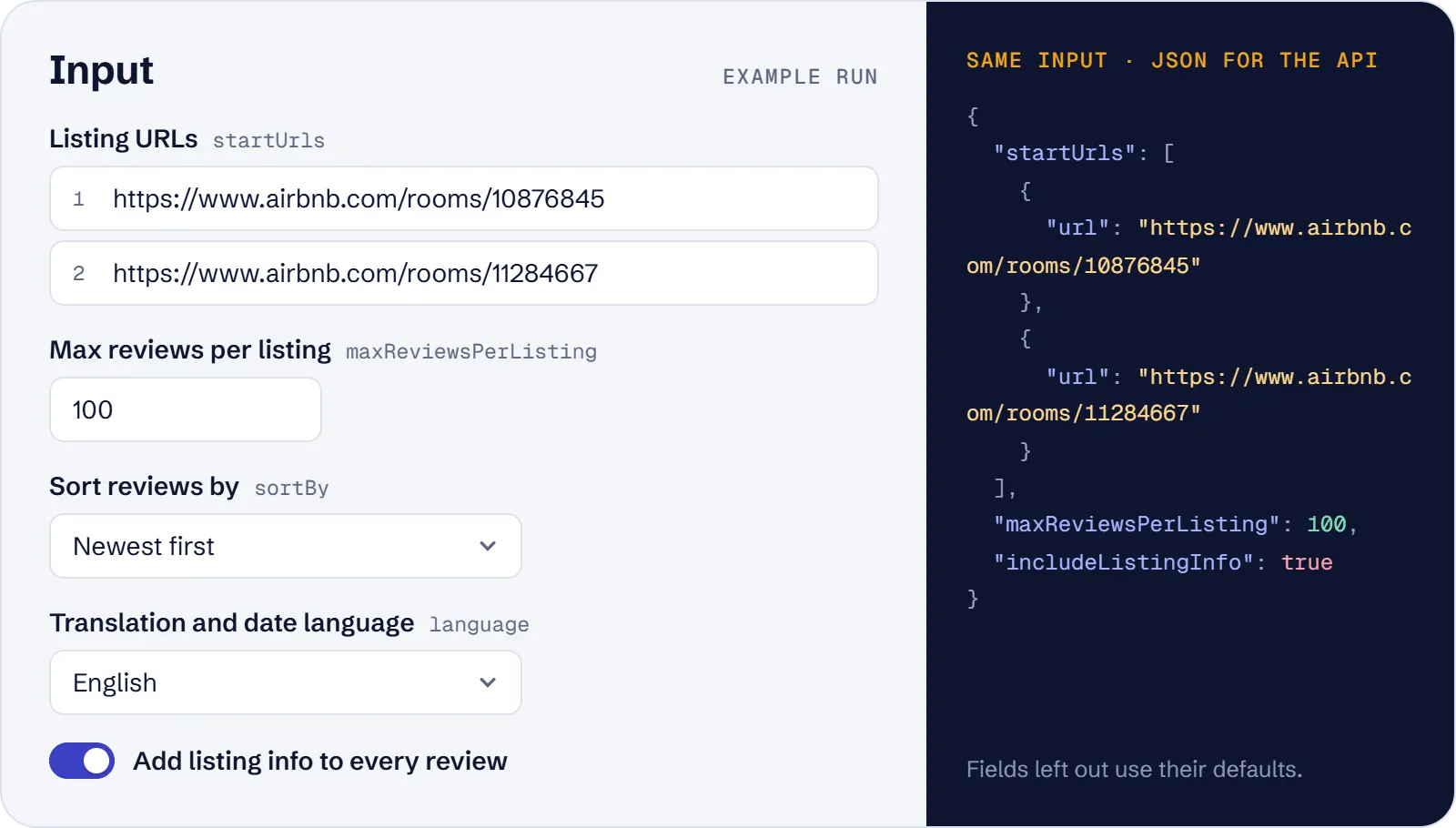
The actor needs at least one listing in startUrls or listingIds; everything else is optional.
| Field | What it does |
|---|---|
startUrls | Listing URLs on any Airbnb domain (airbnb.com, airbnb.co.uk, airbnb.de …), /rooms/<id> or /rooms/plus/<id>. Query strings are ignored. |
listingIds | Listing numbers (5–20 digits), e.g. 11284667. Combined with the URLs; a listing given twice is read once. |
maxReviewsPerListing | Reviews per listing after filters; default 100, 0 = all. |
maxItems | Optional cap on reviews in the whole run. |
sortBy | MOST_RECENT (default), RATING_ASC, RATING_DESC, BEST_QUALITY. |
sinceDate | Only reviews on or after this date (YYYY-MM-DD, UTC). |
minRating / maxRating | Star range 1–5. |
searchQuery | Keyword searched by Airbnb in the original review text. |
topic | Airbnb review topic, e.g. CLEANLINESS, LOCATION, CHECK_IN. Not together with searchQuery. |
language | One of 20 languages for Airbnb's translation and the text dates; default en. Does not filter reviews. |
includeListingInfo | Adds listing title, overall rating, review count and 6 category ratings to each row; default on. |
proxyConfiguration | Apify datacenter proxy by default. |
Example input:
What data can you extract from Airbnb reviews?
| Field | Description |
|---|---|
rating | Guest's star rating, integer 1–5 |
text | Original review text, HTML removed, line breaks kept |
textTranslated | Airbnb's translation into the chosen language, when the review is in another language |
language | Language of the original review |
publishedAt / publishedAtText | Exact review date (ISO) and Airbnb's text date ("2 days ago") |
author, authorLocation, authorTenure | Reviewer first name, and either their location or "N years on Airbnb" |
authorId, authorUrl, authorImageUrl, authorIsSuperhost | Reviewer profile details as shown on Airbnb |
hostName, hostId | Host the review is about |
hostResponse, hostResponseDateText | Host's public reply and its text date |
stayHighlight, stayHighlightType | e.g. "Stayed a few nights" / LENGTH_OF_STAY |
roomType | Room type of hotel listings |
photoUrls | Review photos, when there are any |
listingId, listingUrl, position | Listing and the review's 1-based position in it |
listingTitle, listingRating, listingReviewsCount | Listing title, overall rating and review count |
ratingCleanliness, ratingAccuracy, ratingCheckin, ratingCommunication, ratingLocation, ratingValue | Listing's 6 category ratings |
matchedReviewsCount | How many reviews match your keyword or topic |
url, id, scrapedAt | Review link, review ID and scrape time |
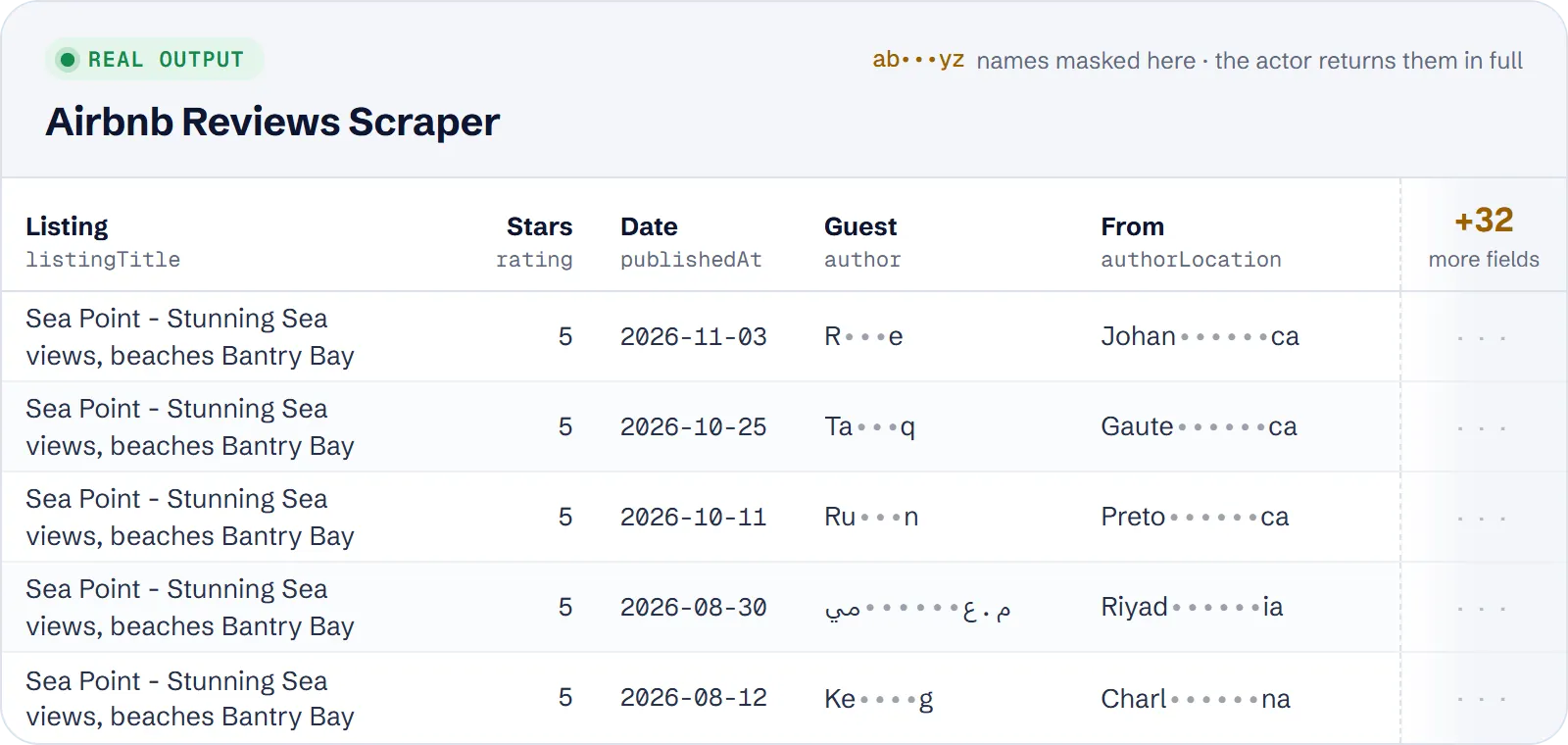
A real row (from a run on listing 10876845, shortened):
Use cases
- Monitor new reviews of your listings: newest first with Reviews since set to your last run; the actor stops paging at the first older review, so a weekly schedule gets only new reviews.
- Benchmark competitor listings: put 20 listing IDs in one run and get every review in one table, each row with the listing title, overall and category ratings.
- Collect complaints: Max rating 3 with lowest rated first returns only 1–3 star reviews; the reviews filtered out are free.
- Research a theme: a keyword such as
noiseor a topic such asCLEANLINESS, withmatchedReviewsCountshowing how many reviews match. - Read foreign reviews in one language: choose German, French or another of 20 languages to get Airbnb's translation next to the original text.
Limitations
- Only public reviews that Airbnb shows on the listing page are returned. Reviewers appear by first name only.
- The host reply date exists on Airbnb only as relative text ("1 week ago"), so
hostResponseDateTextis text, not a date. textTranslatedis null when the review is already in the chosen language or Airbnb has no translation for it; on some first requests Airbnb returns the untranslated text.- Airbnb has no server-side rating filter: with a rating filter or with Reviews since and a sort other than newest first, the actor reads all pages of the listing and filters them, which takes longer (filtered reviews are still free).
- The listing title comes from the English page, so it is in English or in the host's language whatever
languageyou choose. listingReviewsCountcan differ slightly from the number of reviews the API returns.- Fields such as
hostResponse,roomType,authorLocationandphotoUrlsare often empty because hosts and guests did not provide them.
Tips and troubleshooting
- Only new reviews: use
sortBy: MOST_RECENTwithsinceDate; it stops early. With other sort orders the whole listing is read. - All reviews: set
maxReviewsPerListingto 0. Airbnb returns 50 reviews per request, so 1,000 reviews take about a minute. - Keyword or topic, not both:
searchQueryandtopictogether is an input error. An unknown topic gives 0 rows and a warning listing the topics that listing has. - 0 rows? Check the run log: it says per listing whether it was not found, has no reviews, or your filters removed everything. Search, wishlist and experience URLs are not listings and are skipped with a warning.
- Proxy: the default Apify datacenter proxy works; residential proxy is not needed.
API, MCP and integrations
Run the actor from your code with the same JSON input as in Console. Your API token is in Console → Settings → API & Integrations.
Python (pip install apify-client):
Node.js (npm install apify-client):
HTTP — one request runs the actor and returns the results (runs up to 5 minutes; longer ones: run asynchronously):
AI agents (MCP). Add the actor as a tool of the Apify MCP server. Claude Code:
Claude Desktop, Cursor or VS Code: {"mcpServers": {"apify": {"url": "https://mcp.apify.com?tools=genial_candlestand/airbnb-reviews-scraper"}}}. Then ask, for example:
- "Get all reviews posted since 2026-10-01 for Airbnb listing 10876845"
- "Find 1-3 star reviews of airbnb.com/rooms/11284667 and summarize the main complaints"
- "Compare guest comments about noise in Airbnb listings 11284667 and 10876845"
Integrations. Run it on a schedule with Apify Schedules and send the results to Google Sheets, Slack, Zapier, Make, n8n or your webhook — see Apify integrations.
FAQ
Can I use listing URLs from airbnb.co.uk, airbnb.de or other domains?
Yes. Any Airbnb domain and /rooms/plus/ links work; the actor reads the listing ID from the URL. If the same listing is given twice, it is processed once.
How do I get only reviews posted since my last run?
Set Reviews since to the date and keep Newest first. Schedule the actor in Apify to run weekly or daily.
Are filtered-out reviews charged?
No. You pay only for reviews saved to the dataset. Reviews removed by rating, date, keyword or topic filters are free.
How is it different from other Airbnb review actors?
Rows are flat (no nested reviewer or host objects), each row can carry the listing title, overall rating and 6 category ratings, and you can filter by keyword, Airbnb topic, star range and date. Reviewer location and "years on Airbnb" are split into two fields, and the host reply date is included. The price is $2.70 per 1,000 reviews on the Free plan, against $5.00 for the most used Airbnb reviews actor.
Is it legal to scrape Airbnb reviews?
The actor collects only reviews that Airbnb shows publicly on listing pages, without logging in. Reviews include reviewers' first names and profile pictures, which are personal data; you are responsible for using the data lawfully, for example under GDPR, and in line with Airbnb's terms.
Also useful
- Airbnb Scraper — find listings for a destination and dates first: prices per night, ratings and listing IDs
- Google Hotels Scraper — compare your area's hotels: prices, ratings and amenities
- Trustpilot Reviews Scraper — collect reviews of travel brands and booking sites with ratings and company replies
- Yelp Business Scraper — add local businesses near your listings with details, contacts and reviews


