

YouTube Scraper | Videos, Channels, Shorts & Comments
Pricing
from $1.23 / 1,000 results
YouTube Scraper | Videos, Channels, Shorts & Comments
Get YouTube videos with exact views, likes, publish date, description and chapters, channels with subscribers, country, joined date and links, playlists and top comments. Search terms by country and filters, or channel, playlist and video URLs. No login or API key.
Pricing
from $1.23 / 1,000 results
Rating
0.0
(0)
Developer

Flowo
Maintained by CommunityActor stats
0
Bookmarked
2
Total users
1
Monthly active users
5 days ago
Last modified
Categories
Features
Share
Get public YouTube data as flat rows: videos, Shorts and streams with exact view count, like count, publish date, full description, comment count, hashtags and chapters; channels with subscriber count, country, joined date, total views and external links; playlists; and the top comments of every video. Use search terms (with a country, upload date, length and sort filter), channel, playlist and video URLs, or both in one run. No login, cookies or API key.
What does YouTube Scraper do?
You give it YouTube search terms and/or YouTube URLs. It returns one row per item, and the type field tells the row kinds apart: video (also Shorts and live or past streams), channel, playlist and comment. A channel URL gives a channel row with its About panel plus the videos, Shorts or streams of the tabs you pick; a video URL gives one video row, plus its top comments when you ask for them.
It is built for marketers and agencies (influencer and competitor research, channel lead lists), media and research analysts (keyword and trend monitoring by country, comment sentiment), AI and RAG builders (descriptions, chapters and comments as text) and developers who need one YouTube source for videos, channels and comments.
How to scrape YouTube videos, channels and comments
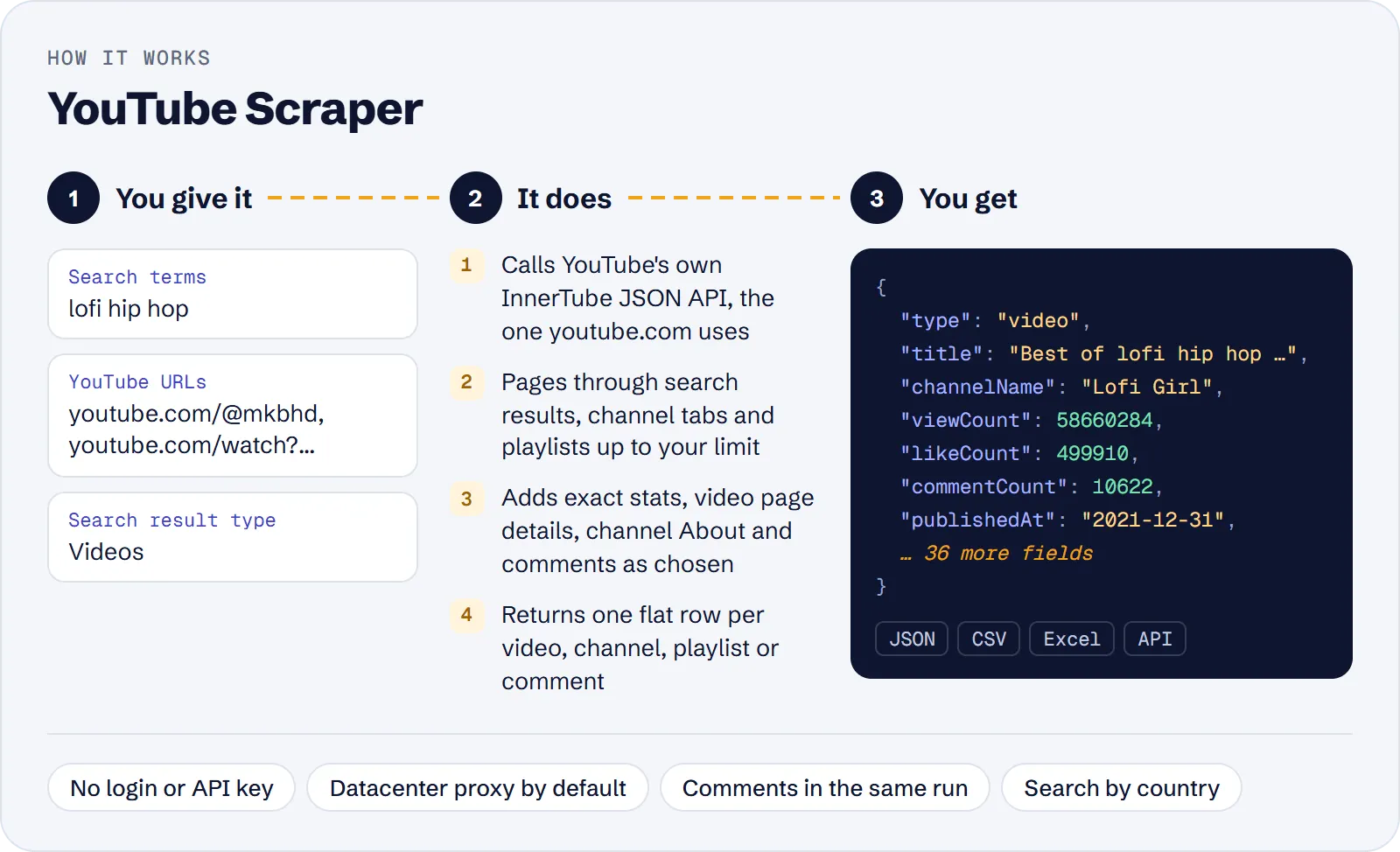
- Open the actor in Apify Console.
- Enter Search terms (one per line), YouTube URLs, or both.
- For search terms, pick the Search result type (Videos, Shorts, Channels, Playlists or Everything) and optional filters: Sort search by, Upload date, Video length and Country.
- For channel URLs, choose the Channel tabs (Videos, Shorts, Live).
- Set Max results per input, Video details and, if you want comments, Max comments per video.
- Click Start. When the run ends, download the rows as JSON, CSV or Excel, or read them through the API.
How much does it cost to scrape YouTube?
Price per event by Apify plan:
| Event | Free | Bronze | Silver | Gold and above |
|---|---|---|---|---|
| Result | $1.45 per 1,000 | $1.377 per 1,000 | $1.305 per 1,000 | $1.232 per 1,000 |
| Actor start | $0.00005 | $0.00005 | $0.00005 | $0.00005 |
A test run with the API example input below returned 22 rows in 27 s.
One paid event is one row saved to the dataset: a video, a channel, a playlist or a comment, all at the same price. Channel About details, Full video details and the tags/category add-on are included in the row price. Inputs that are not found and requests that fail produce no row and cost nothing. The actor-start event is charged once per run (the default memory is 256 MB).
Cost scenarios on the Free plan ($0.00145 per row plus $0.00005 per run start):
| Scenario | Rows (events) | Cost on Free plan |
|---|---|---|
| Default input: 20 search videos, 1 channel with 20 videos, 1 video URL | 42 | ≈ $0.061 |
| 100 most-viewed videos of the month for a search term in Germany | 100 | ≈ $0.145 |
| 2 video URLs with up to 200 top comments each | 402 | ≈ $0.583 |
| 1,000 rows of any type | 1,000 | ≈ $1.45 |
Input
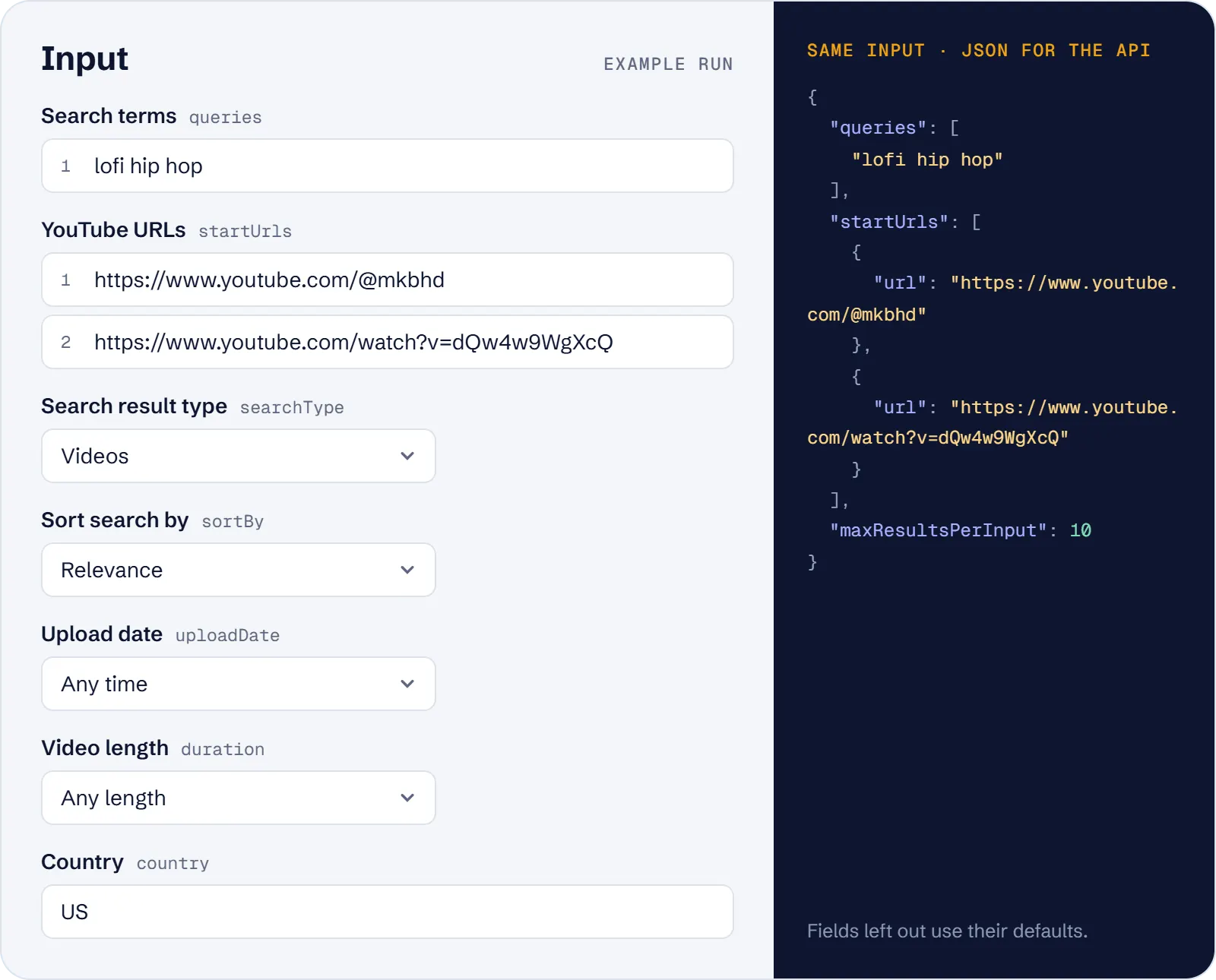
Give at least one search term in queries or one URL in startUrls.
| Field | What it does |
|---|---|
queries | YouTube search terms, one per line. |
startUrls | Channel URLs (@handle, /channel/UC…, /c/…, /user/…, also with a /videos, /shorts or /streams suffix), playlist URLs (/playlist?list=…), video URLs (watch?v=, youtu.be/, /shorts/, /live/) or search URLs (/results?search_query=…). A bare @handle, an 11-character video id or a UC… channel id works too. Hashtag URLs run as a search for #tag. |
searchType | What search terms return: video (default), shorts, channel, playlist or all (YouTube's mixed list). |
sortBy | relevance (default) or viewCount (most viewed). Not for Shorts. Sorting by upload date is not offered because YouTube ignores it. |
uploadDate | any (default), hour, today, week, month, year. Only with search type video or all. |
duration | any (default), short (under 4 minutes), medium (4–20 minutes), long (over 20 minutes). Only with search type video or all. |
country | Two-letter code (e.g. US, DE, JP) or English country name YouTube ranks search results for; default US. It must be a country YouTube supports (e.g. CU or KP stop the run with an input error). Texts stay in English. |
channelTabs | Tabs to list per channel URL: videos (default), shorts, streams (Live). Empty = only the channel row. A URL tab suffix (/@x/shorts) uses that tab. |
maxResultsPerInput | 1–10,000, default 20. Max video, channel or playlist rows per search term, per channel tab and per playlist. The channel row and comments are not counted. |
videoDetails | full (default): description, exact views and likes, date, channel subscribers, comment count, hashtags, chapters. stats: exact views, likes and date. basic: the list as shown (rounded views, "3 days ago"), fastest. Video URLs always get Full. |
maxCommentsPerVideo | 0–10,000, default 0. Top comments saved per video (each comment is a row), for video URLs and every listed video. Replies are not saved, only their count. |
includeChannelAbout | Default on. Adds country, joined date, exact total views and video count, external links and the business-email flag to channel rows. |
includePlayerData | Default off. Adds tags, category, exact publish time, length in seconds, family-safe and unlisted flags to every video row. Needs the RESIDENTIAL proxy group. |
maxItems | Stops the whole run after this many rows of every type. Empty = no total limit. |
proxyConfiguration | Apify datacenter proxy by default; RESIDENTIAL for includePlayerData. |
Example input (a channel audit):
What data can you extract from YouTube?
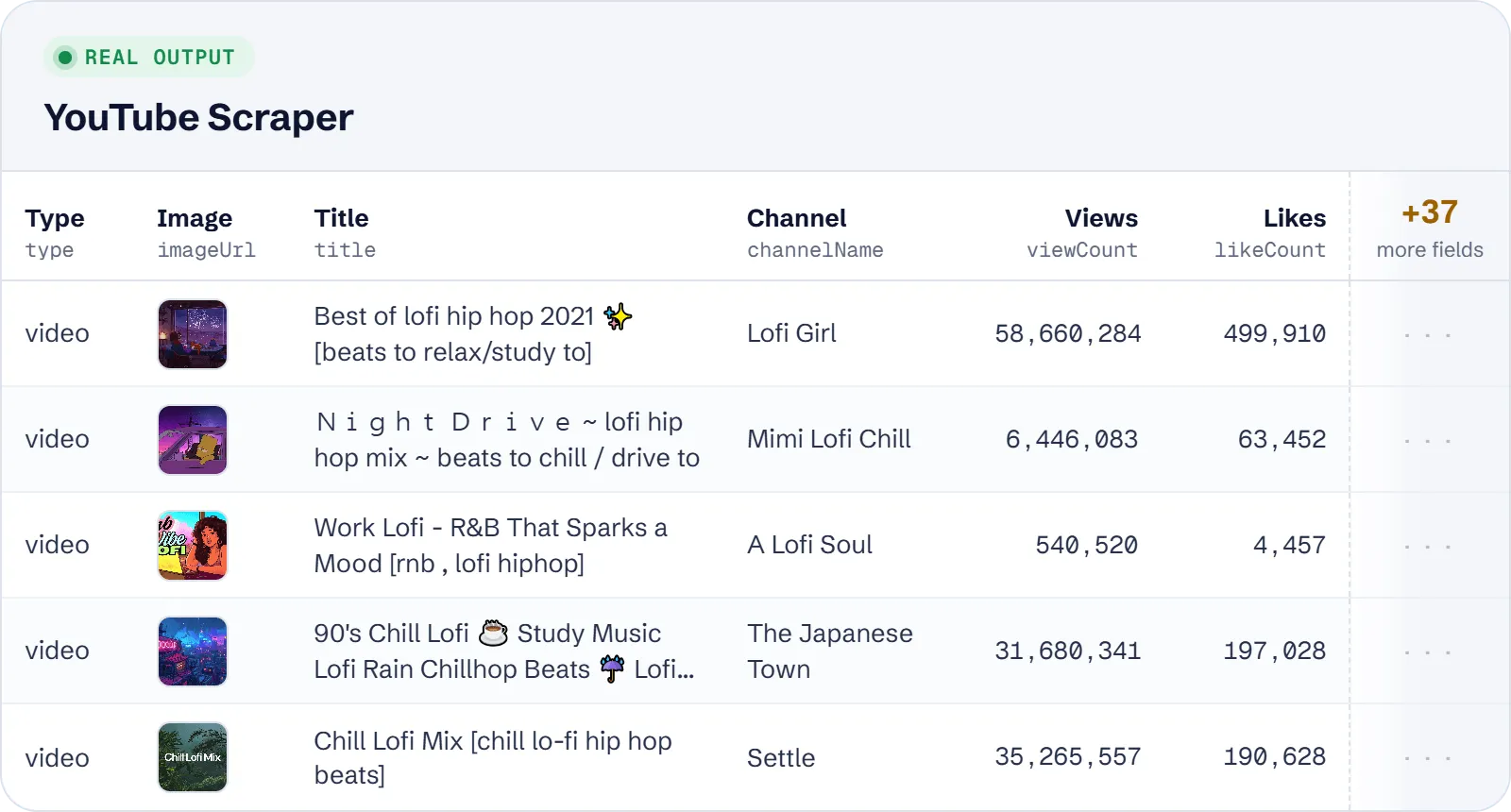
Every row has type, id, url and scrapedAt, plus query (search rows) or inputUrl (URL rows) and position (rank in its list).
| Row type | Fields |
|---|---|
video | title, channelName, channelId, channelUrl, channelVerified, channelSubscriberCount, description, descriptionSnippet, viewCount, watchingCount, likeCount, commentCount, commentsOff, publishedAt, publishedTimeText, durationSeconds, durationText, isLive, isShort, imageUrl, hashtags, chapters, playlistId, playlistTitle; with tags/category on: tags, category, isFamilySafe, isUnlisted |
channel | title, channelName, channelId, channelUrl, channelVerified, handle, description, subscriberCount, videoCount, viewCount (total views), country, joinedAt, links, hasBusinessEmail, tags (channel keywords), isFamilySafe, imageUrl (avatar), bannerUrl |
playlist | title, channelName, videoCount, imageUrl |
comment | videoId, text, author, authorChannelId, authorUrl, authorIsChannelOwner, likeCount, replyCount, isHearted, isEdited, publishedTimeText |
hashtags, chapters, tags and links are arrays of strings. Chapters look like "1:22 Design and comfort approach".
A real video row from a channel URL (description shortened):
A real channel row from the same run (shortened):
Use cases
- Keyword research by country: the 100 most-viewed videos of the month for "electric cars review" in Germany, with exact views, likes, date, description, channel and subscribers.
- Channel audit and influencer lists: one channel row (country, joined date, total views, links) plus the latest videos and Shorts of each channel.
- Channel lead lists from a search: channel search for a topic returns channel rows with subscribers, country, links and the business-email flag.
- Comments for sentiment analysis: the top comments of chosen videos, or of every video a search or channel returns, in the same run.
- Playlist and Shorts exports: every video of a playlist with
playlistIdandplaylistTitle, or Shorts for a search term.
Limitations
- No transcripts or subtitles, no AI summaries, no comment replies (only
replyCount) and no "newest first" comment sort. - YouTube ends a search after about 450 results per search term and filter set.
subscriberCount,channelSubscriberCountand commentlikeCountare rounded the way YouTube shows them (21.4M → 21400000). Video views and likes are exact with Stats or Full details; Basic lists of channels and Shorts give rounded views.viewCountis null for live and upcoming streams (live ones havewatchingCount).commentCountis null when comments are off.countrycomes from the channel's About panel and is often empty: many channels do not set it.hasBusinessEmailonly says whether a business email exists; the address needs a login and is never collected.- Tags and category on datacenter IPs: YouTube withholds them for about 40% of videos; use the RESIDENTIAL proxy group.
isHeartedis not reliable in the current version: it can be true on comments the creator did not heart.- Age-restricted, members-only and private videos were not tested; such rows carry only what YouTube still shows, with missing fields null.
Tips and troubleshooting
- Input error before the run starts? Shorts search takes no sort or filters; channel and playlist search take only
sortBy;uploadDateanddurationwork only with search typevideoorall. An unknown or unsupported country also stops the run. - Only channel rows, no videos: set
searchType: "channel"for a search, orchannelTabs: []for channel URLs. - Faster and cheaper runs:
videoDetails: "basic"skips the per-video requests;statsgives exact views, likes and date without the description. - Fewer rows than expected? Check the run log: not-found handles, videos and playlists, missing channel tabs and YouTube mixes (
list=RD…) are logged as warnings and skipped, and the run still succeeds. - Search filters on URL-only runs: sort and filters apply only to search terms and search URLs; a search URL with its own
sp=filter keeps that filter. - Cap the bill:
maxItemsstops the whole run after that many rows, comments included.
API, MCP and integrations
Run the actor from your code with the same JSON input as in Console. Your API token is in Console → Settings → API & Integrations.
Python (pip install apify-client):
Node.js (npm install apify-client):
HTTP — one request runs the actor and returns the results (runs up to 5 minutes; longer ones: run asynchronously):
AI agents (MCP). Add the actor as a tool of the Apify MCP server. Claude Code:
Claude Desktop, Cursor or VS Code: {"mcpServers": {"apify": {"url": "https://mcp.apify.com?tools=genial_candlestand/youtube-scraper"}}}. Then ask, for example:
- "Find the 100 most-viewed electric cars review videos uploaded this month in Germany"
- "Get the channel About details and latest 30 videos and Shorts of @mkbhd and @MrBeast"
- "Collect 200 top comments of https://www.youtube.com/watch?v=dQw4w9WgXcQ for sentiment analysis"
Integrations. Run it on a schedule with Apify Schedules and send the results to Google Sheets, Slack, Zapier, Make, n8n or your webhook — see Apify integrations.
FAQ
Is it legal to scrape YouTube?
The actor collects only public data that YouTube shows to any visitor without a login. You are responsible for how you use it; check YouTube's terms and the data protection rules that apply to you, especially for commenter names and handles.
Do I need a YouTube API key or an account?
No. It needs no login, cookies or API key, and the default Apify datacenter proxy works for everything except the tags/category add-on.
Can I scrape a single video?
Yes. One video URL or 11-character video id gives one video row with Full details; there is no minimum number of videos per input.
How is it different from other YouTube actors?
Videos, channels with their About panel, channel and playlist search, playlists and top comments come from one actor in one run, at one price per row of any type: $1.45 per 1,000 rows on the Free plan, against $4.00 per 1,000 videos for the most-used YouTube scraper in the Store.
Does the country setting change the language?
No. country changes which results YouTube ranks for search terms; the request language stays English (dates, labels and counts are read in English).
Are comments charged differently?
No. Every row costs the same, whether it is a video, a channel, a playlist or a comment.
Also useful
- YouTube Comments Scraper — get full comment threads with replies when the top comments are not enough
- YouTube Transcript Scraper — add captions and subtitles of the same videos for AI, RAG or text analysis
- YouTube Channel Scraper — track channel details, videos, Shorts and streams with a channel-only tool
- YouTube Search Scraper — run keyword searches for videos, Shorts and channels with view counts
- Google Trends Scraper — check search interest by region and related queries for your video keywords


