

YouTube Channel Email Scraper | Contacts & Social Links
Pricing
from $5.95 / 1,000 channel contacts
YouTube Channel Email Scraper | Contacts & Social Links
Get YouTube channel emails from the description and the linked website, website URL, 17 social links (Instagram, TikTok, X…), hidden business email flag, subscribers and country. Handles, URLs, video links or search terms, filters, no login.
Pricing
from $5.95 / 1,000 channel contacts
Rating
0.0
(0)
Developer

Flowo
Maintained by CommunityActor stats
0
Bookmarked
2
Total users
1
Monthly active users
3 days ago
Last modified
Categories
Features
Share
YouTube Channel Email & Contact Scraper
Get YouTube creators' contact details, one row per channel: emails from the channel description and from the linked website, the website URL, Instagram, TikTok, X, Facebook, LinkedIn and 12 other social links, and YouTube's hidden business email flag. Each row also has the subscriber count, total views, video count, join date, country and verified badge. You can give channel handles, URLs, IDs or video links, or search terms like "fitness coach". No login, cookies or API key needed.
What does YouTube Channel Email & Contact Scraper do?
It reads the About panel of each YouTube channel you give it. You can also give search terms, and it reads the channels that YouTube's channel search finds for them. Optionally it opens the channel's linked website (or linktr.ee page) and up to 2 of its contact, about or impressum pages to collect more emails. You get one flat row per channel, ready for a spreadsheet or CRM. It's built for influencer-marketing agencies, brand partnership and sponsorship managers, PR people, lead-gen freelancers and AI agents that build outreach lists.
How to scrape YouTube channel emails and contacts
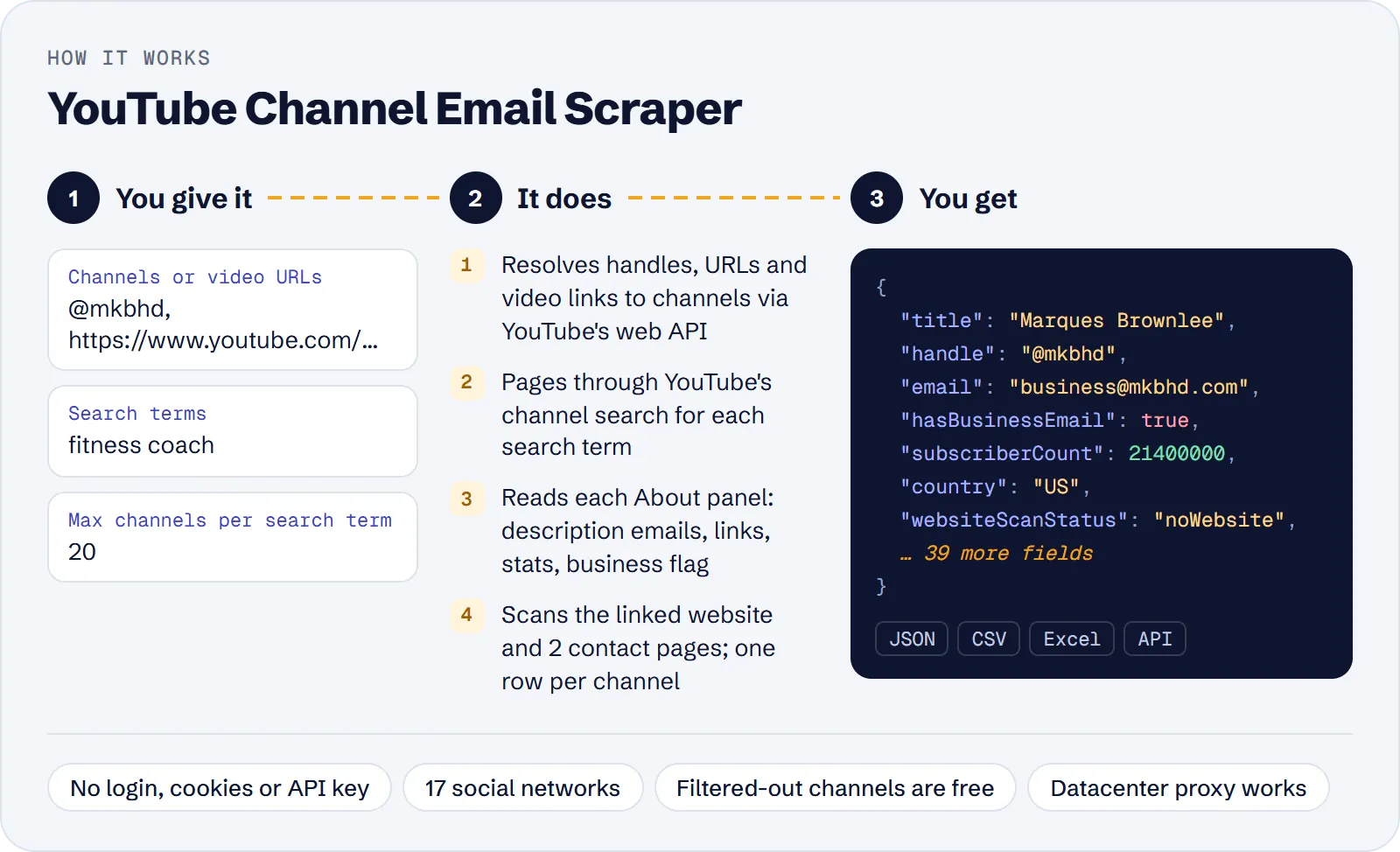
- Open the actor in Apify Console.
- Fill Channels with handles (
@mkbhd), channel URLs,UC…IDs or video / Shorts URLs. You can also fill Search terms (e.g.fitness coach), or use both fields. - Optionally set Max channels per search term, the subscriber range, or Only channels with an email.
- Leave Scan linked website for emails on to look for emails on the creator's website, or turn it off for a faster, links-only run.
- Click Start. When the run ends, download the dataset as JSON, CSV or Excel, or read it over the API.
How much does it cost to scrape YouTube channel contacts?
Price per event by Apify plan:
| Event | Free | Bronze | Silver | Gold and above |
|---|---|---|---|---|
| Channel contacts | $7.00 per 1,000 | $6.65 per 1,000 | $6.30 per 1,000 | $5.95 per 1,000 |
| Actor start | $0.00005 | $0.00005 | $0.00005 | $0.00005 |
A test run with the API example input below returned 22 rows in 38 s.
You pay per channel saved (the channel event, "Channel contacts"), plus a tiny Actor start fee per run. One saved row is one event, whether or not it has an email. You are not charged for channels that are skipped, not found, filtered out by subscriber range or by Only channels with an email, or for invalid inputs. Search terms cost nothing on their own.
| Scenario | Channel events | Cost on the Free plan |
|---|---|---|
3 known creators (@mkbhd, Kurzgesagt, a channel ID) | 3 | ≈ $0.02 |
| 1 search term, 50 channels | 50 | ≈ $0.35 |
| 500 handles, website scan off | 500 | ≈ $3.50 |
| 1,000 channels from a lead list | 1,000 | ≈ $7.00 |
The start fee adds less than $0.0001 to each run at the default 256 MB memory.
Input
| Field | What it does |
|---|---|
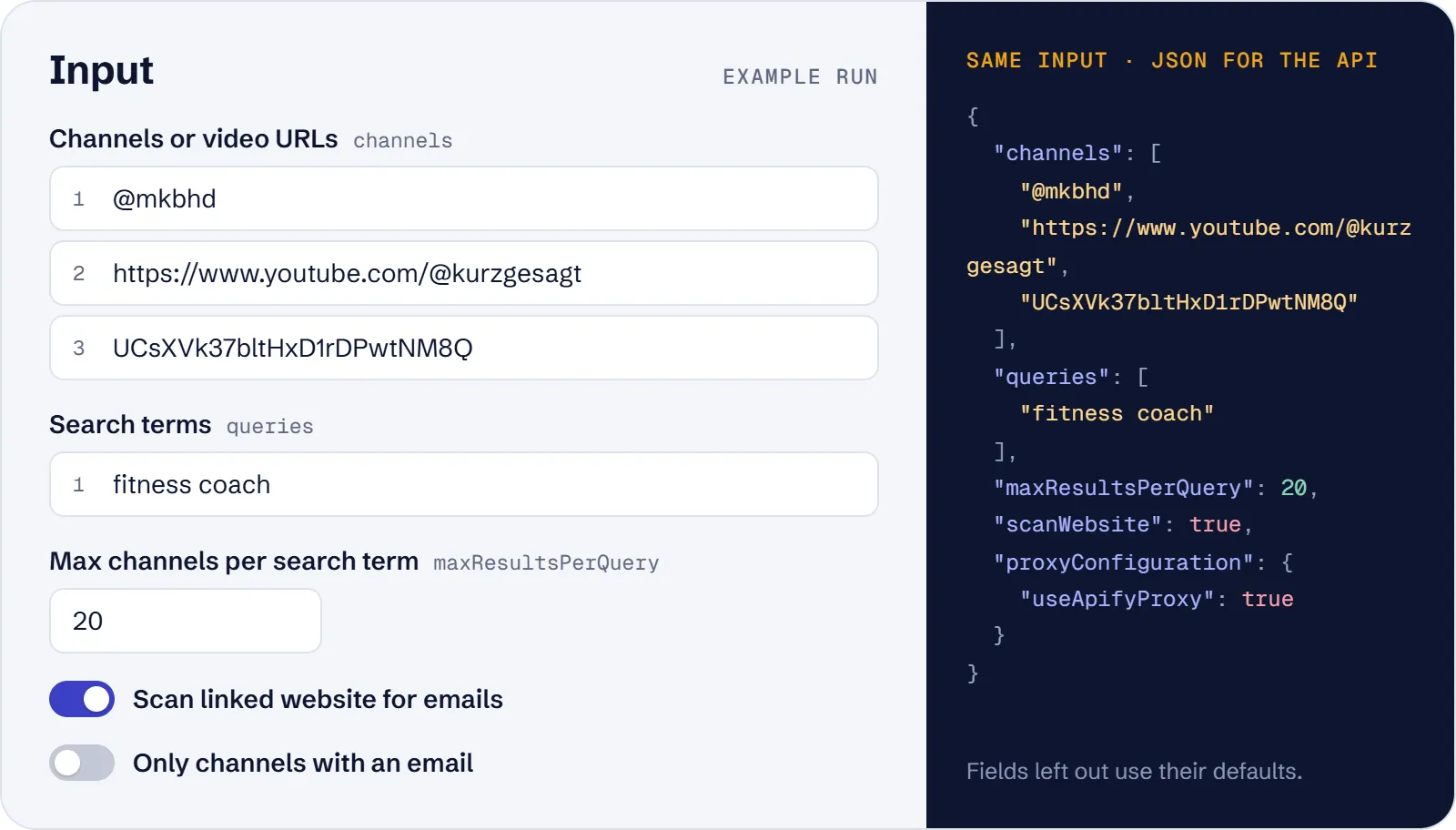
channels | Handles (@name), channel URLs (/@handle, /channel/UC…, /c/name, /user/name, m.youtube.com), bare UC… IDs, or video URLs — /watch?v=, /shorts/, /live/, youtu.be/ (the actor uses the owner channel). Playlist and non-YouTube URLs are skipped with a warning. |
queries | Search terms for YouTube's channel search, one per line. |
maxResultsPerQuery | Channels saved per search term, 1–500, default 20. Only applies to queries. |
scanWebsite | Default true. Opens the linked website or linktr.ee page plus up to 2 same-site contact/about/impressum pages. |
onlyWithEmail | Default false. Saves (and charges) only channels with at least one email in the description or on the website. |
minSubscribers / maxSubscribers | Subscriber range based on YouTube's rounded count. The minimum must not be greater than the maximum. |
maxItems | Stops after this many saved channels across all inputs. Leave it empty for no limit. |
proxyConfiguration | Default is the Apify datacenter proxy, which works for YouTube. |
Fill at least one of channels or queries, or the run stops with an input error. If the same channel comes from two inputs, you get one row.
What data can you extract from YouTube channels?
| Field | Description |
|---|---|
channelId, title, handle, channelUrl, url | Channel ID (UC…), name, @handle, canonical URL and the About page URL |
email | First email found (null when none) |
emails | All emails, lowercased and deduplicated: description emails first, then website emails |
descriptionEmails | Emails written in the channel description, including [at] / (dot) forms |
websiteEmails | Emails found on the linked website or linktr.ee page and not already in the description |
hasBusinessEmail | true when YouTube shows a hidden business email behind "Sign in to see email address". The address itself is not read. |
website | First linked website that is not a social network or a YouTube/Google link |
websiteScanStatus | ok, partial, failed, noWebsite, notRequested or skipped |
pagesScanned | Website pages fetched successfully during the scan |
instagramUrl, tiktokUrl, twitterUrl, facebookUrl, linkedinUrl, twitchUrl, discordUrl, patreonUrl, threadsUrl, snapchatUrl, telegramUrl, spotifyUrl, pinterestUrl, redditUrl, githubUrl, linktreeUrl, beaconsUrl | First link of each of the 17 networks, null when absent |
linkedYoutubeUrl | First link to another YouTube channel |
links | All About-panel links as { title, url, kind } |
description, location, country | Channel description, YouTube's country name and its ISO alpha-2 code |
subscriberCount, subscriberCountText | Subscribers as a number (parsed from YouTube's rounded text) and as shown |
viewCount, videoCount | Exact total views and video count |
joinedDate | Join date, YYYY-MM-DD |
isVerified, imageUrl | Verified badge and avatar URL |
query, inputType, position | The input entry or search term, channel / video / search, and the rank in the search (search rows only) |
scrapedAt | When the row was scraped |
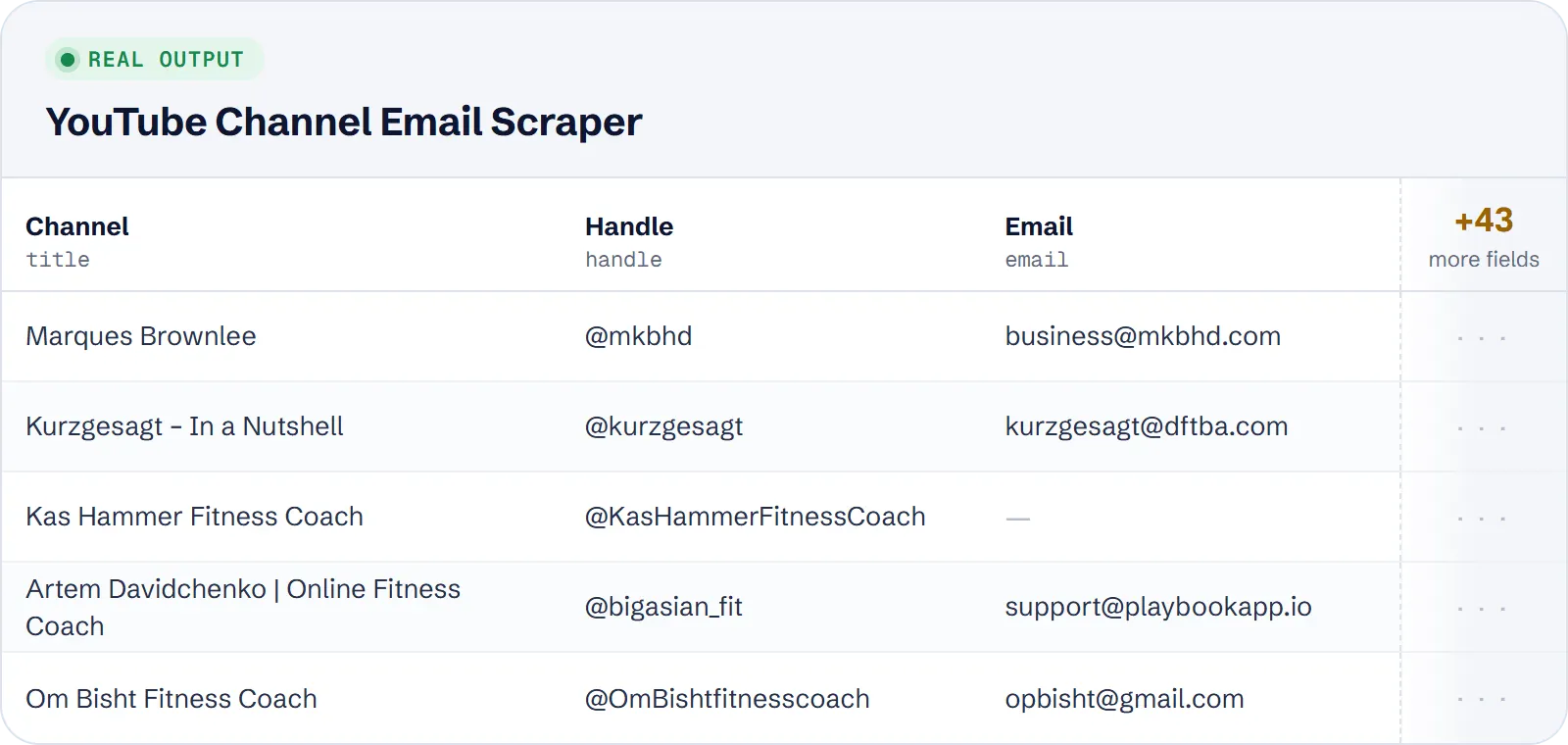
A real row (some unused network fields left out):
Use cases
- Contacts for a known creator list: paste handles or channel URLs and get emails, website, socials and the hidden-email flag for each one.
- Find creators in a niche: search
fitness coachorvegan recipesand get up to about 350 unique channels per term with their contacts and search rank. - Lead lists of small creators with emails only: combine
maxSubscribers(e.g. 100000) withonlyWithEmail. You pay only for the rows that pass. - Who made this video: paste video or Shorts URLs to get the owner channel's contacts (
inputType: "video"). - Fast links-only enrichment: turn off
scanWebsiteto get description emails, social links and stats from YouTube alone.
Limitations
- The hidden business email is not read. The address behind YouTube's "Sign in to see email address" button needs a Google login and a reCAPTCHA. The actor reports only whether it exists (
hasBusinessEmail). If a channel's only email is that hidden one, itsemailslist is empty. - Many channels publish no email at all. In a 22-channel test run, 7 rows had at least one email.
- YouTube's channel search ends after about 23 pages (≈ 350 unique channels per term). A higher
maxResultsPerQuerystops there with a warning. - Some linked websites block the request or time out (often Shopify stores on datacenter IPs). The row is kept with
websiteScanStatus: "failed"or"partial". - beacons.ai pages are kept in
beaconsUrlbut never scanned. Links to YouTube or Google sites are not scanned either (skipped). - Subscriber counts are YouTube's rounded numbers (
21.4M→ 21400000). Channels that hide their count are skipped when a subscriber filter is set. - Search results come from YouTube's US English interface, and their order can differ between runs. Topic channels have no
handleand may have no view or video count.
Tips and troubleshooting
- 0 rows? Check the run log. Each skipped input gets a warning saying why (not found, not a YouTube channel, filtered by subscribers, or no email). Runs with 0 rows are not charged for channels.
onlyWithEmailwithscanWebsite: falseonly counts description emails, so you get fewer rows.- Fewer search results than
maxResultsPerQuery? The search ran out of pages, or your filters removed channels. Try more specific or related terms. - If many websites fail on the datacenter proxy, switch to a residential proxy. It lowers website failures, but YouTube itself works fine on datacenter.
- Use
maxItemsto cap the total rows (and the cost) of a big run.
API, MCP and integrations
Run the actor from your code with the same JSON input as in Console. Your API token is in Console → Settings → API & Integrations.
Python (pip install apify-client):
Node.js (npm install apify-client):
HTTP — one request runs the actor and returns the results (runs up to 5 minutes; longer ones: run asynchronously):
AI agents (MCP). Add the actor as a tool of the Apify MCP server. Claude Code:
Claude Desktop, Cursor or VS Code: {"mcpServers": {"apify": {"url": "https://mcp.apify.com?tools=genial_candlestand/youtube-channel-email-scraper"}}}. Then ask, for example:
- "Get the email, website and Instagram of @mkbhd and @kurzgesagt on YouTube"
- "Find 50 YouTube fitness coach channels under 100000 subscribers that list an email"
- "Who owns this video and how do I contact them: https://www.youtube.com/watch?v=dQw4w9WgXcQ"
Integrations. Run it on a schedule with Apify Schedules and send the results to Google Sheets, Slack, Zapier, Make, n8n or your webhook — see Apify integrations.
FAQ
Does it get the email hidden behind "Sign in to see email address"?
No. That needs a Google account login and a reCAPTCHA, and this actor uses no login or cookies. It sets hasBusinessEmail: true so you know the channel has one, and you can open the channel page yourself to see it.
Where does each email come from?
descriptionEmails are from the channel description. websiteEmails are from the linked website or linktr.ee page and its contact pages, and pagesScanned lists the pages that were read. emails combines both.
Can I use video links instead of channel links?
Yes. Video URLs (/watch?v=, /shorts/, /live/, youtu.be/) are resolved to the channel that owns the video.
How is it different from other YouTube channel actors?
General YouTube channel scrapers return the About info on video rows and don't extract emails or scan websites. Business-email actors that unlock the hidden address cost up to $120 per 1,000 emails. This one returns one row per channel with description and website emails kept separate, 17 social network columns and a scan status per row, at $7 per 1,000 channels on the Free plan.
Is it legal to scrape YouTube channel contacts?
The actor reads only what YouTube and the linked websites show publicly, without logging in. Creators publish these contacts for business inquiries. You are responsible for how you use the data, including privacy and anti-spam laws such as GDPR and CAN-SPAM when you send outreach.
Also useful
- YouTube Channel Scraper — add each creator's videos, Shorts and streams with exact views, likes and dates
- YouTube Search Scraper — find videos, Shorts and channels by keyword with views, duration and position
- YouTube Comments Scraper — check audience reactions on a creator's videos: comments, likes and replies
- YouTube Transcript Scraper — read what a creator says in their videos: transcripts and subtitles
- Google Search Scraper — find a creator's other web presence: organic results, titles and URLs


