

eBay Scraper - Listings, Prices & Price Stats
Pricing
from $1.40 / 1,000 listings
eBay Scraper - Listings, Prices & Price Stats
eBay scraper for search results by keyword or URL on 8 eBay sites: price, shipping, total, condition, bids, sold count, watchers, seller feedback, location and image, plus a min/median/average/max price summary per search. JSON, CSV, Excel.
Pricing
from $1.40 / 1,000 listings
Rating
0.0
(0)
Developer

Group Oject
Maintained by CommunityActor stats
0
Bookmarked
2
Total users
1
Monthly active users
21 hours ago
Last modified
Categories
Share
This eBay scraper pulls eBay search results by keyword or URL from 8 eBay sites. Each row has the item price, shipping, total price, condition, format, bids, sold count, seller feedback, location and image. Each search also gets a price summary with the min, median, average and max price, so you can price an item without opening a spreadsheet.
Sold listings and eBay sign-in (October 2026). eBay now sends most logged-out visitors who open sold or completed searches to its sign-in page. This actor never logs in. In
soldorcompletedmode it tries several fresh proxy sessions. If eBay still asks for sign-in, the search is recorded in theERRORSrecord with the codeSOLD_LISTINGS_SIGNIN_REQUIREDand nothing is charged. Active-listing searches (mode: "active") are not affected and work on all 8 sites.
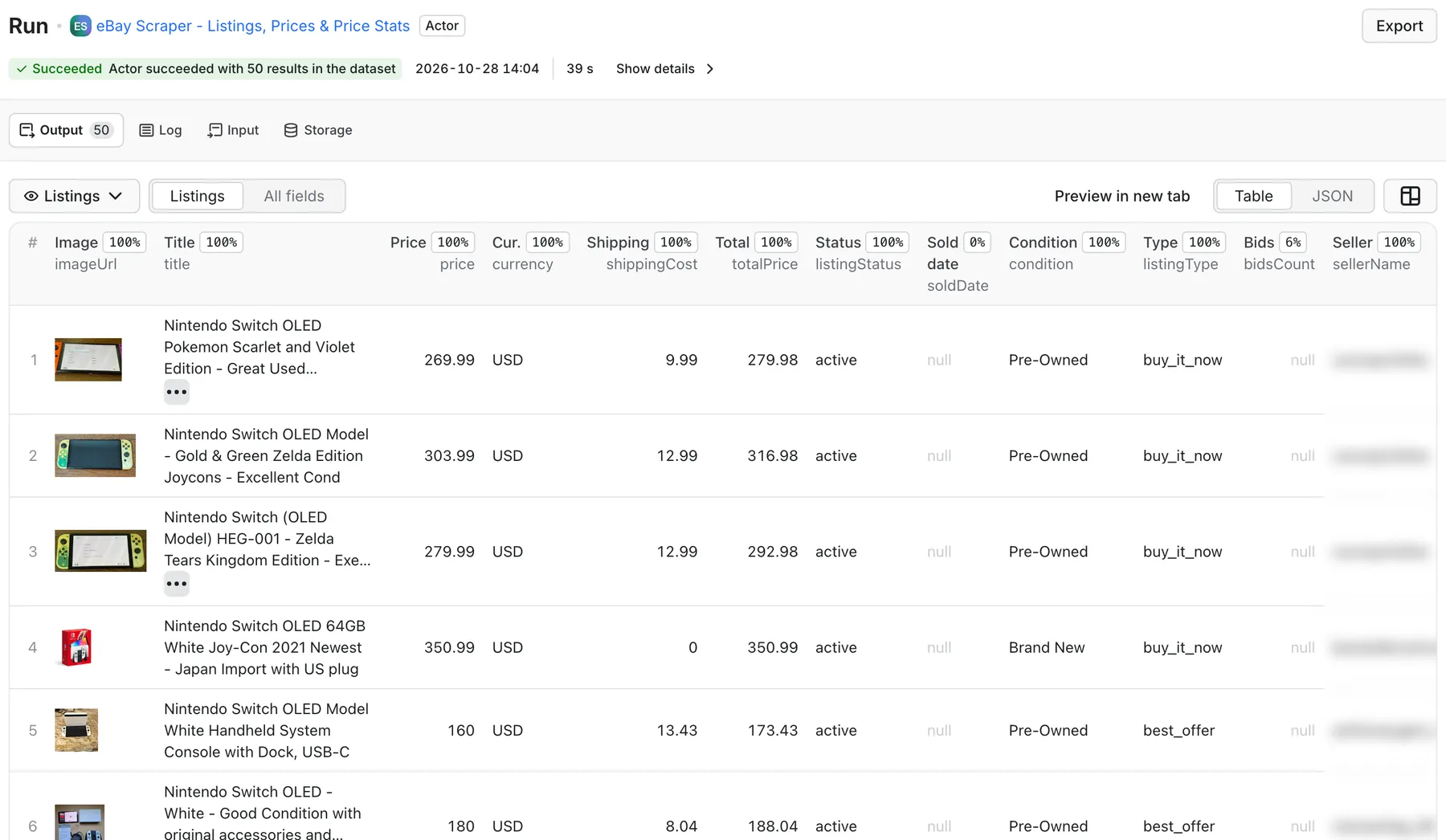
Real output from a default run of eBay Scraper in Apify Console.
What can this eBay scraper do?
- Search by keyword or paste eBay URLs. Run many keywords in one go, or paste search and category URLs straight from eBay. A pasted URL keeps every filter you set on eBay.
- Cover 8 eBay sites: ebay.com, ebay.co.uk, ebay.de, ebay.ca, ebay.com.au, ebay.fr, ebay.it and ebay.es. Prices come back as numbers with an ISO currency code. The parser understands each site's price format and its labels in English, German, French, Italian and Spanish.
- Filter on eBay's side: condition (new, open box, refurbished, used, for parts), minimum and maximum price, auction / Buy It Now / accepts offers, category ID, free shipping only and sort order.
- Pick a mode:
activefor live listings with asking prices,soldfor sold prices and sold dates, orcompletedfor every ended listing, sold and unsold, with a sell-through rate. - Get price statistics per search. The
SUMMARYrecord has count, min, 25th percentile, median, average, 75th percentile and max for the item price and for price + shipping. It also has listing-type and condition breakdowns and the free-shipping share. This record is not billed. - Use a sold date cutoff. Keep only sales from the last N days or after a given date. Older rows are dropped before they are saved, so you don't pay for them.
- Monitor new listings and price drops. Turn on
onlyNewand schedule the run: each run saves only listings it has not seen before, and withalertOnPriceDropalso listings whose total price dropped. Skipped listings are not billed. - Avoid duplicate charges. Items that show up on two pages or in two searches are saved once.
- Respect your spending limit. The run stops cleanly at the maximum charge you set.
What data do you get?
| Field | Description |
|---|---|
itemId, url | eBay item number and listing link |
title, subtitle | Listing title and the seller's subtitle line |
listingStatus | active, sold or unsold |
price, priceMax, currency | Item price as a number (sold price for sold rows, asking price or current bid for active rows), top of a price range, ISO currency |
originalPrice | Struck-through "was" price when eBay shows a discount |
buyItNowPrice | Buy It Now price of an auction that also offers it |
shippingCost, freeShipping, totalPrice | Shipping (0 = free, null = not shown) and price + shipping |
soldDate, soldDateText | Sold date as YYYY-MM-DD and eBay's original label (sold rows) |
timeLeft | Time left on an active auction |
condition, conditionNormalized | eBay's condition label in the site's language, plus new / open_box / refurbished / used / for_parts / other |
listingType, bestOfferAccepted | auction, auction_with_bin, buy_it_now, best_offer or best_offer_accepted |
bidsCount, soldCount, watchersCount | Bids, "N sold" on multi-quantity listings, watchers |
sellerName, sellerFeedbackPercent, sellerFeedbackCount, sellerType | Seller details as shown on the search card. On EU sites eBay often shows only private/business. |
location | Item location when eBay shows it (often only for items outside the site's country) |
imageUrl, imageUrlLarge | Main image at 500 px and 1600 px |
marketplace, searchQuery, searchUrl, page, position, scrapedAt | Where and when the row was found |
isNew, priceDropped, previousPrice, priceChangePct | Monitoring runs only: new since the last run, total price lower than last time, last total price, change in % |
The scraper reads search result pages only. It does not open item pages, so item specifics and full descriptions are not included.
How much does it cost?
You pay per listing saved: $2.00 per 1,000 results. The price summary, run statistics and error report are free key-value records. Searches that eBay sends to sign-in are not billed.
On paid Apify plans the per-result price drops automatically (Bronze and above get volume discounts); the Pricing tab shows your exact rate.
- Price check for one product. 1 keyword × 200 listings = 200 results ≈ $0.40.
- Weekly market scan. 25 keywords × 240 listings every week ≈ 6,000 results a week ≈ $12 a week.
Set a maximum charge per run in Apify Console and the scraper stops at that limit.
How to use it
- Open the actor and add one or more Search keywords, or paste eBay search URLs.
- Choose the eBay marketplace and Mode (
active,soldorcompleted). - Optionally set condition, price range, listing type, category ID, sort order and a sold date cutoff.
- Set Max items per search and click Start.
- Listings appear in the Output tab. Price statistics per search are in the
SUMMARYrecord of the key-value store, and anything that failed is inERRORS.
Input example
Output example
One dataset row (values are illustrative):
The SUMMARY record (one entry per search, shortened):
In sold and completed mode the statistics use sold rows only. The summary also includes soldCount, unsoldCount, sellThroughRate (completed mode) and soldDateRange.
Monitor new eBay listings and price drops
Resellers and deal hunters usually want to know what changed since the last check, not the same 200 listings again. Monitoring mode remembers every listing it has seen and saves only what is new, so a scheduled run gives you an alert feed for new eBay listings.
- Set your keywords or eBay search URLs and filters as usual.
- Turn on Only new listings (
onlyNew: true) and give the monitor a name in Monitor name (stateKey), for exampleswitch-oled-us. Runs with the same name share their history; use a different name per monitor. - Optional: turn on Also alert on price drops (
alertOnPriceDrop: true) to also get listings you have seen before whose price + shipping is now lower. Those rows carrypreviousPriceandpriceChangePct. - Optional: set Alert only at or below total price (
maxTotalPrice) to get only deals under your target price, shipping included. - Save the input as a task and add a schedule in Apify Console (Schedules → Create), for example every hour (
0 * * * *) for fast-moving items or once a day (0 8 * * *) for a daily digest. - Add an integration to the task: Slack, email, Google Sheets, Make, Zapier, n8n or a webhook. The integration fires after each successful run, and the run's dataset holds only the new listings and price drops, so that is all you are sent.
How it works:
- The first run saves everything it finds and remembers it. Later runs save only listings that are new, or cheaper when price-drop alerts are on.
- A listing counts as new until any run with the same
stateKeyhas seen it once. Price drops compare the total price (price + shipping) with the last run that saw the listing. A drop is reported when the seller cut the item price or made shipping free; small total changes caused only by eBay's location-based shipping estimate are ignored. - With sort auto, active searches are sorted newly listed first, and Max items per search is how many of the top results are checked each run. Pick a number larger than the number of new listings you expect between two runs.
- Only saved rows are billed. A run that finds nothing new saves no rows, so no results are charged. Listings above
maxTotalPriceare remembered but not saved, so if one later drops under your target it is reported as a price drop. - The history is kept in your named key-value store
ebay-monitor-<stateKey>. Listings not seen for 120 days are forgotten. To start over, use a newstateKeyor delete that store. - The
SUMMARYrecord shows how many listings were checked, how many were new and how many dropped in price. The price statistics cover every listing checked, not only the saved rows.
Use with the API
cURL
Python
JavaScript
Use with AI agents / MCP
Connect the Apify MCP server at https://mcp.apify.com?tools=groupoject/ebay-scraper in Claude Desktop, Cursor, VS Code or any MCP client. Example prompt: "Find used Nintendo Switch OLED listings on ebay.com and tell me the median price including shipping."
Integrations
Send results to Google Sheets, Make, Zapier, n8n, Slack or your own endpoint with Apify integrations and webhooks. A common setup is a weekly schedule that writes each search's median price to a sheet.
FAQ
Is it legal to scrape eBay?
The actor collects only what eBay shows to any logged-out visitor on public search pages: titles, prices, conditions, public seller usernames and feedback scores. It does not log in, collect private contact data or solve CAPTCHAs. Check eBay's terms and the data-protection rules that apply to you before you use the data, especially seller names.
Why did my sold search return no rows?
eBay currently asks most logged-out visitors to sign in before it shows sold or completed results. The actor does not log in, so these searches end with SOLD_LISTINGS_SIGNIN_REQUIRED in the ERRORS record and are not charged. Active searches still work. For demand signals without sold mode, use the soldCount ("N sold") and watchersCount fields on active listings.
How many listings can I get per search?
Up to 10,000 per search (maxItemsPerSearch), at 240 listings per page. eBay itself rarely serves more than a few thousand results for one query, so split very broad searches by category, condition or price range.
Do I need a proxy?
Yes. eBay rejects many automated requests, so the actor uses Apify Proxy. It starts on datacenter proxies, keeps each proxy session's cookies, retries on fresh sessions when eBay shows a block page or a "Pardon our interruption" page, and switches to residential proxies only if datacenter keeps failing (residentialFallback).
How fast is it?
In local tests a 50-listing search finished in 12–17 seconds, and 1,000 listings took 30–65 seconds on datacenter proxies. Time varies with how often eBay blocks a session.
Why are some fields empty?
The actor reads what eBay prints on the search card. eBay doesn't show condition for some categories (antiques, for example). On EU sites it often shows "private"/"business" instead of a seller name, and it shows item location mostly for items located abroad. Empty fields are null, not guesses.
Can I schedule it to monitor new listings or prices?
Yes. Turn on onlyNew (and alertOnPriceDrop if you want price drops), set a stateKey, save the input as a task and add an hourly or daily schedule. Each run saves only listings that are new since the last run, and an Apify integration can post them to Slack or email. To track the market price instead, run without onlyNew and read the median from the SUMMARY record. See Monitor new eBay listings and price drops.
Related actors
- Amazon Product Scraper & Price Tracker - compare eBay prices with Amazon prices, ratings and offers across 12 marketplaces.
- Shopify Scraper - Products, Prices, Variants & SKUs - track the same products in Shopify stores.
- Google Flights Scraper & Price Tracker - the same price-tracking approach for airfares.


