

Best Damn App Reviews Scraper
Pricing
$0.15 / 1,000 review collecteds
Best Damn App Reviews Scraper
Scrape App Store and Google Play reviews in a single run: rating, text, author, app version, date and developer reply, for any country and sort order. One clean dataset at a flat price per review.
Pricing
$0.15 / 1,000 review collecteds
Rating
0.0
(0)
Developer

Joshua Smith
Maintained by CommunityActor stats
0
Bookmarked
1
Total users
0
Monthly active users
a month ago
Last modified
Categories
Share
An App Store and Google Play reviews scraper that collects public user reviews from both stores in a single run. Paste app links or ids from either store and get back every review as a clean JSON record: star rating, title, text, reviewer display name, app version, date, helpful votes and the developer's reply where one exists. Apps that cannot be found are reported free of charge; you pay a small flat price per review.
Built for product managers, app marketers, researchers and developers who need review data as an API rather than copied from store pages.
Features
- Scrape App Store reviews by app ID or App Store URL
- Scrape Google Play reviews by package name or Play Store URL
- Export app reviews to CSV, Excel, JSON or Google Sheets
- Filter app reviews by star rating, for example 1-2 star complaints only
- Get developer replies to Google Play reviews
- Collect App Store reviews per country (us, gb, de, jp and any other storefront)
- Sort app reviews by newest, most helpful or highest rating
- Monitor competitor app reviews on a schedule
What can you do with Best Damn App Reviews Scraper?
- Product feedback analysis: find the bugs, feature requests and friction points users write about after every release, split by app version.
- Competitor monitoring: track what people like and dislike about competing apps, and schedule weekly runs to spot changes.
- Sentiment pipelines: feed reviews into your own classifier or a BI tool; the rating window filter lets you pull only 1-2 star complaints or only 5 star praise.
- Feeding LLMs and agents: the output is compact JSON that drops straight into a summarisation or RAG workflow, and the Actor is available through the Apify MCP server.
How it works
For Apple the Actor reads the public customer-reviews feed that the App Store publishes for every app and country, plus the public lookup API for the app name, developer, average rating and rating count. For Google Play it uses the public web endpoints behind the Play store page (via the MIT-licensed google-play-scraper library). No login, no browser, low request rates: a run for two apps with 200 reviews each finishes in a few seconds.
Limits you should know: Apple exposes at most 500 reviews per app per country (10 pages of 50) and does not filter by language; the Apple feed also has no developer replies. Google Play returns reviews in pages of 150 and can go much deeper.
How to use it
- Open the Actor and paste your apps into Apps, one per line. App Store URLs, Google Play URLs, numeric Apple ids and Android package names all work and can be mixed.
- Pick the Country (and, for Google Play, the Language), the Sort order and Max reviews per app. Narrow the rating window if you only want complaints or praise.
- Click Start. Reviews appear in the Output tab as they arrive.
- Download the dataset as JSON, CSV, Excel or XML, or send it to Google Sheets, Slack, Make or Zapier with an integration.
Use it from the API, Python, JavaScript or an AI agent
Start a run and get the reviews back in one HTTP call:
Python, with the apify-client package:
JavaScript or TypeScript, with the apify-client package:
Use it from Claude, Cursor, ChatGPT or any MCP client
The Actor is exposed as a tool by the Apify MCP server, so an AI agent can call it by name. Add this to your MCP client configuration (Claude Desktop, Claude Code, Cursor, VS Code, Windsurf and others):
Then ask, for example: "Pull the 100 newest 1-2 star Google Play reviews of com.spotify.music with josh99smith/app-reviews-scraper and summarise the complaints." The agent fills in the input, runs the Actor and reads the dataset back; you pay the same per-result price as in the Console.
The Actor can also be scheduled, or connected to Zapier, Make, n8n and Google Sheets in the Integrations tab.
Output
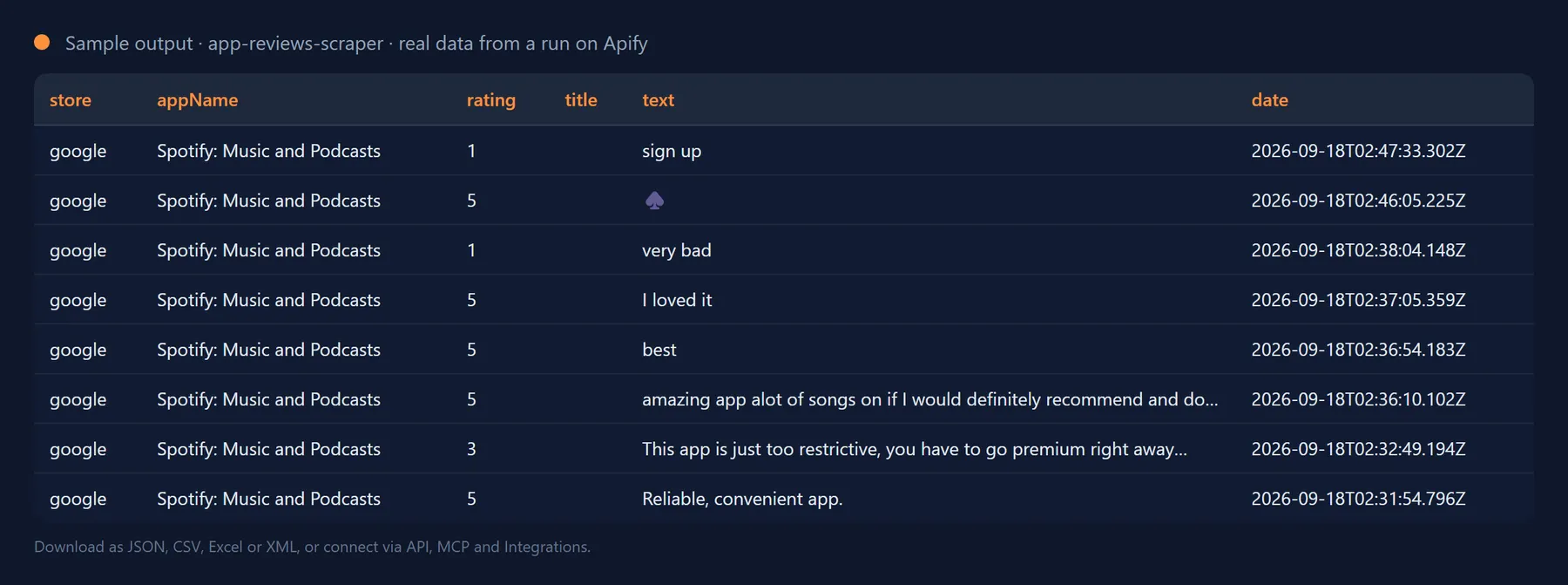
One record per review, identical shape for both stores:
Apps that could not be processed are recorded too, so nothing silently disappears from your list:
The SUMMARY record in the key-value store lists, for every app, the name, developer, average rating, total rating count and how many reviews were fetched and stored.
Output fields
| Field | Description |
|---|---|
store | apple or google. |
appId / appName / developer | Apple track id or Android package name, plus the store listing name and developer. |
reviewId | Store-assigned review id, unique per store. |
title | Review headline (Apple only; always null on Google Play). |
text / rating | Review body and star rating 1-5. |
authorName | The public display name shown next to the review. |
version | App version the review was written for, when the store provides it. |
date | ISO 8601 timestamp of the review. |
helpfulVotes | Helpful votes (Apple voteSum, Google Play thumbs-up). |
developerReply | { text, date } when the developer answered (Google Play only), otherwise null. |
country / language | Store country of the review; language is the requested Play language and null for Apple. |
url | Direct review link on Google Play, or the app's reviews page on the App Store. |
errorType | Failures only: invalid-url, not-found, blocked, rate-limited, timeout, http-error, network or other. |
Pricing: how much does it cost to scrape app reviews?
You pay a flat price per review stored (shown next to the Start button); 1,000 reviews cost well under a dollar. Invalid identifiers, apps that do not exist and store errors are never charged, and there is no start-up fee. The Actor stops as soon as the maximum cost you set for the run is reached, so a long app list never produces a surprise bill.
How it compares (September 2026). Per-review pricing here is $0.00015, in line with the cheapest single-store Actors, and unlike them this Actor covers both stores in one run with one fixed output schema. Apps that cannot be found are free, an error on one app never stops the run, and reviews filtered out by rating or date are never billed.
Tips
- More Apple reviews: the 500-review limit is per country. Run the same app with
countryset togb,de,fr,jpand so on (or several runs on a schedule) and merge the datasets byreviewId. - Complaints only: set
minRating1 andmaxRating2 to collect negative reviews; the Actor keeps paging until it finds enough or the store runs out. - Sort by rating: Apple's feed cannot sort by rating, so the Actor downloads everything available and sorts locally. On Google Play, asking for low ratings switches to newest-first paging so that low-star reviews are actually reached.
FAQ
How many reviews can I scrape per app?
Up to 500 per app and country from the App Store (the limit of Apple's public feed) and up to 10,000 per app from Google Play, controlled by Max reviews per app. Runs are also capped by the maximum cost you set.
Why do I get fewer than 500 Apple reviews?
Apple's feed serves up to 500 of the most recent (or most helpful) reviews per country, fewer for apps that do not have that many. Run per country for wider coverage.
Why is language null for Apple reviews?
The App Store feed does not accept a language parameter; it returns reviews in whatever language reviewers used in that country's store.
Does it include reviewer email addresses or profile data?
No. Only the public display name shown on the store page is stored, exactly as the store publishes it. Reviewer names are personal data in many jurisdictions; you are responsible for using the results in compliance with the privacy laws that apply to you (GDPR, CCPA and similar) and with the store terms.
Is it legal to scrape App Store and Google Play reviews?
The Actor only reads pages and feeds that Apple and Google publish to everyone without a login, at low request rates, and stores what the stores show publicly. Using the data lawfully and within the store terms is your responsibility.
Will the output fields change between runs?
No. Output fields are stable: existing fields are never renamed or removed without a major version bump announced in the changelog, and new fields are only ever added. You can build integrations on the schema without checking it after every run.
Integrate Best Damn App Reviews Scraper and automate your workflow
Best Damn App Reviews Scraper plugs into the tools you already use through Apify integrations, so results can flow on without anyone downloading a file. Ready-made connectors include:
You can also attach webhooks to trigger your own endpoint whenever a run succeeds, fails or times out. For example, post new one-star reviews to a Slack channel, or open a GitHub issue for every bug report users leave.
Related Actors by the same developer
- Best Damn Tech Stack Detector: find out what a website is built with.
- Best Damn Website Screenshot API: full-page screenshots and PDFs of any URL.
- Best Damn Google Autocomplete Scraper: keyword suggestions from Google search.
- Best Damn PageSpeed Insights Audit: Core Web Vitals and Lighthouse scores via Google's API.
- Best Damn Remote Jobs Aggregator: remote job listings from five public boards.
- Best Damn PDF Text Extractor: text and metadata from PDF files.
- Best Damn Sitemap URL Extractor: all URLs from XML sitemaps.
- Best Damn RSS to JSON Converter: RSS and Atom feeds as JSON.
- Best Damn YouTube Comments Scraper: comments and replies from YouTube videos and channels.
- Best Damn YouTube Scraper: videos, channels, playlists and search results with statistics.
Support and feedback
Found an app that is not parsed correctly or need an extra field? Open a ticket in the Issues tab of this Actor. The source code is MIT licensed.
The full source code is on GitHub: josh99smith/app-reviews-scraper. Stars and pull requests are welcome.


