
Best Damn PDF Text Extractor
Pricing
$4.00 / 1,000 pdf processeds
Best Damn PDF Text Extractor
Extract text, per-page text, metadata and links from any PDF URL as JSON or Markdown, ready for RAG and LLM ingestion. Works with Google Drive and Dropbox links. One flat price per PDF, no per-page fees, failed downloads free.
Pricing
$4.00 / 1,000 pdf processeds
Rating
0.0
(0)
Developer

Joshua Smith
Maintained by CommunityActor stats
0
Bookmarked
3
Total users
0
Monthly active users
a month ago
Last modified
Categories
Share
PDF text extractor and PDF to text API: give it public PDF URLs and it downloads each file and returns the full text, the text of every page, ready-made chunks for RAG, document metadata (title, author, dates, producer) and every link in the document as JSON you can search, index or feed to an LLM.
It is built for RAG and LLM ingestion pipelines, research and archiving: no servers, no PDF library to maintain, one flat price per PDF, and files that cannot be processed are reported free of charge.
Features
- Bulk PDF to text or Markdown (page breaks, headings), hundreds of files per run
- Only the pages you need:
pageRangesuch as1-5, 8, 12- - Password-protected PDFs: pass the user password once per run
- Google Drive, Dropbox, OneDrive/SharePoint and GitHub share links become direct downloads automatically
chunks[]with overlap for embeddings, split on paragraph boundaries- Per-page text, word and character counts, metadata and links
- Scanned PDFs without a text layer are detected and never charged
What can you do with Best Damn PDF Text Extractor?
- Feed RAG and vector databases: extract and chunk papers, manuals and reports, then embed the chunks directly.
- Research and literature review: pull text and metadata from hundreds of arXiv, journal or government PDFs in one run.
- Compliance and archive indexing: full-text index of filings and notices with creation and modification dates.
- Document pipelines: extract text from supplier invoices or reports and pass it to a parser or an LLM.
How it works
For each URL the Actor rewrites known cloud share links to direct-download URLs, downloads the file over plain HTTP (following redirects), enforces your size limit from Content-Length and again while streaming, and checks the %PDF signature so that HTML login and error pages are reported instead of parsed. The PDF is opened with Mozilla's pdf.js: text is read page by page, lines are reassembled into paragraphs, hyphenation is repaired, metadata comes from the document info and XMP, and links from annotations and text. Only the text layer is extracted; scanned image-only PDFs return status: "no-text-layer" (no OCR in this version).
How to use it
- Paste your PDF links into PDF URLs, one per line; cloud share links work as they are.
- Pick an Output format: plain text, Markdown or both.
- Optionally set a Page range, a Chunk size for RAG, and (under Advanced) a PDF password.
- Click Start. Each PDF appears in the Output tab as soon as it is processed.
- Download the dataset as JSON, CSV or Excel, or use an integration (LangChain, LlamaIndex, Make, Zapier).
Page ranges
pageRange selects pages (1-based): 1-5, 8, 12- means pages 1 to 5, page 8 and page 12 to the end. Numbers past the end of a document are ignored, duplicates are merged, and Max pages per PDF still caps the total. pageCount always reports the real length; pages[].page tells you what was extracted. A range that selects nothing (50- on a 9-page file) gives a free record with status: "no-pages-in-range". Invalid syntax stops the run with a clear message before any download.
Password-protected PDFs
Set PDF password (a secret input) and it is tried on every file in the run; files that open without a password are unaffected. A wrong password gives a free errorType: "encrypted" record saying the password was rejected.
Cloud share links
These formats are rewritten before downloading and the record then carries resolvedUrl:
- Google Drive:
drive.google.com/file/d/<id>/view,open?id=<id>,uc?id=<id> - Dropbox:
www.dropbox.com/s/...and/scl/fi/...?rlkey=...&dl=0(dl=1is set) - OneDrive:
1drv.ms/...,onedrive.live.com/redir?...; SharePoint file shares getdownload=1 - GitHub:
github.com/<owner>/<repo>/blob/...becomes the raw file
The file must be shared with "anyone with the link"; private or expired shares are reported as not-a-pdf, free of charge.
Chunks for RAG
With chunkSize above 0 (characters; 800-2000 is typical) every record gets chunks[] of { index, page, text, charCount }. The splitter cuts at paragraph breaks where possible, then line breaks, sentence ends and spaces, and repeats the last chunkOverlap characters (default 200, at most half the chunk size) at the start of the next chunk so context survives the cut. page is where the chunk starts, so you can cite it. At most 2,000 chunks per PDF.
Output
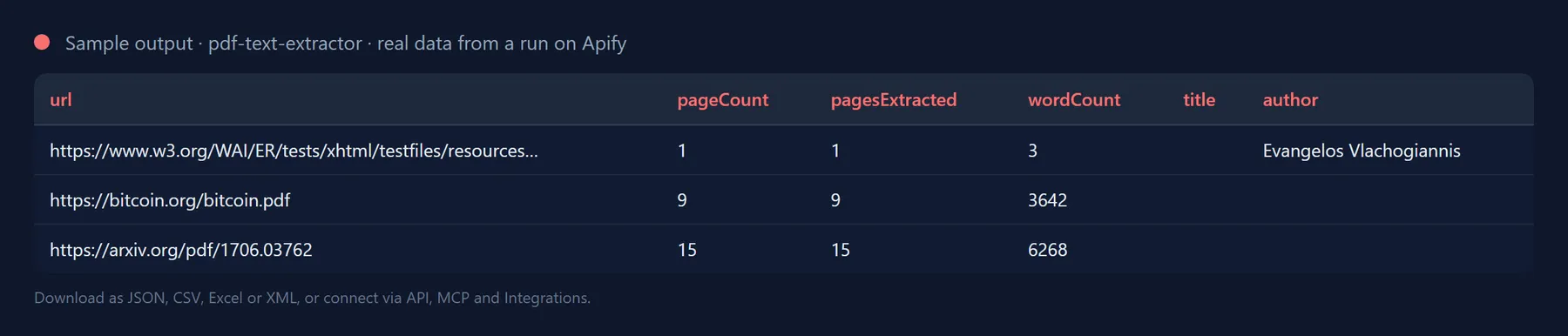
One record per PDF (text trimmed):
Rewritten share links add "resolvedUrl": "https://drive.google.com/uc?export=download&id=...". Failed URLs are still recorded:
Output fields
| Field | Description |
|---|---|
url, resolvedUrl, finalUrl | The URL you supplied, the direct-download URL (only for rewritten share links) and the URL after redirects. |
success, status | success is true when the PDF was parsed; status is ok (billed), no-text-layer or no-pages-in-range (both free). |
fileName, fileSizeBytes | Name from Content-Disposition or the URL, and the downloaded size. |
pageCount, pagesExtracted | Real number of pages and how many were extracted (after pageRange and Max pages per PDF). |
wordCount, charCount, hasText | Size of the extracted plain text; hasText is false for scanned, image-only PDFs. |
metadata | title, author, subject, keywords, creator, producer, creationDate, modDate (ISO 8601), pdfVersion, encrypted. |
text, markdown | Full text (paragraphs separated by blank lines) or Markdown with headings and --- page breaks. Each capped at 2 MB. |
pages[] | page, text, charCount per extracted page (when Include per-page text is on). |
chunks[] | index, page, text, charCount per chunk (when Chunk size is above 0). |
links[] | Unique URLs from link annotations and from the text. |
errorType | For failures: invalid-url, not-a-pdf, too-large, encrypted, http-error, blocked, network, timeout or parse-error. |
Use with LangChain / LlamaIndex
Run the Actor with chunkSize set and embed chunks[] directly, no local PDF parsing or text splitter needed:
For LlamaIndex, build TextNode objects the same way and pass them to VectorStoreIndex(nodes).
Use it from the API or an AI agent
Use it from Claude, Cursor, ChatGPT or any MCP client
The Actor is exposed as a tool by the Apify MCP server, so an AI agent can call it by name. Add this to your MCP client configuration (Claude Desktop, Claude Code, Cursor, VS Code, Windsurf and others):
Then ask, for example: "Extract the text of https://arxiv.org/pdf/1706.03762 with josh99smith/pdf-text-extractor and summarise section 3." The agent fills in the input, runs the Actor and reads the dataset back; you pay the same per-result price as in the Console.
The Actor can also be scheduled, or connected to Zapier, Make, n8n and Google Sheets in the Integrations tab.
Pricing: how much does it cost to extract text from PDFs?
You pay a flat price per successfully processed PDF (shown next to the Start button). There is no start fee and no per-page fee: a 400-page manual and a one-page flyer cost the same, and page ranges, passwords, share-link resolution and chunking are included rather than billed as extra events. Scanned PDFs without a text layer, invalid URLs, non-PDF responses, oversized, password-rejected and unreachable files cost nothing. The Actor stops at the maximum cost you set for the run, so a long list never produces a surprise bill.
Tips
- Only the first pages matter? Use
pageRange(for example1-3for abstract and introduction). - Memory: 512 MB is plenty at the default 25 MB limit and concurrency 5; lower Max concurrency for very large files.
- Smaller records: turn off Include per-page text when you only need
chunks[].
FAQ
Does it extract text from scanned PDFs?
Not in this version. Scanned PDFs contain images rather than text, so the record has status: "no-text-layer" and an empty text; you still get the page count and metadata, and such files are not charged.
Why is the layout of tables and multi-column pages imperfect?
PDF stores positioned text fragments, not paragraphs. The Actor rebuilds lines and paragraphs from positions and font sizes, which works well for articles and reports; complex tables and multi-column layouts may come out in a different reading order.
Can it open password-protected PDFs?
Yes, when you provide the user password in the PDF password input. Without it, or with a wrong one, the file is reported as errorType: "encrypted" and not charged. PDFs that are merely restricted (owner password only) open normally and have metadata.encrypted: true.
What are the limits?
Max file size up to 200 MB (default 25), Max pages per PDF up to 5,000 (default 500), text, markdown and pages capped at 2 MB each, 2,000 chunks per PDF, 20 PDFs in parallel, download timeout up to 300 seconds.
Is it legal to extract text from PDFs?
The Actor downloads publicly available files exactly like a browser would, at low request rates. You are responsible for respecting the copyright and terms of use of the documents you process.
Will the output fields change between runs?
No. Output fields are stable: existing fields are never renamed or removed without a major version bump announced in the changelog, and new fields are only ever added. You can build integrations on the schema without checking it after every run.
Integrate Best Damn PDF Text Extractor and automate your workflow
Best Damn PDF Text Extractor plugs into the tools you already use through Apify integrations, so results can flow on without anyone downloading a file. Ready-made connectors include:
You can also attach webhooks to trigger your own endpoint whenever a run succeeds, fails or times out. For example, send extracted text straight into your vector database or RAG pipeline, or archive it in Google Drive.
Related Actors by the same developer
- Best Damn Website Screenshot API: full-page screenshots and PDFs of any URL.
- Best Damn Sitemap URL Extractor: all URLs from XML sitemaps.
- Best Damn RSS to JSON Converter: feeds as JSON items.
- Best Damn Tech Stack Detector: what a website is built with.
- Best Damn Remote Jobs Aggregator: remote job listings in one dataset.
- Best Damn YouTube Comments Scraper: comments and replies from YouTube videos and channels.
- Best Damn YouTube Scraper: videos, channels, playlists and search results with statistics.
Support and feedback
Found a PDF that extracts badly, or need OCR or table extraction? Open a ticket in the Issues tab. The source is MIT licensed; parsing is powered by pdf.js (Apache-2.0).
The full source code is on GitHub: josh99smith/pdf-text-extractor. Stars and pull requests are welcome.


