

Best Damn RSS to JSON Converter
Pricing
$0.50 / 1,000 feed item delivereds
Best Damn RSS to JSON Converter
Convert RSS, Atom and JSON Feed into clean, consistent JSON items: title, link, author, date, content, images and podcast enclosures. Paste a site URL and it finds the feed for you. Pay per item; failed feeds are free.
Pricing
$0.50 / 1,000 feed item delivereds
Rating
0.0
(0)
Developer

Joshua Smith
Maintained by CommunityActor stats
0
Bookmarked
2
Total users
1
Monthly active users
a month ago
Last modified
Categories
Share
RSS to JSON converter and RSS feed parser API: turn any RSS, Atom or JSON feed into clean, consistent JSON. Paste feed URLs (or website URLs; the Actor finds the feed) and get one normalized record per article, episode or post: title, link, author, date, categories, HTML and plain-text content, lead image and media enclosures.
Built for developers, content teams, newsletter builders and automation users: a small flat price per item, no monthly subscription, and feeds that cannot be found, fetched or parsed are reported free of charge.
Features
- Convert RSS or Atom feeds to JSON with one API call
- RSS 2.0, Atom 1.0, RSS 1.0 (RDF) and JSON Feed parsed into the same item shape
- Automatic feed discovery from a website URL
- Full article HTML and plain text for LLM and RAG pipelines
- Podcast enclosures, media files and lead images
- Only items published after a given date
- Monitor mode: only items new since the last run, so alerts never repeat
What can you do with Best Damn RSS to JSON Converter?
- Content aggregation: dozens of blogs, news sites and podcasts merged into one dataset for a newsletter, news app or digest.
- Competitor and industry monitoring: hourly runs with monitor mode on, pushing new posts to Slack, email or a webhook.
- AI and RAG pipelines:
contentTextis ready for embeddings, summarisation or classification. - Replace Zapier / Make RSS triggers: cheaper on a schedule, with the full item history in your own dataset.
- Podcast and media tooling: enclosure URLs, MIME types and file sizes.
- SEO and content research: publishing frequency, authors and categories across sites.
How it works
Each URL is downloaded (gzip and redirects handled) and its feed format detected. For a web page, the Actor reads the <link rel="alternate" type="application/rss+xml"> / atom+xml / feed+json head tags, otherwise probes common paths such as /feed, /rss.xml and /atom.xml, and uses the first working feed. CDATA, escaped HTML, entities, content:encoded, dc:creator, categories, media:content, itunes:image and enclosures are normalized into one item shape, and dates become ISO 8601.
How to use it
- Paste feed or website URLs into Feed or website URLs, one per line.
- Optionally set Max items per feed and Published after, or switch off Include full HTML content (
contentTextstays available). - Click Start; items appear in the Output tab within seconds as JSON, CSV, Excel or XML, with Google Sheets, Slack, Make, Zapier and webhooks in the Integrations tab.
- For recurring runs, add a Schedule and turn on Only new items since the last run (see Monitor mode).
Output
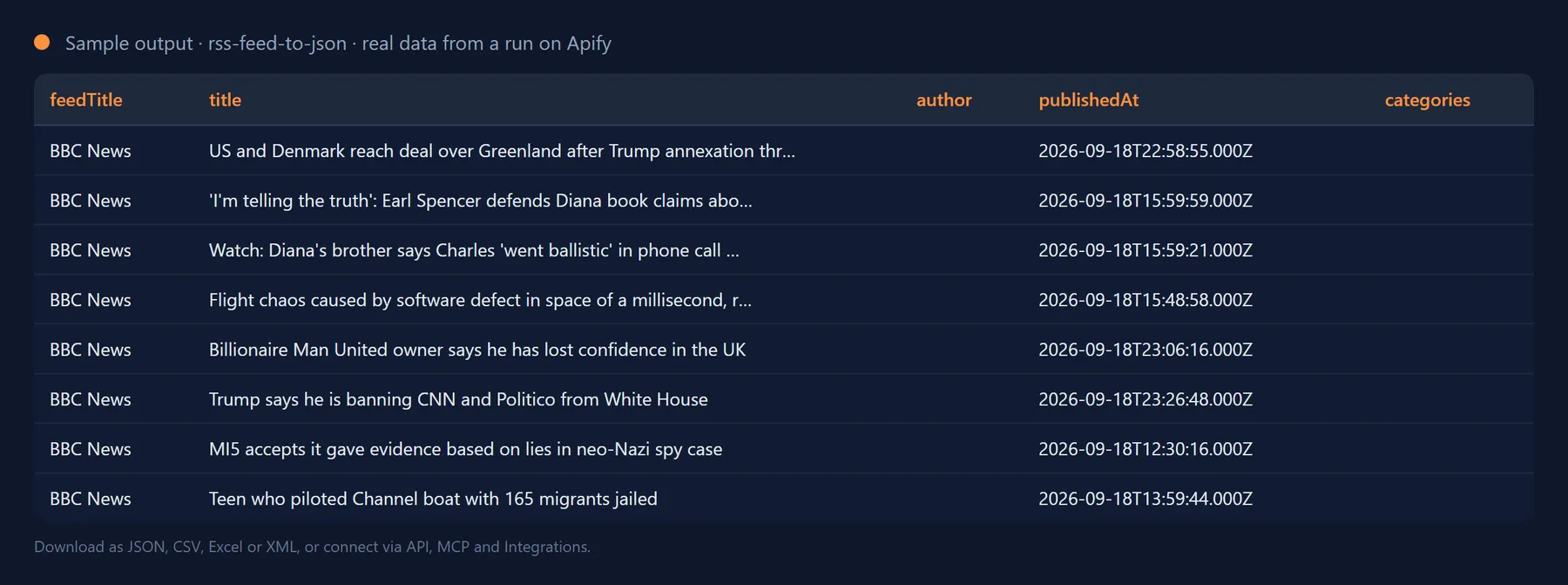
One record per feed item (trimmed):
Failed feeds are recorded too:
Output fields
| Field | Description |
|---|---|
feedUrl | Parsed feed URL; discoveredFrom is the page it was discovered from. |
feedTitle / feedType | Feed title and format: rss, atom, rss1 or json. |
id | guid, Atom id or JSON id, falling back to the link. |
title / url / author | Title (HTML stripped), absolute link, author (dc:creator, author, Atom author/name, or feed-level author). |
publishedAt / updatedAt | ISO 8601 timestamps, or null. |
summary | Plain-text summary (description, Atom summary, JSON summary), max 5,000 characters. |
contentHtml | Full HTML body (content:encoded, Atom content, JSON content_html), max 50,000 characters; null with Include full HTML content off. |
contentText | Plain-text body with paragraph breaks, max 5,000 characters; null with Add plain-text content off. |
categories[] | Categories, tags or dc:subject values, de-duplicated. |
enclosures[] | url, type (MIME) and length (bytes) from enclosures, Media RSS and JSON Feed attachments. |
imageUrl | Lead image: Media RSS, itunes:image, an image enclosure or the first <img> in the content. |
isNew | true unless an earlier run with the same state store delivered the item; always present. |
errorType | Failures only: invalid-url, not-found, invalid-feed, http-error, blocked, dns, timeout, network or other. |
Use it from the API, Python, JavaScript or an AI agent
One HTTP call:
Python (apify-client):
JavaScript or TypeScript (apify-client):
Use it from Claude, Cursor, ChatGPT or any MCP client
The Actor is exposed as a tool by the Apify MCP server, so an AI agent can call it by name. Add this to your MCP client configuration (Claude Desktop, Claude Code, Cursor, VS Code, Windsurf and others):
Then ask, for example: "Fetch the latest 10 items from https://blog.apify.com/rss/ with josh99smith/rss-feed-to-json." The agent fills in the input, runs the Actor and reads the dataset back; you pay the same per-result price as in the Console.
The Actor can also be scheduled, or connected to Zapier, Make, n8n and Google Sheets in the Integrations tab.
Monitor mode: only new items since the last run
With Only new items since the last run on, the Actor stores the id of every delivered item (feed guid or id, else the link, else a hash of title and date) in a named key-value store (rss-feed-to-json-seen by default). The first run returns everything; later runs return only items not seen before. Skipped items are never billed.
Unlike Published after, this needs no date bookkeeping between runs and also catches items without a publication date. The store is shared by all runs in your account, so give each feed group its own State store name (for example competitor-blogs and podcasts).
Ids absent for Forget seen items after (days) (default 90) are dropped and count as new if they return; the store holds at most 100,000 ids. With monitor mode off, isNew still marks previously seen items. SUMMARY in the key-value store reports newItems, alreadySeen and stateStoreName.
Pricing: how much does it cost to convert a feed to JSON?
You pay a flat price per delivered item (shown next to the Start button); 2,000 items cost about $1. Nothing is charged for Actor start-up, items skipped by monitor mode or feeds that fail. Max items per feed and Published after limit what is fetched; the Actor stops when a run reaches the maximum cost you set.
How it compares (September 2026). Comparable feed readers charge $0.00115 per item plus a $0.035 start fee, or $0.008 per item. This Actor charges $0.0005 per item with no start fee, supports RSS, Atom, RSS 1.0 and JSON Feed, discovers feeds from a plain site URL, and offers monitor mode so scheduled runs return only new items, with skipped items never billed.
Tips
- Blocked feeds: some publishers block cloud IP addresses. Enable Proxy configuration > Apify Proxy in the Advanced section (proxy traffic is billed by Apify separately).
- Websites instead of feeds: pasting
https://www.theverge.comis enough; if a site advertises several feeds the first working one is used, so paste the exact URL for a specific feed.
FAQ
Which feed formats can be converted to JSON?
RSS 2.0 (including podcast feeds with iTunes and Media RSS extensions), Atom 1.0, RSS 1.0 / RDF and JSON Feed 1.0 and 1.1, gzip-compressed or behind redirects.
Why is contentHtml short or missing for some items?
The Actor reads feeds only, never linked articles, so you get what the feed contains: full text for most blogs, a summary for many news sites. For full articles, pass the url values to a content-extraction Actor.
How are feed dates handled?
RFC 822 (Tue, 10 Jun 2003 04:00:00 GMT), ISO 8601 and common timezone abbreviations become UTC ISO 8601. Unparseable dates give publishedAt: null and are never filtered by Published after.
What are the limits on items, content size and feeds?
Max items per feed goes up to 10,000 per run (default 100). contentHtml is capped at 50,000 characters, summary and contentText at 5,000 each. Feed files may be up to 32 MB, up to 10 feeds are fetched in parallel, and each request times out after at most 120 seconds.
How do I reset the seen list?
Delete the store named in State store name (rss-feed-to-json-seen unless you changed it) under Storage > Key-value stores in Apify Console; the next run returns everything again. Or set a new State store name to keep the old watchlist.
Is it legal to parse RSS feeds?
Feeds are published for syndication and read as a feed reader would (a couple of requests per feed); only what the publisher includes is stored. Complying with the publisher's terms and applicable law is your responsibility.
Will the output fields change between runs?
No. Existing fields are never renamed or removed without a major version bump announced in the changelog; new fields are only ever added.
Integrate Best Damn RSS to JSON Converter and automate your workflow
Best Damn RSS to JSON Converter plugs into the tools you already use through Apify integrations, so results can flow on without anyone downloading a file. Ready-made connectors include:
You can also attach webhooks to trigger your own endpoint whenever a run succeeds, fails or times out. For example, forward new feed items to Slack or Discord, or append them to a Google Sheet as they are published.
Related Actors by the same developer
- Best Damn Tech Stack Detector: what a website is built with.
- Best Damn Website Screenshot API: full-page screenshots and PDFs.
- Best Damn Google Autocomplete Scraper: Google search keyword suggestions.
- Best Damn App Reviews Scraper: app reviews from both stores.
- Best Damn PageSpeed Insights Audit: Core Web Vitals via Google's API.
- Best Damn Remote Jobs Aggregator: remote job listings in one dataset.
- Best Damn PDF Text Extractor: text and metadata from PDF URLs.
- Best Damn Sitemap URL Extractor: all URLs from XML sitemaps.
- Best Damn YouTube Comments Scraper: comments and replies from YouTube videos and channels.
- Best Damn YouTube Scraper: videos, channels, playlists and search results with statistics.
Support and feedback
Found a feed that is not parsed correctly? Open a ticket in the Issues tab with the feed URL. Open source under the MIT licence.
The full source code is on GitHub: josh99smith/rss-feed-to-json. Stars and pull requests are welcome.


