

Best Damn Tech Stack Detector
Pricing
$8.00 / 1,000 website analyzeds
Best Damn Tech Stack Detector
Detect what any website is built with, in bulk: CMS, ecommerce platform, frameworks, analytics, CDN and hosting from 7,600+ fingerprints. Straight answers at one flat price per site, and failed URLs never cost a cent.
Pricing
$8.00 / 1,000 website analyzeds
Rating
0.0
(0)
Developer

Joshua Smith
Maintained by CommunityActor stats
0
Bookmarked
2
Total users
1
Monthly active users
4 days ago
Last modified
Categories
Share

This website technology detector finds out what any website is built with in seconds. Paste a list of URLs and get back the CMS, ecommerce platform, JavaScript frameworks, analytics and marketing tags, CDN, hosting provider, email provider, security tools and more, matched against a database of 7,600+ technology fingerprints.
It is a Wappalyzer / BuiltWith alternative that runs as an API: no browser extension, no monthly subscription, no per-seat licence. You pay a flat price per website analyzed, and websites that cannot be reached are reported free of charge.
Features
- Detect the CMS and ecommerce platform of any website (WordPress, Shopify, Magento, Webflow, WooCommerce and more)
- Find which JavaScript framework a website uses (React, Next.js, Vue, Angular, jQuery)
- Check a list of domains for their tech stack in bulk from a CSV or Google Sheet
- See what analytics, tag manager, A/B testing and advertising tools a competitor runs
- Identify the CDN, web server, hosting provider and email provider behind a domain
- Build lead lists of websites using a specific technology, such as HubSpot or Klaviyo
- Look up the technology stack of a website from Python, JavaScript or an AI agent
- Detect software versions and CPE identifiers for security and compliance audits
What can you do with Best Damn Tech Stack Detector?
- Qualify sales leads by technology: find every prospect running Shopify, HubSpot, Magento, WordPress + WooCommerce, Salesforce, Intercom, and so on.
- Enrich CRM records with the tech stack of each account (works with the Apify integrations for Google Sheets, Airtable, HubSpot, Zapier and Make).
- Competitive research: see which analytics, A/B testing, personalisation and advertising tools competitors deploy.
- Migration and agency prospecting: build lists of sites on an outdated CMS, an end-of-life framework, or a platform you specialise in.
- Security and compliance checks: spot exposed server versions, missing HSTS, third-party trackers or unexpected scripts across your own portfolio of domains.
How it works
For every URL the Actor downloads the HTML page and inspects HTTP headers, cookies, meta tags, inline scripts and styles, script and stylesheet URLs, the DOM structure and (optionally) DNS records. Every signal is matched against the open-source fingerprint database maintained by the webappanalyzer project, the community continuation of the original Wappalyzer rules. Detections also resolve implied technologies (for example WordPress implies PHP and MySQL) and drop contradictory ones.
Detection is HTTP-only, so it is fast (typically 1 to 3 seconds per site) and cheap. Technologies that only reveal themselves after JavaScript executes in a browser are not detected; see the FAQ.
How to use it
- Open the Actor and paste your website URLs into Website URLs, one per line. The scheme is optional.
- Optionally turn on Include detection evidence to see exactly which header, script or cookie triggered each match.
- Click Start. Results appear in the Output tab as they arrive.
- Download the dataset as JSON, CSV, Excel or XML, or connect it to your tools with an integration.
Output
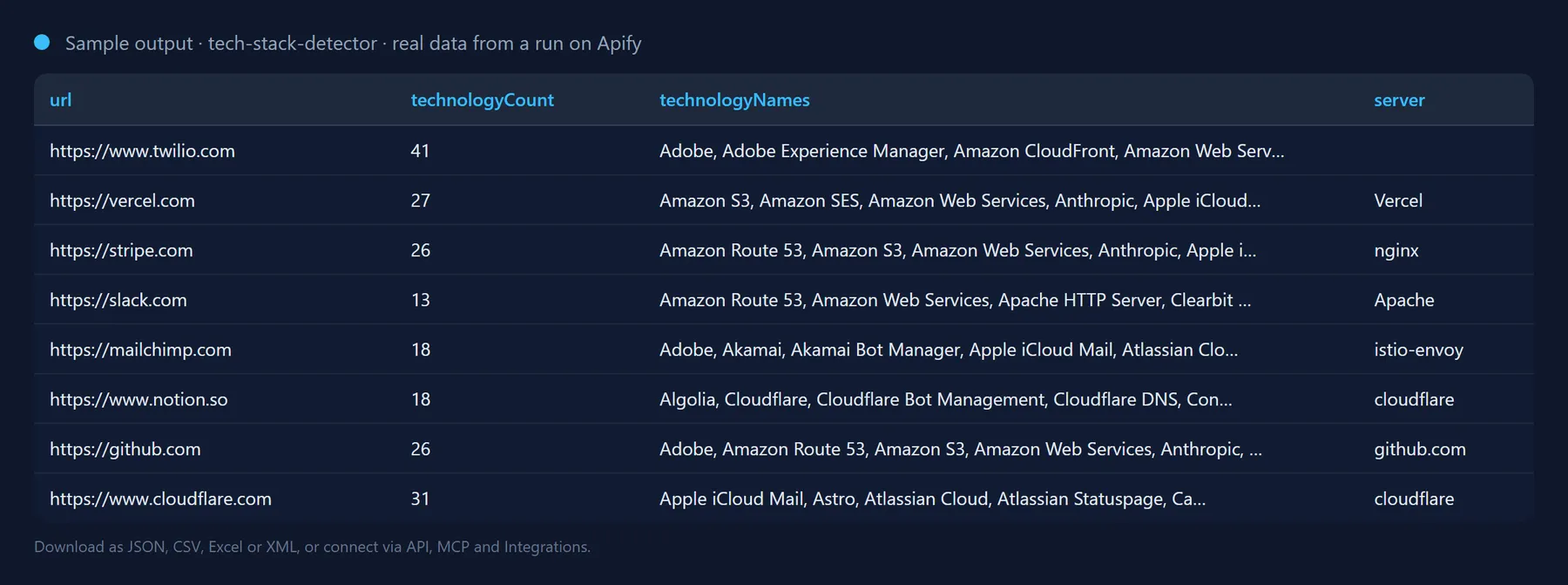
One record per website. Successful records look like this (trimmed):
Websites that could not be analyzed are still recorded, so nothing silently disappears from your list:
| Field | Description |
|---|---|
url / finalUrl | The URL you supplied and the URL after redirects. |
success | true when the page was fetched and analyzed. Only these records are billed. |
statusCode | HTTP status of the final response. |
title | The page <title>. |
technologyCount | Number of technologies detected. |
technologies[] | name, slug, categories, version (when it can be determined), confidence (0 to 100), vendor website, optional cpe identifier, optional description and evidence. |
byCategory / byGroup | Technology names grouped by category (CMS, CDN, Analytics, ...) and by broader group (Content, Servers, Marketing, ...). |
server | Raw Server response header. |
errorType | For failures: invalid-url, dns, timeout, blocked, http-error, network or other. |
Use it from the API, Python, JavaScript or an AI agent
Run the Actor and get the results back in one HTTP call:
Python, with the apify-client package:
JavaScript, with the apify-client package:
Use it from Claude, Cursor, ChatGPT or any MCP client
The Actor is exposed as a tool by the Apify MCP server, so an AI agent can call it by name. Add this to your MCP client configuration (Claude Desktop, Claude Code, Cursor, VS Code, Windsurf and others):
Then ask, for example: "What is shopify.com built with? Use josh99smith/tech-stack-detector." The agent fills in the input, runs the Actor and reads the dataset back; you pay the same per-result price as in the Console.
The Actor can also be scheduled, or connected to Zapier, Make, n8n and Google Sheets in the Integrations tab.
Pricing: how much does it cost to detect a website's tech stack?
You pay a flat price per successfully analyzed website (see the price shown next to the Start button). Unreachable or invalid URLs cost nothing. There is no charge for Actor start-up, and the Actor stops automatically when it reaches the maximum cost you set for a run, so a large list never produces a surprise bill.
For comparison, a 1,000-domain lookup on this Actor costs a fraction of a single month of a BuiltWith or Wappalyzer subscription, and you only pay for what you actually run.
How it compares (September 2026). The most-used alternative on Apify Store charges $0.10 per website and the next one $0.07 to $0.10; this Actor charges $0.008 per analyzed website with the same 7,600-technology catalogue, so 1,000 domains cost about $8 instead of $70 to $100. There is no start fee, blocked or unreachable sites are never billed, and the run stops on its own at the cost cap you set.
Tips
- Speed: raise Max concurrency (up to 50) for large lists. Most runs finish at several hundred sites per minute.
- Blocked sites: a few websites refuse cloud IP addresses. Enable Proxy configuration > Apify Proxy to route those through residential or datacenter proxies (proxy traffic is billed by Apify separately).
- Auditing: switch on Include detection evidence to see the exact header, cookie, script URL or DNS record behind each detection.
- Fresh fingerprints: the fingerprint database is refreshed with every release of the Actor. The snapshot date is printed at the top of every run log.
- Scheduling: use the Schedule tab to re-run the same list weekly or monthly and track technology changes over time.
FAQ
Why does it find fewer technologies than my browser extension on some sites?
Browser extensions execute the page's JavaScript and read global variables. This Actor analyzes the served HTML, headers, cookies and DNS records, which covers the large majority of fingerprints and is many times faster and cheaper. Single-page applications that render everything client-side will show fewer detections. A JavaScript-rendering mode is on the roadmap; tell us in the Issues tab if you need it.
How accurate is website technology detection?
Each fingerprint is a community-maintained rule. Confidence values reflect how many independent signals matched. Occasional false positives are possible when a page merely mentions another platform; use the evidence field to review them.
Which page of the website is analyzed?
Only the page you provide (usually the home page), after following redirects. Sub-pages are not crawled.
Are there limits on how many websites I can check?
There is no fixed cap on the list size. Large lists are processed in parallel (up to 50 sites at a time) and the run stops cleanly when it reaches the maximum cost you set. Each request times out after the configured Request timeout (default 30 seconds) and is retried once before it is reported as a free failure.
Is it legal to detect what technology a website uses?
The Actor reads publicly served pages exactly like a browser does, at low request rates, and stores no personal data. You are responsible for using the results in compliance with the laws and terms that apply to you.
Will the output fields change between runs?
No. Output fields are stable: existing fields are never renamed or removed without a major version bump announced in the changelog, and new fields are only ever added. You can build integrations on the schema without checking it after every run.
Integrate Best Damn Tech Stack Detector and automate your workflow
Best Damn Tech Stack Detector plugs into the tools you already use through Apify integrations, so results can flow on without anyone downloading a file. Ready-made connectors include:
You can also attach webhooks to trigger your own endpoint whenever a run succeeds, fails or times out. For example, post a Slack message when a prospect list finishes, or push newly detected Shopify stores into your CRM.
Related Actors by the same developer
- Best Damn Website Screenshot API: full-page screenshots and PDFs of any URL.
- Best Damn Google Autocomplete Scraper: keyword suggestions from Google's search box.
- Best Damn App Reviews Scraper: App Store and Google Play reviews.
- Best Damn PageSpeed Insights Audit: Core Web Vitals via Google's API.
- Best Damn Remote Jobs Aggregator: remote job listings.
- Best Damn PDF Text Extractor: text and metadata from PDFs.
- Best Damn Sitemap URL Extractor: all URLs from XML sitemaps.
- Best Damn RSS to JSON Converter: feeds as JSON.
- Best Damn YouTube Comments Scraper: comments and replies from YouTube videos and channels.
- Best Damn YouTube Scraper: videos, channels, playlists and search results with statistics.
Support and feedback
Found a site that is misdetected, or a technology that is missing? Open a ticket in the Issues tab of this Actor. Fingerprint contributions are welcome upstream at enthec/webappanalyzer. If this Actor saved you time, a review on its Store page helps other people find it.
This Actor is open source under the GPL-3.0 licence. The technology fingerprints are © their contributors, GPL-3.0.
The full source code is on GitHub: josh99smith/tech-stack-detector. Stars and pull requests are welcome.


