

Best Damn Website Screenshot API
Pricing
from $5.00 / 1,000 screenshot captureds
Best Damn Website Screenshot API
Capture any URL in a real Chrome browser: full-page or viewport PNG/JPEG, desktop and mobile presets, dark mode and optional PDF. Cookie banners are cleared before the shot, you pay per page, and failed captures are free.
Pricing
from $5.00 / 1,000 screenshot captureds
Rating
0.0
(0)
Developer

Joshua Smith
Maintained by CommunityActor stats
0
Bookmarked
1
Total users
1
Monthly active users
a month ago
Last modified
Categories
Share
This website screenshot API turns any URL into a full-page screenshot or PDF with one call. Paste a list of websites, pick a device (desktop, laptop, tablet, mobile or custom viewport), choose PNG or JPEG, and get back image files plus a structured record for each page. Cookie banners are hidden automatically, lazy-loaded images are scrolled into view, sticky headers are captured once instead of covering the page, emoji and CJK text render correctly, and pages that fail to load are reported free of charge.
It runs in headless Chromium on Apify's infrastructure, so there is nothing to install, and it can be scheduled, called from code, or wired into Zapier, Make, n8n and the Apify MCP server.
Features
- Full-page or viewport screenshots of a list of URLs in bulk, as PNG or JPEG
- Web page to PDF (A4, Letter or Legal)
- Desktop, laptop, tablet and mobile presets, custom viewport, dark mode
- Cookie banners hidden, sticky headers pinned, emoji and CJK fonts included
- Capture a single element, wait for an element, block images or fonts
- Logged-in pages via your own cookies and headers; scheduling and integrations via Apify
What can you use Website Screenshot API for?
- Visual monitoring: schedule daily captures of landing, pricing or competitor pages.
- Link previews and thumbnails for directories, newsletters and CMS cards.
- Design and QA reviews: the same pages on laptop, tablet and mobile, light and dark.
- Compliance and evidence: archive how a page looked on a given date, as image and PDF.
- AI agents: give an agent eyes on the web through the Apify MCP server.
How it works
Each URL is opened in headless Chromium with the viewport, pixel density and user agent of the chosen device. The Actor waits for the page to load (by default until the network goes idle), scrolls to the bottom so lazy-loaded content appears, hides consent pop-ups with CSS (nothing is clicked or accepted on your behalf), pins fixed and sticky elements so they appear once, waits an optional delay, and captures the image. Files go to the run's key-value store and the dataset record links to them.
How to use it
- Paste your URLs into Website URLs, one per line.
- Pick a Device preset, Image format and whether you want the Full page or only the first screen.
- Optionally enable Also render a PDF, Dark mode, add Hide elements selectors (chat widgets, newsletter pop-ups), or set Wait for element, Cookies, Extra HTTP headers and Block resource types under Advanced.
- Click Start. Each finished page appears in the Output tab with a preview; the files are in the Storage tab (or via API).
| Input | Default | What it does |
|---|---|---|
device + viewportWidth, viewportHeight, deviceScaleFactor | laptop | Presets, or custom with any size from 320x240 to 3840x2160 at 1x to 3x. |
fullPage | true | Whole scrollable page, or only the viewport. |
unstickFixed | true | Pin fixed and sticky headers, bars and chat bubbles so each appears once in full-page captures. |
waitForSelector | none | Wait for this element (up to timeoutSecs); if it never appears the page is still captured with a warnings entry. |
hideCookieBanners, hideSelectors | true, [] | Hide 60+ known consent pop-ups plus your own selectors. |
cookies | [] | Playwright cookies (name, value, domain, path) set before navigation. Never logged. |
extraHeaders | {} | Sent only to the page's own domain and subdomains, never to third-party hosts. Never logged. |
blockResources | [] | Abort image, media, font, stylesheet, script or xhr requests; the last three change rendering. |
waitUntil, delayMs, autoScroll, timeoutSecs, maxRetries | networkidle, 500, true, 60, 1 | Loading and timing controls. |
Output
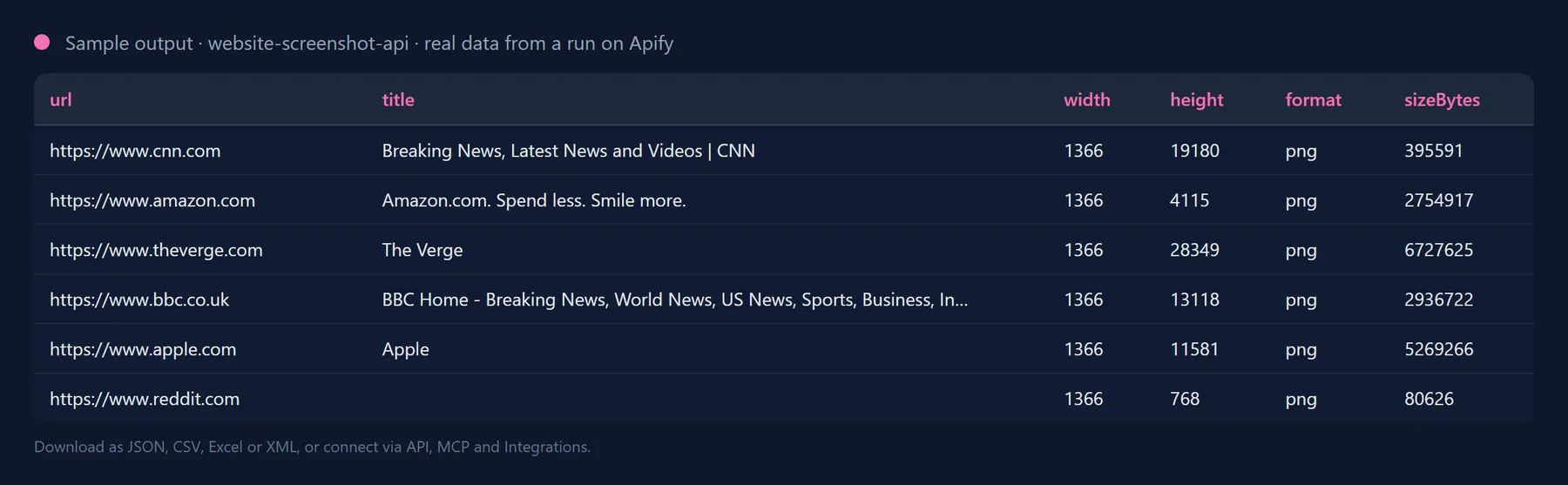
Pages that could not be captured are still listed, so nothing goes missing from your batch:
| Field | Description |
|---|---|
screenshotUrl / screenshotKey | Direct link to the image and its key in the key-value store. |
pdfUrl / pdfKey | Present when Also render a PDF is on. |
width / height | Pixel dimensions of the captured image (height is the full page height when fullPage is on). |
statusCode | HTTP status of the page. Error pages (404, 500) are still captured so you can see them. |
title | The page title. |
warnings | Only present when something non-fatal happened, e.g. waitForSelector timed out. |
errorType | For failures: invalid-url, dns, timeout, blocked, http-error, network or other. |
Fixes for the common screenshot problems
The complaints users report most often about free screenshot tools, and what this Actor does about each:
- Cookie banners cover the page: 60+ consent pop-ups are hidden with CSS by default; add your own in Hide elements.
- Sticky headers repeat or cover content in full-page screenshots:
unstickFixedpins fixed and sticky elements once at their natural place and moves bottom bars to the end of the page. - Emoji and Chinese, Japanese or Korean text render as boxes: Noto Color Emoji and Noto CJK fonts are installed.
- Cannot set the height or dimensions: use the
custompreset withviewportWidth,viewportHeightanddeviceScaleFactor; the record reports the exactwidthandheight. - Timeouts and pages that load forever still cost credits: a failed page is a free
success: falserecord with anerrorType. You pay only for delivered images. - Captured before the content appears:
waitForSelector,delayMsandautoScroll. - Logged-in or personalised pages: pass your own
cookiesandextraHeaders(never logged). Use only sessions you are entitled to. - Heavy pages are slow:
blockResourcesdrops images, media or fonts.
Use it from the API, Python, JavaScript or an AI agent
One HTTP call runs the Actor and returns the dataset records with every screenshotUrl:
Python, with the apify-client package:
JavaScript, with the apify-client package:
Use it from Claude, Cursor, ChatGPT or any MCP client
The Actor is exposed as a tool by the Apify MCP server, so an AI agent can call it by name. Add this to your MCP client configuration (Claude Desktop, Claude Code, Cursor, VS Code, Windsurf and others):
Then ask, for example: "Take a full-page mobile screenshot of apify.com with josh99smith/website-screenshot-api." The agent fills in the input, runs the Actor and reads the dataset back; you pay the same per-result price as in the Console.
The Actor can also be scheduled, or connected to Zapier, Make, n8n and Google Sheets in the Integrations tab.
Pricing: how much does it cost to screenshot a website?
You pay a flat price per captured screenshot and, if enabled, a flat price per PDF; both are shown next to the Start button. Pages that fail to load cost nothing, and there is no per-run start fee. Set a maximum cost per run and the Actor stops cleanly when it is reached.
For comparison, screenshot SaaS products typically charge a monthly subscription for a fixed quota; here you only pay for the pages you actually capture.
Tips
- Speed:
networkidlegives the best render; switch toloadordomcontentloadedand block images for large batches of simple pages. - Thumbnails: turn off Full page and combine with
device: "mobile"for app-store style captures. - Cleaner captures: hide chat bubbles, promo bars or "download our app" overlays with Hide elements.
- Blocked or geo-restricted sites: enable Apify Proxy (residential groups available) in Proxy configuration.
- Memory: each concurrent tab needs roughly 200 to 400 MB; raise run memory with concurrency.
FAQ
Are cookie banners accepted or dismissed?
No. They are hidden visually with CSS so the capture is clean. No consent choice is made on the visited site.
Why is the screenshot dark or light?
A light colour scheme is requested unless Dark mode is on. Sites with a dark design (like Apify's) still render dark.
Can it log in or click through pop-ups?
It does not fill in forms or click. To capture a page as a logged-in user, pass the session cookies from your own browser in Cookies (and any required headers in Extra HTTP headers); they are set before navigation and never logged. Pop-ups are hidden with CSS, not clicked.
What are the limits on page size, timeouts and batch size?
No fixed cap on URLs; the run stops cleanly at the maximum cost you set. Each page gets the configured Page timeout (10 to 180 s) and up to 3 retries; concurrency is capped at 20 tabs. Very long pages are captured in full, but extremely tall images (tens of thousands of pixels) may be truncated by Chromium.
Is it legal to screenshot a website?
The Actor loads public web pages in a browser, like a visitor would, at low request rates. You are responsible for how you use the captured images and for respecting the target sites' terms and copyright.
Integrate Best Damn Website Screenshot API and automate your workflow
Best Damn Website Screenshot API plugs into the tools you already use through Apify integrations, so results can flow on without anyone downloading a file. Ready-made connectors include:
You can also attach webhooks to trigger your own endpoint whenever a run succeeds, fails or times out. For example, drop every new capture into a Google Drive folder, or ping Slack when a scheduled visual check completes.
Related Actors by the same developer
- Best Damn YouTube Comments Scraper: comments and replies from YouTube videos and channels.
- Best Damn YouTube Scraper: videos, channels, playlists and search results with statistics. Best Damn Tech Stack Detector, Best Damn Google Autocomplete Scraper, Best Damn App Reviews Scraper, Best Damn PageSpeed Insights Audit, Best Damn Remote Jobs Aggregator, Best Damn PDF Text Extractor, Best Damn Sitemap URL Extractor, Best Damn RSS to JSON Converter.
Support
Report problems or request features in the Issues tab. Feature requests such as scripted interactions are welcome.
The full source code is on GitHub: josh99smith/website-screenshot-api. Stars and pull requests are welcome.


