

LinkedIn Company Employees Scraper · Email Finder, No Login
Pricing
from $4.00 / 1,000 employee profiles
LinkedIn Company Employees Scraper · Email Finder, No Login
Find a company's employees on LinkedIn two ways: no login (public web search) or with your cookie (full roster, richer data, contact info). Names, titles, headlines, profile URLs, filter by position — CEO, CTO, recruiter. Every row's confidence field says if its employer was confirmed.
Pricing
from $4.00 / 1,000 employee profiles
Rating
4.1
(11)
Developer

Muhamed Didovic
Maintained by CommunityActor stats
67
Bookmarked
1.5K
Total users
86
Monthly active users
3.6 hours
Issues response
2 days ago
Last modified
Categories
Features
Share
LinkedIn Company Employees Scraper · Decision Makers, No Login
Find the people who run and work at any company on LinkedIn, without logging in. Type company names or paste LinkedIn company URLs, choose the job titles or seniority you sell to, and get one row per person with a profile URL and a grade that says how sure the match is.
| You give it | You get back |
|---|---|
Stripe (a plain company name) | Stripe's leadership and staff who match your titles, one row each |
https://www.linkedin.com/company/figma/ | The same, for the company behind the URL |
| A list of 300 company names | Up to your per-company limit for every one of them, in one run |
Titles such as CEO, Head of Sales, Gerente General | Only people whose profile carries those titles |
No LinkedIn account, cookie or API key. Export as JSON, CSV or Excel, or read it from the API.
Why use this scraper
- Company names work. You do not need to look up LinkedIn URLs first. Names and URLs can be mixed, and numeric company ids and Sales Navigator company links are accepted too.
- Many companies per run. Paste a whole account list and set how many people you want from each, from 1 to 1,000.
- Decision makers by default. Leave the titles empty and a built-in English and Spanish leadership set is used (CEO, CTO, CFO, Founder, Owner, President, Director, VP, Presidente, Dueño and more). Or type your own titles, or pick seniority levels.
- Every row is graded. Each person is checked against the company you asked for and marked
highormedium, with a plain-English reason. Lookalike companies and former staff are flagged instead of being passed off as current employees, and people with no trace of your company are dropped before you pay. - Low cost per run. The run-start fee is $0.003, so running one company per call from an automation costs almost nothing in fees.
- Your LinkedIn account is never used. Nothing to connect, nothing to get restricted.
Overview
This actor is built for prospect lists: the decision makers and visible staff at a list of target accounts. It reads public LinkedIn profiles, matches them to the companies you give it, and returns a flat, de-duplicated table.
What each row holds:
- always: full name, first and last name, headline, LinkedIn profile URL and handle, the company key you searched, a confidence grade and its reason
- when the public profile shows it: current employer, location, and the current job title (titles show most often for leadership, where the headline usually says "CEO at …")
- with Full profiles on: work history, schools, top skills, about text and follower count
- with Find contact email on: one contact email for the company, plus its phone number and social links when its website shows them
What it is not: a full-roster export. A large company's entire 10,000-person workforce is not what this actor returns. It finds the people whose public profiles tie them to the company, which on a typical run is the leadership plus the most visible staff, up to the limit you set.
Supported inputs
| Input | Example |
|---|---|
| Company name | Stripe |
| LinkedIn company URL | https://www.linkedin.com/company/figma/ |
| School or showcase page URL | https://www.linkedin.com/school/stanford-university/ |
| Numeric company id, or its URL | 105621, https://www.linkedin.com/company/105621/ |
Sales Navigator company URL or urn:li:organization: id | urn:li:organization:105621 |
| Job titles to target | ["CEO", "Head of Sales", "Recruiter"] |
| Seniority levels | ["cxo", "vp", "director"] |
| A location to narrow the search | "Germany" |
Not supported: people search by keyword without a company (use LinkedIn People Search for that), and personal email addresses (see the FAQ).
Use cases
| Who | What they build |
|---|---|
| Sales and SDR teams | Decision-maker lists for every account in a territory, ready for a CRM import |
| Agencies and lead-gen shops | Owner and founder lists for hundreds of small businesses typed in by name |
| Recruiters | Who leads engineering, sales or HR at a competitor, by title and seniority |
| Account-based marketing | Buying committees (CxO, VP, Director) for a target account list |
| LATAM and Spain outreach | Spanish titles (Gerente General, Director Comercial, Dueño) matched as written |
| AI agents and automations | One company per call with a tiny start fee, structured JSON back |
How it works
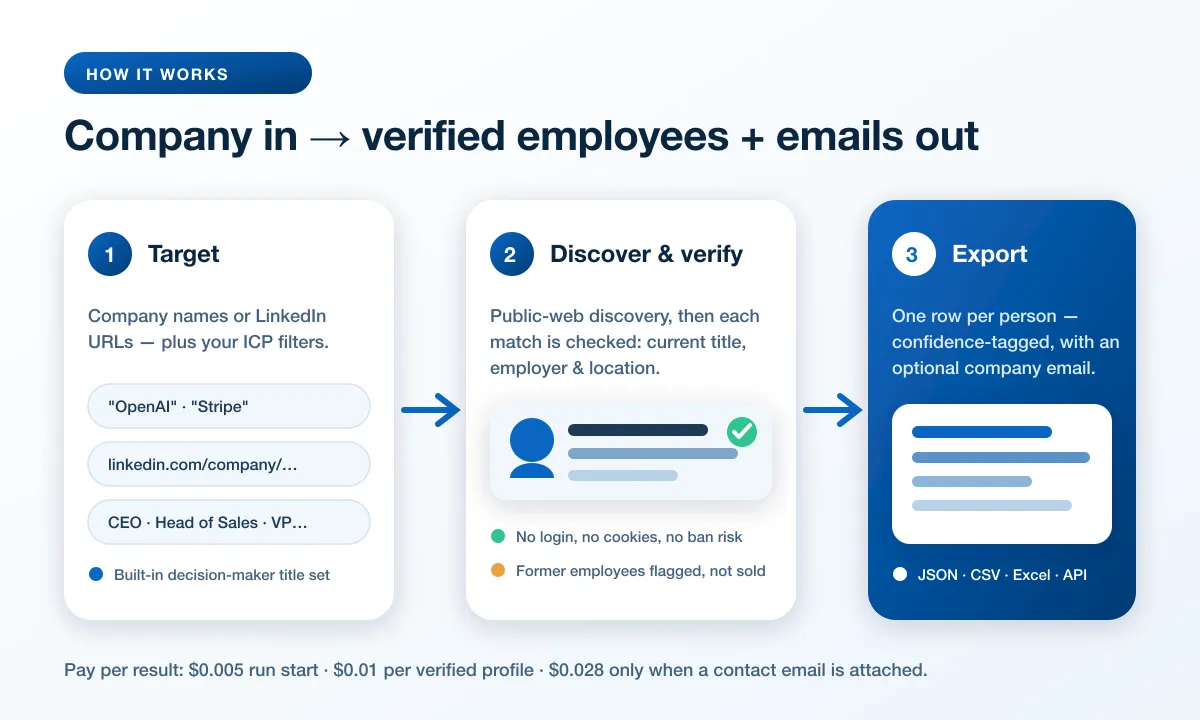
- You list the companies by name or URL, and optionally the titles, seniority and location you want.
- The actor finds public LinkedIn profiles connected to each company and title.
- Each match is graded against your company: confirmed current employer, lookalike company, former employee, or no trace of the company (dropped).
- You get one row per person, de-duplicated, capped at your per-company limit, in the dataset as JSON, CSV or Excel.
Optional steps run only when you switch them on: Full profiles reads each person's work history and schools, and Find contact email looks up one contact email per company.
Input configuration
| Field | Type | Default | What it does |
|---|---|---|---|
companies | array | none (required) | Company names and LinkedIn URLs, one per line, mixed freely |
targetTitles | array | built-in leadership set | Job titles to look for. Empty = the built-in English/Spanish decision-maker set |
seniorityFilter | array | [] | Seniority levels expanded into titles: owner, partner, cxo, vp, director, manager, senior, entry, training, unpaid |
location | string | empty | A place to narrow the search, such as "San Francisco" or "Germany" |
maxItems | integer | 50 | People to keep per company, 1 to 1,000. The form opens at 10 |
verifyProfiles | boolean | true | Grade each row against your company and drop rows with no trace of it. Off = raw matches, all graded low |
enrichEmails | boolean | false | Add one contact email per company, plus its phone and social links when shown |
fullProfiles | boolean | false | Add work history, schools, top skills, about text and follower count per person |
companySearchTerms | object | {} | Search a different phrase for one company, e.g. { "notionhq": "Notion" }. Rows keep your original key |
deepVerify | boolean | false | Re-grade each row from the person's public profile. Slower, no extra charge |
googlePages | integer | 3 | Result pages read per company and title, 1 to 10. More pages, more candidates |
maxConcurrency | integer | 10 | Parallel requests, 1 to 50 |
startUrls | array | none | LinkedIn company URLs from a request list or Google Sheet, in addition to companies |
cookies | array | none | Optional LinkedIn session for the full signed-in roster. Leave empty for the no-login mode |
Example: decision makers at three companies
Example: sales leaders at a list of accounts, in one country
Example: buying committee with work history and a company email
Output overview
One row per person per company. Rows are de-duplicated, so the same person found under two titles appears once. Every row carries the same keys; fields the public profile did not show are null or empty rather than missing, so CSV columns line up. The company field is always the key you supplied (a typed name becomes its slug, Stripe → stripe; a URL keeps its handle; a numeric id stays numeric).
Output sample
A real row from a run on Figma with the default settings (trimmed of empty cookie-mode fields):
With Full profiles on, the same kind of row also carries:
Key output fields
Who the person is
| Field | Meaning |
|---|---|
fullName, firstName, lastName | The person's name |
headline | The headline on their profile |
profileUrl, publicIdentifier | LinkedIn profile link and handle |
location | Location, when shown |
Where they work
| Field | Meaning |
|---|---|
company | The company key you searched (your input, slugged) |
currentEmployer | The employer shown on their profile, when shown |
currentTitle | Their current job title, when the profile names it |
matchedTitles, titleMatchType | Which of your titles matched, and how (exact, partial, none) |
How sure the match is
| Field | Meaning |
|---|---|
confidence | high: employer confirmed and your title matches. medium: tied to your company but the title is not confirmed, or the employer only resembles yours, or the person may have left. low rows are dropped unless you turn grading off |
verified | true only when the employer exactly matches your company. Use it for a strict cut |
confidenceReason | The reason for the grade, in plain English |
snippet | The public text the grade was read from |
Optional extras
| Field | When |
|---|---|
experience, education, topSkills, about, followerCount, connectionCount, fullProfile | fullProfiles on, for rows whose profile could be read |
contactEmail, contactWebsite, sitePhone, siteProfiles, emailEnrichment | enrichEmails on, when the company's site shows them |
image, connectionDegree, insights, contactInfo | Filled in cookie mode; image also with deepVerify |
Pricing
Pay per event. You pay for rows delivered, never for empty searches, failed pages, duplicates, or rows dropped as unrelated.
| Event | When it is charged | Price |
|---|---|---|
| Actor start | Once per run | $0.003 |
| Employee profile | Each person row delivered | $0.004 ($4 per 1,000) |
| Profile with email | Instead of the line above, for a row that carries a found company email | $0.015 |
| Full profile | Added to a row that carries a full profile (fullProfiles on) | $0.002 |
A run that returns 10 people at each of 3 companies costs $0.003 + 30 × $0.004 = $0.123.
Free Apify plan: each run searches the first 3 companies, up to 200 people each, and reads full profiles for the first 10 rows. The run log says what was trimmed, and every other field comes through in full. Any paid plan removes the caps.
Coming from another employee scraper?
| What buyers ask for | Here |
|---|---|
| "Most of my bill is start fees" | $0.003 per run start, so one company per call stays cheap |
| "I only have company names, not URLs" | Type the name; URLs are optional |
| "My free trial run returned nothing" | The free plan returns real rows: 3 companies per run, up to 200 people each |
| "Half the list had left the company" | Former staff and lookalike companies are flagged per row, and rows with no trace of your company are dropped before billing |
FAQ
Do I need a LinkedIn account or cookie?
No. The default mode needs no login, and your account is never touched. A cookie mode exists for people who want the full signed-in roster of one company; leave cookies empty to stay in no-login mode.
How many people will I get per company?
Up to maxItems. On well-known companies the decision-maker set usually fills a limit of 10 to 25; smaller or ambiguous company names return fewer. The run log names companies that came back thin.
Why is currentTitle empty on some rows?
Many public profiles show only the employer in the headline ("Figma") rather than a title. Those people were found by searching your titles at that company, but the title itself is not on the public profile, so the field stays empty. Leadership profiles carry it more often. headline is always filled.
Which grade should I filter on?
Keep high and medium. Do not cut to high alone: high also needs the headline to repeat your exact title, and many senior people do not write their title that way. For a strict employer check use verified: true.
Does it find personal email addresses?
No. enrichEmails adds one contact email for the company (for example sales@ or info@), plus its phone and social links when the website shows them. For a person's own work email, run the profile URLs through LinkedIn Email Finder.
A company URL returned far fewer people than its name did. Why?
A LinkedIn URL carries a handle, which is not always the company's name (notionhq for Notion). Add companySearchTerms, such as { "notionhq": "Notion" }, and the rows still come back under company: "notionhq".
Can I export to CSV or Google Sheets? Yes. Every dataset exports as JSON, CSV, Excel, XML or RSS from the Apify Console or API, and the Google Sheets and Zapier integrations read it directly.
Support
Open an issue on the actor's Issues tab with the run link and what you expected.
Additional services
Need a custom field, a fixed weekly export of your account list, or the data delivered to your CRM? Open an issue and describe the job.
Explore more scrapers
- LinkedIn People Search: people by company, title and industry, no login
- LinkedIn Email Finder: work emails from LinkedIn profile URLs
- LinkedIn Profile Scraper: full profile detail for a list of profile URLs
- LinkedIn Jobs Scraper: job postings by keyword, location and company
- LinkedIn Posts Scraper: posts from profiles and companies
- B2B Email Finder & Verifier: find and verify emails and phone numbers
- Crunchbase Scraper: funding rounds and investors for account research
🤖 For AI Agents & LLM Apps
Actor: memo23/linkedin-company-employees-scraper, callable through the Apify MCP server or the Apify API.
Purpose: list the people at given companies on LinkedIn (name, headline, profile URL, employer and location when shown), filtered by job title or seniority, each row graded against the company. No login.
Minimal input:
Output fields: fullName, firstName, lastName, headline, currentTitle, currentEmployer, location, company, profileUrl, publicIdentifier, verified, confidence, confidenceReason, matchedTitles, titleMatchType, snippet, profileDepth, scrapedAt, source, image, connectionDegree, insights, contactInfo; with fullProfiles: fullProfile, experience, education, topSkills, about, followerCount, connectionCount; with enrichEmails: contactEmail, contactWebsite, sitePhone, siteProfiles, emailEnrichment.
Behaviors to know:
maxItemsis per company (default 50). Set it; a 100-company run at the default returns up to 5,000 rows.- Empty
targetTitlesandseniorityFilteruse the built-in decision-maker set, except on runs of more than 50 companies, where each company is searched without a title filter unless you set one. - Rows come back
highormedium. Filter withverified: truefor an exact employer match; do not cut tohigh. currentTitleandcurrentEmployercan be null;headlineis always present.- Billing: $0.003 per run, $0.004 per row, $0.015 for a row with a found company email, +$0.002 for a full profile. Nothing is charged for empty or dropped rows.
- Free plan: first 3 companies per run, up to 200 people each, full profiles on the first 10 rows.
⚠️ Disclaimer
This actor is an independent tool. It is not affiliated with, endorsed by, or sponsored by LinkedIn Corporation or Microsoft Corporation. LinkedIn is a trademark of LinkedIn Corporation; all other trademarks belong to their owners.
In its default mode the actor reads only publicly available information and does not sign in to LinkedIn. You are responsible for using the data lawfully: follow LinkedIn's terms of service, the GDPR, the CCPA and any other data-protection law that applies to you, and process personal data only on a lawful basis and for legitimate purposes.
SEO Keywords
LinkedIn company employees scraper, LinkedIn employee list, find employees of a company, LinkedIn decision makers, company decision makers list, LinkedIn employees by company name, scrape LinkedIn employees without login, LinkedIn people scraper no cookies, LinkedIn lead generation, B2B prospect list builder, account based marketing contacts, sales prospecting LinkedIn, recruiter talent mapping, LinkedIn CEO finder, founders and owners list, LinkedIn org chart, company staff directory, LinkedIn company people export, LATAM decision makers, Apify LinkedIn scraper


