🏥 CMS Hospital Compare — Info, Type & Ratings
Pricing
$20.00 / 1,000 goo.gl url resolve attempts
🏥 CMS Hospital Compare — Info, Type & Ratings
CMS Hospital Compare data: facility name, type, ownership, location, emergency services, and overall rating for 5,400+ US hospitals. For hospital strategy, benchmarking, payers, and consultants.
Pricing
$20.00 / 1,000 goo.gl url resolve attempts
Rating
0.0
(0)
Developer
NexGenData
Maintained by CommunityActor stats
0
Bookmarked
2
Total users
0
Monthly active users
2 days ago
Last modified
Categories
Share
Pay only for the rows you pull — $0.10 per hospital record, no seat license, no annual contract. This actor turns the official CMS Hospital Compare / Care Compare feed into clean, structured JSON: facility name, city, state, hospital type, and ownership for 5,400+ Medicare-certified US hospitals. It is the same provider universe that commercial healthcare databases charge $20,000–$100,000+/year per seat to access — except here you query it on demand, filter by state, and pay by the record straight from the public CMS source.
Whether you are mapping a hospital-system market, planning rep territories, scoping a payer network, screening M&A targets by ownership type, or building a provider directory, this actor gives you the canonical CMS facility list without scraping PDFs, wrangling Socrata pagination, or signing an enterprise data contract.
Why use this
Every hospital strategist, medtech rep, payer analyst, and healthcare consultant eventually needs the same thing: a complete, current, authoritative list of US hospitals with their type and ownership attached. CMS publishes it free in the data.cms.gov Provider Data Catalog — but turning it into a warehouse-ready table means dealing with the Socrata API, dataset IDs, column quirks, and rate limits.
This actor does that for you. Point it at the default Hospital General Information dataset (xubh-q36u), optionally filter to a single state, set a record cap, and get back flat JSON ready to drop into Snowflake, BigQuery, Postgres, a CRM, or a spreadsheet. No authentication, no PHI — just the public facility-level reference data that underpins every healthcare go-to-market and benchmarking exercise. And because it is pay-per-result, a single-state pull of ~300 hospitals costs about thirty dollars versus a five-figure annual seat license for a commercial database you may query only a handful of times.
What you get
Each record is structured JSON with the following five fields, populated directly from the CMS source dataset:
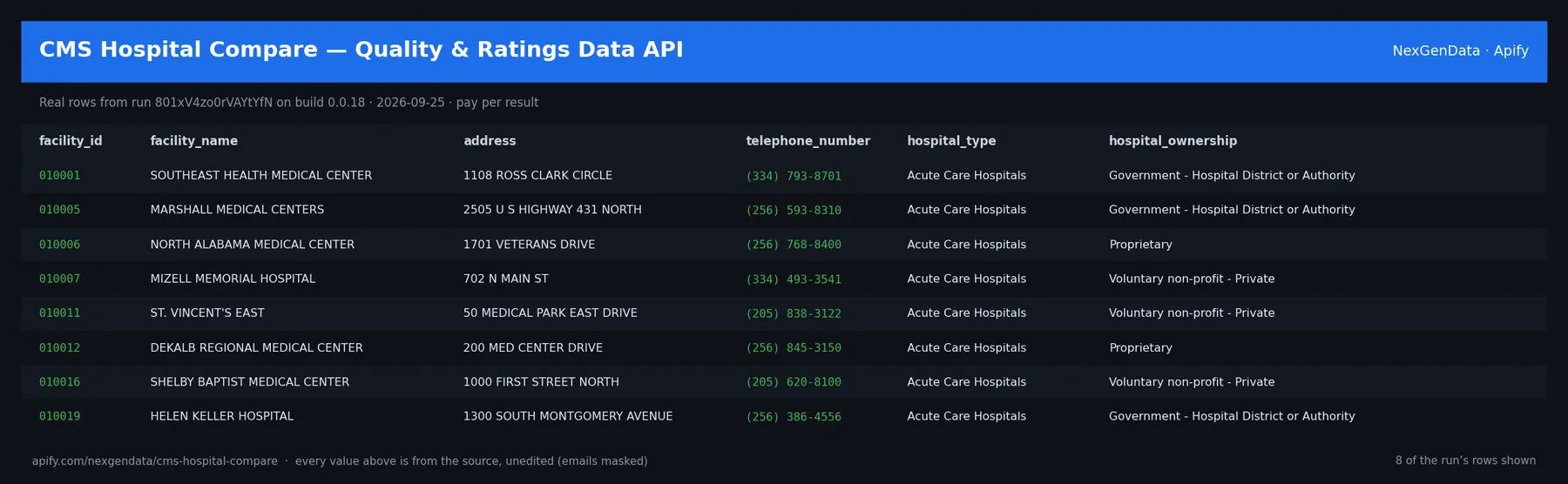
facility_name— The official Medicare-certified facility name as CMS records it (e.g.CLEVELAND CLINIC). This is the legal/registered hospital name, useful as a join key against NPI, claims, and internal CRM records.citytown— The city or town where the facility is located. Combined withstate, this is the geographic anchor for territory mapping, market-area analysis, and catchment modeling.state— The two-letter US state or territory code (e.g.OH,CA,TX,PR). This is the field thestateinput parameter filters on, so you can pull a single state's roster in one run.hospital_type— The CMS facility classification. Common values: Acute Care Hospitals (the general short-stay inpatient majority), Critical Access Hospitals (small rural facilities ≤25 beds under the CAH program), Childrens (pediatric specialty), Psychiatric, and Acute Care - Veterans Administration / Department of Defense. This is the primary lever for segmenting by care setting.hospital_ownership— The ownership/control category, often the single most decision-relevant attribute for M&A, payer, and vendor-prospecting use. Common values: Voluntary non-profit - Private, Voluntary non-profit - Church, Voluntary non-profit - Other, Government - Hospital District or Authority, Government - State, Government - Local, Government - Federal, and Proprietary (investor-owned / for-profit). Ownership maps directly to budget authority, procurement style, and acquisition appetite.
The output schema is stable across runs, so you can load it straight into a warehouse or CRM without re-mapping columns on every refresh.
Use cases
- Hospital-strategy market mapping — Pull every Acute Care Hospital in a target state, segment by ownership, and build the competitive map for a service-line expansion, a new outpatient site, or a network-adequacy filing. The
hospital_type+hospital_ownershippair is the backbone of any market-share or catchment analysis. - Medtech / pharma rep territory planning — Hand your field force a clean, current list of every hospital in their geography, classified by type. Filter out Critical Access and Psychiatric facilities to focus on the Acute Care accounts that match your device or drug, then balance territories by facility count instead of guesswork.
- Payer network analysis — Cross-reference the full facility universe in a state against your contracted-provider list to find network gaps, model adequacy, and identify which hospital systems (by ownership) you still need to bring in-network.
- Healthcare consulting benchmarking — Use the national facility list as the denominator for benchmarking studies: proprietary vs. non-profit counts per market, Critical Access density by state, a client's footprint vs. peers.
- M&A target screening by ownership type — Filter to
ProprietaryorVoluntary non-profit - Privatefacilities in a region to build a buyer-side target list, or surfaceGovernment - Hospital District or Authorityfacilities that may be candidates for lease/conversion deals. - Vendor B2B prospecting into systems by type/state — Software, RCM, supply-chain, and staffing vendors can build a TAM list of every hospital of a given type in a given state, then route by ownership category (for-profit chains buy differently than church-affiliated non-profits or county districts).
- Academic health-services research — Use the CMS facility frame as a sampling base or linkage key for studies on access, ownership effects, rural care, or market concentration — fully citable from the official source.
- Building provider directories — Seed a provider-directory or healthcare-marketplace product with the canonical CMS hospital list, then enrich with NPI, address, and contact data downstream.
Sample output
A single record returned by this actor, using only the five source fields:
{"facility_name": "CLEVELAND CLINIC","citytown": "CLEVELAND","state": "OH","hospital_type": "Acute Care Hospitals","hospital_ownership": "Voluntary non-profit - Private"}
A run returns an array of these records — one per Medicare-certified hospital matching your filters — exportable from the Apify dataset as JSON, JSONL, CSV, Excel, or HTML.
Input parameters
| Parameter | Description | Example |
|---|---|---|
datasetId | The CMS Provider Data dataset ID to pull from. Defaults to xubh-q36u (Hospital General Information). Because every dataset in the CMS Provider Data Catalog shares the same Socrata structure, you can swap in any other CMS Provider Data dataset ID to retrieve a different table (e.g. timely-and-effective-care, complications-and-deaths, or other Care Compare measure sets). | xubh-q36u |
state | Two-letter state/territory code to filter results to a single jurisdiction. Leave blank to return all states and territories. | OH |
maxResults | Maximum number of records to return in the run. Use it to cap cost or to grab a quick sample. | 300 |
The
datasetIddefault (xubh-q36u= Hospital General Information) is what produces the facility/type/ownership fields documented above. If you swap in a different CMS Provider Data dataset, the returned columns will be those of that dataset — the actor passes CMS's own field names through.
How to use
Python (apify-client)
from apify_client import ApifyClientclient = ApifyClient("YOUR_APIFY_TOKEN")run = client.actor("nexgendata/cms-hospital-compare").call(run_input={"datasetId": "xubh-q36u","state": "OH","maxResults": 300,})for item in client.dataset(run["defaultDatasetId"]).iterate_items():print(item["facility_name"], item["citytown"], item["state"],item["hospital_type"], item["hospital_ownership"])
cURL
curl -X POST "https://api.apify.com/v2/acts/nexgendata~cms-hospital-compare/run-sync-get-dataset-items?token=YOUR_TOKEN" \-H "Content-Type: application/json" \-d '{"datasetId": "xubh-q36u","state": "OH","maxResults": 300}'
You can also run it from the Apify Console — open the actor page, click Try for free, paste the input JSON, and hit Run. Schedule it monthly with the built-in Apify Scheduler to catch CMS's periodic refreshes automatically.
Pricing
This actor runs on Apify's pay-per-event (PPE) model — you pay for results, not run-time:
- $0.10 per hospital record returned to the dataset
- A small actor-start event (sub-cent at typical memory) charged once per run
No subscriptions, no seats, no minimums. Apify's $5 free credit covers your first experiments — enough to pull several states before you spend a dollar of your own.
Worked examples
| Pull | Records | Cost |
|---|---|---|
| Full national file (all Medicare-certified hospitals) | ~5,400 | $0.01 actor-start + 5,400 × $0.10 = $540.01 |
| Single state (e.g. Ohio) | ~300 | $0.01 actor-start + 300 × $0.10 = $30.01 |
| Quick 50-record sample | 50 | $0.01 + 50 × $0.10 = $5.01 |
Because billing is per-record, your cost is fully predictable before you run, and a failed run that returns zero rows costs effectively nothing. Start a free run via the affiliate link: https://apify.com/nexgendata?fpr=2ayu9b
How this compares to Definitive Healthcare / IQVIA
| Source | Price | What you get |
|---|---|---|
| Definitive Healthcare | ~$20,000+/year per seat | Enriched commercial hospital database with contacts, financials, technology installs — annual seat license |
| IQVIA | Enterprise / custom contract | Large-scale healthcare commercial intelligence and analytics — enterprise pricing |
| NexGenData CMS Hospital Compare | $0.10 per record, pay-as-you-go | Official CMS facility name, city, state, type, and ownership — straight from data.cms.gov, no seat, no contract |
Definitive Healthcare and IQVIA are excellent when you genuinely need their proprietary layers: executive contacts, IT-system installs, claims-derived volumes, and financial benchmarks. If your team lives in that data daily, the seat license pays for itself.
But for a large share of real work — market mapping, territory planning, payer-network gap analysis, M&A screening by ownership, building a clean facility frame — you don't need the enriched commercial layer. You need the authoritative list of hospitals with their type and ownership, which is exactly what CMS publishes for free and this actor delivers as JSON. Paying $20k+/year for a seat to look up a fact CMS gives away is overkill: take the official public data on demand, pay only for the rows you pull, and reserve the commercial database for the enrichment it alone provides.
FAQ
Q: How fresh is the data, and how often does CMS refresh it?
A: The actor pulls live from the CMS Provider Data Catalog at run time, so you always get whatever CMS currently publishes. CMS refreshes the Hospital Compare / Care Compare datasets on a periodic cycle (generally quarterly for measure data, with the General Information file updated as facilities are added or change status). Schedule a monthly run to stay current automatically.
Q: Can I pull other CMS datasets via datasetId?
A: Yes. The default xubh-q36u is Hospital General Information, but any dataset in the CMS Provider Data Catalog shares the same Socrata API structure. Swap its dataset ID into the datasetId parameter to retrieve a different table — the actor passes CMS's own column names through.
Q: What hospital types exist?
A: Common hospital_type values include Acute Care Hospitals, Critical Access Hospitals, Childrens, Psychiatric, and Acute Care - Veterans Administration / Department of Defense facilities. The exact set reflects whatever CMS currently classifies in the source dataset.
Q: Can I get star ratings?
A: This actor's default output covers facility name, city, state, type, and ownership. CMS's overall hospital rating and measure-level data live in the broader Care Compare measure datasets — point datasetId at the relevant CMS Provider Data dataset to retrieve those measure tables.
Q: What output formats are supported?
A: Results land in an Apify dataset, exportable as JSON, JSONL, CSV, Excel, or HTML, and accessible via API for direct warehouse or CRM ingestion.
Q: Is this the official CMS data?
A: Yes. The actor reads exclusively from the official data.cms.gov Provider Data Catalog (CMS Hospital Compare / Care Compare), which is public and requires no authentication. It is the same data CMS publishes on its consumer-facing Care Compare site.
Schema stability & versioning
This actor follows NexGenData's additive-only schema contract:
- New fields may be added at any time — they appear as new keys in the JSON output and default to
nullfor older runs. - Existing fields are never renamed or removed without a major-version bump and an advance changelog notice.
- One caveat unique to government open data: CMS itself occasionally renames or restructures columns in its upstream datasets. Because this actor passes CMS field names through, an upstream CMS rename will surface in the output. We track CMS schema changes and document them on the actor's Issues tab when they occur.
You can build production pipelines on this actor with confidence — and if you spot an unexpected change, open an issue and we'll look at it the same business day.
Compliance & legal
- The actor reads public CMS open data from the official data.cms.gov Provider Data Catalog, which CMS publishes for unrestricted public use.
- The data contains no PHI and no patient-level data — it is facility-level reference information (name, location, type, ownership) only.
- All requests go to the official CMS publication endpoint; there is no scraping of authenticated or restricted pages.
- You are responsible for ensuring your downstream use complies with your jurisdiction's data-protection laws and any sector-specific rules. Most reference, benchmarking, and lead-generation use of public CMS data is widely accepted; consult counsel before bulk redistribution.
Related NexGenData actors
Part of NexGenData's Pharma & Health intelligence cluster — pair this actor with:
- CMS Nursing Home Compare — Ratings, Staffing & Ownership
- CMS Home Health Agencies — Care Compare Directory
- Clinical Trials Tracker — ClinicalTrials.gov Study Feed
- NIH RePORTER Grants Scraper — Federal Research Funding
- FDA Recall Monitor — Drug & Device Recall Feed
- FDA Drug Approvals — New Drug Approval Tracker
Browse the full 200+ actor catalog and start a free run at https://apify.com/nexgendata?fpr=2ayu9b.