

Website Screenshot API: Full Page, Mobile, PNG, JPEG
Pricing
from $1.88 / 1,000 screenshots
Website Screenshot API: Full Page, Mobile, PNG, JPEG
Screenshots of a list of URLs as PNG or JPEG: full page or viewport, desktop, laptop, tablet or mobile size, with cookie banners hidden. Images are saved to the key-value store with public links. $2.50 per 1,000 screenshots, compute included. Failed pages are free.
Pricing
from $1.88 / 1,000 screenshots
Rating
0.0
(0)
Developer

Red Fox Scout
Maintained by CommunityActor stats
0
Bookmarked
3
Total users
2
Monthly active users
20 days ago
Last modified
Categories
Features
Share
Capture website screenshots in bulk: give it up to 1,000 page URLs and get a PNG or JPEG for each one, full page or viewport, at desktop, laptop, tablet or phone size, with cookie banners hidden. Each image is saved to the run's key-value store with a public link, and each dataset row says what happened to its page.
Price: $2.50 per 1,000 screenshots, compute included. Failed, blocked and refused pages are free. Apify's free plan includes $5 of credit a month, which covers about 2,000 screenshots.
Questions it answers
- What does my homepage look like on a phone, a tablet and a laptop?
- Can I capture the full length of a list of pages as PNG files in one run?
- What did a competitor's pricing page look like on a given day?
- Can I get a link to each screenshot to share or embed?
Who uses this
- 🎨 Designers and web agencies: check client layouts at desktop, tablet and phone sizes in one run.
- 📈 Marketing and competitor teams: keep dated images of competitor homepages and pricing pages.
- 🛠️ Developers and QA: capture a page list before and after a release and compare the images.
Why this Website Screenshot API
- 📦 Bulk in one run: up to 1,000 URLs, with the same settings for every page.
- 🧹 Clean captures: common cookie banners are hidden with CSS. Nothing is clicked and no consent is given.
- 📜 Full pages that load: lazy images are scrolled into view before a full-page capture.
- 💸 Pay for results: failed, blocked or refused pages are free, and each error row says why.
- 🔗 Works with other Actors: feed it URLs from another Actor's dataset, or run it on a schedule.
How to use the Website Screenshot API
- Click Try for free (a free Apify account is enough).
- Paste the page URLs, one per line. A bare domain such as
apify.comopens over https. - Choose a device size, PNG or JPEG, and whether to capture the full page. The defaults give a 1920 x 1080 desktop PNG.
- Click Start. Each page takes a few seconds.
- Open the dataset to see the screenshots, then download the results as JSON, CSV or Excel.
Input
| Field | Default | What it does |
|---|---|---|
urls | – | Pages to capture, one per line: full URLs or bare domains. Up to 1,000 per run. |
device | desktop | Screen size: desktop 1920 x 1080, laptop 1366 x 768, tablet 768 x 1024 (touch) or mobile 390 x 844 (phone browser). |
width / height | preset | Override the device size in px (width 320 to 3840, height 240 to 2160). |
fullPage | false | Capture the whole page instead of the first screen. |
maxPageHeight | 16000 | Full-page captures stop at this height in px. A cut page has truncated: true. |
format | png | png (lossless) or jpeg (smaller files). |
quality | 80 | JPEG quality from 1 to 100. Ignored for PNG. |
waitUntil | load | load (page load event) or networkidle (waits at most 15 s for network activity to stop). |
delaySecs | 1 | Extra wait after the page loads, 0 to 30 s, for late images and animations. |
hideCookieBanners | true | Hides common cookie banners before the capture. It never clicks Accept or any other button. |
publicLinks | true | Lets anyone with a screenshot link open it without an Apify token. Turn off to keep images private to your account. |
maxConcurrency | 4 | Pages captured in parallel (up to 8). Each page uses browser memory, so higher values need more. |
requestTimeoutSecs | 30 | Give up on a page after this long. |
Example (the input behind the output row below):
Output
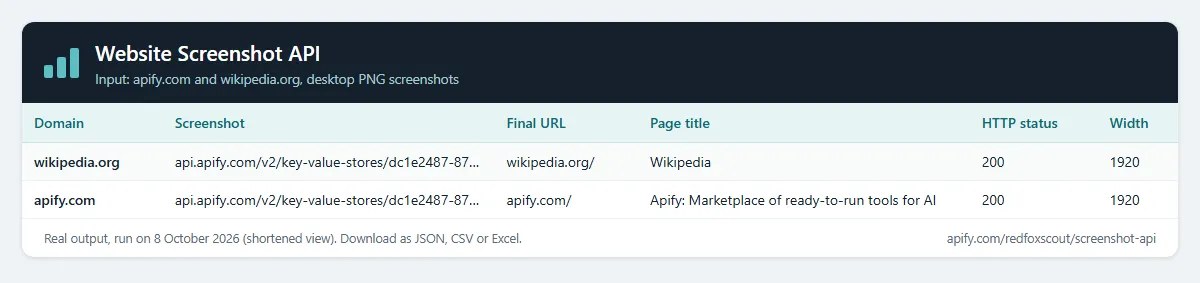
One row per URL. The real row for apify.com from the run with the input above, shortened:
screenshotUrl opens the image. A page that fails keeps the same fields, set to null, and gets an error message. The missing page in the example returned "error": "HTTP 404: the page does not exist, so there is nothing to capture. Not charged."
Example tasks
Ready-made inputs you can open, change and run:
Full pages, device sizes and cookie banners
- Full page: turn on
fullPageto capture the whole page. Images that load as you scroll are loaded before the capture. Pages taller thanmaxPageHeightare cut and flagged withtruncated: true. - Device sizes: desktop, laptop, tablet and mobile presets.
widthandheightoverride the preset. - Cookie banners:
hideCookieBannershides common consent banners and their overlays. Consent walls that block the article itself are not removed.
Scheduled captures and dated archives
Put the Actor on an Apify schedule with the same URLs, for example daily. Each run saves new images with the time in the file name, so the archive grows by one dated image per page. The Actor does not compare images, so compare the dated files yourself.
Use URLs from another Actor
Pick its dataset under Websites from another Actor, or add this input to an Actor-to-Actor integration:
This reads the website field (or the field you name) from each row. Rows without a website are skipped.
Limits
- Some sites block automated browsers, especially traffic from cloud servers, and answer with a bot check or an error. These rows are free and say why.
- Pages behind a login are not captured. The Actor never logs in and never sends cookies.
- PDFs and file downloads are refused. Only HTML pages are captured.
- Very tall pages are cut at
maxPageHeightand flaggedtruncated: true.
How much does it cost?
- Screenshot saved: $0.0025 each, $2.50 per 1,000. Compute is included in that price.
- Run start: Apify adds a small start fee per run for its memory: $0.0002 at the default 4 GB.
- Free: pages that fail, are blocked or are refused.
| Screenshots | Cost |
|---|---|
| 100 | $0.25 |
| 1,000 | $2.50 |
| 10,000 | $25 |
Apify's free plan includes $5 of credit every month, enough for about 2,000 screenshots. Paid Apify plans get Store discounts. You can set a maximum cost per run; the Actor stops cleanly when it is reached.
FAQ
Is this legal? It opens each public page once in a headless Chromium browser, like a visitor, and saves what it shows. It never logs in, sends cookies, clicks buttons, solves CAPTCHAs or collects personal data. Screenshots can contain copyrighted material, so check your rights before you publish them.
Why did a site fail? The row's error field gives the reason. Common ones: HTTP 404 (the page does not exist), a bot check or HTTP 403 or 429 (the site blocks automated browsers), a redirect to a sign-in page, a PDF or file download, a domain that does not resolve, or a timeout. Failed rows are free.
How long do screenshot links last? For as long as Apify keeps the run's storage. Apify removes unnamed run storage automatically, and on the free plan it keeps only your 10 most recent runs, for 4 months. Download the images you need to keep them longer.
Related Actors
- SEO Meta Tag & Schema Checker: titles, meta descriptions and schema tags for the same pages.
- Bulk URL Status & SSL Checker: status codes, redirects and SSL expiry.
- Website Tech Stack Detector: what a site is built with.


