
Dataset Dedup and Merge API: Remove Duplicate Rows
Pricing
from $0.15 / 1,000 row delivereds
Dataset Dedup and Merge API: Remove Duplicate Rows
Merge several runs into one clean dataset and pay only for the unique rows delivered. Choose the key columns, normalise case, spaces and URLs, keep the most complete row and get a duplicate report. Works inside your own Apify account.
Pricing
from $0.15 / 1,000 row delivereds
Rating
0.0
(0)
Developer

Rowcraft
Maintained by CommunityActor stats
0
Bookmarked
2
Total users
1
Monthly active users
4 days ago
Last modified
Categories
Security
Limited permissionsShare
Merge several datasets of your Apify account into one clean dataset and pay only for the unique rows that are delivered. You pick the datasets (for example the last ten runs of a scraper), the key columns that make a row a duplicate (a URL, an ID, a SKU) and how values are compared; the actor reads the datasets page by page, removes the repeated rows, optionally keeps the most complete copy of each row and fills its empty fields from the copies, and writes the result to a new dataset together with a duplicate report.
Nothing is fetched from the web and nothing leaves your account: the only calls the actor makes go to the Apify API of your own account, with the token of the run. Duplicates, empty rows and rows you already received in an earlier run are never charged.
What you get
Price: $0.25 per 1,000 rows on the Free plan, $0.15 on the Business plan, paid per row delivered; the $5 monthly credit of a free Apify account covers about 20,000 rows. Details in Pricing below.
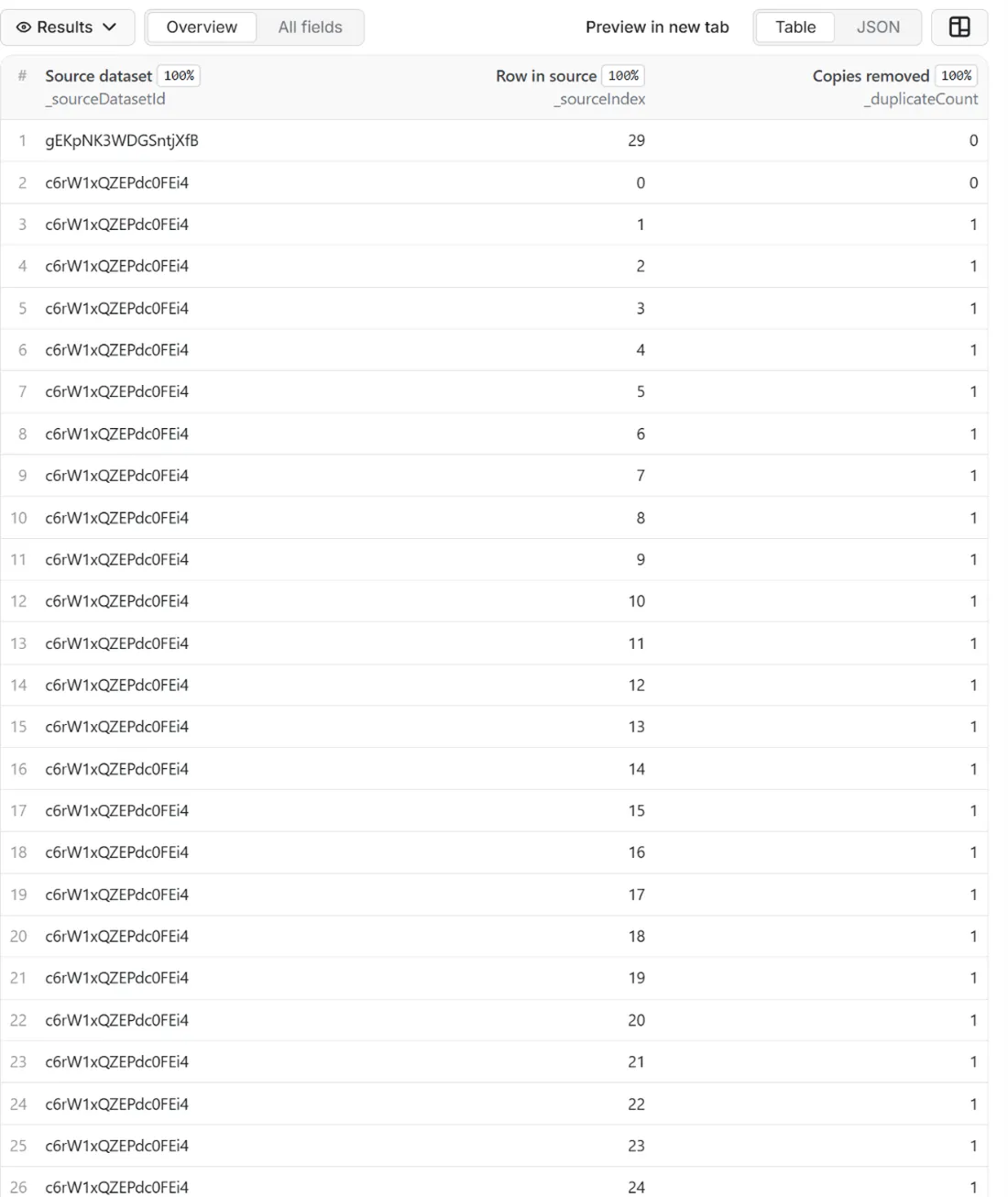
One row for every distinct key found in your datasets, with all the columns of the row that was kept, exactly as they were stored, plus three optional source columns that say where the row comes from:
- Your own columns, unchanged. Values keep their type and their original spelling: normalisation is used only to compare, never to rewrite your data. You can deliver only some columns, or drop some, if you want a slimmer result.
_sourceDatasetId: the ID of the dataset the kept row was read from, so you can trace a row back to the run that produced it._sourceIndex: the position of the row in that dataset, counting from 0._duplicateCount: how many copies of the row were removed. It is 0 for a row that appeared once, which makes it easy to find the rows that kept coming back.- A duplicate report (
DEDUP_REPORT): per dataset, the rows read, the unique rows, the duplicates and the empty rows, and the twenty most repeated keys as a short hash with the number of copies. It never contains a value from your rows. - A coverage record (
COVERAGE): one line per dataset you listed, with the status (ok, not_found, error), the rows read and the rows delivered. - A run summary (
RUN_SUMMARY): totals, the key fields and the rules used, the warnings and the reason the run stopped.
Why this actor
- You pay for the result, not for the input. The price is per unique row delivered. A merge of ten runs of 5,000 rows each that ends with 8,000 distinct rows costs 8,000 rows, not 50,000.
- A key that fits your data. Use one column or several, with nested columns written as
seller.id. Compare after lower-casing, trimming, collapsing spaces, dropping the query string or the trailing slash of a web address, or keeping only the digits of a code. With no key fields the whole row is the key. - Choose the copy to keep. The first copy, the last copy (the newest run when you list the runs oldest first), or the copy with the most filled-in fields. With Fill empty fields from the duplicates the kept row also receives the values that only a duplicate had.
- Several datasets in one run. Up to twenty datasets are read in the order you give them and treated as one stream, so the same product found by three scrapers is delivered once.
- A dry run before you pay. Turn on Dry run and the actor reads your datasets and reports how many rows are unique, how many are duplicates and what the merge would cost. Nothing is delivered and only the start event is charged.
- Made for schedules. With Only new rows the actor remembers which keys it already delivered, so a daily run over a growing set of datasets costs only the keys that appeared since yesterday.
- Small memory. The actor keeps about 12 bytes for each distinct key and 4 bytes for each row, never the rows themselves. In a local test, 500,000 distinct keys used about 120 MB in all, so a large job fits in the smallest 256 MB container.
- Values stay out of the logs. The log, the summary and the report hold counts, the names of your key columns and short hashes. The values of your rows are written only to the dataset you asked for.
How to use it
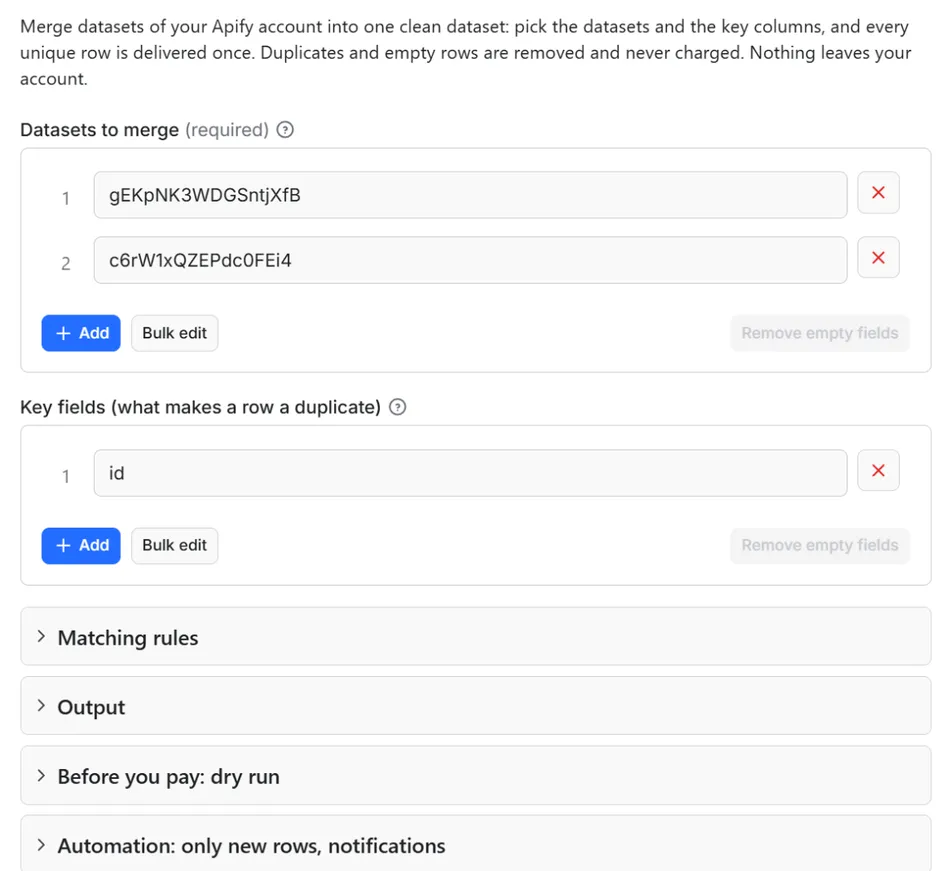
- Open the Actor and, in Datasets to merge, pick the datasets to read. You can paste dataset IDs instead (the Storage tab shows them, and so does the page of a run) or
username~dataset-namefor a named dataset. - Write the Key fields, one per line: the columns whose values identify a row, such as
urlfor pages orproductUrlfor products. Leave the list empty to compare the whole row. - Keep the default Normalise values before comparing unless you know you need more (for example the URL options when the same page appears with and without tracking parameters).
- Choose Which copy to keep, and tick Fill empty fields from the duplicates if the copies complete each other.
- For a first try tick Dry run and start. The summary tells you how many unique rows you would get and what they cost. Untick it and run again to get the data.
- Click Start. The status line shows the progress; the run stops cleanly at your maximum or at the charge limit you set in the run options.
- Open the Dataset tab to download JSON, CSV, Excel, XML or HTML, or send the rows on with the Integrations tab. Open
DEDUP_REPORTin the key-value store to see the duplicates per dataset.
Input
Quick start. This input is ready to run (it is also the example in the API tab):
One real row it returns (long texts shortened here):
In the quick start above, replace the placeholder IDs with the IDs of your own datasets (in the form you simply pick them from a list).
| Field | What it does |
|---|---|
datasetIds | The datasets to read, 1 to 20, from your own account. Pick them in the list, or give dataset IDs, username~dataset-name, or the address of a dataset in Console. Order matters for "first" and "last". |
keyFields | Columns that identify a row, one per line; nested columns as a.b. Two rows are duplicates when all key values are equal after normalising. Empty = compare the whole row. |
normalize | lowercase, trim, collapseWhitespace (the default), stripUrlQuery, stripUrlTrailingSlash, digitsOnly. Used only for the comparison. An empty list compares exactly. |
keep | first (default), last or mostComplete: which copy of a duplicated key is delivered. |
mergeFields | Fill the empty top-level fields of the kept row from its duplicates. Reads your datasets one more time. |
addSourceColumns | Add _sourceDatasetId, _sourceIndex and _duplicateCount to every row. On by default. |
fieldsToKeep | Deliver only these top-level columns, in this order. A column missing from a row is null. |
fieldsToDrop | Remove these top-level columns from the delivered rows. |
maxItems | Stop after this many unique rows are delivered. 0 = no limit. |
dryRun | Only read and report: rows read, unique rows, duplicates, estimated cost. Nothing delivered, nothing charged except the start event. |
onlyNew, stateName | Deliver a key only if it was not delivered in an earlier run with the same state name |
notifyUrl, notifyWhenEmpty | A webhook that receives one message when the run ends; see Automation below |
requestIntervalMs | Pause after each page of rows read from the API, default 0 |
Example: merge two runs of a scraper and keep one row per product URL, preferring the copy with the most data.
Example: a nightly check that delivers only the pages that were not delivered before, from the datasets of the last seven sitemap runs, with a Slack message.
Example: compare whole rows but ignore the column that holds the scrape time, which differs between runs.
Output
The dataset holds the rows that were kept, with every column they had. The columns the actor adds are:
| Field | Type | What it holds |
|---|---|---|
_sourceDatasetId | string | ID of the dataset the kept row was read from |
_sourceIndex | integer | Position of the row in that dataset, counting from 0 |
_duplicateCount | integer | Number of copies of the row that were removed (0 = it appeared once) |
They are added only when Add source columns is on. If one of your own columns has the same name, the actor's value replaces it.
Example rows
Two real rows from a run (long texts shortened here, complete in the dataset):
Results can be downloaded as JSON, CSV, Excel, XML or HTML from the Dataset tab, or read through the Apify API.
The duplicate report
DEDUP_REPORT is a JSON record in the key-value store of the run. It lists, for every dataset, how many rows were read, how many were empty, how many are unique (counted where the kept copy lives) and how many were duplicates, then the totals and the most repeated keys:
The hash is the first eight characters of the SHA-256 of the normalised key, so you can find the same key in another report without the report ever holding the value. The COVERAGE record carries the per-dataset lines, and RUN_SUMMARY the totals, the rules, the warnings and the reason the run stopped (all read, maximum reached, charge limit, read limit, time limit or dry run).
What counts as a duplicate
With key fields, the actor takes the value of each key column from the row, turns it into text (numbers and booleans as text, a missing or null value as empty text, a list or an object as sorted JSON), applies the normalisation you chose and joins the parts. Two rows with the same result are duplicates. A number 42 and a text "42" are the same key. Normalisation runs in a fixed order: trim, collapse spaces, web address options, lower case, digits only.
A row whose key columns are all empty has no usable key. It is not merged with the other rows that lack a key: its whole row is used as its key, so it is delivered once and only an identical row is treated as its copy. RUN_SUMMARY reports how many rows had no key (rowsWithoutKey).
With no key fields the key is the whole row as it will be delivered, after Columns to keep and Columns to drop. That is how you ignore a column that always differs, such as a scrape time or a run ID: drop it.
An empty row, one with no value in any column, is never delivered and never charged; it is counted in emptyRows.
Pricing
Pay per result. You pay for each row delivered to your dataset, nothing else: no subscription, no minimum, no charge for rows your filters drop or for the requests behind them.
| Your Apify plan | Price per 1,000 rows | Price per row |
|---|---|---|
| Free plan | $0.25 | $0.00025 |
| Starter plan | $0.22 | $0.00022 |
| Scale plan | $0.20 | $0.0002 |
| Business plan and above | $0.15 | $0.00015 |
Example: 1,000 rows cost $0.25 on the Free plan and $0.15 on the Business plan. Platform usage of the run (compute, storage) is included in that price and is not billed to you separately (pay per event: the actor covers it).
A start event of $0.00005 is charged once per run (Apify default).
Cap your spend: set Maximum total charge in the run options. The actor stops cleanly when the cap is reached and you keep everything delivered until then. The run summary (RUN_SUMMARY in the key-value store) says why a run stopped.
A row is charged when it is delivered to the dataset. Nothing is charged for duplicates that were removed, for empty rows, for rows skipped because Only new rows found them already delivered, for datasets that could not be read, for a dry run, or for the work of reading the datasets more than once. A run that ends with no rows delivered costs only the start event.
Automation: only new rows, notifications, schedules
Only new rows since the last run. Turn on onlyNew and the actor remembers every row it delivered to you (in a key-value store named rowcraft-dataset-dedup-merge-state in your Apify account). The next run with the same stateName skips what you already have and you pay only for new rows. The first run delivers everything that matches. Use a different stateName for each schedule or search so they keep separate memories.
Notification when the run ends. Put a webhook address in notifyUrl and the actor sends one JSON POST with the number of new rows, links to the dataset (JSON and CSV) and the run. It works out of the box with Slack and Discord incoming webhooks (the message is in text and content), with Make, n8n and Zapier catch hooks, and with your own endpoint. By default it is sent only when there is at least one new row; notifyWhenEmpty sends it every time.
Schedules. Create a schedule in Apify Console (hourly, daily, weekly or cron) with onlyNew on. A daily schedule gives you a feed of new rows for the price of the new rows only.
Integrations. Send the results to Make, n8n, Zapier, Google Sheets, Slack, Google Drive, Airtable or any webhooks from the Integrations tab of the Actor, with no code. Apify also offers native actions for Make, n8n and Zapier.
API, SDKs and AI agents. Every run is available through the Apify API and the official JavaScript and Python clients; the Actor can also be called by AI agents through the Apify MCP server. The example input in the API tab is a working call.
Use with AI agents (MCP). Add the Apify MCP server to Claude, Cursor, VS Code or any MCP client and the agent can run this Actor as a tool:
Call it from a shell or any language. One request runs the Actor with the input below and returns the rows as JSON:
Python (pip install apify-client):
JavaScript / Node.js (npm install apify-client):
Chain it after any scraper. The datasets of earlier runs are ordinary inputs, so the actor fits at the end of a pipeline. The pattern with the fewest moving parts is a webhook on the scraper: when a run of the scraper succeeds, Apify calls this actor with the dataset of that run and the dataset you keep as your master list.
The same works with the Integrations tab of the scraper, with a schedule that starts the scraper and then this actor, or from code by passing defaultDatasetId of the scraper's run in datasetIds. See the Apify documentation on webhooks and on datasets.
Use cases
- Combine the runs of a scraper. A scraper that runs every day returns mostly the same rows. Merge a week of runs into one clean list, or deliver only the keys that are new today.
- Merge results from different scrapers. Products from two shops, companies from two registers, jobs from three boards: choose the column that identifies an item and get each item once, with the fullest data.
- Clean a dataset that grew by accident. A run that was restarted, a list scraped twice or a retry that pushed the same rows again leaves duplicates. Point the actor at the dataset and keep one copy of each.
- Compare lists by key. Run with Dry run over two datasets to see how many keys they share: the duplicates per dataset show the overlap, without paying for any row.
- Build a master list over time. With Only new rows and a fixed state name, each run delivers only the keys that were never delivered before, which feeds a database or a spreadsheet with inserts only.
- Prepare data for a mailing, a catalogue or a model. Remove repeated rows by a normalised URL, product code or title before the next step in the pipeline, so that downstream work and costs are not repeated for the same item.
Ready-made examples, each with the input filled in (open one and press Start, or save it as your own task):
What this actor does not do
- Fuzzy or semantic matching. Two rows are duplicates only when their normalised keys are equal. "Acme Ltd" and "Acme Limited" are different keys; the actor does not guess that they mean the same company.
- Cleaning personal data. It does not search your rows for names, e-mail addresses or phone numbers and does not remove them. It is a tool for processing data you already have; what is in your datasets is delivered as it is.
- Reading datasets of other accounts. It reads datasets of the account that runs it, through the token of the run. A dataset you cannot access is reported as not read.
- Rewriting your values. Normalisation is only for comparing. Delivered values keep their spelling and type; the actor does not trim, translate or reformat them.
- Merging fields of nested objects. Fill empty fields from the duplicates works on top-level columns. A column that holds an object is kept or filled as a whole.
- Fetching anything from the web. It never opens a website, never follows the links in your rows and sends your data to no third party.
- Matching across different column names. The key columns must have the same names in all datasets. If two scrapers call the URL
urlandlink, rename one column first, or merge datasets that share their column names.
Limits and fair use
- Datasets: 1 to 20 per run, from your own account.
- Rows: at most 500,000 rows are read in one run, all datasets together. The run says so in a warning when the limit stops the reading; split a larger job into runs over fewer datasets.
- Memory: the actor works in the default 256 MB. It keeps a small record for each key (about 12 bytes plus a few numbers) and one number for each row, not the rows. With Fill empty fields from the duplicates it also keeps, for keys that have duplicates, the values their kept row lacks; if that grows close to the memory of the run, the filling stops with a warning, so give such a run more memory.
- Time: the actor reads your datasets two or three times (once to find the duplicates, once to fill empty fields if you ask for it, once to deliver), because it keeps no rows in memory. Processing is fast (500,000 keys took about seven seconds in a local test); the rest of the time is the Apify API serving the pages of your rows, which depends on how big the rows are. The run stops 90 seconds before its timeout. If that happens while the datasets are still being read, nothing is delivered and nothing is charged, because a partial merge would be wrong; raise the timeout or merge fewer rows per run.
- Order: rows are delivered in the order of the input: the first dataset first, and inside a dataset the original order. With last or most complete a row is delivered at the position of the copy that was kept.
- Datasets that change during the run: the actor reads each dataset once to the end, remembers how many rows it saw, and delivers from those rows only. Rows added to a dataset while the run is going are not part of that run.
- Hidden fields that Apify adds to some datasets are read like any other column.
- Charge limit: set Maximum total charge in the run options and the actor stops delivering when it is reached; the summary says
charge limit.
Data source and licence
The data is the content of the datasets you choose, read through the Apify API of your own account. The actor opens each dataset by its ID or its name, lists its rows page by page, and writes the unique rows to the default dataset of the run. It uses no other source, no proxy, no cookies and no key apart from the token of the run.
You are the owner of that data and you decide what may be done with it. Which rows you may keep, merge or deliver further depends on where they come from and on the law that applies to you. Rowcraft is an independent publisher on the Apify Store and this actor is not affiliated with or endorsed by the authors of the scrapers whose datasets you merge.
Privacy: no personal data of its own
- The actor collects no personal data. It makes no request to any website and adds no information about people to your rows; the three columns it adds are an ID, a position and a count.
- Your rows are not logged. The log,
RUN_SUMMARY,DEDUP_REPORT,COVERAGEand the webhook message hold counts, the names of your key columns, short hashes and dataset IDs. A test of every release scans all of them for the values of a dataset and fails if one appears. - The memory of "Only new rows" is a list of hashes. It is stored in a key-value store of your own account (
rowcraft-dataset-dedup-merge-state) and holds 16 characters of the SHA-256 of each normalised key, never the key itself. - Nothing is sent anywhere. The only outgoing calls are to the Apify API of your account and, if you set one, to the webhook address you gave.
- What your datasets contain is your responsibility. If a dataset holds names, e-mail addresses or phone numbers, they are delivered as they are, in the dataset you asked for. Process only data you are allowed to process, and apply the rules that fit your data.
Other Rowcraft actors
Related Rowcraft actors. All of them read official or public sources, deliver flat rows without private contact details and support only-new runs and notifications; the full list is on the Rowcraft profile:
- Bulk Image Downloader API: Save Page Images with Sizes — Download the images of any web pages, or direct image links, into a key-value store with width, height, format, size and a download link per file.
- Chrome Web Store Scraper: Users, Ratings & Versions — Reads public Chrome Web Store listing pages with no login, no proxy and no personal data: users, rating, category, version, update date, permissions and company developers.
- GitHub Repository Search Scraper: Stars, Topics, Licenses — Search GitHub repositories through the official REST API: filter by language, stars, topic, license and date, or list new trending-like projects.
- SSL Certificate and Security Headers Checker API — Check the TLS certificate and the HTTP security headers of every domain in one run, with an A+ to F grade and the exact issues to fix.
- Website Screenshot API: Full-Page PNG, JPEG and PDF Captures — Capture full-page or viewport screenshots of any public web page as PNG, JPEG or WebP, with an optional A4 PDF.
- Broken Link Checker: Find 404s — Pay per crawled page, not per link: crawl a site within robots.txt and check every link on each page for 404s, 5xx errors, DNS and TLS failures and redirects.
FAQ
Is my data sent anywhere? No. The actor reads your datasets through the Apify API of your own account and writes the result to a dataset of the run. It makes no other request, so your rows never go to a server of ours or of a third party. If you set a webhook, it receives counts and links, not rows.
How is the key built? For each key column the actor takes the value from the row (nested columns with dots, such as seller.id), turns it into text, applies the normalisation options you chose and joins the parts; two rows with the same result are duplicates. With no key columns the whole row, as it will be delivered, is the key. Only the hash of the key is kept in memory, never the value.
Why is the result empty? The RUN_SUMMARY and COVERAGE records say why. The usual reasons: the datasets were not found or not accessible (status not_found or error, check the ID or pick the dataset in the list), the datasets are empty or contain only empty rows (emptyRows), everything was already delivered by an earlier run with Only new rows (skippedAlreadySeen), or Dry run is on, which delivers nothing by design. Nothing is charged in any of these cases apart from the start event.
Why were my duplicates not removed? Most often the key does not match what you expect. With no key fields the whole row is compared, so a column that differs between runs, such as a scrape time, makes every row unique: add the column to Columns to drop or name the key columns. A different spelling of a value needs a normalisation option: case and spaces are on by default; web addresses may need the query and slash options. Different column names in two datasets cannot be matched.
Is it legal to use it? The actor reads data that is already in your own Apify account and returns it to you, with duplicates removed. It does not collect anything from outside. Whether you may keep, merge or republish the rows depends on where they came from and on the law that applies to you.
Does it collect personal data? No. The actor itself collects no personal data and adds none; it does not read websites and does not log your values. The rows you merge are yours: if they contain personal data, it stays in the delivered rows exactly as it was.
Which copy is kept when there are duplicates? The first copy in the order of your datasets by default. Last keeps the last copy, which is the newest if you list the runs oldest first. Most complete keeps the copy with the most non-empty top-level fields, and the earlier one when two copies are equal. With Fill empty fields from the duplicates the kept row also gets, for each of its empty fields, the first non-empty value found in the other copies.
Do I pay for the duplicates I remove? No. You pay for each unique row that is delivered. Duplicates, empty rows and rows skipped by Only new rows are free, and a dry run costs only the start event. Set Maximum total charge in the run options to cap a run.
What is a dry run for? It reads your datasets and writes the statistics to DEDUP_REPORT and RUN_SUMMARY: rows read, unique rows, duplicates per dataset and the estimated cost at your plan. Use it to test your key columns on a real set before you pay for the delivery.
How many rows can it handle? Up to 500,000 rows from up to 20 datasets in one run, in the default 256 MB. Larger jobs are split into several runs, with Only new rows keeping the runs from delivering the same key twice.
Can I use the names of datasets? Yes: a named dataset is written username~dataset-name, and the address of a dataset in Console is accepted too. Unnamed datasets, such as the results of a run, are given by their ID. When you pick datasets in the form, the platform fills the IDs for you.
Can I call it from code or from an AI agent? Yes: through the Apify API, the JavaScript and Python clients, and the Apify MCP server. The API tab shows a working example with the input of this Actor, and the run returns the rows as JSON, CSV or Excel.
Does it change or delete my source datasets? No. The actor has read access to the datasets you choose and never writes to them. The result goes to a new dataset, so your source data stays as it was.
Support and reviews
Problems, missing fields, questions: open an issue on the Issues tab of this Actor. We answer within one working day and fix confirmed bugs in the next release; the changelog lists every change.
If this Actor saved you time, a short review on its page helps other users find it and helps us keep improving it.


