

SSL Certificate and Security Headers Checker API
Pricing
from $0.60 / 1,000 domain checkeds
SSL Certificate and Security Headers Checker API
Check the TLS certificate and the HTTP security headers of every domain in one run, with an A+ to F grade and the exact issues to fix. Expiry, chain trust, HSTS, CSP and more from one handshake and a few polite requests per domain. robots.txt obeyed, no personal data, pay only per domain.
Pricing
from $0.60 / 1,000 domain checkeds
Rating
0.0
(0)
Developer

Rowcraft
Maintained by CommunityActor stats
0
Bookmarked
2
Total users
1
Monthly active users
4 days ago
Last modified
Categories
Security
Limited permissionsShare
Check the SSL certificate and the security headers of a list of domains in one run. For every domain the actor reads the TLS certificate (who issued it, when it ends, whether the chain is trusted, whether it fits the host name), the protocol and cipher the server negotiates, and the security headers of the home page (HSTS, Content-Security-Policy, X-Frame-Options and six more), and it returns one flat row with a grade from A+ to F, the exact issues behind the grade and the list of headers that are missing, as JSON, CSV or Excel.
The grade follows a formula that is written out in full below, so you can check any result by hand and explain it to a client. Run it once to audit a list of sites, or on a schedule with Only new rows turned on to watch certificate expiry: a domain is delivered again only when its certificate, its grade or its expiry state changed.
What you get
Price: $0.80 per 1,000 websites on the Free plan, $0.60 on the Business plan, paid per row delivered; the $5 monthly credit of a free Apify account covers about 6,200 websites. Details in Pricing below.
One row per domain whose certificate could be read:
- Grade and score:
securityGrade(A+, A, B, C, D, E, F), thesecurityScorebehind it (0 to 100), the number of issues and the issues in plain words, for exampleContent-Security-Policy missing; certificate expires in 12 days - Certificate: common name, issuing organisation and name, valid from and to (ISO 8601),
daysLeft,expired,expiresSoon,selfSigned, key type and size, signature algorithm, the number of names in the certificate and the first ten, a SHA-256 fingerprint that changes when the certificate is renewed - Trust:
chainTrustedwith the reason when it is not (an expired certificate, a missing intermediate, an unknown root),hostnameMatch, and whether the server staples an OCSP response - Connection: the TLS protocol and the cipher suite negotiated
- Security headers of the home page: Strict-Transport-Security (max-age, includeSubDomains, preload), Content-Security-Policy (present, and the first 300 characters), X-Frame-Options, X-Content-Type-Options, Referrer-Policy, Permissions-Policy, Cross-Origin-Opener-Policy, Cross-Origin-Embedder-Policy, Cross-Origin-Resource-Policy, plus the Server and X-Powered-By headers
- Redirect: whether
http://sends visitors tohttps:// - Missing headers: the recommended headers the page does not send, as one comma-separated text
The run also writes a COVERAGE record with one line per domain you asked for (ok, tls_only, no_tls, not_found, error or not_checked, with the reason) and a RUN_SUMMARY with the grade counts, the certificates that expired or expire soon, and why the run stopped.
Why this actor
- Certificate and headers in one row. The two checks that site owners, agencies and security teams run together are delivered together, with one grade, so a spreadsheet or a dashboard needs no join.
- A grade you can explain. Every deduction is listed in the formula below and repeated in the
issuescolumn of the row. Nothing is hidden in a score that only the tool can reproduce. - Built for expiry monitoring.
daysLeft,expiresSoonandexpiredare columns, the warning window is an input, and the run summary lists the certificates that need attention first. With Only new rows on, a schedule costs only the domains that changed. - Honest about what it could not read. If robots.txt refuses the home page or an anti-bot page answers, the row still carries the certificate and says in
headersNotewhy the headers are missing; the grade is not guessed. - Pay only for domains checked. Domains without TLS, domains that do not exist, invalid or repeated entries and domains skipped by Only new rows are never charged.
- Polite by design. robots.txt is read and obeyed before any page is requested, there is a pause between requests to the same host, and the page body is not even downloaded: the connection is closed as soon as the headers are in.
How to use it
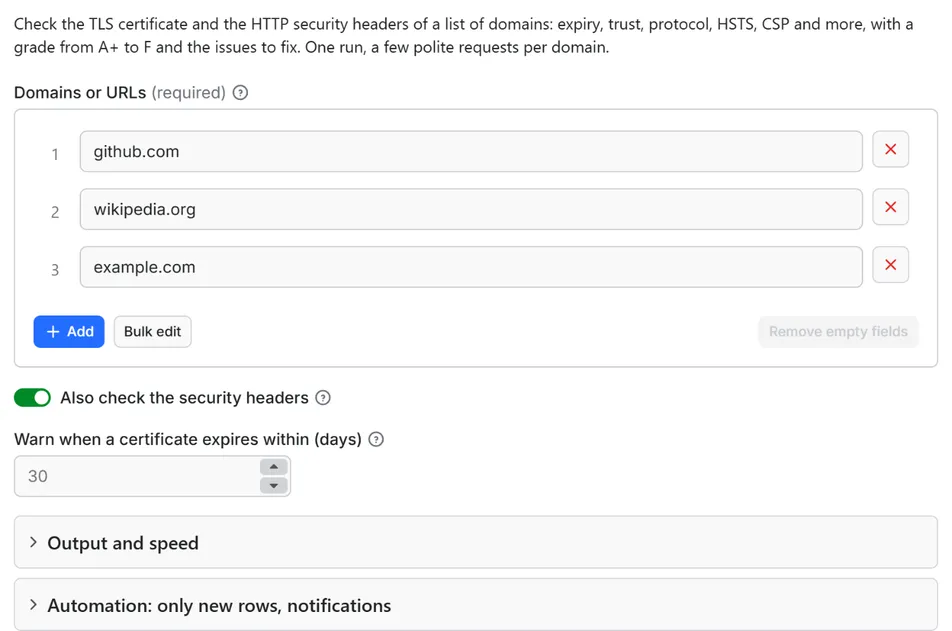
- Open the Actor and paste your domains into Domains or URLs, one per line. A column copied from a spreadsheet works, and so do entries separated by commas.
- Keep Also check the security headers on for the grade, or turn it off for a certificate-only check that sends no HTTP request at all.
- Set Warn when a certificate expires within (days) to the lead time you need to renew (30 by default).
- Click Start. The status line shows progress; the run stops cleanly at your maximum or at the charge limit you set in the run options.
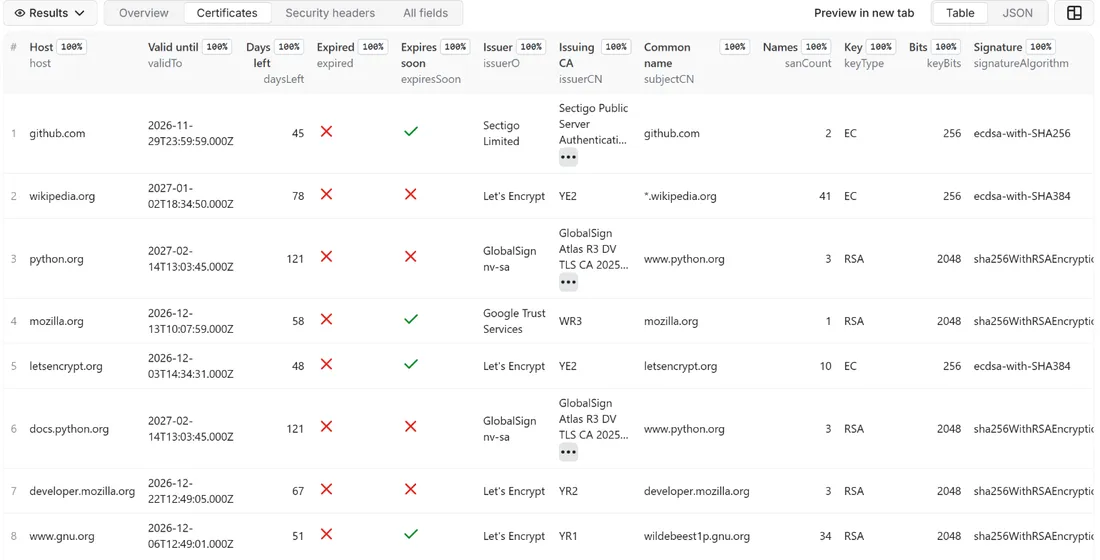
- Open the Dataset tab: the Overview, Certificates and Security headers views show the main columns. Download JSON, CSV, Excel, XML or HTML, or send the rows to Google Sheets, Slack, Make, n8n or Zapier with the Integrations tab.
- Open the
COVERAGErecord in the key-value store to see which domains could not be checked and why, andRUN_SUMMARYfor the grade counts and the certificates that expire soon.
Input
Quick start. This input is ready to run (it is also the example in the API tab):
One real row it returns (long texts shortened here):
| Field | What it does |
|---|---|
domains | Domains (example.com), addresses (https://www.example.com/shop) or domains with a port (example.com:8443), one per line. The host is checked exactly as written: example.com and www.example.com can carry different certificates, so no www. is added or removed. Up to 100,000 per run. |
checkHeaders | On by default. Reads robots.txt and the home page for the headers, checks the redirect from http://, and gives the grade. Off = certificate only, no HTTP request. |
expiryWarningDays | Certificates with this many days left or fewer get expiresSoon = true. Default 30. |
maxItems | Stop after this many delivered rows. 0 = the whole list. |
port | The port where the certificate is read, 443 for websites. A port written in an entry wins over this value. |
onlyNew, stateName | Deliver a domain only when its certificate, its grade or its expiry state changed since the last run with the same state name |
notifyUrl, notifyWhenEmpty | A webhook that receives one message when the run ends; see Automation below |
requestIntervalMs | Minimum pause between two requests to the same host, default 1000 ms, minimum 250 ms |
Example: three websites, one row each.
Example: a daily certificate watch that warns 21 days ahead and reports only what changed, with a Slack message.
Output
52 fields per row. Empty values are null, never missing, so CSV and Excel columns are stable.
| Field | Type | Example |
|---|---|---|
id | string | github.com |
host | string | github.com |
port | integer | 443 |
securityGrade | string | A |
securityScore | integer | 90 |
issueCount | integer | 4 |
issues | string | Permissions-Policy missing; Cross-Origin-Opener-Policy missing; Cro… |
protocol | string | TLSv1.3 |
cipher | string | TLS_AES_128_GCM_SHA256 |
subjectCN | string | github.com |
issuerO | string | Sectigo Limited |
issuerCN | string | Sectigo Public Server Authentication CA DV E36 |
validFrom | string | 2026-09-01T00:00:00.000Z |
validTo | string | 2026-11-29T23:59:59.000Z |
daysLeft | integer | 45 |
expiresSoon | boolean | False |
expired | boolean | False |
selfSigned | boolean | False |
chainTrusted | boolean | True |
chainError | string | CERT_HAS_EXPIRED |
hostnameMatch | boolean | True |
sanCount | integer | 2 |
sanSample | string | github.com, www.github.com |
keyType | string | EC |
keyBits | integer | 256 |
signatureAlgorithm | string | ecdsa-with-SHA256 |
ocspStapling | boolean | False |
chainLength | integer | 4 |
certFingerprint | string | 46b601ee08b418cf8a3a1ebfe670ba5ce43bb05a917fa8b2dd087a30471cfc63 |
headersChecked | boolean | True |
headersNote | string | headers not read: robots.txt of www.reddit.com disallows / for auto… |
finalUrl | string | https://github.com/ |
statusCode | integer | 200 |
hsts | boolean | True |
hstsMaxAge | integer | 31536000 |
hstsIncludeSubDomains | boolean | True |
hstsPreload | boolean | True |
contentSecurityPolicy | boolean | True |
contentSecurityPolicyPreview | string | default-src 'none'; base-uri 'self'; child-src github.githubassets.… |
xFrameOptions | string | deny |
xContentTypeOptions | string | nosniff |
referrerPolicy | string | origin-when-cross-origin, strict-origin-when-cross-origin |
permissionsPolicy | string | geolocation=(), camera=(), microphone=() |
crossOriginOpenerPolicy | string | same-origin |
crossOriginEmbedderPolicy | string | require-corp |
crossOriginResourcePolicy | string | cross-origin |
server | string | github.com |
xPoweredBy | string | Express |
httpToHttpsRedirect | boolean | True |
missingHeaders | string | Permissions-Policy, Cross-Origin-Opener-Policy, Cross-Origin-Embedd… |
inputUrl | string | github.com |
checkedAt | string | 2026-10-15T20:19:39.427Z |
How the grade is calculated
The headers that count, and the values that are recommended for them, come from the OWASP Secure Headers Project and the documentation of each header on MDN; HSTS follows RFC 6797. The points are Rowcraft's own weighting of those recommendations. The grade is therefore consistent and explainable, but it is not the grade another service would give the same site.
The score starts at 100 and loses points for each finding, never going below 0:
| Check | Points lost |
|---|---|
Strict-Transport-Security missing (or max-age=0) | 25 |
HSTS max-age under 15,552,000 seconds (180 days) | 10 |
Content-Security-Policy missing | 25 |
CSP present but it does not restrict scripts: no script-src or default-src, or it allows 'unsafe-inline' (without a nonce, hash or 'strict-dynamic'), 'unsafe-eval', a * wildcard, data: or http: | 10 |
X-Content-Type-Options missing or not nosniff | 10 |
No clickjacking protection: neither X-Frame-Options (DENY or SAMEORIGIN) nor a CSP frame-ancestors directive | 15 |
Referrer-Policy missing, or unsafe-url | 5 |
Permissions-Policy missing | 5 |
Cross-Origin-Opener-Policy missing | 2 |
Cross-Origin-Embedder-Policy missing | 2 |
Cross-Origin-Resource-Policy missing | 1 |
Server header with a version number (for example nginx/1.18.0) | 3 |
X-Powered-By header present | 3 |
http:// answers with the page instead of redirecting to https:// | 10 |
The grade comes from the score:
| Grade | Score |
|---|---|
| A+ | 95 or more, and an HSTS header that qualifies for the browsers' preload lists (max-age of at least 31,536,000 seconds, includeSubDomains and preload) |
| A | 85 to 94 (and 95 or more without the preload-ready HSTS) |
| B | 75 to 84 |
| C | 60 to 74 |
| D | 45 to 59 |
| E | 30 to 44 |
| F | under 30 |
The certificate can only lower the result. An expired certificate, one that is not valid yet, a self-signed or untrusted one (including a missing intermediate certificate) or one that does not match the host name caps the score at 29, which is an F, and gives an F even when the headers could not be read. An old protocol (TLS 1.0 or 1.1), a SHA-1 or MD5 signature or an RSA key under 2,048 bits caps the score at 74, which is a C. A certificate that is merely close to expiry adds an issue line and sets expiresSoon, but does not change the grade.
Every deduction appears in the issues column, so the score of a row can be added up from its text. When the headers were not read (robots.txt, an anti-bot page, an error, or Also check the security headers switched off) securityScore is empty and securityGrade is empty too, unless the certificate alone is a failure, which gives an F.
Example rows
Two real rows from a run (long texts shortened here, complete in the dataset):
Results can be downloaded as JSON, CSV, Excel, XML or HTML from the Dataset tab, or read through the Apify API.
Pricing
Pay per result. You pay for each domain checked and delivered to your dataset, nothing else: no subscription and no minimum.
| Your Apify plan | Price per 1,000 rows | Price per row |
|---|---|---|
| Free plan | $0.80 | $0.0008 |
| Starter plan | $0.70 | $0.0007 |
| Scale plan | $0.65 | $0.00065 |
| Business plan and above | $0.60 | $0.0006 |
Example: 1,000 domains cost $0.80 on the Free plan and $0.60 on the Business plan. Platform usage of the run (compute and storage) is included in that price and is not billed to you separately; the actor runs in 256 MB and spends most of its time waiting for the servers.
A start event of $0.00005 is charged once per run (Apify default).
Cap your spend: set Maximum total charge in the run options. The actor stops cleanly when the cap is reached and you keep everything delivered until then. The run summary (RUN_SUMMARY in the key-value store) says why a run stopped.
A domain is charged when its certificate was read and the row was delivered, including a row that carries the certificate only because robots.txt or an anti-bot page kept the headers back. Domains without a TLS service, domains that do not exist, invalid or repeated entries, and domains skipped by Only new rows because nothing changed are not charged.
Automation: only new rows, notifications, schedules
Only new rows since the last run. Turn on onlyNew and the actor remembers, for every domain it delivered to you, the certificate fingerprint, the grade and the expiry state (in a key-value store named rowcraft-ssl-security-headers-checker-state in your Apify account). The next run with the same stateName delivers a domain again only when its certificate was renewed or replaced, its grade changed, or its certificate entered the warning window or expired. A domain whose daysLeft merely went down by a day is skipped and not charged. The first run delivers every domain it can read. Use a different stateName for each list so they keep separate memories.
Expiry monitoring on a schedule. Create a schedule in Apify Console (daily is typical) with onlyNew on and the lead time you need in expiryWarningDays. The day a certificate comes within the window, its row is delivered again with expiresSoon = true and an issue line, and the webhook fires; after the certificate is renewed the next run delivers it once more with the new fingerprint. In between, the runs cost nothing but the start event.
Notification when the run ends. Put a webhook address in notifyUrl and the actor sends one JSON POST with the number of delivered rows, links to the dataset (JSON and CSV) and the run. It works with Slack and Discord incoming webhooks (the message is in text and content), with Make, n8n and Zapier catch hooks, and with your own endpoint. By default it is sent only when at least one row was delivered; notifyWhenEmpty sends it every time. The RUN_SUMMARY record lists the certificates that expired or expire soon with their days left, which is what an alert rule needs.
Integrations. Send the results to Make, n8n, Zapier, Google Sheets, Slack, Google Drive, Airtable or any webhook from the Integrations tab of the Actor, with no code.
API, SDKs and AI agents. Every run is available through the Apify API and the official JavaScript and Python clients; the Actor can also be called by AI agents through the Apify MCP server. The example input in the API tab is a working call.
Use with AI agents (MCP). Add the Apify MCP server to Claude, Cursor, VS Code or any MCP client and the agent can run this Actor as a tool:
Call it from a shell or any language. One request runs the Actor with the input below and returns the rows as JSON:
Python (pip install apify-client):
JavaScript / Node.js (npm install apify-client):
Use cases
- Certificate expiry watch: a daily schedule over the domains of a company or of a client portfolio, with a message when a certificate comes within 30 days of its end. Outages caused by a forgotten renewal are the most common and the most avoidable TLS failure.
- Agency audits and sales prospecting: run a prospect list through the actor and open the conversation with facts: no HSTS, no Content-Security-Policy, a certificate that ends next month,
http://that is still served in clear text. - Security posture of a supplier list: a quick outside-in look at the websites of vendors and partners, graded the same way, to decide who to ask questions first. It reads what a visitor's browser reads and does not test anything else.
- Baseline and regression checks after a release: run it before and after a change of CDN, proxy or hosting and compare the grades; with Only new rows the second run lists only what moved.
- Migration checklists: after moving a site to a new platform, check the certificate chain, the redirect from
http://and the headers that the new platform stopped sending. - Store and brand sites: audit the headers of a group of online shops, where Content-Security-Policy and Referrer-Policy are most often missing.
Ready-made examples, each with the input filled in (open one and press Start, or save it as your own task):
What this actor does not do
- Scan for vulnerabilities: no probing, no exploit tests, no port scan, no login, no form submission. It reads the certificate every browser receives and the headers every visitor receives.
- List every protocol and cipher a server accepts: it reports the TLS protocol and cipher that a modern client negotiates. A server that also still allows TLS 1.0 next to TLS 1.3 shows TLS 1.3.
- Check certificate revocation, Certificate Transparency logs, DNS CAA or DANE records, or the certificates of subdomains it was not asked about.
- Read the body of a page: the connection is closed after the headers. Security headers sent only on other pages, or set by a
<meta>tag, are not seen. - Collect contacts: no e-mail addresses, phone numbers or names of people. Certificate subject fields other than the common name are never copied.
- Use proxies, solve CAPTCHAs or get around an anti-bot page: a domain that answers with one keeps its certificate row and is reported in the coverage record.
Limits and fair use
- A pause between requests to the same host (1,000 ms by default, minimum 250 ms). A domain takes about five requests: the TLS handshake, robots.txt and the home page over
https://, then robots.txt and the page overhttp://, plus any redirects. Up to four domains are checked at the same time, and different domains do not wait for each other. In our test runs that came to under two seconds per domain, roughly 2,000 domains an hour on a list of different sites. - robots.txt is obeyed for every address whose page is requested, including redirect targets and the
http://check. If robots.txt disallows the home page, the row carries the certificate only andheadersNotesays so. If robots.txt answers with a server error the page is not read, as the robots.txt standard (RFC 9309) requires. The TLS handshake is not an HTTP request and robots.txt does not apply to it; it is the same connection a browser opens. - Anti-bot pages (Cloudflare, DataDome, Akamai and similar) are reported, never retried and never bypassed. The row still delivers the certificate. After 10 domains in a row answer with an anti-bot page, the actor stops reading headers for the rest of the list, because they would most likely be blocked too; certificates are still checked.
- Redirects: up to five are followed by hand for the home page; the headers are those of the page that finally answers. The
http://check follows up to four. - The
http://check is made only for port 443, where the plain-HTTP counterpart is port 80. For a certificate on another port it is skipped andhttpToHttpsRedirectis empty. - Up to 100,000 domains per run. The run stops 90 seconds before its timeout with the summary, the coverage and the Only new rows memory saved; for long lists raise the timeout or split the list.
- Header values are cut at 300 characters in the row. Headers up to 128 KB are read.
Data source and licence
The data is what each server sends to every visitor: the certificate chain in the TLS handshake and the response headers of its home page. The actor opens one TLS connection to read the handshake, then reads robots.txt and the home page of the site over https:// and over http://, and keeps only the certificate fields and the header values listed in the output table. It does not store page content, cookies or any response body.
The grade is Rowcraft's own calculation from the recommendations of the OWASP Secure Headers Project and MDN, written out in full above. No third-party scoring service is queried or copied. The actor is independent and not affiliated with or endorsed by OWASP, MDN, any certificate authority or any of the websites it reads; product and organisation names belong to their owners and are used only to say what a header or an issuer is.
Privacy: no personal data
Rowcraft actors are built not to collect personal data:
- From the certificate subject only the common name is delivered, and only when it is a domain name or an IP address. The organisation, organisational unit, e-mail address, locality, country and any other subject field are never copied, because on some certificates they name a person.
- The issuer fields (organisation and name of the certificate authority) are delivered, except on a self-signed certificate, where the issuer is the subject itself and is left empty.
- The certificate's names list keeps only DNS names and IP addresses; e-mail addresses and URIs in it are ignored.
- Header values are cut at 300 characters, and an e-mail address or a phone number inside one is removed.
- Only the home page of each host is requested. No cookies are sent or stored, no form is filled and nothing is logged into.
You are responsible for using the data in line with the law that applies to you.
Other Rowcraft actors
Related Rowcraft actors. All of them read official or public sources, deliver flat rows without private contact details and support only-new runs and notifications; the full list is on the Rowcraft profile:
- Bulk Image Downloader API: Save Page Images with Sizes — Download the images of any web pages, or direct image links, into a key-value store with width, height, format, size and a download link per file.
- Chrome Web Store Scraper: Users, Ratings & Versions — Reads public Chrome Web Store listing pages with no login, no proxy and no personal data: users, rating, category, version, update date, permissions and company developers.
- Dataset Dedup and Merge API: Remove Duplicate Rows — Merge several runs into one clean dataset and pay only for the unique rows delivered.
- GitHub Repository Search Scraper: Stars, Topics, Licenses — Search GitHub repositories through the official REST API: filter by language, stars, topic, license and date, or list new trending-like projects.
- Website Screenshot API: Full-Page PNG, JPEG and PDF Captures — Capture full-page or viewport screenshots of any public web page as PNG, JPEG or WebP, with an optional A4 PDF.
- Broken Link Checker: Find 404s — Pay per crawled page, not per link: crawl a site within robots.txt and check every link on each page for 404s, 5xx errors, DNS and TLS failures and redirects.
FAQ
What exactly does the grade measure? The security headers of the home page, the redirect from http:// to https:// and the state of the certificate, combined by the formula in the "How the grade is calculated" section. It does not measure how secure the application behind the site is.
Why is a site with a valid certificate graded F? Either its headers are almost all missing (a site with no security headers at all, such as a plain landing page, scores near the bottom), or the certificate has a problem that caps the grade: the issues column of the row names it. A grade is never lowered without a line that explains it.
Why is the grade empty? The row carries the certificate only. The headersNote column says why: robots.txt disallows the home page, an anti-bot page answered, the page returned an error, or you turned Also check the security headers off. The certificate columns are complete in that case.
Which certificate is read when a domain has several? The one the server presents to a client that asks for exactly the host name you wrote, with the name in the TLS handshake, as a browser would. That is why www.example.com and example.com are checked separately.
Why does chainTrusted say false for a certificate that works in my browser? A browser can repair a chain that the server sends incompletely, by fetching the missing intermediate certificate itself. The actor does not: chainError shows UNABLE_TO_VERIFY_LEAF_SIGNATURE and the issue line says the intermediate is missing. Clients that do not repair chains (many APIs, mobile apps, command-line tools) fail on such a server, so it is worth fixing.
Which roots does it trust? The root certificates that ship with the Node.js runtime of the actor, which follow the Mozilla list, so a certificate from a private or corporate authority shows chainTrusted = false.
Is it legal? The actor reads the certificate that every browser receives and the headers of one public page per site, obeys robots.txt for the page requests and never probes, logs in or submits anything. It is not a vulnerability scanner. Whether and how you may use the results, for example for sales outreach, depends on the law that applies to you; check only domains you own or that you are allowed to look at.
Does it collect personal data? No personal data: no e-mail addresses, phone numbers or names of people, and no certificate subject field except the common name when it is a domain. See the Privacy section.
Why is the result empty? Every domain in the list could not be checked, or was skipped. The COVERAGE record gives the reason per domain: no TLS service on the port (no_tls), no such domain (not_found), an invalid entry (error). With Only new rows on, domains whose certificate and grade did not change are skipped too. Nothing is charged for those, apart from the start event.
Do I pay for domains that have no certificate or do not exist? No. Only domains whose certificate was read are charged, and a duplicate in your list is read once.
Can I check a certificate on a port other than 443? Yes: write example.com:8443 or set Port of the TLS service for the whole list. The redirect check from http:// is made only for port 443.
Can I check an IP address? Yes, an IPv4 or IPv6 address works as an entry; the certificate is then matched against the IP addresses it lists. Private and local addresses are refused on the Apify platform.
What does ocspStapling mean? true means the server sent a signed OCSP answer with the handshake, which lets browsers check revocation without contacting the authority; false means it did not. It is information, not a deduction.
How does Only new rows work here? The actor remembers, per domain, the certificate fingerprint, the grade and whether the certificate expired or is about to. A later run with the same state name delivers a domain again only when one of those changed, so a daily schedule costs only the domains that need your attention.
Support and reviews
Problems, missing fields, questions: open an issue on the Issues tab of this Actor. We answer within one working day and fix confirmed bugs in the next release; the changelog lists every change.
If this Actor saved you time, a short review on its page helps other users find it and helps us keep improving it.


