

Bulk Image Downloader API: Save Page Images with Sizes
Pricing
from $1.50 / 1,000 images
Bulk Image Downloader API: Save Page Images with Sizes
Download the images of any web pages, or direct image links, into a key-value store with width, height, format, size and a download link per file. Tracking pixels are skipped, robots.txt obeyed, pay only for images saved.
Pricing
from $1.50 / 1,000 images
Rating
0.0
(0)
Developer

Rowcraft
Maintained by CommunityActor stats
0
Bookmarked
1
Total users
1
Monthly active users
12 days ago
Last modified
Categories
Security
Limited permissionsShare
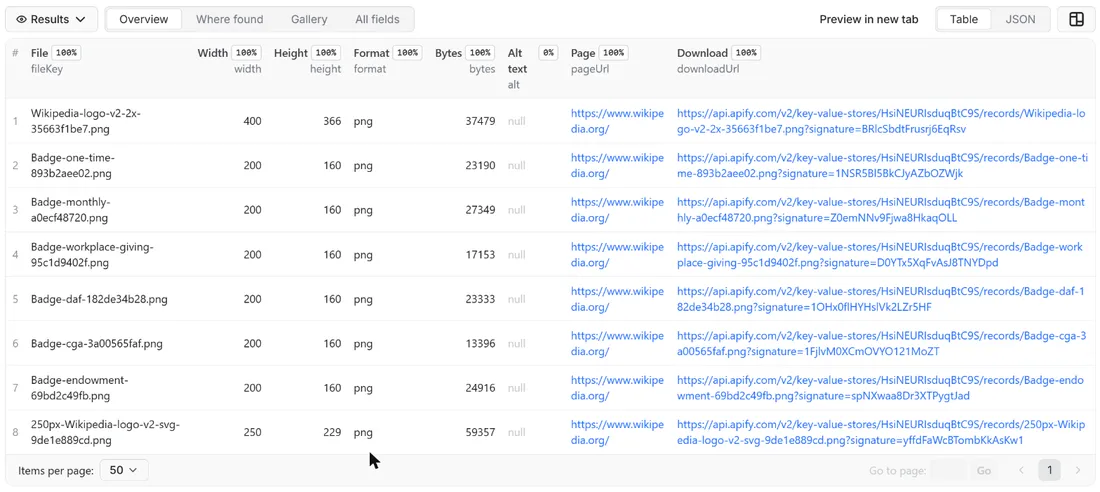
Bulk Image Downloader saves the pictures of any list of web pages into the key-value store of your run and tells you, for every file, its width, height, format, size in bytes, SHA-1 and a download link. Give it page addresses, direct image links, or both; it finds the images in each page's HTML, downloads them politely one by one, skips tracking pixels and icons with a size filter, and returns one row per image saved, as JSON, CSV or Excel, with the files next to the rows.
No browser is started and no JavaScript is run: the actor reads the HTML a page sends, as a plain visitor would. That keeps a run fast and cheap, and it means pictures that a page only builds later with JavaScript are not seen (see Limits).
What you get
Price: $2.00 per 1,000 images on the Free plan, $1.50 on the Business plan, paid per row delivered; the $5 monthly credit of a free Apify account covers about 2,500 images. Details in Pricing below.
One row per image saved:
- Where it came from: the address of the image (
imageUrl), the page it was found on (pageUrl, null for a direct link) and how it was found (source:img,srcset,picture,og,link,cssordirect) - What it is: width and height in pixels, format (
jpeg,png,gif,webp,avif,svg,bmp,ico,tiff) and size in bytes, all read from the file's own header, never guessed from the address - A fingerprint: the SHA-1 of the file, so identical pictures under different addresses can be spotted and removed
- The file itself: saved in the run's key-value store under
fileKey(a readable name from the address plus ten characters of the hash, for examplea-light-in-the-attic-fe72f05323.jpg), with adownloadUrlthat opens it - The alt text of the image, when the page has one, with e-mail addresses, phone numbers and contact names next to a cue removed
- When:
savedAt, the time the file was saved
The run also writes two records in the key-value store: COVERAGE (one line per page and one per image that was not saved, with the reason) and RUN_SUMMARY (counts, the filters used, bytes stored, why the run stopped).
Why this actor
- You pay per image saved, not per page. Leaders in this niche charge per page processed, whatever the page holds. Here a page with 30 images costs $0.06 at the Free price and $0.045 at the Business price, a page with 8 images costs $0.016, and a page with no usable image costs nothing.
- Junk is free. Tracking pixels, spacers, icons and anything below your minimum width and height are not saved and not charged. The default minimum is 100 x 100 px.
- One file per picture, not three. Modern pages list the same photo at several widths and formats. By default you get the largest listed version once; turn on Save every listed size of a picture to get them all.
- Duplicates are free. An address handled twice, or two addresses with the same content (SHA-1), count once.
- Sizes from the file. Width, height and format come from the image header, so a
.jpgthat is really a WebP is reported aswebp. - Polite by design. robots.txt is read and obeyed on the page host and on the image host (a CDN has its own), one request per second per host by default, a site's Crawl-delay is honoured up to 10 seconds, no proxies, no CAPTCHA solving.
- Fits small runs. The actor runs in 256 MB; a 14 MB image was saved in a test with a peak of about 130 MB.
How to use it
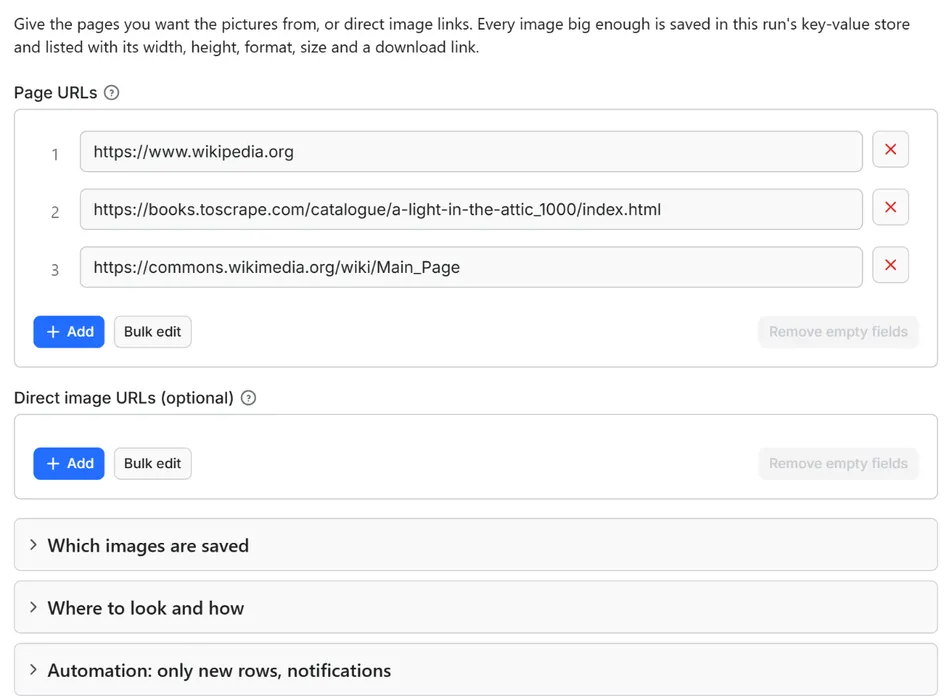
- Open the Actor and fill in Page URLs (the other fields are optional filters).
- Set Maximum images to a small number for a first try (the default is a safe start).
- Click Start. The status line shows progress; the run stops cleanly at your limit or at the charge limit you set in the run options.
- Open the Dataset tab and download JSON, CSV, Excel, XML or HTML, or send the rows to Google Sheets, Slack, Make, n8n or Zapier with the Integrations tab.
- To run it on a schedule, use Schedules in Apify Console and turn on Only new rows since the last run below: every run then costs only the new rows, and a webhook URL tells you when something new came in.
A few practical notes:
- Put pages in Page URLs and files in Direct image URLs; the same run can take both.
- For a first try, keep the list short and leave the filters at their defaults.
- The files are in the Storage tab of the run, in the key-value store. Each row's
fileKeyis the record key. - To collect a gallery, tick Also take links to image files: thumbnails often link to the full-size picture.
Input
Quick start. This input is ready to run (it is also the example in the API tab):
One real row it returns (long texts shortened here):
| Field | What it does |
|---|---|
urls | Pages to collect the images of, one address per line. A bare domain is read as https://. |
imageUrls | Direct links to image files, one per line (optional). |
minWidth, minHeight | Smallest image saved, in pixels. Default 100 x 100. 0 turns the filter off. |
formats | Save only these formats. Empty = all. |
maxImagesPerPage | Stop reading a page after this many images were saved from it. Default 100. |
maxItems | Stop the whole run after this many images were saved. Default 500, 0 = no limit. |
allSizes | Save every listed size and format of a picture, not only the largest. Default off. |
includeLinkedImages | Also take links to image files (<a href="photo.jpg">). Default off. |
includeBackgroundImages | Also take inline CSS background-image. Default off. |
dedupe | Skip repeated addresses and files with the same content. Default on. |
maxImageSizeMb | Largest file saved, default 15 MB, maximum 30. Larger files are not saved. |
includeAltText | Deliver the alt text. Default on. |
onlyNew, stateName | Save an image again only when its content changed since the last run with the same state name |
notifyUrl, notifyWhenEmpty | A webhook that receives one message when the run ends; see Automation below |
requestIntervalMs | Pause between requests to the same host, default 1000 ms, minimum 250 ms |
Example: the product photos of two pages, large images only.
Example: download a list of image links you already have.
Where the actor looks for images
<img src>, and the lazy-loading attributesdata-src,data-lazy-srcanddata-originalthat many shops use instead of a realsrcsrcsetof an image and of the<source>tags inside<picture>: by default the largest width listed (or the highest pixel density) is taken- the
og:imagepreview picture of the page - on request, links to image files and inline CSS backgrounds
- never:
data:pictures embedded in the HTML (they are counted as skipped), favicons, pictures drawn by JavaScript, videos, and anything inmailto:,tel:orsms:links
Output
13 fields per row. Empty values are null, never missing, so CSV and Excel columns are stable.
| Field | Type | Example |
|---|---|---|
imageUrl | string | https://books.toscrape.com/media/cache/fe/72/fe72f0532301ec28892ae7… |
pageUrl | string | https://books.toscrape.com/catalogue/a-light-in-the-attic_1000/inde… |
alt | string | A Light in the Attic |
width | integer | 318 |
height | integer | 395 |
format | string | jpeg |
bytes | integer | 31047 |
sha1 | string | 3e7b0b8c3a2c9f6c2f6e8f4c6b1a5d9e0f7a1b2c |
fileKey | string | fe72f0532301ec28892ae79a629a293c-3e7b0b8c3a.jpg |
downloadUrl | string | https://api.apify.com/v2/key-value-stores/XXXX/records/fe72f0532301… |
source | string | img |
savedAt | string | 2026-10-17T09:30:00.000Z |
error | string | Always null for a saved image; images that could not be saved are listed in COVERAGE, never as rows |
Example rows
Two real rows from a run (long texts shortened here, complete in the dataset):
Results can be downloaded as JSON, CSV, Excel, XML or HTML from the Dataset tab, or read through the Apify API.
The downloadUrl is a link to the file in the run's key-value store. On the Apify platform it carries a signature, so it opens without logging in for as long as the file exists.
Pricing
Pay per result. You pay for each image saved and delivered to your dataset, nothing else: no subscription, no minimum, no charge for images your filters drop, for duplicates, for failed or refused downloads, or for the requests behind them.
| Your Apify plan | Price per 1,000 images | Price per image |
|---|---|---|
| Free plan | $2.00 | $0.002 |
| Starter plan | $1.80 | $0.0018 |
| Scale plan | $1.60 | $0.0016 |
| Business plan and above | $1.50 | $0.0015 |
Example: 1,000 images cost $2.00 on the Free plan and $1.50 on the Business plan.
A start event of $0.00005 is charged once per run (Apify default).
Platform usage is separate. Apify bills the compute of the run (it runs in 256 MB and spends most of its time waiting between requests, about one image per second per host) and the storage of the saved files, as for every Actor; it is not part of the price above.
Cap your spend: set Maximum total charge in the run options. The actor stops cleanly when the cap is reached and you keep everything saved until then. The run summary (RUN_SUMMARY in the key-value store) says why a run stopped.
What a page costs. The price is per image saved, so the cost of a page follows its content:
| Images saved from the page | Free plan | Business plan |
|---|---|---|
| 1 | $0.002 | $0.0015 |
| 8 | $0.016 | $0.012 |
| 30 | $0.06 | $0.045 |
| 100 | $0.20 | $0.15 |
Tools in this niche that charge per page processed list $0.056 to $0.07 per page on their Free plan, whatever the page holds. Per image, this actor is cheaper from the first page that holds fewer than 28 saved images.
Storing the files uses Apify storage, billed with the platform usage of the run: a run that saves 1,000 images of 150 KB keeps 150 MB in the key-value store.
Automation: only new rows, notifications, schedules
Only new rows since the last run. Turn on onlyNew and the actor remembers every image it delivered to you (in a key-value store named rowcraft-bulk-image-downloader-state in your Apify account). The next run with the same stateName skips what you already have and you pay only for new rows. The first run delivers everything that matches. Use a different stateName for each schedule or search so they keep separate memories.
Notification when the run ends. Put a webhook address in notifyUrl and the actor sends one JSON POST with the number of new rows, links to the dataset (JSON and CSV) and the run. It works out of the box with Slack and Discord incoming webhooks (the message is in text and content), with Make, n8n and Zapier catch hooks, and with your own endpoint. By default it is sent only when there is at least one new row; notifyWhenEmpty sends it every time.
Schedules. Create a schedule in Apify Console (hourly, daily, weekly or cron) with onlyNew on. A daily schedule gives you a feed of new images for the price of the new rows only.
Integrations. Send the results to Make, n8n, Zapier, Google Sheets, Slack, Google Drive, Airtable or any webhooks from the Integrations tab of the Actor, with no code. Apify also offers native actions for Make, n8n and Zapier.
API, SDKs and AI agents. Every run is available through the Apify API and the official JavaScript and Python clients; the Actor can also be called by AI agents through the Apify MCP server. The example input in the API tab is a working call.
Use with AI agents (MCP). Add the Apify MCP server to Claude, Cursor, VS Code or any MCP client and the agent can run this Actor as a tool:
Call it from a shell or any language. One request runs the Actor with the input below and returns the rows as JSON:
How "new" is decided here. The actor remembers each image address together with the SHA-1 of the file it delivered. On the next run with the same stateName, an image is saved and charged again only if its content changed at that address (a new product photo under the same file name counts, a re-uploaded identical file does not). The actor still has to download an image to compare it, so the requests are made; only the saving and the charge are skipped.
Use cases
- Product photo archives: keep the images of your own shop pages, supplier pages or catalogue pages with their sizes, before a redesign or a platform move.
- Image audits: list every picture of a set of pages with its real dimensions and file size, to find oversized files, wrong formats and images that are too small for a layout.
- Datasets and mood boards: collect the pictures of pages you are allowed to use for research, design reference or machine-learning data preparation.
- Duplicate and change detection: the SHA-1 column shows identical pictures under different addresses, and a schedule with Only new rows tells you when a picture changed.
- Migration checks: download the images of the old pages, then compare sizes and hashes after the move.
- Feeding other tools: pass the key-value store links to an image-processing, OCR or tagging step in Make, n8n, Zapier or your own code.
Ready-made examples, each with the input filled in (open one and press Start, or save it as your own task):
What this actor does not do
- Log in: pages and images behind a login, a paywall or a cookie wall are not read.
- Read social networks: Instagram, Pinterest, Facebook and similar sites are outside this actor.
- Resize, convert, compress or watermark images: files are saved exactly as the server sent them.
- Read text in pictures (OCR) or recognise what a picture shows.
- Run JavaScript or a browser: pictures that a script adds after the page loads are not found.
- Read or deliver photo metadata: camera, location and author fields inside a file are not read and not in the rows; the files themselves are saved unchanged, so they still contain whatever metadata the server sent.
- Work around protection: a server that answers with an anti-bot page, 401, 403 or 429 is reported in COVERAGE and not charged; the actor does not use proxies, solve CAPTCHAs or send a fake referrer.
- Give you the rights to use the pictures: see the FAQ.
Limits and fair use
- One request per second per host by default (minimum 250 ms). A page and the server that holds its images are different hosts, so they are paced separately. A longer Crawl-delay in a site's robots.txt is applied instead, up to 10 seconds. In our test runs this came to about one saved image per second on a typical page.
- Page size: the first 5 MB of a page's HTML are read.
- File size: 15 MB per image by default, up to 30 MB with
maxImageSizeMb. A server that announces a larger file is not even asked for it. - Images per page: 100 saved by default (
maxImagesPerPage, up to 2,000); at most five times as many addresses per page are tried, so a page with thousands of tiny pictures cannot use up a run. - Pages per run: up to 10,000 pages and 50,000 direct image links.
- Memory: 256 MB is enough for the default limits; the run stops 90 seconds before its timeout and keeps everything saved until then.
- Refused images: some image servers refuse a request that does not come from a page (hotlink protection). These images are listed as
blocked; the actor does not pretend to be a browser on the page to get around that. After 10 refusals in a row on one page the rest of the page is skipped. - How long files are kept: the images live in the default key-value store of the run, which Apify deletes when the retention period of your plan ends (on the Free plan, the 10 most recent runs are kept for 4 months; check the retention setting of your own plan). Download what you need, or copy it to a named store or your own storage; named storages are kept until you delete them.
- robots.txt is obeyed for every address the actor touches, including redirect targets and the image servers. If robots.txt disallows a path, that page or image is
robots_disallowed; if robots.txt answers with a server error, the host is not read, as the robots.txt standard (RFC 9309) requires. - Private addresses (localhost, internal networks) are refused on the platform.
Data source and licence
The data is what a web page sends to every visitor: its HTML, and the image files it points to. The actor reads the page once, after checking robots.txt, and downloads the image files that the page itself shows. The rows contain facts about the files (size, format, hash) and the addresses; the files are saved unchanged in your storage.
The rights to the pictures stay with the page and its owner. Most pictures on the web are protected by copyright or by a licence. The actor only downloads what a visitor's browser would download; it does not grant, check or transfer any right to use the files. You decide what you may do with them.
Bulk Image Downloader is independent and not affiliated with or endorsed by the websites it reads or by the owners of the pictures it saves.
Privacy: no personal data
Rowcraft actors are built not to collect personal data:
- No e-mail addresses, phone numbers or names of people are read from pages or delivered. Links starting with
mailto:,tel:orsms:are ignored completely. - Photo metadata (EXIF: camera, GPS, author) is not read and not in the rows.
- Image addresses with a user name or password inside are used without them, and an e-mail address inside an address is removed.
- The alt text is cleaned of e-mail addresses, phone numbers and contact names next to a cue (Mr, Ms, "contact", "recruiter"); other names written in free text cannot be removed reliably. If the pages you read show photos of people with their names in the alt text, turn Deliver the alt text off.
- The actor sends no cookies, fills no forms and never logs in.
The files are the pictures of the pages you choose: a photo that shows a person is personal data under the law of many countries. You are responsible for using the files in line with the law that applies to you.
Other Rowcraft actors
Related Rowcraft actors. All of them read official or public sources, deliver flat rows without personal data and support only-new runs and notifications; the full list is on the Rowcraft profile:
- Website Screenshot API: Full-Page PNG, JPEG and PDF Captures — Capture full-page or viewport screenshots of any public web page as PNG, JPEG or WebP, with an optional A4 PDF.
- Chrome Web Store Scraper: Users, Ratings & Versions — Reads public Chrome Web Store listing pages with no login, no proxy and no personal data: users, rating, category, version, update date, permissions and company developers.
- Dataset Dedup and Merge API: Remove Duplicate Rows — Merge several runs into one clean dataset and pay only for the unique rows delivered.
- GitHub Repository Search Scraper: Stars, Topics, Licenses — Search GitHub repositories through the official REST API: filter by language, stars, topic, license and date, or list new trending-like projects.
- SSL Certificate and Security Headers Checker API — Check the TLS certificate and the HTTP security headers of every domain in one run, with an A+ to F grade and the exact issues to fix.
- Broken Link Checker – Find 404s and Dead Links API — Pay per crawled page, not per link: crawl a site within robots.txt and check every link on each page for 404s, 5xx errors, DNS and TLS failures and redirects.
FAQ
Are the images mine to use? The actor only downloads what a visitor's browser would download. The rights to a picture stay with the page's owner or the photographer. Use your own images, images with a licence that allows your use, or pictures you have permission for. The actor does not check licences.
What does it cost for a page with many images? You pay for each image saved: $2.00 per 1,000 on the Free plan and $1.50 per 1,000 on the Business plan. Images below the size filter, duplicates, failed downloads and refused images are not charged.
How long are the files kept? In the default key-value store of the run, until your plan's retention period for unnamed storages ends (Free plan: the 10 most recent runs for 4 months). Download or copy the files you need; a named storage is kept until you delete it.
Why is the result empty? Check COVERAGE. The usual reasons: every image was below the minimum size (lower minWidth and minHeight), the page loads its pictures with JavaScript, robots.txt disallows the page or the images (robots_disallowed), the site answered with an anti-bot page (blocked), or with Only new rows on nothing had changed. Nothing is charged for those, apart from the start event.
Why were small images skipped? The default minimum is 100 x 100 px, to leave out tracking pixels, spacers and icons. Set both to 0 to save everything. Skipped images are listed as too_small in COVERAGE with their real size.
Is it legal? The actor reads public pages, obeys robots.txt and collects pictures that a page shows to every visitor. Whether you may copy, store or reuse a given picture depends on its copyright or licence and on the law that applies to you.
Does it collect personal data? No personal data is read from pages or put in the rows: no e-mails, phone numbers or names, and photo metadata is not read. Pictures themselves can show people; see the Privacy section.
Which formats and sizes does it read? JPEG, PNG, GIF, WebP, AVIF, SVG, BMP, ICO and TIFF. The size comes from the file header; for an SVG it is the width and height or the viewBox. A JPEG that carries a quarter-turn rotation flag is reported as it is displayed.
Why does it not take every size of a picture? Pages list one photo at several widths so that browsers pick the right one. Saving all of them would triple your bill for the same picture, so by default only the largest listed version is saved. Tick Save every listed size of a picture if you want them all.
Why does an image say "blocked"? The server that holds the image answered with 401, 403 or 429 or an anti-bot page. The actor does not work around that. Try again later, with a longer requestIntervalMs, or use a different source.
Can I get the images of a whole website? Not by itself: it reads the pages you list and does not follow links. Use a sitemap or link-list tool to build the list of pages first, then paste the addresses here.
Do I pay for images that were already delivered? With Only new rows on, an image whose content did not change since your last run with the same state name is not saved and not charged.
Support and reviews
Problems, missing fields, questions: open an issue on the Issues tab of this Actor. We answer within one working day and fix confirmed bugs in the next release; the changelog lists every change.
If this Actor saved you time, a short review on its page helps other users find it and helps us keep improving it.


