

GitHub Repository Search Scraper: Stars, Topics, Licenses
Pricing
from $0.28 / 1,000 repositories
GitHub Repository Search Scraper: Stars, Topics, Licenses
Search GitHub repositories through the official REST API: filter by language, stars, topic, license and date, or list new trending-like projects. No proxy, no user data, and you pay only for repositories delivered.
Pricing
from $0.28 / 1,000 repositories
Rating
0.0
(0)
Developer
Rowcraft
Maintained by CommunityActor stats
0
Bookmarked
2
Total users
1
Monthly active users
4 days ago
Last modified
Categories
Security
Limited permissionsShare
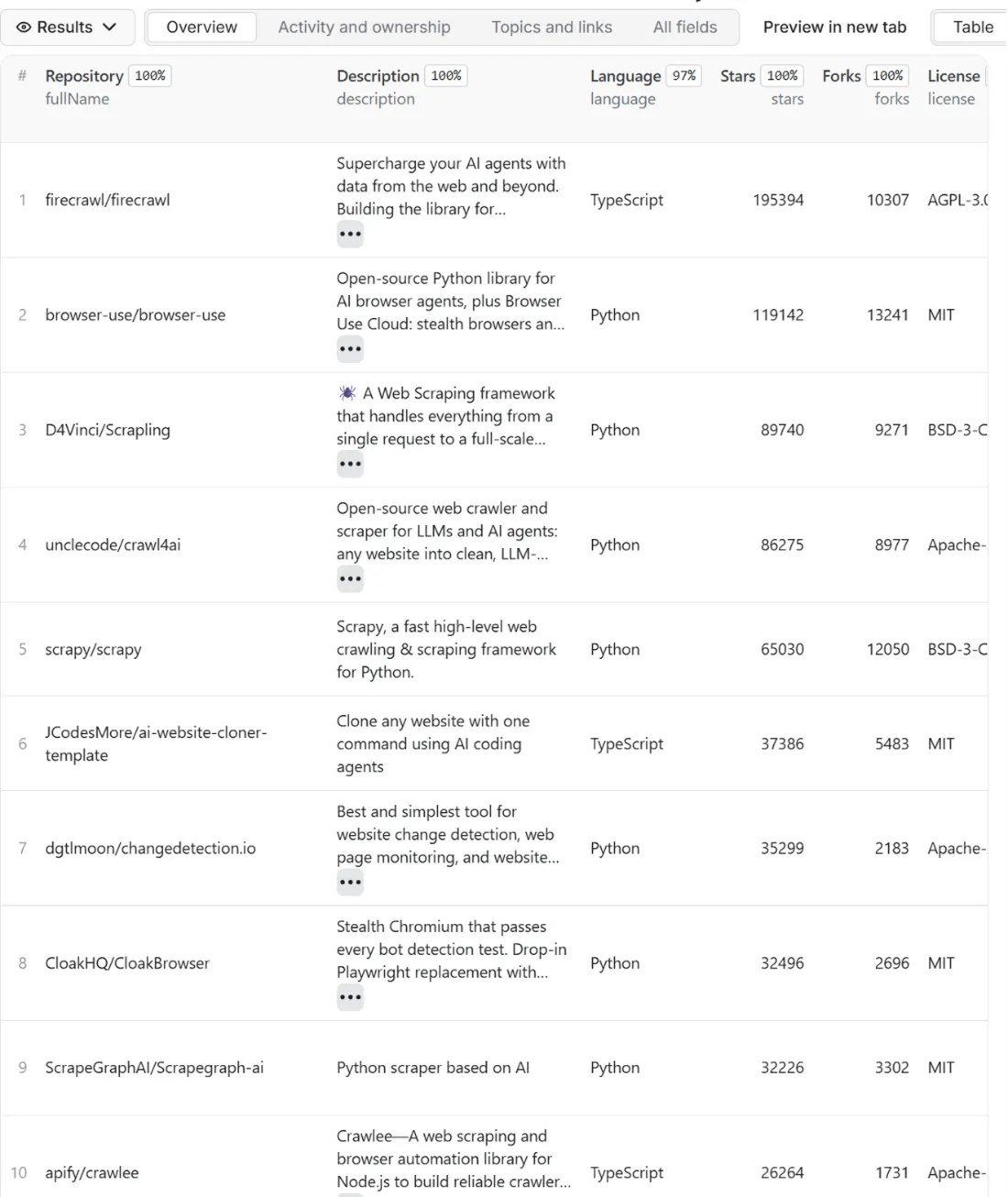
Search GitHub repositories and get them as clean rows: name, description, main language, stars, forks, topics, license, creation and last push dates, open issues and more, as JSON, CSV or Excel. The actor sends your searches to the official GitHub REST API, so there is no page parsing to break, no proxy and no login. Write queries in GitHub's own syntax (language:python stars:>500 topic:scraping) or just fill in the filters: language, minimum stars, topics, license and dates. A second mode lists new, trending-like projects: repositories created in the last N days, ordered by stars.
Know the limit before you start: GitHub serves at most 1,000 results per search (10 pages of 100), and without a token of your own it answers 10 searches a minute. The actor works within both limits, tells you in the run summary when a query matches more than it can reach, and speeds up three times if you add your own free token.
What you get
Price: $0.40 per 1,000 repositories on the Free plan, $0.28 on the Business plan, paid per row delivered; the $5 monthly credit of a free Apify account covers about 12,000 repositories. Details in Pricing below.
One row per repository, with 32 fields:
- Identity: the numeric GitHub
id(stable even when a repository is renamed),fullName(owner/name),nameandurl, the address of the repository on GitHub - Description:
descriptionwith e-mail addresses and phone numbers masked,homepage, the mainlanguage, thetopics(a list) and thelicenseas an SPDX identifier (MIT,Apache-2.0,GPL-3.0, orNOASSERTIONfor a license GitHub cannot name) - Popularity:
stars,forks,openIssuesandwatchers(GitHub's legacy field, which equals the stars; the real watchers are insubscribers, see below) - Activity:
createdAt,updatedAt,pushedAt(the last code push),isArchived,isFork,isTemplate,defaultBranchandsizein kilobytes - Features:
visibility,hasIssues,hasWiki,hasPagesandhasDiscussions - Owner:
ownerType(OrganizationorUser) andowner, the organization's name, only when the owner is an organization. For a repository owned by a user,ownerisnull: user accounts are not delivered - Optional counters:
subscribers(the real number of watchers) andnetworkCount(the size of the fork network), filled when you tick Add watchers and network count, otherwisenull - Provenance:
query, the exact search sent to GitHub, andfetchedAt, when the page of results was read
Empty values are null (and topics is an empty list), never missing, so CSV and Excel columns stay stable from run to run.
The run also writes a COVERAGE record with one line per query (GitHub's total count, how many results were reachable, read, delivered, skipped as duplicates or as already delivered, and why it stopped) and a RUN_SUMMARY with the totals, the searches sent, the rate-limit numbers GitHub reported and the warnings.
Why this actor
- Official REST API only. Every request goes to
api.github.com: the repository search and, if you ask for it, one detail request per repository. The github.com website is never loaded, so a change in its layout cannot break the actor. - GitHub's own query language. Qualifiers such as
language:,topic:,stars:,forks:,license:,created:,pushed:,user:,org:andin:name,description,readmework exactly as on GitHub, because the query is passed on as you wrote it. The plain filters add the same qualifiers for you. - Filters before charging. The filters are part of the search, so repositories that do not match are never returned and never charged. Archived repositories and forks are left out by default.
- Honest about limits. The 1,000-result cap and the rate limits are written here, in the input form and in the run summary. When a query matches 4,000 repositories the run says so and tells you to narrow it.
- A recent mode. Repositories created, or pushed to, in the last N days, ordered by stars: a list of what is new and growing, without scraping a page that has no API.
- Your token, your speed. A personal token of your own GitHub account triples the search rate and lifts the detail limit from 60 to 5,000 requests an hour. It is optional, encrypted by Apify, sent only to
api.github.comand never logged. - Count first. Tick
countOnlyto see how many repositories each query matches and what delivering them would cost, for free. - Ready for schedules.
onlyNewdelivers, and charges, only repositories you have not received before, andnotifyUrlsends a message to Slack, Discord, Make, n8n or Zapier when the run ends. - No people. No user profiles, no contributors, no commit authors, no e-mails. See the Privacy section.
How to use it
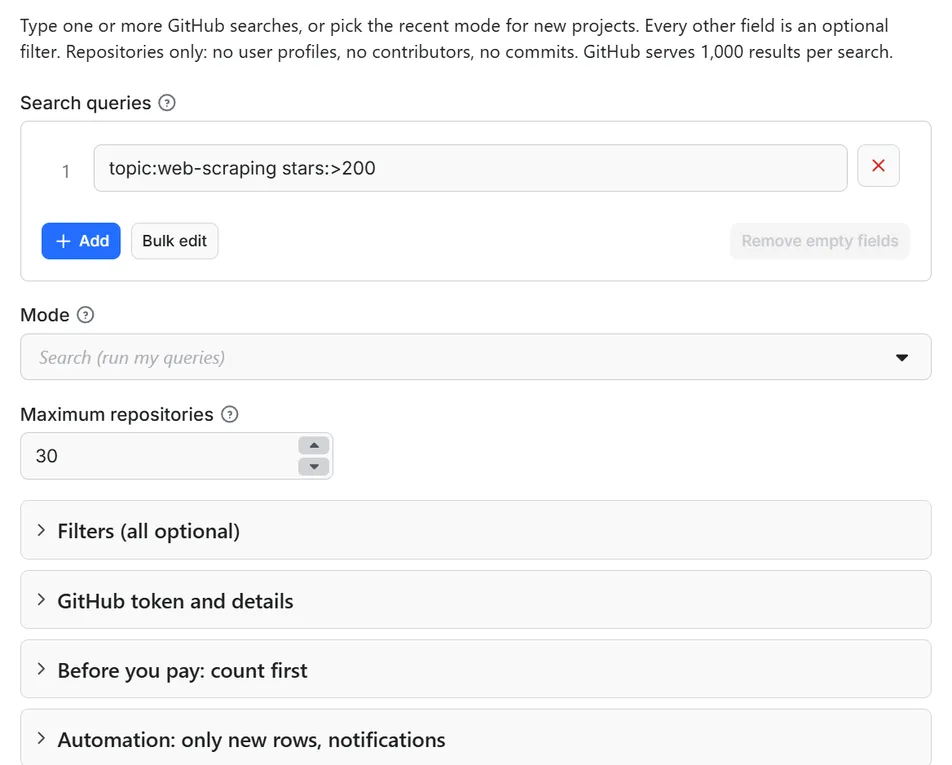
- Open the Actor and fill in Search queries (the other fields are optional filters).
- Set Maximum repositories to a small number for a first try (the default is a safe start).
- Optional: tick Count only and start once. You get the number of matching rows and the estimated cost, for free (only the start event is charged). Untick it to get the data.
- Click Start. The status line shows progress; the run stops cleanly at your limit or at the charge limit you set in the run options.
- Open the Dataset tab and download JSON, CSV, Excel, XML or HTML, or send the rows to Google Sheets, Slack, Make, n8n or Zapier with the Integrations tab.
- To run it on a schedule, use Schedules in Apify Console and turn on Only new rows since the last run below: every run then costs only the new rows, and a webhook URL tells you when something new came in.
A few habits that save money and time:
- Start with
countOnlyfor a new query. GitHub tells you how many repositories match, and you see at once whether the query is too wide (above 1,000) or too narrow. - Narrow wide queries instead of paging: add
stars:>1000, a language, or a date range, or split one query into several ranges (stars:100..500,stars:501..2000,stars:>2000), each of which can return its own 1,000. - Sort order matters when you cap the result: with
maxItemsof 50 and sort by stars you get the 50 most-starred repositories that match, not a random sample. - For a weekly digest of new projects, use the recent mode with
recentDaysof 7, aminStarsthat suits you,onlyNewon and a Slack address innotifyUrl.
Input
Quick start. This input is ready to run (it is also the example in the API tab):
One real row it returns (long texts shortened here):
| Field | What it does |
|---|---|
queries | Searches in GitHub syntax, one per line. Optional in recent mode. At most 256 characters each, including the filters the actor adds. |
mode | search runs your queries as written. recent adds "created (or pushed) in the last N days" to every query. |
maxItems | Stop after this many delivered repositories in total, queries are read in order. Default 100, 0 = everything GitHub serves (up to 1,000 per query). |
language, minStars, topics, license | Added to every query as language:, stars:>=, topic: (all topics must match) and license: qualifiers. |
createdAfter, pushedAfter | Keep repositories created, or last pushed to, on or after a date written YYYY-MM-DD. |
excludeArchived, excludeForks | On by default. Archived repositories and forks are left out. |
sort | stars (default), forks, updated or best-match, highest first. |
recentDays, recentBy | For recent mode: how many days back (1 to 365, default 7), and whether to count from the creation date or from the last push. |
githubToken | Optional. A personal access token of your own GitHub account, no scopes needed. |
fetchDetails | One more request per delivered repository to fill subscribers and networkCount. |
countOnly | Count what each query matches and estimate the cost; nothing is delivered. |
onlyNew, stateName | Deliver a repository only if you have not received it in an earlier run with the same state name. |
notifyUrl, notifyWhenEmpty | A webhook that receives one message when the run ends; see Automation below. |
requestIntervalMs | An extra delay between requests, on top of the one GitHub's limits already require. Default 0. |
If a query already contains a qualifier (for example language:go), the query wins over the matching setting and the run summary says so.
Example: the Python scraping libraries with more than 1,000 stars, most-starred first.
Example: new Rust projects of the last 30 days with at least 20 stars.
Example: MIT-licensed TypeScript command-line tools, still maintained.
Example: several queries in one run, with your own token for speed.
Output
32 fields per row. Empty values are null, never missing, so CSV and Excel columns are stable.
| Field | Type | Example |
|---|---|---|
id | integer | 881458615 |
fullName | string | browser-use/browser-use |
name | string | browser-use |
url | string | https://github.com/browser-use/browser-use |
description | string | Open-source Python library for AI browser agents |
homepage | string | https://browser-use.com |
ownerType | string | Organization |
owner | string | browser-use |
language | string | Python |
topics | array | ["web-scraping", "playwright"] |
license | string | MIT |
stars | integer | 119143 |
forks | integer | 13241 |
watchers | integer | 119143 |
openIssues | integer | 608 |
isArchived | boolean | False |
isFork | boolean | False |
isTemplate | boolean | False |
defaultBranch | string | main |
size | integer | 37819 |
createdAt | string | 2024-10-31T16:00:56Z |
updatedAt | string | 2026-10-26T05:18:56Z |
pushedAt | string | 2026-10-24T07:23:03Z |
visibility | string | public |
hasIssues | boolean | True |
hasWiki | boolean | False |
hasPages | boolean | False |
hasDiscussions | boolean | True |
query | string | topic:web-scraping stars:>=200 archived:false |
fetchedAt | string | 2026-10-26T07:40:00.000Z |
subscribers | integer | 812 |
networkCount | integer | 13241 |
Example rows
Two real rows from a run (long texts shortened here, complete in the dataset):
Results can be downloaded as JSON, CSV, Excel, XML or HTML from the Dataset tab, or read through the Apify API.
Pricing
Pay per result. You pay for each repository delivered to your dataset, nothing else: no subscription, no minimum, no charge for rows your filters drop or for the requests behind them.
| Your Apify plan | Price per 1,000 rows | Price per row |
|---|---|---|
| Free plan | $0.40 | $0.0004 |
| Starter plan | $0.36 | $0.00036 |
| Scale plan | $0.32 | $0.00032 |
| Business plan and above | $0.28 | $0.00028 |
Example: 1,000 repositories cost $0.40 on the Free plan and $0.28 on the Business plan. Platform usage of the run (compute, storage) is included in that price and is not billed to you separately (pay per event: the actor covers it).
A start event of $0.00005 is charged once per run (Apify default).
Cap your spend: set Maximum total charge in the run options. The actor stops cleanly when the cap is reached and you keep everything delivered until then. The run summary (RUN_SUMMARY in the key-value store) says why a run stopped.
Check before you pay: turn on Count only to see how many rows match and what they would cost at your tier. That run delivers nothing and costs only the start event.
What that means in practice: one query that matches the full 1,000 repositories costs $0.40 on the Free plan and $0.28 on the Business plan. A weekly list of the 50 newest popular projects costs two cents.
Automation: only new repositories, notifications, schedules
Only new rows since the last run. Turn on onlyNew and the actor remembers every repository it delivered to you (in a key-value store named rowcraft-github-repo-search-scraper-state in your Apify account). The next run with the same stateName skips what you already have and you pay only for new rows. The first run delivers everything that matches. Use a different stateName for each schedule or search so they keep separate memories.
Notification when the run ends. Put a webhook address in notifyUrl and the actor sends one JSON POST with the number of new rows, links to the dataset (JSON and CSV) and the run. It works out of the box with Slack and Discord incoming webhooks (the message is in text and content), with Make, n8n and Zapier catch hooks, and with your own endpoint. By default it is sent only when there is at least one new row; notifyWhenEmpty sends it every time.
Schedules. Create a schedule in Apify Console (hourly, daily, weekly or cron) with onlyNew on. A daily schedule gives you a feed of new repositories for the price of the new rows only.
Integrations. Send the results to Make, n8n, Zapier, Google Sheets, Slack, Google Drive, Airtable or any webhooks from the Integrations tab of the Actor, with no code. Apify also offers native actions for Make, n8n and Zapier.
API, SDKs and AI agents. Every run is available through the Apify API and the official JavaScript and Python clients; the Actor can also be called by AI agents through the Apify MCP server. The example input in the API tab is a working call.
Count only. countOnly returns the number of matching repositories and the estimated cost without delivering anything, so you can size a job before paying for it.
Use with AI agents (MCP). Add the Apify MCP server to Claude, Cursor, VS Code or any MCP client and the agent can run this Actor as a tool:
Call it from a shell or any language. One request runs the Actor with the input below and returns the rows as JSON:
Python (pip install apify-client):
JavaScript / Node.js (npm install apify-client):
A note on how "new" is decided here: a repository is identified by its numeric GitHub id. A repository you already received is not delivered again when its stars grow, so onlyNew is a feed of repositories you have not seen, not a feed of changes. To follow how stars develop, run without onlyNew and compare runs by id.
Use cases
- Open-source scouting: find the maintained libraries for a job (a language, a topic, a license you can use) and rank them by stars, forks and last push before you pick one.
- Technology and market research: count how many repositories exist per language or topic, and how the numbers change from month to month, from
language,topics,createdAtandstars. - Trend watching: run the recent mode every week to see which new projects gain stars fastest, and get the list in Slack.
- Developer-relations and competitor tracking: follow the repositories around your category, with stars and last push, to see who is active.
- License audits: list the repositories under a given license in a topic, or find the ones with no license at all (
licenseisnull). - Lead lists of organizations: the
ownerfield names the organization behind a repository, which gives you a list of companies that publish open source in your area (organizations only, no individuals). - Datasets for analysis and AI: a flat table of repository metadata, with no personal data, ready for a notebook or a model.
Ready-made examples, each with the input filled in (open one and press Start, or save it as your own task):
What this actor does not do
- Deliver people: no user profiles, no logins of user accounts, no names, no bios, no e-mail addresses, no contributors, no commit authors, no stargazers or followers.
- Read code, commits, issues, pull requests, releases or README files: only the metadata of the repository itself.
- Search code or users: only the repository search is used.
- Read the GitHub Trending page. That page has no API and is not read. The recent mode is a different thing: repositories created or pushed to in the last N days, sorted by stars.
- Go past 1,000 results per query: that is GitHub's limit. Split a wide query into ranges to reach more.
- Read private repositories: only public ones are searched, and the token needs no scopes.
- Follow links in descriptions or open the homepages.
Limits and fair use
- 1,000 results per query. The search API serves the first 1,000 results of any search, in 10 pages of 100. If
total_countis higher, the run warns you andCOVERAGEmarks the query as capped. Narrow the query or split it by stars, dates or language. - Search rate limit. Without a token GitHub allows 10 searches a minute; with a token of your own, 30. The actor waits 6.5 seconds between searches (2.1 seconds with a token), so a full 1,000-result query takes about a minute without a token and about 20 seconds with one. A page of 100 repositories takes about 7 seconds.
- Detail limit. The optional detail request uses the core limit: 60 an hour without a token, 5,000 with one. When it runs out, the rest of the rows are delivered without
subscribersandnetworkCountand the run summary says so. Without a token, ticking Add watchers and network count is practical only for about 60 repositories an hour. - When GitHub says wait. The actor reads the rate-limit headers after every answer. If a limit is used up (other users share the platform's addresses) and the reset is within five minutes and within your run's timeout, it waits; otherwise it stops with what it has, says so in
RUN_SUMMARYandCOVERAGE, and charges nothing for what was not delivered. - Query length. GitHub accepts a search of at most 256 characters, counting the filters the actor adds. A longer one is reported in
COVERAGEand skipped, without a request. - Incomplete results. GitHub sometimes answers that a search timed out on its side and the list may be incomplete. The run summary counts these and a warning names the query.
- Fresh, not instant. GitHub's search index can lag the repository itself by a short while, so the newest pushes or stars may show a moment later.
- No proxy, no CAPTCHA solving, no cookies. One address, one request at a time, a plain user agent that names Rowcraft.
- robots.txt is read first. The API host has none; if that ever changes, the run obeys it.
- Memory. The actor runs in 256 MB; it holds one page of 100 repositories at a time.
- The run stops 90 seconds before its timeout, with the summary and the Only new rows memory saved.
Data source and licence
The data comes from the public GitHub REST API at https://api.github.com, documented on docs.github.com. The actor uses the repository search (GET /search/repositories) and, only if you tick the option, the repository endpoint (GET /repos/{owner}/{repo}) for two counters. GitHub's terms of service distinguish using the API from scraping its website; this actor does the former only. The website at github.com is not loaded, and url is only a link you can open.
Repository names, descriptions and topics are written by the projects and belong to their authors; the license field tells you the license of the code, not of the metadata. Keep the url with a repository when you show it, and check GitHub's terms before you republish content beyond analysis and monitoring. Rowcraft is independent and not affiliated with or endorsed by GitHub or Microsoft. Names are used only to say where the data comes from.
Privacy: no personal data
Rowcraft actors are built not to collect personal data, and this one is stricter than the source:
- User accounts are never delivered. The login, id, avatar and profile links of a user are not copied into a row, a summary or a log.
owneris filled only when the owner is an organization; for a repository owned by a user it isnull, andownerTypesaysUser. - The repository's own address stays:
fullNameandurlare how a work is identified on GitHub (owner/name), as the address of an article identifies the article. If you need rows without even that, use only the numericid. - Contributors, commit authors, committer e-mails, stargazers and followers are never requested.
descriptionis delivered with e-mail addresses and phone numbers masked. A name written inside a normal sentence of a description cannot be told from other words reliably and is not touched.homepageis the project's own link, with e-mail addresses masked.- Your GitHub token, if you give one, is stored encrypted by Apify, sent only to
api.github.comand never written to a log, a row or the run summary. - Nothing is sent to the projects' sites, and the only outside address contacted is the API host.
You are responsible for using the data in line with the law that applies to you.
Other Rowcraft actors
Related Rowcraft actors. All of them read official or public sources, deliver flat rows without private contact details and support only-new runs and notifications; the full list is on the Rowcraft profile:
- Bulk Image Downloader API: Save Page Images with Sizes — Download the images of any web pages, or direct image links, into a key-value store with width, height, format, size and a download link per file.
- Chrome Web Store Scraper: Users, Ratings & Versions — Reads public Chrome Web Store listing pages with no login, no proxy and no personal data: users, rating, category, version, update date, permissions and company developers.
- Dataset Dedup and Merge API: Remove Duplicate Rows — Merge several runs into one clean dataset and pay only for the unique rows delivered.
- SSL Certificate and Security Headers Checker API — Check the TLS certificate and the HTTP security headers of every domain in one run, with an A+ to F grade and the exact issues to fix.
- Website Screenshot API: Full-Page PNG, JPEG and PDF Captures — Capture full-page or viewport screenshots of any public web page as PNG, JPEG or WebP, with an optional A4 PDF.
- Email List Hygiene API: Syntax, MX, Disposable Check — Clean an e-mail list for $0.50 per 1,000 addresses without contacting any mail server: syntax, MX records, null MX, disposable domains, typos and repeats checked from DNS.
FAQ
What does the GitHub Repository Search Scraper return? One row per public repository that matches your searches: name, description, language, stars, forks, topics, license, dates, open issues, flags such as archived or fork, and the search that found it. See the Output section for the 32 fields.
Do I need a GitHub token? No. Without one the actor works within GitHub's anonymous limits: 10 searches a minute, so about 7 seconds per 100 repositories. A token of your own (Settings, Developer settings, Personal access tokens, no scopes) lifts it to 30 searches a minute and makes the optional detail requests practical for thousands of repositories. The token is optional, stored encrypted and never logged.
Is it legal? The actor uses the public API that GitHub documents and offers for this purpose, at the pace GitHub's limits set, and delivers public repository metadata without personal data. GitHub's terms treat API use differently from scraping its website, and this actor does not scrape the website. How you reuse names and descriptions is your responsibility under the law that applies to you. This is not legal advice.
Does it collect personal data? No personal data: no user profiles, no logins of user accounts, no contributors, no commit authors, and e-mail addresses and phone numbers inside descriptions are masked. See the Privacy section.
Why is the result empty? Usually the query is too strict (a high minStars with a rare topic, a date range with nothing in it, a typo in a qualifier), or Only new rows is on and everything that matches was already delivered to you. Open RUN_SUMMARY: it shows how many repositories each query matched, how many were read, and how many were skipped as duplicates or as already delivered, and COVERAGE shows each query. If GitHub refused a query (HTTP 422) the reason is written there too. Nothing is charged for repositories you do not receive, apart from the start event.
Why did I get fewer repositories than the query matches on GitHub? GitHub serves only the first 1,000 results of a search, and your maxItems or charge limit may be lower. The run summary shows the total GitHub reported and how many were reachable. Split a wide query into ranges, for example by stars, to reach the rest.
Why do some rows have no owner? owner is filled only for organizations. For a repository owned by a person, owner is null and ownerType is User, because the actor does not deliver user accounts. fullName and url still identify the repository.
Why does watchers equal stars? GitHub's search answer carries a legacy watchers field that is the star count. The real number of people watching a repository is subscribers, which comes from the repository endpoint; tick Add watchers and network count to get it.
What is the recent mode, and is it GitHub Trending? It is not the Trending page. It lists repositories created (or pushed to) in the last N days that match your filters, ordered by stars, which finds new projects that are growing fast. GitHub Trending has no API and is not read.
Do I pay for repositories my filters drop, for duplicates or for failed requests? No. Only repositories delivered to your dataset are charged. A repository found by two of your queries is delivered once, filtered ones never arrive, repositories already delivered with Only new rows are skipped, and Count only runs, rate-limit stops and failed requests are free.
Can I search by organization or user? Yes, with the GitHub qualifiers org:name or user:name in a query. The actor then returns that account's public repositories. The account itself is not delivered as a row, only its repositories.
What happens when GitHub's rate limit is hit? The actor reads the limit headers and waits for the reset when that fits in your run (up to five minutes). If it does not fit, the run stops with what it has delivered, RUN_SUMMARY says "rate limit", and you pay only for the rows delivered. Adding your own token raises the limit.
Support and reviews
Problems, missing fields, questions: open an issue on the Issues tab of this Actor. We answer within one working day and fix confirmed bugs in the next release; the changelog lists every change.
If this Actor saved you time, a short review on its page helps other users find it and helps us keep improving it.


