

CFPB Complaint Intelligence — Vendor Risk & Screening
Pricing
from $2.00 / 1,000 complaint fetcheds
CFPB Complaint Intelligence — Vendor Risk & Screening
Turn 5M+ CFPB consumer complaints into decisions: screen companies pass / review / fail, score complaint-handling risk, monitor what changed since last run, benchmark cohorts, and build audit-ready due-diligence packs. Filter by company, product, state, and date. No API key.
Pricing
from $2.00 / 1,000 complaint fetcheds
Rating
0.0
(0)
Developer

Ryan Clinton
Maintained by CommunityActor stats
0
Bookmarked
25
Total users
1
Monthly active users
2 months ago
Last modified
Categories
Share
CFPB Complaint Intelligence Platform
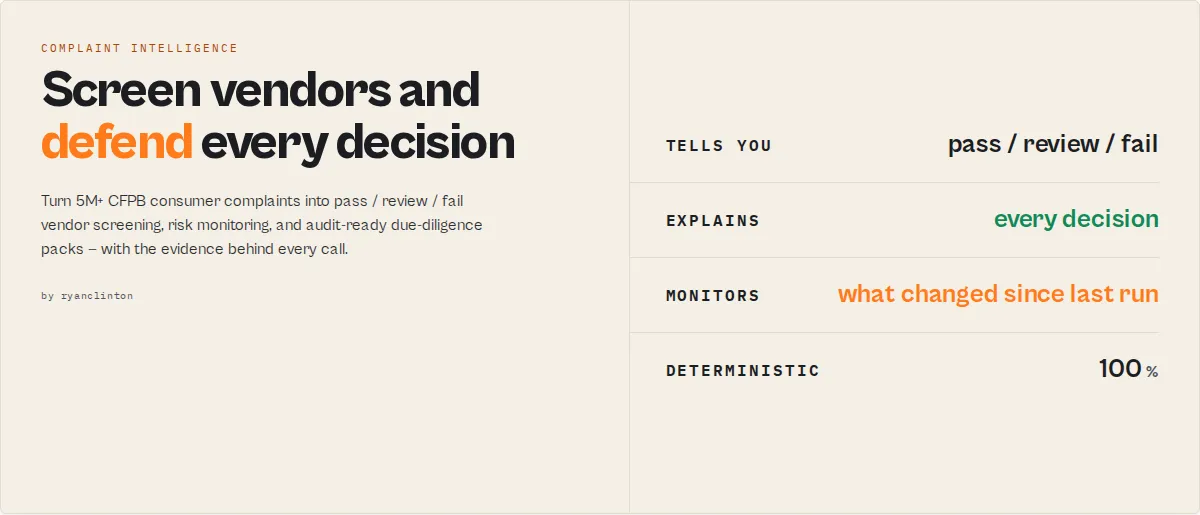
Screen vendors, detect consumer risk, and defend your decisions — from 5M+ CFPB complaints
Most CFPB tools return complaints. This actor returns decisions you can defend.
- Pass / Review / Fail vendor screening
- Complaint Intelligence Score (0-100) + A-F grade
- Decision evidence — exactly why each verdict landed, so you can defend every call
- Executive summaries — paste-ready, no LLM
- Monitoring alerts — what changed since your last run
- Audit-ready due-diligence packs
Built for: vendor-risk teams · procurement · third-party-risk programs · compliance & AML · M&A due diligence · fintech competitive intelligence · journalists & researchers.
No API key, no LLM, no infrastructure — just deterministic, structured decisions.
Why not use the CFPB API directly?
The raw CFPB API gives you complaints:
This actor gives you a decision:
The CFPB API gives you data. This actor gives you risk signals you can act on — and the evidence to defend the call.
What decision are you trying to make?
| Your question | Use | You get |
|---|---|---|
| Should I onboard this vendor? | workflow: "vendor-screening" | Pass/Review/Fail + Complaint Intelligence Score + decision evidence, per company |
| Has this vendor's risk changed? | workflow: "vendor-monitoring" | What changed since last run, risk events, complaint spikes |
| Deep due diligence on one company? | workflow: "due-diligence" | A board-ready pack: exec summary, score, evidence, trend, top issues |
| I need evidence for a review committee | workflow: "audit-evidence" | Due-diligence pack + the underlying complaint records as evidence |
| What's happening across an industry? | workflow: "competitive-monitoring" | Cohort leaderboard, cohort averages, market-level regulatory-risk signals |
Pick a workflow and the actor configures the right mode for you. Power users can still drive outputMode directly (it always wins).
Vendor screening in 30 seconds
Input:
Output (one companySummary row per company, ranked by risk):
Plus a run summary naming the lowest-risk and highest-risk vendor, and riskEvent records for anything that spiked.
CFPB API vs this actor
| Capability | Raw CFPB API | This actor |
|---|---|---|
| Complaint search & filtering | ✅ | ✅ |
| Aggregation / leaderboards | ❌ | ✅ |
| Complaint Intelligence Score + A-F grade | ❌ | ✅ |
| Pass / Review / Fail vendor screening | ❌ | ✅ |
| Decision evidence (why) | ❌ | ✅ |
| Cross-run monitoring + "what changed" | ❌ | ✅ |
| Cohort benchmarking + real product baseline | ❌ | ✅ |
| Market-level regulatory-risk signals | ❌ | ✅ |
| Executive summaries | ❌ | ✅ |
| Due-diligence + audit packs | ❌ | ✅ |
Built on the official CFPB consumer complaint database — the largest public source of US consumer financial grievances (5M+ complaints since 2011). This actor handles pagination, rate limiting, and normalization for you, then layers the intelligence on top.
Defend every decision
Decision evidence is the difference between a score and a recommendation a compliance team can stand behind. Every screening verdict ships with the exact drivers and their weighted contribution:
When someone asks "why did you flag this vendor?", you have the answer in the record — no black box, no LLM, fully reproducible.
What changed since last run
Run with a watchlistName on a schedule and the actor tells you what moved, not just the current state:
Plus riskEvent records for spikes, rapid deterioration, and market-level regulatory-risk themes.
Typical workflows
Vendor onboarding — screen 20 vendors in one run, identify the highest-risk supplier, generate an audit trail:
Quarterly vendor review — monitor a saved portfolio, detect deteriorating vendors, escalate complaint spikes:
M&A due diligence — build a board-ready pack for a target with evidence and trend:
Outputs designed for automation
Every decision is returned as stable, structured fields — no parsing, no prompt engineering, deterministic across runs:
Branch on screeningResult, recommendedAction, riskLevel, or eventType directly in Zapier, Make, n8n, Dify, or an agent tool call. The enums are additive within a major version, so your rules don't break.
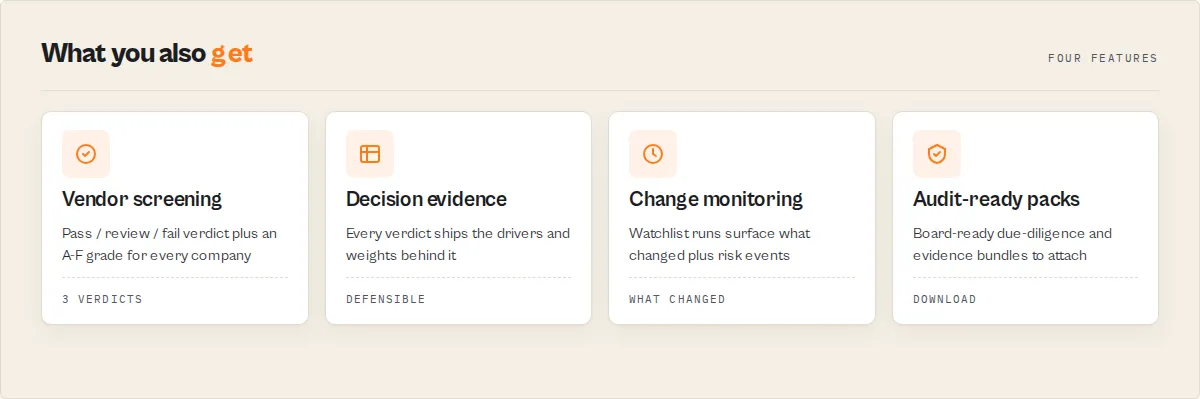
Why use this Complaint Intelligence Platform?
Built on a CFPB consumer complaint search, but it returns decisions, not just rows:
- No API key required -- The CFPB API is a free US government data source. No authentication, no signup, no usage limits.
- Decisions, not data -- Every company comes back with a Complaint Intelligence Score, an A-F grade, a
pass/review/failscreening verdict, decision evidence, and a plain-English executive summary. - Eleven output modes -- from raw records and leaderboards to monitoring, cohort benchmarking, due-diligence packs, audit packs, industry profiles, and time-series. One actor, the mode for the question you're asking.
- Up to 10,000 records per run -- Auto-pagination handles the entire matching result set within the API's 10,000-row single-query limit; time-series and trend modes use exact per-period counts to sidestep the cap entirely.
- Cloud scheduling -- Run on a recurring schedule with a watchlist to build company memory, detect deterioration, and surface what changed since the last run.
- No infrastructure needed -- Runs entirely on Apify's cloud. No servers, no Docker setup, no dependencies to install.
- Direct complaint links -- Every record-mode result includes a generated URL linking directly to the complaint detail page on the CFPB website.
Data foundation (the table stakes)
The retrieval layer everything is built on — search by keyword, company, product, US state, and date range; sort by recency or relevance; up to 10,000 complaints per run with built-in pagination and auto-pagination; consumer narratives where disclosed; a direct CFPB URL per complaint; and a polite delay between API pages. The intelligence layer above (scoring, screening, monitoring, evidence) is what you actually run it for.
How to use
Apify Console
- Go to the CFPB Consumer Complaint Search actor page on Apify.
- Click Start to open the input configuration.
- Enter a search term, company name, or select a product type. You can combine multiple filters.
- Optionally set a date range and state to narrow results.
- Choose your sort order and maximum number of results.
- Click Start to run the actor.
- When finished, download results from the Dataset tab in JSON, CSV, Excel, or other formats.
Python
JavaScript
Input parameters
| Parameter | Type | Required | Default | Description |
|---|---|---|---|---|
workflow | Select | No | -- | Job-named entry point: vendor-screening / vendor-monitoring / due-diligence / audit-evidence / competitive-monitoring. Configures the right outputMode for you. An explicit outputMode always wins. |
searchTerm | String | No | -- | Keyword search across complaint narratives and fields (e.g., "credit report", "late fee", "identity theft") |
company | String | No | -- | Filter by a single company name (e.g., "Bank of America", "Wells Fargo", "Equifax") |
companies | String[] | No | -- | Screen multiple companies in one run (records mode). One filtered query per company (maxResults applies per company), capped at 25. Overrides company when set. |
product | Select | No | Any | Financial product type: credit reporting, debt collection, mortgage, credit card, checking/savings, student loan, vehicle loan, money transfer, payday loan, personal loan |
state | String | No | -- | US state code, automatically uppercased (e.g., "CA", "NY", "TX") |
dateFrom | String | No | -- | Start date for complaints received (YYYY-MM-DD format) |
dateTo | String | No | -- | End date for complaints received (YYYY-MM-DD format) |
sortBy | Select | No | created_date_desc | Sort order: Newest first, Oldest first, Most relevant, Least relevant. Records mode only. |
maxResults | Integer | No | 50 | Maximum complaints to return (1--10000). In aggregation mode, caps how many buckets are emitted. |
outputMode | Select | No | records | records / aggregation / compare / monitor / cohort / dueDiligence / auditPack (pack + evidence + records) / industryProfile / timeseries / trend / stateRisk |
watchlistName | String | No | -- | Track companies across scheduled runs — each run reports newComplaintsSinceLastRun, a change flag, a persistent companyProfile (first seen / runs / all-time-high score / score history / trend) and rankChange. |
portfolioName | String | No | -- | Save a reusable company list under a name (pass with companies to save; pass alone later to reload). Pair with watchlistName + a schedule for hands-off portfolio monitoring. |
trendIntervalMonths | Integer | No | 12 / 3 | timeseries: trailing months to chart (default 12). trend: current-period length in months (default 3); the previous equal window is compared. |
aggregateBy | Select | No | company | When outputMode=aggregation: company, product, sub_product, issue, sub_issue, state, company_response, submitted_via, tags, or timely |
autoPaginate | Boolean | No | false | When true and total matching > maxResults, fetch every matching complaint up to the 10,000 single-query cap. Records mode only. |
enableCompanySummary | Boolean | No | false | Adds one company-risk-summary row per company in the result set plus a run summary, ranked by complaint-handling risk. Records mode only; not charged. |
outputProfile | Select | No | standard | minimal (headline decision fields only), standard, or full. Records mode only. |
Example input — records mode (JSON)
Example input — aggregation mode (top companies in 2024)
Tips: Combine multiple filters for precise results. Use date ranges for trend analysis. When using a keyword search in records mode, try sorting by "Most relevant first" for best matches. For "top N" leaderboard questions over millions of complaints, use aggregation mode — one HTTP call instead of thousands. If no filters are set, the actor returns the most recent complaints (records mode) or the global top buckets (aggregation mode).
Output
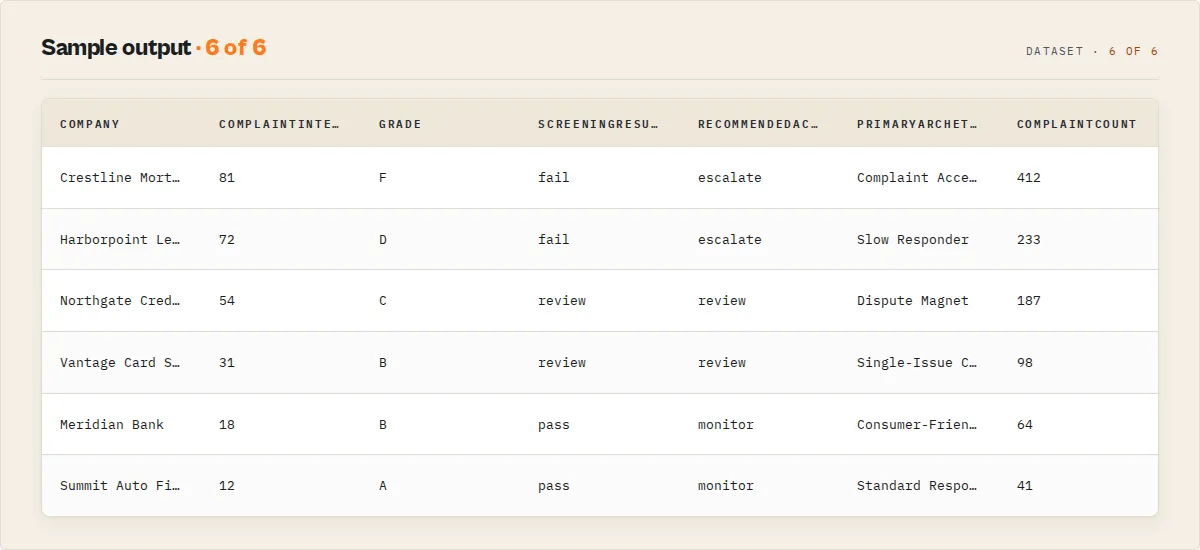
Every row carries a kind discriminator: "record" for individual complaints, "aggregation" for count buckets. Filter kind === "aggregation" downstream to isolate leaderboard rows.
Example output — records mode (JSON)
Example output — aggregation mode (JSON)
Top companies by complaint count for 2024 (aggregateBy: "company", dateFrom: "2024-01-01", dateTo: "2024-12-31"):
Output fields — records mode
| Field | Type | Description |
|---|---|---|
kind | String | Always "record" in records mode |
complaintId | String | Unique CFPB complaint identifier |
dateReceived | String | Date the CFPB received the complaint (YYYY-MM-DD) |
dateSentToCompany | String | Date the complaint was forwarded to the company |
product | String | Financial product or service category |
subProduct | String | More specific product subcategory |
issue | String | Primary issue described in the complaint |
subIssue | String | More specific issue detail |
company | String | Name of the company the complaint is against |
companyResponse | String | How the company responded (e.g., "Closed with explanation", "Closed with monetary relief") |
companyPublicResponse | String | The company's optional public-facing response text |
state | String | Two-letter US state code where the consumer is located |
zipCode | String | Consumer's ZIP code (may be partially redacted) |
narrative | String/null | Consumer's written description of the complaint, or null if not provided or consent not given |
consumerDisputed | String | Whether the consumer disputed the company's response |
timely | String | Whether the company responded in a timely manner ("Yes" or "No") |
submittedVia | String | Submission channel (Web, Phone, Referral, Postal mail, Fax, Email) |
cfpbUrl | String | Direct link to the complaint on the CFPB website |
extractedAt | String | ISO 8601 timestamp of when the data was extracted |
productCategory | String | Product mapped to a stable category enum (credit-reporting, debt-collection, mortgage, credit-card, bank-account, student-loan, auto-loan, money-transfer, payday-loan, personal-loan, other) |
responseType | String | Normalized company response (closed-with-monetary-relief, closed-with-explanation, untimely, …) |
reliefProvided | Boolean | Whether the company provided monetary or non-monetary relief |
timelyResponse | Boolean | Whether the company responded on time |
hasNarrative | Boolean | Whether the complaint carries a consumer narrative |
severityFlags | String[] | Stable flags: untimely-response, consumer-disputed, relief-provided, no-relief |
dataCompleteness | Integer | 0-100 share of key fields populated on this record |
severityScore | Integer | 0-100 weighted severity of the complaint type (identity theft, foreclosure, fraud, harassment, …) — distinct from how the company handled it |
severityClass | String | critical / high / moderate / low |
severityFactors | String[] | Which severity rules fired: identity-theft, fraud, foreclosure, repossession, debt-harassment, legal-action, … |
Output fields — company summary (when enableCompanySummary is on)
One companySummary row per company in the result set, ranked by complaint-handling risk, plus one runSummary row. All scores are within-result-set signals. Complaint volume is heavily confounded by company size (large credit bureaus and banks naturally generate more complaints), so the risk score deliberately leans on response-quality rates and velocity, not raw count — and is never a cross-universe "this company is risky overall" rating.
| Field | Type | Description |
|---|---|---|
kind / recordType | String | "companySummary" |
company | String | Company display name |
companyKey | String | Stable hash of the normalized name for cross-run joins |
complaintCount | Integer | Complaints for this company in the result set |
complaintIntelligenceScore | Integer | Signature 0-100 holistic score (higher = more concerning): handling 50% + complaint-type severity 25% + issue concentration 15% + velocity 10%. The leaderboard ranks on this. |
grade | String | A-F letter grade from the intelligence score |
complaintRiskScore | Integer | Complaint-handling sub-score (untimely + dispute + low-relief + velocity) — a transparent driver of the intelligence score |
signals | String[] | Company-level signal tokens: accelerating-complaints, high-dispute-rate, high-severity-mix, issue-concentration, no-monetary-relief, … |
decisionEvidence | Object | Why the score is what it is — primaryDrivers[] + impactWeights (the actual point contribution of handling / severity / concentration / velocity) + topComponent |
executiveSummary | Object | Deterministic, paste-ready { headline, summary } narrative — no LLM |
themeExposure | Object | Share of the company's complaints per regulatory theme (fraud, identity-theft, mortgage-servicing, credit-reporting, …) |
primaryArchetype | String | Single memorable label: Complaint Accelerator / Dispute Magnet / Slow Responder / High-Severity Risk / Single-Issue Concentrated / Consumer-Friendly Resolver / Standard Responder |
companyProfile | Object | (watchlist mode) persistent memory — firstSeen, runsSeen, highestIntelligenceScore, scoreHistory[], intelligenceTrend |
intelligenceTrend | String | (watchlist mode) improving / worsening / stable / new vs the last run |
vsIndustryBaseline | Object | (product filter set) this company's untimely/relief rate ÷ the real product-wide rate |
monetaryReliefRate | Number | Share of complaints closed with monetary relief (distinct from total relief) |
relativeRisk / cohortComparison | Number / Object | (cohort mode) intelligence score ÷ cohort average, and a worse/near/better-than-cohort position |
previousRank / rankChange | Integer | (watchlist mode) prior-run risk rank and the change since (positive = moved up the leaderboard) |
riskLevel | String | minimal / low / medium / high / critical |
complianceRating | String | A-F letter grade (alias of grade) |
screeningResult | String | Vendor-screening verdict: pass / review / fail |
recommendedAction | String | monitor / review / escalate |
confidence | String | How much to trust the verdict given sample size: high (≥20 complaints) / medium (≥5) / low |
verdict | String | One-sentence plain-English risk verdict, ready for a report or Slack message |
riskFactors | String[] | Codes that drove the score (high-untimely-rate, dispute-heavy, low-relief-rate, accelerating-complaints) |
archetype | String[] | Labels: Poor Responder, Dispute-Heavy, Consumer-Friendly Resolver, Rising Complaints, … |
untimelyRate / reliefRate / disputeRate | Number | Response-quality rates (0..1) |
severityScore / maxSeverityScore / criticalComplaintCount | Integer | Average & worst complaint-type severity, and count of critical-severity complaints |
topIssueConcentration / concentrationRisk | Number / String | Share of the company's complaints from its single biggest issue, and the high/medium/low band — high concentration reads as a systemic weakness |
trend | String | 12-month velocity: accelerating / steady / declining / insufficient-data |
totalMatchingForCompany | Integer | Exact CFPB total matching the company's query (compare / companies[] mode); null on broad searches |
watchlistDelta | Object | When watchlistName is set: { changeFlag, newComplaintsSinceLastRun, riskScoreDelta, … } vs the last run |
timeline | Object[] | Per-year complaint counts |
topProduct / topIssue | String | Most common product category / issue for this company |
rankInResults / percentileInResults | Integer | Risk rank and percentile within the result set |
The runSummary row carries a headline + oneLine takeaway, riskDistribution, screeningDistribution, highestRiskCompany, and an exceptions[] list of the fail-screened companies with reasons. It is also mirrored to the SUMMARY key-value store key.
Output fields — aggregation mode
| Field | Type | Description |
|---|---|---|
kind | String | Always "aggregation" in aggregation mode |
aggregateBy | String | Field used for grouping (e.g., "company", "product", "state") |
rank | Integer | 1-based rank within the result set (1 = largest count) |
term | String | The bucket label (e.g., "EQUIFAX, INC.", "Mortgage", "CA") |
count | Integer | Number of complaints in this bucket |
share | Number | count / totalMatching — fraction of all matching complaints in this bucket (0..1) |
totalMatching | Integer | Total complaints matching the query filters across all buckets |
queryFilters | Object | Echo of the filters that produced this aggregation, for traceability |
extractedAt | String | ISO 8601 timestamp of when the aggregation was computed |
Output — monitoring & analytical modes
timeseries (one timeseries row): series[] of { period: "YYYY-MM", count } (exact monthly counts, computed via one count query per month so the 10,000-row cap never applies), plus total, velocityScore (0-100, 50 = on-average), velocityClass (spike / rising / steady / dropping), and changePercent / trend.
trend (one trend row): currentPeriodComplaints vs previousPeriodComplaints (exact counts for two equal-length windows), changePercent, trend, severity, and emergingIssues[] — issues that are new or grew ≥50% vs the previous period ({ issue, currentCount, previousCount, growthRate, trend }).
stateRisk (one stateRisk row per state): complaints, population (bundled US Census 2020), complaintsPer100k (normalized rate — far more comparable than raw counts), and rank.
compare = records mode with the company risk leaderboard forced on (see the company-summary fields above), ranked by the Complaint Intelligence Score with exact per-company totals.
monitor (needs watchlistName): emits only the companies whose complaint total changed since the last run, plus riskEvent records. Each riskEvent: { eventType, severity, company, detail, changePercent } where eventType is complaint-spike / risk-escalation / rapid-deterioration / high-severity-company / critical-screening (company-level) or regulatory-risk (market-level — a regulatory theme like identity-theft dominant across many companies, with theme + warningLevel + affectedCompanies). Paste-ready for Slack/Zapier/PagerDuty.
cohort: the company leaderboard plus a cohortStats block on the run summary (cohortAverageDisputeRate, cohortAverageIntelligenceScore, cohortLeader/cohortLaggard) and a per-company relativeRisk + cohortComparison. Averages are across the companies in your run, never a fabricated cross-industry figure.
dueDiligence (one dueDiligence row): a board-ready pack for a single company — executiveSummary (paste-ready {headline, summary}), complaintIntelligenceScore + grade + screeningResult, decisionEvidence, trendAnalysis, topIssues[], watchItems[], supportingMetrics, recommendedAction, vsIndustryBaseline, and the persistent companyProfile.
auditPack (one auditPack row + the company's complaint records): the due-diligence pack with the underlying complaint records kept in the dataset as evidence — built for "download → attach to the vendor review file."
When you run with a watchlistName, the runSummary adds a portfolio block (portfolioRiskScore, criticalAlerts, newCriticalAlerts, portfolioTrend) and a changes[] feed — the "what changed since last run" diff (new / rank-up / rank-down / complaints-increased per company) that monitoring workflows read first.
industryProfile (one industryProfile row): for a product/category — topIssues[], fastestGrowingIssues[] (new or +50% vs the previous period), earlyWarnings[] (named surge signals: identity-theft-surge, fraud-surge, … + a warningLevel), highestSeverityIssues[] (ranked by complaint-type severity), a real product-wide baseline (exact untimely + relief rates from CFPB aggregation across the whole product — not a fabricated cross-industry figure), and riskTrend.
Cohort mode also surfaces cohortStats.industrySignals[] — signals shared by enough of the run's companies to read as an industry-wide pattern (e.g. an identity-theft wave across the credit bureaus).
Honest scope: every per-company score is a within-result-set signal. The
industryProfilebaseline is the one true cross-company figure — and it's exact (a complaint-weighted product-wide rate from CFPB's own aggregation), labelled "product-wide", never an invented percentile. Complaint volume tracks company size, so the risk score deliberately leans on response-quality rates (untimely / dispute / relief) and velocity — never a cross-universe "this company is risky overall" or industry-percentile rating, which would need per-complaint data for every company in the industry.
Use cases
Enterprise risk & compliance (budget-owning teams)
- Third-party / vendor risk management -- Screen vendors before onboarding (
comparemode + acompanieslist → apass/review/failverdict each), then monitor them after onboarding (monitormode on a schedule with awatchlistName), and auto-escalate any vendor whose complaint handling deteriorates (riskEventrecords +rankChange). - Procurement due diligence -- Compare competing suppliers head-to-head, benchmark their response quality against the cohort (
cohortmode), and detect worsening complaint trends before signing. - M&A screening -- Surface hidden consumer-risk signals before an acquisition: complaint velocity, severity mix, issue concentration, and the Complaint Intelligence Score for the target and its peers.
Analysis, monitoring & research
- Most-complained-about leaderboards (aggregation mode) -- "Top 25 companies by complaint count in 2024", "Top 10 issues for credit cards in CA", "State-by-state complaint distribution for mortgages". One call. No raw-record paging.
- Compliance monitoring -- Track complaints filed against your own institution or competitors on a daily or weekly schedule to catch emerging issues early.
- Due diligence -- Before partnering with, acquiring, or investing in a financial company, review their complaint history for red flags.
- Investigative journalism -- Analyze complaint trends by product type, geography, or time period to uncover systemic consumer harm patterns.
- Legal research -- Find complaints related to specific issues like identity theft, unauthorized charges, predatory lending, or discriminatory practices.
- Market intelligence -- Identify where consumers are most dissatisfied to spot product improvement or market entry opportunities.
- Regulatory risk assessment -- Monitor complaint volumes and company response patterns as leading indicators of potential regulatory action.
- Academic research -- Build datasets for studying consumer finance behavior, complaint resolution effectiveness, or financial inclusion topics.
- Brand reputation tracking -- Track how a company's complaint volume and resolution quality changes over time relative to industry peers.
- Geographic analysis -- Compare complaint patterns across states to identify regional concentrations of specific financial product issues. Aggregation mode with
aggregateBy: "state"returns the full distribution in one call. - Customer experience benchmarking -- Compare timeliness and resolution types across companies in the same product category. Use
aggregateBy: "company_response"oraggregateBy: "timely"for cohort-level metrics.
API & integration
Python
JavaScript
cURL
Platform integrations
- Zapier -- Trigger workflows when new complaint data is collected. Push to Google Sheets, Slack, email, or CRMs.
- Make (Integromat) -- Build multi-step automations combining CFPB data with other sources.
- Google Sheets -- Export results directly to a spreadsheet for collaborative analysis.
- Webhooks -- Receive HTTP callbacks when actor runs complete to trigger downstream processing.
- Apify Dataset API -- Access results in JSON, CSV, XML, Excel, HTML, or RSS formats.
Use in Dify
Drop this actor into Dify workflows via the Apify plugin's Run Actor node. With enableCompanySummary on, each company comes back scored, classified, and screened as structured JSON — pass / review / fail plus the riskLevel and recommendedAction enums your downstream node branches on. A raw CFPB API call returns Elasticsearch hits you still have to interpret; this returns a vendor-screening decision.
- Actor ID:
ryanclinton/cfpb-consumer-complaints - Sample input (screen a list of banks before onboarding a vendor):
The companySummary records carry the routing primitives. A Dify if/else node branches on them without parsing prose:
screeningResult == "fail"→ route to a manual-review / escalation branch (theverdict+riskFactors[]are paste-ready into a ticket or Slack message).screeningResult == "review"→ flag for a human; surfaceuntimelyRate/disputeRate.screeningResult == "pass"→ continue the onboarding flow automatically.
You can also branch on recommendedAction (monitor / review / escalate) or gate automation on confidence == "high" so thin-sample verdicts route to a human instead of firing a downstream action. The runSummary record's headline / oneLine and exceptions[] are ready to drop straight into an exec email or alert. Filter the dataset by recordType (companySummary vs record vs runSummary) so each Dify branch reads only the rows it needs.
How it works
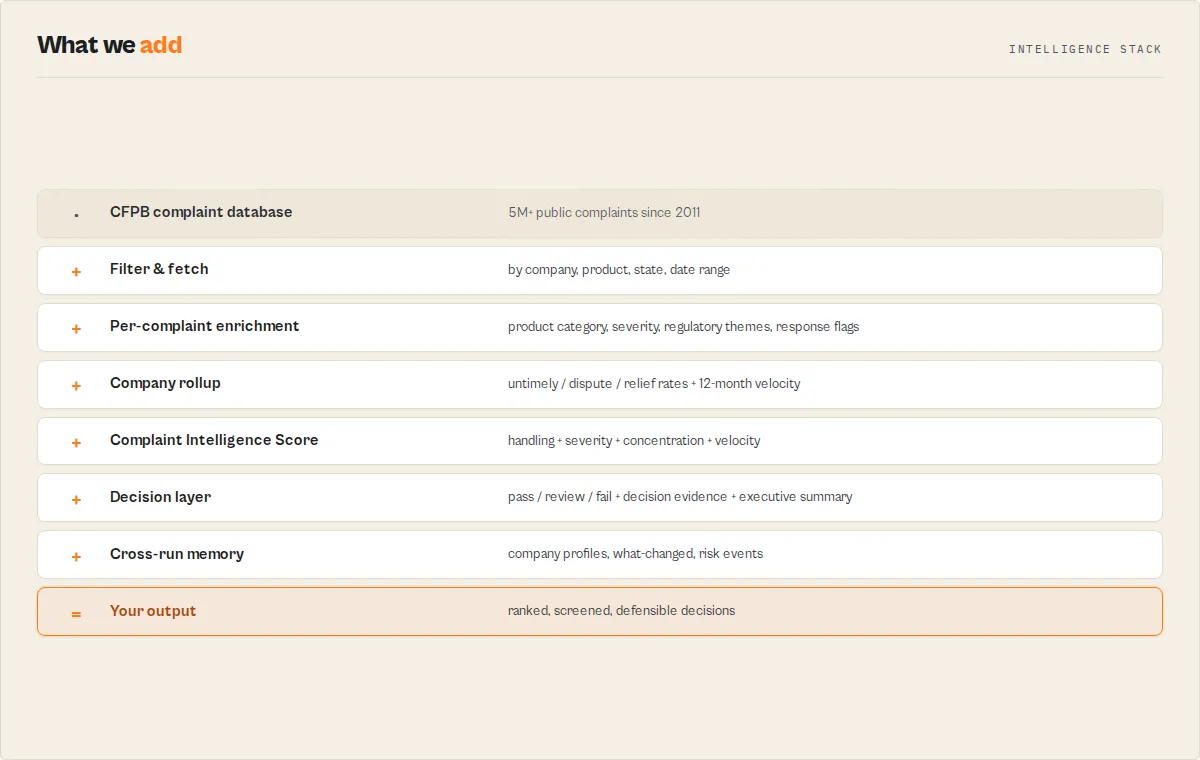
Records mode
- The actor reads your input configuration (search term, company, product, state, date range, sort order, max results, autoPaginate flag).
- It constructs a query URL for the CFPB Consumer Complaint API with pagination parameters (
size=100,frm=0,no_aggs=true). - The actor sends an HTTP GET request to the CFPB API endpoint.
- The Elasticsearch-style response (
hits.hits) is parsed and each complaint record is transformed from the raw_sourceformat into a clean flat JSON object. - Transformed records are pushed to the Apify dataset.
- If more results are needed, the actor increments the offset and fetches the next page after a 200ms delay.
- When
autoPaginate=trueand the total matching count exceedsmaxResults, the actor extends the run to fetch every matching record up to the 10,000 single-query cap. - Steps 3--6 repeat until the requested count is collected or no more results are available.
Aggregation mode
- The actor reads your filters and the
aggregateByfield selection. - It constructs a single query URL with
size=0&no_aggs=false&field=all. - CFPB returns the bucket counts for every aggregatable field in one response.
- The actor extracts the buckets for the chosen
aggregateByfield, ranks them by count (largest first), computesshare = count / totalMatching, and emits one row per bucket up tomaxResults. - The result is a ready-to-graph leaderboard — no client-side counting required.
Performance & cost
| Scenario | Mode | Results | Approx. Run Time | Memory |
|---|---|---|---|---|
| Quick lookup | records | 25 | 3--5 seconds | 256 MB |
| Default run | records | 50 | 5--10 seconds | 256 MB |
| Medium batch | records | 200 | 15--20 seconds | 256 MB |
| Large batch | records | 1,000 | 30--60 seconds | 256 MB |
| Full single-query | records | 10,000 | 4--6 minutes | 256 MB |
| Top-25 leaderboard | aggregation | 25 buckets | 2--4 seconds | 256 MB |
| Full distribution | aggregation | up to 10,000 buckets | 2--4 seconds | 256 MB |
Pricing: $0.002 per row emitted (records or aggregation buckets), pay-per-event. A 25-bucket leaderboard run costs ~$0.05; a 10,000-record full-corpus pull costs ~$20. There are no external API costs — the CFPB database is a free US government resource.
Limitations
- 10,000 records per run (records mode) -- The CFPB API enforces an Elasticsearch single-query limit of 10,000 hits. For full-corpus analysis beyond that, switch to aggregation mode (returns counts over the entire matching set, not capped at 10,000) or split records-mode queries by date range.
- Aggregation mode is per-query -- Each aggregation call returns the buckets for one chosen field across all matching complaints. To group by multiple fields (e.g., company × product), run aggregation once per dimension and join the results downstream.
- No ZIP code filtering -- The CFPB API does not support filtering by ZIP code directly. Filter by state, then post-process using the
zipCodefield in the output. - Narrative availability -- The
narrativefield is only populated when the consumer opted in to public disclosure. Many complaints will havenullfor this field. - 15-day publication delay -- Complaints typically appear in the CFPB database approximately 15 days after being sent to the company, to allow time for the company to respond.
- Company name matching -- Company names must match the CFPB's canonical name format (e.g., "EQUIFAX, INC." not just "Equifax"). Partial matches may not return expected results.
- No real-time data -- The database is updated daily by the CFPB, not in real time. There may be a short lag between updates.
- US complaints only -- The CFPB database covers only complaints filed by US consumers against financial companies operating in the United States.
Responsible use
- Public data only -- This actor accesses a publicly available US government database. All complaint records are published by the CFPB with consumer consent considerations already applied.
- Respectful access -- The actor includes a 200ms delay between API pages and uses
no_aggs=trueto minimize server load on the government endpoint. - No personal identification -- While complaints include state and partial ZIP codes, they do not contain personally identifiable information about the consumers who filed them.
- Fair interpretation -- A high volume of complaints does not necessarily indicate wrongdoing. Larger companies naturally receive more complaints. Always normalize by company size or customer base when drawing conclusions.
- Comply with terms -- Users should review the CFPB data terms and ensure their use aligns with applicable regulations and ethical standards.
FAQ
Do I need a CFPB API key to use this actor? No. The CFPB consumer complaint database is a free, public US government resource. This actor accesses it without any authentication or API key.
How current is the complaint data? The CFPB updates its database daily. Complaints typically appear approximately 15 days after being sent to the company, giving the company time to respond before publication.
Can I get more than 10,000 results per run? The CFPB API enforces a 10,000-record cap on any single query (an Elasticsearch default). To go beyond, you have two options: (1) split records-mode runs by date range and combine the datasets, or (2) use aggregation mode, which returns count buckets computed over the entire matching set without the 10,000-record cap.
What's the difference between records mode and aggregation mode? Records mode returns one row per complaint (the full detail — company, issue, narrative, etc.). Aggregation mode returns top-N count buckets — e.g. "TransUnion: 790,668 complaints, 28.9% of all 2024 complaints." Use records when you need individual complaint details; use aggregation when you need leaderboards, distributions, or share-of-complaints metrics.
What does the autoPaginate flag do?
By default the actor stops at maxResults. With autoPaginate=true, when the total matching count exceeds maxResults, the actor extends the run to fetch every matching complaint up to the 10,000 cap. Useful when you want "all matches for this query" without knowing the total in advance.
What does the narrative field contain?
When consumers submit complaints, they can include a written description of what happened. If the consumer consents to public disclosure, this text appears in the narrative field. Otherwise it will be null.
Can I search for complaints from a specific ZIP code?
The CFPB API does not support direct ZIP code filtering. Filter by state using the state parameter, then filter the output by zipCode in your post-processing.
How far back does the data go? The CFPB complaint database includes records from 2011 to the present, covering over 5 million complaints across all financial product categories.
What product categories are available? The actor supports 10 product filters: Credit reporting/repair, Debt collection, Mortgage, Credit card/prepaid card, Checking/savings account, Student loan, Vehicle loan/lease, Money transfer/virtual currency, Payday/title/personal loan, and Personal loan.
How are company names matched?
The company parameter filters by the CFPB's canonical company name. For best results, use the official name as it appears in CFPB records (e.g., "EQUIFAX, INC." rather than "Equifax"). You can also try the searchTerm field for more flexible matching.
Can I schedule this actor to run automatically? Yes. Use Apify's built-in scheduler to run the actor on any cadence -- daily, weekly, or custom cron expressions. Combine with webhooks or integrations to get notified when new data is available.
What does the timely field mean?
The timely field indicates whether the company responded to the complaint within the CFPB's expected timeframe (typically 15 days). A value of "Yes" means the response was on time.
Can I export results as CSV or Excel?
Yes. Apify datasets support export in JSON, CSV, Excel (XLSX), XML, HTML, and RSS formats. Use the Dataset tab in the console or the Dataset API endpoint with a format parameter.
Is this actor suitable for large-scale research? For datasets up to 10,000 records, a single records-mode run is sufficient. For full-corpus research questions ("what's the complaint distribution across the 2.7 million 2024 complaints?"), use aggregation mode — one call returns counts across the entire matching set. For raw-record needs above 10,000, segment by date range and merge.
Related actors
| Actor | Description |
|---|---|
| FDIC Bank Data Search | Look up detailed information about FDIC-insured banks and financial institutions. Correlate complaint volumes with bank size, assets, or regulatory status. |
| SEC EDGAR Filing Analyzer | Analyze SEC filings for publicly traded financial companies. Cross-reference CFPB complaint trends with financial disclosures and risk factors. |
| OFAC Sanctions Search | Check whether companies or individuals appearing in complaints are on the OFAC sanctions list for enhanced due diligence. |
| SEC Insider Trading | Track insider trading activity at financial companies. Compare insider selling patterns with spikes in consumer complaints. |
| EDGAR Filing Search | Search SEC EDGAR filings by company, form type, or date range. Build a complete regulatory picture alongside CFPB complaint data. |
| Congressional Stock Trade Tracker | Monitor stock trades by members of Congress. Investigate whether legislative activity correlates with changes in complaint patterns for regulated industries. |


