
Google Maps Scraper: Places, Phones, Emails & Websites
Pricing
from $1.00 / 1,000 places
Google Maps Scraper: Places, Phones, Emails & Websites
Scrape Google Maps places without login or browser: name, category, address, phone, website, rating, review count, hours and coordinates. Optional emails and social profiles from each business website, filters for leads (no website, min rating) and new-places monitoring.
Pricing
from $1.00 / 1,000 places
Rating
0.0
(0)
Developer

Smoldesk Studios
Maintained by CommunityActor stats
0
Bookmarked
2
Total users
1
Monthly active users
13 days ago
Last modified
Categories
Features
Share
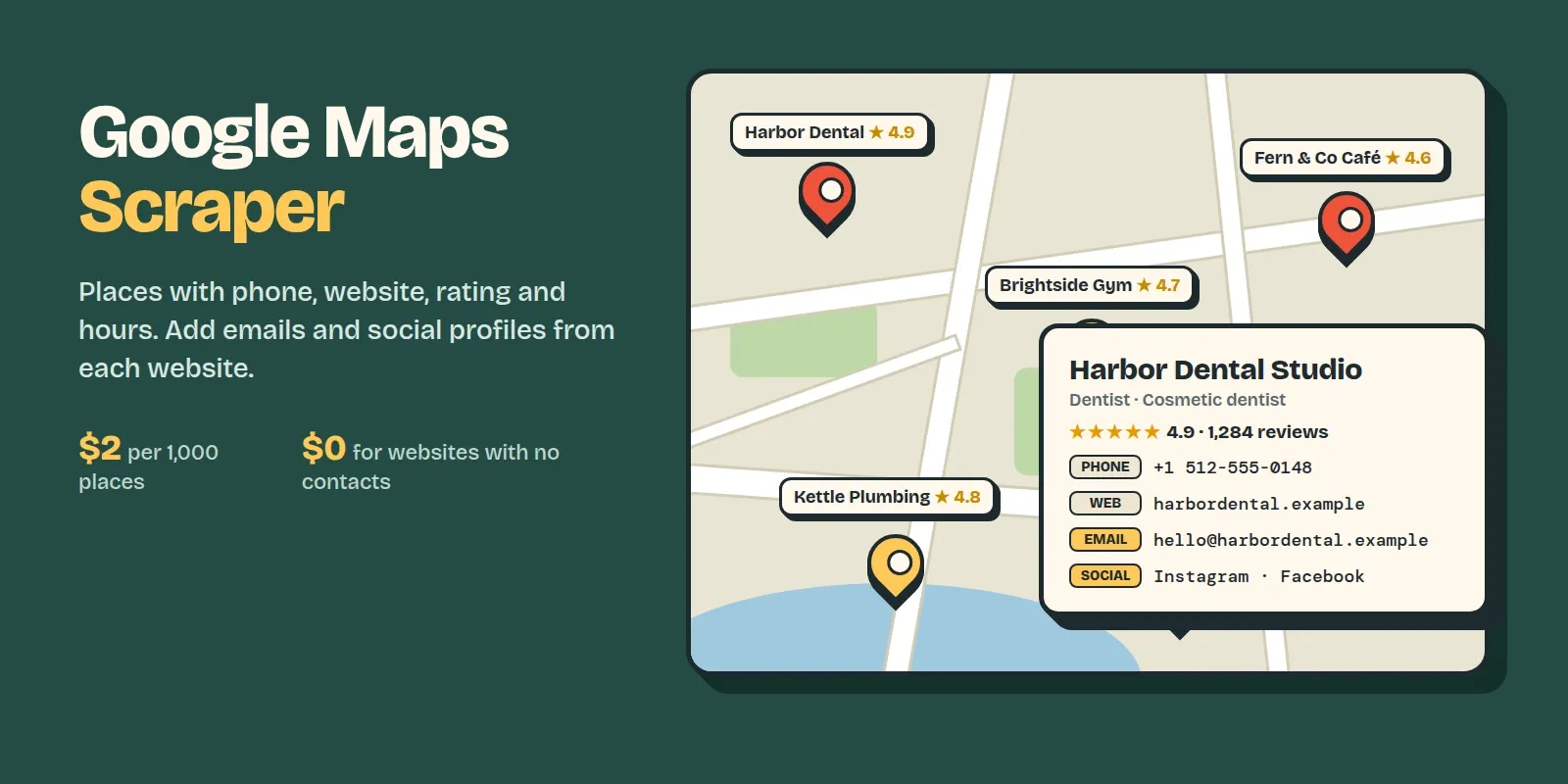
Scrape Google Maps places for any search and location: name, categories, full address, phone (local and international), website, rating, review count, opening hours, coordinates, place ID and a Maps link. Turn on Find emails & social profiles and the Actor also visits each business website and adds emails, Facebook, Instagram, LinkedIn, X, TikTok, YouTube and WhatsApp links and extra phone numbers, charged only when it finds something. Built for lead lists: filter by rating, review count, phone, category or businesses without a website, and schedule it to get only new places. No login, no API key, no browser, so runs are fast and cheap.
Honest note before you start: this Actor is for places and contacts. Without signing in, Google Maps shows only the top 5 reviews per place, so that's all it can add. If you need a place's full review history, use a dedicated reviews scraper.
What you get
One item per place (example record, shortened):
emails, socialProfiles, websitePhones and contactsNote appear when Find emails & social profiles is on; contactsNote says why nothing was found (no website, website answered HTTP 403, website is a social profile). topReviews appears when Top reviews is on; each review has ownerReply (the business's reply text and date, or null if it didn't reply). The dataset has three views: Places, Leads (contacts) and Top reviews.
What you can use it for
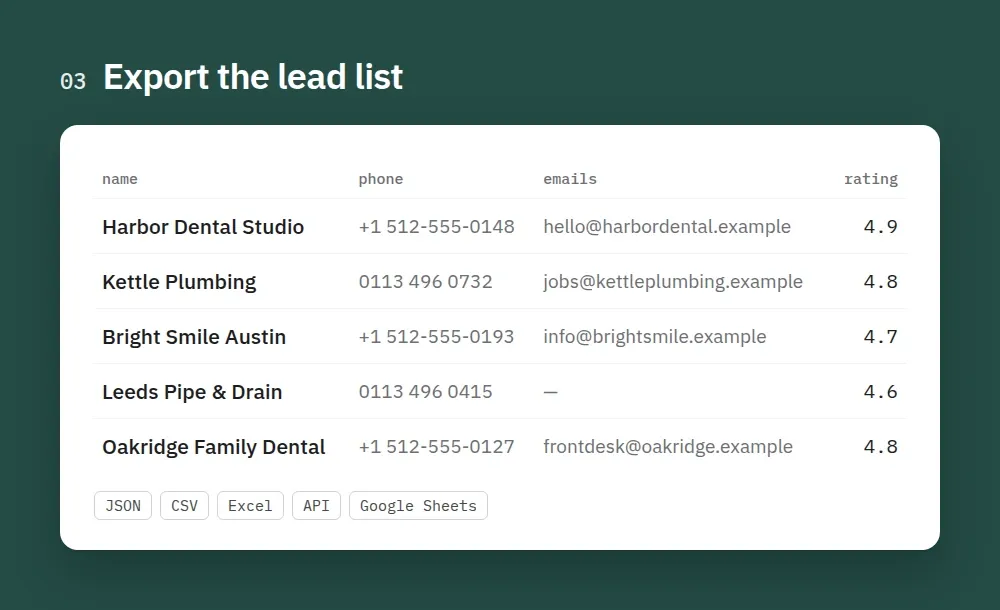
- Lead generation: dentists, plumbers, gyms or restaurants in a city, with phone, website and email in one sheet.
- Web design and SEO agencies: find local businesses without a website or with a low rating.
- Market research: how many coffee shops, clinics or car dealers are in each area, and how they're rated.
- New business alerts: schedule a search with Only new places and get businesses that just appeared on Maps.
- Data enrichment: coordinates, opening hours, categories and place IDs for a list of business types.
Why this scraper
| This Actor | Other Actors on the Store | |
|---|---|---|
| 1,000 places | $2.00 ($1.00 on Business) | The most-used one is $4.00 ($1.50 on Business), +$2.00 for place details |
| Emails and social profiles from the website | +$2.00 per 1,000, only when found | The most-used one charges $2.00 per 1,000 for contact details |
| Filtered-out, duplicate and already-seen places | Free | Filters often cost extra |
| New-place monitoring | Built in |
Competitor prices checked on the Apify Store in November 2026 (Free plan price first). Store prices change, so check the Pricing tab of any Actor before you compare.
How to scrape Google Maps
- Create a free Apify account and open this Actor.
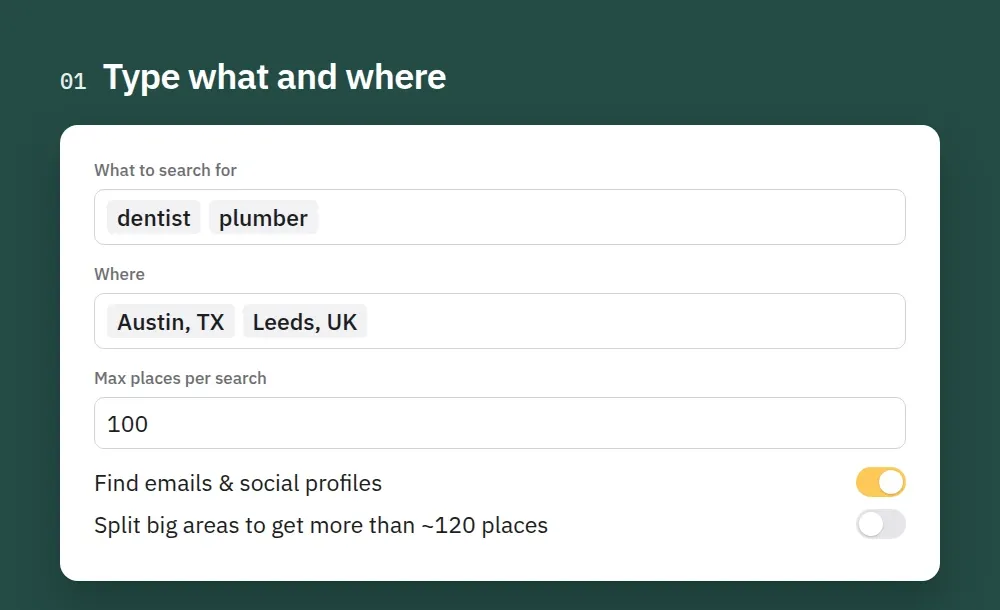
- In What to search for, type business types the way you'd search on Google Maps (
dentist,coffee shop,Starbucks). - In Where, add one or more cities, neighborhoods or postcodes. Every term is searched in every location.
- Set Max places per search. Google shows about 120 places per search; switch on Split big areas to get more.
- Optional: switch on Find emails & social profiles, set filters (rating, reviews, website, phone, category), or Top reviews.
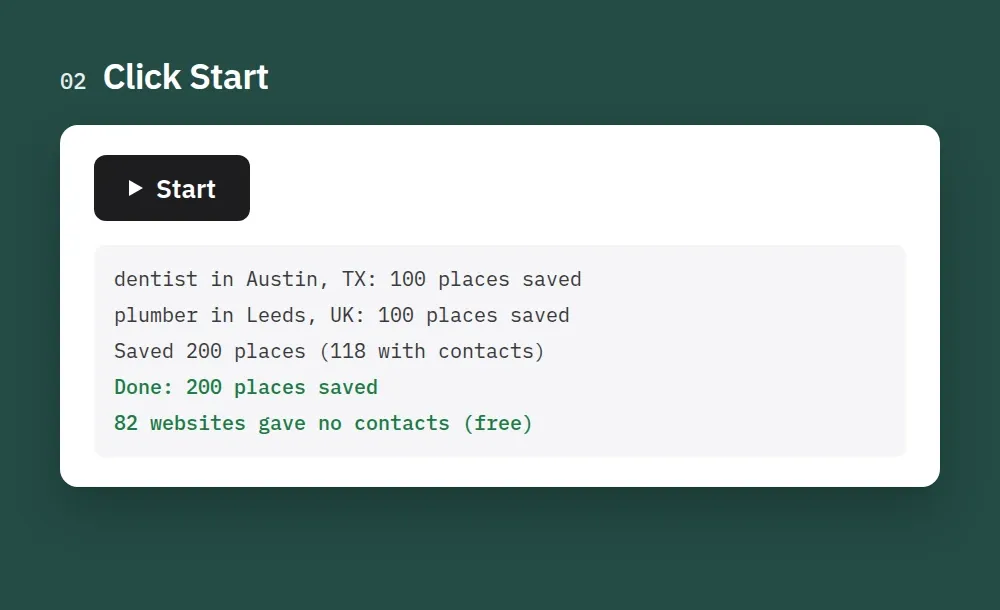
- Click Start. Download the results as CSV, Excel or JSON, or read them through the API.
- To monitor an area, save the input as a task, switch on Only new places and schedule it daily or weekly.
Tips:
- Neighborhoods beat whole countries.
dentist in Brooklyn+dentist in Queensfinds more thandentist in New York. Split big areas does this for you with a 3×3 grid (or 9×9 with 2 levels). - Places found by more than one search are saved once and charged once.
- Filtered-out places are free. Only places you get are charged.
- Only new places checks the same top places each run (your Max places per search, or every place Google lists when it's 0). The first run saves them all as the starting point; later runs save only places that weren't there before.
Input examples
Dentists in two cities with emails, only well-rated ones:
Restaurants without a website, whole city (split into smaller areas):
A search URL copied from Google Maps (the map area in the URL is used):
Pricing
Pay per result, with a lower price on bigger Apify plans. Filtered-out, duplicate and already-seen places are free.
| Event | Free plan | Starter | Scale | Business |
|---|---|---|---|---|
| Place | $2.00 / 1,000 | $1.50 / 1,000 | $1.20 / 1,000 | $1.00 / 1,000 |
| Contact details found (only when an email or social profile is found) | $2.00 / 1,000 | $1.50 / 1,000 | $1.20 / 1,000 | $1.00 / 1,000 |
| Top review (up to 5 per place) | $0.40 / 1,000 | $0.30 / 1,000 | $0.25 / 1,000 | $0.20 / 1,000 |
| Actor start | $0.0005 | $0.0005 | $0.0005 | $0.0005 |
Examples on the Free plan: 1,000 places = $2.00. 1,000 places with contacts, where about half the websites give an email or social profile (what we measured for restaurants in Austin) = $2.00 + $1.00 = $3.00. Add 5 top reviews each = +$2.00.
Proxy and compute are included. Set Maximum cost per run in the run options and the Actor stops before going over it.
Use with AI agents (Claude, ChatGPT, Cursor, MCP)
Add the Actor as a tool through the Apify MCP server: https://mcp.apify.com?tools=smoldesk/google-maps-scraper. In Claude Desktop, Claude Code, Cursor or VS Code, add this to your MCP config (you sign in to Apify in the browser on first use, or put your API token in a headers → Authorization: Bearer <APIFY_TOKEN> field instead):
Or let the Apify CLI write it for you: apify mcp install cursor --tools smoldesk/google-maps-scraper (also claude-code, vscode, codex). Then paste this into your agent's system prompt or tool notes:
Questions an agent can answer with it:
- Find 50 plumbers in Leeds with a phone number and an email.
- Which restaurants in Shoreditch have no website?
- How many gyms in Kuala Lumpur are rated 4.5 or higher?
Want every Smoldesk scraper as agent tools in one connection? See the full list on our publisher page.
Use with AI (LangChain / LlamaIndex / CrewAI)
With LangChain (pip install langchain-apify):
Already have a run? Use ApifyDatasetLoader(dataset_id="<run's dataset ID>", dataset_mapping_function=...). LlamaIndex: ApifyActor from llama-index-readers-apify. CrewAI: use the Apify MCP server above.
Limitations
- Reviews: top 5 per place only. Google Maps shows the full review list only to signed-in users, and this Actor doesn't sign in. For a place's full review history, use a dedicated reviews scraper.
- About 120 places per search. That's Google's own limit. Use more specific locations or Split big areas to go past it.
- Emails come from the business's own website (homepage plus up to 2 contact/about pages). Businesses that list no email there, block bots (some answer HTTP 403) or show the email only as an image have none. In our Austin restaurant test, about half the websites gave an email or social profile. Emails are not verified.
- Not included: popular times, menus, photos beyond the main image, Q&A, review history.
businessStatusrelies on Google's "Permanently closed" / "Temporarily closed" labels. Places Google hasn't marked yet show asOPERATIONAL.
FAQ
Is there a Google Maps API? Yes, Google's Places API, which needs a billing account and charges per request. This Actor reads the public Google Maps pages instead, so you pay only per place.
How do I get more than 120 results from Google Maps? Split the search into smaller areas: list neighborhoods or postcodes in Where, or switch on Split big areas (3×3 grid; 2 levels = up to 81 areas).
Can I find businesses without a website? Yes: set Website filter to Only places WITHOUT a website, and Only places with a phone number if you want to call them.
How are emails found? The Actor opens the website listed on Maps, reads the homepage and up to 2 contact/about pages, and collects mailto: links, emails in the text, social profile links and tel: links. Already have a list of websites? Contact Details Scraper reads up to 10 pages per site, checks each email's domain and accepts a Google Maps Scraper dataset as input.
Do I need a login, cookies or proxies? No. It uses no Google account. It runs from Apify's servers and switches to Apify datacenter proxy on its own if Google slows it down. Residential proxies are never used.
Is it legal to scrape Google Maps? Business listings are public information shown without a login. You are responsible for how you use the data, especially for contacting people (GDPR, CAN-SPAM and similar rules). This Actor is not affiliated with Google.
Feedback
Found a bug or missing a field? Open an issue in the Issues tab. If the Actor saved you time, a short review on this page helps other people find it.
Code examples and a quick reference are also on GitHub: smoldesk/google-maps-scraper.
More Actors from Smoldesk Studios
- Websiteless: Google Maps Leads Without a Website: local businesses with no website, only a Facebook page or a broken site, scored 0 to 100 with reasons to pitch
- Contact Details Scraper: emails, phone numbers, social profiles and contact forms from any list of websites, with email domains checked and junk removed, charged only when contacts are found
- Shopify Store Analyzer: apps, contacts and products of any Shopify store
- Google Ads Transparency Scraper: every ad a competitor runs on Google Search, YouTube and Shopping, creatives, landing pages, countries, EU impressions and new-ad alerts
- Google Hotels Scraper: hotel prices for your dates in any currency, ratings, review aspects and booking-site prices, worldwide
- Google Trends Scraper: interest over time, by region and city, related queries and Trending now, no API key
- All Smoldesk Studios Actors


