
Shopify Store Analyzer & Product Exporter
Pricing
from $5.00 / 1,000 stores
Shopify Store Analyzer & Product Exporter
Analyze any Shopify store: apps, theme, contacts, socials, location, product count and prices. Export all products with images, descriptions and variants, plus a Shopify-ready import CSV.
Pricing
from $5.00 / 1,000 stores
Rating
0.0
(0)
Developer

Smoldesk Studios
Maintained by CommunityActor stats
0
Bookmarked
2
Total users
1
Monthly active users
3 hours ago
Last modified
Categories
Security
Limited permissionsShare
Shopify Store Analyzer – Apps, Contacts & Product Export
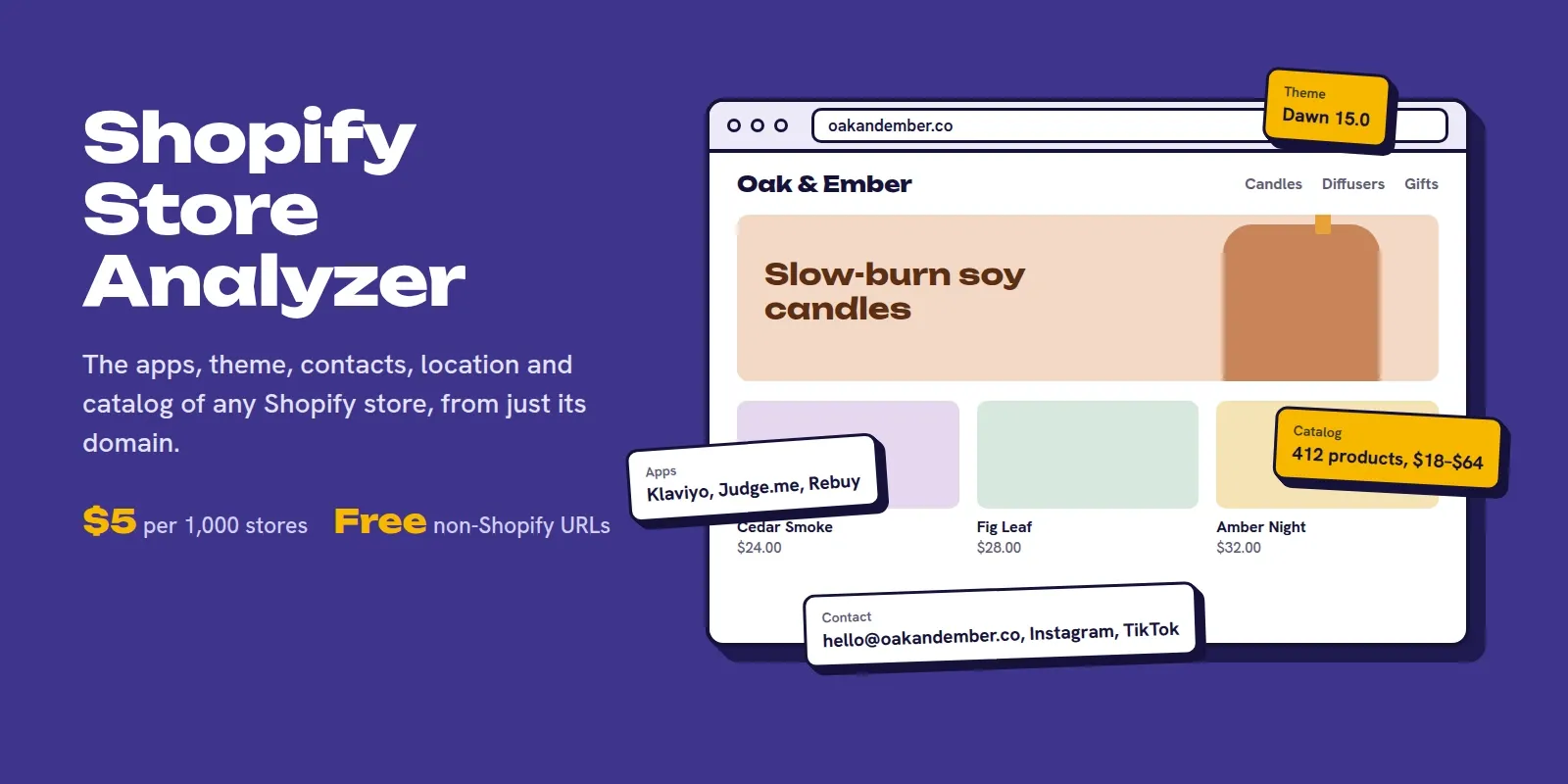
Analyze any Shopify store in seconds: see which apps it uses, its theme, contact emails and social links, location, currency and shipping countries, product count and price range, and how recently it added products.
Need the catalog too? Export every product with all images, full description, variants, SKUs, prices and stock status. You can also get a Shopify-ready import CSV in one click.
No login and no API keys. You pay only for real Shopify stores: non-Shopify sites are detected and returned free.
What you can use it for
- Lead generation for agencies & app developers: find stores using (or missing) a specific app, e.g. Klaviyo without a reviews app, then reach out with the right offer.
- Competitor & market research: compare pricing, catalog size, launch cadence, themes and tech stack across a niche.
- E-commerce & dropshipping research: spot trending products and price points from successful stores.
- Catalog migration & backup: move your own store's catalog, or a supplier catalog you're authorized to resell, to a new Shopify store with the import CSV.
- Data enrichment: turn a list of domains into store size, location and contact data for your CRM.
How to use it
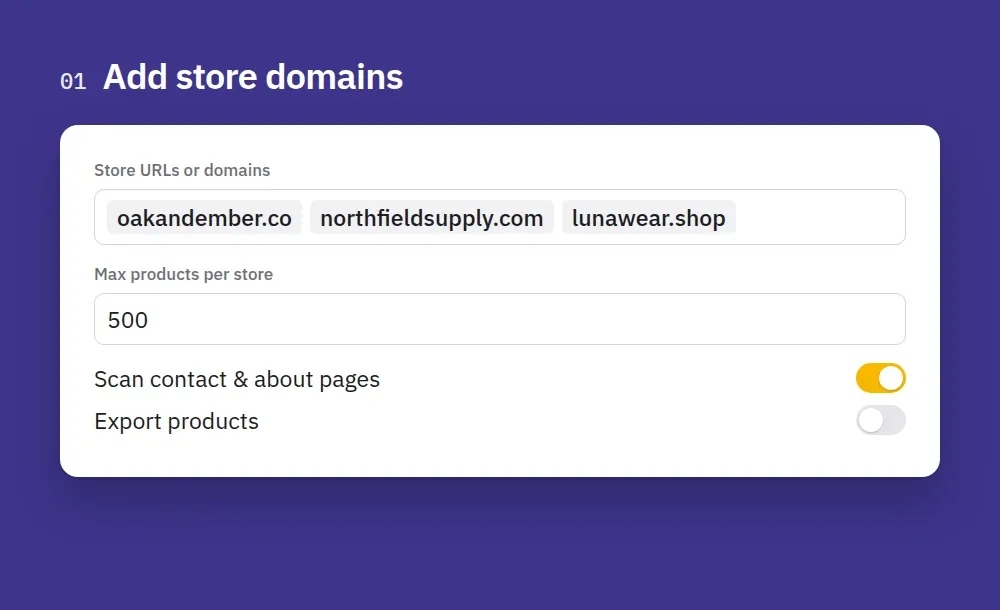
1. Add store domains. Paste store URLs or bare domains, one per line. Turn on product export if you also want the catalog.
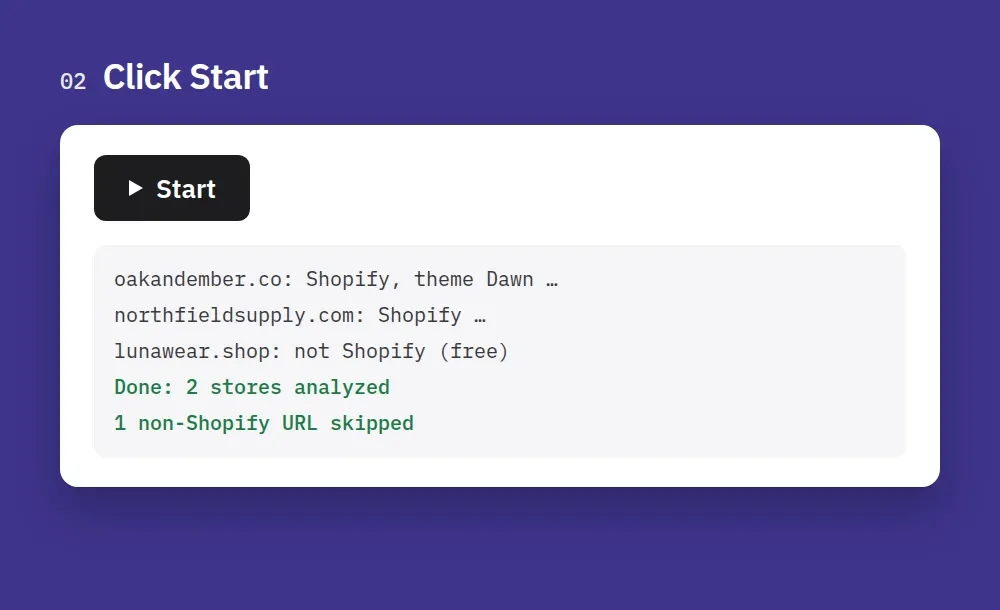
2. Click Start. Each store takes a few seconds. URLs that aren't Shopify stores are skipped for free.
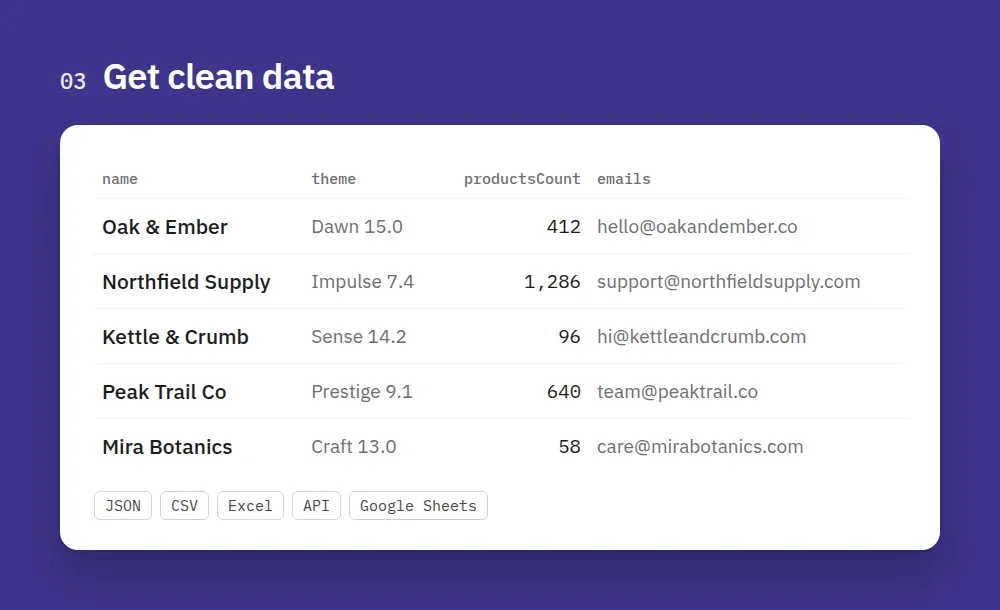
3. Get clean data. One row per store with its theme, apps, product count, price range and contacts. Export it as JSON, CSV or Excel, or read it through the API.
How to analyze a Shopify store
- Create a free Apify account (no credit card needed to start) and open this Actor.
- Add stores. Paste store domains or URLs (one per line) in Store URLs or domains. Any custom domain works, not only *.myshopify.com.
- Choose what to collect. Every store returns its installed apps, theme and contact details. Turn on Export products to also get the product catalog, and Build Shopify import CSV if you want a file you can re-import.
- Scan contact pages. Leave Scan contact & about pages on to find emails, phone numbers and social links beyond the home page.
- Click Start. Results appear in the Output tab while it runs.
- Download or connect. Export as JSON, CSV, Excel or HTML, or read the dataset through the API, Make, Zapier, n8n, Google Sheets or a webhook. The Shopify import CSV is saved as
shopify-products.csvin the run's Storage → Key-value store tab.
Tips
- Paste many stores at once: stores are processed in parallel, so a list of hundreds is fine.
- Not a Shopify store? It comes back marked as non-Shopify and is not charged, so you can use the Actor to check a list of domains.
- Use Max products per store to keep big catalogs cheap.
What you get per store
| Field | Example |
|---|---|
name, description, url, myshopifyDomain | Death Wish Coffee, deathwishcoffee.myshopify.com |
city, province, country, currency, locale | Round Lake, New York, US, USD, en |
productsCount, collectionsCount | 145 products, 60 collections |
apps | Installed app embeds with Shopify App Store links: Klaviyo, Rebuy, Postscript… |
technologies | Pixels & tools: Google Tag Manager, Meta Pixel, Gorgias, Smile.io… |
theme | Theme name, base theme (e.g. Dawn) and version |
emails, phones, socials | hey@…, Instagram, Facebook, TikTok, YouTube, X… |
priceMin, priceMax, priceAvg, variantsOnSalePercent | 5.00 – 119.99, avg 40.20 |
newestProductPublishedAt, lastProductUpdatedAt | Shows if the store is active |
topVendors, topProductTypes | Main brands and categories |
shipsToCountries, shopPayInstallments | Where the store ships |
What you get per product (optional)
Title, handle, URL, vendor, type, tags, description (HTML + clean text), all images (URL, alt, size), options and variants (SKU, price, compare-at price, availability, weight, variant image), and published/updated dates.
Shopify import CSV
Turn on Build Shopify import CSV and the run saves shopify-products.csv in Shopify's official product import format, with products set to draft. Download it from the run's Storage → Key-value store tab (or the "Shopify import CSV" output link) and import it in Shopify Admin → Products → Import.
Input example
Pricing
Pay per result, no monthly rental:
| Event | Price |
|---|---|
| Shopify store analyzed | $5.00 per 1,000 stores |
| Product exported (only when product export is on) | $0.50 per 1,000 products |
| Non-Shopify URL | Free |
Example: analyzing 1,000 domains (600 turn out to be Shopify) costs $3; exporting a 2,000-product catalog costs $1.005. Set "Maximum cost per run" in the run options to stay within budget. The Actor stops cleanly at the limit.
Use with AI agents (Claude, ChatGPT, Cursor, MCP)
Add the Actor as a tool through the Apify MCP server: https://mcp.apify.com?actors=smoldesk/shopify-store-analyzer. Then paste this into your agent's system prompt or tool notes, so it knows when to call it:
Questions an agent can answer with it:
- Which apps do these 20 Shopify stores use for reviews and subscriptions?
- Get the contact emails and Instagram links for these Shopify stores.
- Export all products from this store with prices and variants.
Your agent can pay for its own runs. This Actor is approved for agentic payments on Apify, so an agent with a Skyfire token or an x402 wallet can call it and pay per result without an Apify account. Skyfire: use https://mcp.apify.com?payment=skyfire. x402: buy a prepaid Apify token with USDC. Setup: Apify agentic payments docs.
Use with AI (LangChain / LlamaIndex / CrewAI)
Each product has descriptionText (HTML stripped), so catalogs drop straight into product-matching, pricing-analysis or RAG pipelines. With LangChain (pip install langchain-apify):
Already have a run? Load its dataset with ApifyDatasetLoader(dataset_id="<run's dataset ID>", dataset_mapping_function=...). LlamaIndex: ApifyActor from llama-index-readers-apify. CrewAI / Claude / MCP clients: add it as a tool via the Apify MCP server: https://mcp.apify.com?actors=smoldesk/shopify-store-analyzer.
Tips
- You can paste any URL from the store. It's normalized to the domain automatically.
- Headless stores (custom storefronts) are supported when they expose Shopify's public product feed.
- For thousands of stores, enable a proxy in Advanced to avoid rate limits.
Limitations
- Only public storefront data is collected. Password-protected stores and private data (orders, sales, customers) are not accessible.
- App detection finds apps that load on the storefront (app embeds and scripts). Back-office-only apps can't be seen.
- Some stores hide
products.json. You'll still get the store analysis.
FAQ
How do I check if a website uses Shopify? Paste any list of domains. Shopify stores get the full analysis; other sites come back marked as non-Shopify, free of charge.
How do I find which apps a Shopify store uses? The apps field lists app embeds detected on the storefront with links to the Shopify App Store, and technologies lists pixels and tools like Klaviyo, Meta Pixel and GTM.
Do I need a Shopify API key or store access? No. Only public storefront data is used.
Is it legal? This Actor only reads information that stores publish openly to every visitor. Product images and descriptions are usually copyrighted by the store owner: use them for research, or only republish content you own or are licensed to use. Respect privacy laws (e.g. GDPR, CAN-SPAM) when contacting stores.
Feedback
Found a bug or missing a field? Open an issue in the Issues tab. If the Actor saved you time, a short review on this page helps other people find it.
Code examples and a quick reference are also on GitHub: smoldesk/shopify-store-analyzer.
More Actors from Smoldesk Studios
- Contact Details Scraper: emails, phone numbers, social profiles and contact forms from any list of websites, with email domains checked and junk removed, charged only when contacts are found
- Google Maps Scraper: places with phones, websites, ratings and hours from any search, plus emails and social profiles from each business website, lead filters and new-place monitoring
- WeChat Articles Scraper: WeChat Official Account (公众号) articles from keyword search, full text as Markdown, images, account IDs and publish dates, no login
- Toutiao Scraper: Toutiao (今日头条) news search with date ranges, reads and likes, comments and the hot board (热榜), no login
- YouTube Scraper: videos, Shorts, channels and comments from search, channels and playlists — exact views, likes, publish dates and durations, no API key
- YouTube Comments Scraper: comments and replies from videos, channels, playlists or keyword searches, with likes, pinned/hearted flags and authors
- YouTube Channel Scraper: subscribers, exact total views, join date, country and social links of any channel, plus its latest videos
- Google Ads Transparency Scraper: every ad a competitor runs on Google Search, YouTube and Shopping — creatives, landing pages, countries, EU impressions and new-ad alerts
- Weibo Scraper: keyword and hashtag search, posts, comments, profiles and the hot-search board from China's biggest microblog, no login
- Tennis Scraper: ATP, WTA, Challenger and ITF results and fixtures with odds from 15 bookmakers, H2H, players and rankings, back to the 2000s
- Google Hotels Scraper: hotel prices for your dates in any currency, ratings, review aspects and booking-site prices, worldwide
- Google Hotels Price Calendar: the cheapest nightly rate for every check-in date up to a year ahead, for any hotel, with taxes and booking-site prices
- Bilibili Scraper: videos, danmaku, comments and creator stats from China's YouTube (哔哩哔哩)
- Google Trends Scraper: interest over time, by region and city, related queries and Trending now — no API key
- Telegram Channel Scraper: public channel posts, views, reactions and subscribers
- Substack Scraper: newsletters, subscriber counts and posts
- SEEK, JobStreet & JobsDB Scraper: jobs and salaries across Australia and Southeast Asia
- Career Site Jobs Scraper: live jobs from 12,000+ company career sites (Greenhouse, Lever, Workday, Ashby) with salary and seniority


