
Pinterest Search Scraper: Pins, Promoted Ads & Shop Trends
Pricing
from $0.75 / 1,000 pins
Pinterest Search Scraper: Pins, Promoted Ads & Shop Trends
Get the pins Pinterest shows for any keyword, one row per pin: title, full-size image, outbound link and its domain, pinner, board, reactions, date, product price and stock, promoted flag. New-pins monitor, no login. $1.50 per 1,000 pins; blocked or empty searches are free.
Pricing
from $0.75 / 1,000 pins
Rating
0.0
(0)
Developer

Tenfold Fleet
Maintained by CommunityActor stats
0
Bookmarked
2
Total users
2
Monthly active users
2 days ago
Last modified
Categories
Features
Share
Not affiliated with, endorsed by or sponsored by Pinterest. This Actor reads public search results only, with no login.
What does Pinterest Search Scraper do?
Pinterest Search Scraper turns a keyword into a clean list of the pins Pinterest shows for it. Type the phrases you care about ("home decor", "running shoes", "vegan recipes") and get every pin as a row: title, description, full-size image, outbound link and its domain, pinner, board, reactions, created date, promoted flag with advertiser name, and product price, currency and stock where Pinterest has them.
It works like a Pinterest search API: run it from the Apify Console, call it from the Apify API, schedule it, or let an AI agent call it through the Apify MCP server. A built-in new-pins monitor remembers what each keyword already returned, so a daily schedule gives you only the fresh pins.
Why use it?
- Trend and content research: see which images, titles and topics win a keyword right now, and how many reactions they get.
- Shop and product trends: filter to product pins and read prices, currencies, discounts and stock to see which products and stores are surfacing for a search.
- Traffic sources: the outbound domain column shows which websites Pinterest sends clicks to for a keyword (your site, rivals, marketplaces, affiliate links).
- Ad checks: promoted pins come with
isPromoted: true, the advertiser name and the landing page. Logged-out search shows few ads and mostly below the first pages: one test found 2 ads in the first 290 "home decor" pins, and many keywords show none. - Monitoring: schedule a run with "Only pins not seen in earlier runs" for a feed of new pins per keyword.
- Datasets for creative or AI work: high-resolution image URLs, alt text, dominant colors.
What data can it extract?
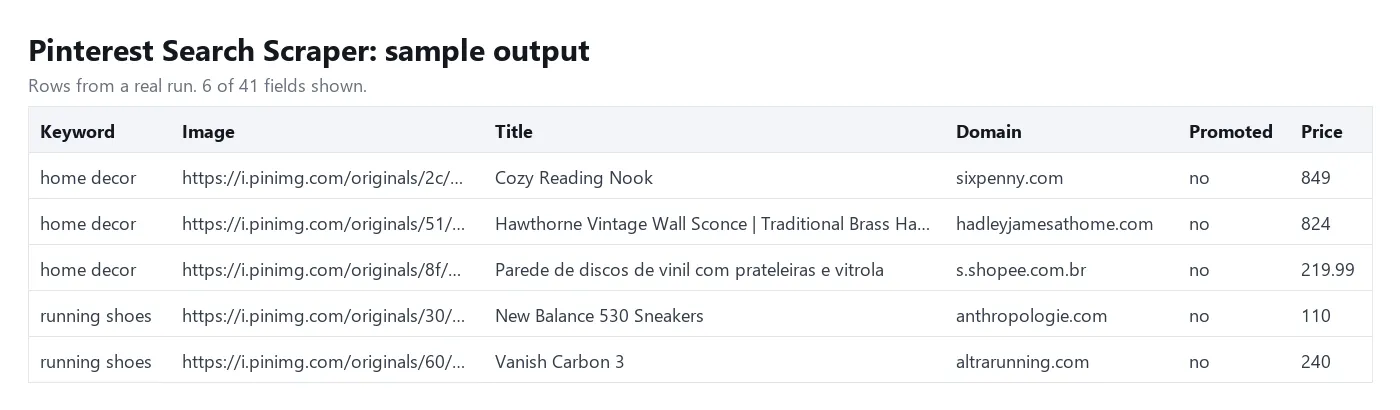
| Field | Example |
|---|---|
pinId, url | e1_AfqP... and the pin page link |
title, description, altText | Pin title, pin text, Pinterest's alt text |
createdAt | 2026-09-02T18:42:09.000Z (ISO) |
outboundLink, domain | The full link the pin sends visitors to, and its domain (nike.com) |
isPromoted, advertiserName, advertiserUsername | true, Acme Home |
isProductPin, productName, price, priceText, currency, availability, originalPrice, percentOff | true, 76.48, US$76.48, USD, in stock, US$89.99, 15 |
richPinType, siteName | product, article, recipe; Amazon.com |
pinnerUsername, pinnerName, pinnerFollowers, pinnerUrl | Who saved the pin |
boardName, boardUrl, boardPinCount | The board it was saved to |
reactionCount, reactionCounts | Total reactions and the split by reaction type |
commentCount, saveCount | Pinterest search leaves these out, so they are almost always empty |
dominantColor, imageUrl, imageWidth, imageHeight | Largest image available, usually the original upload |
isVideo, videoUrl | Video pins |
query, position, scrapedAt | Keyword, rank in the results, time of the run |
How to scrape Pinterest search results
- Open the Actor and enter one or more keywords in Search keywords.
- Set Max pins per keyword (about 24 pins per results page).
- Optional: turn on Only product pins, Only promoted pins or Only pins not seen in earlier runs.
- Click Start and download the dataset when the run finishes.
How much does it cost?
You pay $1.50 per 1,000 pins returned, plus a tiny $0.00005 start fee per run. Things that are free: duplicate pins, pins dropped by your filters, pins skipped by the new-pins monitor, keywords with no results and searches Pinterest blocked (those come back as a free row with an error and message). On the Apify free plan ($5 of monthly credit) you can get about 3,000 pins a month. Set a maximum cost per run in the run options and the Actor stops when it is reached.
Input
Output
A keyword with nothing to return gives one free row such as {"query": "...", "error": "no-results", "message": "Pinterest returned no pins for this search."}. You can download the results as JSON, CSV, Excel, XML or HTML, or read them through the API.
Tips
- Use the exact phrases people type into Pinterest. Broad keywords go many pages deep; narrow ones may end after a few pages.
- For product research, turn on Only product pins and sort by
priceordomain. - For a monitor, keep the same keyword list, turn on Only pins not seen in earlier runs and add a daily schedule. Use a different Monitor store name per project.
- Promoted pins are rare in logged-out search. With Only promoted pins on, a keyword stops after 10 result pages in a row without an ad and returns a free
no-matching-pinsrow. - Keywords are matched without case or extra spaces, so
Home Decorandhome decorrun once.
FAQ
Do I need a Pinterest account or cookies?
No. The Actor reads the same public search results a logged-out visitor sees.
Why are commentCount and saveCount empty?
Pinterest's search results don't include comment or save counts. The fields are kept so the columns stay the same if Pinterest adds them back; use reactionCount for engagement.
Why do some product pins have no price?
Pinterest only attaches an offer to some product pins. isProductPin is still true, and price stays empty.
How fresh is the data?
Every run fetches live results, and createdAt shows when each pin was first saved.
Is it legal to scrape Pinterest?
This Actor collects publicly visible data only. Results can include names and usernames of people who saved pins; if you are in the EU or handle data on EU residents, GDPR may apply, so process personal data only with a legitimate reason. Check with a lawyer if you are unsure.
More tools from Tenfold Fleet
All 124 tools: apify.com/tenfoldfleet. If this Actor saves you time, save it (the bookmark on its Store page) and leave a review: both help other people find it. Found a bug or need another field? Tell us on the Issues tab of this page.


