

Sentiment Analysis — Reviews, Comments & Any Dataset
Pricing
from $1.00 / 1,000 text analyseds
Sentiment Analysis — Reviews, Comments & Any Dataset
Positive, neutral or negative for every review, comment or post: paste texts, upload a CSV/Excel or chain any scraper dataset (Google Maps, Amazon, Trustpilot, YouTube…). 16+ languages, mixed opinions, star-rating mismatches and a summary report. Own model, no third-party API.
Pricing
from $1.00 / 1,000 text analyseds
Rating
0.0
(0)
Developer

tidydata
Maintained by CommunityActor stats
0
Bookmarked
2
Total users
1
Monthly active users
4 days ago
Last modified
Categories
Features
Share
😊 Sentiment Analysis — reviews, comments & any dataset, in 16+ languages
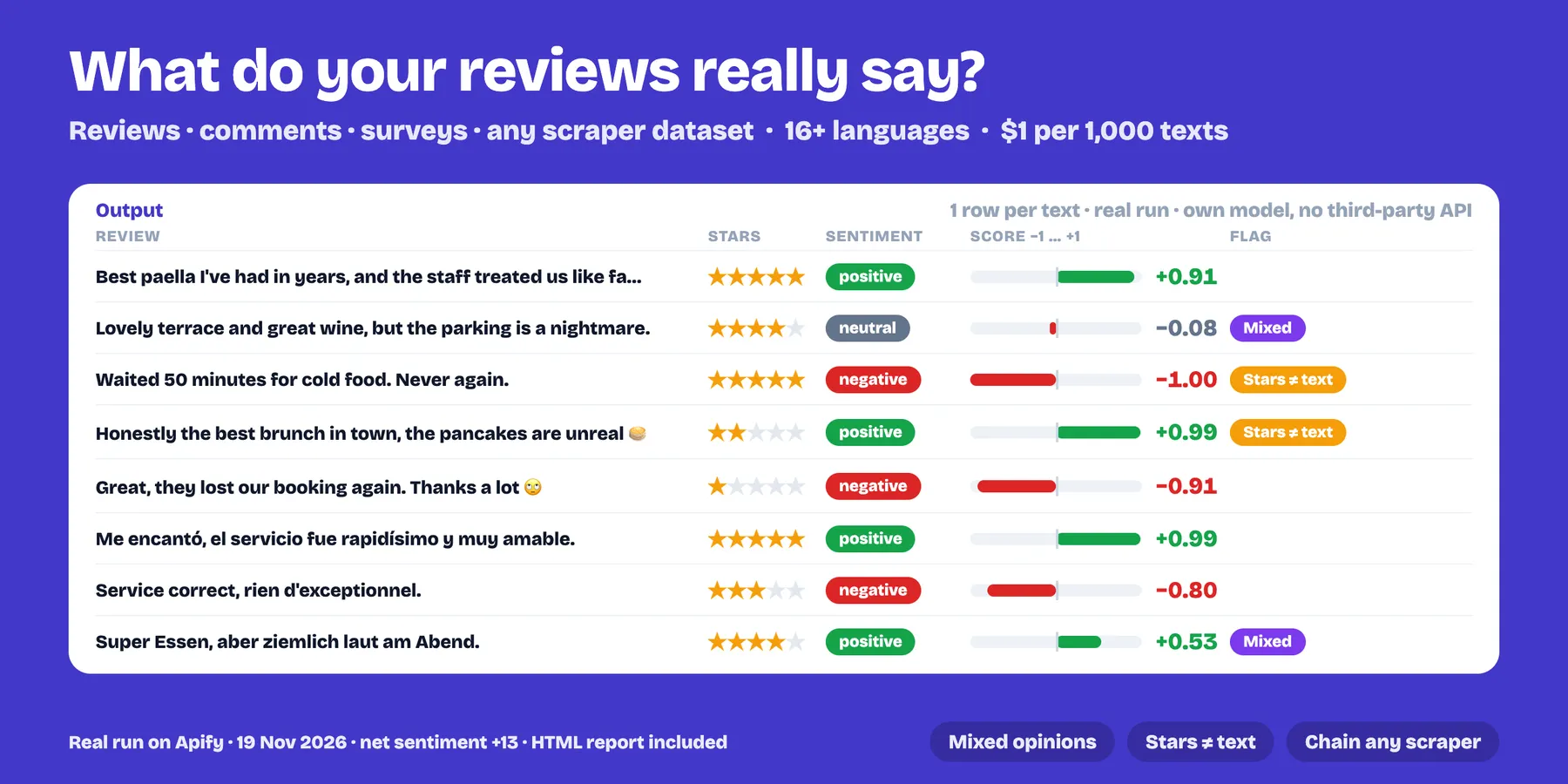
Know what people really think, in bulk. Paste texts, upload a CSV or Excel file, or chain it after any reviews or comments scraper, and get for every text positive / neutral / negative, a score from −1 to +1, the probabilities, mixed opinions with the best and the worst sentence, and a flag when the star rating does not match the words. Every run also writes a one-page report: net sentiment, by star rating, by product or place, by language, and what people mention in positive and in negative texts.
$1 per 1,000 texts (up to 1,000 words each) + the Apify compute of the run (see Pricing). Empty rows, failed files and skipped texts are free. No API key, no subscription.
- ✅ Its own multilingual model (XLM-RoBERTa large, Apache-2.0) running inside the Actor: no OpenAI or other third-party API, nothing that breaks when a website changes, and your texts are not sent to any other service
- ✅ 16+ languages in one run, with no setting: English, Spanish, French, German, Italian, Portuguese, Dutch, Russian, Turkish, Arabic, Hindi, Indonesian, Vietnamese, Chinese, Japanese, Korean… (language detected per text)
- ✅ Understands real comments: irony ("Great, another update that breaks everything 🙄" → negative), emojis, negation ("not bad at all" → positive), slang and typos
- ✅ Chain any scraper: Google Maps, Amazon, Trustpilot, Booking, TripAdvisor, Yelp, App Store, Google Play, YouTube, TikTok, Instagram, X, Reddit… The text, star-rating and ID fields are found automatically, and all the original columns are kept → one enriched table to export
- ✅ Files: CSV / TSV (any separator and encoding), Excel (.xlsx), JSON / JSON Lines, TXT (one text per line), uploads or Google Drive / Dropbox / OneDrive links — exports from Trustpilot, App Store Connect, Play Console, Typeform, Google Forms, help desks…
- ✅ Honest results: probabilities and a confidence on every row, our own accuracy test published below
What can I use it for?
- Reviews (local businesses, hotels, restaurants): run Google Maps Reviews or a TripAdvisor / Booking scraper, then this → net sentiment per place, what guests complain about, 5-star reviews with an angry text.
- E-commerce: Amazon, Trustpilot or Shopify reviews → which products get negative reviews and why (battery, delivery, size…), with
groupByField: "asin". - Apps: App Store and Google Play reviews → spot the update that made people angry.
- Social media and brands: YouTube, TikTok, Instagram or X comments → how people react to each video, post or campaign.
- Customer support and surveys: tickets, chats, NPS and open survey answers → route negative ones first, measure feedback over time.
- AI agents, n8n, Make, Zapier: send
{"texts": […]}and branch onsentiment— no LLM call, no prompt, the same answer every time.
How to use it
- Give it texts in any of these ways (you can mix them):
- Texts: one per line. From the API you can also send objects:
[{"id": "R-1", "text": "…", "rating": 4}]. - Files: links to CSV, Excel, JSON or TXT files, or upload them.
- Dataset of another Actor: pick the dataset of a reviews / comments scraper (or pass its ID from an integration or webhook).
- Texts: one per line. From the API you can also send objects:
- Optional: the field with the text (e.g.
text,reviewText,title,textto join two fields), the star-rating field, the ID field and a field to group the report by (place, product, app, channel…). Empty = found automatically. - Run. Results: one row per text in the dataset, plus the REPORT (HTML page) and SUMMARY (JSON) records in the run's key-value store — both linked in the Output tab.
Chain it after a scraper with an Apify integration ("Run Actor" when the scraper succeeds, passing {"datasetId": "{{resource.defaultDatasetId}}"}), or call it from your code:
Output example
sentiment:positive,neutralornegative·sentimentScore: −1 (very negative) … +1 (very positive) = positive − negative probability ·confidence: probability of the chosen sentiment.isMixed: the text has a clearly positive and a clearly negative part ("great battery, but the camera…").bestSentence/worstSentence: the most positive / negative sentence or clause.rating: the star rating of the row on a 1-5 scale (10-point and 100-point scores, "4/10" and "4.0 out of 5 stars" are converted).ratingMismatch/mismatchType:high_rating_negative_textorlow_rating_positive_text— reviews worth reading first.- With Keep all the original fields (default for files and datasets) every result also has the columns of the original row; a column that has the same name as one of ours is renamed
input_<name>(likeinput_textabove). - Rows that could not be analysed have
status: "failed"and the reason inerror(never charged).
The report (record REPORT, also as JSON in SUMMARY): texts analysed, net sentiment (% positive − % negative), % positive / neutral / negative, average score, mixed texts, a table by star rating, by group (your field) and by language, the terms people mention much more in positive texts and in negative texts ("battery life", "delivery", "staff"…), the most positive and most negative texts, and examples of ratings that do not match the text.
Accuracy (our own test, November 2026)
We tested 5 open sentiment models before choosing this one:
| Test | This Actor | Next best model |
|---|---|---|
| 600 Amazon reviews in 6 languages (EN, ES, DE, FR, JA, ZH), 120 per star level — positive vs negative (1-2 vs 4-5 stars) | 96 % | 96 % |
| Same reviews — negative / neutral / positive (3 stars = neutral) | 82 % | 83 % |
| 63 hard comments we wrote in 14 languages: irony, emojis, negation, slang, mixed opinions | 57 of 63 | 54 of 63 |
The model we use (clapAI/roberta-large-multilingual-sentiment, XLM-RoBERTa large, Apache-2.0) was the best overall; the classic 1-5-star model many tools use scored 71 % and 44 of 63. The most common mistake: plain facts read as slightly positive ("Delivered on Tuesday" → positive), because the model learned from reviews. Use confidence and the probabilities if you need to be strict.
Pricing
| What | Price |
|---|---|
| One text up to 1,000 words | $0.001 |
| Longer texts | $0.001 per started 1,000 words |
| Empty rows, failed files, skipped texts | free |
| Apify compute (paid to Apify; your plan's free credit covers it) | about $0.17 per 1,000 short reviews + about $0.005 per run to start |
So 1,000 short reviews cost about $1.20 in total — measured on Apify in November 2026. Other sentiment Actors charge $3 to $4 per 1,000 comments. Apify store discounts apply automatically (−10 % Bronze, −15 % Silver, −20 % Gold and above). Tip: send many texts in one run instead of one run per text — the start is paid once.
Your spending limit is respected: the Actor checks it before each batch and stops cleanly, marking the rest as skipped (free).
Limits and good to know
- Sentiment is not a fact. It is a probability from a statistical model: great for trends, sorting and routing thousands of texts, less for judging a single sentence. Very short texts ("ok", "👍") get a sentiment, but a weak one.
- Languages: the 16 languages listed above were in the model's training; other languages (Polish, Swedish, Greek…) usually work but were not in our test — the row says so in
note. - Long texts (articles, transcripts) are read in pieces of about 300 words and averaged; texts over 20,000 words are cut there (noted in the row). Sentence analysis looks at the first 40 sentences.
- Key terms in the report need at least a few dozen texts and are not computed for Chinese, Japanese, Korean and Thai (no spaces between words).
- Files: old
.xls→ save as.xlsxor.csv. PDFs and web pages are not read as review tables; for web articles use Article Text Extractor first.
FAQ
Is my text sent to OpenAI or another API? No. The model runs inside your Actor run on Apify; texts are not sent to any other service and are not stored by us.
Why not ask ChatGPT? You can, but for thousands of reviews an LLM is slower, costs more, needs a prompt and can answer differently each time. This model gives the same answer for the same text, with probabilities, at $1 per 1,000.
Does it scrape the reviews? No: it analyses texts you give it. Run any reviews or comments scraper first and chain this Actor after it (or give it the dataset ID).
How fast is it? About 1,000 short reviews in 15 minutes on the default 4 GB of memory (measured on Apify). Turning off Analyse each sentence too makes long reviews faster.
How do I get the result into Google Sheets or Excel? Export the dataset as CSV or Excel (with Keep all the original fields on, it is your original table plus the sentiment columns), or use Google Sheets Import & Export.
Related Actors
- Merge, Dedupe & Transform Datasets — join several review datasets before scoring them, or filter the negative ones after
- Bulk Translator — translate reviews and comments from any language into yours (46 languages), keeping all the columns
- AI Content Detector — check if reviews or posts were written by AI
- Audio & Video Transcription — turn calls, videos and podcasts into text, then score the sentiment here
- Google Sheets Import & Export — send the results to a spreadsheet


