

Facebook Photos Scraper - Pages, Albums, Tagged & Group Photos
Pricing
from $0.90 / 1,000 photos
Facebook Photos Scraper - Pages, Albums, Tagged & Group Photos
Scrape every public photo of a Facebook Page, profile, album or group: full-size image URL, size, alt text and link. Optional details: upload date, caption, reactions, comments, shares and tags. Date window, album list, monitor mode for new photos. $0.90 per 1,000 photos. No login or cookies.
Pricing
from $0.90 / 1,000 photos
Rating
0.0
(0)
Developer

Top Api
Maintained by CommunityActor stats
0
Bookmarked
2
Total users
1
Monthly active users
21 hours ago
Last modified
Categories
Share
What does Facebook Photos Scraper do?
Facebook Photos Scraper extracts Facebook photos from public Pages, profiles, albums and groups and turns each photo into a structured row: the full-size image URL, its width and height, Facebook's own alt text and the photo link. Turn on details and every row also gets the upload date, caption, reactions, comment and share counts, the post link and the people tagged. Built for brand monitoring, competitor creative research, image datasets and archiving.
Also searched as: Facebook image scraper · Facebook photo downloader · Facebook album scraper · Facebook page photos API
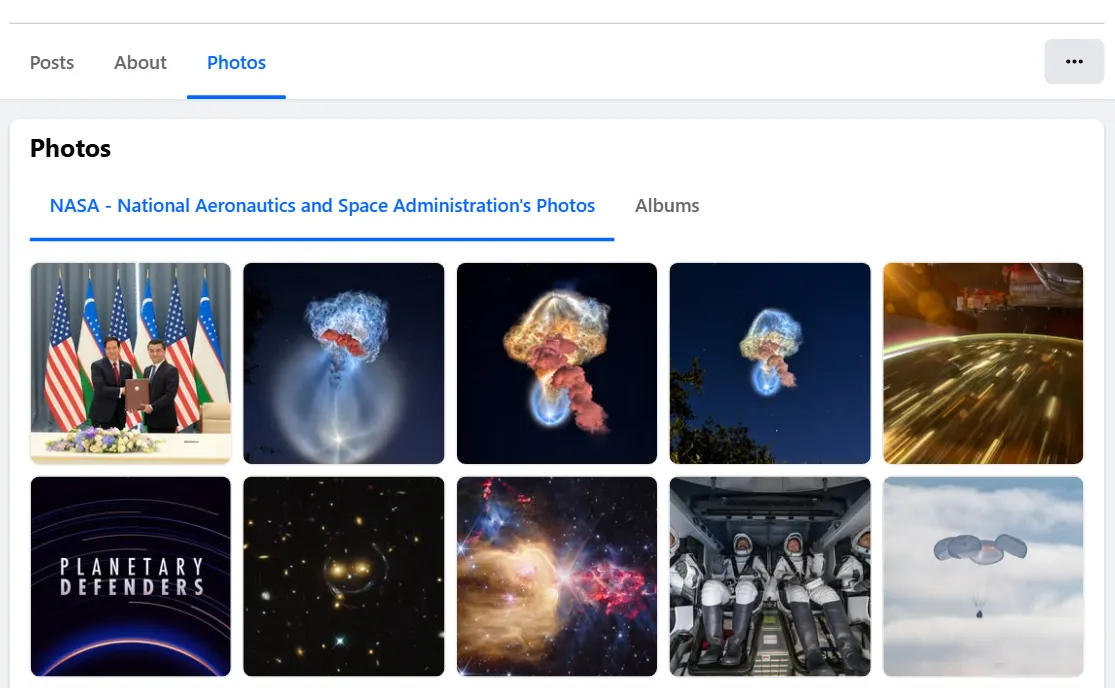
- Every photo of a Page, newest first: the Page's own photos, the photos others tagged it in, or both, plus each album's photos and a list of its albums.
- Full-size images: the image Facebook shows in its photo viewer (up to 2048 px wide) and the grid thumbnail, with the true width and height.
- Photo details on request: upload date, caption, reactions by type, comments, shares, post link, album, tagged people, uploader and privacy.
- Facebook's own date window: a year, a month or any date range; Facebook filters the photos itself, so a narrow window costs no extra requests.
- Monitor mode: a scheduled run returns only photos no earlier run delivered.
- Save image files: optionally download each image into your key-value store and get a permanent link (Facebook's own image links expire after a few days).
- No login, cookies or Facebook API key: paste Page, album, group or photo links, or just usernames.
- Export anywhere: JSON, CSV, Excel, XML; schedules, webhooks, Make, Zapier, n8n, Google Sheets and the Apify MCP server.
What data can you get from Facebook photos?
| 🖼️ Full-size image URL (`image`) | 📐 Width × height | 🔗 Photo link and id |
| 🦯 Facebook's alt text (`ocrText`) | 🏷️ Source: own / tagged / album / group | 🔢 Position, newest first |
| 📅 Upload date (`createdTime`) | 📝 Caption | ❤️ Reactions, total and by type |
| 💬 Comment count | 🔁 Share count | 📰 Post id and link |
| 📚 Album id and title | 👥 Tagged people | 👤 Uploader, verified badge |
| 🏢 Page name, id, followers | 📣 Page's Ad Library id | 💾 Saved image link (`imageStoredUrl`) |
On a 75-photo test run with details (NASA, Mark Zuckerberg, The Copper Kettle Restaurant) the image, size, alt text, upload date, reactions, comments, shares and post link were filled on 100% of rows and the caption on 93%. On a tagged-photos run (20 photos) every row named the tagged people.
How to scrape Facebook photos with Facebook Photos Scraper
- Create a free Apify account. The free plan includes $5 of monthly credit and needs no card.
- Open Facebook Photos Scraper and click Try for free.
- Paste Facebook Page, profile, album, group or photo links into Facebook URLs (or usernames into Page usernames or ids) and set Photos per source.
- Optional: pick Which photos, a date window, and Add photo details.
- Click Start. Photos stream into the dataset as they are read.
- Open the Storage tab and Export as JSON, CSV or Excel, or schedule the run.
⬇️ Input
| Parameter | Type | Description |
|---|---|---|
| 🔍 What to scrape | ||
startUrls | List of { "url": … } | Page or profile (https://www.facebook.com/NASA, profile.php?id=…, /people/…/<id>), album (/media/set/?set=a.<id>), group (/groups/<id or name>) or photo (/photo/?fbid=…) links. Prefill: humansofnewyork |
pageNames | List | Usernames or numeric ids instead of URLs, e.g. NASA, 100044561550831 |
photoType | Select | photos_by (posted by the Page), photos_of (tagged photos) or both. Default: photos_by |
| 🎯 Filters (applied by Facebook) | ||
onlyPhotosNewerThan | Date | Uploaded on or after: 2026-01-01 or relative 30 days, 6 months |
onlyPhotosOlderThan | Date | Uploaded before this date |
dateFilter | Text | A year (2025) or a month (2025-06), like Facebook's own photo filter |
| ✂️ Refine results | ||
keywords / excludeKeywords | List | Keep / drop photos whose alt text (and caption, with details on) contains a word |
minWidth | Integer | Minimum image width in pixels |
minReactions | Integer | Minimum reactions (needs details) |
| ➕ Extra data | ||
includeDetails | Boolean | Upload date, caption, reactions, comments, shares, post, album, tags, uploader, privacy. Charged as Photo details. Default: false |
includeAlbums | Boolean | One row per album: title, item count, cover, link. Charged as Album |
includeAlbumPhotos | Boolean | Also walk the photos inside each album, with the album on each row |
maxAlbums / maxPhotosPerAlbum | Integer | Albums per Page (default 10) and photos per album (default 50, 0 = all) |
includePageContext | Boolean | Add the Page's category (one extra page load per Page, no extra charge) |
storeImages / imageStoreName | Boolean / Text | Save each image file to a named key-value store. Charged as Image stored |
| 🔁 Monitoring | ||
monitorMode / monitorStoreName | Boolean / Text | Return only photos not delivered by earlier runs with the same store. Pair with a schedule |
| 📦 Output | ||
resultsLimit | Integer | Photos per source (per tab when both). Default 50, prefill 20, 0 = all (up to 10,000) |
maxItems | Integer | Rows in total across all sources. 0 = no limit |
compact | Boolean | Core columns only, for AI agents and MCP |
| ⚙️ Advanced | ||
proxyConfiguration | Proxy | Leave off: the run starts without a proxy and moves to the Apify datacenter proxy, then RESIDENTIAL, only if Facebook refuses it |
maxConcurrency / concurrentPhotos | Integer | Sources read in parallel (default 3) / detail requests in flight per source (default 8) |
Input JSON
Paste the Page, not a post
A Page or profile link reads its whole photo library. A post link is not a photo source: open the photo and paste its /photo/?fbid= link, or paste the Page. Accepted: https://www.facebook.com/NASA, NASA, https://www.facebook.com/profile.php?id=100044561550831. Rejected (listed in the run summary): event, search and share links.
Use the date window instead of a large limit
On Pages and profiles the date window is applied by Facebook: "dateFilter": "2025" returned exactly the 220 photos Humans of New York posted in 2025 in 28 requests. Album and group photos are dated one by one (their grids ignore Facebook's filter), so a window there costs one detail request per photo checked.
Use both tabs for brand monitoring
"photoType": "both" adds the photos other people tagged the Page in. The limit applies to each tab, so resultsLimit: 50 returns up to 50 own photos and 50 tagged ones.
⬆️ Output
Every photo becomes one dataset item. Here is a table of a real run on NASA's Page with details on:
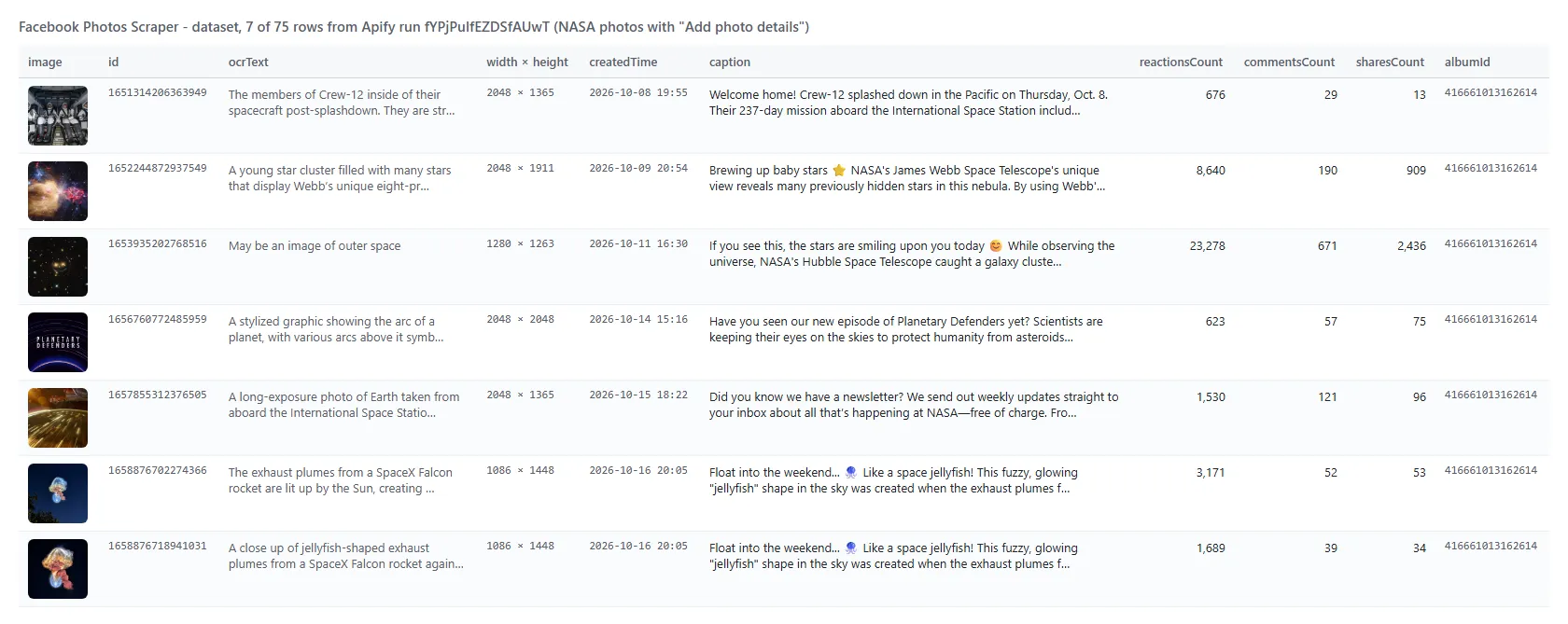
The same row as JSON (long values trimmed here):
Facebook photo fields
| Field | Type | What it is | Fill on test runs |
|---|---|---|---|
id, url | string | Photo id and link | 100% |
image | string | Image URL; full size on Page / profile rows and on every row with details | 100% |
thumbnail | string | The grid thumbnail | 100% |
width, height | number | Size of the photo in pixels | 100% |
imageIsFullSize | boolean | false on album / group rows without details (their grids print a 168-417 px image) | 100% |
ocrText | string | Facebook's alt text ("May be an image of…") | 100% |
photoType | string | photos_by, photos_of, album, group or photo | 100% |
position | number | Position in its source, newest first | 100% |
collectionItemId | string | Facebook's id of the photo in the photos tab | 100% on Page rows |
facebookId, pageName, pageUrl, pageUsername | string | The Page or profile | 100% on Page rows |
pageFollowers, pageTalkingAbout | number | As printed on the Page | 100% on Page rows |
pageIsVerified, pageAdLibrary, navSections | mixed | Verified badge, Ad Library id, photo sections | 100% on Page rows |
albumId, albumTitle | string | Album (album walks; any row with details) | 100% with details |
groupId, groupTitle, ownerId | string | Group rows: the group and the uploader's id | 100% on group rows |
createdTime, timestamp | string, number | Details: upload time | 100% |
caption | string | Details: text of the post | 93% |
reactionsCount, reactions | number, object | Details: reactions, total and by type | 100%, 92% |
commentsCount, sharesCount | number | Details: comment and share counts | 100% |
postId, postUrl, creation_story | mixed | Details: the post the photo was published in | 100% |
ownerName, ownerUrl, ownerIsVerified, ownerProfilePicture | mixed | Details: the uploader | 100% |
tags | array | Details: tagged people {id, name, type, isProductTag} | 100% on tagged photos |
previousPhotoId, nextPhotoId, privacy | string | Details: neighbours in the album, audience | 92-100% |
imageStoredUrl, imageStoreKey | string | Saved image files | 100% when on |
pageCategory | string | Page category | when includePageContext |
inputUrl, scrapedAt | string | The input line and the read time | 100% |
Album rows (dataType: "album") carry id, url, albumTitle, itemCount, itemCountText ("10,975 Items"), coverImage and the Page columns.
How can I use Facebook photo data?
- 🎯 Brand and agency teams: collect every photo a competitor posts and its engagement, then rank creatives by shares or reactions.
- 📊 Social media analysts: track posting cadence and engagement per month with the date window and
createdTime. - 🔎 Brand protection: watch the tagged-photos tab of your own Page for photos other people post about you.
- 🤖 AI and research teams: build labelled image sets from
image+ocrText+caption, with permanent copies via Save image files. - 🗂️ Archivists and journalists: export a Page's or a group's whole photo library, album by album.
- 📈 Monitoring: schedule monitor mode daily and receive only the new photos.
How much does it cost to scrape Facebook photos?
Facebook Photos Scraper is pay-per-result with no start fee: $0.90 per 1,000 photos. The add-ons are charged only for the rows that carry them: Photo details $0.90 per 1,000 photos, Album rows $0.90 per 1,000 albums, Image stored $0.90 per 1,000 saved images. Photos removed by your filters, photos delivered by an earlier monitor run, and sources Facebook does not show cost nothing.
| Photos | Photos only | With details |
|---|---|---|
| 20 | $0.018 | $0.036 |
| 100 | $0.09 | $0.18 |
| 1,000 | $0.90 | $1.80 |
| 10,000 | $9.00 | $18.00 |
There is nothing else to pay: Apify platform usage is included in these prices. On test runs 100 photos took 4 seconds (13 seconds with details) and 1,000 photos 47 seconds (3.6 minutes with details).
Integrations, API, scheduling & MCP
- Schedules: run Facebook Photos Scraper hourly, daily or weekly from the Schedules tab; with
monitorModeon, each run returns only new photos. - Webhooks: call a URL when a run finishes and push the photos to your CRM, Slack or a sheet.
- No-code: Make, Zapier, n8n, Google Sheets, Airtable and Slack via Apify integrations.
- API: start runs and read the dataset with
apify-clientfor Python or JavaScript. - MCP / AI agents: connect Claude, Cursor or any MCP client through the MCP tab;
compactkeeps the rows small.
More Facebook scrapers by TopApi
Limits & empty runs
- Per call: Facebook serves 8 photos per page of a photos tab or group and 14 per page of an album; deeper runs simply take more calls (1,000 photos = 125 calls).
- Per source: up to 10,000 photos per source per run; a 1,000-photo test run made 125 list calls and 1,000 detail calls with no refusal.
- Album and group images: their grids print a 168-417 px image; turn on details to get the full-size file on those rows.
- Not available signed out: tag positions on the photo, Page like counts, photo view counts, pinned or sponsored flags, comment text (use Facebook Comments Scraper for comments).
- Empty dataset: the source is unknown, private or age-restricted, every photo was removed by your filters, or monitor mode found nothing new; the run summary says which. Nothing is charged.
FAQ
How many photos can Facebook Photos Scraper collect from one Page?
Up to 10,000 per source per run (resultsLimit: 0). A test read 1,000 photos of Humans of New York with details in 3.6 minutes. For more, split the work with the date window.
How much does Facebook Photos Scraper cost?
$0.90 per 1,000 photos, plus $0.90 per 1,000 for details when you turn them on. No start fee, and platform usage is included.
Can I get photos from a specific year or month with Facebook Photos Scraper?
Yes. Set dateFilter to 2025 or 2025-06, or use the two date fields. On Pages and profiles Facebook applies the window itself.
Can I run Facebook Photos Scraper on a schedule to get only new photos?
Yes. Turn on monitorMode, keep the same monitorStoreName, and schedule the task. A run that finds nothing new delivers and charges nothing.
Can Facebook Photos Scraper download the image files?
Yes. Turn on Save image files: each image is stored in your key-value store and the row gets a permanent link. Facebook's own image links expire after a few days (the expiry is written into each link).
Does Facebook Photos Scraper get tagged photos and albums?
Yes. photoType: "photos_of" (or both) returns the photos other people tagged the Page in; includeAlbums lists the albums and includeAlbumPhotos walks their photos.
Do I need a Facebook account, cookies or an API key for Facebook Photos Scraper?
No. It reads only what Facebook shows to a signed-out visitor; you paste links or usernames and nothing else.
Can I use Facebook Photos Scraper with the Apify API or an MCP server?
Yes. Use apify-client from the API tab, or connect an MCP client through the MCP tab.
Why did my Facebook Photos Scraper run return no photos?
Usually the address is a post or event rather than a Page, album, group or photo, the Page is private or age-restricted, or your filters removed every photo. The run summary lists each input with its status.
Is it legal to scrape Facebook photos?
Facebook Photos Scraper extracts only publicly available photos and does not log in or collect private data. Results can still contain personal data, which is regulated (for example by GDPR); make sure you have a legitimate purpose before you use it.
Your feedback
Found a bug or missing a field? Open an issue on the Issues tab and we will look at it.


