

OFAC Sanctions Screening: SDN, EU, UN & UK, Fuzzy Match
Pricing
Pay per event
OFAC Sanctions Screening: SDN, EU, UN & UK, Fuzzy Match
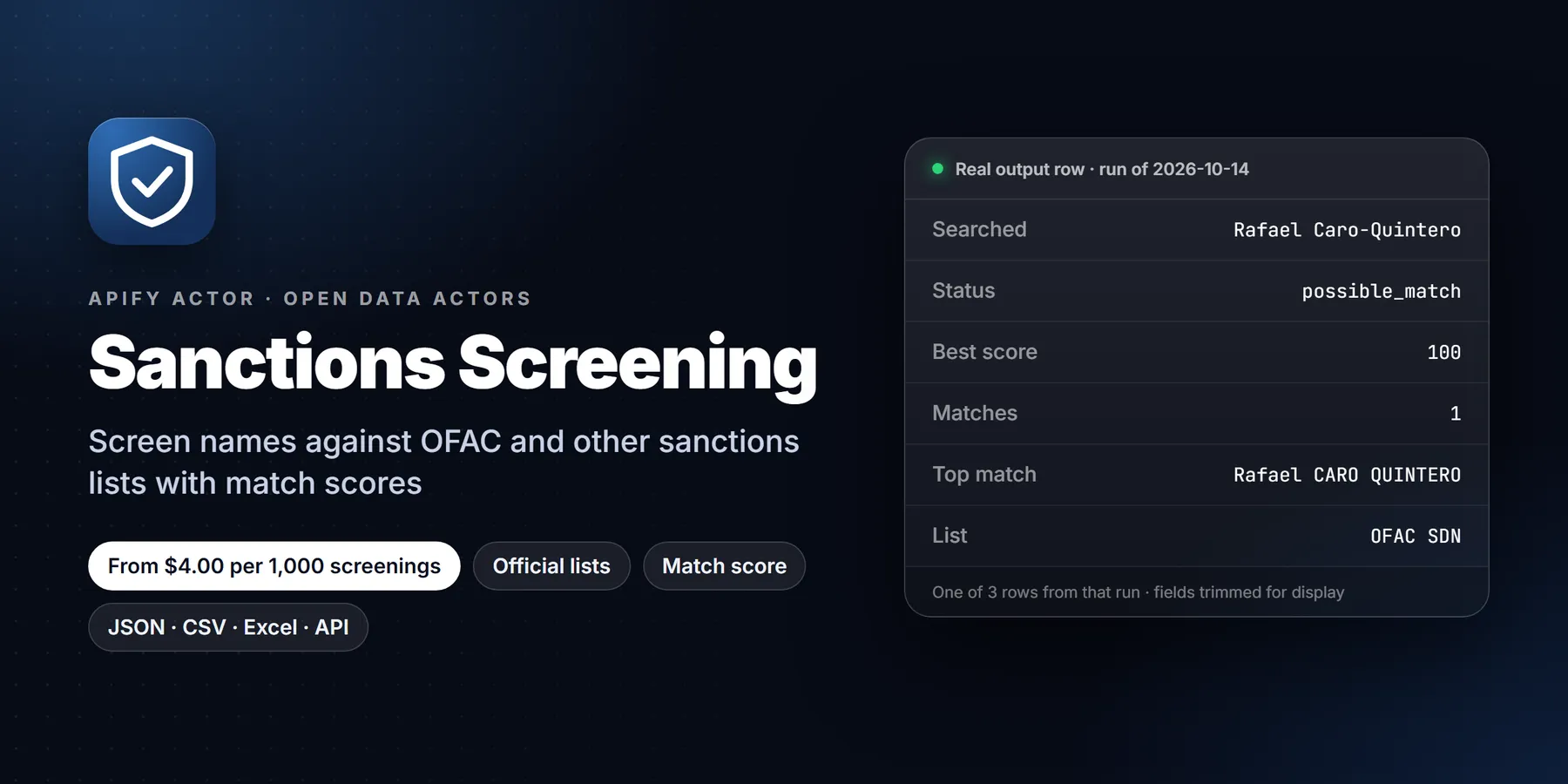
Screen names of people, companies and vessels against the official OFAC SDN, OFAC Consolidated, UN, EU and UK sanctions lists. Fuzzy match handles diacritics, transliteration, word order and aliases; optional DOB and country. Screening aid, not legal advice. $0.004 per name.
Pricing
Pay per event
Rating
0.0
(0)
Developer

Detroit Web Agent - Open Data
Maintained by CommunityActor stats
0
Bookmarked
2
Total users
1
Monthly active users
12 hours ago
Last modified
Categories
Share
Sanctions Screening: check names against the OFAC SDN, UN, EU and UK sanctions lists

| Price per 1,000 screenings | Free plan | Starter | Scale | Business |
|---|---|---|---|---|
| This Actor | $4.00 | $4.00 | $4.00 | $4.00 |
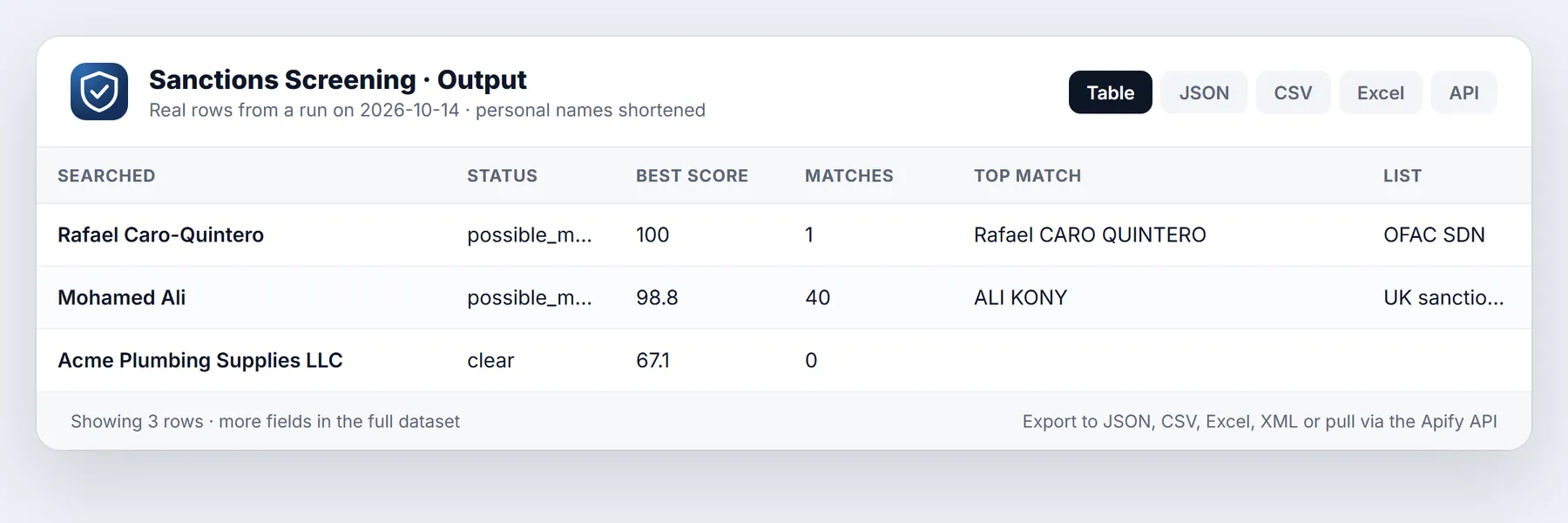
Paste a list of names (people, companies, vessels). The actor downloads the official sanctions lists fresh on every run, normalises both sides, and returns one row per name with a plain status (clear or possible_match), a 0 to 100 match score, and the best matching list entries: which list, which program, the entry id, the aliases, the date of birth and countries on file, the date the list was published, and a link back to the source.
It is built for the boring, repetitive part of compliance work: onboarding checks, vendor and supplier lists, payment-counterparty review, marketplace seller checks, KYC spreadsheets, and a weekly re-screen of a customer file. You get the candidates and the evidence; a person decides.
Important: this is a screening aid, not legal advice and not a compliance certification. Sanctions law is strict and context dependent. This actor can return false positives (a different person with a similar name) and false negatives (a listed party under a spelling, script or alias it did not match). Always verify any hit, and any decision to rely on a "clear", against the official source linked in each row. Nothing here replaces your own compliance program or counsel.
- No API key, no login, no proxy. It reads the public, official downloads published by the governments themselves.
- Fuzzy matching that copes with diacritics, transliteration (Muhammad / Mohammed / Mohamad), word order, punctuation, company suffixes and aliases.
- Optional date of birth and country per name to tighten or loosen a match.
- Pay per event: $0.004 per name screened (plus the platform's tiny per-run start fee). Blank names and names that could not be screened are never charged.
Run in 30 seconds
- Open the prefilled run (free Apify account; it creates a saved task with a working input).
- Press Start. The input is small on purpose, so the first run is quick and costs a few cents at most.
- Open the Output tab, switch to Table view, download as CSV, Excel or JSON.
Prefilled input:
Ready-made presets by use case (each opens as a saved task you can edit):
The lists it checks
| Key | List | Publisher | Notes |
|---|---|---|---|
ofac_sdn | Specially Designated Nationals and Blocked Persons (SDN) | US Treasury, OFAC | About 19,000 entries: individuals, entities, vessels, aircraft. Fetched from OFAC's Sanctions List Service. |
ofac_consolidated | Consolidated (non-SDN) list | US Treasury, OFAC | Sectoral Sanctions Identifications, Foreign Sanctions Evaders, Non-SDN Palestinian Legislative Council and similar programs that are not on the SDN list. |
un | UN Security Council Consolidated List | United Nations | All UN Security Council sanctions committees in one file. |
eu | EU consolidated list of persons, groups and entities subject to EU financial sanctions | European Commission (FISMA) | The public Financial Sanctions Files export. |
uk | UK Sanctions List | FCDO, with OFSI for financial measures | The UK's single list since the move away from the old OFSI consolidated list. |
Each run downloads every list you ask for, so the data is as fresh as the publisher's latest file. The publish date of each list is returned on every row (listPublishDates), so you always know how current the answer is. The default is all five lists. If you only need a US-nexus check, ask for ofac_sdn and ofac_consolidated and the run is faster.
If a requested list cannot be downloaded (publisher outage, timeout), the actor does not quietly return clear. A name with no match is reported as incomplete and is not charged, and the failed list is named in the row and in the run's OUTPUT record. Hits found in the lists that did load are still returned.
What does a result look like
One dataset row per input name:
| Field | Meaning |
|---|---|
inputName, inputType, inputDob, inputCountry | What you asked about |
status | possible_match (at least one entry scored at or above your threshold), clear (none did, and every requested list was checked), incomplete (no match found but a requested list failed to load), invalid_input (blank or one-character name, not screened, not charged) |
bestScore | Highest score found, 0 to 100, even when below the threshold |
matchCount, minScore | Entries at or above the threshold, and the threshold used |
topMatchName, topMatchList, topMatchPrograms, topMatchEntryId, topMatchSourceUrl | The best match flattened for spreadsheets |
matches[] | Up to maxMatchesPerName entries (one per list entry, best matching name shown). Each has score, list, listName, entryId, entryName, matchedName and matchedOn (primary, alias or weak-alias), exact, type, programs, aliases, dateOfBirth, countries, dobMatch, countryMatch, listedOn, listPublishDate, sourceUrl |
nearestBelowThreshold | For clear names, the closest entry that did not reach the threshold, so you can see how close the call was |
listsChecked, listsFailed, listPublishDates | Which lists were used, which failed, and how fresh each one was |
disclaimer | The screening-aid statement, repeated on every row so exports carry it |
Example, a screened person with a hit:
How to use it
- Put one name per row in Names to screen. People and companies both work; word order, capitals, accents and punctuation do not matter.
- Choose the lists to check.
- Leave Minimum match score at 85 to 90 to start. Raise it to cut false positives, lower it to catch more spelling variants.
- Run. Download the table as CSV, Excel or JSON, or call the API.
Adding date of birth, country or type
In the JSON editor, give a name as an object instead of a string:
dobaccepts any text containing a four-digit year. If the list entry has a date of birth and the year matches, the score goes up by 5 anddobMatchistrue. If the entry has one and the year does not match, the score goes down by 15 anddobMatchisfalse. Entries with no recorded date of birth are left alone (dobMatchisnull).countryis compared with the nationalities, citizenships and address countries on the entry. A match adds 3 points and setscountryMatch. A mismatch changes nothing, because sanctioned parties commonly hold other nationalities or addresses.typeisperson,entityorvessel. It restricts matching to that kind of entry. Leave it out (or use the default name type input) to compare against everything.
How the matching works
The goal is to catch the variants real compliance teams meet, without drowning you in noise.
- Normalisation. Both the query and every list name are lower-cased, accents are stripped (
José Garcíabecomesjose garcia), special letters are mapped (ß,ø,ł,æ), and punctuation is removed. Cyrillic, Arabic and other scripts are kept as written, so a name in the original script matches the original-script alias the list publishes. - Tokens. Names are split into words. Corporate suffixes (
LLC,Ltd,GmbH,JSC,PJSC,Co) and name particles (al,bin,van,de) are set aside when other words remain, so "Sberbank of Russia JSC" compares as "sberbank russia". - Order-independent alignment. Each word is compared with each word on the other side using Jaro-Winkler similarity. The score is the average of the best alignments in both directions, so
CARO-QUINTERO, RafaelequalsRafael Caro Quinteroat 100. - Transliteration. Words that share a consonant skeleton (
Muhammad,Mohammed,Mohamad;Gaddafi,Qadhafi,Kadafi) get a similarity floor of 0.94, so common romanisation differences do not sink a true hit. - Missing name parts. If every word of the shorter name is found in the longer one (for example
Ivan PetrovagainstIvan Ivanovich Petrov), the pair scores in the 90s. This catches dropped patronymics and middle names, and it is also a source of false positives for very common names. See limitations. - Aliases. Every
a.k.a.andf.k.a.the publisher lists is searched. Weak or low-quality aliases are still searched but are capped at 97 and markedmatchedOn: weak-aliasso you can treat them with care. - One result per list entry. If several aliases of the same entry match, you get that entry once, with the best-matching name.
A name that scores exactly 100 is an exact match after normalisation (exact: true). Scores between your threshold and 100 are fuzzy. The score is a similarity measure, not a probability.
Choosing a threshold
| minScore | What to expect |
|---|---|
| 95 to 100 | Near-exact only. Few false positives, but spelling variants will be missed. |
| 88 to 92 | A practical default. Catches transliteration and one-letter typos and dropped middle names. |
| 80 to 85 | Wide net. Expect many false positives on common names; useful for a one-time clean-up review. |
| 50 to 79 | Exploration only. |
The bestScore and nearestBelowThreshold fields exist so you can see what was just below the line.
Input reference
| Input | Default | Notes |
|---|---|---|
names | sample names | Strings or objects (name, optional dob, country, type). Up to 5,000 per run. |
lists | all five | Any of ofac_sdn, ofac_consolidated, un, eu, uk. |
minScore | 85 | 50 to 100. |
maxMatchesPerName | 3 | 1 to 20. |
entityType | any | Default type filter for names that do not set their own. |
includeAliases | true | Turn off to match primary names only. |
Pricing
$0.004 per name screened, plus the platform's $0.00005 actor-start event per run. Screening 1,000 names costs about $4. A list refresh is included: every run downloads the current official files at no extra charge.
Why that price: each name is checked against roughly 100,000 names and aliases across five lists, with fuzzy matching and the evidence needed to review a hit, and compliance work is worth more per check than bulk scraping. Charging only for names that were actually screened means a run that fails to load a list, or a blank row in your spreadsheet, costs nothing.
Set a maximum cost per run in the Apify console and the actor stops cleanly at the limit.
Monitor mode: re-screen a watch list, hear only about changes
Set monitorMode to true and pass the same names list on a schedule. The first run is a baseline and returns the result for every name. Each later run re-downloads the official lists, re-screens every name, and returns only names whose outcome changed: a new name, a status flip (for example clear to possible_match), a different set of matched list entries, or a move to another 5-point score band. Each row carries changeType = new or changed. Unchanged names are skipped and not charged.
- Baseline lives in the key-value store
sanctions-screening-monitorunderMONITOR_<monitorName>. A name is identified by its text, type, date of birth and country, so changing any of those makes it a new entry. - Rows with status
incomplete(a requested list could not be downloaded) are always returned and never charged, and never overwrite the baseline. - The monitor compares screening outcomes, not whole lists. It does not tell you that an unrelated list entry was added; it tells you when one of your names is affected.
- It is a screening aid, not legal advice. Review every
possible_matchagainst the official source before acting.
Schedule it. Open the actor in Apify Console, click Save as a new task with monitorMode on and a fixed monitorName, then open Schedules > Create new schedule and add that task on a cron such as 0 7 * * * (daily at 07:00). Add a webhook or an integration (Slack, email, Make, Zapier, n8n) to the task's Run succeeded event so each run's delta is delivered where you need it. A run that finds no changes returns zero rows and incurs no per-result charges.
Removed records (reportRemoved, opt-in)
Turn on reportRemoved (together with monitorMode) and a run also emits names that were in your saved baseline but are absent now, once each, with changeType: "removed", lastSeenOn and a removedNote. Removed rows are never charged; new and changed rows are priced exactly as before. Nothing changes if you leave it off.
Honesty guards: a name is reported removed only if it is no longer in your names list while every requested sanctions list loaded in full this run; a list that failed to download blocks all removals. The row is skipped (and the reason is logged and in OUTPUT.monitor.removedSkipped) when the fetch was incomplete or hit an error, when you changed the filters since the baseline was built, or when the baseline was created before this option existed (run once with it on to build a scope-tagged baseline). A removed row means "not returned any more", which can also mean the source retired or re-filtered the record.
Use cases
- Customer and vendor onboarding. Screen the legal name and director names before you sign.
- Periodic re-screening. Schedule a weekly run over your customer file; lists change often, and every row carries the list publish date.
- Payment and counterparty review. Check names on wire instructions or invoices.
- Marketplace and platform trust and safety. Check sellers, hosts or creators in bulk.
- Data clean-up. Run a legacy contact list through once with a low threshold and review the hits.
New to Apify? Create a free account and run this Actor in under a minute. Some links are affiliate links.
Related actors
More tools from the same publisher that fit this workflow:
- SAM.gov Contract Opportunities: federal bids and RFPs from SAM.gov
- Federal Grants & Contracts Finder: Grants.gov and USAspending awards in one place
- New Business Filings: newly registered LLCs and corporations
- SEC Form D Startup Funding Leads: recently funded startups from SEC Form D
- FMCSA New Motor Carrier Leads: new motor carriers with contact details
- Building Permits Leads: city building permits and violations as leads
Use from AI agents: every actor here is callable through the Apify MCP server (mcp.apify.com) and our open-data-actors MCP endpoint.
Frequently asked questions
Is a clear result proof that a party is not sanctioned?
No. It means no entry on the lists you selected, as published at the dates shown, scored at or above your threshold. A sanctioned party can be listed under a different name, a different script, or an alias that is not on the list, and ownership rules (for example OFAC's 50 Percent Rule) can make an entity subject to sanctions without it appearing on any list. Use this as one input to your own process.
Is a possible_match proof of a hit?
No. Common names produce coincidental matches. Compare the date of birth, nationality, address and other identifiers on the official entry (follow sourceUrl) before treating it as the same party.
Which official files does it download?
OFAC's Sanctions List Service exports (SDN.XML and CONSOLIDATED.XML), the UN Security Council consolidated list (scsanctions.un.org), the European Commission's Financial Sanctions Files full export, and the UK Sanctions List from the FCDO. They are public and free to use.
How current is the data?
As current as the publishers' files at the moment the run starts. Each row reports the publish date of every list that was used. Publishers update at their own pace; the actor does not cache lists between runs.
Does it search the OFAC "Sectoral" or other lists not named here?
The OFAC Consolidated (non-SDN) key covers the non-SDN lists OFAC publishes in its consolidated feed. Lists from other countries (Canada, Australia, Switzerland, Japan and others) are not included in this version.
Why does a company suffix not matter?
Suffixes such as LLC, Ltd and GmbH are the same word in every spelling of a company and carry little identifying weight, so they are set aside when other words remain. Acme Trading LLC and ACME TRADING Ltd. compare as equal.
Does it handle names in non-Latin scripts?
Names are compared in the script they are written in. A query in Cyrillic or Arabic matches the original-script alias when the list publishes one (the UK and EU lists include many). It does not transliterate between scripts, so a Latin query will not match a Cyrillic-only entry and vice versa. Screen both forms if you have them.
What happens with a one-word name or a very common name?
A single word can only match entries by close similarity to a single word or full-name token, and common names produce many near hits. Add a date of birth and country to separate them.
Can I run it on a schedule or call it from my app?
Yes, like any Apify actor: schedule it, call the API, or use the integrations. Pass names as the input array; read the dataset when the run finishes.
Does it keep or share my list of names?
The names you submit are held in the run's input and output on your Apify account like any other run data. The actor does not send them anywhere else; it only downloads the public lists.
More questions
How do I check a name against the OFAC sanctions list?
Paste the names into names and select ofac_sdn in lists. You get one row per name with clear or possible_match, a 0 to 100 score and the matching list entries with programs and source links.
Can I screen a whole customer or vendor list at once? Yes, up to 5,000 names per run. Add date of birth, country or type to cut false positives. Schedule it weekly to re-screen a file.
Which sanctions lists does it check? OFAC SDN, OFAC Consolidated, the UN Security Council list, the EU consolidated list and the UK list, downloaded from the official publishers on every run. No PEP, adverse media or ownership data.
Does a "clear" result prove a party is not sanctioned? No. It is a screening aid, not legal advice or a compliance certification. Spelling, script or alias differences can cause misses, so verify decisions against the official source.
What happens if a list is down?
If a requested list cannot load, names with no match come back as incomplete, not clear, and are not charged.
How much does it cost per name?
$0.004 per name screened, plus the platform start fee. Blank names and incomplete results are not charged.
How this compares
OFAC and the other publishers offer free list downloads and a free search page for single names. This actor screens a whole list of names against five lists in one run, with fuzzy matching, scores and evidence per row. Commercial screening platforms add PEP and adverse-media data, ownership analysis, ongoing monitoring and audit trails; this actor does not, and it is not a compliance certification.
Use it from code
Small real input: it returns only a couple of rows, so a test run costs very little (see Pricing). Set the APIFY_TOKEN environment variable to your token from Apify Console > Settings > API & Integrations.
Python (pip install apify-client)
JavaScript / Node.js (npm install apify-client)
curl (runs the actor and returns the dataset items in one call)
Send results to Google Sheets, Zapier, Make or n8n
- Google Sheets: every run's dataset has a CSV export link:
https://api.apify.com/v2/datasets/<DATASET_ID>/items?format=csv&clean=true(the dataset ID is on the run's Storage tab). In Sheets,=IMPORTDATA("<that link>")loads it. Anyone with the link can read that dataset, so share it carefully. To export to Google Drive automatically, use the Google Drive integration on the actor's Integrations tab. - Zapier: in the Apify app, use the trigger Finished Actor run (or Run Actor as an action) with
transparent_meteorite/sanctions-screening, then Fetch dataset items and pass the rows to Google Sheets, a CRM or Slack. - Make: the Apify app has Watch Actor Runs, Run an Actor and Get Dataset Items modules; connect them to any Make app.
- n8n: install the Apify node (
@apify/n8n-nodes-apify) and use Run an Actor and get dataset, or the On new Apify event trigger. - Schedule and webhooks: create a Task with your input, add a Schedule in Apify Console, and add a webhook if you want a call when a run finishes.
See the Apify integrations docs for setup steps.
Limitations
- A screening aid, not legal advice or a compliance certification. False positives and false negatives are possible. Always verify against the official source.
- Five lists only. OFAC SDN and Consolidated, UN, EU and UK. Other jurisdictions' lists, PEP (politically exposed person) lists, adverse media and ownership data are not included.
- No ownership analysis. An entity owned 50 percent or more by listed parties can be sanctioned without being listed. This actor does not model ownership.
- Name matching is approximate. It is strongest on Latin-script names. It does not translate or transliterate between scripts, and it does not use phonetic dictionaries for every language. Heavily different romanisations can fall below your threshold; lower the threshold or add known variants as separate rows.
- Candidate lookup is indexed. To stay fast across about 100,000 names, a list name is only scored if it shares a word-level key with the query (consonant skeleton, first four letters or last four letters of a word). A query whose every word is misspelled in both its start and its end could be missed. Use more than one spelling if the case is important.
- Common names inflate the "missing name part" rule. A two-word query that is fully contained in a longer listed name scores in the 90s by design. Use date of birth and country to cut these.
- Entries without a date of birth cannot be tightened. Many entity and older individual records carry no date of birth;
dobMatchisnullfor them. - Dates are as the publisher wrote them. Date-of-birth values (for example
24 Oct 1952ordd/mm/1975, where the UK list masks unknown parts) are returned as published. - Per-run size. Up to 5,000 names per run. Each run downloads about 65 MB of list files when all five are selected and needs roughly 2 GB of memory (the default).
- Publishers can change formats or go offline. If a list fails to load or parse, you get
incompleterather than a falseclear. Please report format changes in the Issues tab.
Related actors
- domain-intelligence-lookup: WHOIS/RDAP, DNS, certificates and subdomains for the domains in the same file.
- website-contact-extractor: public contact details from company websites.
Support and feedback
Open an issue on the actor's page with the name (or a redacted version of it), the input you used and the run id. If a list format changed or a variant of a listed name was missed, include the official entry id: each report becomes a regression test.
Reliability
Last 30 days, measured from Apify run records (all runs, including our own daily health checks): 28 of 28 finished runs succeeded (100.0%), median run time 5.2 s (90th percentile 6.1 s). Aborted runs (0) are not counted.
Updated 2026-10-11 automatically every week from the run history. Report any failure on the Issues tab with the run URL.
More resources
- Guide & examples: mamoo85.github.io/open-data-actors/sanctions-screening.html
- Sample output and example input on GitHub (masked sample CSV): github.com/Mamoo85/apify-actor-samples/sanctions-screening
Changelog
- 2026-10-09: First release.
- 2026-10-09: Input sections with a tiny prefill, run status messages, friendly input errors, examples, API snippets, integrations how-tos, FAQ.
- 2026-10-09: Branding: maintained by Detroit Web Agent - Open Data.
- 2026-10-11: Closing log line points to the Issues tab; Reliability section added to this README.
- 2026-10-13: Added a Run in 30 seconds section with a one-click prefilled run link, saved use-case presets, cross-links to pairing actors and Store title and search description reworded around how buyers search.
- 2026-10-13 (0.2): new inputs
minMatchScore,subjectDob,country(defaults for every name),topics(program filter); new output fieldsconfidence,aliases,dateOfBirth,countries,isPep(always null: the official lists carry no PEP data); empty input runs a one-name OFAC demo. Pricing unchanged. price_1107 note: $0.004 per name, plan to lower to $0.003 at the 2026-11-07 review.
Works well with
Other actors from Detroit Web Agent - Open Data that pair with this one:
- New Business Filings: screen newly registered companies before onboarding them.
- Company Enrichment by Domain: turn a domain list into company details to screen.
- Domain Intelligence Lookup: check registration and DNS details for a counterparty's domain.
- Website Contact Extractor: pull the public contact names from a counterparty website to screen as well.
- SEC Form D Funding Leads: screen the issuers and related persons in new Form D filings.
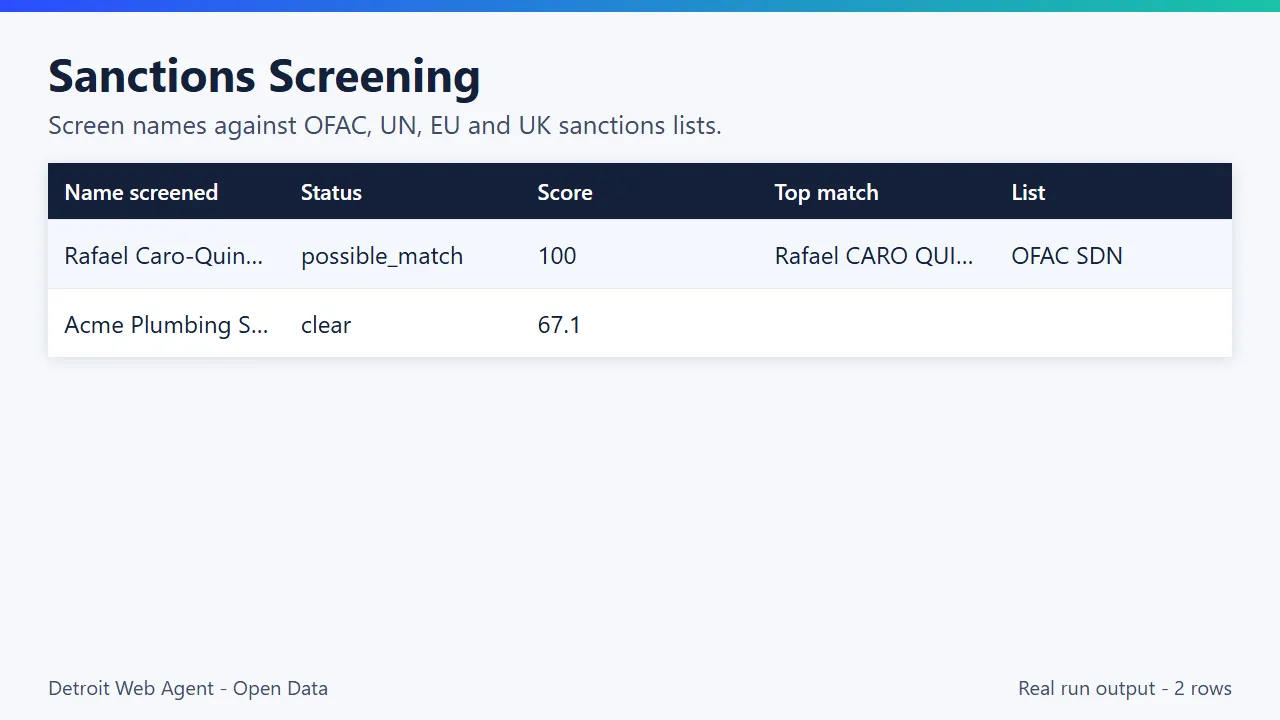
Sample output (real run, truncated)
What the free plan gets you
Free plan: about 1,250 names screened from your $5 monthly Apify credit (at $0.004 each, today's price); default settings return about 2 rows (two sample names). Need more? Upgrade your Apify plan or set a higher result limit in the input.
Need more than the data?
This actor is built by Detroit Web Agent, a small Detroit studio that builds websites, lead pages and simple data tools for small businesses. If you want these results turned into a working website, a landing page or a CRM import, or you need a field this actor does not cover yet, open an issue on the Issues tab or visit detroitwebagent.com.
Built and maintained by Detroit Web Agent - Open Data (Detroit, Michigan). Questions, bugs or a field you need: open an issue on this Actor's Issues tab and we will reply there.
Use it from AI assistants (MCP)
Sanctions Screening works as a tool for AI assistants through the official Apify MCP server. Add this server URL to any MCP client (Claude Desktop, Claude Code, Cursor, ChatGPT connectors, VS Code):


