
SEC Form D Funding Rounds: Daily Startup & Private Fund Raises
Pricing
Pay per usage
SEC Form D Funding Rounds: Daily Startup & Private Fund Raises
Daily feed of new SEC Form D filings: who just raised money, how much, industry, state, investors and exemptions. Exclude or include hedge, PE and VC funds. Official EDGAR data, Excel-ready, $0.004 per filing.
Pricing
Pay per usage
Rating
0.0
(0)
Developer

Alpine Data Labs
Maintained by CommunityActor stats
0
Bookmarked
1
Total users
0
Monthly active users
a month ago
Last modified
Categories
Features
Share
Get every new SEC Form D filing as a clean spreadsheet: which US startups and private companies just raised money, how much, when the first sale happened, which exemption they used (Rule 506(b), 506(c), 504) and where they are based. Form D is the notice companies file with the SEC within 15 days of selling shares in a private placement, so it is often the earliest public signal of a funding round, before any press release.
How to use it (no code, 4 steps)
- Enter your own contact email in the first field (the SEC requires a contact address for automated access; see FAQ) and click Start. The default settings fetch the latest business day of new Form D filings from operating companies (investment funds are left out).
- Optional: choose industries (e.g. Biotechnology, Other Technology), states, a minimum amount raised or an exemption like 506(c).
- Download the results as Excel, CSV or JSON, or schedule the actor daily with Only new filings turned on to get a fresh list of recently funded companies every morning.
- Optional: automate it. Save your settings as a Task, add a daily Schedule with Only new filings on, and send results to Google Sheets, Slack, Make, Zapier or n8n via the Integrations tab. No code needed.
What you get
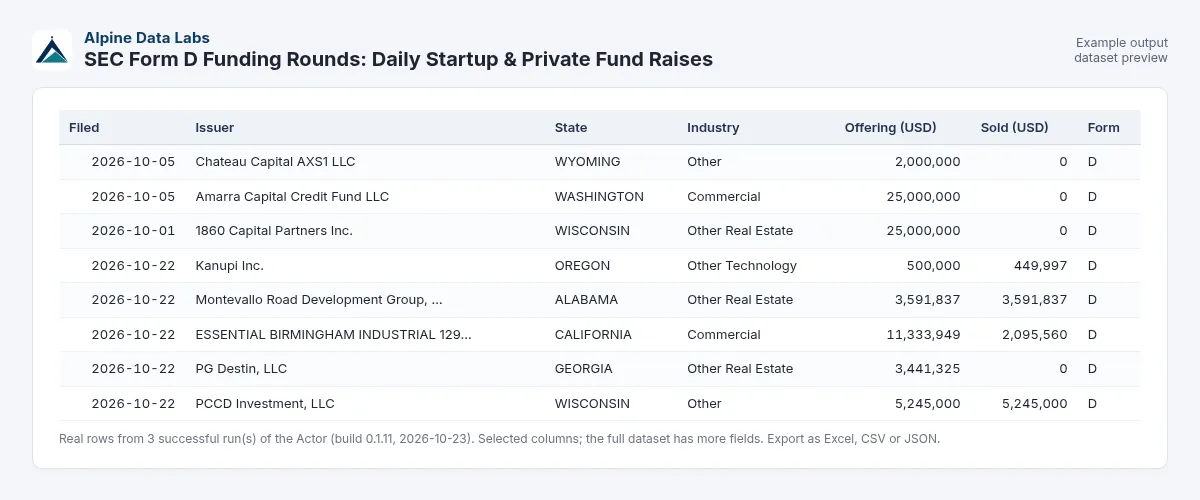
One row per Form D filing, with the data from the official SEC filing (real example rows from 22 October 2026):
| Company | City, State | Industry | Offering size | Amount sold | First sale | Exemption | Founded |
|---|---|---|---|---|---|---|---|
| Kanupi Inc. | Lebanon, OR | Other Technology | $500,000 | $449,997 | 2026-10-13 | Rule 506(b) | 2025 |
| Campian Inc. | Mount Pleasant, SC | Other Technology | $2,499,999 | $2,099,991 | 2026-10-07 | Rule 506(b) | 2025 |
| Montevallo Road Development Group, LLC | Birmingham, AL | Other Real Estate | $3,591,837 | $3,591,837 | 2026-10-08 | Rule 506(b) | 2026 |
| Strongheart Energy III LP | Miami, FL | Oil and Gas | $100,000,000 | $0 | not yet | Rule 506(c) | 2024 |
Every row also contains: filing date, new filing or amendment (D/A), CIK and accession number, entity type, year and place of incorporation, full business address and phone number, industry sector, revenue range (if disclosed), security types (equity, debt, options...), minimum investment, number of investors, whether non-accredited investors took part, sales commissions and finder's fees, broker-dealers involved, pooled fund type (hedge, private equity, venture capital) and direct links to the filing on SEC EDGAR. Optionally the related persons (executive officers, directors, promoters) listed on the form.
Dataset views: Overview, Leads (address and phone), Offering details, Investment funds and Related persons.
Use cases
- Find recently funded startups to sell to: a company that just raised $2M is buying software, hiring and moving offices.
- Startup funding rounds database for VCs, angels and analysts: track seed and growth rounds by industry and state.
- New venture capital, private equity and hedge funds: see which funds are raising (set Investment funds to Only funds).
- Private placement monitoring for lawyers, accountants, fund administrators, banks and journalists.
- Daily funding alerts: schedule it every weekday with Only new filings and connect it to Google Sheets, Slack, email or your CRM via Apify integrations.
Input fields
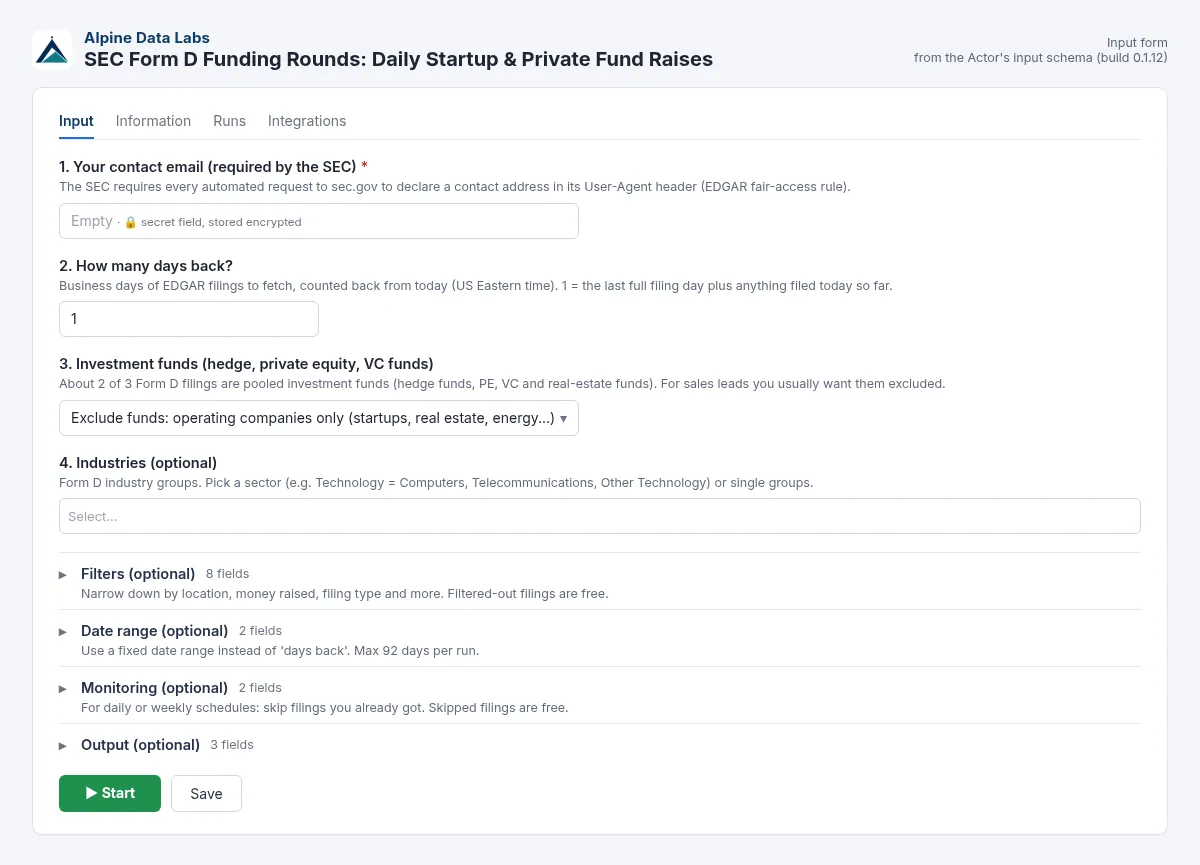
| Field | What it does | Default |
|---|---|---|
| Your contact email (required by the SEC) | Your own email, sent only to sec.gov as required by the SEC. Required | none |
| How many days back? | Business days to look back in addition to today (US Eastern time). 0 = today only, max 60 | 1 |
| Investment funds | Exclude (companies only), Include or Only funds | Exclude |
| Industries | Pick sectors or industry groups, e.g. Technology, Health Care, Biotechnology, Real Estate | all |
| Fund types | Hedge, Private Equity, Venture Capital, Other Investment Fund (picks switch to Only funds) | all |
| Issuer state | US states (CA, "California") or Non-US | all |
| Filing type | New filings, amendments (D/A) or both | New filings |
| Min amount already raised / Min total offering size | e.g. 1000000 for $1M+ rounds | none |
| Exemption | Rule 506(b), 506(c), 504, Section 4(a)(5) | all |
| Issuer name contains | Words like "bio, therapeutics, ai" | none |
| Young companies only | Keep only young companies | off |
| Start date / End date | A fixed range instead of How many days back? (max 92 days) | empty |
| Only new filings since the last run | Skip filings already delivered in earlier runs (for daily schedules) | off |
| Include related persons | Adds names and roles of officers and directors | off |
| Max filings | Stops after this many saved filings, so your cost is capped | 100 |
You can type states, industries and exemptions in a relaxed way ("california", "biotech", "506c"); unknown values are ignored and explained in the run status.
Pricing
You pay $0.004 per Form D filing saved to your dataset, which is $4 per 1,000 filings. There is no start fee.
- A normal day has about 250 Form D filings in total and roughly 70 new filings from operating companies. Fetching one day of new company filings therefore costs about $0.28.
- The prefilled example (max 100 filings) costs at most $0.40.
- Higher Apify plans pay less: SILVER 10 % off, GOLD and above 20 % off.
- Filings removed by your filters are free. While the Actor is billed per filing, very narrow filters over a long date range that match almost nothing make the run stop early and tell you how to narrow the date range instead. On free pricing this early stop is off; Max filings to check (default 20,000) always stays as a safety cap.
- A daily schedule with the default settings costs roughly $5–6 per month.
- Free: filings removed by your filters, filings already delivered (with Only new filings), filings the SEC could not deliver, and runs with a missing or invalid email, an invalid date or no results.
- Set Max filings or the maximum cost per run in Apify to cap your spend.
FAQ and common mistakes
What is SEC Form D? A short notice that a company or fund files with the US Securities and Exchange Commission after it first sells securities in a private offering that is exempt from registration under Regulation D (Rule 504, 506(b), 506(c)) or Section 4(a)(5). It lists the issuer, its address, its industry, the offering size, how much has been sold and the people running the company.
Why do I have to enter my email? The SEC's EDGAR fair-access rules require every automated tool to declare a contact address in the User-Agent of its requests, so the actor sends your email to sec.gov (and only there) with each request; it is encrypted in your run input as a secret field and never stored elsewhere, logged in full or written to the output. If it is missing or invalid, the run stops immediately and nothing is charged.
Is this the same as a startup funding database like Crunchbase? No. This is the official primary source. It covers all US private placements that filed a Form D, including rounds that were never announced. It does not contain investor names, valuation or round labels like "Series A".
Why are there so many funds and real estate LLCs? About two thirds of all Form D filings come from pooled investment funds. They are excluded by default. Real estate and oil and gas offerings are very common too; pick industries such as Technology or Health Care to focus on startups.
Why did I get 0 results? The SEC does not accept filings on weekends and US federal holidays, and very narrow filters can remove every filing. The run status tells you how many filings were checked and why they were removed. Removed filings are free.
Why is the amount sold $0? Companies often file before or right at their first sale. Check firstSaleYetToOccur and totalOfferingAmount.
What is an amendment (D/A)? An update of an earlier Form D, for example yearly for offerings that run more than a year, or when the amount changes. Choose Amendments or All under Filing type to include them.
How do I get a daily list of newly funded companies? Turn on Only new filings, keep How many days back? at 1 and create a schedule (e.g. every weekday at 9:00). Each run only charges for filings you have not received before. Use a different Monitor name for each separate watch list.
Does it give me emails or websites? No. Form D does not contain email addresses or websites. You get the business address and phone number from the filing.
Limits
- Data comes from SEC EDGAR and is usually available within minutes to a few hours after filing. Dates are SEC filing dates in US Eastern time.
- How many days back? goes up to 60 business days; a fixed date range up to 92 days per run (run several times for longer history).
- To respect SEC fair-access rules the actor makes at most 5 requests per second, which is about 3–4 filings per second. 1,000 filings take about 5 minutes.
- Related persons are off by default. Only turn them on if you need them and handle personal data responsibly.
- Only Form D and D/A. Other filings (Form C crowdfunding, 10-K, 8-K) are not included.
Data and legal notes
All data is public information published by the U.S. Securities and Exchange Commission on EDGAR. This actor is not affiliated with or endorsed by the SEC. It identifies itself to the SEC with a declared User-Agent that contains your contact email, as the SEC requires, and stays under SEC rate limits. If you store related persons, you are responsible for complying with privacy laws (e.g. GDPR, CCPA) and anti-spam rules in your country. The data is provided as filed; it is not investment advice.
Related tools from Alpine Data Labs
- Crypto Arbitrage Scanner: exchange spreads for one coin on 20 exchanges, net of fees, as Excel.
- Honeypot & Rug Pull Checker: token risk score (0-100) and honeypot/rug pull flags for Ethereum, BSC, Base and Solana.
- Zefix Scraper: Swiss Company Register: Swiss company lists with UID, legal form and address (Handelsregister Schweiz).
- TED Tenders Scraper: EU public procurement notices and daily tender alerts as Excel.
- Career Page Job Scraper: every open job from Greenhouse, Lever, Workday, Ashby and Personio, plus hiring signals.
- All tools from Alpine Data Labs: no-code data tools for public data, business research and monitoring.
For developers: API & integrations
Everything in the form is also available via the API, with the same field names. Old inputs keep working; new fields are optional.
Input JSON example
cURL (run and get the results in one call):
JavaScript (npm i apify-client):
Python (pip install apify-client):
Webhooks, schedules and no-code tools: add a webhook (event Run succeeded) in the Integrations tab to call your own URL when a run finishes, or use the official Apify apps for Make, Zapier and n8n (action Run Actor, then Get dataset items). Schedules work for API users too. AI agents can call this Actor via the Apify MCP server (mcp.apify.com).
Support
Found a problem or need a field that is missing? Open an issue in the Issues tab of this actor and we will look at it.


