

Sitemap Extractor: every URL listed in sitemap.xml files
Pricing
$0.50 / 1,000 listed urls
Sitemap Extractor: every URL listed in sitemap.xml files
Enter a hostname, get one row per URL with lastmod, priority and changefreq. Reads gzip too. Pay 0.5 USD per 1,000 URLs, nothing for duplicates.
Pricing
$0.50 / 1,000 listed urls
Rating
0.0
(0)
Developer

BEPO Labs
Maintained by CommunityActor stats
0
Bookmarked
3
Total users
2
Monthly active users
2 days ago
Last modified
Categories
Security
Limited permissionsShare
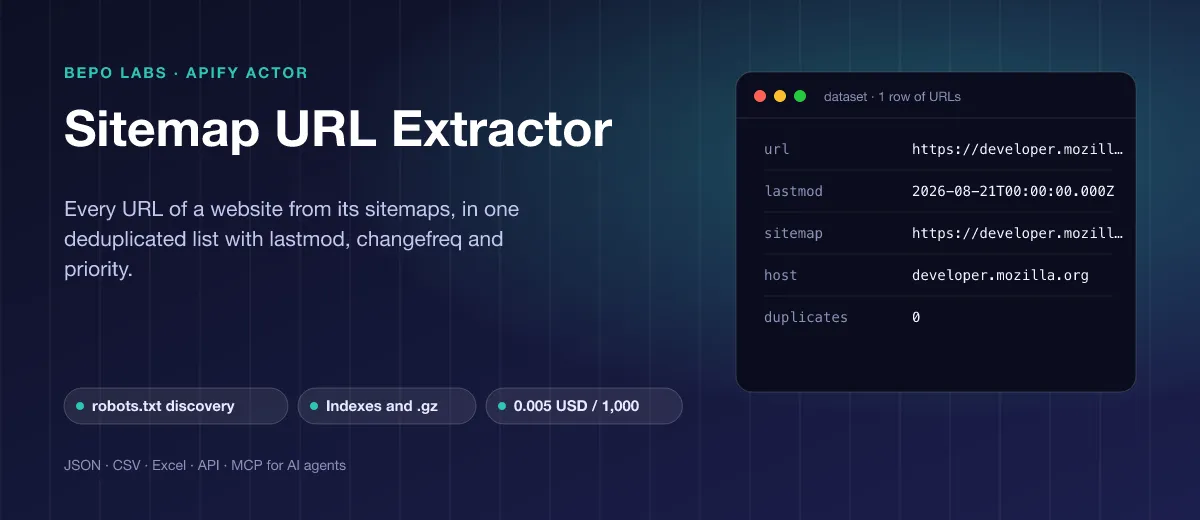
🗺️ What is Sitemap URL Extractor?
This sitemap extractor takes a domain, finds its sitemap.xml and every nested index, unzips archives and parses text versions. You get one clean set of URLs the owner published; only those documents are fetched, never the content itself, so a huge job costs little.
- SEO audits: get the full list of indexable URLs to check status codes, titles, canonicals or internal links
- Crawl planning: hand the exact URL list to a scraper instead of walking the whole site
- Content monitoring: schedule a daily run with
modifiedSinceand see which pages a competitor added or changed - Site migrations: export every old URL before a relaunch and build the redirect map from it
- AI and RAG pipelines: pick the docs or blog URLs of a site and pass them to a Markdown converter for your LLM
✨ Why use this Actor?
- ✅ New: images and language versions: each URL lists its picture links (
images) and its hreflang alternates (alternates), for image SEO and international audits - ✅ A domain is enough: the Actor reads the
Sitemap:lines of robots.txt, else tries/sitemap.xmland/sitemap_index.xml - ✅ Every sitemap format: sitemap indexes to any depth, gzip files, plain-text sitemaps, namespaced tags, CDATA and entities
- ✅ No duplicates: a URL in several sitemaps is saved once, keeps its latest lastmod and records how often it appeared
- ✅ Filters built in: include or exclude URLs by regular expression, keep only URLs changed since a date, same host only
- ✅ Polite by design: one request per sitemap file, its own user agent, and sitemaps the site's robots.txt disallows are not fetched
- ✅ Very cheap: 0.5 USD per 1,000 URLs; duplicates, filtered URLs and failed sitemaps cost nothing
📦 What data can you get with Sitemap URL Extractor?
| 🔗 URL | 📅 Last modified (lastmod, ISO) | 🔁 Change frequency |
| ⭐ Priority | 🗺️ Sitemap it was found in | 🌐 Host |
| 👯 Duplicate count | 📋 Run summary: every sitemap read, its type and URL count | ⚠️ Failed sitemaps with the reason |
Sites publish lastmod, changefreq and priority as they like: when a site leaves one out, the field is null. The Actor never guesses a date.
🚀 How to use Sitemap URL Extractor
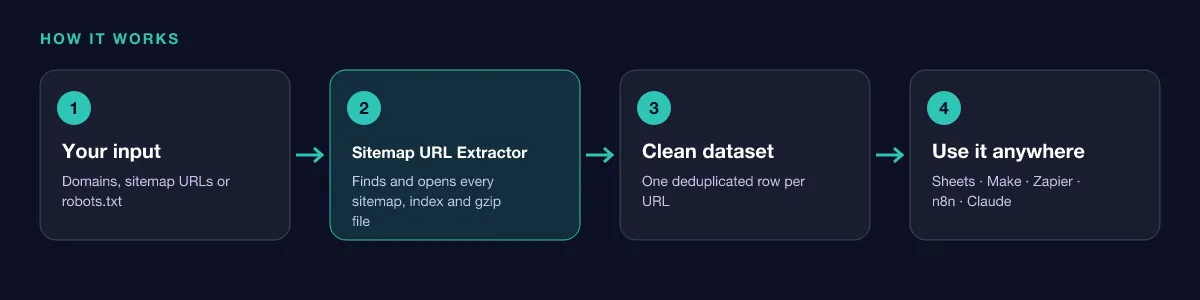
Sitemap URL Extractor works in a few clicks, no coding needed:
- Create a free Apify account (the free plan includes 5 USD of monthly credit).
- Open Sitemap URL Extractor and click Try for free.
- Enter one or more domains, sitemap URLs or robots.txt URLs. Optionally set a URL pattern, a date in
modifiedSinceor a URL limit. - Click Start and wait for the run to finish (most runs take seconds).
- Download your data as JSON, CSV, Excel, XML or HTML, or send it straight to Google Sheets, Make, Zapier or your AI agent.
⬇️ Input
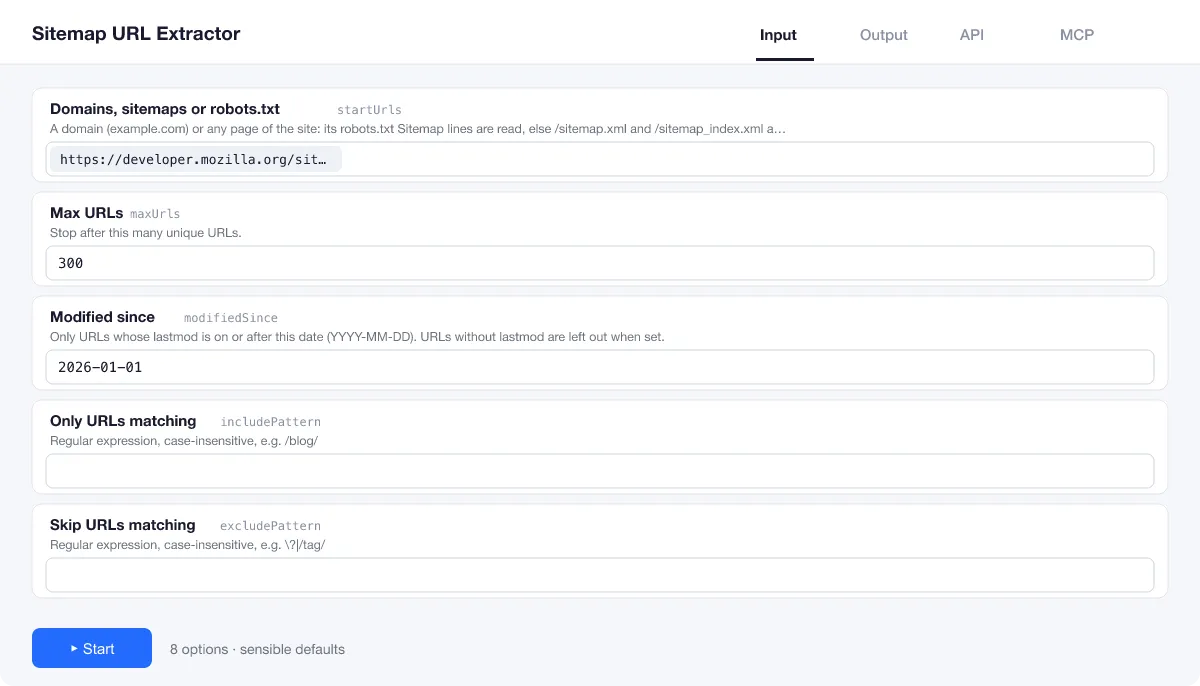
Add up to 100 domains, pages, sitemap URLs or robots.txt URLs. Everything else is optional.
Which start?
A domain or any page of the site (example.com) starts from the standard crawler rules. A sitemap URL (index, .xml, .xml.gz or .txt) is read directly. A robots.txt URL reads every sitemap it lists.
Only some URLs
includePattern and excludePattern are case-insensitive regular expressions, for example /blog/ or \?|/tag/. modifiedSince (YYYY-MM-DD) keeps only URLs with a lastmod on or after that day.
Big sites
The run stops at maxUrls unique URLs (10,000 unless changed, up to 1,000,000) or after maxSitemaps sitemap files (500 by default). The run summary says when a limit was hit.
| Field | Type | What it does | Default |
|---|---|---|---|
Domains, sitemaps or robots.txt (startUrls) | array | A domain (example.com) or any page of the site: its robots.txt Sitemap lines are read, else /sitemap.xml and /sitemap_index.xml are tried. | ["apify.com"] |
Max URLs (maxUrls) | integer | Stop after this many unique URLs. | 10000 |
Only URLs matching (includePattern) | string | Regular expression, case-insensitive, e.g. | |
Skip URLs matching (excludePattern) | string | Regular expression, case-insensitive, e.g. | |
Modified since (modifiedSince) | string | Only URLs whose lastmod is on or after this date (YYYY-MM-DD). | |
Same site only (sameHostOnly) | boolean | Drop URLs on other hosts than the start or its sitemap (www. | true |
Max sitemaps (maxSitemaps) | integer | Stop after reading this many sitemap files (indexes included). | 500 |
Retries (maxRetries) | integer | Retries per sitemap on timeouts, 429 and 5xx. | 2 |
Input example
⬆️ Output
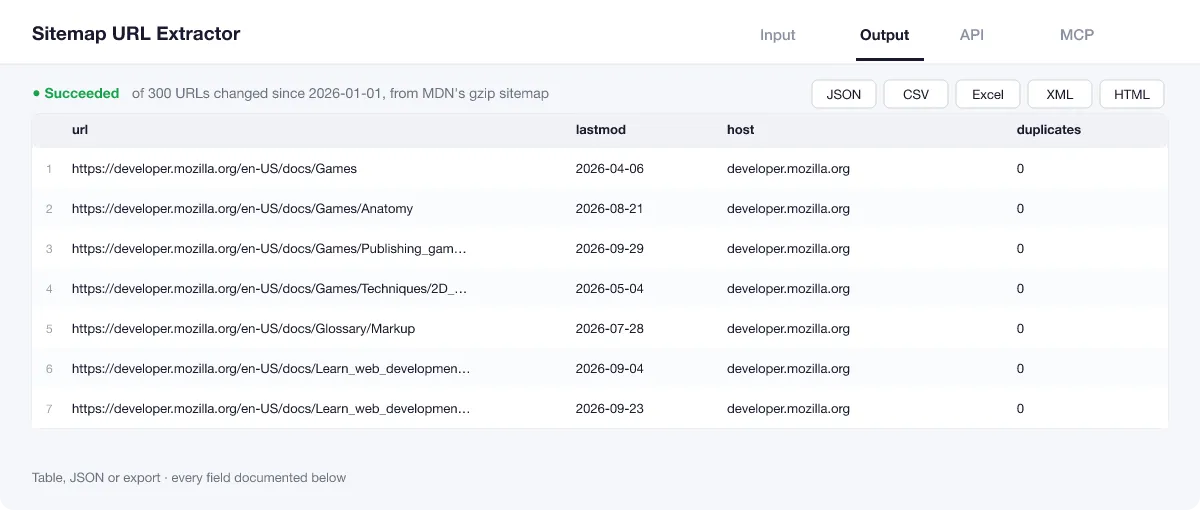
Every unique URL becomes one row. The run summary in the key-value store (OUTPUT) lists every sitemap that was read, with its type (index, urlset or text), the URLs it held and the error if it failed, plus how many URLs were filtered out.
Output example
One row of the dataset (local run on MDN's gzip sitemap, 2026-10-16):
Run summary (OUTPUT)
The key-value store record OUTPUT of a real run on nodejs.org/robots.txt with includePattern /learn/ (local run, 2026-10-16): two sitemaps found through robots.txt, 89 URLs kept, 1,657 filtered out.
View the results as a table or JSON in the Output tab and download them as JSON, CSV, Excel, XML, HTML or RSS, all fields or only those you pick.
💰 How much does Sitemap URL Extractor cost?
Sitemap URL Extractor is priced per event: 0.5 USD per 1,000 URLs (0.0005 USD per URL), with no monthly rental. Each unique URL saved to the dataset is billed; duplicates, filtered URLs and sitemaps that fail cost nothing.
| You get | You pay |
|---|---|
| 100 URLs | 0.05 USD |
| 1,000 URLs | 0.5 USD |
| 10,000 URLs | 5 USD |
| 100,000 URLs | 50 USD |
💡 Apify's free plan gives you 5 USD of credit every month, enough for about 10,000 URLs at no cost. Set a spending limit per run and the Actor stops there.
⚖️ Sitemap URL Extractor vs. the alternatives
| Sitemap URL Extractor | Online sitemap viewers | Full-site crawlers | |
|---|---|---|---|
| Finds the sitemaps from a domain | ✅ robots.txt + common paths | often needs the sitemap URL | ✅ |
| Sitemap indexes and .xml.gz | ✅ | sometimes | ✅ |
| lastmod, changefreq, priority | ✅ | ✅ | rarely |
| Changed-since and pattern filters | ✅ | ❌ | some |
| Speed on a 100,000-page site | ✅ reads only the sitemaps | page limits | visits every page |
| API, schedules and MCP for AI agents | ✅ | ❌ | ✅ |
🔌 Integrations, API and MCP
Connect Sitemap URL Extractor to your AI agent (MCP)
Give Claude, ChatGPT, Cursor or any MCP client direct access to Sitemap URL Extractor through the Apify MCP server. Add this URL to its settings:
For Claude Desktop, add it under mcpServers in claude_desktop_config.json:
Then ask: "List every blog URL in the sitemap of example.com that changed since the first of this month."
Run it from your code
Python (pip install apify-client):
JavaScript (npm install apify-client):
No-code integrations
Send results to Google Sheets, Slack, Airtable, HubSpot, Make, Zapier, n8n and more from the Integrations tab, start runs on a schedule, or trigger your own endpoint with a webhook when a run finishes. The Apify API gives you full control over runs and datasets.
❓ FAQ
The site has no sitemap. What do I get?
An empty list, which costs nothing, and a run summary in OUTPUT naming each sitemap tried (robots.txt lines, /sitemap.xml, /sitemap_index.xml) and why it failed. The run fails only when no sitemap could be read at all.
Why are some lastmod values null?
The site did not publish a lastmod for that URL. The Actor never invents a date.
How do I get only new or changed pages?
Use modifiedSince (YYYY-MM-DD). URLs without a lastmod are left out then. Run it on a schedule to watch a site for changes.
Does it visit the pages?
No. It reads only robots.txt and the sitemap files, one request per file. To get the text of the pages, pass the URLs to Website to Markdown.
The run stopped at 10,000 URLs.
That is the default maxUrls. Increase it (up to 1,000,000), or maxSitemaps for sites with many sitemap files; the summary says when a limit was hit.
Does it keep URLs on other domains?
By default only URLs on the same host as the start address or its sitemap (www. ignored). Switch off sameHostOnly to keep all of them.
Is it legal to use Sitemap URL Extractor?
Sitemaps and robots.txt are published on purpose so that crawlers can find a website's pages; reading them is exactly what they are for. The Actor fetches only these documents, one call each, with its own user agent, and skips any that the rules disallow. You choose the sites and are responsible for how the list is used.
What if something is missing or does not work?
Open an issue on the Issues tab; we read each one and reply. Feature requests are welcome too.
💬 Your feedback
Tell us what Sitemap URL Extractor should add on the Issues tab or leave a review; your notes decide what we work on next.
🔗 Related Actors
| Actor | What it does |
|---|---|
| 🔗 Broken Link Checker | Every link and image on your pages checked: HTTP status, each redirect hop, final URL and response time. |
| 🩺 SEO Audit | Any page to a 0 to 100 SEO score and grade, with the fixes that matter most first: on-page, links and Core Web Vitals. |
| ⚡ Bulk PageSpeed Insights | Lighthouse scores, lab metrics and real-user Core Web Vitals for any list of URLs, on mobile, desktop or both. |
| 📸 Website Screenshot | Full-page PNG, JPEG or PDF of any URL, on desktop, tablet and phone, with cookie banners closed. |
| 📝 Website to Markdown | Any web page or docs site to clean Markdown for LLMs, RAG and AI agents, with headings, links and ready-made chunks. |
| 🌐 Domain RDAP and DNS | Domains to registrar, creation and expiry dates, age, status, nameservers, DNSSEC and DNS records from official RDAP, in bulk. |
| 📈 Google Trends Scraper | Interest over time for up to five keywords on one 0 to 100 scale, any country or worldwide, plus top and rising related queries. |
| 🧩 Tech Stack Detector | Any list of domains to the technologies behind each site: CMS, shop, framework, analytics, CDN and hosting. |


