

LinkedIn Post Search Scraper: Keywords & Engagement
Pricing
$3.00 / 1,000 post collecteds
LinkedIn Post Search Scraper: Keywords & Engagement
Search public LinkedIn posts by keyword. Export text, author profiles, dates, reactions and comment counts as JSON, CSV or Excel. No login or cookies required.
Pricing
$3.00 / 1,000 post collecteds
Rating
0.0
(0)
Developer

Capable Cauldron
Maintained by CommunityActor stats
0
Bookmarked
3
Total users
2
Monthly active users
3 days ago
Last modified
Categories
Features
Share
LinkedIn Post Search Scraper is a LinkedIn post search scraper that finds public posts by keyword and exports their text, authors, dates and available engagement. No LinkedIn login or cookies are required. Set limits for each search and the whole run.
Choose Try for free to open the Actor's input form. Apify's free plan provides a monthly platform allowance; how many results it covers depends on the active price and platform usage. Scheduled runs, webhooks and dataset exports fit into existing research workflows.
See a real run in 47 seconds:
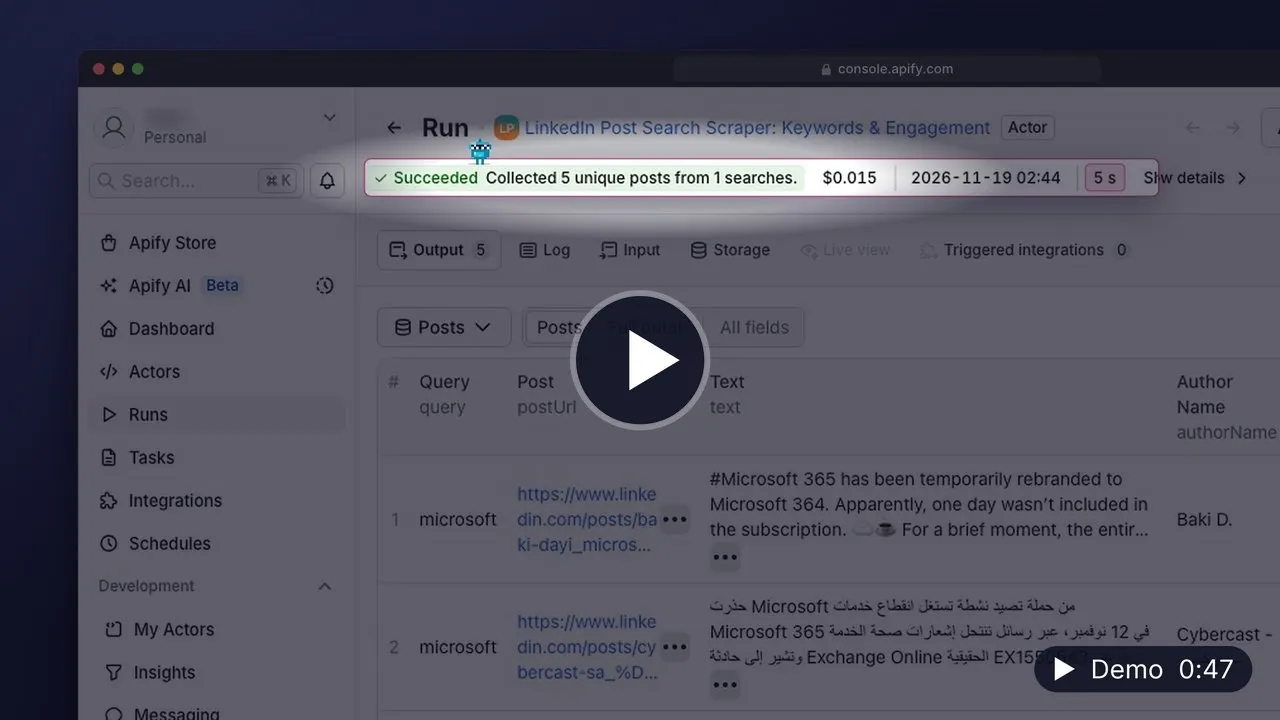
▶️ Watch the 47-second demo (MP4, 24 MB, opens in your browser) · Transcript
What can LinkedIn Post Search Scraper do?
- 🔍 Find public LinkedIn posts for single or multiple keyword searches.
- 📝 Export post text, author names, headlines and LinkedIn profile links.
- 📊 Collect available reaction and comment counts with each post.
- 📅 Restrict returned posts to a selected age, including the past day, week or month.
- 📤 Export unique posts as CSV, Excel or JSON for analysis.
Results are ordered by relevance. This Actor does not promise an exhaustive archive or chronological search. Counts can change after a post is collected. Missing engagement stays null rather than being reported as zero. Textually similar posts with different identities remain separate posts.
How to scrape LinkedIn post search results
- Open the Actor's input form.
- Add keywords such as
microsoftorartificial intelligence. - Choose the maximum posts per query and maximum posts per run.
- Start the run and inspect the Posts dataset view.
- Export your results or connect the completed dataset to your workflow.
Start with a small search. A result cap is an upper bound, and fewer posts may be returned. Narrow post ages can exclude otherwise relevant matches. The Actor keeps the first matching search query when the same post appears in multiple searches.
How much does it cost to scrape LinkedIn post search results?
Pay $0.003 per unique post delivered to the dataset, or $3.00 per 1,000 posts. Platform usage is included in this price. There is no separate start charge.
| Event | Unit | Price |
|---|---|---|
post-scraped | One new post delivered | $0.003 |
For example, 100 delivered posts would cost $0.30 in result charges. A run delivering 1,000 posts would cost $3.00 in result charges. Duplicate posts, failed searches and searches without results have no result charge. Set maxPosts and the run's maximum cost to control spending. The free plan allowance is shared with other platform activity, so these examples do not guarantee a free result quantity.
Input
| Field | Type | Default | Meaning |
|---|---|---|---|
searchQueries | array of strings | Required | One to twenty keyword searches, each 1 to 200 characters |
maxPostsPerQuery | integer | 50 | Maximum unique posts for each query, from 1 to 500 |
maxPosts | integer | 200 | Maximum unique posts across the run, from 1 to 1,000 |
maxPagesPerQuery | integer | 5 | Search depth per query, from 1 to 50; results may be incomplete |
postedWithin | string | any | any, 24h, week or month; posts without a known date are excluded when an age is selected |
One run reads at most 100 search result pages across all queries, which is about 1,000 posts. Queries left when that depth is used up are listed as skipped in the run summary.
Output
Each dataset item represents one unique post. This illustrative example shows the shape of a Microsoft search result; live content and dates vary:
The Posts view shows text, links, authors, dates and engagement. Full detail includes media links and attachment indicators. The OUTPUT record contains a run status, total posts and per-query outcomes. Search limits or repeated results can end a search early; the summary says when coverage may be incomplete. A zero-result search is not proof that no matching LinkedIn posts exist.
Use cases
- LinkedIn brand monitoring: find company mentions. Find public posts discussing Microsoft and collect text, authors and engagement for brand research.
- LinkedIn AI post search: discover industry discussions. Find posts about artificial intelligence and export authors, post links and available engagement.
- LinkedIn hiring posts: find recruiting conversations. Search posts about hiring sales teams to identify public recruiting conversations and relevant authors.
- LinkedIn product launch posts: research new releases. Collect relevant product launch conversations with post text, publication dates and available engagement.
- LinkedIn marketing posts from the past week. Find relevant content marketing posts with known dates from the past seven days. Coverage may be incomplete.
- LinkedIn post search: compare multiple business topics. Search three business topics in one run and export unique posts for market research and content planning.
API and integrations
Call capable_cauldron/linkedin-post-search-scraper through Apify and read the resulting dataset.
Python:
JavaScript:
CLI:
Schedule searches in Apify or send completed datasets to Google Sheets, Make, Zapier or n8n. A completion webhook can notify your application when exported posts are ready.
FAQ
Do I need LinkedIn login cookies?
No. Supply keywords and result limits in the input form.
Does this find every recent post?
No. Results are relevant matches rather than an exhaustive chronological archive. A selected post age restricts returned records, but recent matches can still be missed. Increase search depth cautiously if you need broader coverage.
Does this collect comments or search ads?
No. The Actor returns organic post search results and available comment counts. Use the related comment Actors to collect comment text from known post links.
Is it legal to use these results?
Use the results responsibly and respect applicable privacy rules and LinkedIn's terms. Public availability does not remove restrictions on reuse or outreach. Consult your own advisers when your intended use requires a legal assessment.
Other Actors by capable_cauldron
| Actor | What it does |
|---|---|
| App Store Reviews Scraper | App Store Reviews Scraper: iOS Reviews & Ratings |
| Company Job Postings Scraper | Job Postings Scraper: Greenhouse, Lever, Ashby & Workable |
| Bulk Email Validator | Bulk Email Validator: Syntax, MX, Disposable & Role Checks |
| Verified Work Email Finder | LinkedIn Email Finder: Verified Work Emails |
| GTM Account Enrichment | GTM Account Enrichment: Contacts, Tech, Hiring & Fit Score |
| Investor Database Search | Investor Database Search: VC & Angel Investor Contacts |
| LinkedIn Comment Scraper | LinkedIn Comment Scraper: Comments & Replies |
| LinkedIn Post Comments Scraper | LinkedIn Post Comments Scraper (No Cookies) |
| LinkedIn Profile Posts & Comments Scraper | LinkedIn Profile Posts & Comments Scraper (No Cookies) |
| LinkedIn Profile Posts Scraper | LinkedIn Posts Scraper: Profile Posts & Engagement |
| Ad Scraper: Meta, Google, LinkedIn & TikTok | Ad Scraper: Meta, Google, LinkedIn & TikTok |
| TikTok Shop USA Scraper | TikTok Shop USA Scraper: Products, Shops, Creators |
| Website Contact Scraper | Website Contact Scraper: Emails, Phones & Social Links |
| Website Tech Stack Detector | Website Tech Stack Detector: Technology Lookup for Any Site |
Support
Report reproducible problems through the Actor's Issues tab. Include the run link and a description of the missing result or field, without credentials. We aim to respond within two business days. Custom fields and private workflow adaptations can be discussed there.


