

Bulk Email Validator: Syntax, MX, Disposable & Role Checks
Pricing
$0.50 / 1,000 email validateds
Bulk Email Validator: Syntax, MX, Disposable & Role Checks
Clean an email list before you send. Checks syntax, MX records, disposable and role addresses, free providers and typos like gmial.com, and returns VALID, RISKY, INVALID or UNKNOWN with a score. Paste emails or point it at another run's dataset.
Pricing
$0.50 / 1,000 email validateds
Rating
0.0
(0)
Developer

Capable Cauldron
Maintained by CommunityActor stats
0
Bookmarked
2
Total users
1
Monthly active users
3 days ago
Last modified
Categories
Features
Share
Email Validator is a bulk email validator that cleans an email list before you send. It checks every address for valid syntax, live MX records, disposable inboxes, role accounts like info@ and sales@, free providers like Gmail, and common typos such as gmial.com or .con. Each email comes back as VALID, RISKY, INVALID or UNKNOWN with a short reason and a 0 to 100 score, so you can drop bad rows, fix typos and protect your sender reputation.
This Actor flags address and domain risks; it does not confirm whether a specific mailbox exists. When you need verified addresses, use Verified Work Email Finder, which returns emails that have already been verified. Like every Apify Actor, it runs on a schedule, through the API, and inside Make, Zapier, n8n and Clay workflows.
Click Try for free, paste your emails and press Start. The Apify free plan gives you $5 of credit every month, which covers about 10,000 email checks.
See a real run in 47 seconds:
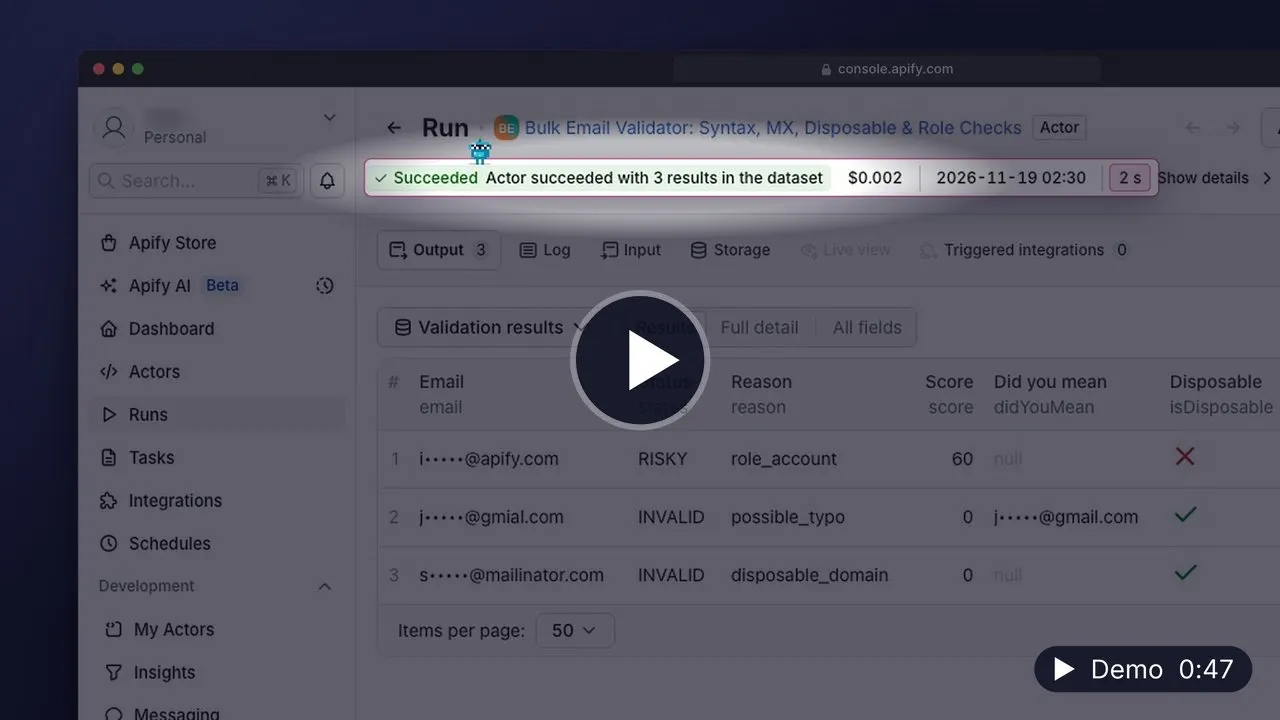
▶️ Watch the 47-second demo (MP4, 20 MB, opens in your browser) · Transcript
What can Email Validator do?
- ✅ Checks syntax the way mail servers do, normalizes case and whitespace, strips
mailto:links, and converts international domains (bücher.de) to their DNS form - 📮 Looks up MX records for every domain and catches dead domains, domains that publish "no mail accepted" (null MX), and domains with no mail server at all
- 🗑️ Flags disposable email domains including subdomains
- 👥 Marks role accounts (info, sales, support, admin, noreply and about 80 more) that reach a team instead of a person
- 🆓 Tags free providers (Gmail, Outlook, Yahoo, iCloud, Proton, GMX, Yandex, Mail.ru, QQ, 163 and more) so you can separate B2B from personal addresses
- ✏️ Suggests a fix for typos:
john@gmial.comgetsdidYouMean: john@gmail.com - 🔗 Validates the email column of another run's dataset, so it slots in right after any lead scraper
- ⚡ Supports large batches and returns one verdict per input address
| Status | Meaning | What to do |
|---|---|---|
VALID | Good syntax, the domain accepts mail, no red flags | Send |
RISKY | Role account, likely typo, or a domain without an MX record | Review, fix the typo, or send with care |
INVALID | Broken syntax, dead domain, no mail server, or disposable inbox | Remove |
UNKNOWN | DNS did not answer in time | Re-run later |
How to validate an email list
- Open the Actor and click Try for free. Sign up with Google, GitHub or email; no credit card is needed.
- Paste your addresses into Emails, one per line. Commas and semicolons work too.
- Or put a Dataset ID from an earlier run (for example a lead or contact scraper) and tell it which Email column to read.
- Click Start. Results stream into the dataset in the same order as your list.
- Filter by
status, then download CSV, Excel or JSON, or send the clean list to Google Sheets, HubSpot or your email tool with an integration.
How much does it cost to validate emails?
You pay per unique email checked. Duplicates in your list are checked and billed once.
| Event | Price |
|---|---|
| Email validated | $0.0005 |
That is $0.50 per 1,000 emails. Platform compute is included, so the event table is the whole bill.
Worked examples:
- A 1,000-row lead list costs $0.50.
- A 20,000-contact CRM export costs $10.00.
- The free plan. $5 of monthly credit validates about 10,000 emails.
A useful workflow is to clean the list here first, then use an SMTP verification service when you need mailbox-level checks. To cap spending, set Maximum cost per run in the run options; the Actor stops cleanly at the cap and keeps every result so far.
Input
| Field | Type | Default | Description |
|---|---|---|---|
emails | array | — | Addresses to check. One per line; commas and semicolons also separate them. |
datasetId | string | — | Optional. Validate the emails in another Apify dataset as well. |
emailField | string | email | The dataset field that holds the email. A single address or a list both work. |
checkMx | boolean | true | Look up the mail servers for each domain. Off means syntax and list checks only. |
maxConcurrency | integer | 20 | Domains looked up in parallel (1 to 100). |
Validating the output of another Actor
Every Apify run has a default dataset. Copy its ID from the run's Storage tab (or defaultDatasetId in the API) into datasetId, and set emailField to the column name, such as emails for Website Contact Scraper. Rows where the field holds a list of addresses are expanded, one result per address.
How the score works
| Result | Score |
|---|---|
| VALID, MX checked | 90 |
| VALID, MX not checked | 70 |
| RISKY, role account | 60 |
| RISKY, no MX record but the domain has a web server | 50 |
| UNKNOWN | 40 |
| RISKY, possible typo | 20 |
| INVALID | 0 |
The highest score is 90, because a DNS check cannot prove that a specific mailbox exists.
Output
One row per unique email, in the order you gave them. Here is the row for the typo in the example input:
gmial.com is a typo-squat domain on the disposable blocklist, so mail sent there reaches a stranger instead of John. The row says INVALID and gives the corrected address. Possible values of reason: ok, ok_mx_not_checked, role_account, possible_typo, no_mx_records_a_fallback, syntax, empty, disposable_domain, domain_not_found, null_mx, no_mx_records, dns_timeout, dns_servfail, dns_error.
The dataset has a Results view and a Full detail view with the MX hosts. Counts of valid, risky, invalid and unknown emails are saved to the OUTPUT record in the key-value store.
Use cases
Start with one of these six prefilled examples:
- Clean a business email list with DNS checks
- Find common email domain typos
- Identify disposable email addresses in a list
- Separate role inboxes from named email addresses
- Run a quick email syntax and domain-list check
- Inspect mail-routing evidence for email domains
API and integrations
The Actor ID is capable_cauldron/email-validator.
JavaScript:
Python:
CLI:
To validate automatically after another Actor finishes, add a webhook or a Make or Zapier step that starts this Actor with the finished run's defaultDatasetId.
FAQ
Is it legal to validate email addresses?
Checking the syntax and DNS records of an address is a technical lookup that sends no email and touches no mailbox, and the DNS records it reads are public. What you do with the list afterwards is regulated: under GDPR, CAN-SPAM, CASL and similar laws you need a lawful basis to email people and must honor opt-outs. Ask a lawyer if you are unsure about your use.
Does this verify that the mailbox exists?
No. It checks everything that can be checked without connecting to the recipient's mail server. Mailbox-level checks need an SMTP conversation, which is blocked or unreliable from cloud servers and can hurt your sending reputation. For verified addresses, use Verified Work Email Finder.
Why is an address RISKY instead of VALID?
It is a role account (info@, sales@), the domain looks like a typo of a big provider, or the domain has no MX record and only a web server. The reason field says which. These addresses often work, but they deserve a look before a cold campaign.
What does UNKNOWN mean?
The DNS resolvers did not answer for that domain after several retries on two providers. It is not a verdict about the address; run those rows again later.
Can I validate emails with Python?
Yes. Use the Python example above, or call the Apify API from any language. Results are plain JSON.
How is this different from other email validators?
It is cheaper than SMTP verifiers for the checks it does, reads another run's dataset directly, fixes typos with a suggested address, and explains every verdict with a reason and a score instead of a bare yes or no.
Other Actors by capable_cauldron
| Actor | What it does |
|---|---|
| App Store Reviews Scraper | Reviews and ratings for iPhone and iPad apps, grouped by app and country |
| Company Job Postings Scraper | Open roles and hiring summaries from supported company job boards |
| Verified Work Email Finder | Verified professional emails from LinkedIn URLs or a name and company domain |
| GTM Account Enrichment | Public company contacts, technologies and hiring signals with an account fit score |
| Investor Database Search | Filter investors by stage, industry and geography and export available partner contacts |
| LinkedIn Comment Scraper | LinkedIn comments and replies using your own session cookies |
| LinkedIn Post Comments Scraper | Comments, replies and reactions on public LinkedIn posts without cookies |
| LinkedIn Profile Posts & Comments Scraper | Posts from any LinkedIn profile with up to 50 comments and replies per post, no cookies needed |
| LinkedIn Profile Posts Scraper | Public profile posts with 56 enriched fields, including engagement and content metadata |
| Ad Scraper: Meta, Google, LinkedIn & TikTok | Competitor ads from Meta, Google, LinkedIn and TikTok in one dataset |
| TikTok Shop USA Scraper | US product, shop, creator and shoppable-video data from TikTok Shop |
| Website Contact Scraper | Public emails, phone numbers and social profile links from company websites |
| Website Tech Stack Detector | Visible website technologies and the evidence supporting each detection |
| LinkedIn Post Search Scraper | Keyword searches for public LinkedIn posts with text, authors and engagement |
Support
Found a wrong verdict or a missing provider or role name? Open an issue on the Actor's Issues tab with the address (or just its domain). Issues are usually answered within 24 hours. Custom versions, such as your own blocklists or a CRM sync, are available on request.


