

Apna.co Jobs Scraper: India Jobs, Salaries & Filters
Pricing
from $0.63 / 1,000 jobs
Apna.co Jobs Scraper: India Jobs, Salaries & Filters
Scrape Apna.co jobs in India by keyword, city and category: title, company, area, monthly salary, experience, education and posting date. Build hiring lists for a city, catch new jobs with repeat runs and export to CSV or JSON.
Pricing
from $0.63 / 1,000 jobs
Rating
0.0
(0)
Developer

Cliqto Media
Maintained by CommunityActor stats
0
Bookmarked
2
Total users
1
Monthly active users
6 days ago
Last modified
Categories
Features
Share
Search Apna.co jobs in India by keyword, city and category, and get one clean row per job: title, company, city, area, monthly salary in INR, experience, education, job type, posting date and the job link.
Use it to build India job lists, track hiring in a city or feed jobs into a sheet or app. The smallest run is one keyword and one city: delivery in Bangalore gives 20 jobs in under a minute for about $0.02. No Apna account or login is needed.
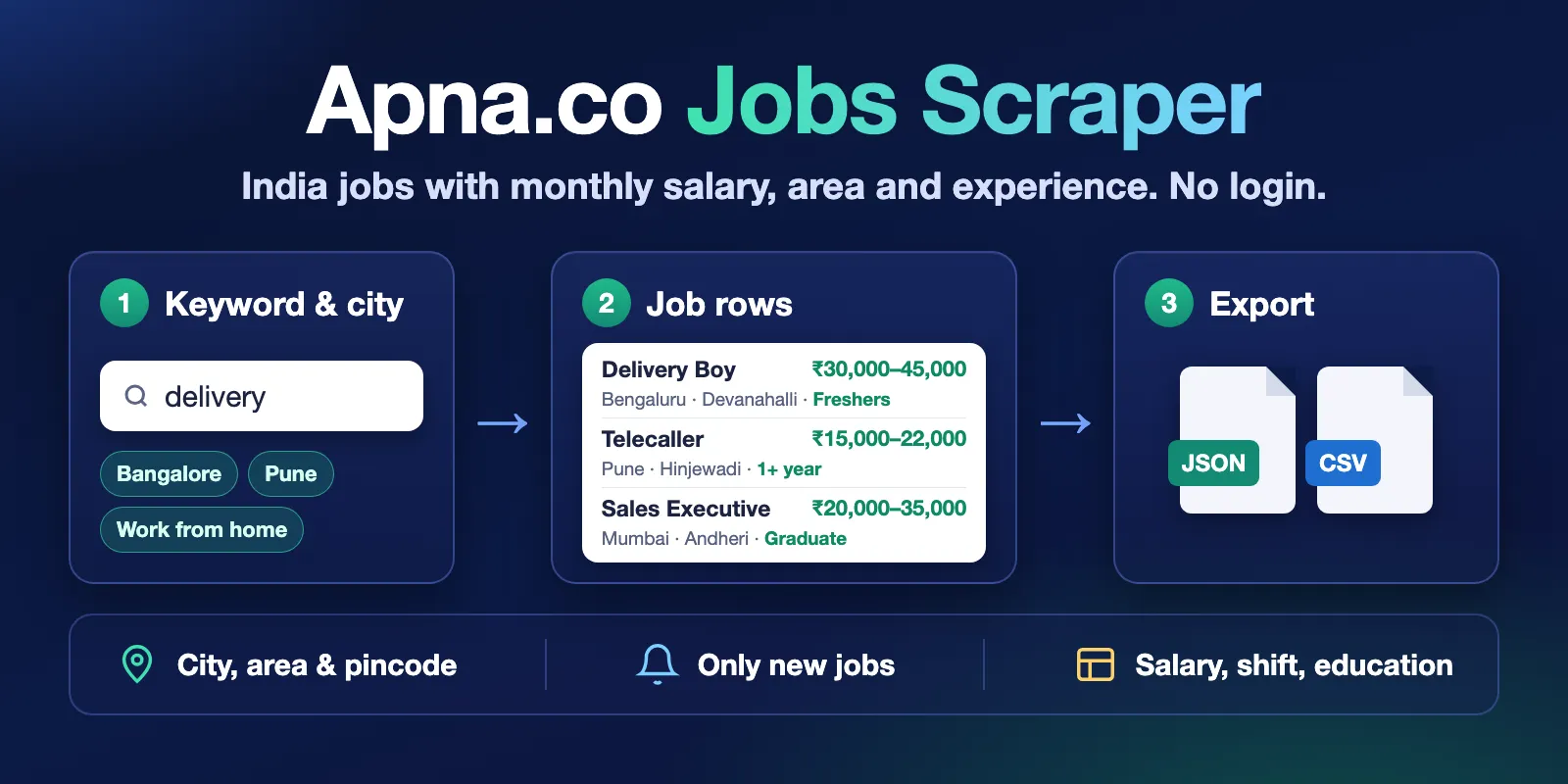
Table of contents
- What it does
- How it works
- Quick start
- Use cases
- Input
- Output
- Pricing
- Limits
- API, export and integrations
- Troubleshooting
- FAQ
- Related Actors
- Support
What it does
The Actor reads public job ads from Apna.co, a large job site in India for delivery, sales, telecaller, driver, office and many other jobs. You give keywords, cities or categories. It returns jobs as Dataset rows that you can export to Excel, CSV or JSON.
Each row has the job title, company, city and area, salary from and to per month in rupees, experience, education, English level, full time or part time, work mode (office, work from home, field), shift, posting date and the apna.co link. With job details on (the default), a row also has the full description, skills, address, pincode and map coordinates.
No login is needed. The Actor does not collect employer phone numbers or emails: if a description has one, it is replaced with [contact hidden].
Good fit
- Get all delivery or telecaller jobs in one city with salary and area.
- Compare pay for one job type across several Indian cities.
- Watch a search every day and get only new jobs (monitoring).
- Find work from home jobs or jobs near a point on the map.
How it works
- The Actor finds each city on Apna and runs one search for each keyword, city and category.
- It reads the result pages (25 jobs per page) and, if you want details, opens each job page.
- It applies your filters (salary, experience, date, company, distance and others), removes duplicates and saves one row per job.
- At the end it saves a short run report (
RUN_SUMMARY) with counts, warnings and the reason the run stopped.
Quick start
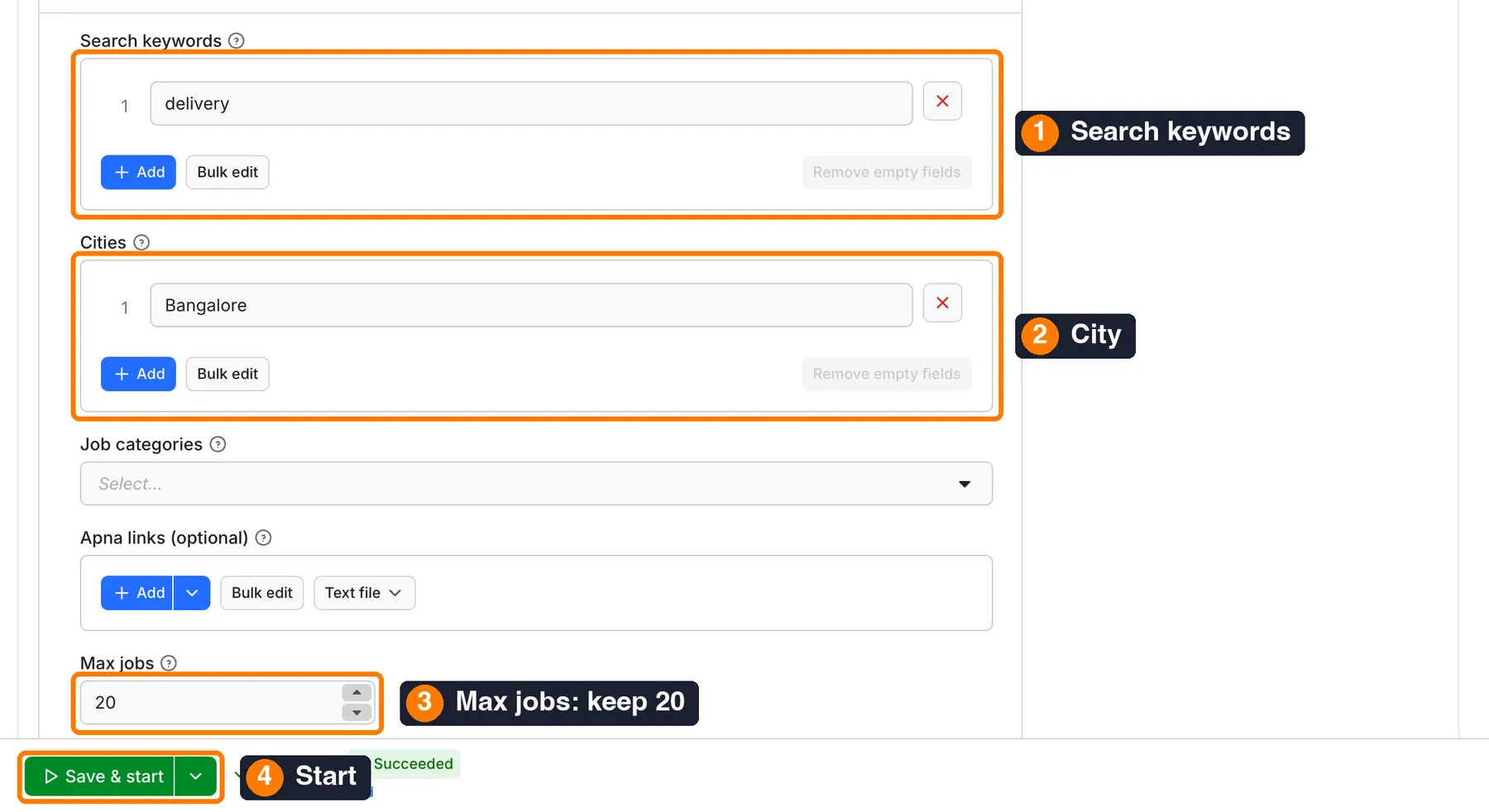
-
Open the Input tab. The form already has
deliveryin Search keywords (box 1). -
Keep
Bangalorein Cities or type your own city (box 2). -
Keep Max jobs at 20 for a first test (box 3). The default for API runs is 100.
-
Click Start (box 4).
-
Open the Output tab and check the
title,company,salaryMinandsalaryMaxcolumns.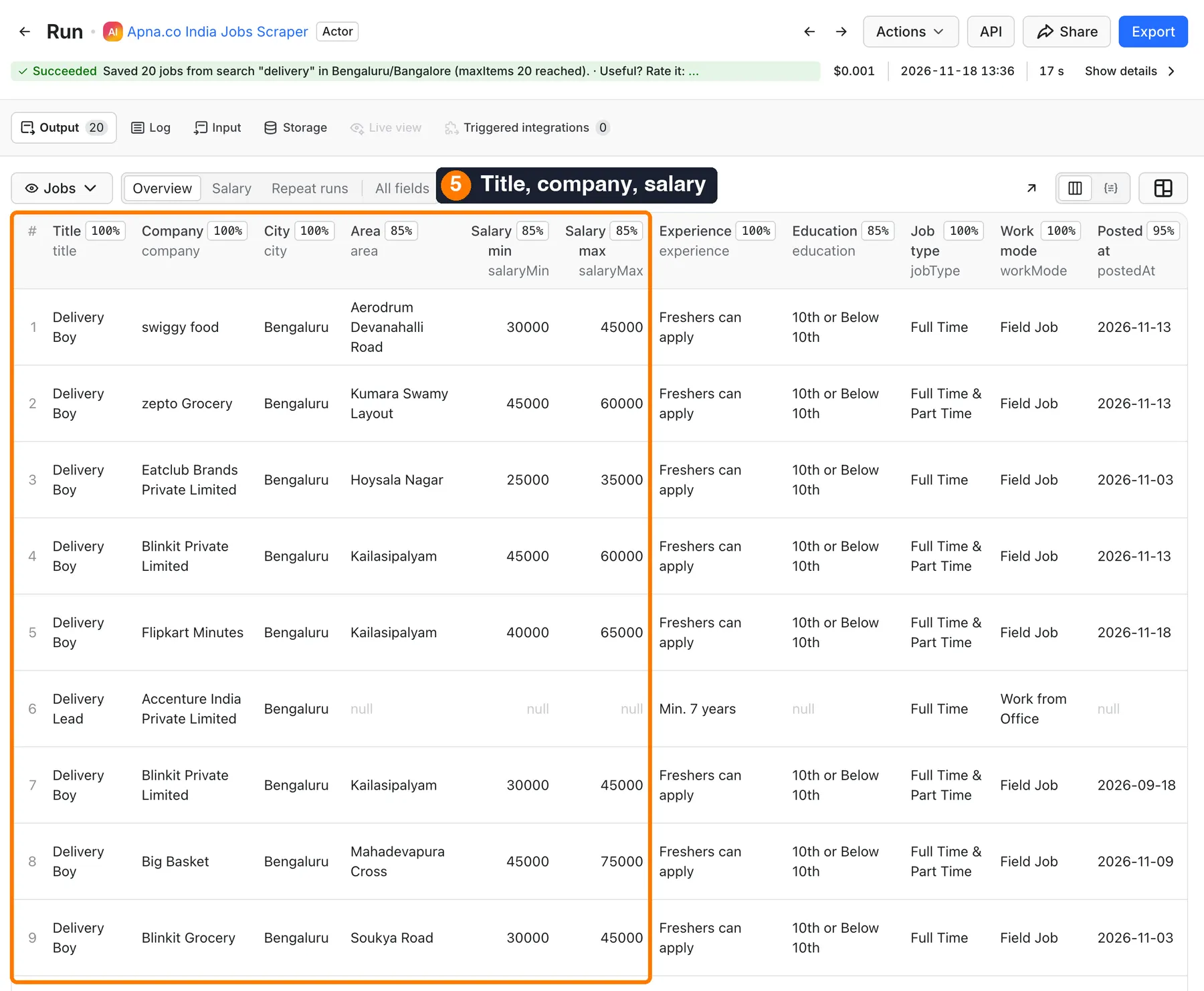
Expected result: 20 delivery jobs in Bengaluru with company, area, salary and link, usually in 13–50 seconds.
Use cases
| Buyer job | Input path | Output entity | Key fields | Next integration |
|---|---|---|---|---|
| Job list for one city | searchQueries, cities | Job | title, company, area, salaryMin, url | CSV / Google Sheets |
| Salary research by city | searchQueries, several cities | Job | city, salaryMin, salaryMax, experience | Excel, BI tool |
| Daily new jobs alert | monitoringMode = newOnly, schedule | Job with changeType | changeType, title, postedAt, url | Slack or Notion summary |
| Work from home jobs | workMode = home | Job | workMode, title, salaryMin | CSV / API |
| Jobs near an address | nearLatitude, nearLongitude, radiusKm | Job | latitude, longitude, address, pincode | Map app |
Input
Input fields
| Field | Plain name | Type | Required | Default / prefill | Allowed values | Effect | Example | Recommendation |
|---|---|---|---|---|---|---|---|---|
searchQueries | Search keywords | array of text | no | prefill ["delivery"] | any keyword, Hindi works | one search per keyword and city | ["telecaller", "data entry"] | short keywords as on Apna |
cities | Cities | array of text | no | prefill ["Bangalore"] | Indian city names, common spellings | one search per city | ["Pune", "Gurgaon"] | empty = all India |
categories | Job categories | array of choices | no | empty | Apna departments | one search per category | ["customer_support"] | use when you have no keyword |
startUrls | Apna links | array of links | no | empty | apna.co job or search links | job link = one row, search link = one search | https://apna.co/jobs?text=driver | for links you already have |
maxItems | Max jobs | number | no | 100, prefill 20 | 1–5000 | stops after this many saved jobs | 500 | each saved job is charged |
workMode | Work mode | choice | no | any | any, office, home, field | Apna filter | home | — |
jobTypes | Job type | choices | no | both | full time, part time | Apna filter | ["part_time"] | — |
educationLevels, englishLevels, shifts, gender | Requirement filters | choices | no | any | Apna values | keep matching jobs | ["graduate"] | — |
minSalary | Minimum monthly salary (₹) | number | no | none | 0–10,000,000 | keep jobs paying at least this | 20000 | — |
maxExperienceYears | Your experience | number | no | none | 0–30 | keep jobs open to this experience | 0 (freshers) | — |
postedWithinDays | Posted within | number | no | 0 (any) | 0–365 | keep recent jobs, needs details | 7 | — |
companies | Companies | array of text | no | empty | name parts | keep these companies | ["Swiggy"] | — |
sortBy | Sort by | choice | no | relevance | relevance, latest, salary | order of Apna results | latest | use latest for monitoring |
nearLatitude, nearLongitude, radiusKm | Near a point | numbers | no | none | lat/lon, 0.1–500 km | keep jobs inside the circle, needs details | 12.97, 77.59, 10 | — |
includeDetails | Include job details | yes/no | no | yes | — | opens each job page | false | turn off for faster, smaller rows |
descriptionFormat, descriptionMaxLength | Description | choice, number | no | text, 0 (full) | text/html, 0–50000 | shape of description | html, 500 | — |
excludeEmptyFields | Leave out empty fields | yes/no | no | no | — | drops empty values | true | — |
excludeJobIds | Skip job IDs | array of text | no | empty | Apna job IDs | these jobs are skipped | ["964154651"] | — |
monitoringMode | Repeat runs | choice | no | all | all, newOnly, changesOnly | saves only new or changed jobs | newOnly | with a schedule |
emitRemoved, stateName, resetState | Monitoring options | yes/no, text | no | no, auto, no | — | removed rows, list name, start over | "bangalore-delivery" | — |
maxConcurrency, maxRequestRetries | Speed and retries | numbers | no | 5, 3 | 1–10, 0–8 | request settings | 3 | keep defaults |
proxyConfiguration | Proxy | proxy | no | none | Apify Proxy or own | usually not needed | — | keep empty |
deliveryConnector, deliveryTarget | Send results to | connector, text | no | none | your MCP connector, Notion page or Slack channel | posts a summary after the run | — | — |
Empty input searches all jobs in India and saves 100 jobs. Repeated keywords and cities are searched once. A city Apna does not know becomes a free invalid_input row and the other searches still run. One run saves at most 5000 jobs; Apna shows at most about 500 jobs for one keyword in one city, so use more keywords or cities for more jobs.
Interacting settings
| When | Input A | Input B | Effective behavior | Example | Cost/result effect |
|---|---|---|---|---|---|
| Many keywords and cities | searchQueries | cities | every keyword × every city | 2 keywords × 3 cities = 6 searches | maxItems counts for all searches together |
| Filter needs details | postedWithinDays, nearLatitude… | includeDetails | details are opened even if includeDetails is off | postedWithinDays: 7 | jobs that do not match cost a small job-checked event |
| Monitoring | monitoringMode | stateName | runs with the same name share the list of seen jobs | newOnly + "pune-all" | seen jobs are not saved again |
| Job links | startUrls | searchQueries | links and searches both run | 1 job link + 1 keyword | each saved job is charged once |
Input examples
Delivery jobs in Bangalore (prefill)
Expected behavior: one search, one result page, 20 job pages opened.
Expected output: 20 jobs with title, company, area, salaryMin, salaryMax.
Limit or cost note: under a minute, $0.0185 on the Free plan.
New work from home jobs every day
Expected behavior: the first run saves up to 200 jobs; the next runs save only jobs not seen before.
Expected output: jobs with changeType = new.
Limit or cost note: seen jobs are not charged as jobs; each one opened for details costs one job-checked event.
Output
Output fields
| Field | Meaning | Type | Can be empty? | Example / enum | Source / notes |
|---|---|---|---|---|---|
jobId | Apna job ID | text | no | 964154651 | from the job link |
title | Job title | text | no | Delivery Boy | |
company | Employer name | text | rarely | swiggy food | as written on Apna |
city | City | text | rarely | Bengaluru | one form, without /Bangalore |
area | Area or locality | text | yes | Aerodrum Devanahalli Road | |
salaryMin, salaryMax | Salary from and to | number | yes | 30000, 45000 | INR per month; salaryMax includes incentive, as Apna shows it |
salaryFixedMin, salaryFixedMax, salaryIncentive | Fixed pay and incentive | number | yes | 30000, 40000, 5000 | empty when Apna shows "Not disclosed" |
experience | Experience text | text | rarely | Freshers can apply | also experienceMinYears, experienceMaxYears |
education | Education needed | text | rarely | 10th or Below 10th | |
english | English level | text | yes | No English Required | |
jobType | Full or part time | text | rarely | Full Time | |
workMode | Office, home or field | text | rarely | Field Job | |
postedAt | Posting date | date | yes | 2026-11-13 | needs details |
description, skills | Job text and skills | text, list | yes | needs details; contacts hidden | |
address, pincode, latitude, longitude | Location | text, number | yes | 560055 | needs details |
url | Job page on apna.co | link | no | https://apna.co/job/... | |
changeType | Monitoring result | text | yes | new, changed, removed | only in monitoring |
status | Row type | text | no | ok, invalid_input | invalid_input rows are free |
The Dataset also has state, category, role, openings, shift, tags, highlights, applyUrl, isExternalJob, searchQuery, searchCity, hasDetails and scrapedAt.
Output entities and surfaces
| Situation | Dataset/API/KVS/live view | Result shape | User action |
|---|---|---|---|
| Normal item | Dataset | one row per job, status = ok | open, export or use the fields |
| Domain-empty result | Dataset empty, RUN_SUMMARY status NO_RESULTS | no rows, message explains why | use a broader keyword or fewer filters |
| Partial result | Dataset + RUN_SUMMARY status PARTIAL | rows saved so far; hasDetails false when a job page failed | read stopReason and warnings |
| Bad input | Dataset row status = invalid_input | field, input and message | fix that value; other searches still ran |
| Technical failure | RUN_SUMMARY with errorCode | run status FAILED on invalid input, when nothing could be read, or when Apna stopped answering, blocked or rate-limited the requests (at once if nothing was answered yet, otherwise after 2 failures in a row); rows saved before that stay in the Dataset | wait and run again |
Output example
This example is trimmed and shows one job from the prefill run. null means Apna does not show the value for this job (for example, salary "Not disclosed" or a field that needs details while includeDetails is off).
Send results to Slack or Notion
Pick your connector in the optional deliveryConnector field. After the run saves its data, the Actor posts a short summary (up to 25 rows and a link to the full dataset) there. Put a Notion page link or a Slack channel ID in deliveryTarget: in Notion every run is added on top of that one page, so your workspace does not fill up with new pages. Without a page link, Notion delivery is skipped and the log says so. A delivery error never fails the run and costs nothing extra. Connect a service once in Apify Console → MCP connectors.
Use case → fields
| Buyer job | Input path | Output entity | Key fields | Next integration |
|---|---|---|---|---|
| City job list | searchQueries, cities | Job | title, company, salaryMin | CSV |
| Daily alert | monitoringMode | Job | changeType, url | Slack / Notion |
| Pay research | several cities | Job | city, salaryMin, salaryMax | Excel |
Pricing
Pricing unit
You pay per event. Apify platform usage is included in the price.
| Event | When | Free plan | Bronze | Silver | Gold and higher |
|---|---|---|---|---|---|
job | one saved job row | $0.000905 ($0.905 / 1000) | $0.00081 | $0.00072 | $0.00063 |
search-page | one Apna result page read (25 jobs) | $0.0001 | $0.0001 | $0.0001 | $0.0001 |
job-checked | one job page opened but not saved | $0.00005 | $0.00005 | $0.00005 | $0.00005 |
apify-actor-start | run start, one per GB of memory (512 MB default = 1) | $0.0003 | $0.0003 | $0.0003 | $0.0003 |
- A valid search with no jobs costs the start and the result pages read.
- A filter that matches nothing costs the pages read and one
job-checkedper job opened. It never costs more than a saved job. - In monitoring, a job seen before is not saved and not charged as
job; if it was opened for details, it costs onejob-checked. invalid_inputrows are free. A link that is not an Apna job is not opened.- When your spending limit is reached, the run stops and keeps the rows saved so far.
Cost examples
Measured runs on the Free plan:
| Scenario | Input scope | Events | Charge | Time | Stop/cap behavior |
|---|---|---|---|---|---|
| Prefill | delivery, Bangalore, 20 jobs | 20 jobs, 1 page | $0.0185 | 13–50 s | stops at maxItems |
| One job | delivery, Bangalore, 1 job | 1 job, 1 page | $0.0013 | 4 s | stops at maxItems |
| Normal | sales, Mumbai, 200 jobs | 200 jobs, 8 pages | $0.182 | 33–71 s | stops at maxItems |
| Filter with no matches | delivery, Bangalore, 1 km around a point in Delhi | 0 jobs, 20 pages, 500 checked | $0.0273 | 207–208 s | all 500 Apna results checked |
| Monitoring rerun | all jobs in Pune, newOnly, 100 jobs | 100 new jobs, 9 pages, 100 checked | $0.0967 | 32–162 s | seen jobs skipped |
| Large | 12 keywords × 3 cities, 5000 jobs | 5000 jobs, 303 pages | $4.56 | about 45 min | stops at maxItems |
Limits
- Up to 5000 jobs per run. Apna shows at most about 500 jobs for one keyword in one city (20 pages).
- Up to 50 keywords, 50 cities and 50 values in other lists, and up to 500
startUrlsper run. A longer list stops the run with an input error. - Each Apna request waits up to 25 seconds and is retried once after a timeout. The default run timeout is 3600 seconds (1 hour).
- India only, and only jobs that Apna shows publicly without login.
- No employer phone numbers or emails; contacts in descriptions are hidden.
- With details, the speed is about 2 jobs per second, because Apna slows down fast readers. 5000 jobs take about 45 minutes. Turn off
includeDetailsfor faster runs. - Some fields are empty when Apna does not show them (salary of external jobs, posting date without details).
- The Actor does not apply to jobs and does not log in.
API, export and integrations
- API: start a run with
POST https://api.apify.com/v2/acts/cliqtomedia~apna-jobs-scraper/runsand the input JSON; read rows from the run's default Dataset. - Export: download the Dataset as JSON, CSV, Excel, XML or HTML from the Output tab or the Dataset API.
- Scheduling: create a schedule in Apify Console with
monitoringMode=newOnlyand astateNameto get only new jobs each day. - Webhooks / no-code: use an Apify webhook on run success, or the Apify apps for Make, Zapier or n8n, and read
url,titleandsalaryMinfrom the Dataset. - SDK / MCP / agent: call the Actor from the Apify JavaScript or Python client, or from an AI agent through Apify MCP.
Use with AI agents (MCP)
- MCP server URL with only this Actor:
https://mcp.apify.com?tools=cliqtomedia/apna-jobs-scraper. - Smallest useful input:
{"searchQueries": ["delivery"], "cities": ["Bangalore"], "maxItems": 20}. - Key output fields:
title(job title),company(employer),cityandarea(where),salaryMin/salaryMax(INR per month),url(job page). - Typical run: 20 jobs in under a minute for $0.0185 on the Free plan. Up to 5000 jobs per run; about 500 jobs per keyword and city.
Send results to Slack or Notion
See Send results to Slack or Notion in Output: set deliveryConnector and deliveryTarget, and the Actor posts a summary after the run.
Troubleshooting
No jobs in the Dataset
Symptom: the run ends with "No jobs matched".
Likely reason: the filters are too strict, or the keyword is rare in this city.
Check: the run message and RUN_SUMMARY → counts.filteredOut.
Action: use a broader keyword, another city or fewer filters.
Jobs do not match my keyword
Symptom: the log says "Apna found no job that mentions …; it returns its nearest jobs instead".
Likely reason: Apna shows similar jobs when it has none for this keyword.
Check: the warning in the log and RUN_SUMMARY.
Action: try a simpler or more common keyword.
Some rows have no description
Symptom: hasDetails is false for a few rows.
Likely reason: the job was removed from Apna (404) or Apna was busy.
Check: RUN_SUMMARY → detailErrorReasons.
Action: run again later; the rest of the row is still correct.
The run stopped early
Symptom: status PARTIAL with stopReason.
Likely reason: the run time or your spending limit ran out, or Apna stopped answering. When Apna does not answer, the Actor stops within about two minutes instead of waiting for the run time to end, and keeps the jobs saved so far.
Check: stopReason (DEADLINE, CHARGE_LIMIT, SOURCE_ERROR) in RUN_SUMMARY.
Action: give the run more time or a higher limit, or lower maxItems. For SOURCE_ERROR, run again later.
FAQ
Do I need an Apna account or cookies?
No. The Actor reads public job ads only and needs no login.
Why did I get fewer jobs than maxItems?
Apna shows at most about 500 jobs for one keyword in one city, and filters remove some jobs. Add more keywords, cities or categories to get more.
How fresh are the jobs?
The Actor reads Apna at the time of the run. Use postedWithinDays or sortBy = latest for recent jobs, and monitoring for a daily feed of new jobs.
Can I get employer phone numbers?
No. The Actor does not collect employer contacts and hides phone numbers and emails found in descriptions.
Related Actors
- Indeed Jobs Scraper — jobs and salaries from Indeed, also for India.
- Google Jobs Scraper — jobs from many job sites in Google search.
- Glassdoor Scraper — jobs, company reviews and salaries.
Support
For a bug, question or feature request, open the Actor's Issues tab on Apify. Include the run ID, your input (without private data) and the error text. Never send tokens, cookies or billing data.
⭐ Found it useful? Rate this Actor. Something wrong? Report a problem — we fix reported problems.


