

Europages Scraper: B2B Suppliers & Certificates (No Login)
Pricing
from $1.58 / 1,000 companies
Europages Scraper: B2B Suppliers & Certificates (No Login)
Find B2B suppliers, manufacturers and wholesalers on Europages by keyword, country and company type: website, address, employees, founding year, certificates, activities, keywords, VAT ID and company phone. No login.
Pricing
from $1.58 / 1,000 companies
Rating
0.0
(0)
Developer

Cliqto Media
Maintained by CommunityActor stats
0
Bookmarked
2
Total users
1
Monthly active users
8 days ago
Last modified
Categories
Features
Share
Search Europages, the European B2B directory, by product keyword, country and company type. Get one row per supplier with website, address, employees, founding year, certificates, activities, VAT ID and company phone.
Use it to build supplier and manufacturer lists for sourcing, sales or market research. The smallest run is one keyword and one country: packaging in DE returns 20 German packaging companies in up to 4 minutes. No login and no account on Europages are needed.
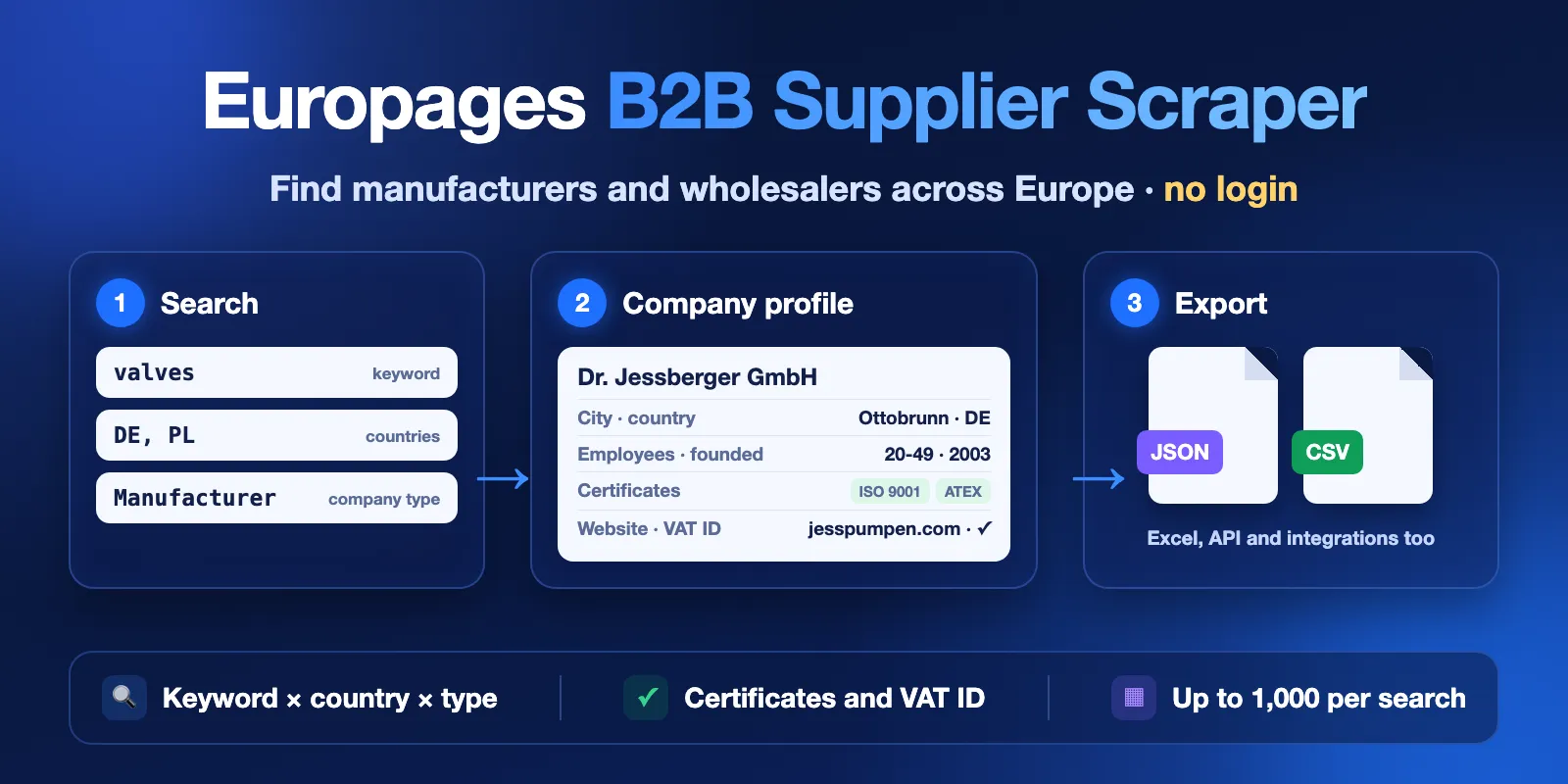
Table of contents
- What it does
- How it works
- Quick start
- Use cases
- Input
- Output
- Pricing
- Limits
- API, export and integrations
- Troubleshooting
- FAQ
- Related Actors
- Support
What it does
The Actor runs a Europages search for every keyword in every country you choose. It reads the result pages (30 companies per page). Then it opens each company profile and adds certificates, activities, product categories, VAT ID and the company phone. Each company is one row in the dataset.
Data source: public search and company pages of Europages, read without login. This Actor is not affiliated with Europages or Visable GmbH. Company texts, logos and trademarks belong to their owners. You are responsible for using the data in line with GDPR and the Europages terms.
Good fit
- Find manufacturers or wholesalers of a product in one or more European countries.
- Build a supplier shortlist with website, size (employees) and founding year.
- Check which suppliers list a certificate such as ISO 9001 or ISO 14001.
- Enrich a lead list with the company VAT ID and main phone number.
Not a fit / limits
- No e-mail addresses and no personal contacts. The Actor returns only the company's main phone number. E-mail addresses in company descriptions are replaced with
[email removed]. - Europages search is fuzzy. It also returns companies that only match part of a word, or a related term. Even a nonsense word can return a few companies. Check
keywords,activitiesandmainActivityif you need exact matches. - Up to 1,000 companies per search (one keyword in one country) and up to 20 searches per run.
- Fields depend on what each company publishes. Many companies have no certificates, VAT ID or activities.
- The Actor does not promise a complete list of all companies in a country. It returns what Europages search shows.
How it works
- The Actor opens the public Europages search for each keyword in each country you chose, page by page.
- For every company in the results it opens the public company profile and reads certificates, activities, VAT ID and the company phone. A company found twice is kept once.
- It saves one row per company in the dataset and writes a run summary with the status, the counts per search and the searches it could not finish.
If Europages starts showing bot checks, the Actor slows down to one page at a time, pauses and tries again. When Europages still refuses, the run keeps every company saved so far and lists the unfinished searches, so you can run only those again later.
Quick start
Open the Input tab and fill in three fields:
- Search terms (
queries): one product keyword per line, for examplepackaging. - Countries (
countries): one or more countries, for example Germany. Leave it empty to search all of Europe. - Max companies per search (
maxItems): keep the prefill20for a first test.
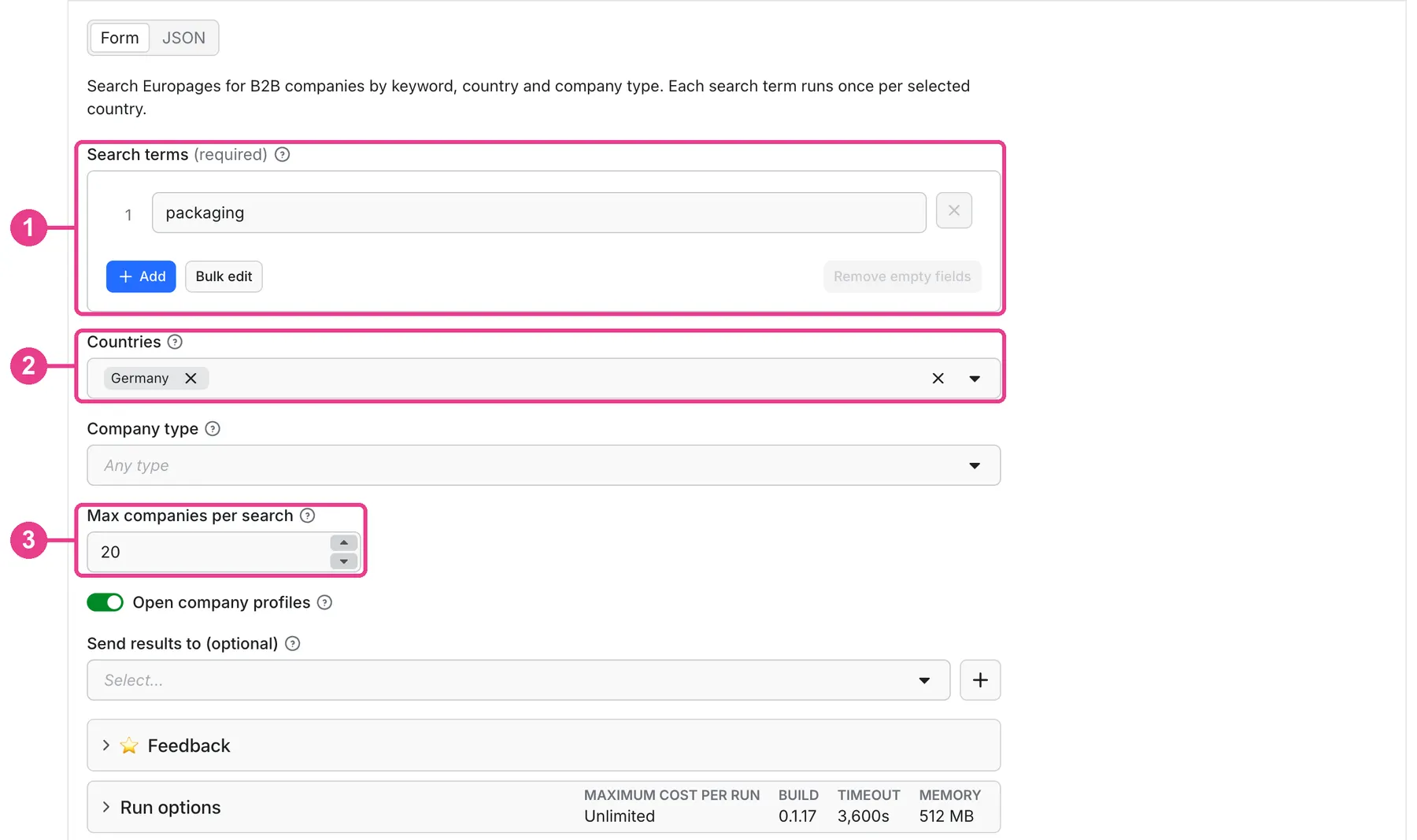
Click Start at the bottom of the form. With these settings the run usually takes under a minute.
- When the run finishes, open the Output tab and keep the Companies view.
- Check the first columns: Company (
name), Country, City, Website and Type (companyType). Scroll right for employees, founding year, certificates, main activity and the other fields.
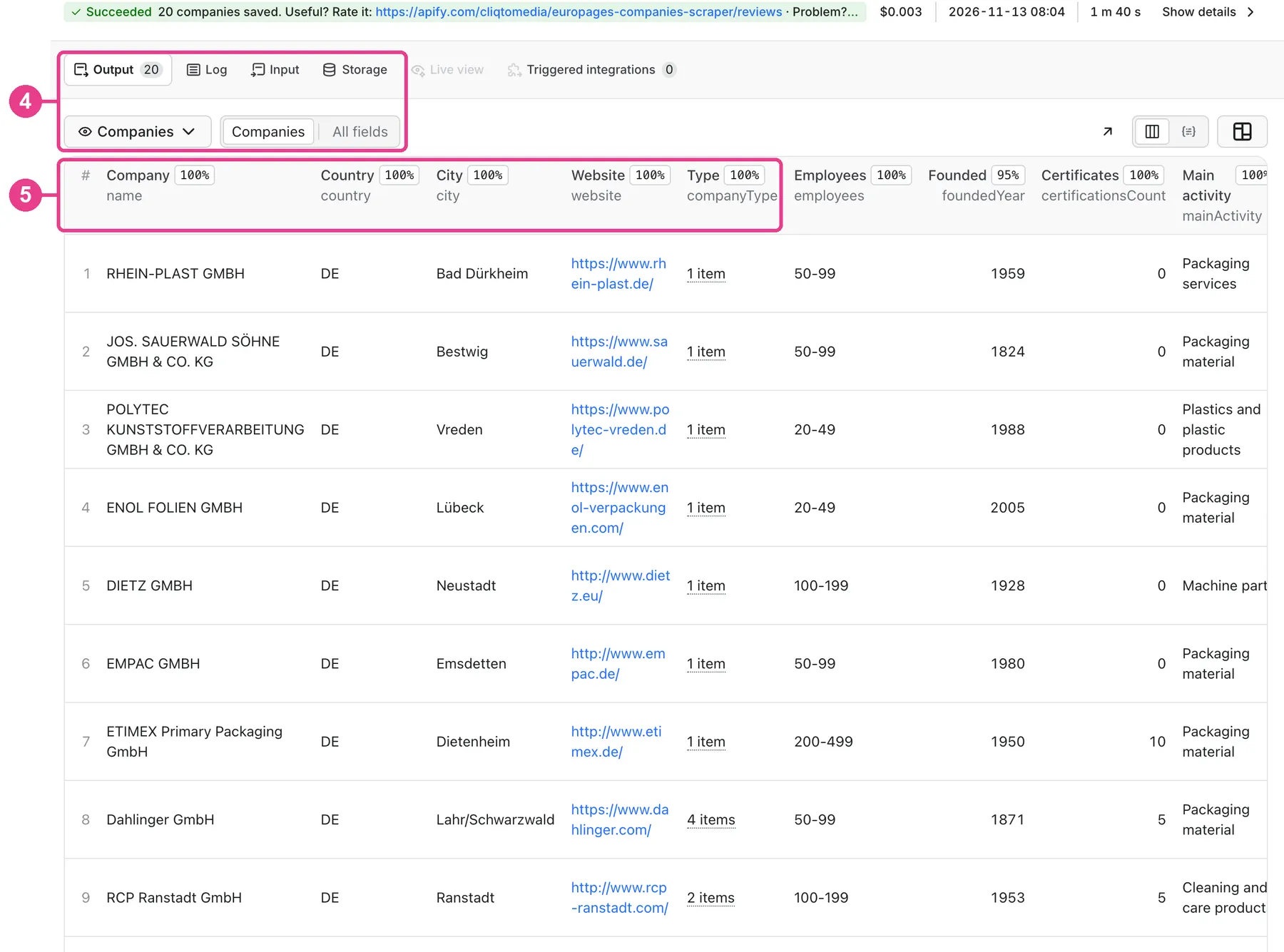
Expected result: 20 rows of German packaging companies, each with detailStatus = complete.
Use cases
| Buyer job | Input path | Output entity | Key fields | Next step |
|---|---|---|---|---|
| Find manufacturers of a product | queries, countries, companyType = production | Company | name, website, country, employees | Export to CSV or Google Sheets |
| Supplier check by certificate | queries, includeDetails = true | Company | certifications, foundedYear, distributionArea | Filter rows by certifications |
| Lead list for B2B sales | queries, countries | Company | website, phone, vatId, city | Import to CRM via API or integration |
| Quick market count | queries, includeDetails = false | Company (search result only) | name, country, companyType | Count rows per country |
Input
Input fields
| Field | Plain name | Type | Required | Default / prefill | Allowed values | Effect | Example | Recommendation |
|---|---|---|---|---|---|---|---|---|
queries | Search terms | array of strings | yes | prefill ["packaging"] | 1–20 terms, 2–100 characters each | Each term is a separate Europages search | ["led street lighting"] | Use English product words |
countries | Countries | array of country codes | no | prefill ["DE"]; empty = all countries | 44 Europages countries (DE, FR, IT, PL, ...) | Each country is a separate search for every term | ["DE", "PL"] | Leave empty for one Europe-wide search |
companyType | Company type | string | no | any | any, production, customer_specific_manufacturing, distribution, wholesaler, service | Europages keeps only companies of this type | production | A company can have several types |
maxItems | Max companies per search | integer | no | default 100, prefill 20 | 1–1000 | Stops each search after this many companies | 200 | Start small, then raise it |
includeDetails | Open company profiles | boolean | no | true | true, false | true adds certificates, activities, VAT ID, phone; false is faster | false | Turn off for quick counts |
deliveryConnector | Send results to | MCP connector | no | none | Your Slack, Notion or other MCP connector | Posts a short run summary after the run | Slack connector | Leave empty if you read the dataset |
deliveryTarget | Notion page or channel | string | no | none | Notion page link or Slack channel ID | Where the summary goes; Notion needs a page | C0123456789 | Use one page for all runs |
Duplicates are removed: if two searches find the same company, it is saved and charged only once.
The maxItems run option (set when you start the run through the API) caps the companies for the whole run. When it is reached, the run ends as succeeded and RUN_SUMMARY.limitReached is MAX_ITEMS.
Common field names from other tools also work: keyword, searchTerms (for queries), country (for countries), maxResults, limit (for maxItems). Fields the Actor does not use are listed in RUN_SUMMARY.ignoredInputFields and in the log.
Interacting settings
| When | Input A | Input B | Effective behavior | Example | Cost/result effect |
|---|---|---|---|---|---|
| Several terms and countries | queries | countries | One search per term × country; at most 20 per run | 4 terms × 5 countries = 20 searches | Up to 20 × maxItems rows |
| No countries | queries | countries empty | One search per term over all countries | ["valves"], [] | Fewer searches, mixed countries |
| Profiles off | includeDetails = false | — | Rows come from search pages only; detailStatus = listing_only | — | Same price per row, much faster |
| Too many searches | queries | countries | Run stops with INVALID_INPUT before any search | 7 terms × 3 countries = 21 | Only the start fee |
Input examples
German packaging manufacturers
Expected behavior: one Europages search, two result pages, 50 profiles opened.
Expected output: 50 company rows with name, website, employees, certifications, vatId.
Limit or cost note: 50 companies plus one start fee.
Valve suppliers in two countries, search results only
Expected behavior: two searches, no profile pages.
Expected output: up to 400 rows with detailStatus = listing_only.
Output
Output fields
| Field | Meaning | Type | Can be empty? | Example / enum | Notes |
|---|---|---|---|---|---|
companyId | Europages company ID, stable across runs | string | no | 21241677 | Use it to remove duplicates |
name | Company name | string | no | RHEIN-PLAST GMBH | |
url | Company profile on Europages | string | rarely | https://www.europages.co.uk/en/company/... | |
website | Company's own website | string | yes | https://www.rhein-plast.de/ | |
country, city, street, zipcode | Company address | string | yes | DE, Bad Dürkheim | country is ISO 3166-1 alpha-2 |
latitude, longitude | Address coordinates | number | yes | 49.477384 | |
companyType | Company types | array | can be empty | production, wholesaler | |
employees | Employee range | string | yes | 50-99 | |
foundedYear | Year founded | integer | yes | 1959 | |
certifications | Certificate names | array | yes | ["ISO 9001:2015"] | null without profile details |
certificationsCount | Number of certificates | integer | yes | 2 | |
vatId | VAT ID, when the company publishes it | string | yes | DE149372181 | |
phone | Company's main phone | string | yes | +4963227980 | No personal contacts |
mainActivity | Main business area | string | yes | Packaging services | Profile only |
activities | Europages categories, up to 15 | array | can be empty | Profile only | |
keywords | Business keywords, up to 50 | array | can be empty | Bubble wrap films | Profile only |
productCategories | Product catalogue categories | array | can be empty | Flat Pouches | Profile only |
distributionArea | Where the company sells | string | yes | national, europe, international | |
description | Company description | string | yes | E-mails replaced with [email removed] | |
query, searchCountry, searchRank | Which search found the company and its position | string / integer | searchCountry is null for all countries | packaging, DE, 1 | |
detailStatus | Profile result | string | no | complete, listing_only, detail_error | See below |
detailError | Why the profile could not be read | string | yes | Only for detail_error | |
fetchedAt | When the row was collected | string | no | ISO 8601, UTC |
Other fields: uuid, activitiesTotal, productCount, logoUrl, source (always europages).
detailStatus values:
complete— search result and profile were read.listing_only—includeDetailswasfalse; profile fields are empty.detail_error— the profile page could not be read. The row keeps the search-result fields. This row is not charged.
Output entities and surfaces
| Situation | Where | Result shape | What to do |
|---|---|---|---|
| Normal company | Dataset, view Companies | One row per company | Open, export or read via API |
| No companies found | Dataset empty; RUN_SUMMARY status empty, reason NO_RESULTS | No rows | Try a broader keyword or more countries |
| Some profiles not read | Dataset rows with detailStatus = detail_error; reason DETAILS_MISSING | Search-result fields only | Run again later for those companies |
| Run stopped at a limit | RUN_SUMMARY status partial (CHARGE_LIMIT, INTERNAL_LIMIT) | Partial result: rows saved before the stop are kept and the run ends as succeeded | Read message; use fewer searches or a lower maxItems |
| Europages blocked the run after some rows | Run fails; RUN_SUMMARY status partial, reason SOURCE_ERROR, stopCode (for example BLOCKED), unprocessedSearches | Saved rows stay in the Dataset; each unfinished search with its query, country and rows saved | Run only the searches from unprocessedSearches again later |
| Blocked before any row | Run fails; RUN_SUMMARY status error, reason SOURCE_ERROR | No rows; only the start fee | Try again later |
| Invalid input | Run fails; RUN_SUMMARY reason INVALID_INPUT | No rows | Fix the input from the message |
The key-value store record RUN_SUMMARY has the run status and reason, stopCode, counts per search, unprocessedSearches and request statistics.
Output example
This example is trimmed and shows one company from the packaging / DE run. An empty array means the profile has no such data. null means the field was not available (for example, profiles were turned off).
Send results to Slack or Notion
Pick your connector in the optional Send results to field (deliveryConnector). After the run saves its data, the Actor posts a short summary (up to 25 companies and a link to the full dataset) there. Put a Notion page link or a Slack channel ID in Notion page or channel (deliveryTarget): in Notion every run is added on top of that one page, so your workspace does not fill up with new pages. Without a page link, Notion delivery is skipped and the run summary says so. A delivery error never fails the run and costs nothing extra. Connect a service once in Apify Console → MCP connectors.
Use case → fields
| Buyer job | Input path | Output entity | Key fields | Next integration |
|---|---|---|---|---|
| Manufacturer shortlist | queries, countries, companyType = production | Company | name, website, employees, foundedYear | CSV or Google Sheets |
| Certificate check | queries, includeDetails = true | Company | certifications, mainActivity | Filter in a spreadsheet |
| CRM lead list | queries, countries | Company | website, phone, vatId, city | API or Make / Zapier |
| Team update | queries, deliveryConnector, deliveryTarget | Run summary | name, city, country | Slack channel or Notion page |
Pricing
Pricing unit
You pay per event:
- Actor start: $0.005 per run (one event per GB of memory; the default 512 MB is one event).
- Company: one event for each saved company row. The price depends on your Apify plan:
| Plan | Price per company | Per 1,000 companies |
|---|---|---|
| Free | $0.00225 | $2.25 |
| Bronze | $0.002025 | $2.03 |
| Silver | $0.0018 | $1.80 |
| Gold | $0.001575 | $1.58 |
Platform usage (compute, proxy) is included. A run that finds no companies, or a filter with no matches, costs only the start fee. Rows with detailStatus = detail_error are not charged. Duplicates are not charged twice. You can set Maximum cost per run in run options: the Actor stops when the next row would go over it (reason CHARGE_LIMIT).
Cost examples (Free plan)
| Scenario | Input scope | Rows | Start | Rows charge | Total |
|---|---|---|---|---|---|
| First test | packaging / DE / 20 | 20 | $0.005 | $0.045 | $0.05 |
| Normal | 1 term / 1 country / 100 | 100 | $0.005 | $0.225 | $0.23 |
| Large | 1 term / 1 country / 1,000 | 1,000 | $0.005 | $2.25 | $2.255 |
| Nothing found | any | 0 | $0.005 | $0 | $0.005 |
If Europages blocks the run after some rows, you pay only for the companies saved before the stop.
Limits
- 20 searches per run, 1,000 companies per search, 20 terms per run.
- One run works for at most 1 hour. With profiles this is roughly 1,500 companies per run (a cautious estimate: the measured pace was about 38 companies per minute, and bot checks slow it down), so 20 searches × 1,000 companies do not fit in one run.
- 20 companies with profiles: about 20 seconds to 4 minutes. 1,000 companies with profiles: about 26 minutes (measured), allow up to 40 minutes when Europages shows many bot checks.
- Default memory 512 MB; default timeout 3,600 seconds. For big runs keep the timeout at 3,600 seconds or more.
- When Europages shows many bot checks, the Actor slows down; a big run can take longer, and it can stop early with the unfinished searches listed in
unprocessedSearches.
API, export and integrations
- API: start the Actor with the same JSON input and read rows from the default dataset (
/items?view=companies). - Export: download the dataset as JSON, CSV, Excel, XML or HTML from the Output tab.
- Scheduling and integrations: use Apify schedules, webhooks, or integrations such as Google Sheets, Make and Zapier to send new rows to your tools.
Use with AI agents (MCP)
- MCP server with only this Actor:
https://mcp.apify.com?tools=cliqtomedia/europages-companies-scraper - Smallest useful input:
{"queries": ["packaging"], "countries": ["DE"], "maxItems": 20} - Key output fields:
name(company),website(own site),country(ISO code),companyType(manufacturer, wholesaler, ...),certifications(certificate names). - Typical run: 20 companies in 20 seconds to 4 minutes, about $0.05 on the Free plan. Limits: 20 searches per run, 1,000 companies per search, roughly 1,500 companies with profiles per run (1 hour, estimate).
Troubleshooting
The run returned companies that do not match my keyword
Symptom: some rows are about a different product.
Likely reason: Europages search is fuzzy and also matches related words.
Check: look at keywords, mainActivity and searchRank. The best matches come first.
Action: use a more specific keyword, a lower maxItems, or filter rows after export.
The run failed with "at most 20 per run"
Symptom: status INVALID_INPUT, message queries × countries gives N searches.
Likely reason: too many terms × countries.
Action: split the job into several runs, or leave countries empty for one Europe-wide search per term.
Some rows have detailStatus = detail_error
Symptom: certificates, activities, VAT ID are empty for a few rows.
Likely reason: the profile page did not load in time.
Action: these rows are free. Run the same search again later to fill them. If most profiles fail (10 in a row, or more than half), the run stops early with SOURCE_ERROR so you do not wait for free rows.
The run stopped with SOURCE_ERROR and unprocessedSearches
Symptom: the run failed, but the Dataset has rows; RUN_SUMMARY has status partial, reason SOURCE_ERROR, stopCode = BLOCKED.
Likely reason: Europages kept showing bot checks even after the Actor slowed down and changed IPs.
Check: unprocessedSearches lists each unfinished search and how many rows it saved.
Action: the saved rows are kept and charged; run only the unfinished searches again later, or with fewer searches per run.
The run stopped with INTERNAL_LIMIT
Symptom: status partial, fewer rows than expected.
Likely reason: the run reached its time limit (1 hour, or less if you set a shorter timeout) or the internal request limit. The Actor stops itself after 1 hour, even with a longer timeout.
Action: split the job: use fewer searches or a lower maxItems per run.
FAQ
Do I need a Europages account or login?
No. The Actor reads public Europages pages. You need only an Apify account.
Does it return e-mail addresses?
No. It returns the company's main phone number and website. It does not collect personal contacts or e-mails.
Why does the same keyword give a slightly different list on another day?
Europages changes its ranking and its company data. The Actor returns what Europages shows at run time. Use companyId to compare runs.
What happens if nothing is found?
The run ends with status empty and reason NO_RESULTS. You pay only the start fee.
Related Actors
- Website Contact Scraper | Contacts & Social Links — open the
websiteof each supplier and collect public contact pages and social links. - Phone Number Validator & Formatter - Bulk E.164, No Login — check and format the company
phonenumbers in E.164. - France Company Search: SIREN, SIRET & VAT (Sirene) — check French suppliers in the official Sirene register (SIREN, SIRET, VAT).
- LEI Lookup & Change Monitor (GLEIF) — find the legal entity identifier of larger suppliers.
Support
For bugs, questions or feature requests, open an issue in the Issues tab of this Actor. Include the run ID and your input. Never send tokens, passwords or billing data.
⭐ Found it useful? Rate this Actor. Something wrong? Report a problem — we fix reported problems.


