

US Health Data: CDC & HealthData.gov API, No login
Pricing
from $0.60 / 1,000 result rows
US Health Data: CDC & HealthData.gov API, No login
Search CDC (data.cdc.gov) and HealthData.gov open datasets and export their rows as clean JSON, CSV or Excel. SoQL where/select filters, typed numbers, dataset name and last update on every row. No login or API key.
Pricing
from $0.60 / 1,000 result rows
Rating
0.0
(0)
Developer

Cliqto Media
Maintained by CommunityActor stats
0
Bookmarked
2
Total users
1
Monthly active users
8 days ago
Last modified
Categories
Features
Share
Search the open data portals of the CDC (data.cdc.gov) and HealthData.gov by keyword or dataset ID, and export the rows of the dataset as clean JSON, CSV or Excel.
For analysts, data journalists, health-tech teams and developers who need CDC and HHS tables without manual downloads: type covid vaccinations, keep 20 rows, click Start. No login or API key. A 20-row run costs about $0.02.
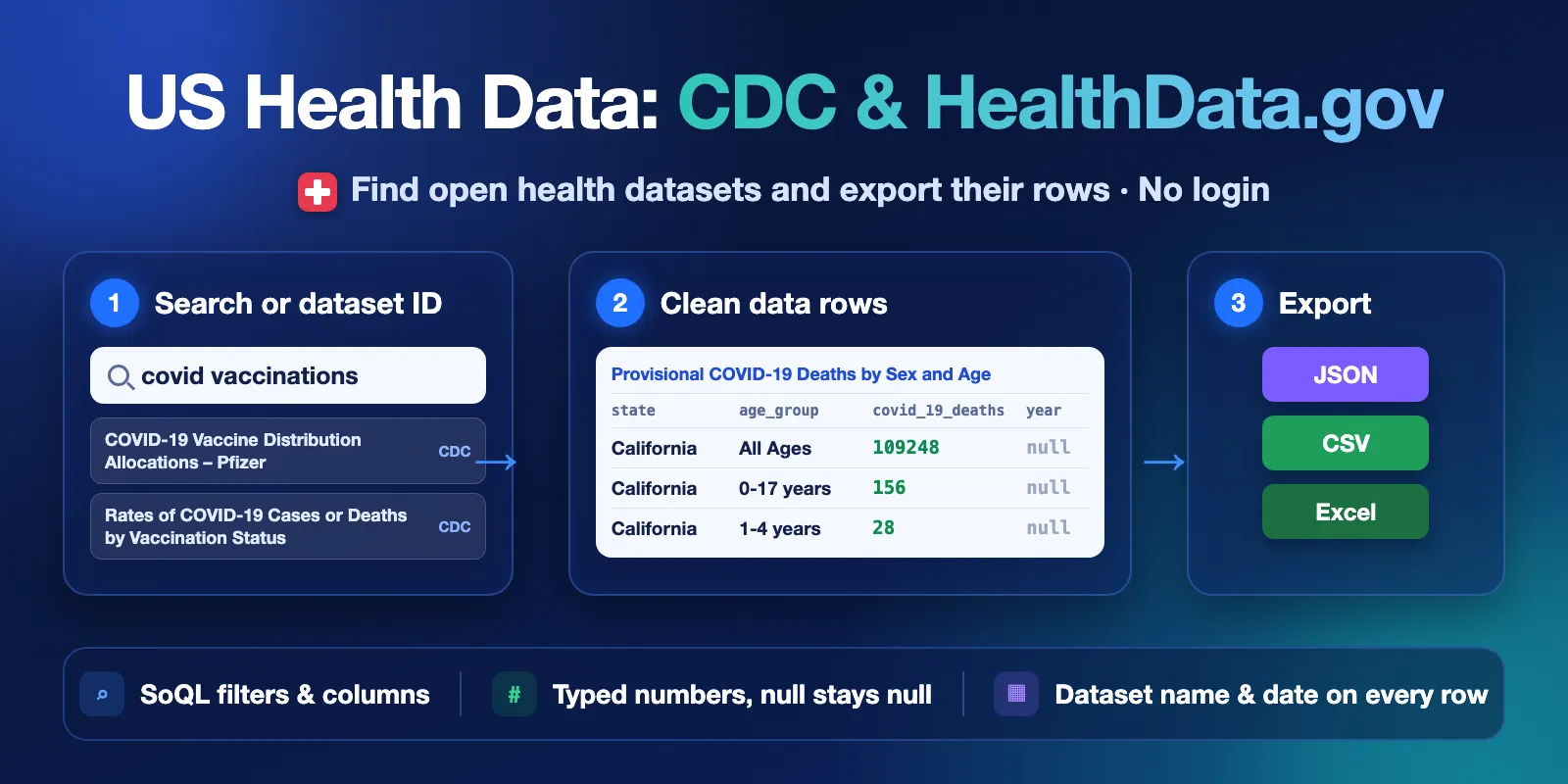
Table of contents
- What it does
- Quick start
- Use cases
- Input
- Output
- Pricing and limits
- API, export and integrations
- Troubleshooting
- FAQ
- Source, licence and attribution
- Support
What it does
The Actor reads the official public Socrata API of two U.S. government health portals: data.cdc.gov (Centers for Disease Control and Prevention) and healthdata.gov (U.S. Department of Health & Human Services).
- Data rows mode (default): give a dataset ID or a search query. The Actor finds the dataset, reads its rows page by page and saves each row with every source column, plus the dataset ID, dataset name, portal, last update of the data and the time of reading.
- Dataset search mode: list the datasets that match your keywords, with name, category, last update, licence, columns, page views and the API endpoint. No rows.
- Search: both portals are searched separately and the matches are merged (alternating by relevance: CDC first, then HealthData.gov; or newest first, exact for up to 100 datasets). With the default
maxDatasets: 1, rows come from the top CDC match; for a HealthData.gov table setdomainsto["healthdata.gov"]or pick its ID in Dataset search mode.
Number columns become JSON numbers and checkbox columns become true/false when this loses nothing. A missing value stays null; it never becomes 0.
Good fit
- Export a CDC table (COVID-19 deaths, vaccinations, measles, wastewater, overdose and many more) to CSV or Excel with a filter, without writing code.
- Feed health statistics to a database, a notebook or an AI agent through the Apify API, with the same field names as the source.
- Find which CDC or HHS dataset holds the numbers you need, and how fresh it is.
Not a fit / limits
- Only data.cdc.gov and healthdata.gov. Other Socrata portals (cities, states) are not searched.
- The Actor returns what the portal publishes. It does not fix, merge or interpret the numbers. Many CDC datasets are provisional or no longer updated; check
datasetUpdatedAt. - Some HealthData.gov entries are only links to files on other websites. They have no rows in the API; you get a free status row instead.
- Up to 50,000 rows per run. Very wide or slow datasets can stop earlier (see Pricing and limits).
Quick start
- Open the Input tab.
- Type keywords in Search query (
searchQuery), for examplecovid vaccinations. Or paste a dataset ID such as9bhg-hckuinto Dataset IDs or URLs (datasetIds). - Keep Max results (
maxRows) at the prefilled 20, or set up to 50,000. - Click Start.
- Open the Output tab. Check
datasetNameon the first row: it tells you which dataset matched your words.
Expected result: 20 rows of the best-matching CDC dataset, in a few seconds.
Use cases
| Buyer job | Input path | Output entity | Key fields | Next integration |
|---|---|---|---|---|
| Export one known CDC table with a filter | datasetIds + where | data row | source columns, datasetName, datasetUpdatedAt | CSV / Excel download, API |
| Quick look at data on a topic | searchQuery | data row | source columns, datasetName | Dataset view, API |
| Find the right dataset first | mode: datasets + searchQuery | dataset record | datasetId, datasetName, datasetUpdatedAt, columns, apiEndpoint | then run Data rows mode with that datasetId |
| Totals without downloading rows | datasetIds + select with count(*), sum(...) | one data row | your aggregate columns | API, AI agent |
Input
Input fields
| Field | Plain name | Type | Required | Default / prefill | Allowed values | Effect | Example |
|---|---|---|---|---|---|---|---|
searchQuery | Search query | string | one of searchQuery / datasetIds | prefill covid vaccinations | up to 300 characters | finds datasets; ignored when datasetIds is set | measles |
datasetIds | Dataset IDs or URLs | array of strings | one of searchQuery / datasetIds | empty | up to 20; 4x4 ID or a data.cdc.gov / healthdata.gov dataset URL | exports these datasets | ["9bhg-hcku"] |
mode | Mode | string | no | rows | rows, datasets | rows or catalog records | datasets |
maxRows | Max results | integer | no | default 100, prefill 20 | 1–50,000 | maximum paid results in the run | 500 |
where | Filter rows (SoQL where) | string | no | none | SoQL condition on API field names | keeps matching rows only | state = 'California' |
select | Columns (SoQL select) | string | no | all columns | SoQL column list or whole-result aggregates | returns only these columns | state, covid_19_deaths |
order | Sort rows (SoQL order) | string | no | the source's stable row order | SoQL order | sorts rows | end_date DESC |
maxDatasets | Datasets to export from a search | integer | no | 1 | 1–20 | how many best matches to export rows from | 3 |
domains | Portals | array | no | both portals | data.cdc.gov, healthdata.gov | where to search | ["data.cdc.gov"] |
sortDatasetsBy | Rank datasets by | string | no | relevance | relevance, updated | order of search matches | updated |
typedValues | Typed numbers and booleans | boolean | no | true | true / false | false keeps every value as the source's text | false |
appToken | Socrata app token | secret string | no | none | your free Socrata token | higher source rate limits; never saved to output or logs | — |
Empty input (no searchQuery and no datasetIds) fails at once with a clear message. A bare ID is looked up on data.cdc.gov first, then on healthdata.gov. The same dataset given twice (as an ID and as a URL) is exported once. An ID in the wrong format gets a free error status row; an unknown ID gets a free not_found status row. The other datasets are still exported.
Interacting settings
| When | Input A | Input B | Effective behavior |
|---|---|---|---|
| Both are set | datasetIds | searchQuery | datasetIds wins; the search query is ignored |
| Several datasets | maxRows | datasetIds / maxDatasets | maxRows is shared across all datasets in the run |
| Dataset search mode | mode: datasets | where, select, order | row filters are ignored; maxRows counts dataset records (the catalog serves at most 10,000 matches) |
| Aggregates | select with count(*), sum(...) | plain columns in select | do not mix them: there is no GROUP BY, the source rejects it (INVALID_INPUT) |
Column names in where, select and order are the API field names, for example covid_19_deaths, not the column titles on the website. Run Dataset search mode to see them in columns.
Input examples
Rows of a known dataset, filtered
Expected output: 20 rows of "Provisional COVID-19 Deaths by Sex and Age" for California, with covid_19_deaths, total_deaths, age_group and the other source columns.
Find datasets first
Expected output: 5 dataset records with datasetId, datasetName, datasetUpdatedAt, columns and apiEndpoint.
Output
Output fields
Every item has recordType: row (a data row), dataset (a catalog record) or status (a free note about a dataset that gave no rows).
| Field | Meaning | Type | Can be empty? | Example / enum |
|---|---|---|---|---|
recordType | kind of item | string | no | row, dataset, status |
status | outcome | string | no | ok, not_found, no_rows, error |
statusCode, statusReason, input | why a status row has no data, and what you entered | string | status rows only | DATASET_NOT_FOUND |
datasetId | 4x4 dataset ID | string | null only for an invalid ID | 9bhg-hcku |
datasetName | dataset title on the portal | string | yes | Provisional COVID-19 Deaths by Sex and Age |
domain | portal | string | yes | data.cdc.gov |
datasetUpdatedAt | when the data rows were last updated | string (ISO) | yes | 2023-09-27T14:43:31.000Z |
rowNumber | position of the row in this export | integer | rows only | 1 |
sourceUrl | the exact API request that returned the item | string | yes | https://data.cdc.gov/resource/... |
fetchedAt | time of reading | string (ISO) | no | 2026-10-17T13:26:07.250Z |
| source columns | the dataset's own columns, same names as the API | as in the source | yes, null when the source has no value | covid_19_deaths: 109248 |
metadataUpdatedAt, category, license, attribution, permalink, description, tags, columns, columnCount, apiEndpoint, createdAt, pageViewsLastMonth, pageViewsTotal, downloadCount, searchQuery, searchRank | catalog record fields (Dataset search mode); searchRank is the position in the merged search result | mixed | yes | Public Health Surveillance |
If a source column has the same name as one of the fields above, it is saved with a src_ prefix. Emails in dataset descriptions are replaced with [email removed].
Output entities and surfaces
| Situation | Where | Result shape | What to do |
|---|---|---|---|
| Normal run | Dataset (Output tab, API, export) | row items | download or use the fields |
| Dataset search mode | Dataset, view Datasets | dataset items | pick a datasetId |
| Filter with no matches, unknown ID, link-only dataset | Dataset, view Status rows | one free status item per dataset | check statusReason and your filter |
| Search with no matches | Dataset is empty, run summary says NO_RESULTS | — | try other words or both portals |
| Any run | key-value store record RUN_SUMMARY | status, counts, per-dataset outcome, moreRowsAvailable, source attribution | read status and message |
Run summary status values: COMPLETE (everything asked for was read; reaching maxRows is still COMPLETE, with moreRowsAvailable: true for that dataset; a filter rejected by some of several datasets is COMPLETE with free error status rows for them), CAPPED (stopped at your max charge or at the internal time limit; the run still succeeds), PARTIAL (the source failed after some rows were saved; the run fails, the rows stay), NOT_FOUND, NO_RESULTS, ERROR (source unavailable), INVALID_INPUT (bad input or a SoQL the source rejected).
Output example
From the first example above (trimmed to one row):
year and month are null because this is the "By Total" row: the source has no value there. null means "no value in the source", never zero.
A free status row for a filter with no matches:
Pricing and limits
Pricing unit
Pay per event:
| Event | Price | When |
|---|---|---|
| Actor start | $0.002 per run (per GB of memory, minimum one) | every run; default memory is 256 MB, 512 MB when maxRows is above 2,000, so one start event |
| Result row | $0.00085 (Bronze $0.000765, Silver $0.00068, Gold and higher $0.000595) | each data row, or each dataset record in Dataset search mode, saved to the Dataset |
Status rows (not_found, no_rows, error) are free. A run that finds nothing — a search with no matches, a filter with no matches, unknown IDs — costs only the start event, $0.002. Platform usage is included in the price. If the source fails in the middle, you pay only for the rows already saved. If you set a maximum charge for the run, the Actor stops before the first row that would go over it.
Cost examples (Free plan prices)
| Scenario | Input | Paid events | Charge |
|---|---|---|---|
| Quick look | prefill, 20 rows | 1 start + 20 rows | $0.019 |
| One table | 100 rows | 1 start + 100 rows | $0.087 |
| Larger export | 1,000 rows | 1 start + 1,000 rows | $0.852 |
| Nothing found | unknown IDs or a filter with no matches | 1 start | $0.002 |
Limits
- Up to 50,000 rows per run (tested on an earlier build with the same row reader: 50,000 rows of a CDC dataset in 32 seconds).
- The Actor stops reading the source 250 seconds after the start, so a run fits the default 5-minute timeout. Very wide or slow datasets can stop earlier: a 135-column HealthData.gov dataset needed 204 seconds for 20,000 rows, so a bigger request on it reaches the limit. Then the run ends with
CAPPED, and the dataset's outcome inRUN_SUMMARYisstoppedwithDEADLINE_REACHED; run again with awherefilter on a date or ID to get the next part. - Up to 20 dataset IDs and 20 datasets from a search per run.
- The source has no published quota. If it answers HTTP 429, the Actor waits and retries; your own free Socrata app token (
appToken) raises the limit.
API, export and integrations
- Export: JSON, CSV, Excel, XML and other formats from the Output tab or the Dataset API.
- API: start the run with the input above and read the items of the run's default Dataset; the run summary is the
RUN_SUMMARYrecord in the default key-value store. - Scheduling: set a schedule in Apify Console to refresh a table every day or week.
Use with AI agents (MCP)
- MCP server with only this Actor:
https://mcp.apify.com?tools=cliqtomedia/us-health-data-api - Smallest useful input:
{"searchQuery": "covid vaccinations", "maxRows": 20}. - Key output fields:
datasetName(which dataset matched),datasetUpdatedAt(how fresh the data is), the source columns (the numbers),status(okor why there is no data). - Typical run: a few seconds for 20 rows, $0.019 on the Free plan. Keep
maxRowssmall and usewhere/selectto get only what the answer needs; usecount(*)orsum(...)inselectfor totals.
Troubleshooting
The rows are from a different dataset than I expected
Symptom: datasetName is not the table you wanted.
Likely reason: the search query matched another dataset better, or the table is on HealthData.gov while the top CDC match was used (default maxDatasets: 1).
Action: run Dataset search mode with the same words, pick the datasetId and put it into datasetIds.
INVALID_INPUT with a SoQL message
Symptom: the run fails and RUN_SUMMARY shows the source's message, for example column-not-in-group-bys or an unknown column.
Likely reason: the column name is the website title instead of the API field name, or aggregates are mixed with plain columns.
Action: check the names in columns (Dataset search mode) and quote text values: state = 'California'.
A status row with no_rows or not_found
Symptom: one item with recordType: status.
Likely reason: the filter matched no rows, the ID does not exist on either portal, or the HealthData.gov entry is only a link to a file elsewhere.
Action: read statusReason. This is not a failure and it is free.
The run ended CAPPED before maxRows
Symptom: fewer rows than maxRows; in RUN_SUMMARY the dataset outcome is stopped with DEADLINE_REACHED or MAX_CHARGE_REACHED.
Likely reason: the dataset is very wide or the portal answered slowly, and the 250-second limit was reached, or your maximum charge was reached.
Action: export in parts with a where filter, choose fewer columns with select, or raise the maximum charge.
ERROR or RATE_LIMITED
Symptom: the run fails with ERROR and a message about the source.
Likely reason: the portal is down or limits requests. Rows saved before the failure stay in the Dataset.
Action: try again later, or add your free Socrata app token in appToken.
FAQ
Do I need a login or an API key?
No. Both portals are public. A Socrata app token is optional and only raises the source's rate limit.
Why are some numbers null?
The source has no value there (for example a suppressed small count or a total row). The Actor never turns a missing value into 0.
Is the data up to date?
The Actor reads the portal live at run time. How fresh the data is depends on the dataset: datasetUpdatedAt shows when its rows last changed. Many COVID-19 datasets were archived in 2023.
Can I get the same output as the website export?
The column names are the API field names, which can differ from the titles on the website. The values are the same; numbers are typed unless you set typedValues: false.
Source, licence and attribution
Data comes from the public Socrata APIs of data.cdc.gov and healthdata.gov. Most CDC datasets are U.S. Government works marked "Public Domain U.S. Government"; some include third-party material, and HealthData.gov datasets carry their own licence. Check the license and attribution fields of each dataset (Dataset search mode). Please credit the source agency. This Actor is not affiliated with or endorsed by the CDC or HHS.
Support
Use the Issues tab of this Actor. Add the run ID, the input mode and the statusReason or RUN_SUMMARY message you saw. Do not send API tokens.


