

Weibo Scraper: Posts, Comments & Profiles, No Login
Pricing
from $1.75 / 1,000 result rows
Weibo Scraper: Posts, Comments & Profiles, No Login
Scrape public Weibo (微博) data with no login: keyword search with date ranges, user profiles with their latest posts, post details by link and comments. Text, likes, reposts, comments, images, video, hashtags and region in clean rows, with a free status row for not-found inputs.
Pricing
from $1.75 / 1,000 result rows
Rating
0.0
(0)
Developer

Cliqto Media
Maintained by CommunityActor stats
0
Bookmarked
2
Total users
1
Monthly active users
7 days ago
Last modified
Categories
Features
Share
Scrape public Weibo data with no login. Search posts by keyword and date, read users' profiles and latest posts, or get full details for post links, with up to 40 comments per post. Each item is one clean row with full text, likes, reposts, comments, images, video, hashtags and region. A typical run with 10 rows takes about 8 seconds and costs $0.034 on the Free plan.
Use it for brand monitoring, trend research and audience studies on Weibo (微博), the Chinese microblogging platform. Start with the keyword 苹果 and 10 results.
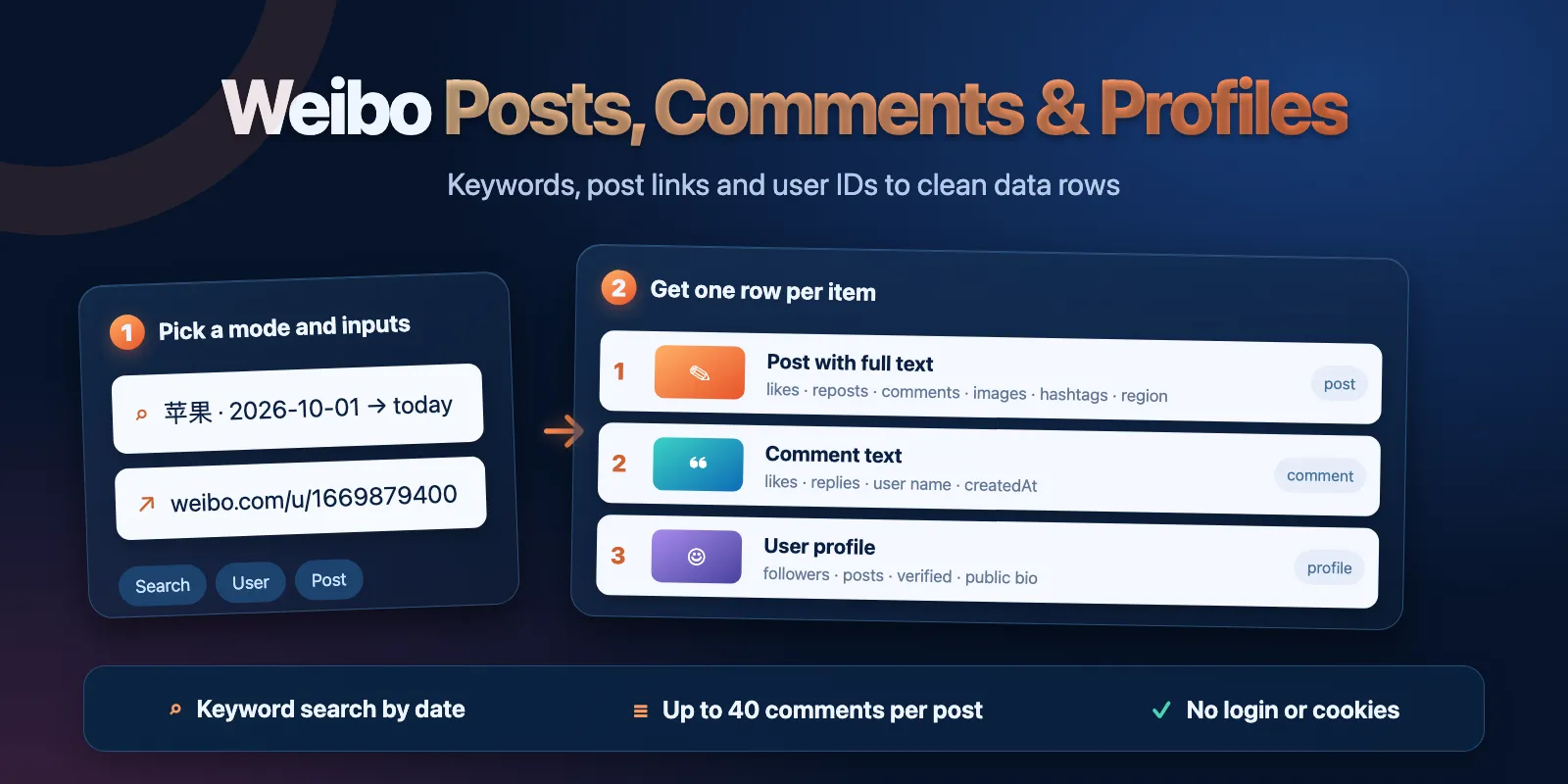
Table of contents
- What it does
- How it works
- Quick start
- Use cases
- Input
- Output
- Pricing
- Limits
- API, export and integrations
- Troubleshooting
- FAQ
- Related Actors
- Support
What it does
The Actor has three modes. You pick one mode per run.
| Mode | You give | You get |
|---|---|---|
search | Up to 20 keywords or hashtags | Post rows, newest first, up to 5,000 per keyword, with an optional date range |
user | Up to 100 user IDs or profile links | One profile row per user, plus their latest posts (about 10) |
post | Up to 250 post links or IDs | One post row with full details for each post |
In every mode you can turn on Include comments to add up to 40 comments per post (hot comments first, then the latest).
It reads the public guest pages of Weibo. It does not sign in, does not need your cookies, and does not read private or follower-only posts.
Good fit
- Track what people say about a brand or product on Weibo, by day.
- Follow a trending hashtag and find the accounts that drive it.
- Collect comments under chosen posts for sentiment analysis.
- Compare creators and brand accounts by followers and their latest posts.
Data you get
- Posts: post ID, short ID, URL, full text (long posts are expanded), created time, likes, reposts, comments, image URLs, video URL, cover and length, hashtags, mentions, region, source app, the original post of a repost, and the author's ID, name, verified flag and followers.
- Comments: comment ID, post ID, text, created time, likes, reply count, region and the commenter's public name and ID.
- Profiles: user ID, name, URL, public bio, followers, following, post count, verified flag and reason, location and avatar URL.
- Status: one free row that lists inputs that were not found, invalid, duplicate or not processed, with a reason for each.
How it works
- The Actor reads the public Weibo pages that a visitor sees without an account: search results, user profiles and post pages.
- It expands long posts, collects comments when you ask for them, removes HTML and merges the same post given twice.
- It saves one row per post, comment or profile to the Dataset, one free status row for inputs with no data, and a run summary with the result of each input.
Quick start
-
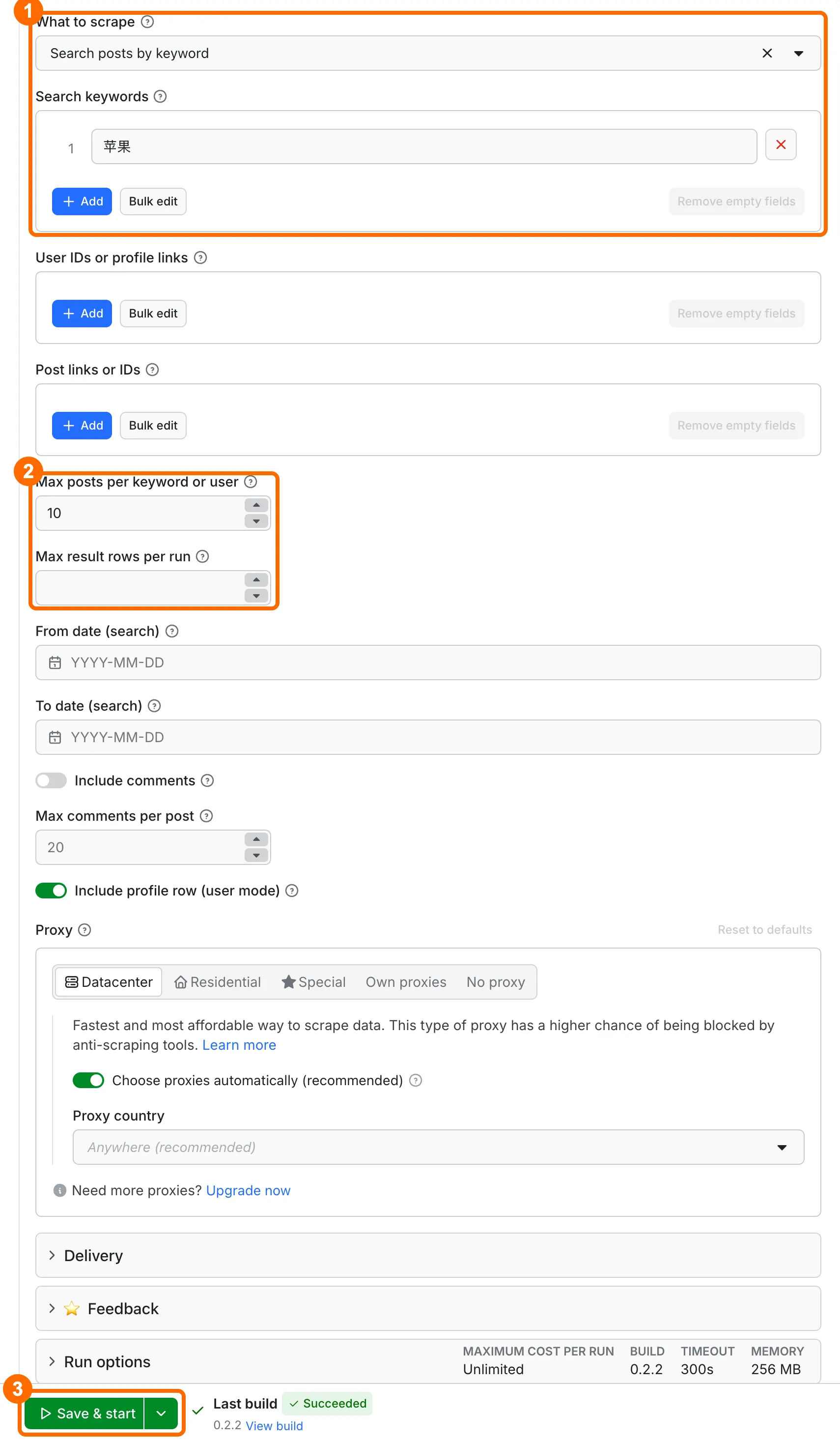
Open the Input tab. What to scrape is Search posts by keyword and Search keywords has
苹果(box 1 in the picture). -
Keep Max posts per keyword or user at
10(box 2). Leave Max result rows per run empty for no total limit. -
Click Save & start (box 3).
-
Open the Posts tab of the Output (box 4) and check
text,likesandreposts(box 5). Open Run summary to check each input.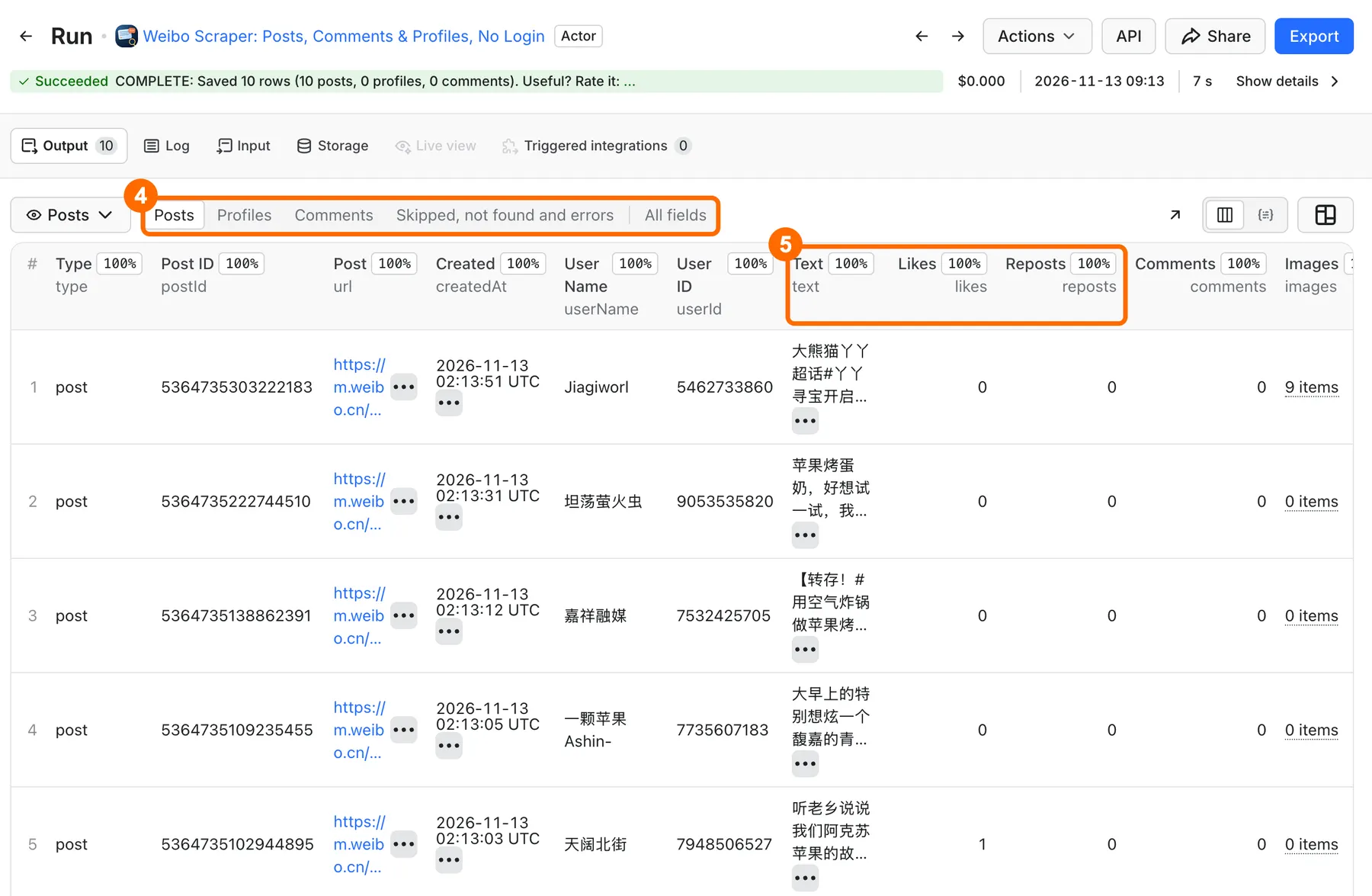
Expected result: 10 post rows about the keyword in about 8 seconds. Search results are live and change every minute.
Use cases
| Buyer job | Input path | Output entity | Key fields | Next integration |
|---|---|---|---|---|
| Monitor a brand or product | search, brand keywords, startDate | post | text, likes, reposts, createdAt, region | Daily schedule, summary to Slack or Notion |
| Follow a trending hashtag | search, #topic#, maxPosts: 1000 | post | hashtags, mentions, userFollowers | Export to CSV or Excel |
| Study audience reactions | post with postIds, includeComments | comment | text, likes, region | Sentiment or keyword analysis |
| Benchmark creators and brands | user with userIds | profile and post | followers, postsCount, verifiedReason | Spreadsheet or BI tool |
Input
No field is required on its own. Each mode needs its list: keywords for search, userIds for user, postIds for post. The new form prefills mode: "search", keywords: ["苹果"] and maxPosts: 10. The default build is latest.
Input fields
| Field | Type | Default / prefill | Allowed values | What it changes / advice |
|---|---|---|---|---|
mode | string | search / none | search, user, post | What to scrape. Only the list for this mode is used. If you leave it out, the mode is taken from the list or links you give (keywords → search, users → user, posts → post). |
keywords | array of strings | none / ["苹果"] | 1–20 keywords | Search mode. Chinese or English words, or hashtags like #topic#. Exact duplicates are merged. |
userIds | array of strings | none | 1–100 | User mode. Numeric user ID (1669879400), https://weibo.com/u/1669879400 or https://m.weibo.cn/u/1669879400. Custom names like weibo.com/name are not supported. |
postIds | array of strings | none | 1–250 | Post mode. https://m.weibo.cn/detail/<id>, https://weibo.com/<uid>/<short id>, a numeric ID (5343871682741457) or a short ID (RipiMbvb3). Short t.cn links are not supported. |
maxPosts | integer | 100 / 10 | 1–5,000 | Search: posts per keyword. User: posts per user; Weibo shows guests only about the latest 10. Not used in post mode. |
maxItems | integer | empty (no limit) | 0–1,000,000 | All paid rows of the run together: posts, comments and profiles. The run stops cleanly at this number. 0 or empty means no limit. |
startDate | string | empty | YYYY-MM-DD | Search mode. Oldest day to include, Beijing time. |
endDate | string | empty | YYYY-MM-DD | Search mode. Newest day to include (the whole day), Beijing time. Empty means up to now. |
includeComments | boolean | false | true, false | Also save comments of each post. Each comment is one paid row. |
maxCommentsPerPost | integer | 20 | 1–40 | With includeComments. Weibo shows guests up to about 40 comments per post. |
includeProfile | boolean | true | true, false | User mode. false returns only the users' posts. |
proxyConfiguration | object | {"useApifyProxy": true} | Apify Proxy settings | Apify Proxy datacenter IPs work for Weibo. Keep the default. |
deliveryConnector | string | empty | One of your MCP connectors | Optional. Posts a short run summary to Slack, Notion or another connected service. See Send results to Slack or Notion. |
deliveryTarget | string | empty | Notion page link or Slack channel ID | Optional. Where the summary goes. Notion needs a page link here. |
A bad entry in a list (for example a weibo.com/name link) does not stop the run: it gets a free status row with the reason, and the other entries are scraped. If every entry is bad, the run fails with a message that names the field and shows a valid example.
Field names from other scrapers
If you move from another Weibo scraper, its input usually works as is:
| Other name | Used as |
|---|---|
maxResults, limit, resultsLimit | maxItems |
query, queries, searchTerms, keyword, searchQuery | keywords |
userId, profileUrls, userUrls, accounts | userIds |
postId, weiboId, weiboIds, postUrls | postIds |
maxResultsPerKeyword, postsPerKeyword, maxPostsPerUser, postsPerAccount | maxPosts |
startDay, searchDateFrom / endDay, searchDateTo | startDate / endDate |
maxComments, commentsPerPost | maxCommentsPerPost |
startUrls, urls (strings or { "url": ... }) | postIds, userIds or keywords, by what each link points to. A s.weibo.com/weibo?q=... link becomes a keyword. |
When both names are given, this Actor's own field wins, and the log says so. Fields the Actor does not know are skipped with a warning and listed in ignoredInputFields of the run summary.
How settings work together
| When | Input A | Input B | Effective behavior | Cost/result effect |
|---|---|---|---|---|
| Search with dates | startDate | endDate | The run walks back in time from endDate until startDate or maxPosts, whichever comes first. | Fewer rows for a short window. |
| Comments on | maxPosts | includeComments | maxPosts counts posts only. Comments and profile rows are extra rows on top of it. | Up to 40 more paid rows per post. |
| Total limit set | maxPosts | maxItems | maxItems caps all rows of the run, whatever maxPosts says. | Never more than maxItems paid rows. |
| Maximum cost per run set | maxItems | Apify cost limit | The smaller of the two limits stops the run. | The run ends as succeeded, not failed. |
| User mode with comments | userIds | includeComments | Comments are added for each of the user's posts. | Extra paid comment rows. |
Input examples
Posts about two brands in October 2026, at most 300 rows in total:
Returns up to 250 post rows per keyword from that date range, newest first, with keyword set on each row; the run stops at 300 rows.
Profiles and latest posts of two users:
Returns two profile rows and about 10 post rows per user.
One post with its comments:
Returns one post row and up to 40 comment rows.
Output
All rows go to the default Dataset. The type field tells the row kind: post, comment, profile or status.
Output fields
Post fields
| Field | Type | Null? | Meaning / example |
|---|---|---|---|
postId | string | no | Numeric post ID, e.g. 5343871682741457. |
bid | string | yes | Short post ID used in weibo.com links, e.g. RipiMbvb3. |
url | string | no | Public post URL. |
userId | string | yes | Author user ID. |
userName | string | yes | Author public name. |
userVerified | boolean | yes | true for a verified account. |
userFollowers | integer | yes | Author followers. Exact in user mode; search and post mode can be rounded by Weibo (e.g. 3909000). |
text | string | no | Post text, HTML removed. Can be "" for a post with only images or video. |
textTruncated | boolean | no | true when Weibo did not serve the full text of a long post and the row has the preview. |
createdAt | string | yes | Post time, ISO with Beijing offset +08:00. |
reposts | integer | yes | Repost count. |
comments | integer | yes | Comment count. |
likes | integer | yes | Like count. |
countsCapped | boolean | no | true when Weibo shows a counter as "1,000,000+" (the field is then 1000000). |
images | array of strings | no | Image URLs, largest size. [] when none. |
video | object | yes | url, cover, durationSec. Null for posts without video. |
hashtags | array of strings | no | Hashtags without #. |
mentions | array of strings | no | Mentioned user names without @. |
region | string | yes | "Posted from" region shown by Weibo, e.g. 浙江. |
sourceApp | string | yes | Client or source label, e.g. 微博视频号. |
repostOf | object | yes | For a repost: the original postId, bid, userId, userName and text. Null otherwise. |
keyword | string | yes | The search keyword in search mode, else null. |
input | string | no | The input line that produced the row. |
fetchedAt | string | no | UTC fetch time, ISO format. |
Comment fields
| Field | Type | Null? | Meaning / example |
|---|---|---|---|
commentId | string | no | Comment ID. |
postId | string | no | The post the comment belongs to. |
userId | string | yes | Commenter user ID. |
userName | string | yes | Commenter public name. |
text | string | no | Comment text, HTML removed; emoji codes stay as [good]. |
createdAt | string | yes | Comment time, ISO +08:00. |
likes | integer | yes | Likes on the comment. |
replies | integer | yes | Number of replies. Replies themselves are not collected. |
region | string | yes | Commenter region shown by Weibo. |
replyToCommentId | string | yes | Parent comment ID when Weibo gives it; usually null. |
input | string | no | The input line. |
fetchedAt | string | no | UTC fetch time. |
Profile fields
| Field | Type | Null? | Meaning / example |
|---|---|---|---|
userId | string | no | User ID, e.g. 1669879400. |
userName | string | no | Public name. |
url | string | no | Profile URL. |
description | string | yes | Public bio. E-mail addresses and phone numbers are replaced with [email removed] / [phone removed]. |
followers | integer | yes | Exact follower count. |
following | integer | yes | Accounts the user follows. |
postsCount | integer | yes | Total posts on the profile. |
verified | boolean | yes | true for a verified account. |
verifiedReason | string | yes | Verification text, e.g. 嘉行传媒签约演员. |
location | string | yes | Location from the profile. |
avatar | string | yes | Avatar image URL (signed, expires). |
input | string | no | The input line. |
fetchedAt | string | no | UTC fetch time. |
Status row
When some inputs give no new data, the run adds one free type: "status" row. It has a message (for example 2 input(s) returned no new data: 1 not found, 1 duplicate, 0 failed or not processed. Free row.) and an inputs list. Each entry has input, status (not_found, error, duplicate or not_processed), code and reason.
Output examples
A post row (video and avatar links shortened; signed CDN links expire, see Limitations):
A comment row (commenter shortened):
A profile row:
Output tabs and run summary
The Output has Posts, Profiles and Comments tabs and a Run summary. The Dataset also has a Skipped, not found and errors view for status rows. Each view shows the columns for its row kind. Apify Dataset views cannot filter rows, so every view lists all rows of the run, and rows of other kinds show empty cells. For clean exports, filter by type or use the JSON export.
Run summary is the RUN_SUMMARY record in the default key-value store. It has status, partialReason, limitReached, message, counts (rows by kind, charged rows, inputs complete, partial, not found, errors, not processed), per-input inputs, ignoredInputFields, warnings, delivery, http (requests, retries, blocks) and timing.
| Situation | Dataset | Run result |
|---|---|---|
| Results found | Data rows | Succeeded, COMPLETE. |
Row limit reached (maxItems) | Rows up to the limit | Succeeded, COMPLETE with limitReached: "MAX_ITEMS". Not a partial run. |
| Keyword matches nothing | Empty | Succeeded, NO_RESULTS. Not an error. |
| Post or user does not exist or is hidden | Status row lists it | Succeeded. NOT_FOUND when nothing at all was found. |
| Same post or user given twice | One data row; status duplicate | Succeeded. The repeat is not charged. |
| One bad entry among good ones | Data rows plus a status row | Succeeded. The bad entry has code INVALID_INPUT. |
| Your maximum cost per run reached | Rows that fit the budget | Succeeded, partial CHARGE_LIMIT. Other inputs are not_processed. |
| Run time almost over | Rows saved so far | Succeeded, partial DEADLINE. The status message tells you to raise the timeout or split the input. With no rows saved yet, the run fails. |
| You abort the run | Rows saved so far | Partial CANCELLED. The run summary lists the inputs that were not processed. |
| Weibo refuses or fails repeatedly | Rows saved so far stay | Failed, partial SOURCE_ERROR. Not the same as "no results". |
| Invalid input | Empty | Failed before any Weibo request. The message names the field and gives an example. |
Send results to Slack or Notion
Pick your connector in the optional deliveryConnector field. After the run saves its data, the Actor posts a short summary (up to 25 rows and a link to the full dataset) there. Put a Notion page link or a Slack channel ID in deliveryTarget: in Notion every run is added on top of that one page, so your workspace does not fill up with new pages. Without a page link, Notion delivery is skipped and the log says so. A delivery error never fails the run and costs nothing extra. Connect a service once in Apify Console → MCP connectors.
Coming from another Weibo scraper (output fields)
Field names are this Actor's own, and counters are numbers, not strings. The common fields map like this:
| Other Weibo scrapers | This Actor |
|---|---|
weiboId, id | postId |
bid | bid |
userId, user_id | userId |
screenName, screen_name | userName |
repostCount, reposts_count | reposts |
commentCount, comments_count | comments |
attitudeCount, attitudes_count | likes |
postedAt, created_at | createdAt (ISO +08:00) |
topics | hashtags |
atUsers | mentions |
regionName, region_name | region (without 发布于) |
picUrls, pics | images |
weiboPageUrl | url |
followersCount, followers_count | followers |
friendsCount, friends_count | following |
statusesCount, statuses_count | postsCount |
Use case → fields
| Buyer job | Input path | Output entity | Key fields | Next integration |
|---|---|---|---|---|
| Brand monitoring | keywords, startDate | post | text, likes, createdAt | Notion page with daily summaries |
| Hashtag research | keywords with #topic# | post | hashtags, userName, userFollowers | CSV export |
| Comment analysis | postIds, includeComments | comment | text, likes, region | Sentiment tool via API |
| Account benchmarking | userIds | profile | followers, postsCount, verified | Spreadsheet |
Pricing
Pricing unit
Pay per event: a start fee per run plus each saved data row (post, comment or profile). The status row is free. Platform compute and proxy traffic are included.
| Plan | Start fee per run | Per data row | Per 1,000 rows, excluding start |
|---|---|---|---|
| Free | $0.009 | $0.0025 | $2.50 |
| Bronze | $0.009 | $0.00225 | $2.25 |
| Silver | $0.009 | $0.0020 | $2.00 |
| Gold / Platinum / Diamond | $0.009 | $0.00175 | $1.75 |
The start fee scales with run memory: it is charged per 1 GB, and the Actor runs with 256 MB, so it is charged once per run. It also applies when nothing is found. Duplicates, not-found inputs and invalid inputs are not charged as rows. Partial and failed runs charge only the start fee and the rows that were saved. Each row is charged at the moment it is saved, so chargedRows in the run summary matches the rows in the Dataset.
Cost examples
| Saved rows | Free-plan total | Gold-plan total |
|---|---|---|
| 0 | $0.009 | $0.009 |
| 1 | $0.0115 | $0.01075 |
| 10 | $0.034 | $0.0265 |
| 100 | $0.259 | $0.184 |
| 1,000 | $2.509 | $1.759 |
| 5,000 | $12.509 | $8.759 |
These are price calculations, not promised result counts. To control spending, set maxItems (rows) or Maximum cost per run (dollars). The run stops cleanly at the first limit it reaches.
Limits
- Per run: 20 keywords and up to 5,000 posts per keyword, 100 users, 250 posts in post mode, 40 comments per post.
- Speed: measured on Apify with 256 MB: 10 search rows in about 8 s, 500 rows in 130 s, 2,000 rows in 425 s, 5,000 rows in about 20 minutes (timeout raised to 2,400 s). 12 users with their posts (112 rows) in 19 s, 7 posts with 76 comments in 10 s.
- Timeout: the default is 300 seconds, which fits about 1,300 search rows; raise it for larger runs. A run stops at 30 minutes of work at the latest and saves what it has.
- Live search: the same keyword gives different posts minutes later. Use
startDateandendDatefor repeatable windows. - User mode: Weibo shows guests only about the latest 10 posts of a user. For older posts of an account, search by its name or topic with dates.
- Comments: guests see up to about 40 comments per post (hot first, then latest). Replies to comments are counted in
repliesbut not collected. - Counters: counters over one million are shown by Weibo as "100万+"; the row then has
1000000andcountsCapped: true. - Media links: video and avatar links are signed by Weibo's CDN and stop working after about 1–3 hours. Download media soon after the run if you need it. Image links do not expire.
- Hidden posts: posts that are deleted, private, follower-only or hidden from guests get status
not_found. - Politeness: the Actor waits about 1 second between requests on each of 3 guest sessions.
- Personal data: bios can hold contact details. E-mail addresses and phone numbers are removed from bios and texts of profiles; treat the rest of the data as personal data.
- No new-items mode: each run is a new snapshot. Compare snapshots in your own system by
postId,commentIdoruserIdandfetchedAt. - This Actor is not affiliated with or endorsed by Weibo or Sina. It reads public data only, without login. Use the data in line with Weibo terms and local law, and respect the privacy of users and commenters.
API, export and integrations
- API: start the Actor with the Apify API using the same JSON input. When the run ends, read the default Dataset and the
RUN_SUMMARYrecord. - Export: JSON, CSV, Excel or XML from the Dataset.
images,hashtagsandmentionsare lists; in CSV they become several columns. - Scheduling: save the input as an Apify task and schedule it, for example daily for the same keywords with
startDateset to yesterday. Each run is charged normally. - Webhooks / no-code: Apify webhooks, Make, Zapier and n8n can start runs and pass the Dataset ID on. Use
postIdas the key for posts,commentIdfor comments anduserIdfor profiles. - Slack / Notion: set
deliveryConnectoranddeliveryTargetto get a short summary of each run. See Send results to Slack or Notion.
Use with AI agents (MCP)
Add https://mcp.apify.com?tools=cliqtomedia/weibo-scraper to your MCP client. A small input:
Key output fields: text (post text), url (post link), likes, reposts and comments (engagement), createdAt (Beijing time). This run takes about 8 seconds and costs $0.034 on the Free plan. Set maxItems to cap the rows. Check RUN_SUMMARY.status before you treat a partial run as complete.
Troubleshooting
| Symptom | Possible reason | Check | Action |
|---|---|---|---|
| Run fails with "Invalid input" | Missing list for the mode, or a value over a limit | The message in the run log names the field | Use an example above and change one field at a time. |
NO_RESULTS | No posts for the keyword in the date range | Search the keyword on weibo.com | Widen the dates or change the keyword. |
NOT_FOUND, no data rows | Posts or users do not exist or are hidden from guests | The status row | Open the link in a browser while logged out. |
INVALID_INPUT for a user name link | weibo.com/name links are not supported | The status row | Open the profile and copy the numeric ID from weibo.com/u/<id>. |
Fewer rows than expected, limitReached: "MAX_ITEMS" | The row limit was reached | maxItems in your input | Raise or clear maxItems. |
Partial CHARGE_LIMIT | Your maximum cost per run was reached | counts.chargedRows in Run summary | Raise the limit if you need more rows. |
Partial DEADLINE | Too much work for the run timeout | Status message | Raise the timeout or split the input into several runs. |
Partial SOURCE_ERROR | Weibo refused or failed repeatedly | http.blocked in Run summary | Run again later; keep the default Apify Proxy. |
| A field from your old input is ignored | The Actor does not know this field name | ignoredInputFields in Run summary | Use the field names from Input. |
| No summary in Notion | No page link in deliveryTarget, or the connector has no access to the page | delivery in Run summary | Add the page link and share the page with the connector. |
| Video link gives 403 | The signed CDN link expired | fetchedAt of the row | Run again and download the video right away. |
FAQ
Do I need a Weibo account or cookies?
No. The Actor uses public guest access. Do not add your cookies.
Can I get posts older than the latest 10 of a user?
Not in user mode, because Weibo hides them from guests. Search mode with startDate and endDate reaches older posts by keyword.
Are short IDs and numeric IDs both supported?
Yes. RipiMbvb3, 5343871682741457 and the full link point to the same post, and the Actor saves and charges it once.
Why did a search return fewer rows than maxPosts?
Weibo had fewer posts for that keyword in the date range, or the run reached maxItems.
Do empty runs cost money?
Only the start fee of $0.009. Inputs that are not found do not create paid rows.
Can I reuse the input from another Weibo scraper?
Usually yes. maxResults, query, searchTerms, startUrls and similar names are read as this Actor's fields. Unknown fields are listed in the run summary.
Is the data the same as on the website?
Yes, it comes from the same public pages. Counters change quickly, so values can differ a little minutes later.
Related Actors
- Zhihu Scraper — answers, votes and authors from China's largest Q&A site.
- Bilibili Scraper — videos, comments and creators from the Chinese video platform.
- Threads Scraper — public posts, profiles and replies from Threads.
- Bluesky Scraper — public Bluesky posts, profiles and followers.
Support
For a bug, question or feature request, open the Actor's Issues tab on Apify. Include the run ID, the mode and the error code from the Run summary. Do not send API tokens or cookies.
⭐ Found it useful? Rate this Actor. Something wrong? Report a problem — we fix reported problems.


