

Capterra Reviews Scraper - Software Reviews & Ratings
Pricing
from $0.30 / 1,000 results
Capterra Reviews Scraper - Software Reviews & Ratings
Scrape Capterra (capterra.com) software reviews and listings: rating, title, pros, cons, reviewer role, usage time, sub-ratings, price, categories and alternatives. Paste a product or category URL. Cache returns only new reviews. Export JSON, CSV or Excel.
Pricing
from $0.30 / 1,000 results
Rating
0.0
(0)
Developer

ActorFlow
Maintained by CommunityActor stats
0
Bookmarked
2
Total users
1
Monthly active users
15 days ago
Last modified
Categories
Features
Share
Capterra Reviews Scraper - Software Reviews, Ratings & Listings
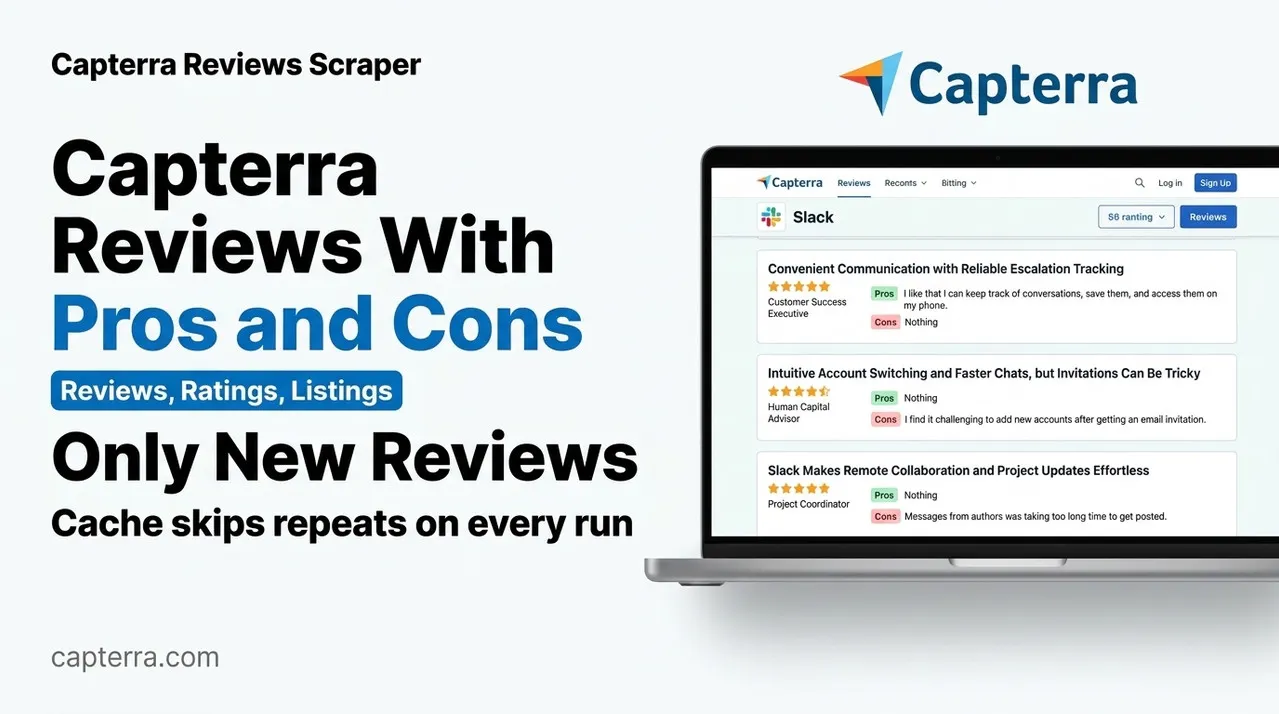
Scrape software reviews from Capterra (capterra.com): rating, title, pros, cons, review text, reviewer job title, usage time, sub-ratings (ease of use, functionality, customer support, value for money), plus product details such as vendor, overall rating, categories, price and alternatives. Paste a product, category or search URL, press Start, then export the data as JSON, CSV or Excel or call the actor as an API.
Target website: capterra.com
✨ Features of this Capterra reviews scraper
- Software review extraction — one flat row per review with the product's id, name, vendor, URL, overall rating and total review count, and the review's rating, title, text, pros, cons, date, source and reviewer details.
- Category and search pages — paste a software category page (for example team communication software) or a Capterra search page (for example
https://www.capterra.com/search/?query=accounts) and the actor scrapes the reviews of every product listed. Search pages list the top 20 products only. Use Max reviews per product to set how many reviews each product gets. - Pagination support — walks the review pages of a product until your limit, or until Capterra's own limit of 100 review pages (2,500 reviews per product).
- Product details filtering — switch on product details to add categories, starting price, pricing model, free trial or free version, description, alternatives and average sub-ratings to every row.
- Complete reviews only — optionally skip the reviews Capterra publishes only as a short summary.
- Cache deduplication — skips reviews saved in earlier runs (deduplication) so scheduled runs return only new reviews.
- Proxy support — optional proxy configuration.
🚀 How to scrape Capterra reviews in 5 steps
- Sign up for a free Apify account — includes $5 monthly credit.
- Open the actor page and click Try for free.
- Add one or more Capterra product, category or search URLs or product ids in the Input fields.
- Click Start and wait for the run to complete.
- Download results from the Output tab in JSON, CSV, or Excel format.
You can also run this actor via the Apify API or integrate it directly into your workflows using Zapier, Make, or n8n.
💰 Pricing for the Capterra scraper
This actor uses pay-per-result billing based on the compute units a run consumes.
- New Apify accounts include $5 of free monthly credit.
- Leaving the proxy configuration off keeps runs cheapest.
🖼️ Capterra scraper input screenshot
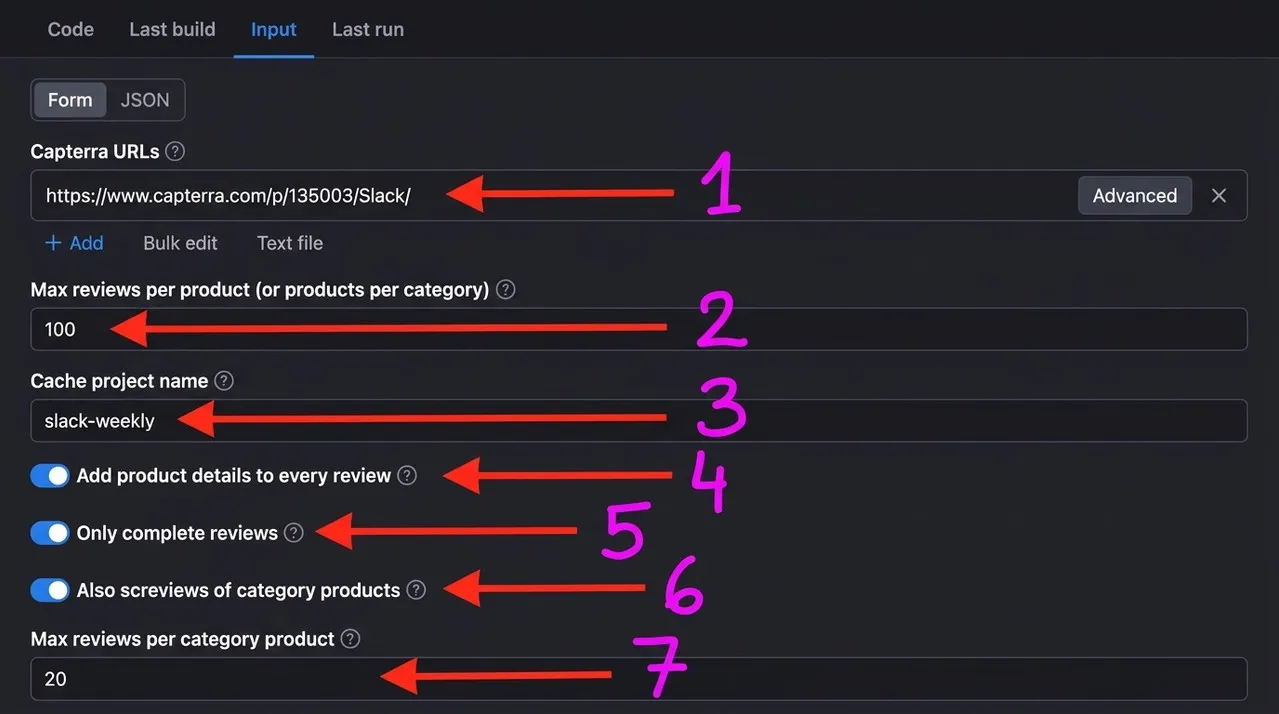
- Capterra URLs - Product pages (reviews of that product) and software category pages (the products of that category).
- Max reviews per product - Maximum reviews saved for each product URL or id.
- Cache project name - Use the same name on each scheduled run to get only new reviews.
- Add product details to every review - Adds categories, starting price, pricing model, free trial or version, description, alternatives and average sub-ratings to every row.
- Only complete reviews - Skips reviews that Capterra publishes only as a short summary.
- Max products per category/search page - How many of the listed products (companies) to scrape.
- Max reviews per product (category and search pages) - Maximum reviews saved for each product found on a category or search page.
🔧 Capterra scraper input configuration
| Field | Type | Required | Default | Description |
|---|---|---|---|---|
Capterra URLs (startUrls) | array | — | prefill: Slack product page | Product pages (reviews of that product) and software category pages (the products of that category). |
Product ids (productIds) | array | — | — | Capterra product ids, one per line. The id is the number in the product URL, e.g. 135003. Add the name after a slash (135003/Slack) if you know it. |
Max reviews per product (maxItems) | integer | — | 5 | Maximum reviews saved for each product URL or id. |
Cache project name (cacheProjectName) | string | — | — | Same name on each scheduled run: only new reviews are returned. Empty turns the cache off. |
Add product details to every review (includeProductInfo) | boolean | — | false | Adds categories, starting price, pricing model, free trial or version, description, alternatives and average sub-ratings to every review row. |
Only complete reviews (fullReviewsOnly) | boolean | — | false | Skips reviews that Capterra publishes only as a short summary. |
Max products per category/search page (maxProducts) | integer | — | 5 | How many listed products to scrape; a search page lists 20 at most. |
Max reviews per product, category and search pages (maxReviewsPerProduct) | integer | — | 5 | Maximum reviews saved for each product found on a category or search page. |
Proxy configuration (proxyConfiguration) | object | — | no proxy | Optional proxy settings. |
Supported URL types:
- Product page:
https://www.capterra.com/p/135003/Slack/(the reviews tab URL,.../reviews/, works too) - Software category page:
https://www.capterra.com/team-communication-software/
📦 Capterra scraper output data
The output is a table with one row per review. Fields: rowType, productId, productName, vendor, productUrl, overallRating, totalReviews, category, categories, startingPrice, pricingModel, pricingCurrency, hasFreeTrial, hasFreeVersion, description, alternatives, easeOfUseRating, functionalityRating, customerSupportRating, valueForMoneyRating, likelihoodToRecommend, categoryRank, reviewId, reviewType, source, reviewDate, title, text, pros, cons, summary, rating, easeOfUse, functionality, customerSupport, valueForMoney, recommendScore, reviewerName, reviewerJobTitle, reviewerIndustry, usageDuration, scrapedFrom, changeType.
The dataset has 2 views. Reviews shows product, rating, title, date, reviewer, source, review type, pros and cons. Products shows the category ranking with vendor, rating, review count, price and URL. Fields that do not apply to a row (for example review fields on a product row) are null.
Output at a glance:
| Product | Rating | Title | Date | Reviewer | Type | Source |
|---|---|---|---|---|---|---|
| Slack | 5 | Convenient Communication with Reliable … | 2026-11-07 | Prakash N. | full | G2 |
| Slack | 4.5 | Intuitive Account Switching and Faster … | 2026-11-07 | Stacey M. | full | G2 |
| Slack | 5 | Slack Makes Remote Collaboration and Pr… | 2026-11-07 | Malepati Venkat… | full | G2 |
| Slack | 5 | Slack Keeps Team Communication Organize… | 2026-11-07 | Reviewer | full | G2 |
| Slack | 4.5 | Quick Team Communication with Organized… | 2026-11-06 | Reviewer | full | G2 |
Sample output (raw JSON):
🔁 Scrape only new Capterra reviews with cache deduplication
Set a cache project name and use the same name on every scheduled run. The scraper keeps a deduplication list of the review ids it saved before: reviews already saved under that name are skipped, not charged and not counted towards the maximum, and every new row gets changeType: "new". Different names keep separate caches. Tip: combine it with an Apify Schedule (for example daily) and a higher maximum to collect only the reviews written since the last run.
🐍 How to scrape Capterra with Python, JavaScript or the API
Run the actor programmatically with the official Apify clients. Replace <YOUR_API_TOKEN> with the token from your Apify Console.
Python (pip install apify-client):
JavaScript (npm install apify-client):
cURL — start a run and wait for the dataset:
💡 What you can use Capterra review data for
- Competitor analysis: compare ratings, pros and cons of rival software products.
- Product research for buyers: shortlist tools by category, rating, price and alternatives.
- Voice-of-customer analysis: mine pros and cons for feature requests and complaints.
- Sentiment tracking: follow new reviews of your own product on a schedule.
- Market mapping: rank every product of a software category by rating and review count.
Product managers, SaaS marketers, analysts and investors in the software industry typically use this data.
⚠️ Limitations of the Capterra scraper
- Review depth — Capterra shows at most 100 review pages (2,500 reviews) for each product, and its sort and filter options cannot be applied from a URL, so the newest and older reviews of a very large product cannot be separated further.
- Summary-only reviews — some reviews are public only as a short summary: they have no title, text, pros or cons and are marked
reviewType: "summary". Turn on "Only complete reviews" to skip them. - Reviewer names — reviews show first names and initials, and are personal data. You are responsible for using them in line with GDPR, CCPA and similar laws.
- Site terms — Capterra's terms of use restrict automated access. Check them before you scrape and use the data accordingly.
- Login-required content — the actor cannot access anything behind authentication.
- Speed — pages take a few seconds each, so large runs take time.
❓ Capterra scraper FAQ
Can I scrape Capterra legally?
The actor only collects data that is publicly visible on capterra.com, with no login or paywall. Scraping publicly available data is generally considered lawful (see hiQ Labs v. LinkedIn), but you are responsible for complying with Capterra's Terms of Service and with laws such as GDPR and CCPA, because reviews include reviewer names.
What data does the Capterra scraper return?
Each review row has the product (id, name, vendor, URL, overall rating, total reviews) and the review (id, type, source, date, title, text, pros, cons, rating, sub-ratings, recommend score, reviewer name, job title, industry and usage time). With product details on you also get categories, starting price, pricing model, free trial or version, description, alternatives and average sub-ratings.
How many reviews can I scrape from one Capterra product?
maxItems limits the reviews per product URL or id; maxProducts limits the products taken from a category or search page. Capterra itself shows at most 100 review pages of 25 reviews, so the most you can get for one product is about 2,500 reviews.
Do I need a proxy to scrape capterra.com?
No. The proxy configuration is off by default and the actor loads pages without any setting from you. You can add your own proxy configuration if you need pages loaded from a specific network.
How do I scrape Capterra with Python?
Use the Python example above with the Apify client, then iterate over the dataset items to read the reviews.
Can I run this Capterra scraper on a schedule?
Yes, use Apify Schedules. Add a cache project name so every run is deduplicated against what you saved before and returns only new reviews.
What output formats are supported?
JSON, CSV, Excel, XML and RSS, either from the Output tab or through the Apify API.
Is this the cheapest Capterra reviews scraper?
Possibly, because of the cache. With a cache project name, reviews saved in earlier runs are skipped, so on scheduled runs you are charged only for new reviews, not for the old ones again.
Why do some Capterra reviews have no text, pros or cons?
Capterra publishes some reviews only as a short summary of the full review. These rows have reviewType: "summary" and a summary field; enable "Only complete reviews" to leave them out.
🔗 Relevant actors for Capterra and software reviews
| Scraper | Description |
|---|---|
| ⭐ Shopify App Reviews Scraper | Merchant reviews of any Shopify App Store app, one row per review. |
| 🛍️ Shopify App Store Scraper | Apps from the Shopify App Store: name, rating, reviews, pricing and developers. |
| 📱 Google Play Store Reviews Scraper | User reviews of Google Play Store apps with ratings and developer replies. |
🔗 Other actors you may find useful
| Scraper | Description |
|---|---|
| 💼 HiringCafe Jobs Scraper | Job listings from HiringCafe: title, company, location and more. |
| 🏷️ Craigslist Listings Scraper | Craigslist classifieds in any city and category: housing, for sale, jobs, cars. |
| 🇩🇪 XING Jobs Scraper | Job listings from XING Jobs in Germany by keyword. |
| 🧑💻 Dice Jobs Scraper | Tech job listings from Dice by keyword or URL. |
| 🔗 LinkedIn Jobs Scraper | LinkedIn job postings without login, with cache for new jobs only. |
💬 Support & contact
If you encounter any issues or have questions, please open an issue.
You can also find more of our actors on the Actor Flow page.


