

X Community Scraper
Pricing
from $1.00 / 1,000 community results
X Community Scraper
Search public X (Twitter) Communities by keyword and export community details, rules and member counts, the members X shows, and community posts. No login, no cookies. Pay only for rows saved.
Pricing
from $1.00 / 1,000 community results
Rating
0.0
(0)
Developer

Delowar Munna
Maintained by CommunityActor stats
0
Bookmarked
2
Total users
1
Monthly active users
4 days ago
Last modified
Categories
Features
Share
Find and export public X (Twitter) Communities. Search communities by keyword, pull each community's details (name, description, rules, member count, topic, creation date), list the members X shows, and export community posts with likes, reposts, replies and views. Every record is one flat row in JSON, CSV, Excel or Google Sheets, or call it from the API, Make, Zapier, n8n or an AI agent.
- No login, no cookies, no X account. Public data only.
- Four modes: search communities, community details, members, posts. One mode per run.
- Batch inputs: up to 100 search terms or community URLs per run, read in turns so one large input can't use up your total limit.
- Honest coverage. X shows only the first ~20 members of a community; the Actor says so in every members run instead of pretending to export the full roster.
- Filters: minimum members for communities, a date cut-off for posts, and a skip list for what you already have.
- Pay only for rows saved. Duplicates, rows your filters or skip list drop, failed inputs and empty runs are free.
- Clear status messages and a
RUN_SUMMARYwith per-input coverage, so you know what was found, what failed and why the run stopped.
What can you do with it?
| Use case | Mode | Typical setup |
|---|---|---|
| Find niche communities to join, sponsor or study | Search communities | A few keywords, Minimum members 1,000 |
| Compare communities in a market | Community details | The community URLs from a search, for descriptions, rules, member counts and topics |
| Community research and moderation analysis | Community details | Rules and descriptions side by side |
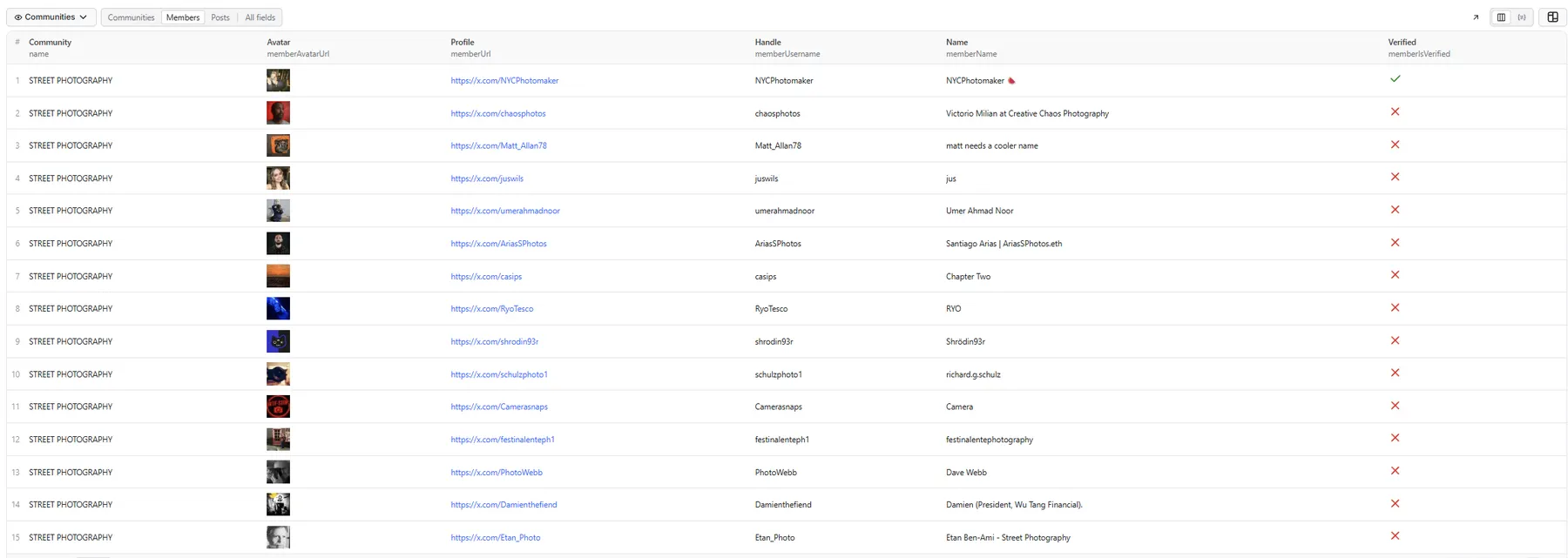
| See who is active in a community | Members | The members X shows: handle, name, profile link, picture and verified badge |
| Monitor what a community talks about | Posts | Recency order, Posts since 7 days, on a daily schedule |
| Content and trend datasets | Posts | Several communities, JSON into your analysis pipeline |
How to use it
- Pick What to scrape: Search communities, Community details, Members or Posts.
- For Search communities, add Search terms. For the other modes, add Community URLs (
https://x.com/i/communities/<id>) or numeric community IDs. - Set Maximum results (total) and, for several inputs, Maximum results per input.
- Optionally add filters, Include full community details (search), or a skip list.
- Click Start, then download the results from the Output tab.
Run it with the defaults and it searches communities for AI and returns up to 10.
Tip: run Search communities first, then copy the communityUrl values into Community URLs for the other modes.
The four modes
| Mode | Input | One row per | Notes |
|---|---|---|---|
| Search communities | Search terms | Community found | Name, member count, topic, banner. Turn on Include full community details to add the description, rules and creation date |
| Community details | Community URLs or IDs | Community | Name, description, rules, member count, topic, creation date, banner, sensitive-content flag |
| Members | Community URLs or IDs | Member | The members X shows, about 20 per community (see Limits): handle, name, profile link, picture, verified badge |
| Posts | Community URLs or IDs | Post | Recency (newest first) or Relevance order; text, date, author, likes, reposts, replies, quotes, views, hashtags, media |
Inputs that don't fit the mode are ignored with a warning (for example search terms in Posts mode). Entries that aren't a community URL or ID (a profile link, a post link, another website) are skipped and listed in the run log. A community that doesn't exist or can't be read is reported in the status message, and the run carries on with the others.
Filters and options
| Option | Modes | What it does |
|---|---|---|
| Minimum members | Search, Details | Keeps communities with at least this many members (0 = off) |
| Posts order | Posts | Recency (newest first) or Relevance |
| Posts since | Posts | Keeps posts from a date (2026-11-01) or a period (7 days, 2 weeks, 3 months). With Recency order, reading a community stops once it reaches older posts |
| Include full community details | Search | One extra lookup per saved community for the description, rules and creation date, billed as a separate community-details event |
| Skip these | All | Community IDs or URLs, member IDs or handles, post IDs or URLs to leave out |
| Fail on partial results | All | Marks the run failed when any input fails. Rows already saved are kept |
Filters work on each page after it's fetched. Rows they drop are never charged, but the pages still have to be read, so a strict filter makes a run take longer to reach your limit.
Input examples
Search communities, default size:
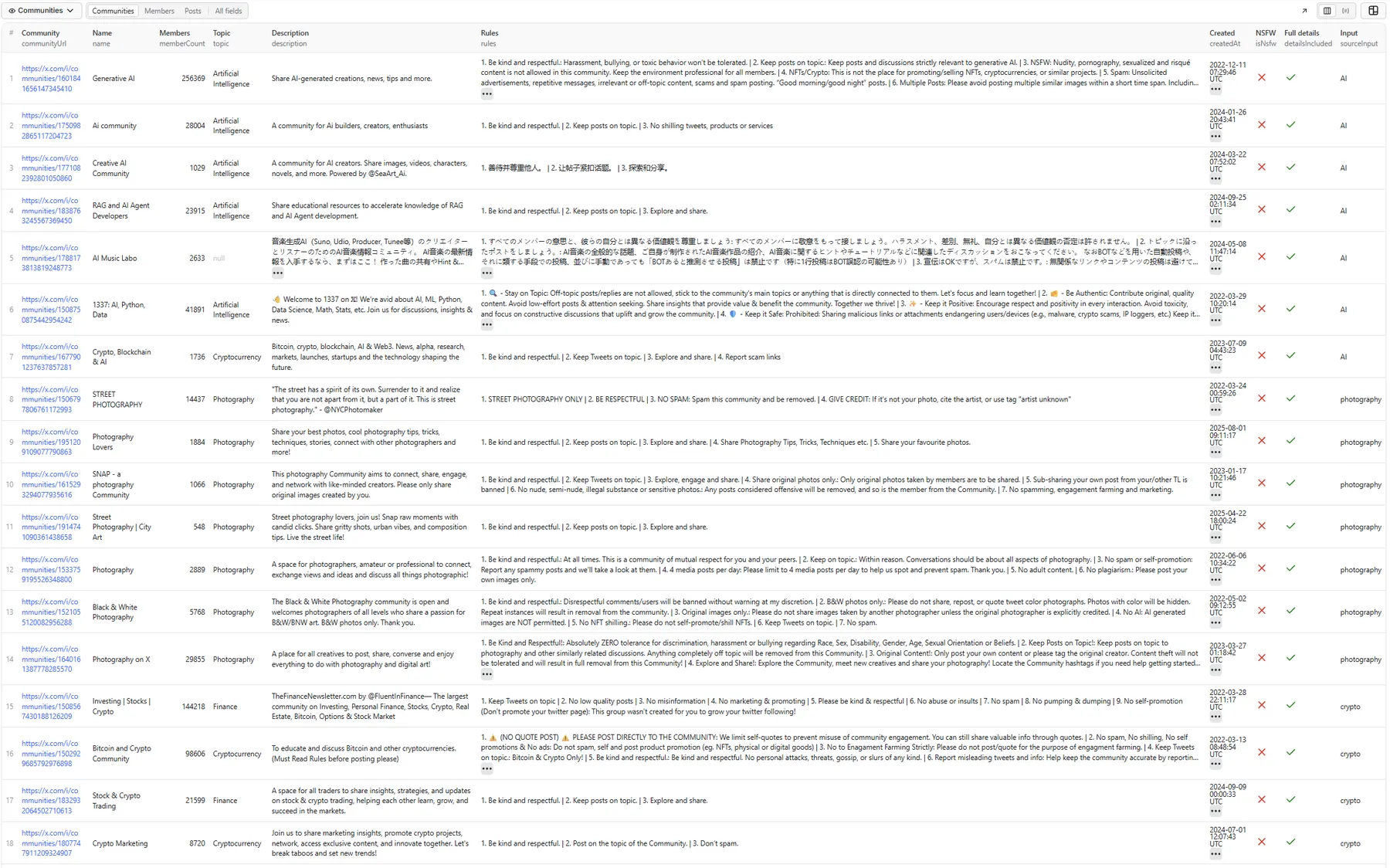
Search three topics with full details (the run behind the Communities screenshot below):
Larger communities only:
Details of specific communities:
Members of two communities:
Last week's posts in a community, newest first:
1506797806761172993 is the "STREET PHOTOGRAPHY" community and 1533759195526348800 is "Photography". Swap in the communityUrl values from your own search run.
Output
One row per community, member or post, depending on the mode. All rows share the same columns; the fields a mode doesn't fill are null. A value X doesn't provide is null, never a guess.
Every row
| Field | Description |
|---|---|
recordType | community, member or post |
mode | The mode that produced the row |
communityId, communityUrl | The community |
name | The community's name (on member and post rows too) |
memberCount | The community's member count (on member and post rows too, when available) |
sourceInput | The search term or community you entered |
sourceProvider, scrapedAt, runId, schemaVersion | Data source, collection time (ISO, UTC), the run and the row format version |
Community rows (Search communities, Community details)
| Field | Description |
|---|---|
description | The community's description |
rules, ruleCount | Its rules as one text (1. Rule: explanation | 2. …) and how many there are |
topic | X's topic for the community |
isNsfw | X's sensitive-content flag |
createdAt | When the community was created (ISO, UTC) |
bannerUrl | Banner image |
detailsIncluded | true when the row comes from a full details lookup (always in Details mode; in Search mode with Include full community details) |
Member rows (Members)
| Field | Description |
|---|---|
memberUserId, memberUsername, memberName, memberUrl | The member |
memberIsVerified | Verified badge |
memberAvatarUrl | Profile picture |
Post rows (Posts)
| Field | Description |
|---|---|
postId, postUrl, postText, postedAt | The post |
lang | Language X detected |
likeCount, retweetCount, replyCount, quoteCount, viewCount | Engagement at the time of the run |
hashtags, mediaUrls | Hashtags in the post text, and image/video links |
authorUserId, authorUsername, authorName, authorIsVerified | Who posted it |
The Output tab has three views: Communities, Members and Posts. They show the same dataset with different columns. Open the one that matches the mode you ran. The Console always opens on Communities, so for a Members or Posts run click its tab; otherwise the columns look empty.
Communities
Members
Posts
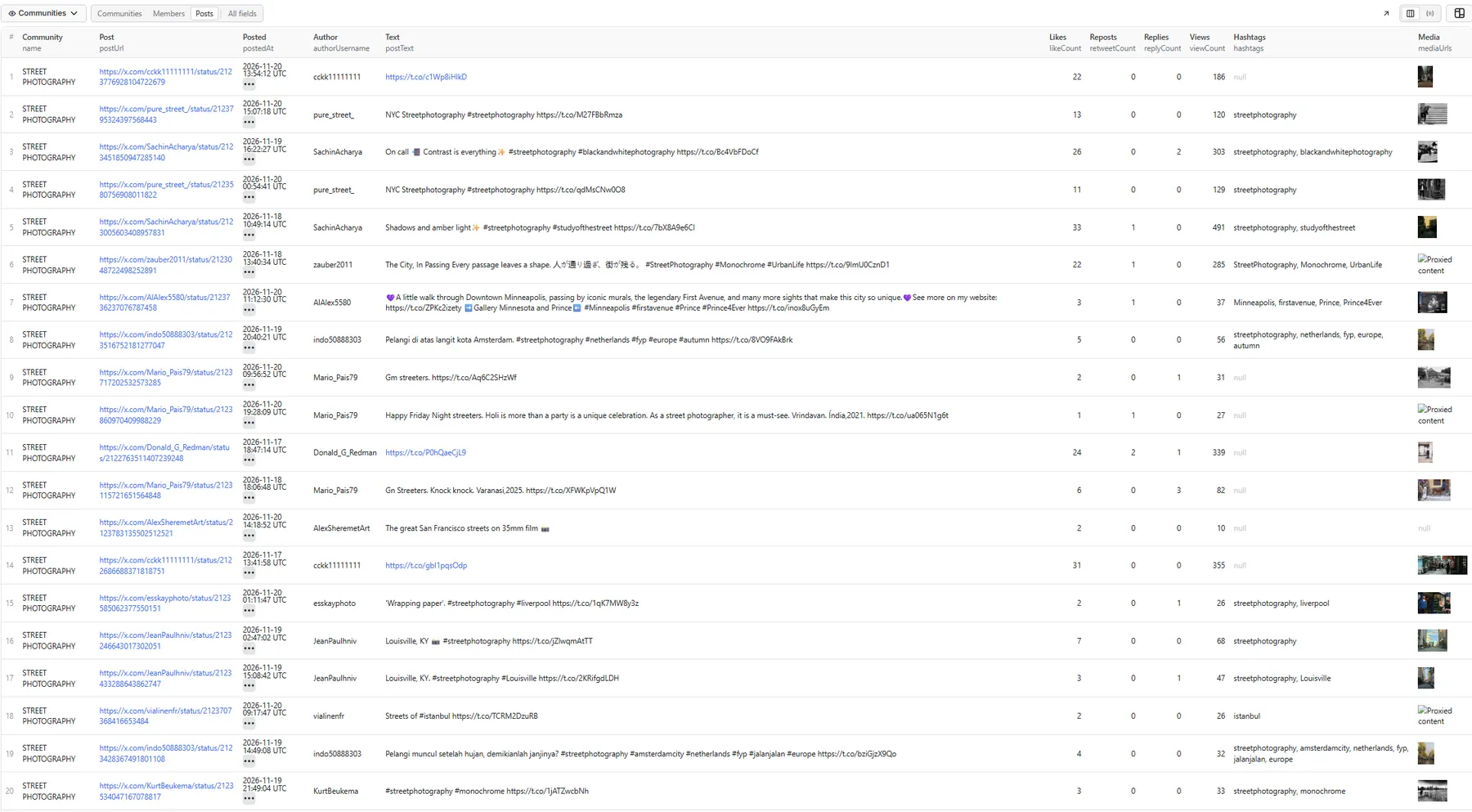
The samples leave out the fields a mode doesn't fill (they're null in the real rows) and runId. hashtags is null on posts without a hashtag, and mediaUrls on text-only posts.
A run summary is saved in the key-value store as RUN_SUMMARY: mode, inputs requested, processed, succeeded and failed, pages read, rows seen and saved, duplicates, skipped and filtered rows, details lookups, charged events by type, and, for each input, its status, rows saved, coverage (complete, partial or unknown) and why it stopped.
Pricing
This Actor uses pay-per-event pricing. You pay one event per row saved, by mode:
community-resultper community saved by Search communities,community-detailsper community saved with full details: every row in Community details mode, and each saved search row when Include full community details is on (once per community),member-resultper member saved,post-resultper post saved.
Nothing else is charged:
- duplicate rows,
- rows dropped by your filters or skip list,
- inputs that fail, communities that don't exist or can't be read,
- the run summary, and runs that save nothing.
The prices are on the Actor's Pricing tab in the Apify Console, and they can differ by Apify plan. This README deliberately doesn't quote figures, so it never goes out of date. Set a maximum cost per run in the run options and the Actor stops saving before it would exceed it.
Limits and good to know
- Public data only. Private communities, posts that need membership and anything that needs a login aren't available.
- Members: about 20 per community, basic profile only. X serves only the first page of a community's member list, and it can't be paged further. Each member comes with handle, name, picture and verified badge; for full profiles (bio, follower counts), run the handles through a profile scraper. Members runs report this as
partialcoverage inRUN_SUMMARYand in the status message. The Actor doesn't promise, and can't deliver, a full member export. - Search results are what X's community search returns for the keyword; very broad terms return X's top matches, not every community.
- One-word search terms work best. X's community search handles multi-word terms poorly, so the Actor tries a term like
star warsasstar-wars, thenstarwars. If neither works, the term is reported as failed and nothing is charged for it. Prefer one distinctive word (starwars,crypto,photography). - Posts go back as far as X serves the community timeline.
- Counts change. Member counts and engagement are a snapshot taken when the run happened.
- Timeouts. If a run gets close to its timeout, it stops by itself, keeps every row already saved and says so in the status message.
FAQ
Do I need an X account or API key? No.
How do I find a community's URL? Run Search communities and copy communityUrl, or open the community on X: the address looks like https://x.com/i/communities/1493290339532222469.
Why did I get only ~20 members? That's all X shows for a community's member list; see Limits.
Is scraping X legal? This Actor collects publicly available data only. You're responsible for how you use it: follow X's terms, data-protection laws such as GDPR, and don't collect personal data without a lawful reason, use it for harassment or unsolicited mass contact. This is an independent tool, not affiliated with, sponsored or endorsed by X Corp.
Can I get tweets by keyword or profile, or an account's followers? Not in this Actor. Use our X Tweet Scraper or X Followers Scraper.
Can I collect only new posts each day? Yes: schedule a Posts run with Posts since 1 day (or 2 days for overlap), and put post IDs you already have in Skip these.
Can I use it from code or an AI agent? Yes. Call it through the Apify API, the Apify client libraries or the Apify MCP server, and read the dataset as JSON:
Feedback
Found a problem or need a field that's missing? Open an issue on the Actor's Issues tab and include the run link.


