

X List Scraper
Pricing
from $0.25 / 1,000 list member or subscribers
X List Scraper
Export public X (Twitter) List members, subscribers or List posts by List URL or ID. One typed row per member, subscriber or post, with the List's ID and link on every row, plus profile and engagement fields. No login, no cookies. Pay only for rows saved.
Pricing
from $0.25 / 1,000 list member or subscribers
Rating
0.0
(0)
Developer

Delowar Munna
Maintained by CommunityActor stats
0
Bookmarked
2
Total users
1
Monthly active users
2 days ago
Last modified
Categories
Features
Share

Export the members, subscribers or posts of public X (Twitter) Lists. Paste one or more List URLs, pick what you want, and get one flat row per member, subscriber or post, with the List's ID and link on every row. Export to JSON, CSV, Excel or Google Sheets, or call it from the API, Make, Zapier, n8n or an AI agent.
- No login, no cookies, no X account. Public Lists only.
- Three modes: List members, List subscribers (the accounts that follow the List), or the List's posts (its timeline, newest first).
- Profile fields on every member and subscriber: handle, name, bio, follower and following counts, post count, verified flag, location, website and join date where the account sets them.
- Engagement on every post: text, time, likes, reposts, replies, quotes, bookmarks, views, media, hashtags and mentions, plus the author's handle, name, followers, verified flag and avatar.
- Many Lists in one run. Lists share Maximum results fairly, so one huge List can't use up the whole limit.
- Incremental runs. Skip the IDs you already have, and pay nothing for them.
- Pay only for rows saved. Duplicates, filtered rows, skipped IDs, failed Lists and the run summary are free.
What can you do with it?
| Use case | Setup |
|---|---|
| Audience research | Members of curated Lists in your niche, then sort by followers |
| Influencer and expert discovery | Members of several expert Lists, Minimum followers set |
| Find a List's real audience | Subscribers mode: who chose to follow the List |
| Niche news feed | Posts mode on a curated List, scheduled every morning, Posts since yesterday |
| Track roster changes | Schedule Members daily and compare runs, or pass yesterday's IDs to Skip these |
How to use it
- Pick What to get: Members, Subscribers or Posts.
- Add one or more X Lists (URL or numeric ID).
- Set Maximum results for the whole run.
- Optionally set Minimum followers (members and subscribers) or Posts since (posts).
- Click Start, then download the results from the Output tab.
Run it with the defaults and it returns 20 members of the example List (X's own List of official X accounts).
Lists
Use the List's address as X shows it, https://x.com/i/lists/84839422, or just the number at the end. To find it, open the List on X and copy the address bar. Old-style addresses with a List name instead of a number (twitter.com/user/lists/name) can't be resolved; open the List and copy its current address instead. A List added twice runs once. Private Lists aren't available and are reported in the log and run summary.
Modes
- Members: the accounts added to the List.
- Subscribers: the accounts that follow the List.
- Posts: the List's timeline, newest first, as X shows it to a logged-out visitor.
One mode per run. To get members and posts of the same List, run the Actor twice, or schedule two tasks.
Filters and incremental runs
- Minimum followers keeps accounts with at least that many followers. Accounts without a follower count are dropped when it's set.
- Posts since keeps posts created on or after the date (UTC). The run stops reading a List once a whole page is older.
- Skip these takes IDs from earlier runs: user IDs, handles or profile URLs for members and subscribers; post IDs or post URLs for posts. Skipped rows aren't saved or charged.
Filters are applied after fetching, so a strict filter can take more requests to reach your limit. Maximum pages per List (Advanced) bounds that.
Input examples
20 members of a List (the input behind the sample member row below):
The latest 20 posts of the same List (the input behind the sample post row):
Members of two Lists:
Larger accounts among a List's subscribers:
This week's posts from a List:
Output
One row per member, subscriber or post, per List. Every row has every field; fields that don't apply to the mode, or that X doesn't provide, are null, never guessed.
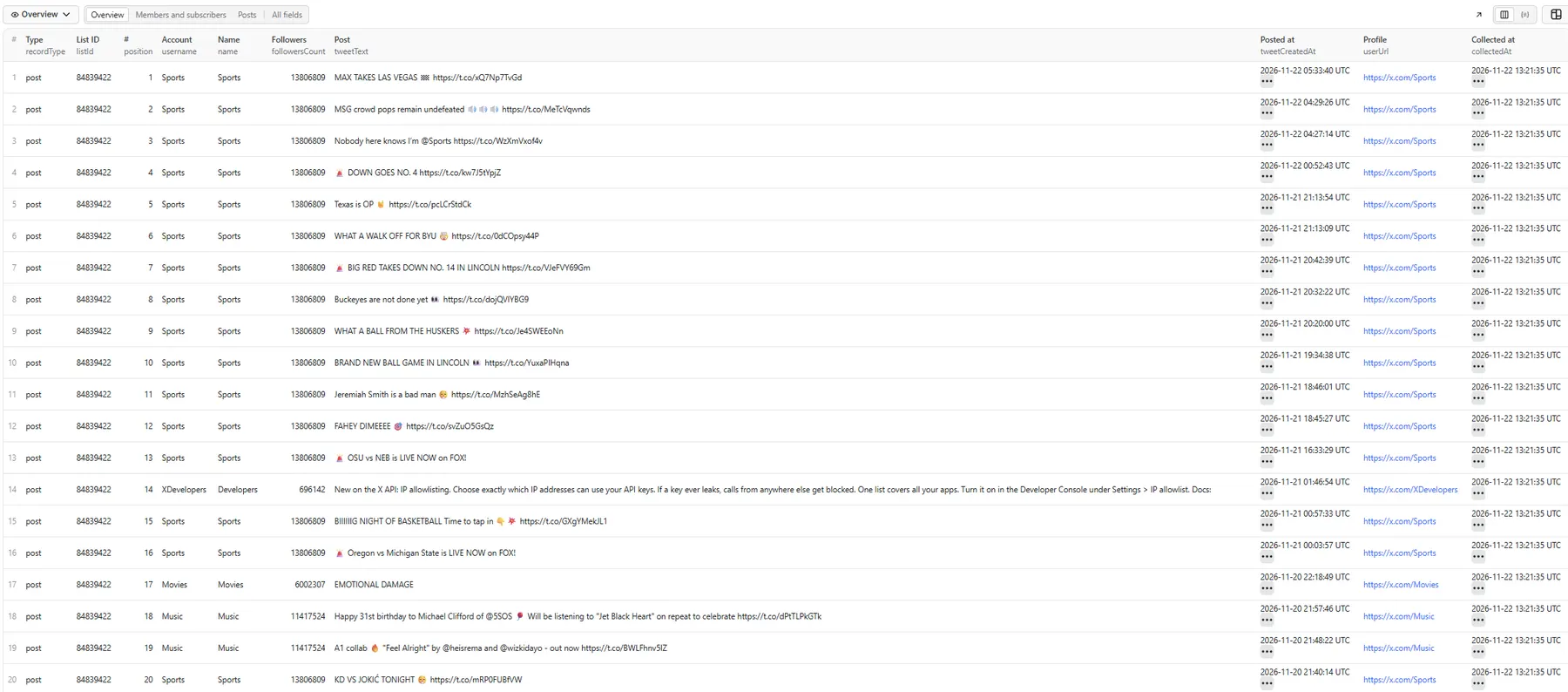
Overview tab (posts run):
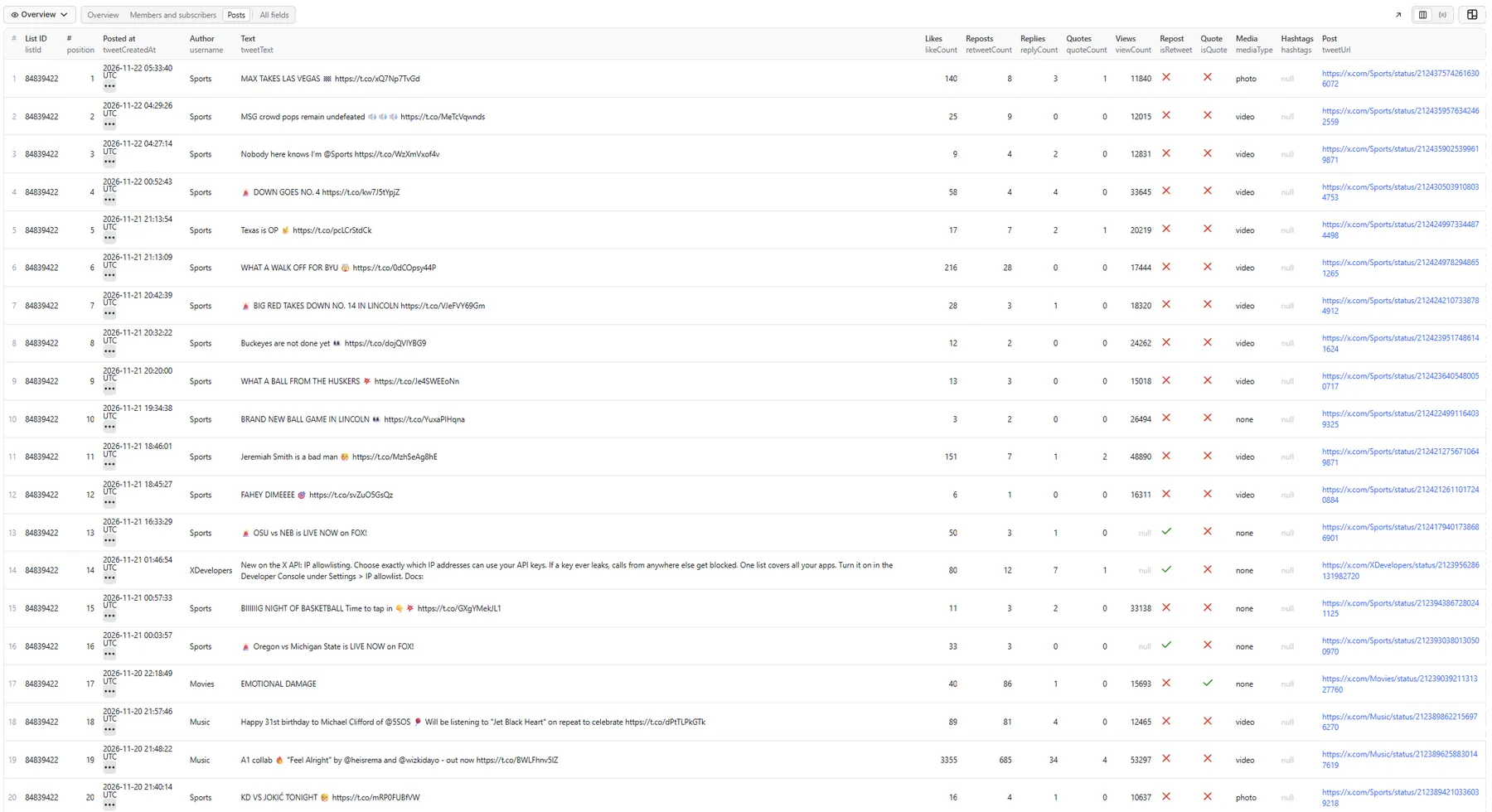
Posts tab:
Sample member row, from the first input above (the post fields, all null on member rows, are left out here):
Sample post row, from the second input (the profile-only fields, null for post authors, are left out here):
| Field | Meaning |
|---|---|
recordType, _type | member / subscriber / post (list_member / list_subscriber / list_post). |
id | Stable row ID: List ID + type + user or post ID. The same account in two Lists is two rows. |
position | Order in which X listed the item for that List (1 = first). |
listId, listUrl | The List. |
userId, username, name, userUrl | The member or subscriber, or the post's author. |
bio, location, website, followingCount, tweetCount, userCreatedAt | Members and subscribers (empty when the account doesn't set them); null for post authors. |
followersCount, isVerified | Follower count and verified (blue check), for every account. |
avatarUrl | Profile image of a post's author; null for members and subscribers. |
tweetId, tweetUrl, tweetText, tweetCreatedAt, lang | The post (posts mode). For a repost, text and counts are the original post's. |
likeCount, retweetCount, replyCount, quoteCount, bookmarkCount, viewCount | Engagement counts (posts mode). viewCount is null on reposts: the data source gives no view count for the original post. |
isRetweet, isQuote, retweetedAuthorUsername, quotedTweetId | Repost and quote (posts mode). |
mediaType, mediaUrls | photo, video, mixed or none, and the media links, comma-separated (posts mode; a video gives its preview image). |
hashtags, mentions | Hashtags and @handles in the post text, comma-separated without # or @; null when there are none (posts mode). |
collectedAt | When the page was fetched (ISO, UTC). |
sourceInput, inputIndex | The List entry you gave and its position in your input. |
The Overview tab shows the main fields of any mode. Members and subscribers shows the profile fields. Posts shows the post and engagement fields. All fields shows everything.
Run summary
The key-value store record RUN_SUMMARY lists the Lists requested and processed, per-List status, pages, rows listed and saved, duplicates, skipped and filtered rows, warnings, errors and the reason the run stopped.
Pricing
This Actor uses pay-per-event pricing: you pay per member or subscriber row saved, or per post row saved, to the dataset. Duplicates, rows dropped by your filters or skip list, failed or private Lists and the run summary aren't charged. See the Pricing tab for current rates; this README deliberately doesn't quote figures, because they can change.
You can set a maximum cost per run in Apify's run options; the Actor stops cleanly when it's reached.
Limits and coverage
- Public Lists only. Private Lists, and Lists X hides from logged-out visitors, return nothing.
- No List details. The data source doesn't return a List's name, description, owner or counts, so rows carry the List's ID and link only.
- Very large Lists. X may stop serving a long member or subscriber list before its end. The run summary shows how many rows each List gave.
- Counts are a moment in time. Follower and engagement counts are as X showed them when the page was fetched.
- Maximum requests per run and Maximum pages per List (Advanced) cap the requests. 0 = sized automatically from Maximum results.
Use it from the API
Monitor on a schedule
Create a schedule in Apify Console (for example daily) with your Lists. Each run saves a fresh, timestamped copy, so a sheet, database or webhook downstream can track who joined or left a List, or collect its new posts. Pass the IDs you already have to Skip these to save and pay only for new rows.
Troubleshooting
| Message | What to do |
|---|---|
old-style List URL without the numeric List ID | Open the List on X and copy its current address (x.com/i/lists/<number>). |
not a List URL or numeric List ID | Use the List's address or just its number. Profile and post URLs aren't Lists. |
X returned no members; the List may be private, deleted or have no members | Check the List opens on X without logging in. Private Lists aren't available. |
the List was not found or is unavailable | Check the List ID. If it's right and public, it may be a temporary provider problem; try again later. |
the data provider did not answer / rate-limited | A temporary provider problem. Saved rows are kept; run again, or turn on Fail on partial results to make it visible in your pipeline. |
Per-run request limit reached | Raise Maximum requests per run, or set it to 0 (automatic). |
Privacy and disclaimer
This is an independent tool by Coregent. It isn't affiliated with, sponsored by or endorsed by X Corp or Apify; X and Twitter are named only to identify the data source. It collects public List data only and asks for no X login, password or cookies. Public availability isn't unrestricted permission to reuse: use the data in line with applicable privacy laws and X's terms, and not for harassment, spam or surveillance.
Support
Found a problem or need a feature? Open an issue on the Actor's Issues tab with the run ID, and we'll take a look.


